A standing desk converter sits on top of the desk you already own and lifts your monitor and keyboard to a height where you can work on your feet. The appeal is obvious: you keep the desk, skip a full replacement, and can go back to sitting in seconds. The decision, though, hinges on three numbers that are easy to overlook, the width of the top, the weight it can hold, and whether the lift is manual or motorized. A converter that is too narrow cannot hold two monitors, and one that is rated too low will sag under a heavy display and a laptop.
This guide is for office workers, home-office freelancers, students, and gamers who spend long stretches at a desk and want to alternate positions. We compare eight converters, mostly manual models from VIVO and FLEXISPOT plus one electric VERSADESK, using only the facts printed in each title: top width, listed capacity, keyboard tray design, and the lift mechanism. The goal is to match a size and style to your desk and your gear before you buy.
Our Top Picks
 VIVO Manual Height Adjustable Standing Desk Converter32"31.5 x 31.5 x 31.3 Inches26 poundsCheck on Amazon
 FLEXISPOT Standing Desk Converter 36" Desk Riser36"24.9 x 36 x 19.6 inches34.54 PoundsCheck on Amazon
 VERSADESK PowerPro 40 Inch Electric Standing Desk Converter40" Wide24 x 40 x 5 Inches38.5 poundsCheck on Amazon


Top 3 picks at a glance
Quick Picks
As an Amazon Associate we earn from qualifying purchases at no extra cost to you.




| Product | Best for | Key spec from the title |
|---|---|---|
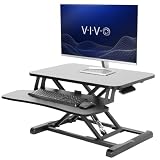
| VIVO 32-inch Manual | Compact desks, one monitor | 32-inch top, holds 33 lbs, wide keyboard tray |
| VIVO 48-inch Manual | Dual monitors and wide setups | 48-inch top, holds 33 lbs, wide keyboard tray |
| VIVO 42-inch Manual | Mid-size dual setups | 42-inch top, holds 33 lbs, laptop and monitor riser |
| FLEXISPOT 36-inch Riser | Spacious sit-stand workstation | 36-inch, height adjustable, sit-stand workstation |
| VIVO 36-inch Manual | Common mid-width option | 36-inch top, holds 33 lbs, manual lift |
| VIVO Dual Tier 36-inch | Separate tiers and front slot | Dual tier, small front device slot, removable tray |
| VERSADESK PowerPro 40-inch | Motorized heavy setups | Electric, push-button, triple monitors and laptop |
| VIVO 26-inch Manual | Small desks, laptops | 26-inch top, holds 33 lbs, wide keyboard tray |
How to Choose
Width and your desk depth
Top width decides what fits. A 26-inch top works for a laptop or a single small monitor. A 32 to 36-inch top handles one larger monitor plus a laptop. At 42 to 48 inches, you can place two monitors side by side. Also measure your desk depth, because the converter needs space for its base and the keyboard tray that pulls out in front. A converter wider than your desk will overhang, and a deep one will push your monitor farther from your eyes. Ideally, the monitor should sit an arm’s length away.
Capacity and what you actually load
The VIVO titles list a 33 lb capacity. Add up the weight of your monitor, laptop, and accessories before you buy, because a 27-inch monitor with a heavy stand can use most of that. If you plan to load a monitor arm or multiple displays, favor models that mention triple monitors, like the VERSADESK. Capacity applies to the top; the keyboard tray often has its own limit, so keep it light. Ignore marketing claims about stability unless a weight is stated.
Manual lift or electric
A manual converter uses a lever or spring system; it is quick to adjust but requires you to lift or lower the load by hand, and it can feel stiff with a heavy top. An electric model such as the VERSADESK PowerPro adds a motor and a push button, which is easier on the body and allows small adjustments, but it needs an outlet nearby and usually costs more. If you change position several times a day, the motor is worth considering. If you change once or twice, manual is fine.
Keyboard tray, tiers, and ergonomics
A wide keyboard tray lets your mouse sit at the same height as the keyboard, which keeps your wrists neutral. A removable tray is handy for storage. Dual-tier designs give you a separate upper level for the monitor, which helps set the screen at eye level while the keyboard stays lower. Where budget converters cut corners is in surface finish, wobble at maximum height, and tray support. Look for a stated capacity, a sturdy cross brace, and a tray wide enough for your mouse.
The 8 Best Options
VIVO 32-inch Manual
The 32-inch VIVO is a black-top manual converter that holds 33 lbs and includes a wide keyboard tray. It is aimed at people who want a straightforward stand-up desk riser for a single monitor and a laptop. The size is compact enough to fit on a modest desk without taking over the room, and the manual mechanism means no power cable. Think of it as the right size for a student desk or a bedroom corner, where every inch counts and a laptop plus a single external display is the whole setup. Because the keyboard tray is wide, you are not forced to cramp the mouse beside the keys.
- Strength: compact top suits small desks.
- Strength: wide keyboard tray for mouse and keyboard.
- Trade-off: only 33 lbs capacity, so heavy displays use most of it.
Skip it if you need a dual-monitor surface.
VIVO 48-inch Manual
The 48-inch model is the widest manual VIVO here. The title lists a black top, 33 lbs capacity, a manual height-adjustable mechanism, a laptop and monitor riser design, and a wide keyboard tray. The extra width accommodates two monitors side by side, which suits designers, traders, and developers who rely on more screen space. It also leaves space for speakers, a notepad, or a document holder on the top surface, so the converter can replace a cluttered desk area instead of merely lifting it. Buyers should confirm that their desk is deep and wide enough, since this is the largest manual footprint in the set.
- Strength: 48-inch top fits dual monitors.
- Strength: wide keyboard tray with a manual lift.
- Trade-off: the same 33 lbs limit across a larger surface restricts heavy gear.
Skip it if your desk is narrow or your monitors are heavy.
VIVO 42-inch Manual
The 42-inch version sits between the compact and widest sizes. It lists 33 lbs capacity, a manual lift, a stand up laptop and monitor desk riser, and a wide keyboard tray. It is a good match for a desk that is wide enough for two smaller monitors or a monitor and a laptop side by side. Many home offices have desks around this width, which makes it a natural pick for someone who has outgrown a single-monitor riser but does not want to cover the entire surface. Pairing it with lighter, modern monitors keeps total weight comfortably within the stated limit.
- Strength: balanced width for two displays.
- Strength: wide tray keeps accessories together.
- Trade-off: 33 lbs capacity can limit larger monitors.
Skip it if you plan to load three displays.
FLEXISPOT 36-inch Riser
FLEXISPOT markets its 36-inch riser as a spacious sit-stand computer workstation that is height adjustable. The title does not list a capacity, but it positions the unit as a full workstation rather than a basic riser. It suits users who want a well-known desk brand and a mid-size top for a monitor and laptop. Buyers who value a recognizable brand, easier support conversations, and replacement parts may lean here. Since the capacity is not in the visible title, confirm it in the full listing before loading a large display.
- Strength: 36-inch top is a versatile size.
- Strength: workstation positioning with a spacious surface.
- Trade-off: no capacity number in the visible title.
Skip it if you need a confirmed weight rating in the headline.
VIVO 36-inch Manual
The 36-inch VIVO mirrors the other VIVO models with a black top, 33 lbs capacity, a manual lift, and a wide keyboard tray. It is the common middle size, wide enough for a main monitor and a laptop and suited to most standard desks. If you are not sure which size you need, this is the least risky guess, because it fits desks from about the same width up to wider ones with room to spare. Its manual operation also means one fewer cable behind the desk.
- Strength: standard width fits most desks.
- Strength: manual lift needs no outlet.
- Trade-off: 33 lbs capacity, as with the other VIVO sizes.
Skip it if you want a motor or a dual-tier layout.
VIVO Dual Tier 36-inch
The Dual Tier model separates the display level from the keyboard level, with a small front device slot and a wide removable keyboard tray. The title lists it as height adjustable for stand-up use. It appeals to people who want the monitor raised high while the keyboard stays near the desk surface. The front slot is handy for a phone, a tablet, or notes you want in view, and the removable tray lets you slide the keyboard away when you need clear desk space. For people who find that a single flat surface forces the monitor too low, the second tier solves a common ergonomic problem.
- Strength: dual-tier layout sets monitor height independently.
- Strength: removable keyboard tray and front slot for a phone or tablet.
- Trade-off: the visible title lists no capacity figure.
Skip it if you need to confirm weight capacity first.
VERSADESK PowerPro 40-inch
The only electric option, the PowerPro 40-inch features push-button height adjustment and is described as suitable for triple monitors and a laptop. A motorized lift makes frequent changes easy and is friendlier for anyone with sore shoulders or wrists. It is the pick for heavy multi-screen setups. A motor also helps people who stand and sit many times a day, since repeated manual lifting can turn into a barrier to using the converter at all. Set your preferred heights and move between them with a press instead of wrestling a latch.
- Strength: motorized lift with a push button.
- Strength: described for triple monitors and a laptop.
- Trade-off: needs power and typically sits at a higher price tier.
Skip it if you want a cord-free manual system.
VIVO 26-inch Manual
The smallest listing, the 26-inch VIVO, still lists 33 lbs capacity and a wide keyboard tray. It is aimed at cramped desks, dorm rooms, and anyone who only needs to lift a laptop and a small monitor. The footprint is the main selling point. It leaves room around it for a lamp, a notebook, or a small speaker, which is useful when the desk is shared with other tasks. Treat it as a laptop riser first and a monitor stand second.
- Strength: smallest footprint in the group.
- Strength: wide tray despite the compact top.
- Trade-off: too narrow for most dual-monitor setups.
Skip it if you use a large monitor or two screens.
Which One Fits Your Situation
You have a small desk and a laptop
The VIVO 26-inch Manual or VIVO 32-inch Manual fits tight spaces. Choose the 32-inch if you want room for an external monitor.
You run two monitors
The VIVO 42-inch Manual or VIVO 48-inch Manual gives enough width. Weigh your monitors first, as the title lists a 33 lbs limit.
You alternate positions many times a day
The VERSADESK PowerPro 40-inch’s motor takes the effort out of constant adjustments, which makes sit-stand habits easier to keep in 2026 and beyond.
You want better monitor height with a lower keyboard
The VIVO Dual Tier 36-inch separates the two levels so your screen sits at eye height while your keyboard stays comfortable.
Common Mistakes
- Ignoring your desk depth. A converter that pushes the monitor too far away strains your eyes.
- Overloading the platform. Check monitor, laptop, and accessory weight against the listed capacity.
- Buying more width than you need. A wide top on a small desk overhangs and wobbles.
- Choosing manual when you will adjust often. Repeated lifting becomes a reason to stop standing.
- Skipping a floor mat or footwear plan. Standing for hours on a hard floor causes fatigue.
Related guides
- What Is The Best Budget Most Responsive Gaming Mouse Wired
- Low Latency Gaming Headphones Usb-C 2.4 Ghz Wireless
- Low Latency Gaming Headphones Usb-C Dongle 2.4 Ghz
Frequently Asked Questions
How long should I stand each day?
Most guidance suggests alternating positions instead of standing all day. Many people start with short periods and extend gradually.
Will a converter fit my desk?
Measure your desk width and depth, then compare them against the listed top width. Leave room for the base and the keyboard tray.
Is electric worth the extra cost?
If you change positions often or carry heavy equipment, yes. For occasional use, a manual unit is simpler and works without an outlet.
What monitor height is right?
The top of the screen should be near eye level, with elbows near a right angle at the keyboard. A dual-tier or adjustable riser helps reach that position.