A desk for three monitors has to solve a geometry problem before it solves anything else. Three 27-inch screens in a row measure roughly six feet across before you count bezels, which is wider than most standard desks. An L-shaped or corner layout wraps the side screens toward you, shortening the neck turn and letting a smaller footprint carry the same screen area. Then come the practical details: outlets for the power bricks, a shelf or arm to lift the screens to eye level, and a surface that will not sag under hardware.
This guide is for gamers, streamers, traders, and remote workers building a triple-screen station in a bedroom, a spare room, or a corner of an office. Six desks are reviewed below, mostly L-shaped designs from Korfile, SEDETA, and PRAISUN, ranging from 59 to 79 inches in listed width. A seventh Korfile desk at 40 inches and a clamp-on triple monitor mount in the same brief were excluded from the reviews, since the first is too narrow for three screens and the second is an accessory rather than a desk. Everything below comes from the listings, so measure your room before ordering in 2026.
Our Top Picks
 Korfile 66'' L Shaped Gaming Desk with StorageLarge: 66 inches42.5 x 65.4 x 36.5 InchesCheck on Amazon

Top 3 picks at a glance
Quick Picks
As an Amazon Associate we earn from qualifying purchases at no extra cost to you.


| Product | Best for | Key spec from the listing |
|---|---|---|
| Korfile 66 Inch L-Shaped Gaming Desk | Mid-size triple setups with storage | 66 in, drawers, power outlets, LED, reversible |
| SEDETA 78.7 Inch L-Shaped Gaming Desk | Large corner stations | 78.7 in, drawers, LED, shelves, display cabinet |
| SEDETA L-Shaped Gaming Desk with Monitor Shelf | Organized builds with accessories | Monitor shelf, keyboard tray, pegboard, LED strip |
| SEDETA 79 Inch Gaming Desk | Single long run of screens | 79 in, fabric drawers, power strip, keyboard tray |
| PRAISUN 63 Inch L-Shaped Desk | Compact corner with USB-C charging | 63 in, power outlets, Type-C port, fabric drawers |
| Korfile 59 Inch L-Shaped Computer Desk | Smaller rooms | 59 in, four adjustable drawers, power outlets |
How to Choose
Width and layout: do the arithmetic first
A 24-inch 16:9 monitor is about 21 inches wide and a 27-inch model is about 24 inches. Three 24-inch screens need roughly 63 inches in a straight line, and three 27-inch screens need around 72 inches or more. An L-shaped desk changes the math, because the side monitors can sit on the return and angle inward, but you still need enough run on each leg. A listed width of 63 inches suits three smaller screens only with careful placement; 78.7 and 79 inches handle larger panels more comfortably. Also check the depth, since a deep surface lets you sit at a healthy viewing distance of about an arm’s length.
Monitor support: shelves, stands, and arms
Raising screens to eye level matters more than the desk surface itself. The SEDETA models list a monitor shelf or monitor stand, and the Korfile 59 inch mentions monitor stands in its title. A shelf lifts the center screen but leaves the side screens on the desk, so decide whether you will use arms instead. VESA arms clamp to the desk edge and free up surface, but they require a thick enough top and a sturdy frame. Check the weight limit and tabletop thickness before relying on any arm, and ignore decorative extras that crowd the area behind the screens.
Power, cable management, and storage
Three monitors, a PC, speakers, and a charger add up to a lot of plugs. Several listings name built-in power outlets or a power strip, and the PRAISUN adds a Type-C port. Built-in outlets keep cords short, but they still need a wall socket and a surge-protected source. Drawers and shelves store peripherals, though they take space under the desk where legs and a tower might go. If your PC sits on the floor, confirm that the tower fits beside the drawers rather than assuming it will.
Build quality and what to ignore
Budget desks typically use particleboard tops with laminate finishes and steel frames. Check the listed weight capacity, frame thickness, and any stabilizer feet. Ignore LED strips as a deciding factor, since they are decoration, and be wary of extras such as glass display cabinets that add weight to one corner and complicate assembly. Reversible L-shaped desks, a feature on several of these models, let you choose the left or right return when you build them, which matters more than lighting. Assembly takes time, so plan for two people and an afternoon. Finally, measure the doorway and stairs that the packed boxes must pass through, since long desk boxes are awkward and heavy. Leave a gap of a few inches behind the desk for cables and for airflow around any equipment on the shelf.
The 6 Best Options
Korfile 66 Inch L-Shaped Gaming Desk
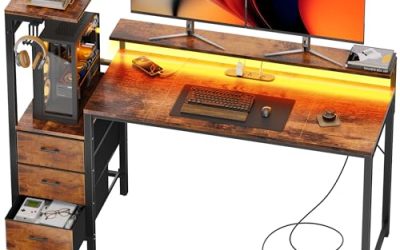
Korfile describes a 66 inch black corner desk with storage drawers, power outlets, LED lighting, and a large reversible layout meant for multiple monitors. It suits a mid-size room where you want drawers and outlets built in, and the reversible design means the return can go on whichever side the wall demands. For three monitors, plan on 24-inch screens or smaller, angled slightly inward, so the outer panels do not hang past the edge.
- Strength: the listing explicitly targets multiple monitors.
- Strength: built-in storage and outlets cut desk clutter.
- Trade-off: 66 inches is on the shorter side for three larger screens in a line.
Skip it if you plan to run three 27-inch panels side by side.
SEDETA 78.7 Inch L-Shaped Gaming Desk
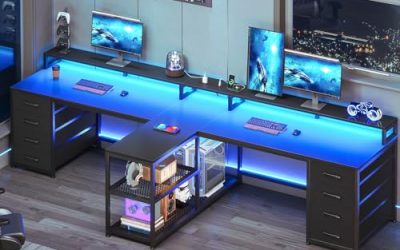
One of the widest options, with drawers, LED lighting, storage shelves, a power outlet, a reversible corner layout, and a glass display cabinet. It fits players who want a statement station that also displays collectibles, and the generous width is the main reason it earns a place on a triple-monitor list. Because the glass cabinet and drawers add mass, place it on a level floor and check that all the feet make contact before loading the surface.
- Strength: 78.7 inches of width gives room for larger monitors.
- Strength: shelves, drawers, and a display cabinet add storage.
- Trade-off: the size and extras demand a big room and a longer assembly.
Skip it if your room is small or you prefer a minimal look.
SEDETA L-Shaped Gaming Desk with Monitor Shelf
This reversible desk lists power outlets, an LED strip, a monitor shelf, a keyboard tray, a pegboard, and storage. It is built for organized setups with many accessories, such as a streamer who keeps a headset, controller, and capture gear within reach. Because the width is missing from the title, read the dimension table on the product page and compare it with the arithmetic above before buying.
- Strength: the monitor shelf and keyboard tray support ergonomics.
- Strength: the pegboard offers a place for headsets and controllers.
- Trade-off: the title does not state the width, so confirm dimensions.
Skip it if you need exact dimensions before buying.
SEDETA 79 Inch Gaming Desk
A long carbon-fiber black desk with fabric drawers, LED lighting, a power strip, a monitor stand, and a keyboard tray. It suits a straight run of screens rather than a corner, such as along a long wall of a bedroom or office. Three 24-inch panels fit with spare inches at either end, and even three 27-inch screens can sit side by side with some care about bezel overlap and speaker placement.
- Strength: 79 inches of width fits three monitors in a row.
- Strength: power strip and keyboard tray are included.
- Trade-off: a long single surface needs wall space and may not suit corners.
Skip it if your space is a corner or a narrow alcove.
PRAISUN 63 Inch L-Shaped Desk
This 63 inch desk lists power outlets, a Type-C port, three fabric drawers, mesh shelves, and a corner study layout. It targets compact rooms that need charging options, and the corner layout helps the side screens turn toward the chair. A good fit for a student or remote worker whose third screen is smaller than the other two, or a laptop screen used as the third display.
- Strength: Type-C port and outlets handle modern chargers.
- Strength: mesh shelves add storage without bulk.
- Trade-off: 63 inches suits three smaller monitors rather than three large ones.
Skip it if you use 27-inch or larger panels.
Korfile 59 Inch L-Shaped Computer Desk
A black corner desk with power outlets, four adjustable storage drawers, and monitor stands, designed for home office and bedroom use. It is the most compact entry here, which makes it suitable for a spare corner where a larger desk would never fit. Treat it as a two-large-screens-plus-a-small-third option, or three compact monitors, rather than a station for three big panels.
- Strength: fits smaller rooms and corners.
- Strength: adjustable drawers offer flexible storage.
- Trade-off: the footprint is tight for three screens, and the title mentions two monitor stands.
Skip it if you want generous room for three large monitors.
Which One Fits Your Situation
You have a large room and big monitors
Choose the SEDETA 78.7 inch or the SEDETA 79 inch. Both provide the width to place three screens comfortably.
You are working in a corner
The Korfile 66 inch or the SEDETA L-shaped model with the monitor shelf let you angle side screens inward.
Your room is small
The PRAISUN 63 inch or the Korfile 59 inch suit tighter spaces, with smaller monitors in mind.
You want organization and accessories
The SEDETA model with a keyboard tray, pegboard, and monitor shelf is built for that kind of setup.
Common Mistakes
- Buying by listed width alone without matching it to the actual size of the monitors.
- Forgetting depth, which affects viewing distance and keyboard space.
- Choosing a reversible desk and then assembling the wrong orientation.
- Relying on built-in outlets without a wall socket nearby.
- Skipping the weight capacity check and overloading shelves with heavy monitors, speakers, and a tower all at once.
Related guides
- What Is The Best Budget Most Responsive Gaming Mouse Wired
- Low Latency Gaming Headphones Usb-C 2.4 Ghz Wireless
- Mechanical Gaming Keyboards Competitive Pc Gaming
Frequently Asked Questions
How wide should a desk be for three monitors?
Roughly 63 inches for three 24-inch screens and 72 inches or more for three 27-inch screens in a line. An L-shape can reduce the needed width.
Do I need a monitor arm?
Not required, but arms free desk space and help set screen height. Check tabletop thickness and weight limits before buying one, and confirm that your monitors have standard mounting holes on the back, since not every panel does.
Are L-shaped desks better than straight desks?
For three monitors in a corner, yes, because they wrap the screens toward you and reduce the head turn needed to see the outer panels. A long straight desk works if you have wall space, and it keeps every screen at the same distance, which some people prefer for competitive play or color work.
What does reversible mean?
You can assemble the return on the left or right side to suit your room layout. Decide on the orientation before you open the hardware bags, because swapping it after the frame is built means undoing most of the work.