Setting a ceiling of 300 dollars on a computer desk changes the question. At this level you are no longer fighting for the cheapest flat top; you can afford to ask what the desk should do for the next five years. Do you want more surface for dual monitors, a corner layout that swallows a tower and a printer, built-in shelving that keeps papers off the keyboard, or lighting and drawers for a gaming nook? The cap leaves room for a decent desk, a monitor arm, and cable management, so the real work is matching shape to routine.
This guide is for home-office workers upgrading from a kitchen table, students building a study corner that has to last through several years, and gamers who want a cleaner station than a folding table. The shortlist below includes only desks, because a chair or a prebuilt computer is a separate purchase with different rules. Each pick is judged on the width, frame, storage, and layout details the title states, not on invented dimensions.
Our Top Picks
 DUMOS 32 Inch Small Computer Desk for Home32 Inch31.5 x 19.69 x 29.69 inches17.4 PoundsCheck on Amazon

Top 3 picks at a glance
Quick Picks
As an Amazon Associate we earn from qualifying purchases at no extra cost to you.



| Product | Best for | Key spec from the title |
|---|---|---|
| DUMOS 32-Inch Desk | Narrow rooms and compact study spots | 32 inches, modern writing and craft table |
| 50-Inch Reversible L-Shaped Desk | Corner workstations with extra surface | 50 inches, reversible, CPU stand, metal frame |
| Huuger 55-Inch Desk | Dual-monitor remote work | 55 inches, large legroom, sturdy metal frame |
| Furinno Econ Writing Desk | Papers and supplies kept close | Side shelves and a storage bin |
| DurayLoly Gaming Desk | Gaming setups with storage | 2 drawers, LED lights, monitor stand |
How to Choose
Decide your surface needs before the shape
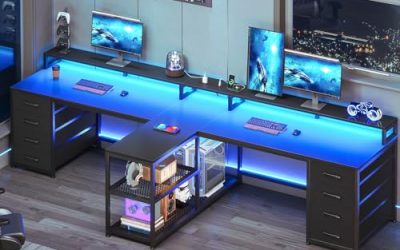
Count what must sit on the desk daily: one monitor, two monitors, a laptop dock, a drawing tablet, a printer, a lamp. A rough guide is 40 to 47 inches for a single large monitor and peripherals, 55 inches or more for two screens, and a corner layout when you need an “L” of workspace for documents beside the screen. Depth around 20 to 24 inches keeps the display at a comfortable distance. If you are unsure, go wider rather than taller; a wide, shallow top beats a narrow, deep one for most workflows. Remember that a monitor sits roughly an arm’s length away, so a top that is too shallow will force the screen uncomfortably close to your face.
Frame, weight capacity, and stability
A desk that wobbles undermines everything else. Metal frames, listed on the Huuger and the L-shaped desk, are the first thing to look for. Check for cross-bracing, leveling feet, and a stated weight capacity, particularly if you plan to add a heavy monitor arm, a large display, or a stack of equipment. Remember that particleboard tops carry laminate finishes and that weight ratings matter more than glossy marketing photos. Tighten all hardware after a week, because bolts settle with use.
Storage and cable management
Storage is where mid-tier desks pull ahead of bare tables. The Furinno offers side shelves and a bin, the DurayLoly offers two drawers and a side pocket, and the L-shaped desk has a hook and a storage bag. Choose by habit: shelves for books and binders, drawers for small items you want hidden, hooks for headphones and bags. Whatever you buy, plan cable routing early with clips or a tray, because a clean station depends more on cables than on the desk. A few adhesive clips, a power strip mounted under the top, and a length of sleeving cost little and change the whole look of the setup.
Ergonomics and what to ignore
Desk height is typically around 29 to 30 inches, which suits most seated users, but check the listing before buying if you are very tall or short. A monitor stand or riser, as on the DurayLoly, raises the screen toward eye level. Ignore “gaming” branding as a proxy for strength and ignore LED effects as a productivity feature. Budget corners tend to be edge finishing, hardware quality, and instructions, so read recent buyer comments for assembly problems and chipped corners. Also confirm the weight limit if you plan to place a heavy printer or a pair of speakers on the top, because the stated capacity is rarely generous at this level.
The 5 Best Options
DUMOS 32-Inch Small Computer Desk
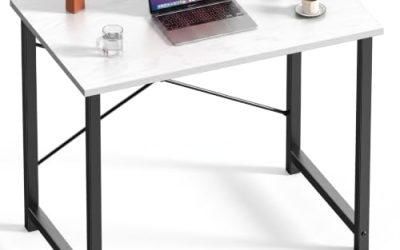
The DUMOS is a 32-inch desk in black and white, described as a modern study, writing, and craft table suitable for a bedroom or home office. It is the smallest surface here, designed for tight corners and light use rather than a full battle station.
- Strength: its compact width fits into alcoves, bedrooms, and the end of a hallway.
- Strength: a simple design that works as a laptop desk, a sewing table, or a homework spot.
- Trade-off: 32 inches leaves little room for a second monitor or a large keyboard tray.
Skip it if your equipment list is longer than a laptop and a lamp, or if you work with large documents spread out beside the keyboard. It is a space-saver first, a workstation second, and it makes sense as a second desk for a hobby area, a nursery corner, or a guest room that occasionally needs a work surface.
50-Inch Reversible L-Shaped Desk
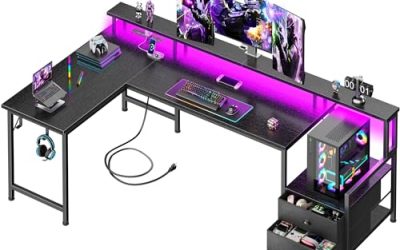
This black corner desk measures 50 inches, can be configured in either direction, and comes with a CPU stand, a storage bag, and a side hook. A sturdy metal frame supports the top, which makes it a sound pick for a cramped bedroom or a corner office. Because the stand holds the tower up, it also keeps dust and spilled drinks away from the computer, a quiet advantage in a busy household.
- Strength: the L shape adds surface area without extending far into the room.
- Strength: the CPU stand lifts the tower off the floor, and the hook holds headphones or a bag.
- Trade-off: it only works well in a corner and is awkward to relocate to an open wall.
Skip it if you want a desk that floats in the middle of the room or if you plan to move apartments often and need flexible placement.
Huuger 55-Inch Home Office Desk
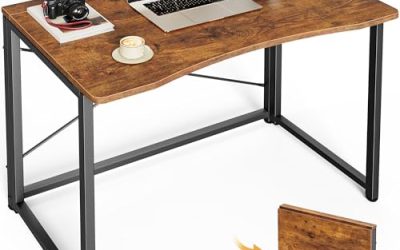
Huuger gives you 55 inches of width with a sturdy metal frame and large legroom, in a modern rustic brown finish. It aims at work-from-home buyers who want a calm, uncluttered top and room to stretch their legs through long video-call days. With a flat, uncluttered top, it pairs naturally with a separate shelf or cabinet if you collect paperwork, and the silhouette suits living rooms where the desk must look like furniture.
- Strength: 55 inches supports a dual-monitor layout or a monitor plus laptop.
- Strength: the open legroom and metal frame favor comfort and stability.
- Trade-off: no drawers or shelves are listed, so storage needs to come from other furniture.
Skip it if you depend on built-in storage or if the room is narrower than the desk. It suits buyers who already own a filing cabinet.
Furinno Econ Multipurpose Writing Desk
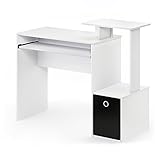
Furinno’s Econ is a multipurpose home office and writing desk in white and black, with side shelves and a storage bin. It leans on organization rather than width, giving books, supplies, and small devices a home beside the work surface.
- Strength: side shelves and a bin keep supplies off the main surface.
- Strength: a multipurpose layout suits study, writing, and general home-office tasks.
- Trade-off: shelves on the side reduce the room available for equipment on the main top.
Skip it if you want a large, clear surface for multiple monitors or a gaming rig. It is a better match for paperwork, laptops, and study sessions than for heavy hardware, and its mix of black and white finishes blends into most rooms without drawing attention.
DurayLoly Gaming Desk with Drawers
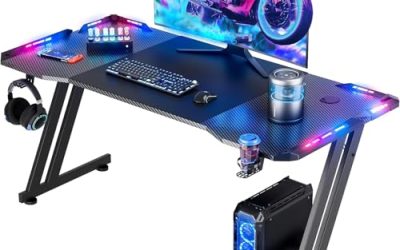
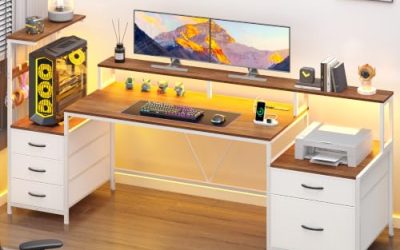
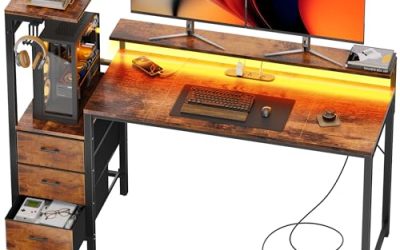
DurayLoly offers a gaming desk in rustic brown with two drawers, LED lights, an ergonomic monitor stand, and a side pocket, framed as a space-saving design. It packs storage, lighting, and a raised display platform into a single footprint.
- Strength: two drawers conceal clutter, while the side pocket keeps controllers within reach.
- Strength: the monitor stand improves screen height without a separate riser.
- Trade-off: drawers cut into legroom, and LED lights add a feature you may never use.
Skip it if you prefer a plain, open desk or if you sit with crossed legs for hours. It is the most feature-heavy option and the most opinionated, so decide whether you will actually use the lights and drawers before paying for them in the form of lost legroom.
Which One Fits Your Situation
You work remotely with two monitors
Go with the Huuger 55-Inch. The width and legroom suit all-day sessions, and a monitor arm clamps to the metal frame neatly. Add a filing cabinet or shelf unit for storage, and keep the second monitor centered with the first so neither screen forces you to twist your neck all day.
You have a corner and a lot of gear
The 50-Inch Reversible L-Shaped Desk keeps the tower off the floor and wraps your work around you. Decide on the orientation based on where the door and window sit.
You study or write with piles of books
The Furinno Econ keeps supplies on shelves and in a bin beside the work area. It suits a student who values organization over a huge desktop.
You game and want drawers and lights
The DurayLoly Gaming Desk bundles the extras. If your room is tiny and you only need a laptop surface, the DUMOS 32-Inch is the lighter choice for 2026 and beyond, particularly when paired with a wall shelf for the books and chargers that would otherwise clutter the top.
Common Mistakes
- Spending the whole budget on the desk and leaving nothing for a chair or monitor arm.
- Buying an L-shaped desk without confirming which side the corner sits on.
- Assuming shelves and bins add storage without taking away from the main surface.
- Ignoring depth, then sitting too close to a large monitor.
- Skipping cable management, which makes even a good desk look messy within a month.
Related guides
- What Is The Best Budget Most Responsive Gaming Mouse Wired
- Low Latency Gaming Headphones Usb-C 2.4 Ghz Wireless
- Low Latency Gaming Headphones Usb-C Dongle 2.4 Ghz
Frequently Asked Questions
Is a bigger desk always better?
No. A desk should fit the room and your reach. An oversized top forces you to lean and crowds the floor, while a mid-size top with good storage can be more efficient.
What matters more, frame material or top size?
For stability, frame material and bracing matter more. A wide top on a weak frame wobbles; a smaller top on a metal frame feels solid. Consider both together with your equipment weight.
Do I need a dedicated monitor stand?
If the display sits below eye level, yes. A built-in stand, like the one on the DurayLoly, or a separate riser or arm, helps your neck and shoulders.
How should I plan assembly?
Expect one to two hours, lay out parts and hardware first, and enlist a second person for lifting. Check that every bolt is snug a week later.