A desk earns the word ergonomic when it lets your elbows rest near ninety degrees at the keyboard and puts the top of your monitor close to eye level, whether you are sitting or standing. A fixed-height table cannot do that for more than one body type, which is why every model in this roundup is an electric sit-stand desk with a motorized frame. The decision is no longer whether to go adjustable, but how much surface, storage, and built-in accessory support you actually need.
This guide is for anyone shopping for a home office or gaming desk in 2026 who wants to compare seven electric desks without wading through marketing copy. The picks split into two clear camps: compact 48 by 24 inch tops that suit small rooms, and wider 55 inch tops that can hold a monitor arm, a laptop, and a drawer unit at once. Read the table first, then use the buying checklist to match a footprint to your wall, your chair, and the way you really work through a day.
Our Top Picks
 HUANUO 55″ x 26″ Electric Standing Desk with55*26 Inch26.2 x 55 x 28.4 inches69.23 poundsCheck on Amazon
 Veken 55 Inch Large Electric Standing Desk55×23.6 Inch23.64 x 55.12 x 28.3 inches42.1 PoundsCheck on Amazon
 COMHOMA Electric Standing Desk with Drawers48 x 24 Inch24 x 48 x 28.3 inches59 poundsCheck on Amazon


Top 3 picks at a glance
Quick Picks
As an Amazon Associate we earn from qualifying purchases at no extra cost to you.


| Product | Best for | Key spec from the title |
|---|---|---|
| ErGear 48 x 24 (Black) | Small rooms, preset users | 4 memory presets, 48 x 24 inch top |
| FEZIBO 48 x 24 (Maple) | Lighter wood look | 3 customizable presets, 48 x 24 inch top |
| HUANUO 55 x 26 | Storage-heavy setups | 2 drawers, 24.4 inch keyboard tray |
| Veken 55 Inch (White) | Gaming or study spaces | 55 inch large electric top |
| AODK 55 Inch | Everything-included buyers | Drawers, keyboard tray, power outlet, LED lights |
| COMHOMA 48 x 24 | Laptop plus monitor desks | Drawers, monitor stand, laptop stand |
| Claiks 48×24 (Rustic Brown) | Tidy cable runs | 3 memory presets, cable management hub and hook |
How to Choose
Surface size and depth
A 48 by 24 inch top handles one monitor and a keyboard, and little else. If you run two displays, a laptop dock, or a drawing tablet, look at 55 inches wide or more and a depth of at least 26 inches, because a 24 inch depth leaves a large monitor uncomfortably close to your face. Measure your wall and chair clearance before ordering, since a wide top also needs room to roll back when you stand. Leave at least a couple of feet behind the chair so you can move freely, and remember that a corner-pushed desk with a bulky drawer unit can make the room feel smaller than the floor plan suggests.
Height range and memory presets
Check that the lowest setting reaches about 25 to 28 inches for seated work and that the highest setting clears your standing elbow height, often 42 to 48 inches for taller users. Memory presets matter more than they sound: two or three saved heights make switching a one-touch habit, and habits are what make a standing desk worth owning. Three presets are enough for most people; four helps shared desks. Also confirm the control panel is simple enough to use without reading the manual, since a clumsy keypad is the main reason people stop adjusting their desk after the first month.
Storage and built-in accessories
Drawers, keyboard trays, monitor stands, and power outlets save money compared with buying each piece separately, but they also add weight and limit leg room. A keyboard tray helps you keep wrists flat, yet a tray that is too shallow forces the mouse onto the desktop. Ignore decorative LED strips when comparing; they have no bearing on posture. A bundled monitor stand also deserves a second look, because a fixed riser may not match your eye level, and an arm that clamps to the edge often positions a screen more precisely.
Stability and where budget models cut corners
Wobble shows up at the top of the height range, so look for sturdy steel legs, a crossbar, and a stated weight capacity of 150 pounds or more. Cheaper frames often skimp on anti-collision sensing, quiet motors, and thick tabletops. Wood-look finishes are cosmetic, so do not pay a premium for a color name. Budget desks also tend to ship with thin hardware and vague assembly diagrams, so set aside an hour, a second pair of hands, and a flat floor, and tighten every bolt again after the first week of use.
The 7 Best Options
ErGear 48 x 24 Electric Standing Desk
This black desk suits a single-monitor setup in a bedroom corner or apartment nook, and the 4 memory presets make it a sensible fit for two people sharing one workspace who each want a saved sitting and standing height.
- Strength: four memory presets let each user store a sitting height, a standing height, and extras.
- Strength: the 48 x 24 inch top keeps the footprint small and the room open.
- Trade-off: the compact surface leaves little room for a second monitor, a printer, or a wide desk mat.
Skip it if you want drawers or a keyboard tray included, or if you use a laptop riser alongside a large external display. Gamers with a wide mouse pad and a tower on the desk will also run short of space, and people who stand for long stretches may want a model with more tabletop.
FEZIBO 48 x 24 Electric Standing Desk
The maple finish brings a lighter tone to rooms where black desks feel heavy. It targets buyers who want a straightforward sit-stand desk with a motorized lift and no extras attached to the frame or the top.
- Strength: the 3 customizable presets cover sitting, standing, and one in-between height.
- Strength: the 48 x 24 inch size fits tight spaces and shared rooms.
- Trade-off: the listing mentions no drawers or trays, so storage becomes a separate purchase.
Skip it if you need a deep tabletop for a large display, or want built-in outlets for charging gear at the desk. Anyone planning to add a monitor stand will also give up a good share of the surface. Shared-room users who need more than three saved heights may prefer a model with an extra slot.
HUANUO 55 x 26 Electric Standing Desk with Drawers
The wider and deeper top is aimed at people who keep paperwork, chargers, and peripherals close at hand. The 24.4 inch keyboard tray and C-clamp mount compatibility also point to a monitor-arm setup that frees up desktop space.
- Strength: two drawers keep small items off the surface.
- Strength: the 55 x 26 inch top gives more room than the 48 inch models and more depth for a bigger monitor.
- Trade-off: drawers and a tray add bulk and can limit knee room for taller users.
Skip it if you want fully open leg space, or if your room cannot spare 55 inches of wall. Anyone who prefers a minimalist surface may find the tray and drawers more than they need.
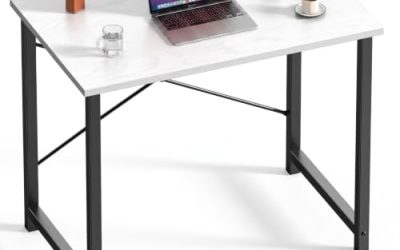
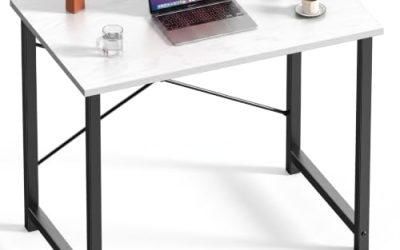
Veken 55 Inch Large Electric Standing Desk
This white desk is marketed as a gaming table and a study surface, so it fits students, streamers, and anyone who wants a clean, bright look combined with a long top that stays uncluttered.
- Strength: the 55 inch width fits dual monitors, or a monitor plus a laptop, without crowding.
- Strength: the white finish suits light, minimal rooms and reflects ambient light.
- Trade-off: the listing highlights size and finish rather than storage or memory presets.
Skip it if you want drawers built in, or if you would rather avoid a light surface that shows smudges. Those who want a keyboard tray or power outlet attached will need to add them separately, which adds cost and cable runs.
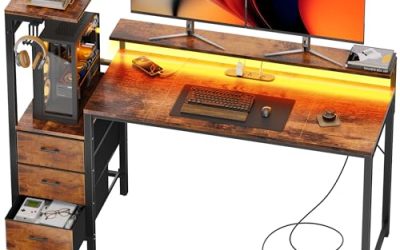
AODK 55 Inch Standing Desk with Drawers
This rustic brown model packs the longest feature list here: drawers, a keyboard tray, a power outlet, LED lights, a monitor stand, and a cable management tray, plus 3 memory height settings for sit-stand switching.
- Strength: a power outlet and cable tray reduce cord clutter under the top.
- Strength: the bundled monitor stand and keyboard tray cover most accessory needs in one purchase.
- Trade-off: more built-in parts mean more assembly and more pieces that could crowd leg room.
Skip it if you prefer a clean, empty top or plan to mount your own monitor arm. Buyers sensitive to a busy look may also find the attached extras visually cluttered, and the LED lights add nothing for posture or comfort.
COMHOMA 48 x 24 Electric Standing Desk with Drawers
The COMHOMA targets small spaces that still need storage, adding drawers, a monitor stand, and a laptop stand to a 48 x 24 inch top. It suits someone who works from a laptop and a single external screen and wants the whole setup in one assembled package.
- Strength: the included monitor stand and laptop stand raise screens toward eye level.
- Strength: drawers add storage without enlarging the footprint.
- Trade-off: stands and drawers eat into an already compact surface, leaving less room for a mouse.
Skip it if you use a large keyboard and mouse pad, or need a clear work area for sketching or paperwork. Buyers who prefer to choose their own monitor arm will end up paying for stands they never use.
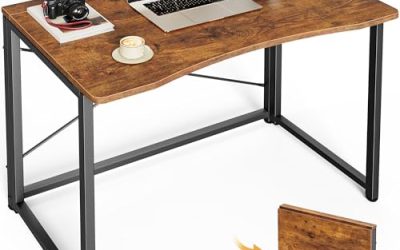
Claiks 48×24 Electric Standing Desk
The Claiks in rustic brown leans on tidy wiring, with a cable management hub and hook that keep cords from tangling or pulling when the desk travels through its full height range during the day.
- Strength: the cable hub and hook are practical on a desk that moves up and down.
- Strength: 3 memory presets support a quick sit-stand routine.
- Trade-off: the 48 x 24 inch top limits multi-monitor setups and large peripherals.
Skip it if you need drawers or a keyboard tray, or want a wide top for two displays. People who rarely move the desk may find the cable features less useful than extra surface. If you plan to add a drawer unit later, check that the frame leaves enough clearance beneath the top for it.
Which One Fits Your Situation
You work in a spare-room corner
The ErGear or Claiks suits tight corners. Pick the ErGear for four saved heights, or the Claiks if loose cords bother you and you want a hub to gather them.
You run two monitors or a laptop and monitor
Go wide with the Veken 55 inch for a clean top, or the HUANUO if you want drawers, a keyboard tray, and a deeper 26 inch surface for the screens.
You want everything attached from day one
The AODK bundles drawers, a tray, outlets, and a monitor stand, so it is the closest to a one-box workstation in this list.
You need storage in a small footprint
The COMHOMA adds drawers and stands to the compact 48 x 24 size, which works when floor space is the limit and the laptop does most of the work. Pair it with a wireless mouse so the cramped top never gets in the way. The mix of stands and drawers also makes it a busier build than the plain 48 inch models.
Common Mistakes
- Buying a 48 inch top for a dual-monitor setup and running out of space within a week.
- Ignoring depth: a 24 inch top pushes large monitors too close to your eyes.
- Paying extra for LED lighting instead of preset buttons or a sturdier frame.
- Forgetting to check the lowest height against your chair and elbow position.
- Skipping a floor mat and monitor arm, then blaming the desk for neck strain.
Related guides
- What Is The Best Budget Most Responsive Gaming Mouse Wired
- Low Latency Gaming Headphones Usb-C 2.4 Ghz Wireless
- Low Latency Gaming Headphones Usb-C Dongle 2.4 Ghz
Frequently Asked Questions
How wide should an ergonomic desk be?
A 48 inch top works for one monitor, while 55 inches or more suits two screens or a laptop plus monitor. Pick width based on your equipment, not just the room.
Are memory presets necessary?
They are not required, but saved heights make you more likely to actually switch positions. Three presets suit one user; four helps when two people share the desk.
Are drawers worth it on a standing desk?
They help if you keep supplies at hand, but they can limit knee space and add weight. If you prefer a clean surface, a separate rolling cabinet is a flexible alternative.
Does the finish affect ergonomics?
No. Maple, white, black, and rustic brown differ only in looks, so choose a color that fits the room and spend your money on size, stability, and height range.
Related guides
- How to Measure Hand Size for a Mouse: Length, Width and a Simple Fit Rule
- Best Office Chairs for Desk and PC Setups: 10 Listings Compared by Fit (2026)
- Best Ergonomic Keyboard: Split, Wave and Wrist-Rest Layouts Compared (2026)
- Best Ergonomic Chairs: Ten Mesh and Lumbar Designs for Long Desk Days (2026)