Two monitors change what a desk has to do. A pair of 27-inch panels needs roughly 50 to 55 inches of straight width before you add a keyboard, mouse, speakers, and a tower, and a desk that looks generous in a photo can leave you leaning to see the second screen. The real decision with this keyword is the layout: a long straight surface, an L-shaped corner setup, or a two-person desk that gives each monitor its own lane.
This guide is for gamers and remote workers setting up a dual-monitor station in 2026 who also want built-in extras such as outlets, storage, and lighting. We narrowed the product set to six distinct desks. We left out a 40-inch Korfile model because that width is too tight for two displays, and we kept only one of the three Korfile sizes so the list does not repeat the same design at different footprints.
Our Top Picks
 Korfile 66'' L Shaped Gaming Desk with StorageLarge: 66 inches42.5 x 65.4 x 36.5 InchesCheck on Amazon

Top 3 picks at a glance
Quick Picks
As an Amazon Associate we earn from qualifying purchases at no extra cost to you.


| Product | Best for | Key spec from the title |
|---|---|---|
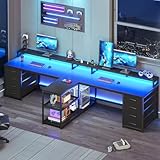
| SEDETA 94.5″ Two-Person Gaming Desk | Shared workspace for two players | 94.5 inches, T-shaped, 8 drawers, LED, power strip |
| Korfile 66″ L-Shaped Gaming Desk | Corner dual-monitor setup | 66 inches, reversible L-shape, drawers, outlets, LED |
| SEDETA L-Shaped Gaming Desk with Display Cabinet | Large corner build with storage | 4 drawers, display cabinet, 2 monitor stands, CPU stand |
| Tribesigns Two Person Desk | Long straight desk for office and gaming | 78.74 inches, monitor stand, storage shelves |
| 96.6″ Two-Person Computer Desk | Maximum straight width | 96.6 inches, LED, outlet, file drawers, printer shelf |
| AODK 53″ L-Shaped Gaming Desk | Smaller rooms with a corner layout | 53 inches, reversible, LED, outlet, shelf |
How to Choose
Measure the width you actually need
Add up the width of your two monitors, including bezels, then add room for a keyboard and mouse that sit in front of the main screen. For two 27-inch monitors side by side, around 48 to 55 inches of monitor width is typical. A desk under 55 inches can work if you mount the monitors on arms or use a stand that lifts them above the surface. Anything wider than 70 inches gives space for speakers and a mouse mat without crowding. Depth matters too: around 24 inches is a common minimum, and deeper desks let you push screens back for a more comfortable viewing distance, which is especially helpful with two larger panels. Write the numbers down before you shop, and compare them with the dimensions in each listing instead of trusting a photo.
Pick the right shape
A straight desk keeps both screens at the same distance from your eyes. An L-shaped desk puts one monitor on each wing or lets you angle them, but it needs a corner of the room and can push the second display farther away. A two-person desk with a T or long layout suits couples, streamers, or a shared office. Check whether the listing says the L is reversible, because that decides which side the return wing falls on. If your two monitors are different sizes, put the larger one on the main surface and the smaller one on the return so the primary screen stays centered in front of you.
Check built-in features that matter
Power outlets and USB ports on the desk cut down on cable runs, and drawers help hide controllers and headsets. A monitor stand or riser is useful only if its height suits your eyes; the top edge of the screen should sit near eye level. LED lighting is cosmetic, but the controller should be easy to switch off. Weight capacity and thickness of the desktop matter for heavy monitors, and the listing should state them. If you plan to add monitor arms, a clamp needs a solid edge, so confirm the desktop is thick enough and that built-in shelves will not block the clamp position.
Know what to ignore and where cheap desks cut corners
Ignore decorative extras like display cabinets if function is the priority. Budget desks usually cut corners on particleboard thickness, cam-lock hardware, and leg stability; wobble at the far end of a long desk is common. Check assembly time, how many people it takes to move the pieces, and whether the monitor stand shelves can hold a screen without bowing. For long desks, look for a support leg or crossbar near the middle, since a span of 90 inches or more can sag over time if only the two ends are supported.
The 6 Best Options
SEDETA 94.5″ Two-Person Gaming Desk
This T-shaped desk runs 94.5 inches long and comes with eight drawers, storage shelves, LED lights, and a power strip with USB. It is built for a shared station where two people each need their own monitor lane, or for one gamer who wants room for a full battle station with a tower, console, and speakers all in reach. The double T layout gives each side its own lane, which also helps if one person streams while the other works.
- Strength: the 94.5-inch length holds two monitors with room left for accessories.
- Strength: eight drawers and shelves provide a lot of storage.
- Trade-off: the size demands a large room and a patient assembly process.
Skip it if your room is small or you want a minimal desk surface.
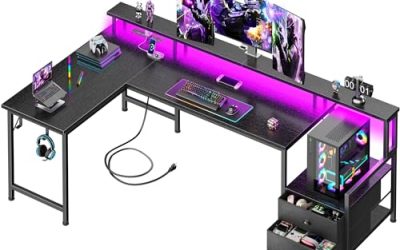
Korfile 66″ L-Shaped Gaming Desk
This reversible L-shaped desk is described as large and suited to multiple monitors, with storage drawers, power outlets, and LED lighting. At 66 inches it is a mid-size corner choice for players who want a main surface and a side return. It is a sensible step up from a basic desk for someone who has outgrown a single-monitor table but does not want a giant piece of furniture.
- Strength: the reversible design lets you choose the left or right return.
- Strength: outlets and drawers sit on the desk itself.
- Trade-off: the second monitor may sit on the return wing, farther from your eyes.
Skip it if you have no corner to fill or if you want both screens on one flat surface.
SEDETA L-Shaped Gaming Desk with Display Cabinet
The SEDETA corner desk comes with four drawers, a display cabinet, two monitor stands, a CPU stand, and LED lights. It is for buyers who want one piece of furniture to hold a tower, two screens, and a shelf for collectibles or figures. The title also lists LED lights, so it works as a fairly complete station out of the box, though the cabinet and stands take up real floor space. Measure the corner twice before ordering, and leave room to pull the desk out for cable access later.
- Strength: two monitor stands are included, matching the dual-screen use case.
- Strength: a dedicated CPU stand keeps the tower off the floor.
- Trade-off: its size and weight make it difficult to move once built.
Skip it if you want a clean, uncluttered look or have limited floor space.
Tribesigns Two Person Desk
The Tribesigns desk is 78.74 inches long with a monitor stand and storage shelves. It is aimed at a long straight setup, useful for two workstations or one wide gaming station that shares a room with an office. The wording of the title points to a work-and-study design more than a pure gaming look, which some buyers prefer.
- Strength: the long straight surface keeps two monitors at an even distance.
- Strength: the monitor stand and storage shelves add organization.
- Trade-off: the title does not mention built-in outlets or lighting.
Skip it if you want lighting or power features included.
96.6″ Two-Person Computer Desk
This 96.6-inch desk lists LED lights, a power outlet, file drawers, a monitor stand, and a printer shelf. It targets a home office that doubles as a gaming room, where a printer and file storage share the same surface as the PC. It is the desk to look at if you need to print, file, and play in one room.
- Strength: 96.6 inches gives more straight width than any other desk here.
- Strength: the printer shelf and file drawers suit a combined work and play setup.
- Trade-off: the brand is not named in the title, so check the listing details before ordering.
Skip it if you need a compact footprint or a gaming-only look.
AODK 53″ L-Shaped Desk
The AODK desk is a reversible 53-inch L-shaped desk with LED lights, a power outlet, a shelf, a storage bag, and a hook. It suits smaller rooms and players who want an L layout without taking over a corner. It can work for a single-gamer setup with one main monitor and a secondary display on the return.
- Strength: the 53-inch size fits tighter rooms.
- Strength: the headset hook and storage bag help with clutter.
- Trade-off: 53 inches is tight for two larger monitors unless you use arms.
Skip it if your monitors are wide or you want generous desktop space.
Which One Fits Your Situation
You share the room with a partner
Take the SEDETA 94.5″ Two-Person Gaming Desk. Its T-shaped layout and eight drawers give each person a space, and the power strip with USB ports keeps both setups charged without crawling behind the desk.
You want a corner battle station
The SEDETA L-Shaped desk with a display cabinet offers two monitor stands, a CPU stand, and four drawers, all in one corner footprint. It suits someone who wants the tower raised, the screens placed on stands, and a display shelf in view.
You work from home as well as game
The 96.6″ Two-Person Computer Desk adds file drawers and a printer shelf, which suits a mixed office and gaming room. The drawers can hold paperwork while the outlet and lighting cover the gaming side.
Your room is small
Go for the AODK 53″ L-Shaped desk or the Korfile 66″ model, then mount the monitors on arms to save desk depth. The Tribesigns desk is the straight-line alternative if you can spare 78 inches of wall.
Common Mistakes
- Buying a desk by length alone without checking depth for two monitors and a keyboard.
- Choosing an L-shaped desk without confirming which side the return will sit on.
- Ignoring floor space and door width for large boxes.
- Counting on a built-in monitor stand to fit the screen height you need.
- Forgetting that LED strips and power strips need an outlet close to the desk.
Related guides
- What Is The Best Budget Most Responsive Gaming Mouse Wired
- Low Latency Gaming Headphones Usb-C 2.4 Ghz Wireless
- Low Latency Gaming Headphones Usb-C Dongle 2.4 Ghz
Frequently Asked Questions
How wide should a desk for two monitors be?
Plan on at least 55 inches for two 27-inch screens, and more if you want speakers and extra desk space. Arms can help in tighter spaces.
Is an L-shaped desk better than a straight desk?
It depends on the room. L-shaped desks use a corner and add surface area, while straight desks keep both monitors equally distant.
Do built-in outlets matter?
They reduce cable clutter and make charging easier. Check the listing for the surge protection and the number of ports.
Can these desks hold heavy monitors?
Most can hold standard monitors, but the weight limit should be confirmed in the listing before you add stands or arms.