
A good headset stand does more than get your headphones off the desk. In a gaming room, home office, or shared bedroom setup, it can turn one crowded corner into a more usable charging station—especially when your PC’s front ports are already occupied by a keyboard, mouse, webcam, or storage drive. The best headset stands with USB ports combine a dedicated resting place for headphones with convenient connections for everyday accessories.
For 2026 desk setups, the biggest decision is whether you need a simple headphone holder with charging ports or a more involved gaming organizer with controller storage, lighting, audio connections, or wireless charging. This ranking focuses on the listed features, desk-friendly functionality, and value at each price point. Keep in mind that a USB port’s charging speed or data capability is not always specified, so shoppers with power-hungry devices should confirm those details before buying.
As an Amazon Associate we earn from qualifying purchases at no extra cost to you.


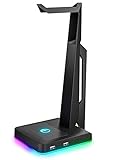


Our Top Picks
 cozoo Headphone Stand with Charger for DeskStandard4.17 x 3.94 x 10.4 inches0.9 PoundsCheck on Amazon
 KDD RGB Gaming Headphone and Controller Stand with13.8*15*28.1CM5.93 x 5.43 x 11.14 inchesCheck on Amazon

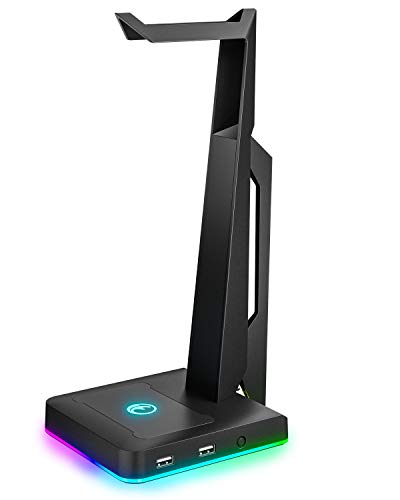


Top 3 picks at a glance
Quick Picks
| Product | Best for | Price |
|---|---|---|
| New Bee Headphone Stand with RGB Lighting | Budget RGB desk setups | Check on Amazon |
| cozoo Headphone Stand with Charger for Desk | Simple desk charging | Check on Amazon |
| IFYOO RGB Gaming Headset Stand with 2 USB Ports | Console and PC gaming stations | Check on Amazon |
| KDD RGB Gaming Headphone and Controller Stand | USB-C-heavy accessory collections | Check on Amazon |
| EKSA RGB Headset Stand | Wired headset audio setups | Check on Amazon |
| New Bee RGB Headphone Stand with 2 USB-C & 1 USB Charging Ports | Multi-device charging | Check on Amazon |
| KDD Headset Stand with Charging Station | Flexible controller organization | Check on Amazon |
| KDD Headphone & Controller Stand with Wireless Charging | Wireless-charging gaming desks | Check on Amazon |
How We Compared
We prioritized the features that matter most in a headset stand with USB ports: useful connectivity, stable-looking construction, compatibility language for common headphones, and whether the stand solves more than one desktop problem. Products with USB-C ports earned particular attention because they can better suit newer accessories, while models with controller holders or wireless charging stand out for gamers building an all-in-one station.
We also weighed price against the stated feature set. A basic aluminum headset holder with charging ports can be the smarter choice for a compact work desk, while a larger gaming-oriented stand may justify its cost if it replaces separate controller storage or a charging pad. Rankings reflect the information provided by each listing rather than unverified charging, audio, or durability performance claims.
The Best Picks
1. New Bee Headphone Stand with RGB Lighting
The New Bee Headphone Stand with RGB Lighting is the best value pick for someone who wants a cleaner gaming desk without spending much. Its aluminum construction, stable desktop design, RGB lighting, and both USB-C and USB charging ports make it more versatile than a bare headphone hook. It is also described as suitable for all headphone sizes, making it an approachable choice for households with more than one headset style. It sits in the budget tier while still delivering the core features most buyers want.
- Pro: Aluminum build and stable desktop design suit everyday use.
- Pro: Includes both USB-C and USB charging ports at a budget price.
- Con: It does not list controller storage, wireless charging, or audio connections.
Skip it if your setup needs a controller holder or a dedicated audio port.
2. cozoo Headphone Stand with Charger for Desk
The cozoo Headphone Stand with Charger for Desk is a straightforward option for shoppers who prefer a less feature-heavy accessory. Positioned as a desk charger and a gift for gamers, it is a sensible choice for a work-from-home desk, dorm room, or gaming area where the priority is giving headphones a designated home while adding charging convenience. The listing specifies a 20W USB-C Power Delivery port, two USB-A Quick Charge 3.0 ports rated at 18W, and two AC outlets with a combined 1250W rating, so it can also power a laptop charger, lamp, or console. Its budget-to-mid-range price suits buyers who do not need elaborate RGB controls or accessory racks.
- Pro: Combines headset storage and desk charging in one accessory.
- Pro: Affordable option for a simple desk refresh.
- Con: There is no RGB lighting, and the built-in power cord adds one more cable to route to the wall.
Skip it if you want RGB lighting or a controller holder.
3. IFYOO RGB Gaming Headset Stand with 2 USB Ports
The IFYOO RGB Gaming Headset Stand is a strong match for gamers who move between a PC and consoles. It has RGB lighting and 2 USB ports, while its product description specifically calls out compatibility with PC, Xbox One, PS4, and Switch gaming stations. That broad setup focus makes it a practical centerpiece for a desk with multiple platforms rather than a stand intended only for office headphones. It is among the pricier stands in the main list, so its appeal depends on whether its gaming-station styling and console-friendly positioning fit your room.
- Pro: Designed with PC and major console gaming stations in mind.
- Pro: Includes RGB lighting and 2 USB ports.
- Con: No USB-C port is specified in the listed information.
Skip it if USB-C charging is essential to your current accessory lineup.
4. KDD RGB Gaming Headphone and Controller Stand
The KDD RGB Gaming Headphone and Controller Stand is built for buyers whose desk has both a headset and controllers competing for space. Its stated connectivity is especially notable: 2 Type-C ports and 1 USB port. That mix can be useful for a gaming setup with newer rechargeable accessories alongside a traditional USB device. RGB lighting adds visual interest, while the controller stand function helps this model earn its place on a more crowded desktop. It offers a strong feature package at a budget price.
- Pro: Provides 2 Type-C ports plus 1 USB port.
- Pro: Combines headphone and controller storage with RGB lighting.
- Con: Wireless charging and audio connections are not listed.
Skip it if you only need a minimal stand for one headset and no controllers.
5. EKSA RGB Headset Stand
The EKSA RGB Headset Stand is the standout for wired gaming headset users who want more than charging ports. Along with RGB lighting, an aluminum alloy rod, and a non-slip rubber pad, it includes 7.1 surround sound and USB/3.5mm port connectivity. That makes it the most audio-oriented option in this group, particularly for a desktop gamer who wants a stand that better integrates with a wired headphone setup. Its budget price is competitive given the stated audio features. Still, buyers should check their particular headset and computer connection needs before treating it as a universal audio solution.
- Pro: Includes 7.1 surround sound plus USB and 3.5mm connections.
- Pro: Aluminum alloy rod and non-slip rubber pad support a secure desk setup.
- Con: Controller storage and USB-C ports are not specified.
Skip it if your priority is charging several USB-C devices rather than wired audio functionality.
6. New Bee RGB Headphone Stand with 2 USB-C & 1 USB Charging Ports
The New Bee RGB Headphone Stand with 2 USB-C and 1 USB charging ports is the best choice for a desk full of newer accessories. Its port arrangement is more flexible than the basic New Bee model, and the stand also adds 7 light modes and a non-slip rubber base. It is described as suitable for all earphone accessories, giving it broad appeal for gamers, students, and remote workers who cycle through headphones, earbuds, and charging cables. It is a well-priced upgrade for someone who wants USB-C convenience without adding controller storage.
- Pro: Offers 2 USB-C ports and 1 USB charging port.
- Pro: Includes 7 light modes and a non-slip rubber base.
- Con: It does not include a controller holder or wireless charging.
Skip it if controller organization matters as much as headset storage.
7. KDD Headset Stand with Charging Station
The KDD Headset Stand with Charging Station is a compelling organizer for gamers who like to rearrange their desk layout. Its detachable controller holder and rotatable headphone hanger offer more flexibility than a fixed stand, while USB A and USB-C charger ports cover common accessory cables. The stand also includes 9 light modes, making it a good fit for a personalized gaming station where lighting is part of the overall look. It is priced close to KDD’s other wired-charging controller stand but emphasizes adjustability over a fixed format.
- Pro: Detachable controller holder and rotatable headphone hanger add flexibility.
- Pro: Includes USB A and USB-C charger ports with 9 light modes.
- Con: Wireless charging is not part of the stated feature list.
Skip it if you want the simplest possible stand with no movable components.
8. KDD Headphone & Controller Stand with Wireless Charging
The KDD Headphone & Controller Stand with Wireless Charging is the best premium all-in-one option in this roundup. In addition to a rotatable headset stand and controller holder, it includes wireless charging, 2 USB ports, a Type-C port, and 9 light modes. That collection of features makes it a practical choice for a gamer who wants to reduce the number of separate accessories on the desk. It costs only slightly more than the other feature-rich picks, making it the strongest choice when wireless charging is a deciding factor.
- Pro: Adds wireless charging to headset and controller organization.
- Pro: Includes 2 USB ports, a Type-C port, a rotatable stand, and 9 light modes.
- Con: It is one of the highest-priced options in the lineup.
Skip it if you do not use wireless charging and would rather spend less on a simpler design.
9. Razer Base Station V2 Chroma

The Razer Base Station V2 Chroma is the premium choice in this expanded list and the stand most often recommended by gaming peripheral guides. It differs from every stand above in one important way: its two USB ports are USB 3.1 SuperSpeed data ports that pass through to your PC, not just charging outlets. That makes it a genuine desk hub for a keyboard, a wireless mouse receiver, a webcam, or even an external drive, freeing up ports on the back of your tower.
Razer’s spec sheet lists two USB 3.1 ports, a 3.5mm combo jack with a built-in DAC, access to Razer’s 7.1 surround sound software after product registration, and Chroma RGB lighting across eight zones in the base. The stand itself is aluminum, about 11 inches (278 mm) tall with a 4.7-inch base, and weighs roughly one pound. A wide rubberized ledge supports heavier headsets, and the hexagonal anti-slip underside keeps it planted. The lighting syncs with other Razer Chroma devices through Razer Synapse.
Strengths: real USB 3.1 data passthrough, a DAC-equipped audio jack for wired headsets, tall enough for large over-ear models, and the most polished build and lighting control in this roundup.
Drawbacks: it is several times the cost of most stands here, the ports are not designed for fast phone charging, and you need Razer software to control lighting and surround sound. There is no controller holder.
Compared with the EKSA RGB Headset Stand in the main list, which also offers a 3.5mm port and 7.1 surround, the Razer adds faster data ports and a much sturdier build. Choose it if you want your stand to work as a USB hub and a desk audio interface at the same time.
10. Tilted Nation RGB Gaming Headset Stand with Mouse Bungee

The Tilted Nation stand combines three desk tools in one: a headset hanger, a mouse bungee, and a two-port USB hub. For anyone using a wired mouse, the bungee is the most useful part. It lifts the mouse cable off the desk so it cannot snag on the edge or drag during fast flicks, which is the main reason competitive players use separate bungees in the first place.
The listing describes a two-port USB hub that works without software, dynamic or static RGB lighting with several color options, and a weighted base with non-slip grips. Retailers disagree about the hub speed: some describe USB 3.0 ports at up to 5Gbps, while current listings describe USB 2.0, so treat it as a hub for peripherals and charging rather than for fast storage. It comes in black, white, and pink versions, which helps match themed desk setups.
Strengths: the mouse bungee adds real value for wired-mouse players, USB data passthrough lets you plug a keyboard or receiver in at desk level, and the weighted base handles heavy headsets.
Drawbacks: it sits in the mid-range, above most stands here, the hub speed depends on the version you receive, and there is no USB-C port. The bungee is wasted if you already use a wireless mouse.
Against the IFYOO RGB Gaming Headset Stand in the main list, which also has two USB ports, the Tilted Nation adds the bungee and a heavier base. It is the better pick for PC players with a wired mouse and limited desk space for separate accessories.
11. MARVO RGB Headphone Stand with Data Transmission

The MARVO RGB Headphone Stand is the budget answer for anyone who wants a stand that works as a data hub, not just a charger. Many low-cost stands advertise USB ports that only supply power. This one is listed with three USB 2.0 ports, a USB-C port, and a 3.5mm audio jack that connect through to your computer, so you can plug in a keyboard, a wired headset, a webcam, or a mouse receiver at the front of the desk.
The stand offers nine lighting modes controlled by a single button (press to switch modes, hold to dim or brighten), and MARVO describes an enlarged, weighted base with a silicone non-slip pad to keep heavier headsets from tipping it over. Assembly is simple, and it is marketed for PC, PlayStation, and Xbox setups.
Strengths: more data ports than most stands at a budget price, a front-facing audio jack, a weighted base, and simple single-button lighting control.
Drawbacks: USB 2.0 speeds are fine for peripherals but slow for external drives, the ports share one connection to the PC, and the listing provides no specific charging output. Build materials are less premium than the aluminum stands in this guide.
Compared with the New Bee Headphone Stand with RGB Lighting, the main list’s value winner, the MARVO trades some build quality for genuine data connectivity and an audio jack. Choose it if your PC’s front panel ports are hard to reach or already full.
12. KAFRI RGB Dual Headphone Stand with USB-C Charger
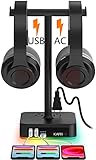
The KAFRI RGB Dual Headphone Stand solves a problem none of the other stands here address: a desk with two headsets. Streamers with a separate monitoring headset, couples sharing a gaming room, and anyone who switches between a gaming headset and music headphones can hang both on one compact base.
It is also a small power station. KAFRI lists one USB-C and two USB-A charging ports that detect devices automatically, with up to 2.4 amps per port and 4 amps total, plus two AC outlets rated for a total of 1250W, enough for a laptop charger, a lamp, or a console. The body is aluminum with a fire-resistant plastic power section and built-in protection against overload, short circuits, and over-current. RGB lighting is controlled by touch.
Strengths: holds two headsets, adds two AC outlets for bigger devices, includes a USB-C charging port, and replaces a separate power strip on a crowded desk.
Drawbacks: the USB ports are for charging only, not data. The USB-C port is not a high-wattage fast charger, and the dual hooks are spaced for typical headbands, so very wide headsets may crowd each other.
Compared with the KDD stands in the main list, the KAFRI gives up controller storage in exchange for a second headset hook and AC outlets. It is the best fit for shared or two-headset desks.
13. cozoo RGB Headphone Stand with 3 USB Ports and 2 AC Outlets

This is the RGB sibling of the cozoo stand in the main list, and it is worth separating the two because the listings are easy to confuse. This version adds nine lighting modes to the same charging-station idea: an aluminum stand with a silicone non-slip pad, two USB-A ports and one USB-C port, and two AC outlets with a combined 1250W rating, all fed by a built-in five-foot power cord.
cozoo lists automatic device detection with up to 2.4 amps per USB port and about 4 amps combined across the three, which is fine for overnight phone, earbud, and controller charging but not a fast-charge setup. The lighting can be turned on or off by holding the button for three seconds, which is handy for bedrooms. cozoo backs the product with a 24-month warranty.
Strengths: AC outlets plus USB-A and USB-C charging in one base, nine lighting modes that can be switched off, stable aluminum construction, and a longer warranty than most stands at this level.
Drawbacks: the USB ports are for charging, not data, total USB output is modest, and the built-in power cord adds one more cable to route to the wall.
Choose this version over the non-RGB cozoo if you want lighting to match a gaming setup. If you need faster USB-C charging, the non-RGB cozoo in the main list specifies 20W Power Delivery on its USB-C port.
Buying Guide
Choose Ports for the Devices You Actually Use
Start with your cable mix. A stand with USB-C and USB ports is generally the most adaptable choice for a modern desk, while a model with only USB ports may still work well for older peripherals. If you need several charging connections, the New Bee model with 2 USB-C and 1 USB port or the KDD controller stand with 2 Type-C and 1 USB port deserves close attention. Do not assume that every port supports the same charging speed or data transfer function unless the manufacturer confirms it.
Decide Whether You Need a Stand or a Desktop Organizer
A basic headset stand is ideal when headphones are your only loose accessory. But if controllers, earbuds, cables, and phones also collect around your monitor, a controller stand can be more useful. KDD’s models are the clearest organizer-focused choices, with controller holders and, in one case, wireless charging. For a compact office desk, a simpler New Bee or cozoo stand may look less busy and meet the need just as well.
Match Extras to Your Setup
RGB lighting is a style feature, but it can help a gaming station feel more coordinated. If variety matters, look for stated light modes: the New Bee model offers 7, while the KDD stands list 9. For wired headsets, the EKSA’s USB/3.5mm port and 7.1 surround sound are the more specialized features in this roundup. Buyers who prioritize a stable resting surface should also favor details such as a non-slip rubber base or pad and a metal support rod.
Charging Ports vs. Data Ports: The Difference That Matters Most
The phrase “USB ports” on a headset stand can mean two very different things, and listings rarely make it obvious.
- Charging-only ports draw power from the stand’s own cable (either from a wall plug or from a USB connection to your PC) and simply supply power. You can top up a phone, earbuds, or a controller, but a keyboard or flash drive plugged into them will not communicate with your computer. Most budget RGB stands, including the KAFRI and cozoo power-station models, work this way.
- Data passthrough ports connect to your PC through the stand’s cable and work like a USB hub. Peripherals plugged into them behave as if they were plugged into the computer. The Razer Base Station V2 Chroma, Tilted Nation, and MARVO stands offer this.
If you want to move your keyboard, mouse receiver, or webcam connection to the front of the desk, you need data ports. If you just want a place to charge small devices overnight, charging-only ports are fine and often supply more power.
How Much Charging Power Do You Need?
Headset stand ports are generally slow chargers. Many share about 4 amps (roughly 20W) across all ports, and data-hub stands powered by a single PC USB port supply even less. That is enough for wireless earbuds, gaming headsets, controllers, and mice, which only draw small amounts of power, and it will charge a phone overnight. It is not enough to fast-charge a modern phone or run a laptop. If fast phone charging matters, look for a stand that specifies a USB-C Power Delivery wattage, or keep your phone’s own fast charger nearby.
Stability, Height, and Headband Fit
A stand that tips over or presses into the headband cushion causes more harm than good. Check three things before buying:
- Height: large over-ear headsets need around 10 inches or more of clearance so the ear cups do not rest on the base. The Razer stands about 11 inches tall; most budget stands are slightly shorter.
- Base weight: heavier headsets and stiff cables can pull a light stand over. Weighted bases and silicone or rubber pads make a real difference.
- Hanger shape: a wide, rounded, padded top supports the headband evenly. A narrow or sharp-edged hanger can leave a permanent dent in soft foam headbands over time.
Comparison of the Added Picks
| Stand | Price tier | Port type | Ports | Extras | Best for |
|---|---|---|---|---|---|
| Razer Base Station V2 Chroma | Premium | Data (USB 3.1) | 2x USB-A, 3.5mm with DAC | Chroma RGB, 7.1 surround software | Desk hub plus wired audio |
| Tilted Nation with Mouse Bungee | Mid-range | Data | 2x USB-A | Mouse bungee, RGB, weighted base | Wired-mouse PC players |
| MARVO Data Transmission Stand | Budget | Data (USB 2.0) | 3x USB-A, USB-C, 3.5mm | 9 light modes, weighted base | Adding front-desk ports cheaply |
| KAFRI RGB Dual Stand | Budget | Charging | 2x USB-A, USB-C, 2 AC outlets | Holds two headsets, RGB | Shared or two-headset desks |
| cozoo RGB with AC Outlets | Budget | Charging | 2x USB-A, USB-C, 2 AC outlets | 9 light modes, 24-month warranty | Charging station with lighting |
Setup Tips for a Tidy Desk
- Place the stand within easy reach of your non-mouse hand, usually on the left side for right-handed players, so it never interferes with mouse movement.
- Plug data-hub stands into a rear motherboard port rather than a front-panel port or another hub. Rear ports usually provide steadier power and fewer connection drops.
- Route the stand’s cable behind the monitor and secure it with a cable clip or sleeve along with other desk cables.
- Keep the charging cables short. Short USB-C and micro-USB cables for your headset, earbuds, and controller look tidier and are less likely to tangle.
- Turn off the lighting at night if the stand is in a bedroom; most stands remember the last setting or can be switched off with a long press.
- Do not daisy-chain power strips. If your stand includes AC outlets, plug it directly into a wall socket or a surge protector, not into another stand or extension cord.
Which Type of Stand Fits Your Setup
With thirteen options in this guide, it helps to start from how your desk is actually used rather than from the feature list.
- PC gamer with full rear ports: a data-hub stand such as the Razer Base Station V2 Chroma or MARVO lets you plug a keyboard, wireless receiver, or webcam in at desk level. Receivers in particular work better closer to the mouse, so moving one onto the stand can reduce wireless dropouts.
- Wired-mouse competitive player: the Tilted Nation stand’s built-in bungee replaces a separate accessory and keeps the cable from catching on the desk edge.
- Console player on a couch-and-TV setup: a controller stand from KDD keeps pads charged and in one place, while a USB-C port handles a wireless headset.
- Desk without a nearby power strip: the KAFRI and cozoo stands with AC outlets double as a small power bar for a laptop charger, lamp, or speaker.
- Two headsets or a shared room: the KAFRI dual stand is the only option here with two hooks.
- Small work-from-home desk: a simple charging stand like the New Bee or the non-RGB cozoo looks less like gaming gear and still keeps earbuds and a headset charged.
Caring for Your Headset Between Sessions
A stand also helps your headset last longer, provided you use it well. Hanging a headset lets the ear pads breathe and dry out after long sessions, which slows the cracking and flaking that happens when pads stay compressed or sweaty in a drawer. Wipe leatherette pads with a slightly damp cloth every week or two, and let fabric or velour pads air out fully before storing.
For wireless headsets, avoid leaving the battery at 100 percent on a charger around the clock if the headset software offers a battery-saving or charge-limit option. Wrap the charging cable loosely rather than tightly around the stand, since tight bends near the connector are the most common point of cable failure. If your headset has a detachable microphone, store it on the stand with the headset or in a small desk tray so it does not get lost or crushed.
Our Verdict
The New Bee Headphone Stand with RGB Lighting is the best overall value because it brings aluminum construction, RGB lighting, USB-C and USB charging ports, and broad headphone-size suitability at a budget price. For a fuller gaming station, choose the KDD Headphone & Controller Stand with Wireless Charging. Its rotating headset support, controller holder, wireless charging, USB ports, Type-C port, and 9 light modes make it the most complete desk organizer in the main list.
FAQ
Are headset stands with USB ports worth it?
They are worthwhile when your desk needs both headphone storage and easier access to charging connections. They can reduce clutter by consolidating a headset holder and accessory-charging area into one desktop item.
Should I choose USB-C ports or standard USB ports?
Choose based on your devices and cables. USB-C is helpful for newer accessories, while standard USB remains useful for many peripherals. A stand with both types offers the most flexibility.
Can a headset stand hold gaming controllers?
Only models with a dedicated controller holder are designed to do so. In this roundup, several KDD stands specifically include controller storage. A simple headphone-only stand should not be assumed to securely hold controllers.
Do RGB headset stands improve performance?
No. RGB lighting is primarily decorative. It can make a gaming or streaming setup feel more cohesive, but it does not change headset audio, charging capability, or computer performance.
Can I plug a keyboard or mouse into a headset stand’s USB ports?
Only if the stand offers data passthrough. Stands like the Razer Base Station V2 Chroma, Tilted Nation, and MARVO models connect to your PC and work as a USB hub. Charging-only stands supply power but will not pass data, so a keyboard plugged into them will light up but not type.
Will a headset stand charge my phone quickly?
Usually not. Most stands share a modest amount of power across all ports, which is fine for overnight charging and small accessories but slower than a dedicated phone charger. Look for a listed USB-C Power Delivery wattage if fast charging is important.
Can a headset stand damage my headphones?
A good one will not. Problems come from narrow or hard hangers that press a dent into the headband padding, or from stands so short that the ear cups rest on the base. Choose a stand with a wide, rounded top and enough height for your headset.
Do headset stands with AC outlets need surge protection?
Many include basic overload and short-circuit protection, but that is not the same as a dedicated surge protector. Plugging the stand into a surge-protected wall strip adds a layer of safety for anything connected to it, and you should never plug one power strip into another.
Is a clamp-on or under-desk hanger better than a desktop stand?
A clamp-on hanger saves desk space and is the cheapest option, but it cannot add USB ports, charging, or lighting. If you want your headset stand to double as a charging station or USB hub, a desktop stand is the better choice.









