
Over an eight-hour shift of back-to-back calls, overlapping chatter, and a noisy HVAC unit running overhead, the gap between a decent call center headphone and a great one becomes painfully clear. The best ones disappear on your head by hour four. The worst ones leave a hot spot behind your ear, a crackle in the mic line, or a mute button you fumble when a supervisor walks up.
What separates the top performers in this category is not audiophile tuning or wireless range. It is microphone rejection, clamp pressure that stays even over long sessions, and connectivity that does not drop mid-sentence. Call center buyers need a tool, not a lifestyle gadget, and every product below was judged on specs and owner feedback for whether it holds up during the fourth consecutive call in a row.
As an Amazon Associate we earn from qualifying purchases at no extra cost to you.





Our Top Picks
 Jabra Evolve 10 Wired USB Headset with Noise-CancellingMedium7.16 x 7.02 x 1.56 Inches0.3 poundsCheck on Amazon





Top 3 picks at a glance
Quick Picks
| Product | Best for | Price |
|---|---|---|
| Wireless Headset with Mic for Work | Wireless freedom on a desk | Check on Amazon |
| Upgrade ANC & ENC Wireless Headset | Flip-to-mute speed and dongle reliability | Check on Amazon |
| NUBWO HW02 USB Headset | Ultra-budget wired comfort | Check on Amazon |
| AOC USB Headset Over-Ear | Balanced wired over-ear sound | Check on Amazon |
| Auvonix Mono USB Headset | Situational awareness in mixed-role work | Check on Amazon |
| USB Headset for PC Laptop | Simple plug-and-play office use | Check on Amazon |
| Jabra Evolve 10 USB Headset | Name-brand wired headset on a budget | Check on Amazon |
| MAIRDI Phone Headset RJ9 | Deskphone-to-PC flexibility | Check on Amazon |
How We Compared
We compared every unit on four criteria: microphone noise rejection with background conversation, comfort over long continuous wear, connection stability (wired or wireless), and control layout — whether you can mute, adjust volume, and answer calls without hunting. Price was a tiebreaker, not a filter. If a budget headset matched a pricier one on comfort, it earned its slot.
The 8 Best Headphones For Call Centers in 2026
Wireless Headset with Mic for Work, Bluetooth Headset with Noise Cancelling
This is the pick for agents who pace, stretch, or rotate between a desktop and a laptop during calls. Owners report Bluetooth range that holds through a typical cubicle layout without dropouts. The noise cancelling on the mic is aggressive enough to suppress keyboard clatter and nearby talkers.
- Pro: No cable clutter means fewer snags and less shoulder fatigue.
- Pro: Mic noise cancelling is designed to suppress nearby voices.
- Con: Battery life may require a mid-shift charge on twelve-hour rotations.
Skip this if your workplace enforces a no-bluetooth IT policy or your shifts regularly exceed the charge window.
Upgrade ANC & ENC Wireless Headset with Mic for Work (Flip-to-Mute & Dongle)
The flip-to-mute mechanism is genuinely faster than pressing a button, and that matters when a customer says something that makes you need a half-second to compose your response. The included USB dongle gives you a rock-solid connection that does not compete with office Wi-Fi congestion.
- Pro: Dongle plus Bluetooth dual connection for failover redundancy.
- Pro: Physical flip mute is one less thing to fumble during escalation calls.
- Con: Dongle is a small item that is easy to misplace in a shared workspace.
Skip if you prefer zero extra accessories; the Bluetooth-only mode works but loses the latency edge.
NUBWO HW02 USB Headset with Microphone Noise Cancelling and In-line Control
At a budget price this undercuts most competitors while still delivering a boom mic with working noise cancellation and a comfortable on-ear fit. It is the default recommendation for teams equipping new hires in bulk without breaking a per-seat budget.
- Pro: In-line controls for mute and volume are responsive and tactile.
- Pro: Ultra-light on-ear design stays cool during long sessions.
- Con: On-ear pads flatten over months of daily use and are not replaceable.
Skip if you need over-ear isolation or if your office requires USB-C-only ports without an adapter.
AOC USB Headset with Microphone for PC, Over-Ear Wired Headphones with Mic
The 40mm drivers give this a fuller voice range on the receiving end, which helps when customers describe technical issues and you need to catch every detail. Over-ear cups seal out low-frequency hum from HVAC systems, and the USB-A/USB-C compatibility covers older and newer office machines.
- Pro: Over-ear isolation reduces ambient fatigue across an eight-hour shift.
- Pro: Dual connector compatibility means no dongle hunting.
- Con: Heavier than on-ear options; noticeable clamp on the first hour.
Skip if you prefer minimal weight or work in a quiet single-person office where passive isolation is unnecessary.
Auvonix USB Headset with Microphone for PC, Mono Wired Computer Headset
Mono designs shine when you still need one ear open to your environment — a team lead, a coworker question, or just not feeling sealed off. The dual 3.5mm and USB plug gives you flexibility across phones, laptops, and older desktops without adapters.
- Pro: Situational awareness preserved; you hear your own voice naturally without sidetone tuning.
- Pro: Two connector types in one package for mixed-equipment offices.
- Con: Single-ear design causes ear fatigue if you rotate sides poorly across a full shift.
Skip if your office is loud enough that the open ear defeats the purpose of a headset.
USB Headset with Microphone for PC Laptop Office Phone Meeting Zoom Skype
Another budget entry that trades premium materials for straightforward reliability. Plug it in, set it as your default input device, and it does the job. The mic boom is positioned closer to the mouth than some rivals, which helps pick up your voice before background noise does.
- Pro: Close-proximity mic pickup gives clean voice transmission in quiet rooms.
- Pro: Lowest barrier to entry; zero learning curve on controls.
- Con: Plastic build feels cheap and may flex or crack under daily coiling.
Skip if you need something that survives two years of heavy daily use without replacement.
Jabra Evolve 10 Wired USB Headset with Noise-Cancelling Mic
The Evolve 10 is the entry model in Jabra’s office headset range, and it brings a name-brand noise-cancelling boom mic to the budget tier. It plugs into a USB-A port with no software to install, an in-line controller handles volume and mute, and the boom arm can be worn on the left or the right. The on-ear stereo design weighs only about 92g without the controller, and Jabra notes it is TCO certified and made from more than 50% recycled plastic.
- Pro: Very light on-ear design that suits all-day wear.
- Pro: Name-brand noise-cancelling mic on a boom that swaps sides.
- Con: A single microphone and on-ear pads give less noise handling and isolation than the Evolve2 30 SE.
Skip if you need wireless freedom or only have USB-C ports and no adapter.
MAIRDI Phone Headset with RJ9 and 3.5mm Jacks for Call Center Deskphone
This is the only unit here that talks to a desk phone directly via RJ9, making it essential for offices still running Polycom, Avaya, or Nortel hardware. The 3.5mm jack adds PC and mobile flexibility. It bridges the gap between traditional call center infrastructure and modern computing.
- Pro: RJ9 compatibility means no expensive phone-system upgrade to get headset audio.
- Pro: Dual jack design lets you switch between deskphone and laptop without a second headset.
- Con: Wired-only; no wireless option for agents who move around.
Skip if your office has fully migrated to softphones and no longer maintains RJ9 ports.
6 Business-Grade Headsets Contact Centers Also Choose
Most of the picks above are value-focused headsets from lesser-known brands. Editorial guides to contact center equipment, however, are dominated by Jabra, Poly (formerly Plantronics), Logitech, and EPOS, the brands IT departments standardize on because of certified microphones, hearing-protection features, and multi-year support. If you are equipping a team or want a headset that will survive years of shifts, these six are worth comparing.
Jabra Evolve2 30 SE

The Evolve2 30 SE is one of the most widely deployed wired office headsets, and it is purpose-built for exactly the work this guide covers. Jabra uses a two-microphone call system on the boom, designed to capture your voice while analyzing and reducing surrounding noise, and states that it meets Microsoft’s open-office requirements. For agents in crowded rows of desks, that certification-level noise handling is the main reason to step up from a budget headset.
The dual-ear version uses 28mm speakers with a speech mode, and Jabra’s SafeTone hearing protection limits sudden loud sounds, an important safeguard for anyone on calls all day. An integrated busylight on the earcup turns red automatically during calls, telling coworkers and supervisors not to interrupt. This listing includes USB-A and USB-C connection options, so it works with older desktops and newer laptops alike, and the stereo version weighs around 125 grams with its cable.
The leatherette ear cushions are on-ear rather than over-ear, which keeps the headset light and cool, though some wearers find on-ear pressure tiring by late afternoon. It comes in UC and Microsoft Teams variants; the Teams version adds a dedicated Teams button.
- Strength: Two-microphone noise reduction designed for open offices.
- Strength: Busylight and SafeTone hearing protection, features budget headsets rarely include.
- Drawback: On-ear pads are less isolating than the AOC over-ear model.
- Drawback: Costs several times more than the NUBWO HW02.
Choose the Evolve2 30 SE over the NUBWO HW02 or generic USB headsets if your floor is noisy and customers often complain they cannot hear you clearly. For a quiet home office, the budget picks may be enough.
Jabra Evolve2 65

The Evolve2 65 is Jabra’s wireless counterpart for agents who want to stand up, stretch, or walk to a whiteboard without ending a call. It uses a three-microphone array, 40mm speakers, and Bluetooth with a USB Link adapter that Jabra rates for up to 30 meters (about 100 feet) of range. The dedicated adapter is the key advantage over consumer Bluetooth headsets: it provides a consistent, pre-paired connection that is less affected by computer Bluetooth driver issues.
Battery life is the other standout. Jabra lists up to 37 hours of music playback and talk time of up to 24 hours with the busylight on, meaning most agents can work a full week between charges. A 15-minute quick charge is listed at up to 8 hours of use. The headset connects to two devices at once, such as a PC softphone and a mobile phone, and remembers multiple paired devices.
- Strength: Multi-day battery life and a dedicated USB adapter for stable connections.
- Strength: Three-microphone call technology and a busylight.
- Drawback: On-ear design with passive isolation only; no active noise cancellation on the speakers.
- Drawback: Priced in a premium tier compared with the wireless picks above.
The Evolve2 65 directly addresses the main weakness of the Wireless Headset with Mic for Work in the list above, which needs a mid-shift charge on long rotations. If battery anxiety is your problem, this is the fix.
Poly Blackwire 3320
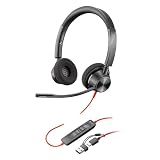
The Blackwire 3320 is the stereo model in Poly’s long-running Blackwire 3300 series, a fixture in call centers and corporate offices for years. It is a simple, durable USB headset with a noise-canceling boom microphone that rotates so you can wear it on either side, and inline controls for answering, ending, muting, and adjusting volume without touching the keyboard.
Poly specifies 32mm stereo speakers and SoundGuard hearing protection, which guards against sudden sounds above 118 dBA. It is light enough for all-day wear. Versions are available with USB-A or USB-C connections, and Teams variants add a dedicated Teams button.
- Strength: Simple, reliable design with full inline call controls.
- Strength: Hearing protection and a well-supported brand for IT departments.
- Drawback: On-ear foam cushions offer limited passive isolation.
- Drawback: The microphone is good but not as advanced as the Jabra two-mic system.
The Blackwire 3320 is a sensible middle ground between the NUBWO HW02 and the Jabra Evolve2 30 SE: more robust and better supported than budget models, simpler and usually cheaper than the Jabra.
Poly Voyager 4320 UC

The Voyager 4320 UC is Poly’s wireless boom headset for office and hybrid work, and this bundle includes a charging stand, which makes battery management effortless: drop it on the stand at the end of each shift. Poly lists up to 24 hours of talk time, and a short charge provides hours of additional use.
Range is rated at up to 164 feet (50 meters) with the included USB Bluetooth adapter, among the longest for a Bluetooth headset. Dual noise-canceling microphones use Poly’s Acoustic Fence technology, which is designed to filter voices and noise from outside a zone around your mouth. It connects to two devices at once, and it can also work over a USB cable if the battery runs low.
- Strength: Long range, long talk time, and a charging stand in the box.
- Strength: Acoustic Fence microphones target busy shared offices.
- Drawback: On-ear cushions, so it is less isolating than over-ear models.
- Drawback: Premium price tier, similar to the Jabra Evolve2 65.
Compared with the Jabra Evolve2 65, the Voyager 4320 offers longer stated range and a charging stand, while the Jabra has longer listed battery life. Either is a clear step up from generic wireless headsets for full-time agents.
Logitech H390

The H390 is one of the best-known budget USB headsets, and it appears regularly on lists of call center headsets under the low price tiers. It plugs into USB-A and needs no drivers, which makes it easy to roll out across many workstations. The noise-canceling microphone sits on an adjustable boom, and the inline control pod handles volume and mute.
Padded leatherette ear cushions and an adjustable headband provide reasonable comfort for its class, and the cable is long enough to reach a tower under the desk. Audio quality is clear for voice, though music and media sound basic.
- Strength: Recognized brand at a budget tier, plug-and-play setup.
- Strength: Inline volume and mute controls.
- Drawback: Leatherette pads can feel warm and wear out with daily use.
- Drawback: USB-A only; newer USB-C laptops need an adapter.
The H390 competes directly with the NUBWO HW02 and the generic USB Headset for PC. Its advantage is Logitech’s brand support and wide availability, which helps teams that replace headsets frequently.
EPOS Adapt 160 USB II

EPOS, which took over Sennheiser’s business headset line, built the Adapt 160 USB II as a lightweight stereo headset for UC softphones. It features a noise-canceling boom microphone that folds into the headband when not in use, fold-flat ear cups, and a carry pouch for hybrid workers. Inline controls manage mute, volume, and call answer and end.
EPOS lists ActiveGard protection against acoustic shock, which limits sudden sound spikes, and a speaker response of 20 Hz to 20 kHz with a microphone response tuned for voice. The cable is about 1.8 meters long, and the headset weighs around 5 ounces.
- Strength: Acoustic shock protection and a boom that tucks away neatly.
- Strength: Clean stereo sound from a brand with long business-audio experience.
- Drawback: On-ear foam cushions offer modest isolation.
- Drawback: Availability varies as EPOS updates its range, so check current versions.
The Adapt 160 USB II suits agents who split time between home and office and want a compact, protected headset. For loud floors, the Jabra Evolve2 30 SE offers stronger microphone noise handling.
Buying Guide
Mic Noise Rejection Is Not Marketing Fluff
ENC and noise cancelling on microphones work through hardware beamforming or algorithmic suppression. In practice, the difference shows up when a customer says they cannot hear you or you pick up your neighbor’s entire conversation. Look for reviews or spec sheets that mention the mic pattern (cardioid is standard) and whether noise cancelling is onboard the headset or processed by your software. Onboard processing offloads the work from your PC and is more consistent across machines.
Wired Versus Wireless Changes Your Workday
A wireless headset lets you stand, stretch, and walk without a cable catching on a drawer. But it introduces battery anxiety, pairing issues, and latency that can make quick interjections feel out of sync. Wired headsets are simpler and never die mid-call, but the cable can tug at one ear over an eight-hour shift. Decide based on whether your workflow involves physical movement or if you are truly seated for the entire shift.
Comfort Architecture Beats Cushion Thickness
Thick pads sound better in a store but can create uneven pressure across the jaw. What matters is weight distribution: a headband that spreads load across the top of the skull rather than clamping sideways. On-ear designs press on the outer ear, which can become sore over a long shift, although they stay cooler. Over-ear cups enclose the ear and spread pressure around it, but trap more heat. For call center work where you wear the device for six to nine hours, a well-padded over-ear design with breathable cushions usually wins on comfort.
Comparison Table: The Business-Grade Additions
| Model | Connection | Fit | Key call feature | Hearing protection | Price tier |
|---|---|---|---|---|---|
| Jabra Evolve2 30 SE | Wired USB-A / USB-C | On-ear stereo | Two-mic noise reduction, busylight | SafeTone | Mid-range |
| Jabra Evolve2 65 | Bluetooth + USB adapter | On-ear stereo | Three-mic array, multi-day battery | Check spec sheet | Premium |
| Poly Blackwire 3320 | Wired USB | On-ear stereo | Rotating noise-canceling boom, inline controls | SoundGuard | Mid-range |
| Poly Voyager 4320 UC | Bluetooth + USB adapter, stand | On-ear stereo | Acoustic Fence mics, long range | Check spec sheet | Premium |
| Logitech H390 | Wired USB-A | On-ear stereo | Noise-canceling boom, inline mute | Not a headline feature | Budget |
| EPOS Adapt 160 USB II | Wired USB | On-ear stereo | Fold-away boom, inline controls | ActiveGard | Mid-range |
More Buying Criteria for Call Center Headsets
Match the Connection to Your Phone System
Call centers run on three main kinds of systems, and the headset has to match. Softphones and UC apps such as Teams, Zoom, Webex, and cloud contact-center platforms work best with USB headsets or wireless models with a USB adapter. Traditional desk phones use RJ9 headset ports, like the MAIRDI model above, or Quick Disconnect (QD) connectors with an amplifier cable in larger centers. DECT wireless headsets, common on big floors, connect to a base station and offer more range and density than Bluetooth. Check what your IT team supports before buying anything.
Look for Platform Certification
Headsets certified for Microsoft Teams or optimized for UC platforms have tested call controls that work reliably with those apps: answer, end, and mute buttons stay in sync with the software. Uncertified headsets usually work for audio, but the mute button may not reflect the app’s mute state, which is how agents end up talking while muted or, worse, unmuted when they thought otherwise.
Treat Hearing Protection as Essential
Agents can encounter sudden loud tones, line noise, or feedback without warning. Business brands build in protection, such as Jabra SafeTone, Poly SoundGuard, and EPOS ActiveGard, that limits acoustic shock and long-term exposure. Budget headsets rarely specify it. For full-time agents, this alone justifies stepping up from the cheapest options.
Mono or Stereo?
Mono headsets, like the Auvonix pick above, leave one ear open to hear supervisors and colleagues, which suits team leads and floor support roles. Stereo headsets block more distraction and make soft-spoken callers easier to understand, which suits agents who need to focus on every word. Many models, including the Jabra and Poly lines, come in both versions.
Consider Replaceable Cushions and Hygiene
In shared or hot-desk environments, replaceable ear cushions and boom covers keep headsets hygienic and extend their life. Business brands sell spare cushions; most budget headsets do not, so a worn pad means a new headset.
Microphone Position Beats Microphone Specs
Even the best noise-canceling boom underperforms if it sits too far from your mouth. Look for a flexible or rotating boom that can be positioned about two fingers’ width from the corner of your mouth, slightly off-axis to avoid breath noise.
Setup Tips for Clearer Calls All Shift
- Set the headset as the default communication device. In Windows sound settings, set it as the default for both playback and recording, then confirm the same selection inside your softphone or contact-center app.
- Disable duplicate noise suppression if voices sound robotic. Headsets with onboard noise reduction can clash with aggressive software suppression. If callers say you sound watery or clipped, reduce the app’s noise suppression one step.
- Turn on sidetone if available. Hearing a little of your own voice in the earpiece reduces the urge to talk loudly, which saves your voice over long shifts.
- Use the busylight or mute indicator. A visible mute or on-call indicator prevents interruptions and embarrassing open-mic moments.
- Charge wireless headsets at the end of every shift. A charging stand, like the one bundled with the Poly Voyager 4320, turns this into a habit rather than a chore.
- Clean shared headsets daily. Wipe cushions and the boom with alcohol-free wipes suitable for leatherette and replace foam covers regularly.
Which Headset Fits Your Role?
Inbound Support Agent on a Busy Floor
You spend almost every minute on calls, surrounded by other agents talking. Microphone noise handling and hearing protection matter most. The Jabra Evolve2 30 SE is the strongest wired choice in this guide for that environment, with the Poly Blackwire 3320 as a slightly simpler, often cheaper alternative. If your desk has room to spare and you prefer over-ear isolation, the AOC USB Headset over-ear model reduces floor noise in your ears.
Outbound Sales and Appointment Setting
High call volume and frequent standing or pacing favor wireless. The Jabra Evolve2 65 and Poly Voyager 4320 UC offer full-shift battery life and dedicated USB adapters for stable connections, while the Upgrade ANC and ENC Wireless Headset in the main list is the budget wireless option with a flip-to-mute boom.
Team Lead or Floor Supervisor
You need to hear the room as well as the caller. A mono headset like the Auvonix model keeps one ear free, and many business headsets, including the Jabra Evolve2 30 SE and Poly Blackwire range, also come in mono versions. A busylight helps agents see when you are on a call.
Remote or Hybrid Agent
Home agents move between a home desk, an office, and sometimes a phone. The EPOS Adapt 160 USB II folds flat with a carry pouch, the Jabra Evolve2 65 connects to a computer and phone at the same time, and the NUBWO HW02 works for those who simply need a reliable budget headset for one computer.
Office With Desk Phones
If agents still use physical desk phones, start with the MAIRDI RJ9 headset or ask IT about QD amplifier cables for business-brand headsets. USB-only models will not plug into most traditional desk phones.
Rolling Out Headsets Across a Team
- Standardize on one or two models. A single model simplifies spare parts, training, and troubleshooting. Many centers pick one wired model for desks and one wireless model for roles that move.
- Budget for spares. Keep a few extra headsets and spare cushions on hand so a broken cable or lost adapter never takes an agent offline.
- Assign headsets personally where possible. Personal headsets last longer and avoid the hygiene concerns of sharing.
- Check management software. Jabra and Poly offer tools that let IT update firmware and adjust settings across many headsets, which saves time in larger deployments.
- Collect agent feedback after a trial week. Comfort is personal, and a short pilot with a few agents prevents ordering dozens of headsets that cause ear fatigue.
Common Call Center Headset Problems and Quick Fixes
Callers Say You Sound Muffled or Distant
The boom is usually too far from your mouth or pointed at your chin. Move it to about two fingers’ width from the corner of your mouth. Also check that the headset, not the laptop’s built-in microphone, is selected as the input device in your call app.
Callers Hear Background Chatter
Confirm the microphone’s noise-canceling side faces your mouth; many booms have a marked side. If chatter persists, enable your app’s noise suppression, or move to a headset with multi-microphone noise reduction such as the Jabra Evolve2 30 SE or Poly Voyager 4320 UC.
Crackling or Static on a Wired Headset
Crackle often comes from a worn cable near the plug or from a low-quality analog audio jack. Switching from a 3.5mm headset to a USB model bypasses the computer’s built-in sound hardware, which frequently cures interference on older desktops.
Wireless Audio Drops or Stutters
Use the dedicated USB adapter instead of the computer’s built-in Bluetooth, plug it into a front port or a short USB extension away from metal desks, and keep phones and other Bluetooth devices from competing for the same connection.
Ear Pain by Mid-Shift
Loosen the headband a notch, switch ears with a mono headset every hour or so, and replace flattened cushions. If on-ear pressure remains uncomfortable, an over-ear model like the AOC USB Headset spreads pressure around the ear instead of on it.
Our Verdict
The Wireless Headset with Mic for Work is the top pick overall, thanks to its comfort, noise-cancelling mic, and owner-reported connection stability. The budget pick is the NUBWO HW02; few headsets in that price tier match its in-line controls and light weight. If your office still runs deskphones, the MAIRDI RJ9 model wins outright because no other headset in this group connects to that infrastructure without an adapter chain.
FAQ
Do I need noise cancelling on both the mic and the speakers?
Active noise cancelling on the speakers helps you hear customers in a loud office. Mic-side noise cancelling (often called ENC) ensures your voice reaches the customer clean. They serve different purposes and both matter for call center work.
Is a USB headset better than 3.5mm for a PC?
USB headsets include their own audio processing, so you get consistent output regardless of your computer’s built-in sound card. A 3.5mm headset relies on the machine’s DAC and amplifier, which can introduce crackle on older or poorly shielded hardware.
How long should a call center headset last?
Expect twelve to eighteen months of daily use from a budget model and two to three years from a mid-range or premium unit. Ear cushions and headband padding are the first components to degrade; replaceable pads significantly extend usable life.
Can I use a call center headset for gaming or music?
Wired models with 40mm drivers like the AOC over-ear will reproduce music and game audio acceptably. Mono or on-ear designs prioritize voice clarity over stereo imaging and will sound flat during entertainment use.
What is the difference between DECT, Bluetooth, and USB call center headsets?
USB headsets plug directly into a computer for softphone calls and never need charging. Bluetooth headsets connect wirelessly to a computer, often through a dedicated USB adapter, and to mobile phones. DECT headsets connect to a base station and offer longer range and better performance in dense offices where many wireless headsets operate at once, which is why large call centers often prefer them.
Do call center headsets work with desk phones?
Only if they have the right connector. Many desk phones use an RJ9 headset port or a Quick Disconnect amplifier cable, while USB headsets work with computers and some newer IP phones. The MAIRDI headset above is the RJ9 option in this guide; most USB models need an adapter or a compatible phone.
Why does my headset mute button not match my call app?
Call control depends on software integration. Headsets certified for Microsoft Teams or optimized for UC platforms sync their mute and call buttons with supported apps. Uncertified headsets may mute at the hardware level while the app still shows you as unmuted, or the reverse. Check your app’s device settings and update the headset firmware if the brand offers it.
What is acoustic shock protection?
Acoustic shock protection limits sudden, very loud sounds, such as fax tones, feedback, or line faults, before they reach your ears. Jabra calls it SafeTone, Poly calls it SoundGuard, and EPOS calls it ActiveGard. It is strongly recommended for anyone who spends most of the day on calls.









