Our Short List of 3

- Best for: The Orochi V2 is the natural travel pick. Its compact symmetrical shell, low weight, and choice of AA or AAA power make it easy to drop into an iPad case and forget until you want to play, and the long Bluetooth battery rating suits occasional sessions away from home with no charging cable to remember. It covers fingertip and claw grips comfortably, and its sensor has far more range than tablet gaming requires.
- Sensor: Razer 5G Advanced optical sensor, up to 18,000 DPI
- Connectivity: Bluetooth and Razer HyperSpeed 2.4 GHz wireless
- Weight: under 60 g without battery
- Battery: single AA or AAA battery; up to 950 hours on Bluetooth and up to 425 hours on HyperSpeed

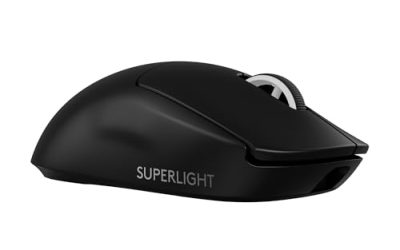
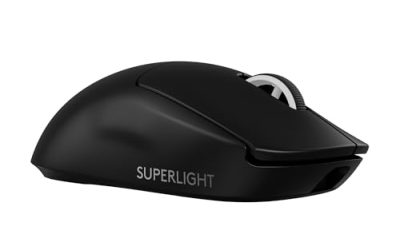
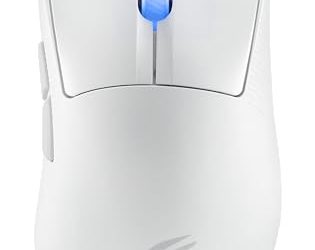
- Best for: The G309 is the balanced all-rounder for someone who splits time between an iPad and a computer. Pair it with the tablet over Bluetooth for Arcade and cloud games, then use the LIGHTSPEED receiver on a PC or laptop for its faster connection there. The HERO 25K sensor is precise and efficient, the hybrid switches combine optical actuation with a mechanical click feel, and the mid-size shape suits a wide range of hands and grips.
- Sensor: HERO 25K sensor, up to 25,600 DPI
- Connectivity: LIGHTSPEED 2.4 GHz wireless and Bluetooth
- Weight: 86 g with an AA battery
- Battery: 300+ hours with an AA battery

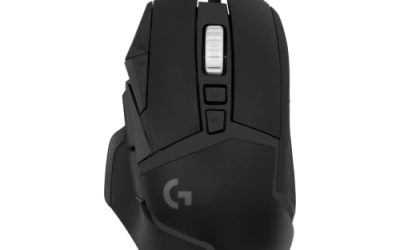
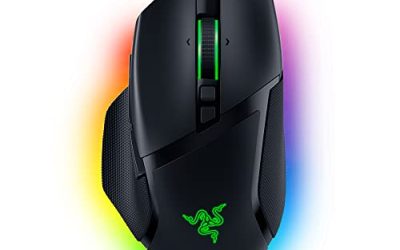
- Best for: If you play at a desk, use a palm grip, and like more controls under your fingers, the Basilisk V3 X HyperSpeed is the most feature-filled option here. Its sculpted right-handed shell supports the whole hand during long RPG, simulation, or strategy sessions with an iPad in a stand. The extra controls give games that recognise additional inputs more to work with, and the long Bluetooth battery rating makes the AA cell an occasional chore rather than a routine.
- Sensor: Razer 5G Advanced optical sensor, up to 18,000 DPI
- Connectivity: Razer HyperSpeed 2.4 GHz wireless and Bluetooth
- Battery: up to 535 hours on Bluetooth and up to 285 hours on HyperSpeed, from a single AA battery
- Switches: Razer mechanical mouse switches Gen-2
All 4 Picks at a Glance
| Product | Specs | Action |
|---|---|---|
| Razer Orochi V2 |
| Check price on Amazon |
| Logitech G309 Lightspeed |
| Check price on Amazon |
| Razer Basilisk V3 X HyperSpeed |
| Check price on Amazon |
 Keychron M3 |
| Check price on Amazon |
Gaming on an iPad is no longer just tapping a touchscreen. Between Apple Arcade, cloud streaming, and iPad games that support pointer input, a proper mouse can make aiming, menus, inventory management, and strategy games feel far more controlled. The catch is that an iPad is not a gaming PC. It has no USB-A port for a traditional receiver, iPadOS handles extra buttons and companion software very differently from Windows, and Bluetooth — not a headline polling rate — decides how most mice actually behave on the tablet.
That changes what “best” means here. A flagship mouse that only connects through a USB dongle is a poor iPad pick, however fast it is on a desktop. Every mouse in this guide offers Bluetooth, so it pairs directly with an iPad with no adapter, and each brings a gaming-grade sensor, switches, and shape rather than basic office hardware. Several also offer a 2.4 GHz mode for a PC or laptop, making them useful dual-purpose purchases.
Below are five Bluetooth gaming mice for different hands, grips, and styles of play, plus what iPadOS does and does not let a mouse do. Read the limitations carefully: on an iPad, the smartest purchase is usually the mouse whose core hardware works well with no software at all.
As an Amazon Associate we earn from qualifying purchases.
Our Top Picks
- Razer Orochi V2 Wireless Gaming Mouse4.26 x 1.52 inch (Pack of 1)4.26 x 1.52 x 2.47 inches0.13 poundsCheck on Amazon
- Logitech G309 Lightspeed Wireless Gaming Mouse1.51 x 2.49 Inch1.51 x 2.49 x 0.1 inches0.2 poundsCheck on Amazon
- Razer Basilisk V3 X HyperSpeed Customizable Wireless GamingStandard5.12 x 2.96 x 1.67 inches0.2 poundsCheck on Amazon
Top 3 picks at a glance
Quick Picks
These five mice cover the main ways people game on an iPad, from travel play to a larger ergonomic shape for desk sessions.
| Product | ASIN | Best For |
|---|---|---|
| Razer Orochi V2 | B0916N2LPZ | Travel and small hands |
| Logitech G309 Lightspeed | B0C84ZD7L6 | All-round iPad and PC play |
| Razer Basilisk V3 X HyperSpeed | B0BXBC26X8 | Palm grip and extra controls |
| SteelSeries Rival 3 Wireless | B08GB2PF71 | Simple, long-battery reliability |
| Keychron M3 | B09MYW2ZX5 | High-end sensor and tri-mode use |
How to Choose
Choosing one starts with compatibility, then the usual PC gaming questions — sensor, shape, weight, and battery — with an iPad twist at every step.
Bluetooth Is the Connection That Matters
An iPad pairs with a mouse over Bluetooth, so Bluetooth is not a nice extra here; it is the entry requirement. Every mouse here connects directly, with no receiver, hub, or adapter in between, keeping a tablet setup clean and portable at a desk, on a sofa, or on a train table.
The 2.4 GHz modes several of these mice also offer are still valuable, just not primarily for the iPad. A receiver generally gives lower latency on a PC or laptop, so a dual-mode mouse can serve two roles: Bluetooth for the tablet, and the faster connection for a computer. Treat any receiver use via a USB-C adapter as a bonus, not the plan.
Understand What iPadOS Limits
iPadOS supports a pointer, clicking, and scrolling, but it is not Windows with a smaller screen. Manufacturer apps that remap buttons, record macros, adjust RGB, or fine-tune sensors generally run on a PC or Mac, not on the iPad. Extra side buttons may do nothing in one game, act as a simple click in another, and work fully in a third, depending on how the game was built.
Polling rate needs the same reality check. A mouse may advertise a very fast rate over wired or 2.4 GHz, while Bluetooth typically reports less frequently. For strategy, simulation, and most Arcade and cloud play, that is unlikely to decide anything. An iPad over Bluetooth is a convenient setup, not a substitute for a wired esports rig.
Sensor and DPI for Tablet Screens
All five mice use optical gaming sensors with maximum sensitivity far beyond what most players will set on a tablet. That headroom is not the point. What matters is clean, predictable tracking at moderate settings, so the pointer goes where your hand expects during a flick, a drag, or a precise tap on a small menu target.
Screen size matters too. A large iPad Pro presents many pixels to cross, so higher sensitivity reduces hand travel, while an iPad mini rewards a lower setting. On-device DPI switching is especially useful, because you can change sensitivity on the mouse itself instead of relying on software the tablet cannot run.
Shape, Size, and Grip for Your Setup
Where you play shapes what fits. If your iPad lives in a backpack, a compact symmetrical mouse for fingertip or claw grip suits tray tables and café setups. If it sits on a stand at a desk, a larger right-handed ergonomic shape can support a relaxed palm grip through hours of play.
Hand size matters as much as grip labels. A small mouse can cramp a large hand even if its sensor is excellent, while a large ergonomic mouse can force a small hand into an awkward reach for the side buttons. Since you cannot easily remap buttons in iPadOS, their physical placement matters more here than on a PC.
Weight and How It Affects Control
Lighter mice are easier to lift, flick, and carry, which suits fast games and travel. Heavier mice, including several here that take AA or AAA batteries, can feel steadier for slow, deliberate movement in strategy or simulation play. Neither is automatically better; the trade-off is speed against stability.
Battery choice also changes weight: a mouse listed as very light without its battery weighs more once a cell is fitted, and choosing a lighter AAA cell where supported is a legitimate way to tune the feel.
Battery Life and Power Style
Long battery life is a real quality-of-life feature. The replaceable-battery mice here are rated for hundreds of hours in Bluetooth mode, so swapping cells rarely interrupts play. The trade-off is keeping a spare battery around and accepting a little extra weight.
A rechargeable mouse removes the spare-battery chore and usually adds a wired mode for charging while you play on a computer. Decide which routine fits: occasional swaps with long intervals, or regular cable top-ups. On-board memory also helps, because settings made elsewhere carry over to the tablet.
5 Best Options
Each pick is a gaming mouse with direct Bluetooth for iPad, chosen for a distinct strength, with specs from the listings.
Razer Orochi V2
- Best for: The Orochi V2 is the natural travel pick. Its compact symmetrical shell, low weight, and choice of AA or AAA power make it easy to drop into an iPad case and forget until you want to play, and the long Bluetooth battery rating suits occasional sessions away from home with no charging cable to remember. It covers fingertip and claw grips comfortably, and its sensor has far more range than tablet gaming requires.
- Sensor: Razer 5G Advanced optical sensor, up to 18,000 DPI
- Connectivity: Bluetooth and Razer HyperSpeed 2.4 GHz wireless
- Weight: under 60 g without battery
- Battery: single AA or AAA battery; up to 950 hours on Bluetooth and up to 425 hours on HyperSpeed
The Orochi V2 is the natural travel pick. Its compact symmetrical shell, low weight, and choice of AA or AAA power make it easy to drop into an iPad case and forget until you want to play, and the long Bluetooth battery rating suits occasional sessions away from home with no charging cable to remember. It covers fingertip and claw grips comfortably, and its sensor has far more range than tablet gaming requires.
Small is the point, and also the limitation. Larger hands using a palm grip may find the shell cramped over long sessions, and weight rises once a battery is installed. Programmability is handled through Razer software on a computer, not iPadOS, so set your DPI beforehand.
Watch out for: Small is the point, and also the limitation. Larger hands using a palm grip may find the shell cramped over long sessions, and weight rises once a battery is installed. Programmability is handled through Razer software on a computer, not iPadOS, so set your DPI beforehand.
Logitech G309 Lightspeed
- Best for: The G309 is the balanced all-rounder for someone who splits time between an iPad and a computer. Pair it with the tablet over Bluetooth for Arcade and cloud games, then use the LIGHTSPEED receiver on a PC or laptop for its faster connection there. The HERO 25K sensor is precise and efficient, the hybrid switches combine optical actuation with a mechanical click feel, and the mid-size shape suits a wide range of hands and grips.
- Sensor: HERO 25K sensor, up to 25,600 DPI
- Connectivity: LIGHTSPEED 2.4 GHz wireless and Bluetooth
- Weight: 86 g with an AA battery
- Battery: 300+ hours with an AA battery
The G309 is the balanced all-rounder for someone who splits time between an iPad and a computer. Pair it with the tablet over Bluetooth for Arcade and cloud games, then use the LIGHTSPEED receiver on a PC or laptop for its faster connection there. The HERO 25K sensor is precise and efficient, the hybrid switches combine optical actuation with a mechanical click feel, and the mid-size shape suits a wide range of hands and grips.
Its battery figure is shorter than the longest-running rivals here, though it still covers long stretches between changes. It uses a replaceable AA cell rather than a built-in rechargeable battery, and button customisation lives in Logitech software on a computer, not on the iPad.
Watch out for: Its battery figure is shorter than the longest-running rivals here, though it still covers long stretches between changes. It uses a replaceable AA cell rather than a built-in rechargeable battery, and button customisation lives in Logitech software on a computer, not on the iPad.
Razer Basilisk V3 X HyperSpeed
- Best for: If you play at a desk, use a palm grip, and like more controls under your fingers, the Basilisk V3 X HyperSpeed is the most feature-filled option here. Its sculpted right-handed shell supports the whole hand during long RPG, simulation, or strategy sessions with an iPad in a stand. The extra controls give games that recognise additional inputs more to work with, and the long Bluetooth battery rating makes the AA cell an occasional chore rather than a routine.
- Sensor: Razer 5G Advanced optical sensor, up to 18,000 DPI
- Connectivity: Razer HyperSpeed 2.4 GHz wireless and Bluetooth
- Battery: up to 535 hours on Bluetooth and up to 285 hours on HyperSpeed, from a single AA battery
- Switches: Razer mechanical mouse switches Gen-2
If you play at a desk, use a palm grip, and like more controls under your fingers, the Basilisk V3 X HyperSpeed is the most feature-filled option here. Its sculpted right-handed shell supports the whole hand during long RPG, simulation, or strategy sessions with an iPad in a stand. The extra controls give games that recognise additional inputs more to work with, and the long Bluetooth battery rating makes the AA cell an occasional chore rather than a routine.
This is the biggest design here, so it suits neither a small bag nor small hands, and left-handed players are excluded by the shape. RGB and deeper customisation are controlled from a computer, not iPadOS, and extra buttons are only as useful as each game allows. Buy it for the shape and hardware.
Watch out for: This is the biggest design here, so it suits neither a small bag nor small hands, and left-handed players are excluded by the shape. RGB and deeper customisation are controlled from a computer, not iPadOS, and extra buttons are only as useful as each game allows. Buy it for the shape and hardware.
SteelSeries Rival 3 Wireless
Specs
- Sensor: TrueMove Air optical sensor, up to 18,000 CPI
- Connectivity: Quantum 2.0 dual wireless — 2.4 GHz and Bluetooth 5.0
- Battery: 400+ hours, using AAA batteries
- Switches: rated for 60 million clicks
- Design: symmetrical gaming mouse, model 62521
- Connectivity note: Bluetooth pairs directly with iPad; 2.4 GHz uses the included micro-dongle
- ASIN: B08GB2PF71
Best for: The Rival 3 Wireless is the straightforward, dependable choice. It pairs a capable 18,000 CPI sensor with dual wireless, a symmetrical shape for a range of grips, and a battery rating measured in hundreds of hours. For strategy, adventure, simulation, and everyday Arcade titles — plus general pointer use between games — that simplicity is a virtue, and there is very little to configure on a platform where configuration is limited anyway.
Watch out for: Its sensor ceiling and feature set are more modest than the newer designs here, and competitive PC players will find more specialised options elsewhere. It runs on AAA batteries rather than recharging, so keep spares if you play daily. Its Bluetooth standard is also older than some rivals offer, though that is unlikely to be what you notice on an iPad.
Keychron M3
- Best for: The Keychron M3 brings the strongest sensor specification here and a flexible tri-mode design. The PAW3395 tracks at up to 26,000 DPI, the 79 g ergonomic shell is light enough for quick movements yet substantial enough for control, and you can move between Bluetooth for the iPad, 2.4 GHz for a computer, and a wired connection. For a mixed Apple and PC setup, that makes the M3 a single considered purchase rather than a tablet-only accessory.
- Sensor: PixArt PAW3395 sensor, up to 26,000 DPI
- Connectivity: Bluetooth 5.1, 2.4 GHz wireless, and wired via Type-C cable
- Weight: 79 g
- Battery: up to 70 hours of use
The Keychron M3 brings the strongest sensor specification here and a flexible tri-mode design. The PAW3395 tracks at up to 26,000 DPI, the 79 g ergonomic shell is light enough for quick movements yet substantial enough for control, and you can move between Bluetooth for the iPad, 2.4 GHz for a computer, and a wired connection. For a mixed Apple and PC setup, that makes the M3 a single considered purchase rather than a tablet-only accessory.
Battery life is the clear trade-off: its rating is measured in tens of hours rather than the hundreds its rivals claim, so expect regular charging. Its fastest polling belongs to its wired and 2.4 GHz modes, not the Bluetooth connection your iPad uses. Macro features also depend on software and games that iPadOS handles far more narrowly than a desktop.
Watch out for: Battery life is the clear trade-off: its rating is measured in tens of hours rather than the hundreds its rivals claim, so expect regular charging. Its fastest polling belongs to its wired and 2.4 GHz modes, not the Bluetooth connection your iPad uses. Macro features also depend on software and games that iPadOS handles far more narrowly than a desktop.
Which One Fits You
- You game while travelling: choose the Razer Orochi V2, because its tiny shell and exceptional Bluetooth battery life were designed for a bag, not a desk.
- You want one mouse for iPad and a gaming PC: choose the Logitech G309 Lightspeed, because Bluetooth covers the tablet while LIGHTSPEED covers the computer.
- You play long desk sessions with a palm grip: choose the Razer Basilisk V3 X HyperSpeed, because its ergonomic shape and extra controls reward a settled hand position.
- You want simple and dependable: choose the SteelSeries Rival 3 Wireless, because its long battery life and no-fuss design match how iPadOS actually works.
- You use a mixed Mac, PC, and iPad setup: choose the Keychron M3, because its tri-mode connectivity and PAW3395 sensor cover every machine from one mouse.
Common Mistakes
- Buying a dongle-only mouse for an iPad: a mouse with no Bluetooth cannot pair directly, so confirm Bluetooth is listed before anything else.
- Expecting PC software features on iPadOS: remapping, macros, and RGB control usually require a computer app, so judge the mouse on its out-of-the-box behaviour.
- Chasing maximum DPI or polling rate: Bluetooth limits and the games themselves matter more than headline numbers you will never use on a tablet.
- Ignoring size because the specs look good: a mouse too small or too large will feel wrong within an hour, so match the shell to your hand and grip first.
- Forgetting the surface: glass tables and sofa arms can defeat any optical sensor, so a thin mouse mat in your iPad kit helps more than another DPI step.
FAQ
Do all gaming mice work with an iPad?
No. An iPad needs a mouse that supports Bluetooth, because there is no standard USB-A port for a gaming receiver. Mice that only offer wired or 2.4 GHz dongle connections will not pair directly, which is why every pick in this guide lists Bluetooth as a connection mode.
Can I use extra buttons and macros in iPad games?
Sometimes, but do not count on it. iPadOS and individual games decide what extra buttons do, and manufacturer macro software generally runs on a computer rather than the iPad. Treat side buttons as a possible bonus in games that support them, not a guaranteed feature.
Is Bluetooth responsive enough for gaming on an iPad?
For Apple Arcade, strategy, adventure, simulation, and most cloud-streamed games, yes — Bluetooth is the normal way to use a mouse with an iPad and suits those genres well. For fast competitive play, a wired or receiver connection on a computer remains the lower-latency setup.
How do I connect a gaming mouse to an iPad?
Put the mouse into Bluetooth pairing mode, then open the iPad’s Bluetooth settings and select it when it appears. Some pointer behaviours also benefit from checking the touch and accessibility settings in iPadOS. Once paired, the iPad should reconnect automatically when the mouse is switched on nearby.
A good gaming mouse for an iPad is the one whose Bluetooth connection, shape, and hardware controls still make sense when the software layer disappears — and each of the five above clears that bar in a different way. Pick by where you play and how your hand grips, and your tablet sessions will feel far more precise than touch alone.
Related guides
More from Amazon
Programs that pair well with the guide above. Offers and eligibility are set by Amazon and may change.
Free shipping on eligible items, Prime Video and more. Eligible new members can start with a free trial.
Start a Prime free trialAd-free music streaming. Eligible new subscribers can start with a free trial.
Try Music Unlimited freeA Prime membership for ages 18-24 with a trial period. Eligibility is set by Amazon.
See Prime for Young AdultsAudiobooks and podcasts to listen to on the go. Eligible new members can start with a free trial.
Try Audible freeAs an Amazon Associate we earn from qualifying purchases.