As an Amazon Associate we earn from qualifying purchases
Best Compact Gaming Mouse: Small Shells, Fast Sensors
Most gaming mice are built around medium-to-large hands, which leaves anyone with smaller hands stretching their fingers just to reach the scroll wheel. A compact gaming mouse fixes that with a shorter shell, a narrower grip width and a lower hump, so your fingers land naturally on the buttons and the mouse moves with small, precise motions instead of whole-arm shoves. That shorter footprint also suits fingertip and claw grips, cramped desks and laptop setups where a full-size mouse simply does not fit the space.
This guide compares four genuinely small gaming mice: two wireless models from Razer and Logitech, an esports-focused mini from Pulsar, and a wired value pick from Logitech. Every model here is under 120 mm long, and the focus is on how shell size, weight, sensor and switches behave for small hands, fingertip control and travel setups rather than on raw specification bragging.
Our Top Picks
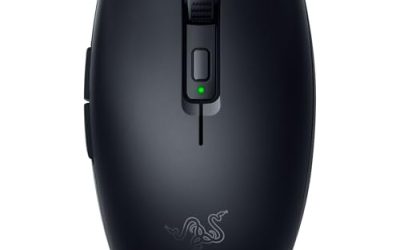
 Razer Orochi V2 Wireless Gaming Mouse4.26 x 1.52 inch (Pack of 1)4.26 x 1.52 x 2.47 inches0.13 poundsCheck on Amazon


Top 3 picks at a glance

Quick Picks
| Product | Best for | Key spec |
|---|---|---|
| Razer Orochi V2 | Travel and the smallest hands | 108 mm shell, under 60 g before battery |
| Pulsar X2H Mini | Fingertip and claw FPS play | 115.6 mm shell, 52 g, PAW3395 sensor |
| Logitech G305 LIGHTSPEED | Wireless value for small hands | HERO sensor, 250-hour AA battery |
| Logitech G203 LIGHTSYNC | Wired budget compact pick | 116.6 mm shell, 8,000 DPI sensor |
How to Choose the Best Compact Gaming Mouse
Shell length and hand size
Length is the number that defines a compact mouse. Full-size gaming mice usually run 120-130 mm long, while every pick in this guide is between 108 mm and 117 mm. As a rough guide, hands under about 18 cm long tend to feel most in control on shells in this range, because the fingers reach the primary buttons without the palm being pushed back off the rear of the mouse. Measure your hand from fingertip to wrist crease before choosing, and treat width as a second filter: a narrow shell around 60-62 mm wide lets smaller hands wrap the sides instead of hovering over them.
Grip style: fingertip and claw
Compact shells reward fingertip grip, where only the fingertips touch the mouse and movement comes from the fingers themselves, giving fine control for small aim corrections. Claw grip also works well on short shells, especially models with a raised rear hump that gives the palm a contact point. Relaxed palm grip is the awkward fit: on a short mouse there is not enough shell to support the whole palm, so palm grippers with medium or large hands should look at bigger mice instead. If your fingers overhang the front of the mouse in fingertip grip, the shell is too small even for this category.
Weight
Shorter shells are usually lighter, and the picks here range from 52 g to 99 g once batteries are counted. Lower weight makes fingertip adjustments easier and reduces fatigue in fast-paced games, but very light mice can feel twitchy for players who rest more of their hand on the shell. Battery choice matters on models that run on replaceable cells: a lighter AAA cell trims weight compared with an AA, at the cost of shorter runtime.
Sensor and polling rate
Every sensor in this guide tracks far beyond what compact-mouse gaming demands. The flagship PixArt PAW3395 in the Pulsar reaches 26,000 DPI, Razer’s 5G Advanced optical sensor reaches 18,000 DPI, Logitech’s HERO sensor reaches 12,000 DPI, and the G203’s gaming-grade sensor reaches 8,000 DPI. In practice, most players use 400-3,200 DPI, so sensor choice here is about tracking consistency rather than the headline number. All four mice report at the standard 1 ms rate in their gaming modes; the Pulsar can go further with an optional higher-polling wireless dongle sold separately.
Switches
Switch feel and durability vary across the picks. The Pulsar X2H Mini uses optical switches rated for 90 million clicks, which also removes the debounce delay of mechanical contacts. The Orochi V2 uses second-generation Razer mechanical switches rated for 60 million clicks. Logitech’s G203 uses mechanical switches with a metal spring tensioning system for a crisp, consistent click, while the G305 uses standard mechanical switches with a lighter actuation feel. None of these is a wrong answer; optical switches mainly buy longevity and consistency over years of heavy clicking.
Connectivity and battery
Three of the four picks are wireless. The Orochi V2 and G305 both run on a single AA battery, which keeps them simple for travel: no charging cable to pack and no dead internal battery mid-session, just a spare cell. The Orochi V2 adds Bluetooth on top of its 2.4 GHz HyperSpeed connection, so it can pair with a laptop for work and switch to the low-latency dongle for gaming. The Pulsar X2H Mini uses a rechargeable internal battery over 2.4 GHz wireless. The G203 is wired only, which removes battery concerns entirely and suits a fixed desk.
The Picks in Detail
Razer Orochi V2
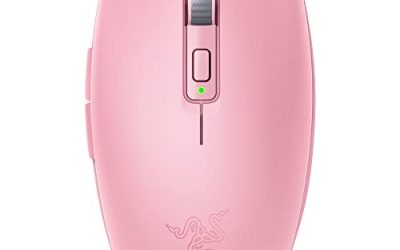
The Orochi V2 is the smallest mouse in this guide at 108 mm long, 60 mm wide and 38 mm high, and the shell alone weighs under 60 g before a battery is fitted. Razer built it as a portable gaming mouse, and the symmetrical shape works for fingertip and claw grips in either hand orientation for left-side button placement aside. Its 5G Advanced optical sensor tracks up to 18,000 DPI with 450 IPS speed, which is more than enough headroom for competitive play.
Battery flexibility is the standout feature. The mouse runs on a single AA or AAA battery, and Razer rates it for up to 425 hours on the 2.4 GHz HyperSpeed connection and up to 950 hours on Bluetooth using the included lithium AA. That makes it an easy travel companion: one mouse covers a gaming PC over the dongle and a laptop over Bluetooth, with no charger in the bag.
- Strength: The shortest shell here and the longest battery life; AA or AAA flexibility lets you trade weight against runtime.
- Trade-off: The small shell is a poor match for palm grip, and the two side buttons sit only on the left side despite the symmetrical body.
- Skip it if your hands are medium-to-large and you palm grip, or if you want a rechargeable mouse with no disposable batteries.
Pulsar X2H Mini
The X2H Mini is Pulsar’s compact esports shell: 115.6 mm long, 62 mm wide and 38 mm high, at 52 g. The “H” stands for the raised hump, which sits towards the rear of the mouse and gives claw grippers a firm contact point while fingertip players still get a short, agile shell. Inside is a PixArt PAW3395 sensor rated to 26,000 DPI with 650 IPS tracking and 50G acceleration, the strongest sensor specification in this guide.
Pulsar fits optical switches rated for 90 million clicks, so clicks register via light rather than metal contacts and stay consistent over time. The 2.4 GHz wireless connection runs at a 1 ms report rate, and Pulsar offers a separate 4K polling dongle for players who want higher report rates. This is the pick aimed squarely at competitive FPS players with small hands who find mainstream esports mice too long.
- Strength: Flagship PAW3395 sensor and optical switches in a true mini shell, with a high rear hump that supports claw grip.
- Trade-off: The shape is specialised; relaxed palm grippers get little support, and the higher polling option needs a separate dongle purchase.
- Skip it if you prefer a low, flat profile, or if you want Bluetooth for pairing with multiple devices.
Logitech G305 LIGHTSPEED
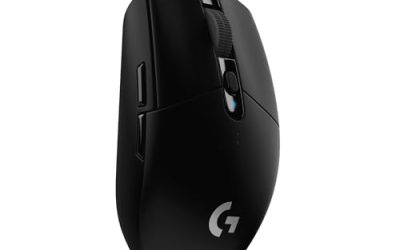
The G305 has been the default small wireless gaming mouse for years, and the formula is simple: a compact 116.6 mm long, 62.15 mm wide and 38.2 mm high shell, Logitech’s HERO sensor adjustable up to 12,000 DPI, and LIGHTSPEED wireless with a 1 ms report rate. It weighs 99 g with its AA battery fitted, which is noticeably heavier than the Pulsar and the Orochi V2 but still easy to move with a fingertip or claw grip.
Battery life is the practical headline: Logitech rates the G305 for up to 250 hours of continuous gaming on a single AA battery. Six programmable buttons and onboard memory cover everyday gaming needs, and the receiver stores inside the mouse body, which is a small but genuinely useful travel detail. The egg-like shape is safe rather than specialised, suiting a wide range of small-to-medium hands.
- Strength: Proven HERO sensor, 250-hour battery and an in-body receiver slot, all in a compact shell that suits most grip styles.
- Trade-off: At 99 g it is the heaviest pick here, and there is no Bluetooth mode for a second device.
- Skip it if ultralight weight is your priority, or if you need Bluetooth pairing for a laptop or tablet.
Logitech G203 LIGHTSYNC
The G203 LIGHTSYNC is the wired option: the same compact footprint family as the G305 at 116.6 mm long, 62.15 mm wide and 38.2 mm high, but 85 g and tethered by a fixed cable. Its gaming-grade sensor adjusts from 200 to 8,000 DPI, which covers the sensitivity range compact-mouse players actually use, and six programmable buttons with onboard memory carry your settings between PCs.
Logitech’s mechanical switches use a metal spring tensioning system that keeps the left and right clicks crisp and consistent, and LIGHTSYNC RGB adds three-zone lighting for players who want some colour on a small desk. As a wired mouse it never needs charging or batteries, which makes it a dependable second mouse for a LAN bag or a child’s first gaming setup as much as a main pick.
- Strength: Compact shell, consistent tensioned clicks and zero battery management at a value-oriented position in the range.
- Trade-off: The cable drags compared with the wireless picks, and the 8,000 DPI sensor is a step below the flagship sensors here on paper.
- Skip it if you play on the move or hate cable drag, or if you want the lightest possible mouse for fingertip aim.
Which One Fits Your Situation
Small hands with a fingertip grip
Choose between the Pulsar X2H Mini and the Razer Orochi V2. The Pulsar’s 52 g weight and PAW3395 sensor suit fast, precise fingertip aim in competitive games, while the Orochi’s shorter 108 mm shell is the safer fit for the very smallest hands. Either way, measure your hand first; if it is under 17 cm, the Orochi’s length is the better starting point.
A travel and laptop setup
The Orochi V2 is built for this job: Bluetooth for the laptop, HyperSpeed wireless for gaming, up to 950 hours of battery on Bluetooth, and a shell small enough to drop into a laptop sleeve pocket. The G305 is the alternative if you prefer Logitech’s shape, and its receiver stores inside the body so it does not get lost in transit.
Claw grip for competitive shooters
The Pulsar X2H Mini’s raised rear hump gives claw grippers something to brace against, and its optical switches and flagship sensor match that intent. The Cooler Master-style short-and-wide approach is not in this guide, so claw players who want a wider shell should check the dimensions carefully before assuming any compact mouse will feel right.
A fixed desk on a tight budget
The G203 LIGHTSYNC covers a permanent desk setup with no batteries to manage and a compact shell for smaller hands. If the budget stretches to wireless, the G305 removes the cable and multiplies battery life to 250 hours per AA cell, which is the more flexible long-term desk mouse.
Common Mistakes
- Buying on DPI alone. All four sensors here exceed what anyone uses in game; shell fit and weight matter far more at this size.
- Ignoring battery weight. On AA-powered mice the cell is part of the handling weight, so compare ready-to-play weights, not shell-only figures.
- Assuming compact means palm-friendly. Short shells support fingertip and claw grips; a relaxed palm grip usually needs a longer mouse.
- Skipping the hand measurement. Two minutes with a ruler prevents the most common compact-mouse mistake: fingers overhanging the front buttons.
- Pairing a tiny mouse with a tiny pad. Fingertip control uses small movements, but a very small pad still runs out during fast turns in shooters.
FAQ
What size counts as a compact gaming mouse?
There is no formal standard, but compact gaming mice are generally under 120 mm long. The picks in this guide run from 108 mm to about 117 mm, compared with 120-130 mm for typical full-size models.
Is a compact mouse good for fingertip grip?
Yes, fingertip grip is the natural match for a short shell, because control comes from the fingers rather than the palm. The Pulsar X2H Mini and Razer Orochi V2 are both shaped with fingertip and claw players in mind.
Does a smaller mouse mean a worse sensor?
No. The Pulsar X2H Mini carries the same PAW3395 flagship sensor class found in full-size esports mice, and the Orochi V2 and G305 use proven 18,000 DPI and HERO sensors respectively. Sensor quality does not scale with shell size.
AA batteries or rechargeable for a compact mouse?
AA-powered models like the G305 and Orochi V2 trade a little extra weight for very long runtimes and instant swaps. Rechargeable models like the X2H Mini are lighter but need cable time eventually. For travel, replaceable cells are usually the simpler option.
Can large hands use a compact gaming mouse?
Fingertip grippers with larger hands sometimes prefer a short shell for its agility, but palm and relaxed claw grippers with large hands will usually find these mice cramped. Check the length against your current mouse before switching.
Related guides
More from Amazon
Programs that pair well with the guide above. Offers and eligibility are set by Amazon and may change.
Free shipping on eligible items, Prime Video and more. Eligible new members can start with a free trial.
Start a Prime free trialAd-free music streaming. Eligible new subscribers can start with a free trial.
Try Music Unlimited freeA Prime membership for ages 18-24 with a trial period. Eligibility is set by Amazon.
See Prime for Young AdultsAudiobooks and podcasts to listen to on the go. Eligible new members can start with a free trial.
Try Audible freeAs an Amazon Associate we earn from qualifying purchases.