MMO mice solve one problem brilliantly: they move an entire action bar onto your thumb. The catch is that most of them are built like bricks. The classic MMO shell is long, wide, and heavy, designed around an average-to-large hand, and that creates a real problem for players with smaller hands. If your fingers cannot comfortably reach the front rows of the side grid, or the shell is so long that your palm floats and your wrist does all the steering, the extra buttons stop being an advantage and start being a source of missed presses and fatigue.
The good news is that a handful of MMO mice keep the full 12-button side panel while trimming the shell down to a size that suits smaller hands. This guide focuses on those models. Every pick below is a genuine MMO mouse with a multi-button thumb grid, and every pick measures roughly 120 mm or less in length, which is the dimension that matters most for hand fit. Specs are taken from the manufacturers’ Amazon listings, so the dimensions, weights, and button counts quoted here are the ones attached to each product.
As an Amazon Associate we earn from qualifying purchases.
Our Top Picks


Top 3 picks at a glance

What Makes an MMO Mouse Work for Small Hands
Length matters more than anything else
Hand size is usually measured from the tip of the middle finger to the base of the palm, and hands under about 17.5 cm are generally classed as small. Mouse length is the spec that has to match that measurement. A mouse in the 118 to 120 mm range lets a smaller hand rest its palm on the shell while the fingers still land naturally on the main clicks and, crucially, on the side panel. Once a shell stretches past 125 mm, smaller-handed players tend to push the mouse from the wrist with the fingers overextended, which makes the front row of thumb buttons a stretch rather than a press.
The thumb grid has to be reachable, not just present
A 12-button panel is only useful if your thumb can reach all three rows without regripping. On compact shells, the panel sits closer to the center of the mouse, which shortens the thumb’s travel. Look for panels with sculpted or angled buttons, because a smaller thumb covers less area and benefits from keys that can be identified by touch and pressed with the side of the thumb rather than the tip alone.
Weight changes how a small hand tires
Smaller hands generally have less leverage, so a heavy mouse that a larger player flicks around easily can feel sluggish and tiring over a long raid session. Lighter models in this roundup start at 85 g, while the heavier picks trade weight for extra features such as dual-layer button functions or adjustable weights. Neither approach is wrong, but weight deserves as much attention as the button count.
Grip style still applies
Palm grip players with small hands need a shell short enough that the palm makes contact without the fingers overshooting the buttons. Claw and fingertip players have an easier time on compact mice in general, because they steer with the fingers and benefit from a shorter shell and lower weight. All four picks below use right-handed ergonomic shells, so they favor palm and relaxed claw grips most.
The Picks
1. Razer Naga X — the lightest full MMO mouse here

The Razer Naga X is the easiest recommendation in this category because it pairs a complete MMO layout with the lightest build of the group. It measures 119 mm long, 74 mm wide, and 43 mm tall, and it weighs 85 g excluding the cable. That combination of a sub-120 mm shell and a genuinely low weight is rare in a mouse that still carries a full 12-button side panel.
The listing gives the Naga X 16 programmable buttons in total, including the 12-button thumb grid, and those buttons are configured through Razer Synapse. The sensor is Razer’s 5G advanced optical sensor rated up to 18,000 DPI, and the main clicks use second-generation Razer optical switches, which actuate with a light beam rather than a physical contact. The wired connection runs through a Razer Speedflex cable, a soft, flexible braided cable designed to reduce drag so the mouse feels closer to wireless in motion.
For small hands, the appeal is straightforward. The shell is short enough that the palm can sit on it properly, the thumb grid sits within a short reach, and at 85 g the mouse does not punish smaller hands during long sessions of small corrective movements. Players who want a full MMO panel without the usual bulk should start here.
- View it here: https://www.amazon.com/dp/B08NXVH8J6
- Key specs from the listing: 119 x 74 x 43 mm, 85 g, 16 programmable buttons, 18,000 DPI optical sensor, wired with Speedflex cable
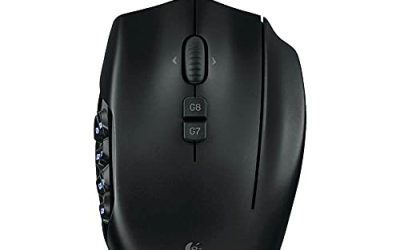
2. Logitech G600 — the shortest shell, with a second layer of commands
The Logitech G600 is a long-running MMO design, and its dimensions explain part of its staying power for this audience: 118 mm long, 75 mm wide, and 41 mm tall makes it the shortest and lowest mouse in this guide. That low, short profile suits smaller hands that find taller shells force an uncomfortable arch.
The G600 carries 20 MMO-tuned buttons, including a 12-button thumb panel. Its signature feature is the G-Shift button, a third primary click under the ring finger. Holding G-Shift gives every other button a second assigned function, so the thumb panel effectively doubles while it is held. For MMO players running large rotations, healing grids, or pet and stance bars, that second layer can matter more than raw button count, and it does so without making the mouse any bigger.
The trade-offs are weight and sensor type. The G600 weighs 133 g without its cable, making it noticeably heavier than the Naga X, and it tracks with a gaming-grade laser sensor rated from 200 to 8,200 DPI rather than a modern optical sensor. The primary buttons are rated for 20 million clicks, the cable is a braided 2 m USB lead, and the thumb buttons have RGB backlighting that can be set per profile through Logitech’s software. Players who value command depth over low weight, and who want the most compact footprint available, will find the G600 fits that brief well.
- View it here: https://www.amazon.com/dp/B0086UK7IQ
- Key specs from the listing: 118 x 75 x 41 mm, 133 g without cable, 20 programmable buttons, G-Shift second layer, laser sensor up to 8,200 DPI, wired
3. Corsair Scimitar RGB Elite — an adjustable thumb panel
The Corsair Scimitar RGB Elite measures 119.4 mm long, 77 mm wide, and 42.4 mm tall, and weighs 122 g. On paper that puts it at the larger end of this guide, but it has one feature none of the others offer, and it is a feature aimed squarely at different hand sizes: the Key Slider control system. The 12-button side panel can be slid forward or backward along the side of the mouse and locked in place, so the grid can be positioned where your thumb actually rests instead of where the designer assumed it would.
That adjustability is valuable for small hands because thumb position varies a lot relative to shell size. Sliding the panel back toward the palm shortens the reach to the front row, which is the row smaller thumbs struggle with most. The panel buttons are also textured and arranged so they can be located by feel.
The Scimitar RGB Elite has 17 programmable buttons in total, configured through Corsair iCUE, which also handles the RGB lighting and onboard profile storage. Its sensor is a PixArt PMW3391 optical sensor, a Corsair-tuned variant native up to 18,000 DPI, and the main switches are Omron switches. It is a wired mouse with a braided cable. At 122 g it is not light, so fingertip players may prefer the Naga X, but for palm-grip players whose main complaint is thumb reach rather than shell length, the sliding panel solves the right problem.
- View it here: https://www.amazon.com/dp/B082LRMY53
- Key specs from the listing: 119.4 x 77 x 42.4 mm, 122 g, 17 programmable buttons, adjustable Key Slider side panel, PMW3391 optical sensor up to 18,000 DPI, wired
4. UtechSmart Venus — compact budget MMO mouse with tuning weights
The UtechSmart Venus is the budget-oriented option in this group, and its shell is genuinely compact: the listing dimensions are 4.6 inches long, 3 inches wide, and 1.5 inches tall, which converts to roughly 117 x 76 x 38 mm. That makes it the shortest and lowest-profile mouse here, a shape that suits small hands and fingertip or claw grips particularly well.
The Venus provides 19 MMO-optimized buttons, including a 12-button side panel, all programmable through its driver software with macro support. Five savable memory profiles are stored on the mouse, and the lighting system offers a wide range of RGB colors with breathing effects. The sensor is a high-precision laser rated up to 16,400 DPI, adjustable on the fly with dedicated DPI buttons on top of the shell, and the polling rate is 1,000 Hz over its wired USB connection with a 6 ft braided-fiber cable and gold-plated connector.
A distinctive feature is the 8-piece weight tuning set stored in the base of the mouse. Adding or removing the small weights lets you adjust the balance and heft to your preference, which is useful for smaller-handed players who want a compact shell but prefer a bit more planted feel, or the opposite. The Venus uses a laser sensor rather than the optical sensors in the Razer and Corsair picks, and its software is more basic than Synapse or iCUE, but as a compact, full-grid MMO mouse at the accessible end of the category, it covers the essentials.
- View it here: https://www.amazon.com/dp/B00FNKMVUO
- Key specs from the listing: about 117 x 76 x 38 mm, 19 programmable buttons, laser sensor up to 16,400 DPI, 1,000 Hz polling, 8-piece weight tuning set, wired
Side-by-Side Comparison
| Mouse | Length | Weight | Total buttons | Sensor | Standout feature |
|---|---|---|---|---|---|
| Razer Naga X | 119 mm | 85 g | 16 | Optical, 18,000 DPI | Lightest full MMO layout |
| Logitech G600 | 118 mm | 133 g | 20 | Laser, 8,200 DPI | G-Shift doubles every button |
| Corsair Scimitar RGB Elite | 119.4 mm | 122 g | 17 | Optical PMW3391, 18,000 DPI | Sliding adjustable thumb panel |
| UtechSmart Venus | about 117 mm | adjustable weights | 19 | Laser, 16,400 DPI | 8-piece weight tuning set |
Read the table with your own priorities in mind. If weight is your main concern, the Naga X stands alone. If you want the most commands under your fingers, the G600’s G-Shift layer wins on depth. If thumb reach is the issue, the Scimitar’s sliding panel addresses it directly. If you want a compact shell and the option to tune the weight yourself, the Venus is the flexible budget pick.
How to Check a Mouse Fits Your Hand Before Buying
First, measure your hand. Measure from the tip of your middle finger to the crease at the base of your palm, and measure your hand width across the knuckles. Hands under roughly 17.5 cm in length are the audience for this guide, and for those hands a mouse between 115 and 121 mm long is the sensible window.
Second, think in ratios rather than absolutes. A common sizing approach is to choose a mouse length around 60 to 65 percent of your hand length for palm grip, and slightly shorter for claw or fingertip grips. For a 17 cm hand, that points to a mouse near 105 to 115 mm for a strict palm fit, which is shorter than any full MMO mouse. That is exactly why MMO mice are hard for small hands: the side panel forces a minimum size. The picks above sit at the small end of what the category offers, and claw or relaxed palm grips will get the most from them.
Third, consider the thumb panel separately from the shell. Rest your hand on any mouse you own and note where your thumb naturally sits. On the mouse you buy, the middle row of the grid should sit close to that resting point. If you consistently have to slide your hand forward to reach front-row buttons, you will either mispress or develop strain over long sessions. An adjustable panel, like the one on the Scimitar RGB Elite, exists precisely to fix that mismatch.
Finally, do not ignore height and weight. A low shell around 38 to 41 mm tall, like the Venus or the G600, keeps smaller fingers from being pushed into an exaggerated arch, while every 20 to 30 g of extra weight is more noticeable the smaller your hand is. If you play long sessions, prioritize the lighter end of this list.
Setting Up a 12-Button Panel Without Overwhelming Yourself
A common mistake is binding all 12 side buttons on day one. A more workable approach is to start with the middle row, which is the easiest to reach, and assign your most frequent abilities there: core rotation skills in a damage role, or your most-used heals and dispels if you heal. Add the top and bottom rows gradually as the positions become familiar. Most MMO software suites, including Razer Synapse, Logitech’s software, and Corsair iCUE, let you save per-game profiles, so the same grid can carry different layouts for different games or characters.
Modifier layers multiply what the grid can do. The G600’s G-Shift is the hardware version of this idea, but the same result can be achieved in software by combining side buttons with a held keyboard modifier. For small hands, a layer button under the ring finger or a comfortable keyboard modifier is often easier than stretching for the far corners of the grid.
Frequently Asked Questions
Are there wireless MMO mice small enough for small hands?
Wireless MMO mice exist, but most use larger shells to house batteries and interchangeable side plates, which pushes their length beyond the compact range covered here. The four picks in this guide are wired models, because wired designs are where the genuinely small MMO shells currently are. A flexible cable such as the Speedflex on the Naga X reduces the practical difference considerably.
Is a 12-button panel too much for a small thumb?
Not necessarily, but reach matters more than count. Smaller thumbs cover less of the grid, so angled, sculpted, or adjustable panels help. Starting with the most reachable rows and expanding your bindings over time is a sensible way to adapt, and mice like the Scimitar RGB Elite let you physically reposition the panel to match your thumb.
Laser or optical sensor: does it matter for MMO play?
For MMO play, both sensor types in this guide track more than accurately enough for the genre, since the gameplay rarely demands the extreme flick speeds of competitive shooters. Optical sensors, like those in the Naga X and Scimitar RGB Elite, are the modern default and behave consistently across most mousepad surfaces. The laser sensors in the G600 and Venus offer very high maximum DPI figures and work on a wider range of surfaces. Sensor choice should rank below size, weight, and button layout in your decision.
Can left-handed players use these mice?
All four picks are right-handed ergonomic shells with the thumb panel on the left side of the mouse, so they are designed for the right hand. Left-handed MMO mice with a mirrored panel are extremely rare, and none of the compact models verified for this guide offer one.
Verdict
For most small-handed MMO players, the Razer Naga X is the place to start: it is the lightest mouse here, its 119 mm shell keeps the full 12-button grid within reach, and its optical switches and sensor are thoroughly modern. Choose the Logitech G600 if you want the deepest command set and the shortest shell, and you are comfortable with a heavier, laser-based design. Choose the Corsair Scimitar RGB Elite if your problem is specifically thumb reach, since its sliding panel is the only hardware-level fix in this group. Choose the UtechSmart Venus if you want the most compact, lowest shell and the ability to tune the weight yourself at a budget-friendly tier. Whichever you pick, measure your hand first and let length, reach, and weight drive the decision, because in this category fit is the feature everything else depends on.
Related guides
More from Amazon
Programs that pair well with the guide above. Offers and eligibility are set by Amazon and may change.
Free shipping on eligible items, Prime Video and more. Eligible new members can start with a free trial.
Start a Prime free trialAd-free music streaming. Eligible new subscribers can start with a free trial.
Try Music Unlimited freeA Prime membership for ages 18-24 with a trial period. Eligibility is set by Amazon.
See Prime for Young AdultsAudiobooks and podcasts to listen to on the go. Eligible new members can start with a free trial.
Try Audible freeAs an Amazon Associate we earn from qualifying purchases.