Cutting the cable used to mean accepting lag, dropped signals, and a sensor that felt a step behind your hand. In the under-50 class, that trade no longer holds in the way it once did. The strongest wireless gaming mice in this tier pair a dedicated 2.4 GHz dongle connection with a 1,000 Hz polling rate, so the link reports movement as often as a basic wired connection and stays steady when a desk is crowded with other wireless gear. Bluetooth is present on several models here, and it earns its place for laptops and second machines, but the dongle remains the mode to use when you play, because it is built for low latency rather than convenience alone.
Sensors are the second reason this tier has become so capable. Optical sensors in these mice reach well beyond the sensitivity most players will ever set, and the number on the box matters less than clean tracking at ordinary settings. What separates a good pick from a weak one is consistency: no unwanted smoothing at flick speeds, and tracking that stays true on both cloth and hard pads. Every mouse below uses an optical sensor from an established sensor line or a maker-tuned equivalent, which is exactly what to look for in the under-50 class.
Battery life is where the acceptable compromises live. Some mice here run for weeks or months on a single AA or AAA cell, while rechargeable models trade that endurance for a lighter body and a cable top-up. Other compromises are also reasonable at this level: a 1,000 Hz ceiling instead of higher polling options, a simpler shell finish, and software that covers the basics. What should never be compromised is the wireless link itself, the main switches, and a shape that fits your hand. The five mice below keep those essentials intact while approaching weight, buttons, and power in different ways, so the right choice depends on your grip, your games, and how you feel about charging.
Our Top Picks
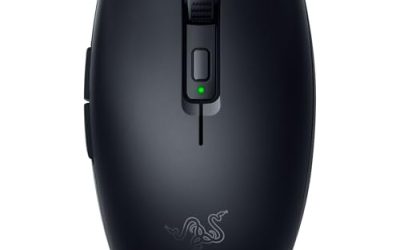
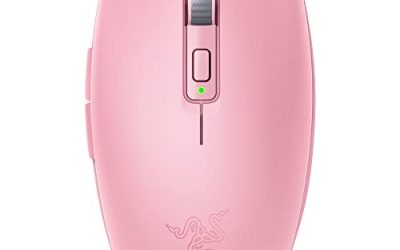
 Razer Basilisk V3 X HyperSpeed Customizable Wireless GamingStandard5.12 x 2.96 x 1.67 inches0.2 poundsCheck on Amazon

Top 3 picks at a glance

How to Choose a Wireless Gaming Mouse
Start With the 2.4 GHz Dongle Connection
For gaming, the 2.4 GHz dongle is the connection that matters. It communicates at a 1,000 Hz polling rate on the mice in this guide, a pace suited to fast shooters and quick camera turns. Bluetooth, by contrast, is designed for power saving and easy pairing, and its lower reporting pace can feel less immediate in play. A tri-mode mouse that adds a wired USB-C mode brings one more advantage: you can keep playing while the battery charges. If a mouse lists only Bluetooth with no dongle at all, treat it as a travel or work mouse rather than a gaming one.
Read the Sensor Beyond the Biggest Number
DPI figures in this tier range from twelve thousand to twenty-six thousand, yet most players settle somewhere far lower for control. Treat the headline figure as headroom, not as a quality score. More useful signs are the sensor family, the tracking speed figure, and whether the maker publishes acceleration limits. A flagship-derived sensor such as the PixArt PAW3395 in one pick below brings very high tracking headroom, while proven sensors in the Logitech, Razer, and HyperX models prioritize efficiency and consistency. Avoid an unnamed sensor with no published tracking figures at all, because that is where jitter and spin-outs tend to hide.
Match Battery Style to Your Routine
There are two power philosophies in the under-50 class. Replaceable-cell mice, powered by a single AA or AAA battery, run the longest: the endurance leaders below are rated in the hundreds of hours, and one Razer model stretches far beyond that over Bluetooth. The cost is weight, since the cell adds grams, and the small chore of keeping a spare cell nearby. Rechargeable mice remove the spare-cell question and often weigh less, but their listed runtimes are shorter and they need a regular charging habit. Decide which routine you will actually keep. A mouse that is always ready beats a lighter mouse that is flat on the evening you wanted to play.
Fit the Shape and Weight to Your Grip
A symmetrical shell suits claw and fingertip grips and players who lift and reset often, while a right-handed ergonomic shell with a thumb rest supports a relaxed palm grip through long sessions. Weight shapes that choice too: the lightest pick below is built for rapid flicks, while the heaviest is a broad ergonomic body that plants itself and stays put. Hand size matters as much as grip style: compact mice reward smaller hands and fingertip control, and larger shells give bigger hands room to spread. Button count follows your games. Six buttons cover shooters and general play well, while eight or nine help with ability-heavy titles.
Check Switches, Skates, and Software
Main switches take more punishment than any other part, so a published click lifespan in the tens of millions is a reassuring sign, and named switch families such as Kailh GM 8.0 or Razer mechanical switches signal a maker taking click feel seriously. PTFE feet help a mouse glide smoothly on a pad, and they matter more as weight drops. Software should let you set DPI stages, remap buttons, and save at least one profile to onboard memory so your settings travel with the mouse. Lighting is personal, but in this tier it should be the last thing you weigh, well behind the link, the sensor, and the fit.
1. Logitech G305 LIGHTSPEED Wireless Gaming Mouse
The G305 LIGHTSPEED is the reference point for this entire tier, and its formula is easy to explain: a proven wireless link, an efficient sensor, and extraordinary endurance in a compact shell. Logitech rates its LIGHTSPEED connection at a 1 millisecond report rate over the included USB nano receiver, which stores inside the body under the top cover so it travels with the mouse. That receiver-only design is the one structural limit to know, since there is no Bluetooth mode for a second machine.
Inside is Logitech’s HERO optical sensor, rated from 200 to 12,000 DPI with four hundred IPS tracking and, per Logitech, no smoothing, filtering, or acceleration. That specification set describes a sensor that stays composed at the settings players actually use, from low-sensitivity arm aiming to quick fingertip corrections. Six programmable buttons cover the essentials, and Logitech G HUB handles DPI stages and assignments, with one profile stored onboard.
Battery life is the headline. A single AA cell is rated for two hundred fifty hours of continuous play in performance mode, and an endurance mode selected in the software stretches that dramatically for everyday use. At 99 grams with the battery fitted, the G305 is not the lightest mouse here, and its symmetrical, egg-like shape favors claw and fingertip grips and smaller to medium hands. Palm-grip players with large hands may find it short. For anyone who wants the safest, most established answer in the under-50 class, this remains the mouse to beat.
- View on Amazon: https://www.amazon.com/dp/B07CMS5Q6P
2. Razer Basilisk V3 X HyperSpeed Wireless Gaming Mouse
Where the G305 goes compact and symmetrical, the Basilisk V3 X HyperSpeed goes broad and ergonomic. Its right-handed shell carries a sculpted thumb rest and a fuller palm profile, which suits palm and relaxed claw grips and players who like a mouse that fills the hand. Nine programmable controls give ability-heavy games and productivity shortcuts more room than the usual six, including a dual-function scroll arrangement on this Basilisk line.
Connectivity is dual-mode. Razer HyperSpeed Wireless over the dongle is the gaming mode, while Bluetooth handles laptops and quieter work, and switching between them makes this a genuine two-machine mouse. The Razer 5G Advanced optical sensor is rated to 18,000 DPI, which is ample headroom, and Razer second-generation mechanical switches are rated for long click life. Chroma RGB lighting is present for those who want it.
Endurance is the standout specification. On a single AA battery, Razer rates the mouse at up to two hundred eighty-five hours over HyperSpeed Wireless and up to five hundred thirty-five hours over Bluetooth. That is the longest gaming-mode figure in this guide, and it changes how little you need to think about power. The trade-offs are size and weight: at roughly 110 grams with a battery, this is a planted, deliberate mouse rather than a flick-first one, and left-handed players are excluded by the shape. For right-handed comfort plus dual wireless, it is the most complete ergonomic pick in the under-50 class.
- View on Amazon: https://www.amazon.com/dp/B0BXBC26X8
3. ATTACK SHARK X3 Lightweight Wireless Gaming Mouse
The X3 takes the opposite approach to the Basilisk: strip weight away and spend the specification budget on the sensor. At 49 grams, it is by far the lightest mouse in this guide, and that lightness is paired with a PixArt PAW3395 optical sensor, a flagship-class sensor rated to 26,000 DPI with very high tracking speed headroom and a 1,000 Hz polling rate. On paper, and by sensor pedigree, this is the strongest tracking hardware in the under-50 class.
Connections cover everything. The X3 is tri-mode, linking by 2.4 GHz dongle for play, Bluetooth 5.2 for a second device, or USB-C wired, and it can move between multiple devices without swapping hardware. Kailh GM 8.0 switches, rated for eighty million clicks, give the main buttons a crisp actuation that matches the mouse’s flick-oriented intent, and five programmable buttons keep the layout focused. The rechargeable battery is rated for up to two hundred hours, generous for a mouse this light.
The shape is compact and symmetrical, aimed at claw and fingertip grips and small to medium hands, and the software provides button remapping, DPI stages, and macro settings. The compromises are those of a focused ultralight: no broad thumb rest, no ergonomic palm support, and a minimalist feature set outside the core hardware. Players who aim with quick, low-effort movements and want the most sensor per gram will find this the most exciting pick here.
- View on Amazon: https://www.amazon.com/dp/B0F7K6N6GW
4. HyperX Pulsefire Haste 2 Core Wireless Gaming Mouse

The Haste 2 Core Wireless is HyperX’s streamlined take on its lightweight Haste shape, keeping the symmetrical shell and low weight while simplifying the internals for this tier. The operating weight is 70 grams with its single AAA battery fitted, which places it neatly between the ultralight X3 and the heavier ergonomic models, and the shape suits claw and fingertip grips as well as a light palm hold for smaller hands.
HyperX fits its Custom Core sensor, rated to 12,000 DPI with three hundred IPS tracking and a polling rate up to 1,000 Hz. Those are modest headline numbers beside some rivals here, and they are also entirely sufficient for the settings most players use, with the emphasis on consistent tracking rather than spec-sheet reach. Dual wireless is on board: 2.4 GHz for gaming and Bluetooth 5.2 for a second device.
Battery life is rated at up to one hundred hours in high-speed 2.4 GHz mode from that single AAA cell, a practical figure that asks for a spare cell every few weeks of heavy play rather than every few days. Six buttons, TTC Gold switches, RGB lighting, and HyperX NGENUITY software for DPI presets and remapping round out a tidy package, and HyperX notes validation for NVIDIA Reflex with compatible monitors. Nothing here chases a headline; everything is sensibly judged, which makes the Haste 2 Core an easy mouse to recommend to a first-time wireless buyer.
- View on Amazon: https://www.amazon.com/dp/B0D2BJTX1L
5. Redragon M686 Vampire Elite Wireless Gaming Mouse
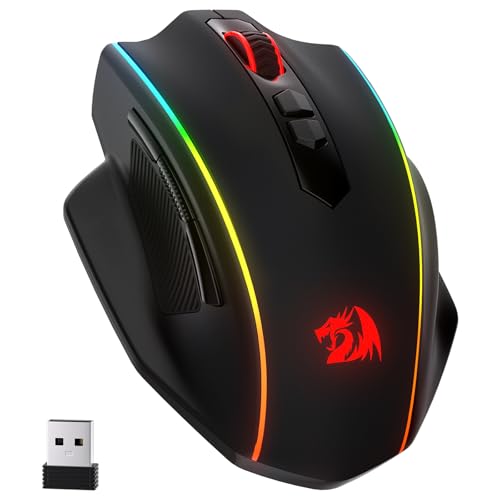
The M686 Vampire Elite is the maximalist of the group: a large ergonomic body, RGB lighting, eight customizable buttons including three side buttons, and both wireless and wired play. Its 2.4 GHz nano receiver connection is rated at a 1,000 Hz polling rate, and plugging in the USB-C cable keeps the mouse running while its rechargeable battery recovers, which is the right kind of flexibility for long sessions.
The optical sensor is rated to 16,000 DPI, with five onboard DPI stages spanning one thousand to sixteen thousand that can be switched on the fly, and Redragon rates acceleration at forty G. That stage layout makes sensitivity changes quick without opening software, and the maker’s software adds macro recording and remapping for the eight buttons. For players coming from a basic mouse, the extra side buttons and on-the-fly DPI are an immediate upgrade.
Power is the honest compromise. The rechargeable battery is rated at forty-five hours, the shortest figure in this guide, so a weekly charging habit is part of owning this mouse, and RGB lighting will shorten intervals further if left bright. At roughly 124 grams it is also the heaviest pick here, with a wide body that favors a palm grip and medium to large hands. Players who want presence, buttons, and lighting, and who accept charging as routine, get a lot of mouse for this class.
- View on Amazon: https://www.amazon.com/dp/B0859TTQRN
Wireless Gaming Mice at a Glance
| Mouse | Connection | Sensor | Battery | Weight | Buttons |
|---|---|---|---|---|---|
| Logitech G305 LIGHTSPEED | 2.4 GHz dongle | HERO, up to 12,000 DPI | Single AA, rated two hundred fifty hours | 99 g | 6 |
| Razer Basilisk V3 X HyperSpeed | 2.4 GHz dongle, Bluetooth | Razer 5G Advanced, up to 18,000 DPI | Single AA, rated up to five hundred thirty-five hours on Bluetooth | About 110 g | 9 |
| ATTACK SHARK X3 | 2.4 GHz dongle, Bluetooth, USB-C wired | PixArt PAW3395, up to 26,000 DPI | Rechargeable, rated up to two hundred hours | 49 g | 5 |
| HyperX Pulsefire Haste 2 Core Wireless | 2.4 GHz dongle, Bluetooth | HyperX Custom Core, up to 12,000 DPI | Single AAA, rated up to one hundred hours | 70 g | 6 |
| Redragon M686 Vampire Elite | 2.4 GHz dongle, USB-C wired | Optical, up to 16,000 DPI | Rechargeable, rated forty-five hours | About 124 g | 8 |
Frequently Asked Questions
Is a 2.4 GHz dongle connection fast enough for competitive play?
Yes, for the level of play this tier serves. The mice here poll at 1,000 Hz over their dongles, and the Logitech and Razer wireless systems are rated at a 1 millisecond report rate. That pace matches a standard wired gaming connection, so hand movement and on-screen response stay in step. Keep the receiver close to the mouse, preferably on an extension or a front port, since distance and obstructions affect any wireless link.
Should I use Bluetooth or the dongle for gaming?
Use the dongle for gaming and Bluetooth for everything else. The dongle modes here are tuned for low latency and full polling rates, while Bluetooth modes are tuned for battery life and easy pairing with laptops and tablets. Dual-mode mice such as the Basilisk V3 X and the Haste 2 Core make the split simple: dongle in the gaming PC, Bluetooth for the work machine, and a switch when you move between them.
How much DPI do I actually need?
Far less than the headline numbers suggest. Most players settle between four hundred and three thousand two hundred DPI depending on game and sensitivity preference, and every sensor here exceeds that range many times over. Judge a sensor by clean, consistent tracking at your settings, not by its maximum. The flagship-class PAW3395 in the X3 brings extra headroom for very fast flicks, while the proven sensors in the other picks prioritize efficiency.
Are replaceable batteries better than rechargeable batteries?
Neither is better for everyone. Replaceable AA and AAA cells deliver the longest runtimes in this guide, measured in hundreds of hours, at the cost of added weight and keeping a spare cell ready. Rechargeable models are often lighter and top up over USB-C, sometimes while you keep playing, but they need a regular charging routine and their listed runtimes are shorter. Match the choice to your habits: set-and-forget players suit cells, and players who already charge other gear suit rechargeable models.
What is an acceptable compromise in the under-50 class?
A 1,000 Hz polling ceiling, a simpler shell finish, modest lighting, and basic software are all reasonable at this level, and none of them will cost you a match. Endurance differences are also a fair trade when they buy lower weight. The compromises to refuse are a Bluetooth-only connection sold as a gaming link, an unnamed sensor with no published tracking figures, and a shape that fights your grip. Every mouse in this guide avoids those three, which is why the choice between them comes down to fit and routine rather than quality.
Disclosure: As an Amazon Associate, we earn from qualifying purchases.
Related guides
More from Amazon
Programs that pair well with the guide above. Offers and eligibility are set by Amazon and may change.
Free shipping on eligible items, Prime Video and more. Eligible new members can start with a free trial.
Start a Prime free trialAd-free music streaming. Eligible new subscribers can start with a free trial.
Try Music Unlimited freeA Prime membership for ages 18-24 with a trial period. Eligibility is set by Amazon.
See Prime for Young AdultsAudiobooks and podcasts to listen to on the go. Eligible new members can start with a free trial.
Try Audible freeAs an Amazon Associate we earn from qualifying purchases.