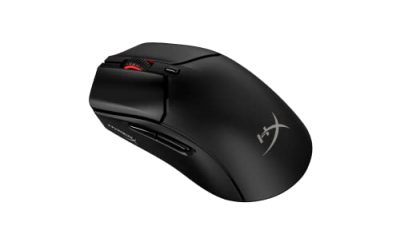
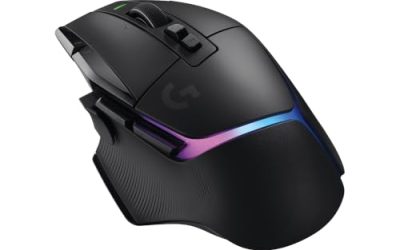
A travel gaming mouse lives a harder life than a desk mouse. It gets packed in the morning, carried in a laptop bag all day, unpacked on a hotel desk or a narrow train table, and then expected to perform like a proper gaming mouse when a match starts. It must be compact enough to disappear into a bag, tough enough for daily packing, and still fast and accurate enough for shooters and strategy games.
Size comes first. A shorter, lower shell takes less room in a sleeve or tech pouch and leaves space for a charger and cables. Weight matters for the same reason, since every gram is carried on your shoulder. Wireless connection matters just as much. A cable snags on a small temporary desk, while a clean wireless link keeps a setup quick to build and pack away.
Battery life decides whether a travel mouse feels relaxing or stressful. A mouse that runs for weeks on a charge, or on a single replaceable cell, removes the need to carry a cable for the mouse alone. Dongle storage matters too, since the tiny receiver is the easiest part of any setup to lose. The four mice below balance all of these needs, each in a different way.
Top 3 picks at a glance


How to Choose a Travel Gaming Mouse
Start With Packed Size and Shell Shape
Look at length first. A mouse around 108 to 121 millimeters long fits most laptop sleeves and tech pouches without forcing the zipper. Height matters as well. A lower profile slides into a slim pocket more easily and puts less pressure on a laptop in a packed bag.
Shape decides comfort once you arrive. A small symmetrical shell suits fingertip and claw grips on small surfaces where you lift and reposition often. A small right-handed ergonomic shell gives the palm more support during longer sessions. Match the shape to your grip and hand size, because a mouse that cramps your hand will stay in the bag no matter how light it is. Smooth, rounded edges also travel better than sharp angles that catch on fabric.
Choose Wireless That Suits Gaming and Travel
Most travel gaming mice give you two wireless paths. A 2.4 GHz connection through a USB receiver gives low latency and a stable link for gaming, the mode to use for competitive play and fast shooters. Bluetooth uses less power and needs no receiver, which makes it useful for work, browsing, and casual play.
Tri-mode mice add a wired mode as a safety net. It lets you keep playing while the mouse charges and helps in rooms with heavy wireless interference. A mouse that switches between a receiver, Bluetooth, and a cable covers almost every machine you might meet. Check the receiver type before you buy. If your laptop has only USB-C ports and the mouse uses a USB-A receiver, keep a short adapter in the same pouch.
Protect the Dongle and Plan for Battery Life
A lost receiver can turn a wireless gaming mouse into a Bluetooth-only mouse, or into one that cannot connect at all. Internal receiver storage is therefore one of the most practical travel features. A slot inside the battery cover or under a removable top shell keeps the receiver with the mouse. If a mouse has no internal storage, keep its receiver in a small sealed pouch that always stays with the mouse.
Battery strategy splits into two camps. Replaceable AA or AAA cells run for very long stretches and can be swapped in seconds almost anywhere, which suits long trips. Built-in rechargeable batteries keep a mouse lighter, but they need a cable and some planning. Look at the stated hours for the mode you will actually use, since high polling rates use more power. For weeks away, the longest-running models become much more valuable.
Demand a Gaming-Grade Sensor in a Small Body
A travel mouse should never ask you to accept office-grade tracking. Modern compact gaming mice carry optical sensors with high maximum sensitivity, fast tracking speeds measured in inches per second, and polling rates that keep cursor movement closely tied to hand movement. Clean, consistent tracking matters more than the highest headline number, and a sensor without surprising smoothing or acceleration will feel precise in any game.
A standard 1000 Hz polling rate already feels responsive for most players. Higher options, such as 4000 Hz or 8000 Hz where supported, can feel slightly smoother on high-refresh monitors, at the cost of higher battery use. For travel, many players will prefer 1000 Hz and long battery life. Switch quality matters too. Switches specified for tens of millions of clicks keep the main buttons crisp after heavy use, and pure PTFE feet keep glide consistent on hotel desks and portable pads.
Think About Build, Cases, and Everyday Carry
A travel mouse needs a shell that tolerates pressure without flexing. Matte finishes handle travel well because they hide scuffs and keep grip when hands are warm. Durable button materials resist wear, and every moving part should still feel solid during fast movement.
A case is not required, but it helps. A slim hard case protects the shell and keeps the cable and receiver in one place, while a padded pouch gives lighter protection with less bulk. If you carry the mouse loose, keep it in a separate pocket away from keys and metal adapters. Also consider courtesy. Mechanical clicks carry in a quiet train carriage or shared room at night, so late-night play may need a closed door.
1. Razer Orochi V2 Mobile Wireless Gaming Mouse
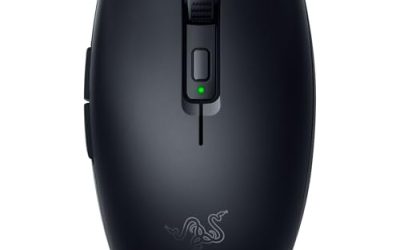
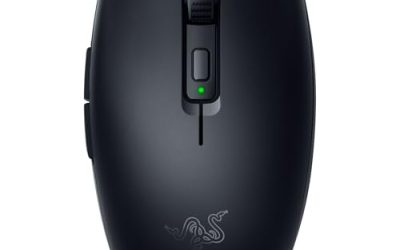
The Razer Orochi V2 is the most travel-focused design in this guide. At approximately 108 millimeters long, 60 millimeters wide, and 38 millimeters high, it is noticeably shorter than a standard gaming mouse, so it slips into a sleeve pocket or tech pouch with room to spare. It weighs under 60 grams without its battery, adding very little burden to a bag while staying quick for flick movements in shooters. Its symmetrical shape suits fingertip and claw grips, and small to medium hands will find the low shell easy to control on small pads and bare desks.
Connection flexibility is a strong point. HyperSpeed Wireless on 2.4 GHz gives a low-latency link for gaming, while Bluetooth covers everyday use. Use HyperSpeed to play and Bluetooth during the day when battery life matters more. The receiver stores under the removable top cover, so it travels inside the mouse and is far harder to misplace during a rushed checkout.
Battery life is the headline strength. The mouse runs on a single AA or AAA battery through a hybrid slot. Razer lists up to 950 hours on Bluetooth and up to 425 hours on HyperSpeed Wireless. Endurance that long changes travel habits. You pack one spare cell instead of a charging cable and stop thinking about power for the whole trip.
Gaming hardware inside is fully serious. The Razer 5G Advanced optical sensor reaches up to 18,000 DPI with 450 IPS tracking, ample precision for competitive shooters and fast strategy play. Second-generation Razer mechanical switches are specified for up to 60 million clicks, and six programmable buttons give room for game commands and shortcuts. Choose the Orochi V2 if your priority is the smallest, lightest full gaming mouse for a laptop bag.
- View on Amazon: https://www.amazon.com/dp/B0BFJSFS7V
2. Logitech G305 LIGHTSPEED Wireless Gaming Mouse
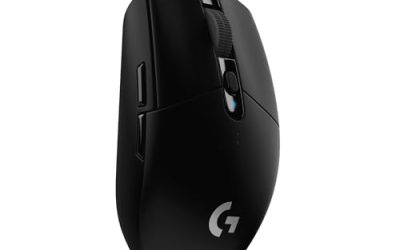
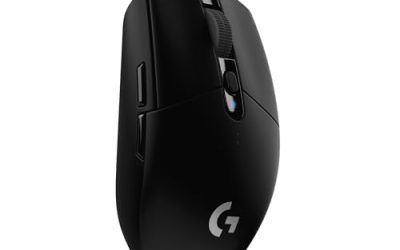
The Logitech G305 LIGHTSPEED is the dependable all-rounder for travelers who want a familiar shape and simple power management. At 99 grams with its battery installed, it is heavier than the lightest models here, yet it remains easy to carry and maneuver. Many players find that extra weight makes the mouse feel planted during longer sessions on uneven travel surfaces. Its compact shape suits small to medium hands in palm, claw, and fingertip grips depending on hand size.
The G305 uses Logitech LIGHTSPEED wireless technology with a 1 millisecond report rate, so its link is built for competition-level responsiveness. There is no Bluetooth mode, which keeps the design focused. You plug in the USB receiver and use one connection method everywhere. Built-in storage for that receiver is a key travel detail, because it has a dedicated home inside the body instead of rattling loose in a bag.
Battery life is simple and generous. The G305 delivers up to 250 hours of continuous gameplay on a single AA battery, with no charging routine to maintain on the road. When the cell finally runs low, a fresh AA from almost any shop restores full power in under a minute. For travelers who move between home, office, and hotel without a fixed charging spot, that simplicity is a genuine advantage.
Inside, the HERO gaming sensor provides up to 12,000 DPI sensitivity with 400 IPS precision, covering the range most players use across shooters, MOBA titles, and strategy games. Six programmable buttons and onboard memory let the mouse carry your settings between computers. Pick the G305 if you want one mouse for daily work and gaming, with no charging cable and a receiver that stores safely inside the mouse.
- View on Amazon: https://www.amazon.com/dp/B07CMS5Q6P
3. Keychron M3 Mini 8K Wireless Gaming Mouse
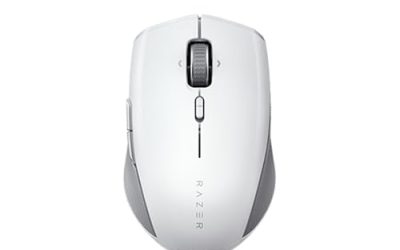
The Keychron M3 Mini 8K takes the travel idea in a performance direction. It keeps the body very light at 55 grams and pairs that light shell with a high-end sensor and very fast polling options. For travelers who play competitive shooters on a gaming laptop, this model pushes specifications furthest while staying in a mini format. Its small shape suits fingertip and claw grips and smaller hands.
Its sensor is the PixArt 3950, with up to 30,000 DPI and up to 750 IPS tracking, built for fast, precise movements on low and high sensitivity settings alike. The M3 Mini 8K also provides an 8000 Hz polling rate option in 2.4 GHz and wired modes. On a high-refresh laptop display, that higher polling can make cursor motion feel especially smooth. On the road, balance performance against battery use by choosing a lower polling setting for casual play and raising it for competitive sessions near a power source.
Connectivity covers three paths. Bluetooth 5.3 handles low-power connection for work and light play without a receiver. The 2.4 GHz link handles serious gaming. A wired Type-C connection handles charging and play at the same time and gives a fallback in crowded wireless spaces such as airports and event venues. Support for Windows, Mac, and Linux helps travelers who switch between a gaming machine and a work machine.
Battery life is listed at up to 140 hours, shorter than the replaceable-cell leaders here. That is the natural trade for a rechargeable mini mouse with high polling options. In return, you avoid spare cells and gain a lighter body, and one Type-C cable style can serve several devices in the bag. Choose the M3 Mini 8K if you travel light but play hard, and you are happy to charge occasionally for maximum responsiveness in a mini shell.
- View on Amazon: https://www.amazon.com/dp/B0DXTSS99Q
4. ASUS ROG Keris Wireless AimPoint Gaming Mouse

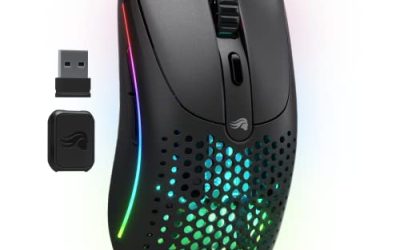
The ASUS ROG Keris Wireless AimPoint is the ergonomic option in this selection. At 75 grams, it is light enough for a laptop bag while giving the hand a fuller right-handed shape than the symmetrical mini mice above. That shape supports the palm more completely, which many players prefer during longer sessions at a hotel desk. If small symmetrical mice feel cramped after an hour, look at this model first.
Its ROG AimPoint optical sensor reaches up to 36,000 DPI with 650 IPS tracking and a 1000 Hz polling rate, giving precise, responsive control across shooters and strategy titles. ROG SpeedNova wireless technology is built to provide low-latency, reliable performance in the 2.4 GHz mode while managing power efficiently, exactly the balance a travel mouse needs when you cannot control the wireless environment around you.
Tri-mode connectivity is the practical highlight. Connect through low-latency 2.4 GHz RF for gaming, pair up to three devices through Bluetooth for quick switching between laptops, or use wired USB and keep playing while the mouse charges. Battery life reaches up to 119 hours in the 2.4 GHz mode with lighting on, according to the listing details, so a full charge covers many evenings of play. For a traveler carrying both a gaming laptop and a work laptop, moving between machines without moving a receiver is quietly valuable every day.
Build details suit a life in a bag. The Push-Fit Switch Socket II design allows the switches to be swapped, and the mouse includes ROG Micro Switches, so a worn switch can be changed instead of replacing the whole mouse. A solid inner structure helps the body feel firm rather than fragile when packed daily. Pick this mouse if you want ergonomic comfort, three connection modes, and a high-end sensor in a mouse that still travels easily.
- View on Amazon: https://www.amazon.com/dp/B0BRTF2PGP
Best Travel Gaming Mouse at a Glance
The table below lines up the core travel facts for each mouse. Weight and battery figures come from the listing details for each model.
| Mouse | Weight | Sensor and Maximum Sensitivity | Wireless Options | Battery Approach and Listed Life | Best Travel Fit |
|---|---|---|---|---|---|
| Razer Orochi V2 | Under 60 g without battery | Razer 5G Advanced, up to 18,000 DPI | HyperSpeed 2.4 GHz and Bluetooth | One AA or AAA, up to 950 hours Bluetooth, up to 425 hours HyperSpeed | Smallest footprint, longest endurance |
| Logitech G305 LIGHTSPEED | 99 g with battery | HERO, up to 12,000 DPI | LIGHTSPEED 2.4 GHz receiver | One AA, up to 250 hours | Simplest routine, in-body receiver storage |
| Keychron M3 Mini 8K | 55 g | PixArt 3950, up to 30,000 DPI | Bluetooth 5.3, 2.4 GHz, wired Type-C | Rechargeable, up to 140 hours | Lightest body, highest polling options |
| ASUS ROG Keris Wireless AimPoint | 75 g | ROG AimPoint, up to 36,000 DPI | 2.4 GHz RF, Bluetooth, wired USB | Rechargeable, up to 119 hours with lighting on | Ergonomic comfort, three-device Bluetooth |
Read the table by priority. Tightest bag space points to the Orochi V2, simplest power routine to the G305, mini-body responsiveness to the M3 Mini 8K, and long-evening comfort to the ROG Keris.
Frequently Asked Questions
Is a travel gaming mouse good enough for competitive games?
Yes, provided it has a gaming-grade sensor and a low-latency 2.4 GHz connection. Every mouse in this guide meets that standard. The main differences from larger esports mice are shell size and weight, not basic accuracy. If the smaller shape fits your hand and grip, a travel gaming mouse can handle competitive shooters and ranked strategy play without holding your aim back.
Should I use Bluetooth or the USB receiver while traveling?
Use the USB receiver and its 2.4 GHz link for gaming, because that path gives the lowest latency and the most stable connection. Use Bluetooth for work, browsing, and casual games, and to save battery or keep a port free. A simple habit works well. Bluetooth during the day, receiver in the evening when the games start. On tri-mode mice, wired mode is a backup for charging and for places with heavy wireless congestion.
How can I avoid losing the USB receiver on a trip?
Choose a mouse with storage inside its own body when you can, as the Orochi V2 and the G305 provide, and return the receiver to that slot every time you pack. For a mouse without an internal slot, keep the receiver in the same small pouch as the mouse, never loose in a main bag compartment. A bright piece of tape on the pouch helps you spot it during a fast pack.
Do I need a case for a travel gaming mouse?
A case is not required, but a slim hard case or padded pouch is strongly recommended. It protects the shell from pressure, keeps the cable and receiver together, and stops the mouse from rubbing against chargers. If you travel without a case, place the mouse in its own soft pocket, away from metal objects, with nothing heavy on top of it.
Which grip and hand size suit a small travel mouse best?
Small travel mice suit fingertip and claw grips most naturally, because those grips need less shell under the palm. Small to medium hands can often use a relaxed palm grip on the larger models here, such as the ROG Keris Wireless AimPoint. Large hands using a full palm grip may find the smallest shells, such as the Orochi V2, too short for long sessions. Favor the mouse whose shape matches how you already hold your desk mouse, only one step smaller.
Disclosure: As an Amazon Associate, we earn from qualifying purchases.
Related guides
More from Amazon
Programs that pair well with the guide above. Offers and eligibility are set by Amazon and may change.
Free shipping on eligible items, Prime Video and more. Eligible new members can start with a free trial.
Start a Prime free trialAd-free music streaming. Eligible new subscribers can start with a free trial.
Try Music Unlimited freeA Prime membership for ages 18-24 with a trial period. Eligibility is set by Amazon.
See Prime for Young AdultsAudiobooks and podcasts to listen to on the go. Eligible new members can start with a free trial.
Try Audible freeAs an Amazon Associate we earn from qualifying purchases.