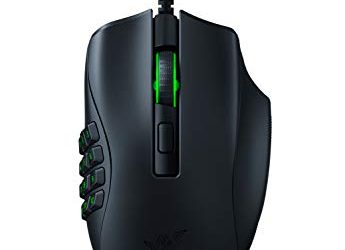
Logitech sells more wireless gaming mice than any other single brand, and that range is exactly what makes picking one hard. The lineup spans a 60-gram esports shell, a button-covered ergonomic workhorse, a 99-gram budget pick that runs on one AA battery, and an ambidextrous shape built for either hand. Each one uses the same LIGHTSPEED wireless link, so the choice comes down to shape, weight, sensor, and how many buttons you actually press during a match.
This guide is for competitive FPS players, MMO and strategy players who need side buttons, and buyers moving from a wired mouse who want wireless without giving up response time. Every mouse below is a Logitech wireless model, and each one was picked from the name and specifications shown on its Amazon product page, with the ASIN listed so you can check the exact listing.
Our Top Picks
 Logitech G Pro X Superlight 2 Lightspeed WirelessClassic1.57 x 2.5 x 4.92 inches0.1 poundsCheck on Amazon
 Logitech G502 X Plus Wireless RGB Gaming MouseWireless7.1 x 4.6 x 2.7 inches0.84 poundsCheck on Amazon


Top 3 picks at a glance
Quick Picks
As an Amazon Associate we earn from qualifying purchases
| Product | Best for | Key spec from title |
|---|---|---|
| Logitech G PRO X Superlight 2 | Competitive FPS players who want the lightest shell | 60g, 44K DPI sensor, 8kHz report rate |
| Logitech G502 X PLUS | MMO and strategy players who want many buttons | 13 programmable controls, HERO 25K sensor |
| Logitech G305 LIGHTSPEED | A first wireless gaming mouse on a tight budget | 250-hour battery life, 12,000 DPI |
| Logitech G PRO 2 LIGHTSPEED | Left-handed or ambidextrous players | Magnetic side buttons, 44K DPI sensor |
| Logitech G502 LIGHTSPEED | G502 fans who want the classic shape wireless | 11 programmable buttons, tunable weights |
How to Choose
Sensor and DPI ceiling
Logitech’s current wireless mice use three sensors: the HERO 12K in the G305, the HERO 25K in the G502 models, and the HERO 2 in the Superlight 2 and G PRO 2. The DPI ceiling climbs from 12,000 to 25,600 and then to 44,000, but most players use between 400 and 3,200 DPI, so the ceiling itself rarely decides a match. What matters more is tracking quality at your chosen sensitivity and the polling rate. The Superlight 2 reports at up to 8kHz, while the rest of the lineup reports at 1kHz, which is still fast enough for nearly every player.
Weight, shape, and grip
Weight changes how a mouse feels far more than any sensor number. The Superlight 2 weighs 60 grams, the G305 weighs 99 grams, and the G502 X PLUS weighs 106 grams, and that gap is obvious within the first hour of play. Shape matters just as much: the Superlight 2 and G PRO 2 use symmetrical shells that suit claw and fingertip grips, while the G502 models use a right-handed ergonomic shell with a thumb rest that suits palm grips. If your hand is large, the G502 shape usually fits better; if your hand is small, a lighter symmetrical mouse is the safer bet.
Battery and charging
Logitech wireless mice split into two camps: rechargeable models with a built-in battery and the G305, which runs on a single AA battery. The G305 lasts up to 250 hours on one AA, the Superlight 2 and G PRO 2 last up to 95 hours per charge, and the G502 X PLUS lasts up to 120 hours with RGB lighting off. Rechargeable models charge over USB-C, and the G502 models plus the Superlight 2 and G PRO 2 also work with the POWERPLAY wireless charging mat, which keeps the mouse topped up while it sits on the desk.
Buttons and software
Count the buttons you will actually press before you buy. The Superlight 2 has 5 programmable buttons, the G305 has 6, the G502 LIGHTSPEED has 11, and the G502 X PLUS has 13, including a removable and reversible DPI-shift button. More buttons help in MMO and strategy games, but they add weight and clutter in FPS games. All five mice work with Logitech G HUB, where you set DPI steps, polling rate, and lighting, and most of them store settings in on-board memory, so your setup follows the mouse to another computer.
The 5 Best Options
Logitech G PRO X Superlight 2
The Superlight 2 is the mouse for players who want the least weight between their hand and the screen. At 60 grams it disappears during long sessions, and the HERO 2 sensor with its 44K DPI ceiling and 8kHz report rate is the most capable sensor in this lineup. The symmetrical shell suits claw and fingertip grips, the LIGHTFORCE hybrid switches give a crisp click, and the 95-hour battery means charging is a weekly task rather than a daily one. It is the most expensive mouse here, and its five buttons leave MMO players short.
Specs
- 60g pro-grade shell
- HERO 2 sensor, 44K DPI
- 8kHz report rate
- 5 programmable buttons
- Up to 95 hours of battery life
- USB-C charging
Best for: Competitive FPS players who want the lightest wireless mouse Logitech makes.
Watch out for: The shell is right-handed only, so left-handed players should look at the G PRO 2 instead.
Logitech G502 X PLUS
The G502 X PLUS is the pick for players who want a mouse that doubles as a command deck. Thirteen programmable controls, a dual-mode scroll wheel, and a reversible DPI-shift button give you room for abilities, macros, and weapon swaps without reaching for the keyboard. The HERO 25K sensor tracks cleanly, the LIGHTSYNC RGB strip adds a glow that can be switched off to stretch battery life, and the 106-gram shell with its thumb rest suits palm grips and long sessions. It is the heaviest mouse in this guide, and small hands may find the shape too wide.
Specs
- HERO 25K sensor, 100 to 25,600 DPI
- 13 programmable controls
- LIGHTSYNC RGB with 8-LED lighting
- LIGHTFORCE hybrid optical-mechanical switches
- 106g, thin-wall exoskeleton
- Up to 120 hours of battery life, 37 hours with RGB on
- POWERPLAY compatible
Best for: MMO and strategy players who want the most buttons on a wireless Logitech mouse.
Watch out for: Check the width against your hand before buying, since the G502 shape runs wide for small hands.
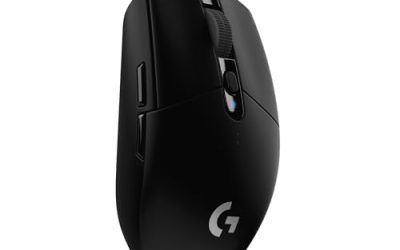
Logitech G305 LIGHTSPEED
The G305 is the cheapest way into Logitech wireless gaming, and it gives up less than its slot in the lineup suggests. The HERO 12K sensor tracks up to 12,000 DPI with a 1ms report rate, the symmetrical shell weighs 99 grams, and one AA battery lasts up to 250 hours, so there is no charging cable to think about. Six programmable buttons cover the basics, on-board memory keeps your settings when you move between computers, and the receiver stores inside the mouse for travel. The clicks are mechanical rather than optical, and the sensor ceiling is lower than the flagships.
Specs
- HERO 12K sensor, 12,000 DPI
- 99 grams
- 6 programmable buttons
- Up to 250 hours on a single AA battery
- 1ms report rate over LIGHTSPEED wireless
- On-board memory
- Built-in storage for the USB receiver
Best for: Buyers who want their first wireless gaming mouse without spending flagship money.
Watch out for: It runs on a disposable AA battery, so keep spares on hand if you play daily.
Logitech G PRO 2 LIGHTSPEED
The G PRO 2 is the ambidextrous answer in the current lineup, and it is the only mouse here built for left-handed players. Magnetic side buttons clip onto either flank, so the mouse works for right- or left-handed use, and the HERO 2 sensor brings the same 44K DPI ceiling as the Superlight 2. LIGHTFORCE hybrid switches, USB-C charging, and up to 95 hours of battery life round out a package that feels like a modern update of the original PRO Wireless shape. The stock receiver reports at 1kHz, and reaching 8kHz needs a separate dongle.
Specs
- HERO 2 sensor, 44K DPI
- Ambidextrous shape, right- or left-handed use
- Up to 4 customizable magnetic side buttons
- LIGHTFORCE hybrid switches
- Up to 95 hours of battery life
- USB-C charging
- POWERPLAY compatible
Best for: Left-handed players and anyone who wants an ambidextrous pro-grade wireless mouse.
Watch out for: Confirm the side buttons sit on your preferred side before play, since they are magnetic and removable.
Logitech G502 LIGHTSPEED

The G502 LIGHTSPEED is the classic G502 shape cut loose from its cable, and it remains the most balanced mouse in this guide. Eleven programmable buttons, a dual-mode scroll wheel, and a tunable weight system let you shape the mouse to your hand, while the HERO 25K sensor and LIGHTSYNC RGB carry over from the newer X models. It costs less than the G502 X PLUS while keeping the same thumb rest and button layout that made the G502 line famous. The shape is right-handed only, and the older shell is slightly heavier than the X revision.
Specs
- HERO 25K sensor, 25,600 DPI
- 11 programmable buttons
- Adjustable weight system
- LIGHTSYNC RGB
- POWERPLAY compatible
- On-board memory
- Up to 60 hours of battery life
Best for: G502 fans who want the familiar shape and button layout in a wireless mouse.
Watch out for: The G502 shape is wide, so players with small hands should try the G305 or the Superlight 2 first.
Which One Fits Your Situation
You play competitive FPS and chase every gram
Pick the G PRO X Superlight 2. Its 60-gram shell and 8kHz report rate give you the fastest, lightest package Logitech sells, and the HERO 2 sensor holds tracking at any sensitivity you use. The five-button layout keeps the shell clean, and the 95-hour battery means the mouse is ready whenever you sit down. If the shell feels too plain, the G PRO 2 offers the same sensor in an ambidextrous shape.
You play MMO or strategy games and need side buttons
Pick the G502 X PLUS. Thirteen programmable controls and the DPI-shift button give you room for abilities, macros, and camera controls without touching the keyboard. The thumb rest supports long sessions, and the 120-hour battery lasts through a full week of play with RGB off. The G502 LIGHTSPEED is the fallback if you want the same layout for less money.
You are buying your first wireless gaming mouse
Pick the G305 LIGHTSPEED. It costs far less than the flagships, weighs 99 grams, and runs up to 250 hours on one AA battery, so there is nothing to charge and nothing to learn. The HERO 12K sensor and 1ms report rate are more than enough for most games, and on-board memory keeps your DPI settings when you move the mouse to another computer.
You are left-handed or switch hands between sessions
Pick the G PRO 2 LIGHTSPEED. It is the only mouse in this guide with magnetic side buttons that move to either side, and its ambidextrous shell works for both hands. You still get the HERO 2 sensor, USB-C charging, and 95 hours of battery, so left-handed play costs nothing in performance. Avoid the G502 models, since their thumb rest is built for right hands only.
Common Mistakes
- Buying the heaviest mouse in the lineup for FPS play, then finding the extra weight slows flicks during long matches.
- Picking a right-handed ergonomic shell like the G502 when you are left-handed, instead of checking the shape first.
- Setting DPI to the maximum the sensor allows, which makes aiming twitchy instead of precise.
- Ignoring battery type and running out of charge mid-match on a rechargeable mouse, or forgetting spares for the AA-powered G305.
- Assuming every Logitech wireless mouse supports 8kHz polling, when only the Superlight 2 does so with the included receiver.
Frequently Asked Questions
Do Logitech wireless gaming mice lag compared with wired mice?
No. LIGHTSPEED wireless reports at 1ms, which matches a wired connection closely enough that most players cannot feel a difference during play. The Superlight 2 goes further with an 8kHz report rate, but the standard 1kHz rate on the other mice in this guide is already fast enough for competitive games. Keep the receiver close to the mouse and away from metal objects for the most stable link.
What DPI should I use for FPS games?
Most competitive players use between 400 and 1,600 DPI with a low in-game sensitivity, because a lower DPI gives finer control over crosshair movement. A 44K DPI ceiling is a sensor specification, not a setting you should actually play at. Try 800 DPI first, adjust in small steps, and keep the same setting for at least a week so your muscle memory can settle.
Can I use these Logitech wireless mice on a Mac?
Yes. All five mice in this guide list PC and Mac compatibility on their Amazon pages, and they work over the LIGHTSPEED receiver or USB-C cable on macOS. Logitech G HUB is available for Mac as well, so you can still change DPI steps, polling rate, and lighting. Some advanced G HUB features may vary between Windows and Mac, so check the software page if a specific feature matters.
How long does the battery last, and how do I charge these mice?
Battery life runs from up to 60 hours on the G502 LIGHTSPEED to up to 250 hours on the AA-powered G305. The Superlight 2 and G PRO 2 last up to 95 hours, and the G502 X PLUS lasts up to 120 hours with RGB off. Rechargeable models charge over USB-C, and four of the five also work with the POWERPLAY mat.
Related guides
More from Amazon
Programs that pair well with the guide above. Offers and eligibility are set by Amazon and may change.
Free shipping on eligible items, Prime Video and more. Eligible new members can start with a free trial.
Start a Prime free trialAd-free music streaming. Eligible new subscribers can start with a free trial.
Try Music Unlimited freeA Prime membership for ages 18-24 with a trial period. Eligibility is set by Amazon.
See Prime for Young AdultsAudiobooks and podcasts to listen to on the go. Eligible new members can start with a free trial.
Try Audible freeAs an Amazon Associate we earn from qualifying purchases.