
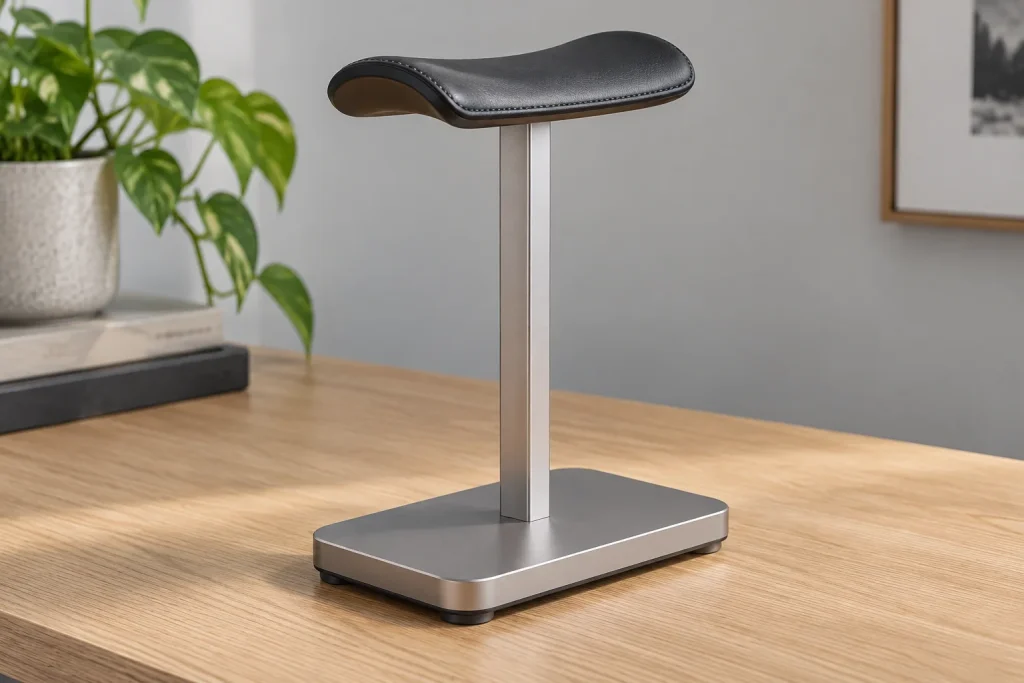
In the modern gaming and productivity setup of 2026, a headphone stand is far more than a simple desk accessory; it is a vital piece of hardware preservation infrastructure. Audiophile-grade headphones and high-end wireless gaming headsets represent a significant investment, often featuring complex suspension headbands, premium leather or velour ear cushions, and delicate internal wiring. Tossing an expensive headset onto the corner of a desk or leaving it draped precariously over a monitor corner inevitably leads to flattened padding, stretched headbands, and tangled cables. Choosing the right headphone stand requires looking past flashy RGB lighting and minimalist aesthetics to focus on structural integrity, physical compatibility, and everyday desk ergonomics.
When shopping for a stand, your decision-making process should be guided by how your specific headset is built and how your workspace is organized. A stand that works wonderfully for a lightweight, plastic-framed wireless headset might completely deform the suspension system of a heavy, metal-chassis planar magnetic pair. By understanding the core mechanics of weight distribution, contact surface geometry, and mounting styles, you can select a stand that protects your gear while keeping your battle station clean and functional.
Headband Width and Contour Matching
The most critical factor in choosing a headphone stand is the contact area where the headset rests. Narrow, knife-edge metal bars or thin plastic ridges concentrate the entire weight of the headphones onto a tiny patch of the headband padding. Over time, this creates permanent indentations, compresses internal foam, and can even crack synthetic leather coverings. Look for stands that feature a wide, curved saddle or a contoured cradle that mimics the natural shape of a human head. This distributes the downward pressure evenly across the headband, preventing premature wear and maintaining the structural integrity of your suspension system.
Weight Distribution and Center of Gravity
Physics plays a major role in how stable your headphone stand will be during daily use. Heavy headsets require a stand with a low center of gravity and a wide base to prevent tipping when you pick up or dock your audio gear. Free-standing models should feature weighted metal bases or rubberized feet to prevent sliding across smooth desk surfaces. If you prefer a clamp-on style, ensure the structural arm is thick enough to resist bending under the combined weight of heavy cables and the headset itself, especially if you frequently adjust the position of the arm.
Desk Attachment Style: Clamp vs. Free-Standing
Deciding between a clamp-on design and a free-standing model depends entirely on your available desk real estate and surface material. Free-standing models are versatile and can be moved anywhere on your desk, but they consume valuable surface area. Clamp-on stands attach directly to the edge of your desk, freeing up space for your keyboard and mouse, but they require a flat, overhanging edge to grip securely. If you use a glass desk, custom gaming setup with beveled edges, or a standing desk with a motorized mechanism, make sure to check the clamp’s clearance requirements and padding thickness to avoid scratching or cracking your desk surface.
Integrated Features: USB Hubs and Wireless Charging
Many modern stands come equipped with extra utility features like built-in USB-A and USB-C pass-through ports, 3.5mm audio jacks, or Qi wireless charging bases integrated into the foot. While these additions can streamline your desk by reducing cable clutter, evaluate whether you actually need them. Powered USB hubs require an extra wall outlet or a dedicated data connection to your PC, and cheap hubs can introduce audio interference if they share power lines with sensitive audio equipment. Prioritize structural build quality first, and treat integrated tech features as a secondary convenience rather than the primary deciding factor.
Material Construction: Aluminum, Wood, and Plastic
The materials used to construct a headphone stand impact both its durability and its aesthetic synergy with your room. Anodized aluminum offers exceptional strength-to-weight ratios, resists corrosion, and provides a sleek, modern industrial look that matches most premium gaming peripherals. Wood and bamboo options offer a warmer, organic aesthetic that dampens vibrations and looks refined in hybrid work-and-play environments. Plastic stands are budget-friendly and lightweight, but they are prone to flexing under heavy loads and can look out of place next to high-end aluminum keyboards and monitors.
Cable Management Integration
Managing the tether of a wired gaming headset or the charging cable of a wireless model can quickly turn into a desk nightmare. The best headphone stands incorporate thoughtful cable management features, such as integrated routing channels along the back of the stem, rubberized clips, or a wrap-around base. These features prevent cords from dangling awkwardly across your view or getting pinched beneath your keyboard. If you use a detachable cable system, look for stands that include a small integrated hook or slot to coil and store the cable neatly when not in use.
Footprint and Vertical Desk Clearance
Before buying any stand, measure the vertical space between your desk surface and any overhead shelves, monitor light bars, or hutch structures. A tall stand combined with a high-profile headset might not fit under low shelves. Conversely, ensure the base footprint does not encroach on your mousepad or interfere with your arm movements during intense gaming sessions. A compact footprint combined with optimal vertical clearance ensures your desk remains efficient and uncrowded.
Related Guides
To see how top-tier models stack up against these criteria and find out which units currently dominate the market, take a look at our roundup of the best headphone stands.
FAQ
Do headphone stands stretch out the headband?
Stands with very narrow or sharp contact points can compress and deform headband padding over time. However, stands with wide, curved cradles evenly distribute the weight and actually help maintain the natural shape and tension of the headband.
Are clamp-on stands safe for glass desks?
Clamp-on stands can be used on glass desks only if the desk features tempered safety glass and the clamp has thick, soft rubber padding to distribute pressure evenly. Even with padding, you should exercise caution because excessive tightening can cause stress fractures in fragile glass edges.
Should I buy an RGB headphone stand?
RGB stands add a synchronized aesthetic element to your gaming setup, but they often require extra software control and a dedicated USB connection. If you value minimalism or clean cable management, a simpler aluminum or wood stand is usually the better choice.
How do I clean dust off my headphone stand?
Cleaning depends on the material: wipe aluminum and plastic stands with a microfiber cloth and a mild electronics-safe cleaner, while wooden stands benefit from occasional treatment with specialized wood conditioner to preserve their finish. Avoid soaking any stand that features integrated electronic hubs or charging pads.
As an Amazon Associate we earn from qualifying purchases at no extra cost to you.










