
The category is deceptively crowded. Most products marketed for education are cheap plastic shells with microphones that pick up every keystroke, ceiling fan, and household conversation. What separates a genuinely useful headphone from a forgettable one in this space is not frequency response or driver size—it is whether the microphone lets you be heard clearly by a teacher on a bad Wi-Fi connection, whether the headset stays comfortable during a three-hour lecture block, and whether it connects without a fight to whatever device the school or employer handed you.
The best headphones for online learning and teaching must solve multiple problems simultaneously: passive noise isolation that does not require active cancellation hardware, a microphone with real noise reduction, low-latency wired or Bluetooth connectivity, and a price that survives bulk procurement. Below is the full lineup, compared on microphone design, comfort, and compatibility with laptops, tablets, and desktops.
As an Amazon Associate we earn from qualifying purchases at no extra cost to you.





Our Top Picks


Top 3 picks at a glance
Quick Picks
| Product | Best for | Price |
|---|---|---|
| Joyqua 2 Pack Wired Headset | Budget classrooms and home use | Check on Amazon |
| Translation Earbuds Real Time | Multilingual students and instructors | Check on Amazon |
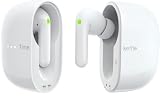
| Timekettle M3 Translator Earbuds | Teacher-student language exchange | Check on Amazon |
| Yunseity Student Headset | Listening and speaking exams | Check on Amazon |
| ZNXZXP Headphones Bulk 15 Pack | Whole-classroom deployments | Check on Amazon |
| Skyaudio AI Translation Headphone | Wireless language learning on the go | Check on Amazon |
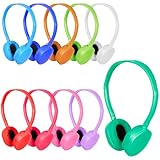
| OSSZIT Classroom Kids Headphones 20 Pack | Younger learners in shared spaces | Check on Amazon |
| Aurikall Bluetooth 5.4 Voice Feedback | Self-paced audio and memory drills | Check on Amazon |
How We Compared
Every product was compared against four criteria that directly determine whether a headset survives a full semester of daily use. Microphone clarity under noisy conditions came first—a headset with a great speaker side but a muddy mic fails its primary job in a learning environment. Second was device compatibility and connection reliability, because schools and offices rarely let you pick your hardware. Third was comfort over extended wear, measured by padding quality, clamping force, and weight distribution. Fourth was cost per unit, especially for buyers purchasing in bulk for a class or training program.
The 8 Best Headphones for Online Learning and Teaching in 2026
Joyqua 2 Pack Wired Headset with Microphone
This is the headset a school IT department hands out and everyone is quietly relieved about. The 3.5mm plug connects to laptops, tablets, and desktops without adapters, which eliminates the single biggest frustration in institutional deployments. Two units in the pack means a sibling pair or a teacher-student shared setup at a remarkably low per-headphone cost. The microphone is marketed as noise-reducing; it does not cancel ambient sound electronically, so a quiet room still gives the clearest results on calls.
- Pros: Universal 3.5mm compatibility, two units included at a price that undercuts most single-headset competitors
- Con: On-ear padding is thin, so comfort degrades past the two-hour mark for users with larger ears
Skip this if you need wireless freedom or plan sessions longer than two hours without breaks.
Translation Earbuds Real Time – 198 Language No Subscription
For learners in multilingual environments, this earbud set solves a problem no traditional headset addresses: real-time spoken translation without a recurring subscription fee. The listed 60-hour total playtime includes top-ups from the charging case, and the no-subscription model means the cost is fixed at purchase. For English-language learners, that can make it easier to follow spoken instructions while the instructor’s voice is translated live.
- Pros: 198 supported languages with zero ongoing cost, exceptional battery life relative to the price tier
- Con: Translation accuracy drops noticeably with heavy accents or overlapping speakers
Skip this if your use case requires only passive listening or speaking in a single language without translation needs.
Timekettle M3 3-in-1 Translator Earbuds
Timekettle’s M3 comes from a brand that specializes in translation hardware, and it serves a different buyer profile. Where the first entry targets students who need comprehension support, this pairs well for teachers who instruct in a non-native language. The earbud form factor keeps the instructor’s hands free for whiteboard work or gesturing, while two-way translation runs through Timekettle’s companion app on a paired phone. The 3-in-1 name refers to translation, music, and calls, so the M3 also works as an everyday pair of earbuds outside the classroom.
- Pros: Bidirectional translation supports teaching in a second language, compact form factor stays out of the way
- Con: No over-ear isolation means classroom ambient noise competes with translated audio in loud environments
Skip this if your classroom environment is physically noisy or you need isolation from background distractions.
Yunseity Student Headset
Designed specifically for listening and speaking exams, this headset makes one architectural choice that matters: the flexible mic rod can be positioned precisely in front of the student’s mouth, giving examiners a clean audio capture with minimal ambient contamination. For proctored assessments where audio quality directly affects grading, this adjustability is not a luxury—it is a requirement. The build is utilitarian, prioritizing function over style, which suits a product meant for institutional use.
- Pros: Flexible mic rod delivers precise mouth positioning for clear exam audio, purpose-built for assessment scenarios
- Con: Limited to wired connections, so students moving between devices mid-session will need the same port type
Skip this if you need a general-purpose headset for everyday classes rather than exam-specific recording quality.
ZNXZXP Headphones Bulk 15 Pack
A fifteen-headset pack keeps the per-unit cost very low, which makes classroom replacement budgets viable. These are simple, lightweight on-ear headphones sized for students and teens. They lack any microphone or advanced features, which is exactly the point: they exist to let an entire class listen to audio content simultaneously without sharing earbuds or fighting over a single speaker. For reading programs, language labs, or silent testing environments, this solves a logistics problem rather than an audio-quality one.
- Pros: Extremely low per-unit cost for whole-class deployment, lightweight enough for younger students to wear without fatigue
- Con: No microphone included, so these cannot handle any interactive or speaking component
Skip this if your curriculum requires students to record responses or participate in live discussions.
Skyaudio AI Translation Headphone Real Time
This is one of the most feature-rich options in the main list and sits in a higher price tier accordingly. The over-ear design with Bluetooth 5.3 gives you wireless freedom plus passive noise isolation from the ear cups, while 144 supported languages and a built-in meeting recording function make it a genuinely multi-purpose tool. A language teacher who also records lessons for asynchronous students gets two problems solved in one device. The over-ear cushioning is noticeably more comfortable than the earbud alternatives for extended sessions.
- Pros: Bluetooth 5.3 with over-ear isolation, integrated meeting recording captures both translated and original audio
- Con: Premium pricing means it is hard to justify for single-language classrooms or students without translation needs
Skip this if you only need basic audio playback without language translation or recording features.
OSSZIT Classroom Kids Headphones Bulk 20 Pack
A twenty-headset pack keeps the per-unit cost low, and the smaller ear cups are intentionally sized for children’s heads. The headband is adjustable enough to grow with a student across two school years. For a teacher managing a mixed-age elementary classroom during quiet listening time, this pack eliminates the constant negotiation over whose headphones are whose. Wired-only means no charging, no pairing, and no Bluetooth conflicts in a room full of twenty devices.
- Pros: Sized specifically for younger heads, no pairing or charging steps required for classroom management
- Con: Smaller fit means older students will outgrow them quickly, limiting shelf life in mixed-grade rooms
Skip this if your students are older teens or adults who need full-size comfort.
Aurikall Bluetooth 5.4 Voice Feedback Headphones
This headset targets a niche that most products in this category ignore: self-directed audio learning that relies on hearing your own voice in real time. The voice feedback function lets students monitor their pronunciation during language drills, chanting, or memory exercises where auditory self-awareness reinforces retention. The 1000mAh battery comfortably outlasts a full school day, and Bluetooth 5.4 ensures a stable connection without the latency that breaks audio-monitoring workflows.
- Pros: Voice feedback mode is uniquely useful for pronunciation and memorization practice, long battery life
- Con: Bulkier over-ear design is less suited to very young children or students with smaller heads
Skip this if you need a basic playback-only headphone without specialized audio feedback features.
More Headsets Built for Online Classes and Teaching
The eight picks above lean heavily toward bulk packs and translation devices. Many students and teachers simply need a dependable headset for daily video calls, lectures and recorded lessons. The six additions below come from established audio and business-headset brands and cover that everyday need, from budget USB headsets to a noise-cancelling option for noisy homes.
Logitech H390 USB Headset

The Logitech H390 is the budget USB headset that schools, call centers and home learners have relied on for years, and it remains the simplest recommendation for anyone who needs to be heard clearly on Zoom, Google Meet or Microsoft Teams. It plugs into a USB-A port and works as a plug-and-play device on Windows, macOS and ChromeOS, which makes it a strong fit for school-issued Chromebooks.
The boom microphone has noise-cancelling design that reduces background sound, and it rotates up out of the way when you are only listening. Inline controls on the cable handle volume and mute, so a student can silence the microphone without hunting through meeting software. The leatherette ear pads and padded headband keep the weight light for long lecture blocks, and the on-ear design is easy to put on and take off between sessions.
Who it suits: students and remote workers who use a laptop or Chromebook with a USB-A port and want reliable voice pickup on a budget.
Strengths: USB connection that avoids the headset-jack issues of 3.5 mm models, an adjustable noise-cancelling boom mic, inline mute, and a long track record in schools.
Drawbacks: USB-A only, so newer USB-C-only laptops and tablets need an adapter or the USB-C H391 variant. The on-ear pads isolate less noise than over-ear cups, and the cable is not detachable, so a damaged cable means replacing the whole headset.
Compared with the Joyqua 2 Pack, the H390 uses USB rather than a 3.5 mm plug, which generally gives more consistent microphone audio and avoids confusion on computers with separate mic and headphone jacks. The Joyqua remains cheaper per unit if you need two headsets.
Jabra Evolve2 30 SE

The Jabra Evolve2 30 SE is a business-grade wired headset that is particularly well suited to teachers who spend most of the day speaking. It sits in the mid-range tier, above budget USB headsets, and its main advantage is microphone quality: Jabra uses two-microphone call technology, and with the boom lowered it meets Microsoft’s open-office microphone requirements, which means your voice stays clear even with noise behind you.
The 2025 version ships with a cable that supports both USB-C and USB-A, so it works across older desktops and newer laptops without adapters. The stereo version weighs about 102 grams without the cable, among the lightest in this guide, and uses 28 mm speakers. A busy light on the earcup turns on automatically during calls, which helps teachers working from home signal to family members that a class is live. Jabra’s SafeTone 2.0 adds hearing protection, and the headset comes in versions optimized for Microsoft Teams or for other platforms such as Zoom and Google Meet.
Who it suits: online teachers, tutors and university students who take or lead long video calls and want a professional-quality microphone.
Strengths: excellent voice pickup, very light weight, USB-C and USB-A support, a busy light, and a two-year warranty.
Drawbacks: it costs several times more than budget USB headsets, the on-ear fit does not block much ambient noise, and some listings incorrectly describe it as active noise-cancelling; the noise reduction applies to the microphone, not your ears.
If your voice is the product, as it is for online teachers, the Evolve2 30 SE is the upgrade that matters most.
Poly Blackwire 3220

The Poly Blackwire 3220 is another business headset that translates well to education, and it sits between the Logitech H390 and the Jabra in price. It connects with a USB-C cable and includes a USB-C to USB-A adapter, so it suits mixed environments where students might use a modern laptop at home and an older desktop at school.
The noise-cancelling boom mic rotates 270 degrees and uses digital signal processing to reduce background sound for listeners. An inline control module handles answer and end, mute and volume, with indicator lights that show mute status at a glance. The stereo on-ear design weighs about 92 grams without the cable, the metal headband adjusts easily, and leatherette ear cushions fold flat for a backpack. Poly’s SoundGuard acoustic limiting protects against sudden loud sounds, and dynamic EQ switches between voice and media tuning automatically.
Who it suits: students and teachers who want business-grade reliability with USB-C support at a moderate price.
Strengths: USB-C with a USB-A adapter, a flexible noise-cancelling mic, clear inline controls with status lights, and hearing protection.
Drawbacks: no active noise cancellation for the listener, a thin padded headband that some users find firm over long sessions, and certification for Microsoft Teams varies by part number, so check the version if your school requires it.
Compared with the Yunseity Student Headset, the Blackwire offers better build quality and a more refined microphone, while the Yunseity is designed specifically for exam recording at a lower cost.
JLab Go Work Gen 2
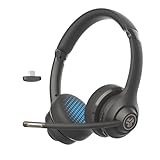
The JLab Go Work Gen 2 is a budget-tier wireless headset with a boom microphone, which is a rare combination. Most cheap Bluetooth headphones rely on a tiny microphone in the earcup that picks up room noise; the Go Work keeps a proper boom mic with two-microphone noise cancellation, so it works for live classes as well as listening.
It connects three ways: Bluetooth with multipoint, which keeps it linked to a laptop and phone at the same time; an included 2.4 GHz USB-C dongle; or a cable. JLab rates it for up to 55 hours of playback and about 34 hours of talk time, with a ten-minute quick charge adding several hours. The boom mic rotates up when not in use, a red light shows when it is muted, and a mic monitoring feature lets you hear your own voice so you do not shout during calls. It weighs about 170 grams.
Who it suits: students who move between rooms or devices, and teachers who want to walk around while presenting.
Strengths: wireless freedom with a real boom mic, multipoint, a dongle for low-latency computer use, and very long battery life.
Drawbacks: on-ear padding is thin for long sessions, sound quality is functional rather than rich, and wireless headsets need charging and pairing management that wired models avoid. In a classroom of many devices, Bluetooth pairing can get confusing.
Compared with the Aurikall Bluetooth headphones, the Go Work is better for interactive classes thanks to its boom mic, while the Aurikall focuses on voice-feedback practice.
Sony WH-CH720N

The Sony WH-CH720N is the pick for learners who study in noisy homes, dorms or shared spaces. Unlike the headsets above, it is a pair of wireless over-ear headphones with active noise cancellation, which reduces the hum of traffic, appliances and conversations so you can focus on a recorded lecture or reading. It sits in the mid-range tier and is one of Sony’s lightest over-ear noise-cancelling models.
Sony rates the battery for up to 35 hours, enough for a full week of classes on one charge, and it supports quick charging. Built-in microphones handle calls without a boom, and an ambient sound mode lets you hear a teacher or family member without removing the headphones. The over-ear cushions are more comfortable for multi-hour study sessions than the on-ear headsets in this guide.
Who it suits: university and older high-school students who mostly listen to lectures, watch recorded lessons, and study in distracting environments.
Strengths: active noise cancellation, long battery life, comfortable over-ear fit, and good music quality for downtime.
Drawbacks: the built-in microphones are less focused than a boom mic, so this is not the best choice for teachers or for students who speak a lot in class. It is wireless only for most use, and it is not designed for younger children.
This pick relates to the noise-cancellation question in the FAQ below: if your study space is genuinely noisy, ANC is worth it; if it is quiet, a wired headset with a better microphone is the smarter buy.
EarFun K1 Kids Headphones

The EarFun K1 is a budget wired headphone for younger students that adds two things the bulk packs in the main list lack: a microphone and a volume limit. EarFun specifies 85 dB and 94 dB volume limiting to help protect children’s hearing, and an inline microphone with controls lets kids answer a teacher in a live class or record a reading response.
The K1 uses a standard 3.5 mm plug that works with tablets, Chromebooks with headset jacks, and laptops. A sharing port lets a second pair of headphones connect for paired reading or sibling use without a splitter. The braided cable resists tangling and tugging, the headband folds for backpacks, and the 40 mm drivers deliver clear speech. The materials meet U.S. children’s product safety standards.
Who it suits: elementary students using tablets or Chromebooks for online lessons, and parents who want a volume-limited headset with a mic.
Strengths: volume limiting, an inline mic for interactive lessons, a sharing jack, and a durable braided cable.
Drawbacks: the inline mic sits farther from the mouth than a boom mic, so it picks up more room noise; at around 198 grams it is heavier than the bulk classroom packs; and 3.5 mm combo jacks are missing on some newer devices.
Compared with the OSSZIT 20 Pack, the K1 costs more per unit but adds a mic and volume limit, making it the better choice for interactive learning at home.
Buying Guide
Microphone Type and Positioning
A fixed boom mic that sits too far from the mouth will capture room noise and underproject your voice. Look for flexible or adjustable mic rods, as the Yunseity demonstrates, so you can position the capsule two to three finger-widths from your lips. Noise reduction is most effective when it is directional, picking up sound from the front rather than using electronic algorithms that degrade voice quality. For exam and assessment scenarios, a precise mic position is not optional.
Wired vs. Wireless in Shared Environments
In a room with fifteen or more students, Bluetooth creates pairing confusion, channel interference, and battery anxiety. Wired headsets using a standard 3.5mm jack or USB connection remain the default choice for institutional use because they require zero management. Wireless makes sense for individual learners, teachers recording lessons, or situations where mobility matters. Match your deployment model before choosing your connection type, not the other way around.
Bulk Pricing and Per-Unit Economics
When outfitting an entire classroom or training cohort, per-unit cost becomes the deciding factor. A budget bulk pack with a low per-student cost lets schools maintain replacements throughout the year without exceeding procurement limits. Always calculate the per-unit price rather than the pack total, and factor in expected breakage rates for younger age groups, where a realistic replacement cycle is three to four months.
USB vs. 3.5 mm vs. USB-C: Matching the Plug to the Device
Connection type causes more classroom headset problems than sound quality. A 3.5 mm plug works with most tablets and many laptops, but computers with separate headphone and microphone jacks need a splitter, and many newer phones and laptops have no headphone jack at all. USB-A headsets such as the Logitech H390 carry their own sound card, which gives consistent microphone audio and avoids jack confusion, but they need a USB-A port. USB-C headsets such as the Poly Blackwire 3220, or cables with both ends like the Jabra Evolve2 30 SE, suit modern laptops and tablets. Before buying in bulk, list every device type students will use and choose the connector that covers the most of them.
On-Ear vs. Over-Ear Comfort for Long Sessions
On-ear headsets press on the ear itself; they are light, cool and quick to take off, which suits short classes and shared devices. Over-ear designs surround the ear, block more noise and spread pressure more evenly, which makes them more comfortable for multi-hour lecture blocks, but they run warmer. For younger children, look for small cups and an adjustable headband; for adults with glasses, softer cushions and lower clamping force reduce pressure on the temples.
Hearing Safety and Volume Limits
Children are more vulnerable to noise-induced hearing damage, and they often turn volume up to drown out a noisy room. Volume-limited headphones such as the EarFun K1 cap output at 85 dB, a level widely used as a safe long-exposure guideline, with a 94 dB setting for noisier environments. Business headsets such as the Jabra and Poly include acoustic limiters that block sudden loud spikes. Encourage a simple rule: if someone next to you can hear your headphones clearly, the volume is too high.
Platform Certification and Software
Microsoft Teams and Zoom certification means a headset has been checked for microphone quality and call-control compatibility with that platform, so mute and call buttons work as expected. It is not essential for students, but schools and universities standardized on Teams may prefer certified models. Check the exact part number, because many business headsets are sold in separate Teams and general versions.
Comparison: The Everyday Learning Headsets at a Glance
| Headset | Price tier | Connection | Microphone | Fit | Best for |
|---|---|---|---|---|---|
| Logitech H390 | Budget | USB-A | Noise-cancelling boom | On-ear | Students on Chromebooks and laptops |
| Jabra Evolve2 30 SE | Mid-range | USB-C and USB-A | Two-mic boom, open-office grade | On-ear | Online teachers and tutors |
| Poly Blackwire 3220 | Budget to mid-range | USB-C with USB-A adapter | Noise-cancelling boom with DSP | On-ear | Mixed device environments |
| JLab Go Work Gen 2 | Budget | Bluetooth multipoint, USB-C dongle, wired | Two-mic boom | On-ear | Mobile students and teachers |
| Sony WH-CH720N | Mid-range | Bluetooth | Built-in | Over-ear with ANC | Studying in noisy spaces |
| EarFun K1 | Budget | 3.5 mm | Inline | Over-ear, kid-sized | Young learners at home |
Price tiers are relative; bulk classroom packs in the main list sit below all of these on a per-unit basis.
Setup Tips for Clear Audio in Online Classes
- Select the headset in the meeting app. Zoom, Meet and Teams often default to the laptop’s built-in microphone. Choose the headset for both microphone and speaker in the audio settings before class starts.
- Position the boom correctly. Place the microphone about two finger-widths from the corner of your mouth, slightly to the side, so breathing sounds do not hit it directly.
- Run a test call. Most meeting apps include a test feature. Record a few seconds and play it back to check volume and background noise.
- Use the mute button, not just the app. Inline or boom mute controls are faster than clicking through software and confirm mute status with a light on many headsets.
- Turn on noise suppression carefully. Meeting apps offer background noise suppression. Moderate settings help in busy homes; aggressive settings can clip a teacher’s voice or music in lessons.
- Charge wireless headsets overnight. Build a charging routine so a headset does not die mid-lecture, and keep a wired backup for exams or presentations.
- Label and clean shared headsets. In classrooms, number each headset, wipe ear cushions and microphones between users, and replace worn ear pads where possible.
Choosing by Role: Students, Teachers and School Buyers
The right headset depends less on specifications than on who will wear it and how. Use these profiles as a shortcut.
Young students (K-5)
Prioritize volume limiting, small adjustable headbands, durable cables and a simple 3.5 mm plug that matches classroom tablets. A built-in microphone matters only if lessons include speaking or recording. Bulk packs such as the OSSZIT 20 Pack cover listening-only stations, while the EarFun K1 suits home learners who also need to speak.
Middle and high school students
Older students join more live discussions and presentations, so a boom microphone becomes important. A USB headset such as the Logitech H390 is a reliable, low-cost choice for school-issued Chromebooks and laptops. Students who study in busy homes may value noise cancellation for independent work.
University students and adult learners
Adults often use one headset for lectures, group calls and personal listening. A wireless boom headset such as the JLab Go Work Gen 2 handles calls and mobility, while noise-cancelling headphones such as the Sony WH-CH720N are better for long recorded lectures in shared housing. Some learners keep one of each.
Online teachers and tutors
Teachers speak for hours, so microphone quality and comfort come first. A business headset such as the Jabra Evolve2 30 SE or Poly Blackwire 3220 delivers clear, consistent voice pickup and light weight. Keep a wired backup on hand so a dead battery never interrupts a lesson.
School and district buyers
Standardize on one connector type that matches most devices, budget for roughly 30 percent spares, and favor models with replaceable ear cushions or low per-unit costs. Business models with documented warranties simplify replacements for staff, while bulk packs are more economical for student listening stations.
Our Verdict
The top pick for most buyers is the Joyqua 2 Pack Wired Headset. It solves the core requirements of online learning and teaching—clear microphone, universal compatibility, low cost per unit—without any compromise that a single-language, standard classroom would notice. For budget buyers outfitting an entire class, the ZNXZXP 15 Pack offers the best per-unit price of any option that actually works. If your specific condition involves multilingual instruction or exam audio capture, the Yunseity Student Headset or Skyaudio AI Translation Headphone become the correct answer regardless of price, because neither can be substituted by a generic headset without losing a capability you depend on.
FAQ
Do I need noise-cancelling headphones for online learning?
Active noise cancellation adds cost and battery drain without meaningfully improving the experience in most learning environments. Passive isolation from a snug over-ear or on-ear seal is sufficient for reducing ambient classroom or household noise while keeping the microphone from picking up that same noise during transmissions.
Are wired headsets still relevant with Bluetooth widely available?
Yes, and in school and office settings they are often preferred because they require no pairing, no charging, and no IT troubleshooting. A wired headset connected to a shared desktop or tablet is simply easier to deploy across dozens of stations than managing individual Bluetooth connections.
Can translation earbuds replace a human interpreter for teaching?
They are a strong support tool for comprehension and simple exchanges, but they will not handle nuanced academic vocabulary, heavy accents, or fast overlapping speech reliably. For routine instruction and student check-ins they work well; for high-stakes assessments or complex subject matter they should supplement rather than replace professional interpretation.
How many headsets does a classroom of 25 students actually need?
Plan for roughly 30 percent more than your headcount, meaning 32 to 33 units for a class of 25, to account for broken headbands, lost cables, and students who need a pair while their primary unit is out for cleaning or repair.
What is the best headset for teaching online?
For most online teachers, a wired headset with a high-quality boom microphone is the best choice, because your voice clarity matters more than anything else. The Jabra Evolve2 30 SE stands out for its two-microphone call technology and light weight, while the Poly Blackwire 3220 offers similar business-grade reliability for less. Teachers who move around while presenting may prefer a wireless boom headset such as the JLab Go Work Gen 2.
Are USB headsets better than 3.5 mm headsets for online classes?
Usually, yes, for computers. A USB headset has its own built-in sound processing, which gives more consistent microphone audio and avoids problems with combined or separate audio jacks. A 3.5 mm headset is still the more universal choice for tablets and devices with a headset jack, and it is typically cheaper for bulk classroom purchases.
Do Chromebooks work with USB headsets?
Yes. Standard USB headsets such as the Logitech H390 work on ChromeOS without drivers, and USB-C headsets work on newer Chromebooks with USB-C ports. After plugging in, select the headset in the Chromebook’s audio settings or in the meeting app if audio still comes from the built-in speakers.
What volume limit is safe for kids’ headphones?
An 85 dB limit is the widely used guideline for safe long listening sessions, which is why many kids’ headphones, including the EarFun K1, offer an 85 dB setting. A 94 dB mode is intended for noisier environments such as travel and should be used for shorter periods. Regular breaks and keeping volume at a level where conversation nearby can still be heard further reduce risk.
How should schools clean shared headsets?
Wipe ear cushions, headbands and microphones with alcohol-free disinfectant wipes between users, and let them dry before the next student uses them. Leatherette cushions are easier to sanitize than fabric. Assigning each student a numbered headset and storing them in individual bags reduces the need for constant cleaning and helps track damage.









