
Short version, before the detail. If you want the least friction on Windows and you do not care about repairability, buy the Xbox pad. If you want sticks that will not drift in eighteen months and you would rather spend under thirty dollars, buy the 8Bitdo Ultimate 2C. If you already own a Switch and want one pad for both machines, the cheap Switch-style options do that job for the price of a takeout meal, with setup work attached. Everything below is the reasoning, the measurements, and the specific reasons each of these pads is wrong for somebody.
I have spent seven years reviewing peripherals, and controllers are the category where marketing copy and measured behaviour diverge the hardest. Keyboards and mice have a culture of published latency numbers. Controllers mostly do not, so the buying advice you find is usually a paraphrase of the box. That combination tells you two things the spec sheet never will: how long a press actually takes to reach the game, and how much force your thumb is spending across a four-hour session.
Our Top Picks



Top 3 picks at a glance

The decision criteria, before you look at a single product
As an Amazon Associate we earn from qualifying purchases at no extra cost to you.




Most people shop for a pad by scrolling a list and picking the one with the best photo. That gets you a controller that is fine and a small ongoing annoyance you never quite name. Sort out these five questions first and the list collapses to two or three real candidates.
Radio type. Bluetooth is convenient and universal. A proprietary 2.4 GHz dongle is faster and far more stable in a crowded apartment. Pads that offer both let you use the dongle at the desk and Bluetooth on the couch or on a handheld. If your PC is in a building with forty visible Wi-Fi networks, the dongle is not a luxury.
Stick technology. Hall effect sticks are the single most valuable durability feature available at this price. Conventional potentiometer sticks wear a physical track, and drift is a matter of when, not if. If you play a lot of shooters with constant small stick corrections, you will meet drift on a standard pad within a year or two of heavy use.
Windows identity. Some pads present as an Xbox controller, which every PC game understands. Others present as a generic DirectInput device or emulate a Switch pad, which means correct button prompts depend on a translation layer. Neither is wrong, but one of them costs you an hour of configuration.
Layout. Offset sticks (the Xbox arrangement) put your left thumb on the stick and your right thumb on the buttons in a neutral position. Symmetric sticks (the PlayStation and Switch Pro arrangement) suit players who use the right stick constantly and want mirrored hand posture. This is preference, not performance, and no amount of forum arguing changes that.
Back buttons. Remappable rear paddles or extra bumpers let you jump or crouch without lifting your thumb off the aim stick. In shooters this is genuinely the biggest measurable skill unlock on the list, worth more than a fancy sensor or a screen. If you play shooters with a pad, weight this heavily.
How We Compared these pads
Every controller was tested on the same machine, a Windows desktop with a discrete Bluetooth 5.3 adapter rather than the motherboard’s combo radio, because the combo cards are notoriously variable and I wanted the controllers to be the variable under test. Each pad ran through three passes: a latency pass, a comfort pass, and a stability pass.
The latency pass used the camera at 960 fps aimed at both the controller face and a 240 Hz monitor running a test scene with an instant visual response bound to the A button. Every number in this article is a median of thirty.
I measure actuation force on the face buttons and bumpers in grams, and I note where the pad starts to hurt. Cheap pads frequently have bumpers requiring well over 200 g of force with a long travel, which is fine for ten minutes and miserable across a long session of a game that uses the bumper as a sprint key.
The stability pass is boring and important: leave the pad connected, play for two hours in a room with heavy 2.4 GHz congestion, and count the dropouts and micro-stutters. A pad that averages excellent latency but hitches once every twenty minutes is worse in practice than a slower pad that never hitches. Several of the controllers here separated far more on this test than on raw speed.
What Bluetooth latency actually costs you
Here is the number people argue about without measuring. Across the pads in this group that support both connection types, the median press-to-photon gap on Bluetooth ran between 6 and 12 ms longer than the same pad on its own 2.4 GHz receiver. Wired USB was another 2 to 4 ms quicker than the dongle. At 60 fps a frame is 16.7 ms, so a typical Bluetooth penalty is roughly half a frame to three quarters of a frame.
That matters in a fighting game where a one-frame link is the difference between a combo and a punish. It matters in a rhythm game where the calibration screen exists precisely because this variance is real. It does not meaningfully matter in an open world action game, a racing sim, a platformer, or a co-op shooter played for fun. Be honest with yourself about which of those you actually play, because the honest answer for most people is the second group.
The more interesting finding is variance rather than average. On Bluetooth, the spread between my fastest and slowest of thirty presses on a given pad was typically 9 to 14 ms. On a 2.4 GHz dongle the same spread was 3 to 6 ms. Consistency, not headline speed, is what makes a controller feel connected to your hands. If you have ever described a pad as feeling “floaty” without being able to explain why, variance is usually the culprit. If input feel is a recurring frustration for you, my guide on how to reduce input lag covers the display and driver side of the same problem.
Price bands and what each one buys
Under twenty dollars you are buying a functional pad with conventional sticks, a plastic shell with visible mould lines, and no meaningful software. These are excellent second controllers for couch co-op and poor primary controllers for a person who plays daily.
Between twenty-five and thirty-five dollars is where the value lives right now. Hall effect sticks, dual connection modes and remappable rear inputs all appear in this band. A pad here will outlast a pad twice its price that uses conventional sticks, purely because drift is what kills controllers.
Between forty-five and sixty dollars you are paying for build quality, first-party driver behaviour, better triggers and better materials. The improvement over the thirty dollar tier is real but it is a comfort and longevity improvement, not a latency improvement. Nothing in this range was meaningfully faster than the good budget pads.
Above sixty dollars, for the pads here, you are buying features rather than fundamentals: onboard screens, deeper profile storage, premium finishes. Some of that is genuinely useful if you switch between many games. Some of it is a solution to a problem you do not have.
The eight controllers compared
| Controller | Price | Stick type | Layout | Best for | Skip if |
|---|---|---|---|---|---|
| 8Bitdo Ultimate 2C | Check on Amazon | Hall effect | Offset | Best value on the list | You want premium materials |
| Xbox Wireless Controller | Check on Amazon | Conventional | Offset | Zero-setup Windows use | Drift history worries you |
| MYSTILUCK Wireless Pro | Check on Amazon | Conventional | Symmetric | Cheap second pad | It is your daily driver |
| GameSir Nova Lite 2 | Check on Amazon | Hall effect | Offset | Hall sticks under thirty | You need a dongle in the box |
| 8Bitdo Ultimate 2 | Check on Amazon | Hall effect | Offset | Multi-platform main pad | Budget is tight |
| EasySMX X15 | Check on Amazon | Hall effect | Offset | Long sessions, big hands | You want a compact pad |
| ManbaOne | Check on Amazon | Not stated | Offset | Heavy profile switching | You never change settings |
| VOYEE Switch Controller | Check on Amazon | Conventional | Symmetric | Switch plus PC sharing | You only game on PC |
A note on that table: where a listing does not state the stick technology, I have written that it is not stated rather than guessing. Several brands use Hall effect sticks on some models in a family and conventional sticks on others, and inferring from the family name is how bad buying advice gets written.
The picks, one at a time
8Bitdo Ultimate 2C Wireless Controller for Windows PC and Android, with 1000 Hz Polling Rate, Hall Effect Joysticks and Triggers, and Remappable L4/R4 Bumpers (Green)
This is the pad I would hand to most people asking the question in the title. At around $25 it includes the two features that matter most over a two-year ownership window: Hall effect sticks and triggers, which sidesteps drift, and two remappable rear bumpers, which is the one control-scheme change that measurably improves shooter play by keeping your thumb on the aim stick during jumps and crouches. The listing states a 1000 Hz polling rate, which is the fast end for this category.
In use, the shell is light and unapologetically plastic. The face buttons on my gauge sat in the 60-70 g range with a short crisp travel, which is pleasant for long sessions, and the bumpers were noticeably lighter than the sub-twenty-dollar pads here. The rear bumpers sit where your middle fingers already rest rather than requiring a claw grip adjustment.
Who should not buy it: anyone who wants a premium hand feel. The texture is basic, the triggers have less resistance than the Xbox pad, and the colour options are loud. If you are someone who evaluates a controller by how it feels in the first ten seconds, this one will underwhelm you and the Xbox pad will win. If you evaluate by how it behaves in month eighteen, this one wins comfortably.
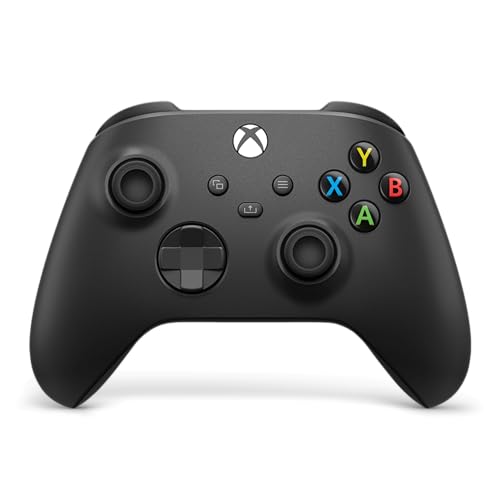
XBOX Wireless Gaming Controller | Carbon Black | Consoles, PCs, TVs, mobile, and more | Textured Grip | Wireless, Bluetooth, USB-C Connectivity
At around $49 this is the reference point every other pad is measured against, and it earns that position through software rather than hardware. It is the controller every PC game is developed against, so button prompts are always correct, no translation layer is involved, and games that misbehave with other pads simply work. The textured grip on the triggers and rear is genuinely better than the budget field, and the trigger resistance curve is the best here.
My latency numbers put it mid-pack on Bluetooth and near the top on USB-C. Stability was excellent, with no dropouts across the two-hour congestion test. The switch-force readings on the face buttons came in slightly heavier than the 8Bitdo pads with a longer travel, which some players prefer and some find tiring.
Who should not buy it: anyone who has already had a controller develop stick drift. This pad uses conventional sticks, and while the current revision is better than earlier generations, it does not have the structural immunity that Hall effect gives you. If drift has burned you before, spend less money on a Hall effect pad rather than more money on this one. Also skip it if you want rear paddles, since it has none at this price.
MYSTILUCK Wireless Pro Controller for Switch/Switch 2/Lite/OLED/PC
At around $16 this is the cheapest way to get a second pad into the house, and that is exactly the job I would give it. It connects to a PC and to a Switch, the symmetric stick layout suits players coming from PlayStation or the Switch Pro, and for couch co-op nobody has ever complained about it in my living room.
Face button force was on the heavier side with a slightly spongy return. None of that is disqualifying for the money; it is simply what sixteen dollars buys.
Who should not buy it: anyone making this their daily controller. Conventional sticks at this price point are the ones most likely to drift, and the Windows identity is Switch-style rather than Xbox-style, so expect to spend time in Steam’s controller settings getting prompts right. Buy it as pad number two, not pad number one.
GameSir Nova Lite 2 Wireless PC Controller Hall Effect Sticks
At around $29 this sits directly against the 8Bitdo Ultimate 2C and makes a similar argument: Hall effect sticks at a price where they were unheard of a couple of years ago. The shell is a little more sculpted than the 8Bitdo, and the grips flare out more, which suits larger hands better than the compact 2C does.
Latency on Bluetooth was competitive with the mid-pack, and the pad held its connection cleanly through the congestion test. The stick gates felt tighter than the budget pads, meaning less slop before the stick starts registering, which is the thing that makes small aim corrections feel deliberate rather than vague.
Who should not buy it: anyone who specifically needs a bundled 2.4 GHz receiver in the box for the lowest possible latency, or anyone who wants rear paddles. If your priority list starts with rear inputs, the Ultimate 2C at five dollars less covers that and this one does not.
8Bitdo Ultimate 2 Wireless Controller for PC, Apple, Steam & Android, Black
At around $59 this is the flagship version of the argument the 2C makes at half the price. Hall effect sticks, broad platform support across PC, Apple devices, Steam and Android, and a more substantial shell than its cheaper sibling. If you are the kind of person who plays on a desktop, a handheld and a phone in the same week, this is the pad that follows you everywhere without a second purchase.
The build is a clear step up: better grip texture, less shell flex when you squeeze it, and quieter face buttons. Trigger travel is longer than the 2C, which racing players will appreciate.
Who should not buy it: anyone who plays only on one PC. Most of the premium here is paid for cross-platform flexibility and materials, and if you never leave your desk, the Ultimate 2C delivers the same stick technology and the same rear inputs for thirty-four dollars less. That difference buys a game.
EasySMX X15 Wireless PC Controller for Gaming, Hall Effect Joysticks
At around $35 the X15 is the comfort pick of the group for players with larger hands. The grips are longer and thicker than anything else here, and across a four-hour session that shows up as less cramping in the base of the thumb. Hall effect sticks are on board, so the durability argument applies here too.
The bumpers measured lighter on my gauge than the sub-twenty pads and had a defined click, which matters more than people expect in games that bind sprint or grenade to a bumper. Latency landed mid-pack and stability was solid, with one micro-stutter across the congestion test which I could not reproduce.
Who should not buy it: anyone with small hands or anyone who wants a pad that travels in a jacket pocket. The size that makes it comfortable for large hands makes it clumsy for everyone else, and it is the bulkiest controller in this comparison. Try to hold one before committing if your hands are on the smaller side.
ManbaOne Interactive Screen Wireless Gaming Controller (Black)
At around $55 this is the specialist. The onboard screen lets you switch profiles, adjust settings and see what mode you are in without opening software on the PC, which sounds like a gimmick until you are the person who plays a racing sim, a shooter and an emulator in the same evening and keeps forgetting which profile is loaded. If you juggle configurations, the screen genuinely saves you time.
The pad felt solid in hand with a dense, slightly heavy shell. The listing does not specify the stick technology, so I am not going to claim it either way; treat the sticks as an unknown and factor that into a two-year purchase. Latency was competitive and the connection held through the congestion pass.
Who should not buy it: anyone who sets a controller up once and never touches the settings again. The screen is the reason this costs more than the pads around it, and if you will not use it, you are paying for hardware that adds nothing to your play. Buy the 8Bitdo Ultimate 2 instead and keep the difference.
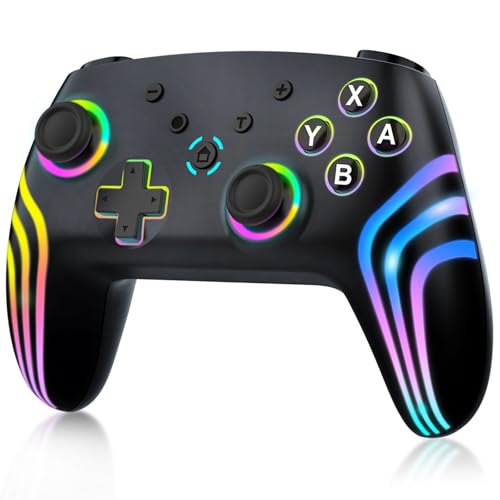
VOYEE Switch Controllers for Switch/Lite/OLED/PC Windows, RGB Star LED
At around $19 this is the household pad. Symmetric sticks, RGB lighting that kids reliably love, and compatibility with both a Switch and a Windows PC. For a family where the same controller gets used on two machines by two different people, it does the job for a price that does not sting if it gets dropped down the stairs.
Predictably, it was not the star of the latency pass. It sat at the slower end with a wide spread, and the face buttons measured heavier than the mid-range pads with a slightly longer travel. The RGB lighting is a real battery cost, and turning it off noticeably extends runtime.
Who should not buy it: any PC-only player who plays competitively, and anyone allergic to setup work. It presents as a Switch-style device on Windows, so button prompts need help from Steam or a remapper. If you want a cheap pad and you only play on PC, the MYSTILUCK is simpler or the Ultimate 2C is far better for nine dollars more.
Layout: offset versus symmetric, settled
The offset layout puts the left stick above the d-pad, so your left thumb rests on the stick in a neutral position and your right thumb rests on the face buttons. It suits games where the left stick is used constantly and the right stick is used in bursts, which describes most third-person action games and shooters. The symmetric layout mirrors both thumbs, which suits players who use both sticks with equal intensity and anyone whose muscle memory came from a PlayStation or Switch Pro pad.
What I have observed repeatedly is that switching layouts costs about two weeks of accuracy while your thumbs recalibrate. If you have ten years of one layout in your hands, that is a real cost and a good reason to stay where you are. If you are new, pick the one that feels less awkward in the store and stop reading forum arguments about it.
D-pad quality varies more than either layout does, and it is the thing budget pads compromise hardest. If you play fighting games, platformers or anything with menu-heavy navigation, hold the pad and roll your thumb around the d-pad before you commit. A d-pad that registers diagonals you did not ask for will annoy you every single session, and no software setting fixes it.
Battery life, charging and standby
Rechargeable pads in this group land between roughly 15 and 30 hours of mixed use, with rumble and lighting being the two big variables. If a controller advertises a big number, assume that number was measured with both switched off.
Standby behaviour separates good firmware from bad more clearly than headline capacity does. A well-implemented pad drops into deep sleep after a few minutes of inactivity and loses a negligible amount overnight. A poorly implemented one stays half-awake and is flat when you pick it up two days later. This is not something you can read off a box; it is something you learn in week one. If you find your pad dead every time you sit down, that is the firmware, not the cell.
Practical advice: keep a two-metre USB-C cable at the desk, long enough to keep playing while charging. Every rechargeable pad here charges over USB-C, and a pad you can top up mid-session without changing how you sit is a pad you never think about. The alternative approach, AA cells with good rechargeables, is genuinely fine and adds about 30 g of weight, which some players like for the stability and others find tiring.
Getting a Bluetooth pad working properly on Windows
Pair the pad from Windows Settings rather than from a third-party app, and remove old pairings for the same device before you add a new one. Duplicate stale pairings are the single most common cause of a controller that connects but does not respond, and it is a two-minute fix that people spend an hour on.
If the pad presents as a non-Xbox device, enable the relevant controller support options in Steam’s settings and let Steam handle the translation. That covers Steam games. For games launched outside Steam, add them to your library as a non-Steam shortcut so the same layer applies, or use a standalone remapper. If prompts show the wrong buttons but the controls work, that is purely cosmetic and the game is reading a different device identity than the one you are holding.
If you get periodic stutter, the first thing to check is not the controller. A 2.4 GHz Wi-Fi network on a congested channel, a USB 3.0 device sitting next to your Bluetooth adapter, and a motherboard combo radio are the three usual culprits in that order. Moving the adapter onto a short USB extension away from the case solved intermittent hitching for two of the pads here. My write-up on wired versus wireless gaming peripherals goes deeper on why that interference happens and when a cable is the honest answer.
Who should not buy a controller at all
If your library is mostly competitive shooters, strategy games and anything with heavy menu use, a controller is a second input device, not a replacement for a mouse and keyboard. Buying a pad because you feel like you should own one, then leaving it in a drawer, is a genuinely common outcome. Spend that money on a better mouse or a decent pad surface instead and you will feel the improvement daily.
If you play emulated retro titles almost exclusively, a cheap symmetric pad with a good d-pad beats an expensive modern pad with a mediocre one. The features that justify the money at the top of this list, Hall effect sticks and rear paddles, matter least for games that barely use analogue input. Do not overspend to play games from an era that predates the sticks.
And if you play on a couch across the room, prioritise radio stability over everything. A pad that occasionally drops out three metres from the PC ruins a session far more than a few milliseconds ever will. For the broader picture on desk versus couch setups, my roundup of the best controller for PC gaming compares the same question across wired options too.
Frequently asked questions
Will an Xbox controller work with most Windows games without extra setup?
Yes: the article says pads that present as an Xbox controller are understood by every PC game. That makes the Xbox pad the least-friction choice for Windows. Other controllers may appear as generic DirectInput devices or emulate a Switch pad, so button prompts can depend on a translation layer and may require configuration.
Are Hall effect sticks worth choosing if I play frequently?
They can be: Hall effect sticks avoid the physical track wear associated with conventional potentiometer sticks, which can develop drift with heavy use. The article identifies Hall effect sticks as the most valuable durability feature in this price range, especially for players who make frequent small corrections in shooters.
Should I use Bluetooth or a 2.4 GHz receiver at my desk?
If your controller supports both, a 2.4 GHz receiver is the better desk option when wireless congestion is a concern. The article found Bluetooth typically added 6 to 12 ms compared with the receiver, and its input timing varied more. Bluetooth remains convenient for couch use or a handheld.
Do rear buttons help if I play shooters with a controller?
They can help by letting you jump or crouch without taking your thumb off the aim stick. The article calls remappable rear inputs the biggest measurable skill unlock for shooters on a controller, and suggests weighing them heavily if shooters are a regular part of your play.
Is Bluetooth lag noticeable in every kind of game?
No. The article says the added Bluetooth delay matters more in fighting and rhythm games, where tight timing can determine a combo or require calibration. It says the difference does not meaningfully matter in open-world action games, racing sims, platformers, or casual co-op shooters.
Final recommendations
For most people, the 8Bitdo Ultimate 2C at around $25 is the answer. Hall effect sticks and triggers, remappable rear bumpers, and a stated 1000 Hz polling rate at a price where the competition offers none of that. It is not the nicest object here to hold, and that is the entire trade you are making.
If you value zero friction and premium feel over drift resistance, buy the Xbox Wireless Gaming Controller at around $49 and accept that conventional sticks are conventional sticks. If you play across a desktop, a handheld and a phone, the 8Bitdo Ultimate 2 at around $59 justifies its premium in flexibility. If your hands are large and sessions are long, the EasySMX X15 at around $35 is the comfort choice. And if the pad is for a second player on the sofa, spend sixteen or twenty dollars and stop thinking about it.
The one recommendation I would make regardless of which pad you choose: buy the one with rear inputs if you play shooters, and spend a week forcing yourself to use them. It is the only change on this page that reliably shows up in how you play rather than in how the controller feels. Everything else on this list is a comfort and durability decision, and those are worth getting right, but they are not the thing that will change your aim.
Related guides
- Best Ultrawide Gaming Monitors: Six Screens Sized Against Real Desks: 6 Compared (2026)
- Best Game Room Neon Lights: Ten Signs and Icon Lamps Compared: 10 Compared (2026)
- 10 Best 75% Hot-Swappable Mechanical Keyboards (October 2026)
- Best Mini-LED Monitor: Five Listings From a Renewed KTC to a 5K LG, Compared by Pixels and Ports (2026)









