
You have a phone that dies by mid-afternoon, a desk that’s already crowded, and two obvious paths forward: a flat wireless charging pad you lay the phone on, or an upright charging stand that props the phone at an angle while it powers up. Both cost about the same. Both skip the cable fumble. But they solve surprisingly different problems, and picking the wrong one for your desk setup is a mistake you’ll feel every single workday.
A flat pad rewards people who set their phone down and forget it. A stand rewards people who glance at their screen constantly — notifications, video calls, timers, the recipe you’re half-following. The choice comes down to how you actually use your phone while it charges, not which gadget has the better spec sheet.
As an Amazon Associate we earn from qualifying purchases at no extra cost to you.




Our Top Picks
 MagSafe 25W Wireless Charger for Apple Magnetic Fast0.37 inches2.2 x 2.2 x 0.21 inches0.2 poundsCheck on Amazon
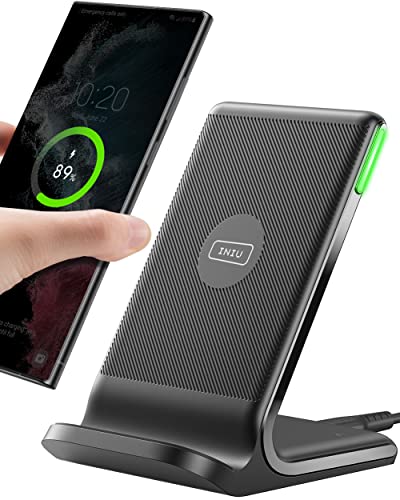

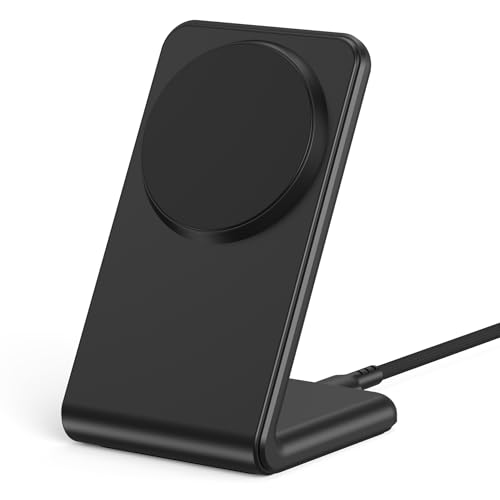
Top 3 picks at a glance
Quick Verdict
If your desk doubles as a video-call studio or you check notifications all day, get a charging stand. If you mostly set your phone down and walk away, a flat wireless charger is cheaper, smaller, and easier to pack when you travel. Most flat pads run $10–$25; most stands run $15–$45. For a first desk charger, a quality 15W pad under $20 is the lowest-risk entry point, and you can upgrade to a stand later without wasting money.
Side by Side
| Category | Wireless Charger (Flat Pad) | Charging Stand |
|---|---|---|
| Ergonomics while charging | Phone lies flat; you must pick it up to read anything | Phone sits at roughly 55–70°; glanceable at eye level |
| Durability | Few moving parts, but the surface can scratch; typical lifespan 3–5 years | More joints and weight-bearing geometry; a cheap hinge can loosen in 1–2 years |
| Price range | $9–$30 for solid single-device pads | $15–$45; multi-device models run $30–$100 |
| Maintenance | Wipe flat surface; nothing to loosen | Check hinge/weight occasionally; more crevices for dust |
| Desk space needed | Roughly 4 x 4 inches, under an inch tall | Roughly 3.5 x 4 inches footprint but 4–6 inches tall; needs vertical clearance |
| Look | Low-profile, nearly invisible on a busy desk | Reads as a piece of desk furniture; good stands look intentional |
| Travel/portability | Slides into any pocket or pouch | Bulky; most people leave them home |
| Magnet alignment | Optional on many models; misalignment quietly kills charging speed | Upright geometry keeps coil alignment more consistent |
| Resale/gift value | Modest; commoditized category | Holds appeal longer; multi-device stands stay useful as collections grow |
| Best for | Set-and-forget chargers, minimalists, travelers | Desk workers, video callers, multi-device owners |
Where Wireless Charger Wins
Price floor. The single biggest advantage is cost. A capable 15W fast-charging pad like the INIU Wireless Charger with its LED indicator sits around $16, and even budget options under $10 now deliver reliable everyday charging. Stands rarely dip that low without cutting corners on the hinge or the base weight.
Footprint and height. A pad occupies roughly a 4-inch square and adds less than half an inch of height to your desk. If your monitor arm or shelf clearance is tight, a flat charger fits where a stand physically can’t.
Simplicity. There’s nothing to adjust, nothing to loosen, and no wrong angle. Drop the phone on, walk away. For a guest room, an entryway tray, or a second charger for a partner who “borrows” yours, the pad is the obvious call.
Travel. A pad weighs a few ounces and packs flat. If you work from coffee shops or travel for work, a stand stays home collecting dust while the pad earns its keep.
Overnight and focus work. If the point is to stop touching your phone — deep work sessions, sleeping through the night — the flat design is a feature, not a flaw. It makes checking the screen mildly inconvenient, which is exactly the point.
Where Charging Stand for Desk Wins
Glanceability. This is the whole reason stands exist. An upright stand holds your phone at an angle you can read without picking it up, which matters enormously if your phone doubles as a video-call camera, a Pomodoro timer, or a message hub during the workday. Apple’s own StandBy mode (iOS 17 and later) turns an upright charging iPhone into a clock-and-widget display — a feature flat pads can’t use.
Consistent alignment. The most common complaint about flat wireless chargers is the phone drifting off-center and charging slowly or not at all. A stand’s upright ledge keeps the coil roughly aligned every time you set the phone down, which quietly improves real-world charging speeds.
Multi-device consolidation. A 3-in-1 magnetic stand that handles an iPhone, Apple Watch, and AirPods in one footprint can replace three cables and three pads for around $18 — often cheaper than buying the devices separately. If your nightstand or desk hosts Apple’s whole ecosystem, this is the single best value in the category.
Cable management. Stands route the cable down through the base, keeping your desk surface clean. Flat pads tend to have a cable trailing off the edge of the desk.
Face ID and video. With the phone upright, Face ID unlocks work without lifting anything, and landscape-oriented stands (common on 3-in-1 models) support StandBy’s full-screen clock and calendar views.
Cost Over 5 Years
Assume a workday desk charger in daily use. Wireless charging hardware doesn’t wear out quickly, but cables and adapters do.
Flat pad route: A $10–$20 pad plus a USB-C wall adapter ($8–$12, since most pads don’t include a power brick) runs roughly $18–$32 up front. Expect to replace the pad once in five years if the surface coating wears or the cable frays at the pad end — figure one $15 replacement plus one $10 adapter around year three. Five-year total: $40–$60, plus pennies of standby electricity.
Stand route: A single-device magnetic stand runs $9–$30; a 3-in-1 model runs $18–$45, plus $10–$15 for an adequate adapter (multi-device stands often want 25W or higher input). If you start with a single-device stand and add a 3-in-1 later when your device collection grows, add that second purchase. Five-year total: $30–$80, with the lower end assuming you bought the multi-device model once and stuck with it.
The honest takeaway: the price gap between the two categories has nearly closed as of 2026. The real financial decision isn’t pad versus stand — it’s buying the right one once instead of upgrading twice.
Which One for Your Home
Small Apartment or Studio
Space is your constraint, so go flat and minimal. A single 15W pad around $10–$16 lives on a windowsill, shelf, or the corner of a folding desk and disappears visually. Skip the dedicated wall adapter clutter by choosing a pad that accepts any USB-C brick you already own. If you also carry a watch or earbuds, one compact 3-in-1 stand at around $18 consolidates three chargers into the footprint of a coffee mug — often the smarter move than owning three separate pads in a small space.
Family with Kids or Pets
Durability and tamper-resistance matter more than looks. Flat pads win here: nothing to knock over, no hinge to snap, and a low center of gravity that survives a tail swipe. Look for pads with a non-slip silicone or rubberized surface so a phone bumped by a passing toddler stays aligned. Keep the charger and cable at the back of the desk where a chewer can’t reach it. If older kids charge their own devices, a cheap second pad ($9–$15) beats fighting over a shared stand.
Rental or Temporary Living
You want gear that moves well and leaves no marks. A flat pad is ideal — no mounting, no adhesive pads on the wall, no furniture drill holes. Pair it with a foldable travel-friendly design if your next move is already on the calendar. Avoid stands with weighted bases over about a pound; they’re dead weight in a moving box. A slim magnetic pad (some magnetic options run under $9) doubles as a desk charger and a travel charger, which suits a two-year rental perfectly.
Long-Term Home
Now you can invest in the setup you’ll look at every day for years. Choose a stand that matches your desk’s material and finish — aluminum and fabric-wrapped models age gracefully, while glossy plastic shows scratches by year two. A 3-in-1 stand is the long-term play if you’re in the Apple ecosystem and likely to add a Watch or AirPods. Position it beside your monitor at eye level so it doubles as a glanceable clock and call station, and buy a quality 25W+ adapter once so you never have to think about power again.
FAQ
Do wireless chargers work through phone cases?
Most do, up to a case thickness of roughly 3–5 mm (about 0.12–0.2 inches). Thick rugged cases, cases with metal plates, orPopSocket-style accessories mounted on the back usually block charging. Magnetic cases charge fine on MagSafe-compatible pads and stands; non-magnetic cases just add a little distance between coils.
Is a charging stand bad for battery health?
No. Modern phones manage their own charging — they slow down, pause, or top off as needed regardless of pad or stand. Overnight charging on either style is safe; phones built in recent years optimize the final 20% to reduce battery stress. Heat is the only real enemy, so avoid charging in direct sunlight or under a pile of papers.
How fast is wireless charging compared to a cable?
A 15W wireless charger typically adds battery roughly as fast as a basic 18–20W wired charger in the 20–80% range, though wired pulls ahead for a full 0–100% session. Magnetic fast-charging pads rated at 25W close the gap further on compatible iPhones. Neither style will match a 60W+ laptop-class cable, but for a desk where the phone charges in increments all day, the difference rarely matters.
Can I use one charger for iPhone and Android phones?
Yes, if it’s a standard Qi or Qi2 charger — nearly all pads and stands under $50 are. iPhones, recent Samsung Galaxy phones, and Google Pixels all support Qi. The caveat is speed: an iPhone caps out around 15W–25W depending on the model and charger, while some Android phones support faster proprietary standards that only work with brand-specific hardware. A plain 15W Qi pad charges everything, just not always at each phone’s maximum rate.
Related guides
- Best Ultrawide Gaming Monitors: Six Screens Sized Against Real Desks: 6 Compared (2026)
- Best Game Room Neon Lights: Ten Signs and Icon Lamps Compared: 10 Compared (2026)
- 10 Best 75% Hot-Swappable Mechanical Keyboards (October 2026)
- Best Mini-LED Monitor: Five Listings From a Renewed KTC to a 5K LG, Compared by Pixels and Ports (2026)









