
The SteelSeries Arctis Nova 3 Wireless is the best gaming headset for Fortnite for most players who want wireless freedom, a modern feature set, and a headset that can move between competitive matches and everyday gaming. Its low-latency wireless design suits Fortnite’s rapid audio cues, while the Fortnite Sprite Edition adds themed styling without changing the basic buying decision: choose it when you want a premium wireless headset and do not mind paying more for convenience. For a lower-cost wired choice, the Razer BlackShark V2 X is the strongest all-round alternative, with a lightweight closed-back design, memory-foam cushioning, a 50mm-driver class, and virtual surround support on compatible PC setups. The BENGOO G9000 and Ozeino are better budget picks when the priority is simply getting a functional headset with a microphone for less.
This roundup compares every listed model by connection type, platform fit, microphone arrangement, comfort features, battery claims where stated, and the practical details that matter in Fortnite: hearing footsteps, separating glider and gunfire cues, avoiding cable problems, and communicating clearly in squad chat. No one headset is ideal for every player. The right choice depends on whether you play on PC, PlayStation, Xbox, Switch, or several systems; whether you need wireless; how long you play; and whether your budget is closer to entry-level, mid-range, or premium.
Top 3 picks at a glance
Quick Comparison
| Product | Best for | Key specs and connection type | Price tier |
|---|---|---|---|
| SteelSeries Arctis Nova 3 Wireless Fortnite Sprite Edition | Best premium wireless Fortnite headset | 2.4GHz wireless gaming connection; wireless headset format; Fortnite-themed edition; platform compatibility should be checked against the included wireless connection method | Premium |
| AOC 2.4GHz Wireless Gaming Headset | Long-session wireless play across console and PC | 2.4GHz wireless; listed for PS5, PS4, PC, and Switch; 45-hour battery claim; black finish | Premium |
| HyperX Cloud II | Comfortable wired PC and console gaming | Wired gaming headset; 7.1 surround-sound feature; memory-foam ear pads; aluminum frame; detachable microphone; multi-platform positioning | Premium |
| NUBWO Wireless Headset | Very long wireless battery life | Wireless gaming headset; listed 100-hour battery claim; 23 ms low-latency claim; microphone; PS5, PS4, and PC compatibility listed | Mid-range |
| Razer BlackShark V2 X | Best value for competitive PC and console play | Wired headset; 7.1 surround-sound feature; 50mm driver class; memory-foam cushion; listed for PC, PS4, and additional console platforms | Mid-range |
| Ozeino Gaming Headset | Budget multi-platform setup | Wired gaming headset; 7.1 surround-sound feature; noise-cancelling microphone claim; listed for PC, PS4, PS5, and Xbox | Budget |
| PowerA Wired Stereo Headset Fortnite Llambro | Fortnite players on Nintendo Switch and Switch 2 | Wired stereo headset; officially licensed Fortnite Llambro design; listed for Nintendo Switch and Switch 2; bonus visual content is listed | Mid-range |
| NUBWO HG04L | Low-cost multi-console wired gaming | Wired headset; listed for PS5, PS4, Xbox Series X|S, Xbox One, and Switch; microphone and gaming headset format | Budget |
| JBL Quantum 100M2 | Budget headset from an established audio brand | Wired gaming headset; detachable microphone; black finish; stereo gaming format | Budget |
| HyperX Cloud Alpha | Durable wired comfort with a detachable mic | Wired headset; dual-chamber driver design; aluminum frame; detachable microphone; memory-foam comfort associated with the Cloud family | Mid-range |
| FIFINE H13BP | USB PC and console desk setup | Wired USB gaming headset; listed for PC, PS4/PS5, and Mac; game/chat balance feature; microphone | Premium |
| BENGOO G9000 | Lowest-cost basic headset for several platforms | Wired stereo gaming headset; over-ear design; noise-cancelling microphone claim; listed for PS4, PC, Xbox One, PS5, and controller use | Budget |
How We Chose
The shortlist is organized around Fortnite decisions rather than headline specifications alone. The main criteria are positional-audio usefulness, microphone practicality, connection reliability, comfort during long sessions, platform compatibility, and the upgrade path from one gaming device to several. A headset can advertise surround sound and still be a poor choice if its microphone connection does not suit the controller or if its cable is awkward for a handheld console.
Product descriptions and established category characteristics were separated from assumptions about performance. Stated features such as a 45-hour or 100-hour battery claim, a detachable microphone, 2.4GHz wireless, a dual-chamber driver design, or USB game/chat balance are included when the listing identifies them. Where the listing does not establish an exact driver response, weight, codec, or platform detail, this guide uses the broader spec class instead of inventing a measurement.
The recommendations also account for value over time. A wired headset avoids battery aging and charging, while wireless models offer cleaner desks and easier movement. Premium does not automatically mean more accurate footsteps, so each pick is matched to a use case and budget rather than ranked solely by price.
1. SteelSeries Arctis Nova 3 Wireless Fortnite Sprite Edition – Best for premium wireless Fortnite
As an Amazon Associate we earn from qualifying purchases at no extra cost to you.

The SteelSeries Arctis Nova 3 Wireless Fortnite Sprite Edition is the clearest choice for a player who wants a modern wireless setup and likes the Fortnite-specific design. It belongs in the premium tier in this roundup, so it is not the model to buy merely because it has a Fortnite logo or themed finish. Its appeal is the combination of 2.4GHz wireless gaming connectivity, a familiar gaming-audio brand, and a product identity built around Fortnite.
Wireless matters in Fortnite when your PC or console is connected to a television, when the controller is several feet from the display, or when a cable repeatedly catches on a chair or desk edge. A 2.4GHz gaming connection is generally preferable to ordinary Bluetooth for active gaming because it is designed around a dedicated low-latency receiver. The receiver, platform support, and any required USB adapter still matter, so confirm that the intended PS5, PC, or other device supports the connection method before buying.
- Connection: dedicated 2.4GHz wireless gaming class.
- Format: wireless over-ear gaming headset.
- Edition: Fortnite Sprite Edition.
- Best use: premium Fortnite-focused wireless play.
- Important check: verify the included wireless adapter and compatibility for your exact platform.
The practical advantage over a basic wired model is not automatically superior sound. It is flexibility. You can keep the same headset on your head while moving between a desk and a couch, and you are less likely to disconnect it accidentally from a controller. The trade-off is charging. Even a strong battery must be treated as another gaming peripheral: charge it after a long session rather than waiting until a tournament or weekend event.
For Fortnite, start with the game’s own audio mix before changing everything in a companion application. Keep effects high enough to distinguish footsteps, reloads, glider movement, and nearby builds. Do not assume a virtual surround toggle will always improve directional accuracy; compare it with stereo in a quiet practice session, because extra processing can make front-versus-back cues less natural for some listeners.
Pros
- Wireless convenience without relying on a traditional analog headset cable.
- Fortnite Sprite Edition styling suits players who want a themed setup.
- Dedicated 2.4GHz gaming connectivity is a better fit for latency-sensitive play than general-purpose wireless audio.
- Premium positioning makes it a sensible upgrade from a basic controller headset.
Cons
- Premium pricing is difficult to justify if you only need a simple wired microphone.
- Wireless charging and adapter management add maintenance.
- Platform compatibility depends on the supplied connection hardware, not just the headset name.
- Fortnite-themed styling may feel less versatile if your setup changes later.
Its nearest alternative here is the AOC 2.4GHz Wireless Gaming Headset. The AOC is the more practical choice when the listed 45-hour battery and support for PS5, PS4, PC, and Switch are your deciding points. Choose the SteelSeries when the Fortnite edition, brand ecosystem, and premium wireless presentation matter more. Choose the AOC when broad listed platform coverage and long battery life matter more than themed styling.
2. AOC 2.4GHz Wireless Gaming Headset – Best for long wireless sessions
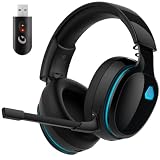
The AOC 2.4GHz Wireless Gaming Headset is a strong fit for players who want wireless Fortnite across several devices and place battery endurance near the top of the buying list. The listing identifies PS5, PS4, PC, and Switch compatibility and states a 45-hour battery claim. That gives it a useful middle ground: more flexible than a simple wired headset, but less specialized around a game-themed edition than the SteelSeries option.
A 45-hour claim is best understood as a planning figure, not a promise that every session will produce exactly the same runtime. Volume, microphone use, wireless conditions, and whether lighting or other features are active can affect endurance. Still, the difference between charging every few sessions and charging every day is meaningful. If you play two hours on school or work nights, 45 hours represents roughly 22.5 sessions before allowing for real-world variation. That is a useful reason to prefer this class of headset.
- Wireless: 2.4GHz gaming connection.
- Listed platforms: PS5, PS4, PC, and Switch.
- Battery: up to 45 hours as stated in the product listing.
- Finish: black.
- Best use: multi-platform wireless Fortnite with fewer charging interruptions.
The important compatibility question is how Switch support works in your setup. A handheld console, a docked Switch, and a Switch 2 can expose different USB and wireless requirements. Check whether the receiver can connect in the mode you plan to use and whether the headset’s microphone operates in that mode. On PC and PlayStation, a dedicated receiver is usually easier to manage than pairing menus, but it still occupies a USB port.
For positional audio, a clean stereo presentation can be enough. Fortnite supplies much of the directional information through its own mix and visual audio options. Begin with stereo, set the volume so quiet footsteps are audible without making gunfire uncomfortable, and only then investigate any surround or spatial mode supported by your device. The best setting is the one that lets you identify direction quickly without making every sound seem artificially wide.
Pros
- 45-hour battery claim is useful for frequent players and shared households.
- 2.4GHz wireless design avoids a cable across the desk or controller.
- Listed support for PS5, PS4, PC, and Switch gives it broad use.
- Neutral black styling is easier to keep when moving between different setups.
Cons
- Wireless receiver compatibility should be confirmed for the exact Switch configuration.
- Charging remains necessary, unlike a fully wired headset.
- It does not offer the Fortnite-specific identity of the Sprite Edition.
- Premium-tier pricing may exceed the needs of casual players.
The nearest alternative is the SteelSeries Arctis Nova 3 Wireless Fortnite Sprite Edition. Both target wireless gaming, but the AOC is the better recommendation when the stated 45-hour battery and listed multi-platform support are central. The SteelSeries is preferable for a player who values the Fortnite edition and wants a more premium branded option. For the lowest purchase cost, a wired Razer or JBL is simpler.
3. HyperX Cloud II – Best for wired comfort and durability

The HyperX Cloud II remains a sensible choice for Fortnite players who prefer a wired headset, memory-foam ear pads, and a durable aluminum frame. It is especially well suited to a desktop PC or a console setup where the headset cable can remain connected to the controller or console. The product listing identifies 7.1 surround sound, memory foam, an aluminum frame, and a detachable microphone, which are more meaningful day-to-day features than a vague promise of “gaming sound.”
Memory foam can help create a comfortable seal around the ears, although comfort depends on head shape, glasses, hair, and clamping pressure. The seal affects Fortnite in two ways: it can make quiet cues easier to hear at a lower volume, and it can reduce the need to turn up the headset to overcome room noise. That does not mean a closed headset blocks all sound. It means the ear cushions form a more controlled listening environment than small earbuds or an open design.
- Connection: wired gaming headset.
- Surround feature: 7.1 surround-sound support as listed.
- Comfort: memory-foam ear pads.
- Construction: durable aluminum frame.
- Microphone: detachable.
- Best use: long wired sessions on PC or console.
The detachable microphone is useful if you also use the headset for music, videos, or travel, and it makes replacement or storage easier than a permanently attached boom. The principal limitation is the cable. A wired connection has no battery anxiety, but the cable can pull on a controller, rub against a desk, or become inconvenient on a couch. Route it behind the monitor or along the side of the desk, leaving enough slack to turn your head without tension.
The 7.1 feature deserves a careful setup. Fortnite players sometimes equate more channels with better positioning, but virtual surround can change the tonal balance and add processing. Test three situations in a quiet Creative island or practice environment: a sound directly ahead, one to the side, and one behind. If stereo makes those transitions easier to identify, use stereo. If the virtual mode gives you a clearer sense of distance on your system, keep it enabled.
Pros
- Memory-foam ear pads are well suited to extended play.
- Aluminum frame gives the headset a sturdier construction class than basic plastic models.
- Detachable microphone improves storage and non-gaming flexibility.
- Wired operation eliminates charging and wireless interference concerns.
Cons
- The cable can be inconvenient for couch or handheld gaming.
- 7.1 processing is not automatically more accurate than stereo.
- Its premium-tier price may be more than needed for casual Fortnite.
- Controller and platform connection details should be checked for the exact device.
The closest alternative is the HyperX Cloud Alpha. The Cloud II is the better pick if the listed 7.1 feature is important and you want memory foam plus a detachable microphone. The Cloud Alpha is more appealing when you prefer its dual-chamber driver design and want to focus on a straightforward wired stereo experience. Both are better suited to players who value comfort and construction over wireless freedom.
4. NUBWO Wireless Headset – Best for maximum battery life

The NUBWO Wireless Headset is aimed at Fortnite players who dislike frequent charging. Its listing states a 100-hour battery claim and a 23 ms latency claim, while identifying PS5, PS4, and PC use. Those numbers make it the battery-focused option in this roundup. A player who leaves a headset at a desk for long evening sessions, or who frequently forgets to charge peripherals, can get more practical value from this model than from a premium headset with a shorter runtime.
The 100-hour figure should be treated as an upper-end usage claim rather than a guaranteed constant. Runtime changes with volume, microphone use, wireless activity, and other features. Even so, the scale is easy to understand. At three hours of Fortnite per day, 100 hours represents about 33 days of nominal play; at five hours per day, it is about 20 days. Real use may be lower, but the calculation shows why battery endurance is this model’s defining advantage.
- Connection: wireless gaming headset.
- Battery: 100-hour claim in the listing.
- Latency: 23 ms claim in the listing.
- Listed platforms: PS5, PS4, and PC.
- Microphone: included gaming microphone.
- Best use: long wireless sessions with minimal charging.
Low latency is particularly relevant in Fortnite because a footstep, weapon swap, or edit cue may arrive only briefly before an action. The listed 23 ms claim is a product specification, not a guarantee that the entire audio path will have exactly that delay. Console processing, the game, the receiver, and display timing all contribute to the experience. The more useful decision is whether you want a dedicated wireless gaming connection rather than ordinary Bluetooth audio.
Consider placement before buying. Keep the receiver in a direct or reasonably clear path to the headset, avoid hiding it behind a metal PC case, and do not place it beside a busy cluster of USB devices if you experience dropouts. If the headset sounds delayed or unstable, test the receiver on a front or extension USB port before assuming the headset is defective.
Pros
- 100-hour battery claim is the strongest endurance figure in this list.
- 23 ms latency claim directly addresses the needs of fast multiplayer games.
- Wireless freedom suits PC and PlayStation desk or couch setups.
- Useful for players who regularly forget to charge accessories.
Cons
- Listed platform coverage is narrower than some wired alternatives.
- A long battery claim does not remove the need to check charge status occasionally.
- Wireless receiver placement can affect reliability.
- Players who want a clearly defined premium materials package may prefer HyperX or SteelSeries.
The nearest alternative is the AOC 2.4GHz Wireless Gaming Headset. NUBWO wins on the stated 100-hour battery and 23 ms latency claims, while AOC offers a stated 45-hour battery and broader listed coverage including Switch. Choose NUBWO for endurance on PS5, PS4, or PC; choose AOC if Switch compatibility and a more conventional long-life wireless specification matter more.
5. Razer BlackShark V2 X – Best value for competitive play

The Razer BlackShark V2 X is the strongest value-oriented choice for players who want a recognizable competitive gaming headset without paying for wireless hardware. Its listing identifies 7.1 surround sound, 50mm drivers, memory-foam cushioning, and PC, PS4, and other platform positioning. The wired format is a feature, not merely a compromise: there is no battery to age, no receiver to lose, and no wireless charge level to monitor during a tournament.
A 50mm driver is a size class, not a guarantee of better directional accuracy. Fortnite positioning depends on the complete acoustic design, the ear-cup seal, the game mix, and your settings. The BlackShark V2 X’s more important practical qualities are the closed over-ear format, memory-foam cushion, and low-complexity wired connection. These help create a predictable setup that is easy to troubleshoot.
- Connection: wired gaming headset.
- Drivers: 50mm driver class as listed.
- Spatial feature: 7.1 surround-sound support.
- Comfort: memory-foam cushion.
- Listed use: PC, PS4, and additional gaming platforms.
- Best use: cost-conscious competitive Fortnite.
For PC players, start with the game in stereo and avoid stacking multiple spatial layers. If Windows spatial audio, a sound-card surround mode, a Razer software mode, and a game surround setting are all enabled at once, the result can become less precise rather than more immersive. Use one primary spatial system. For console play, let the console and game provide the audio processing unless you have a clear reason to change it.
The biggest limitation is mobility. A cable is ideal at a desk but less convenient on a television or handheld setup. The microphone and connector route also need to be checked against your controller. If your controller has a standard headset socket, the setup is usually simple; if you need USB controls or a particular chat balance feature, a different model may fit better.
Pros
- Strong value for a wired competitive gaming setup.
- 50mm driver class and memory-foam cushioning suit the category.
- 7.1 feature offers an optional spatial mode on compatible PC configurations.
- No battery or wireless receiver to maintain.
Cons
- Wired cable limits movement away from the desk.
- 7.1 should be configured carefully rather than enabled automatically.
- Exact platform features may vary by connection method.
- Players wanting multi-device wireless convenience should choose a wireless model instead.
Its closest alternative is the HyperX Cloud II. Choose the Razer for value, a 50mm driver class, and a lighter competitive focus. Choose the HyperX when memory foam, a detachable microphone, and an aluminum frame are worth moving into a higher price tier. The Razer is also a more economical choice than either premium wireless model if your setup is permanently at a PC.
6. Ozeino Gaming Headset – Best budget multi-platform option

The Ozeino Gaming Headset is designed for the buyer who wants a low-cost headset with broad console positioning rather than an elaborate feature set. Its listing identifies PC, PS4, PS5, and Xbox use, 7.1 surround sound, and a noise-cancelling microphone claim. That combination makes it attractive for a household with several platforms or for a new Fortnite player who needs game audio and voice chat without making a large investment.
Budget headsets need to be judged by connection practicality. Before buying, identify where Fortnite is played: a PC may accept USB or an analog headset connection; a PlayStation controller commonly uses a headset socket; Xbox compatibility can depend on the controller and connector arrangement. “For Xbox” in a listing is useful, but it does not replace checking the exact cable, adapter, or controller you own.
- Connection: wired gaming headset.
- Listed platforms: PC, PS4, PS5, and Xbox.
- Spatial feature: 7.1 surround-sound feature as listed.
- Microphone: noise-cancelling microphone claim.
- Price tier: budget.
- Best use: inexpensive multi-platform game and chat.
The noise-cancelling microphone claim should be interpreted as a category feature, not as studio-grade isolation. Mic quality is heavily influenced by distance from your mouth, microphone angle, controller chat processing, room noise, and your platform’s input level. Place the boom close to the corner of your mouth rather than directly in front of it, then lower the input gain if squadmates hear breathing, keyboard noise, or distortion.
For Fortnite audio, avoid judging this model by immersion alone. A large, exciting bass response can make explosions satisfying but mask soft footsteps or reload sounds. Use the game’s effects volume and your system volume to create headroom: loud enough to hear quiet cues, but not so loud that gunfire becomes uncomfortable. If the 7.1 mode makes voices or footsteps hollow, switch back to stereo.
Pros
- Budget-friendly route to a microphone and over-ear gaming format.
- Broad listed compatibility covers PC, PlayStation, and Xbox use.
- 7.1 feature provides an optional spatial mode where supported.
- Noise-cancelling microphone claim targets squad-chat environments.
Cons
- Budget construction and comfort should not be compared with premium aluminum-frame models.
- Exact console connection requirements need checking before purchase.
- Virtual surround may be less useful than a well-configured stereo mode.
- Wired operation is less convenient for television or couch gaming.
The nearest alternatives are the NUBWO HG04L and BENGOO G9000. Ozeino is the better budget pick if the listed 7.1 feature and broad PS5/Xbox positioning matter. NUBWO is the simpler choice if you want a budget multi-console headset without prioritizing the surround feature. BENGOO is the better fit when PS4, PC, Xbox One, PS5, and controller use are the main requirements at the lowest tier.
7. PowerA Wired Stereo Headset Fortnite Llambro – Best for Nintendo Switch

The PowerA Wired Stereo Headset Fortnite Llambro is the natural choice for a Fortnite player whose primary platform is Nintendo Switch or Switch 2 and who wants an officially themed accessory. The listing identifies a wired stereo design, Fortnite Llambro branding, official licensing, support for Nintendo Switch and Switch 2, and bonus visual content. Those details are more relevant here than a surround-sound headline because Nintendo handheld play rewards simple plug-in operation and low setup friction.
Stereo is not a weakness for Switch Fortnite. The game can provide directional cues through a stereo headset, and a wired connection avoids the battery and receiver questions that can complicate portable play. The key limitation is physical: the cable must remain connected while the console is handheld or docked. Keep enough slack for your preferred posture, but avoid excessive cable length that can snag on a case, chair, or charging cable.
- Connection: wired stereo.
- Platform: Nintendo Switch and Switch 2 as listed.
- Design: Fortnite Llambro theme.
- Licensing: officially licensed Fortnite product.
- Included extra: bonus visual content is listed.
- Best use: portable or docked Switch Fortnite.
For a handheld player, comfort and cable placement may matter more than software surround. A headset that sits securely without pressing the glasses arms or becoming heavy after an hour is easier to use. If the headset is shared with a phone or another console, confirm the connector arrangement and microphone behavior. The listing’s stated Switch compatibility should be the starting point, but accessories can behave differently in handheld and docked configurations.
Choose the game’s stereo audio first. Raise effects enough to hear environmental cues, keep voice chat intelligible, and avoid turning up the entire system to compensate for a poor seal around the ears. If you play in a noisy room, a snug over-ear fit can help; if you play near other people, remember that closed ear cups may reduce awareness of conversation and doorbells.
Pros
- Directly suited to Nintendo Switch and Switch 2 use.
- Official Fortnite Llambro design appeals to themed setups.
- Wired stereo keeps portable configuration simple.
- Bonus visual content adds value for Fortnite-focused buyers.
Cons
- Its platform focus makes it less universal than a PC, PlayStation, and Xbox headset.
- Wired operation can be awkward if you prefer wireless couch gaming.
- Stereo does not provide the optional 7.1 feature listed by several alternatives.
- Players who do not want Fortnite branding may prefer a neutral model.
The nearest alternative is the AOC 2.4GHz Wireless Gaming Headset. AOC is better for a multi-platform household and a cable-free setup, while PowerA is the more direct recommendation for Switch and Switch 2 owners who value official Fortnite design and simple stereo operation. For PC or PlayStation-first players, the Razer or HyperX models offer a more natural fit.
8. NUBWO HG04L – Best budget multi-console wired headset

The NUBWO HG04L is a practical budget recommendation for households that use more than one console generation. Its listing names PS5, PS4, Xbox Series X|S, Xbox One, and Switch, giving it one of the broadest platform ranges in the roundup. It is a good choice when the priority is a basic headset that can move among consoles without paying for wireless hardware or premium materials.
Multi-platform compatibility is only useful if the physical connection fits each device. Console controllers may use different headset sockets, and Switch use can mean handheld or docked play. Before buying, inspect the cable and connector information, then consider whether you need a splitter for a PC with separate microphone and headphone ports. A one-cable controller setup is usually less complicated than a desktop setup with two separate audio jacks.
- Connection: wired gaming headset.
- Listed platforms: PS5, PS4, Xbox Series X|S, Xbox One, and Switch.
- Microphone: gaming microphone included in the headset format.
- Price tier: budget.
- Best use: inexpensive multi-console game chat.
In Fortnite, a simple stereo headset can do the fundamental job: reproduce game effects, deliver voice chat, and let you react to nearby movement. Do not buy this class of model expecting the isolation, frame stiffness, or cushion longevity of a premium headset. Instead, treat it as a low-risk starting point or a spare headset for a second console.
To improve results, set the microphone input conservatively. If teammates report that your voice is quiet, move the microphone closer before raising gain. If they hear room noise, lower the input level and reduce the distance between your mouth and the microphone. The best adjustment is usually microphone placement, not maximum volume.
Pros
- Very broad listed console compatibility.
- Budget price tier suits first-time buyers and spare setups.
- Wired design avoids battery charging and wireless pairing.
- Useful for shared households with both PlayStation, Xbox, and Switch systems.
Cons
- Budget materials may not match the comfort or durability of HyperX models.
- Exact cable and adapter requirements should be confirmed for PC.
- No stated long-life battery or premium wireless convenience.
- Players seeking an advanced spatial-audio package may prefer another model.
Its closest alternative is the Ozeino Gaming Headset. NUBWO HG04L wins on the breadth of the specifically listed console generations. Ozeino is more attractive if its 7.1 feature and noise-cancelling microphone claim matter more. If you mainly play on PC, the Razer BlackShark V2 X is a more focused upgrade; if you need a Switch-themed product, choose PowerA.
9. JBL Quantum 100M2 – Best budget JBL option

The JBL Quantum 100M2 is a budget wired gaming headset for buyers who want a straightforward product from an established audio brand. Its listing identifies a detachable microphone and black finish. Those two details shape the recommendation: it is most useful for players who want a simple game-and-chat headset that can be stored or used without the microphone attached.
A detachable microphone is valuable in a mixed-use space. Remove it when watching videos or listening to music, store it without bending the boom, and attach it again for Fortnite squad chat. The trade-off is that the microphone becomes a separate small part that can be misplaced. Keep it in the same case or drawer as the headset rather than leaving it beside the console.
- Connection: wired gaming headset.
- Microphone: detachable microphone.
- Finish: black.
- Price tier: budget.
- Best use: uncomplicated wired gaming and voice chat.
The JBL name should not be interpreted as a guarantee that this headset will sound identical to JBL speakers or headphones. Gaming headsets are tuned and connected differently from general audio products. For Fortnite, focus on whether you can identify quieter effects and whether the microphone is clear to teammates. If the sound is too bass-heavy, lower any bass enhancement before increasing overall volume.
Because this is a wired model, cable management is part of the setup. On PC, check whether your system uses a combined headset jack or separate audio and microphone ports. On a controller, a combined headset connection is often simpler. If you hear buzzing, move the cable away from power bricks and test another controller or port before changing software settings.
Pros
- Budget entry point from the JBL Quantum gaming range.
- Detachable microphone improves storage and non-gaming use.
- Black finish is neutral for a desk or console setup.
- Wired format avoids charging and pairing.
Cons
- The listing does not make it the best choice for wireless or multi-device freedom.
- Users must keep track of the detachable microphone.
- Budget construction may be less substantial than the HyperX aluminum-frame options.
- Players wanting a listed 7.1 feature should compare the Razer, HyperX Cloud II, or Ozeino.
The nearest alternatives are the BENGOO G9000 and Razer BlackShark V2 X. JBL is the better pick if the detachable microphone and established audio-brand positioning matter. BENGOO targets the lowest-cost basic multi-platform setup, while Razer is the better step up for players who want memory foam, a 50mm driver class, and a more competitive-focused design.
10. HyperX Cloud Alpha – Best for dual-chamber wired audio

The HyperX Cloud Alpha is a mid-range wired headset for Fortnite players who want a durable aluminum frame, detachable microphone, memory-foam comfort, and a dual-chamber driver design. The dual-chamber approach is intended to separate bass from mids and highs within the driver system. That is a design feature, not a benchmark result, but it gives the Cloud Alpha a clearer reason to choose it over a generic wired headset.
For Fortnite, separation can matter when multiple sounds arrive together: a weapon firing, a build being placed, a teammate speaking, and a nearby movement cue may overlap. The headset cannot create information that the game does not provide, and no driver design removes poor game mixing. It can, however, offer a presentation that some players find easier to manage than a congested or overly bass-heavy budget headset.
- Connection: wired gaming headset.
- Driver design: dual-chamber drivers.
- Frame: aluminum frame.
- Comfort: memory-foam ear pads associated with the Cloud design.
- Microphone: detachable.
- Best use: durable mid-range wired gaming.
The Cloud Alpha is a good long-term choice when you play mainly at a desk and do not want to replace a battery later. The cable is still the main source of inconvenience. Route it so it does not pull on the headset, and inspect the plug if one side begins cutting out. Intermittent audio is often caused by a partially inserted connector or cable strain rather than a Fortnite setting.
Use stereo as your baseline. If you enable console spatial audio or PC virtualization, change one setting at a time and test the same directional sounds. Keeping a short note of which mode you used can prevent a common problem: changing several controls at once and then being unable to identify what helped.
Pros
- Dual-chamber driver design gives it a distinct audio-engineering feature.
- Aluminum frame supports a more durable construction class.
- Memory-foam comfort suits long sessions.
- Detachable microphone is convenient for storage and general listening.
Cons
- Wired connection is less convenient for couch and handheld play.
- It lacks the wireless freedom and battery convenience of the SteelSeries, AOC, and NUBWO wireless options.
- Dual-chamber drivers do not guarantee better footsteps for every listener.
- Its mid-range price may be unnecessary for an occasional player.
The closest alternative is the HyperX Cloud II. Cloud Alpha is the better choice when dual-chamber drivers and a mid-range price are priorities. Cloud II is preferable if you specifically want the listed 7.1 feature and do not mind moving into a higher price tier. Both beat a basic model for construction and comfort, while the Razer remains a more budget-conscious competitor.
11. FIFINE H13BP – Best for USB game/chat balance

The FIFINE H13BP is a wired USB gaming headset aimed at players who want a computer-style connection and a dedicated game/chat balance feature. Its listing identifies PC, PS4/PS5, and Mac support, along with game/chat balance. That makes it particularly interesting for a desk setup where voice communication is as important as game audio and where USB is more convenient than an analog controller connection.
Game/chat balance is useful because Fortnite players often need to hear a squadmate without losing awareness of nearby movement. A practical starting point is to keep game audio at 70 percent of your comfortable maximum and chat at 30 percent, then adjust by situation. If teammates are too loud, reduce chat rather than raising game volume; preserving headroom helps prevent gunfire and other effects from becoming harsh.
- Connection: wired USB.
- Listed platforms: PC, PS4/PS5, and Mac.
- Control feature: game/chat balance.
- Microphone: included USB gaming-headset microphone.
- Price tier: premium in this comparison.
- Best use: desk-based game and voice-chat control.
USB changes the setup compared with a traditional analog headset. The headset may appear as its own audio device, so select it explicitly in the operating system and in Fortnite. On PC, disable automatic switching between speakers and headset if it causes chat to move to the wrong output. On PS4 or PS5, verify that USB audio output and microphone input are selected, then run the console’s microphone level test.
The main limitation is portability. USB is excellent for a desktop or console dock but is not as convenient as a controller plug for a handheld device. It also occupies a USB port. If your PC has several USB accessories, use a reliable motherboard or powered hub connection and avoid overloading an unpowered hub with many high-draw devices.
Pros
- USB connection is well suited to PC and desk-based console setups.
- Game/chat balance directly addresses squad communication.
- Listed support includes PC, PS4/PS5, and Mac.
- Useful option for players who prefer digital audio controls over an analog cable.
Cons
- USB is less convenient for handheld and controller-based play.
- It uses a port and may require operating-system output selection.
- Premium-tier classification makes it expensive compared with basic analog headsets.
- USB controls cannot compensate for poor microphone placement or an incorrect input level.
The nearest alternative is the HyperX Cloud II. Choose FIFINE when game/chat balance and USB are central to your setup. Choose HyperX when you want memory foam, an aluminum frame, and a detachable microphone in a more conventional wired format. If you want to eliminate cables entirely, the AOC or NUBWO wireless options are more appropriate.
12. BENGOO G9000 – Best lowest-cost basic headset

The BENGOO G9000 is the entry-level choice for a buyer who needs a basic over-ear gaming headset with a microphone and broad platform positioning. Its listing names PS4, PC, Xbox One, PS5, and controller use, and identifies a stereo, noise-cancelling over-ear format. This makes it suitable as a first Fortnite headset, a spare for a second console, or a low-cost solution for a player who is not ready to invest in wireless or premium construction.
The word “stereo” is important. Fortnite does not require a branded 7.1 feature to provide directional information. Stereo can deliver left-right positioning and, with a well-tuned game mix, useful front-to-back cues. The headset’s fit, ear seal, and your platform’s processing will affect the result more than the label alone. Keep expectations aligned with the budget tier: the purpose is functional game audio and voice chat, not a premium materials experience.
- Connection: wired stereo headset.
- Format: over-ear gaming headphones.
- Microphone: noise-cancelling microphone claim.
- Listed platforms: PS4, PC, Xbox One, PS5, and controller use.
- Best use: lowest-cost basic Fortnite setup.
Before ordering, check whether your PC needs a combined headset jack or a splitter. On a controller, confirm that the plug is fully seated. If the microphone sounds quiet, position it close to the mouth and raise input sensitivity gradually. If the headset is too loud, reduce the platform volume before increasing individual Fortnite effects.
A useful budget strategy is to spend time on settings rather than immediately replacing the headset. Use stereo, keep music lower than effects, make voice chat audible without overpowering game audio, and enable visual audio indicators only if they help rather than distract you. These changes can improve awareness without changing hardware.
Pros
- Very accessible entry point for Fortnite game audio and chat.
- Broad listed PS4, PC, Xbox One, PS5, and controller positioning.
- Over-ear stereo format is simple to configure.
- Noise-cancelling microphone claim suits basic squad communication.
Cons
- Budget construction should not be expected to match aluminum-frame models.
- Wired operation limits movement away from a controller or desk.
- No stated long battery, USB game/chat balance, or dedicated 2.4GHz wireless feature.
- Players seeking a more refined competitive setup should step up to the Razer.
The closest alternatives are the NUBWO HG04L and JBL Quantum 100M2. BENGOO is the strongest choice when broad basic platform coverage and low cost are the entire objective. NUBWO is preferable if its listed console range better matches your household, while JBL is the better pick if a detachable microphone and branded budget design matter more.
How to Choose
Start with the platform and connection
The best gaming headset for Fortnite is first a headset that actually connects to your device. PC players usually have the widest choice: analog headset connections, USB headsets, and dedicated wireless receivers may all be available. Console users need to think about the controller, console USB ports, and whether they play docked or handheld. A headset listed for several platforms may still need a particular adapter or connection mode.
For a desk PC, wired analog is the simplest low-maintenance choice. The Razer BlackShark V2 X, HyperX Cloud II, HyperX Cloud Alpha, JBL Quantum 100M2, and BENGOO G9000 all fit the general wired category, with their specific listed features determining which is most attractive. USB models such as the FIFINE H13BP can be convenient when you want digital controls and game/chat balance, but they occupy a port and require correct operating-system selection.
For a television or couch setup, wireless is usually more comfortable. The SteelSeries, AOC, and NUBWO wireless choices avoid a cable running from your head to a controller or console. Dedicated 2.4GHz models are generally the gaming-oriented option, but verify receiver compatibility. If you play Switch in handheld mode, a simple wired model may be less complicated than a receiver-based wireless setup.
Choose wired versus wireless by your routine
Wired headsets have three major advantages: no charging, no wireless receiver, and no battery that gradually loses capacity. A two-hour Fortnite session costs no additional planning. If you sit at one desk and can route the cable safely, wired is often the best value.
Wireless headsets earn their premium through convenience. Calculate your likely charging burden before paying for it. Suppose you play three hours per evening, five evenings per week. That is 15 hours per week, or about 60 hours per four-week month. A headset with a stated 45-hour battery could require roughly one full charge every three-quarters of a month of that pattern, while a 100-hour claim could theoretically cover more than six weeks. Actual runtime varies, but the calculation shows how much battery capacity matters for your routine.
Wireless also introduces failure points: a missing receiver, a depleted battery, interference, or a platform that does not accept the adapter in the way you expect. If you regularly move between PS5, Xbox, Switch, and PC, compare the exact listed platform support instead of assuming one wireless standard works everywhere.
Prioritize comfort for the length of your sessions
Comfort is not a luxury in Fortnite. If a headset becomes hot, presses your glasses, or creates a painful clamp after 45 minutes, you may turn it down, remove it, or stop using it. Over-ear memory foam, used by the HyperX Cloud II and identified in the Razer listing through its memory-foam cushion, can help distribute pressure and create a more consistent seal. It is not automatically comfortable for every head, however.
Measure the practical fit rather than focusing only on the driver diameter. The ear opening should sit inside the cushion rather than on the ear. If your ears touch the driver cover, fatigue may develop quickly. If you wear glasses, thick frames can break the seal and allow room noise in; a slightly softer cushion may work better than a very firm one. Hair, earrings, and head shape also change the fit.
Materials affect long-term use. An aluminum frame, as listed for the HyperX Cloud II and Cloud Alpha, belongs to a more durable construction class than a lightweight budget frame. That does not mean it cannot break, and a metal frame may add weight. A budget headset can still be a sensible choice if it is treated as a spare or used for shorter sessions.
Understand what surround sound can and cannot do
Several products in this list advertise 7.1 surround sound: HyperX Cloud II, Razer BlackShark V2 X, and Ozeino. In gaming headsets, that commonly means virtual processing rather than eight separate physical speaker channels around your head. Virtual processing can make games feel wider, but it may also change tonal balance or make front and rear cues less natural.
Use this three-step comparison:
- Set the headset to stereo and enter a quiet practice area.
- Have a consistent sound move from left to right, then front to back, while you keep volume moderate.
- Enable one surround or spatial mode and repeat the same test without changing volume.
Keep the mode that makes direction easiest to identify. Do not enable multiple layers at once. For example, combining a headset’s virtual 7.1, Windows spatial audio, console 3D audio, and an in-game surround option can produce echo, hollow voices, or an exaggerated sense of distance. One well-configured spatial layer is easier to evaluate and troubleshoot.
Set Fortnite audio for information, not maximum loudness
More volume is not more awareness. Loud gunfire can mask footsteps and make longer sessions tiring. Begin with master volume at a comfortable level, keep music lower than effects, and make voice chat strong enough to understand without covering nearby game cues. Exact percentages vary by platform, but a useful starting arrangement is effects around 80 to 100 percent, music around 20 to 40 percent, and voice chat around 50 to 70 percent. Adjust in small steps.
On PC, select the headset as both output and input in Fortnite and in the operating system. If you use USB, check that the USB headset is not selected for output while the controller microphone remains selected for input. If you use analog audio, confirm that the plug is fully inserted and that the microphone is not muted by a physical switch.
Use Fortnite’s visual audio option according to your preference. It can provide an additional visual cue, but it may also clutter the screen and encourage you to watch indicators instead of reading the environment. Audio remains valuable because it can signal direction and timing before you can see the source.
Choose microphone features based on your squad
A detachable microphone, listed on the HyperX Cloud II, HyperX Cloud Alpha, and JBL Quantum 100M2, is useful for storage and general listening. A permanently attached boom can be harder to damage or lose, but it takes up space when you are not gaming. A noise-cancelling microphone claim, such as those associated with the BENGOO and Ozeino listings, is useful in principle but does not replace correct placement.
Put the microphone about two finger-widths from the corner of your mouth. Point it slightly to the side to reduce breath pops. Speak at your normal gaming volume and ask a teammate whether they hear keyboard clicks or room noise. Lower input gain if they do; do not solve a noisy signal by moving the microphone farther away, because that often makes you speak louder and raises the noise floor.
For team-heavy play, game/chat balance can be more useful than surround sound. The FIFINE H13BP specifically lists this feature. It lets you quickly make a teammate louder or quieter relative to Fortnite without opening several menus. If you play solo or rarely use voice chat, do not pay a substantial premium solely for that control.
Think about latency and wireless reliability
Fortnite benefits from timely sound, but a headset’s latency claim does not describe the whole gaming system. The NUBWO wireless listing states 23 ms, and dedicated 2.4GHz products are intended for gaming. The full path includes the game engine, console or PC audio processing, wireless transmission, headset conversion, and your display for visual synchronization.
To improve wireless reliability, place the receiver where it has a clear path to the headset, avoid hiding it behind a metal computer chassis, and test a front or extension USB position if you hear dropouts. Keep firmware and platform software current when the manufacturer provides an official update path. If the headset works near the console but not at the couch, distance and obstruction are more likely causes than Fortnite settings.
Use price tiers intelligently
Budget does not mean unusable. The BENGOO G9000, Ozeino, NUBWO HG04L, and JBL Quantum 100M2 can cover game audio and squad chat for a new player or secondary setup. Buy budget when you play occasionally, are unsure whether you like over-ear headsets, or need several headsets for a household.
Mid-range is the value sweet spot for many players. The Razer BlackShark V2 X offers a focused wired competitive option, the NUBWO wireless model emphasizes battery life, and the HyperX Cloud Alpha offers a stronger construction and driver design package. This tier is where paying more can deliver a noticeable improvement in convenience or longevity without requiring a premium wireless budget.
Premium makes sense when the feature is used frequently. Choose SteelSeries or AOC when wireless freedom is central. Choose HyperX Cloud II when comfort and a durable wired frame matter. Choose FIFINE when USB game/chat control matches your desk. Do not choose premium merely because a product lists a larger driver or surround sound; match the expenditure to a specific problem you need solved.
Use this decision matrix
| Your situation | Best match | Why |
|---|---|---|
| You want premium wireless Fortnite styling | SteelSeries Arctis Nova 3 Wireless Fortnite Sprite Edition | Fortnite-themed edition and 2.4GHz wireless gaming format |
| You need wireless across PS5, PS4, PC, and Switch | AOC 2.4GHz Wireless Gaming Headset | Those platforms are listed, along with a 45-hour battery claim |
| You forget to charge peripherals | NUBWO Wireless Headset | 100-hour battery claim and 23 ms latency claim |
| You play mainly at a PC and want value | Razer BlackShark V2 X | Wired simplicity, memory foam, 50mm driver class, and 7.1 feature |
| You want a durable wired headset | HyperX Cloud II or Cloud Alpha | Aluminum frames, memory foam, and detachable microphones |
| You play Switch or Switch 2 most often | PowerA Wired Stereo Headset Fortnite Llambro | Listed Switch support, official Fortnite design, and simple stereo |
| You need the broadest budget console coverage | NUBWO HG04L | PS5, PS4, Xbox Series X|S, Xbox One, and Switch are listed |
| You need the lowest-cost basic setup | BENGOO G9000 | Budget wired stereo format and broad listed platform positioning |
| You want USB game/chat controls | FIFINE H13BP | USB connection and listed game/chat balance feature |
Frequently Asked Questions
What is the best gaming headset for Fortnite overall?
The SteelSeries Arctis Nova 3 Wireless Fortnite Sprite Edition is the best overall choice for players who want premium wireless convenience and Fortnite-specific styling. The Razer BlackShark V2 X is a better value choice if you prefer a wired headset and want to spend less.
Is wireless or wired better for Fortnite?
Both can work well. Wired headsets remove charging and receiver concerns, while 2.4GHz wireless models provide more freedom around a desk or television. Choose wired for maximum simplicity and value; choose wireless when cable movement is a daily annoyance.
Does 7.1 surround sound help hear footsteps?
It can help some players, but it is not automatically better than stereo. Test stereo and one virtual surround mode with the same Fortnite sounds, and keep the setting that makes direction easiest to identify without echo or hollow voices.
What is the best budget Fortnite headset here?
The Razer BlackShark V2 X is the best budget-conscious competitive choice if its mid-range price is acceptable. At the lowest tier, the BENGOO G9000 is a practical basic option, while the Ozeino and NUBWO HG04L are better when their listed multi-platform features match your devices.
Which headset is best for Nintendo Switch Fortnite?
The PowerA Wired Stereo Headset Fortnite Llambro is the most direct choice because it is listed for Nintendo Switch and Switch 2 and has an official Fortnite design. The AOC wireless model is worth considering when you also want to use the headset on PS5, PS4, and PC.
How long does a wireless Fortnite headset battery last?
Battery life depends on volume, microphone use, connection conditions, and features. In this roundup, the AOC listing states 45 hours and the NUBWO wireless listing states 100 hours, but actual runtime can vary from those maximum-style claims.
Why can my teammates hear my game through the microphone?
Lower the microphone input level, move the microphone closer to your mouth, and reduce headset volume if sound is leaking from the ear cups. On PC, confirm that the correct microphone is selected and that any software monitoring or virtual audio loop is disabled.
Can I use a PC headset on PS5, Xbox, or Switch?
Only if the connector and platform support match. Check whether the headset is analog, USB, or dedicated wireless, then verify the exact console and controller arrangement; broad wording in a product title does not guarantee every feature works identically on every platform.
Final Recommendations
Choose the SteelSeries Arctis Nova 3 Wireless Fortnite Sprite Edition if you want the most complete premium wireless Fortnite experience and appreciate the themed design. Choose the AOC 2.4GHz Wireless Gaming Headset for long battery life with broad listed PS5, PS4, PC, and Switch coverage. Choose the NUBWO wireless model when its 100-hour claim and 23 ms claim address your biggest problem: charging and delay concerns.
For wired value, the Razer BlackShark V2 X is the easiest recommendation. The HyperX Cloud II and Cloud Alpha are better for players who prioritize comfort and a stronger frame, while the FIFINE H13BP is the specialist choice for USB game/chat balance. Switch players should choose the PowerA Fortnite Llambro headset; budget multi-console buyers should compare the NUBWO HG04L, Ozeino, JBL Quantum 100M2, and BENGOO G9000 according to their connector and microphone needs.


