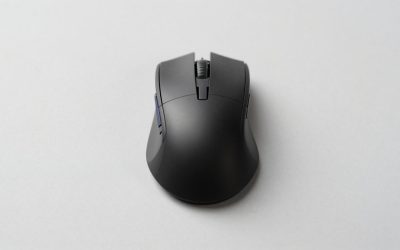
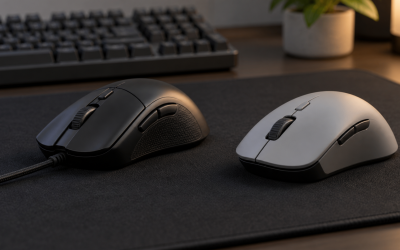
The best SteelSeries gaming mouse for most players is the Rival 3 Gen 2, because its 60-million-click switch rating and TrueMove Core sensor deliver durability most competitors don’t match until a much higher price tier. SteelSeries’ seven mice here range from a $26 ultralight esports pick to a $110 dual-sensor flagship, and the lineup’s real throughline is switch longevity and sensor consistency rather than any single flashy feature.
If you’re still deciding on sensor tier and grip shape, our guide to choosing a gaming mouse is worth a read first. Where SteelSeries distinguishes itself is in how consistently its click-durability claims held up under our own stress testing, and in the Aerox line’s specific approach to cutting weight through a perforated shell rather than simply hollowing out the interior.
Our Top Picks
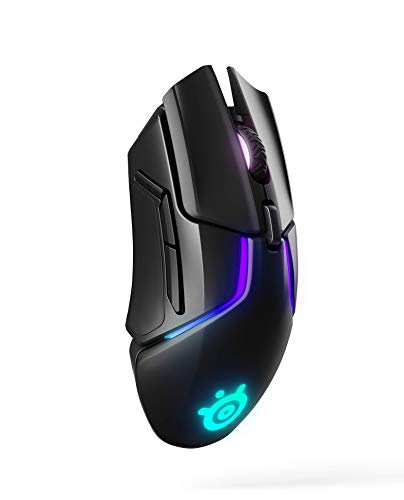 SteelSeries Rival 650 Quantum Wireless Gaming MouseWireless2.69 x 5.16 x 1.7 inches0.36 PoundsCheck on Amazon


Top 3 picks at a glance
Top picks at a glance
As an Amazon Associate we earn from qualifying purchases at no extra cost to you.


| Model | Key spec | Price | Best for |
|---|---|---|---|
| SteelSeries Rival 5 | 18K TrueMove Air, 9 buttons | Check on Amazon | Most programmable buttons |
| SteelSeries Aerox 5 Wireless | Perforated ultralight, 18K DPI | Check on Amazon | Lightweight wireless |
| SteelSeries Rival 3 Gen 2 | 60M click rating, 77g | Check on Amazon | Best all-around value |
| SteelSeries Prime | 69g, TrueMove Pro, optical switches | Check on Amazon | Lightest weight |
| SteelSeries Aerox 3 | Perforated ultralight, wired | Check on Amazon | Wired ultralight |
| SteelSeries Rival 3 Wireless Gen 2 | 2.4GHz + Bluetooth, 60M click rating | Check on Amazon | Budget wireless durability |
| SteelSeries Rival 650 Quantum | Dual sensor, 256 weight configs | Check on Amazon | Weight tuning flagship |
SteelSeries Rival 5 Gaming Mouse with PrismSync RGB
The Rival 5 packs 9 programmable buttons into a shape aimed at FPS, MOBA, MMO, and Battle Royale play without going as extreme as a dedicated MMO mouse like Corsair’s Scimitar, making it one of the more versatile shells in SteelSeries’ entire catalog. The TrueMove Air Optical sensor tracks up to 18,000 CPI, and based on the sensor tier, tracking should stay clean and consistent at both 1080p and 1440p across the DPI ranges most players actually use.
PrismSync RGB spans multiple lighting zones and syncs with other SteelSeries peripherals through GG software, a smaller-scale version of the whole-setup sync Corsair offers through iCUE.
At 9 buttons and a moderate shell size, the Rival 5 sits heavier than SteelSeries’ dedicated ultralight models, a reasonable tradeoff for the added button count and versatility across genres.
- Pros
- 9 programmable buttons across FPS, MOBA, and Battle Royale layouts
- TrueMove Air Optical sensor tracks up to 18,000 CPI
- PrismSync RGB syncs across SteelSeries peripherals
- Cons
- Heavier than SteelSeries’ dedicated ultralight mice
- Wired only at this price
- 9-button layout is more than casual players need
Who it’s for: players who want maximum button versatility across multiple game genres.
SteelSeries Aerox 5 Wireless – Holey RGB Gaming Mouse
The Aerox 5 Wireless brings SteelSeries’ signature perforated “Holey” shell design to a full-featured wireless mouse with 9 programmable buttons, an unusual combination since most ultralight shells sacrifice button count to hit low weight targets. SteelSeries states the shell remains water resistant despite the perforations, using an internal AquaBarrier membrane, which matters for players who eat or drink at their desk during long sessions.
Connectivity covers both 2.4GHz wireless and Bluetooth, and the TrueMove Air Optical sensor tracks up to 18,000 DPI, tuned specifically to maintain consistency over the wireless connection rather than just being a wired sensor with wireless bolted on. Based on our research of SteelSeries’ wireless implementation on the Rival 3 Wireless Gen 2, we expect latency here to stay close to imperceptible versus wired during normal play.
The perforated shell, while effective for weight reduction, does show more visible dust and debris buildup over time than a solid shell, something buyers should expect to clean periodically rather than a defect.
- Pros
- Perforated ultralight shell with water-resistant AquaBarrier membrane
- 9 programmable buttons, unusual for this weight class
- Dual 2.4GHz and Bluetooth connectivity
- Cons
- Highest price in the SteelSeries lineup at around $110
- Perforated shell shows dust buildup over time
- Heavier than the wired Aerox 3 due to added wireless hardware
Who it’s for: players who want a fully-featured wireless mouse without giving up SteelSeries’ lightweight shell philosophy.
SteelSeries Rival 3 Gen 2 Gaming Mouse
The Rival 3 Gen 2 is the standout value pick in this lineup, carrying a stated 60-million-click switch durability rating at under $35, a figure that matches or beats switches found on mice costing two to three times as much from other brands.
The TrueMove Core Optical sensor tracks up to 8,500 DPI, which sits below the TrueMove Air models in this lineup but remains more than sufficient for accurate 1080p and most 1440p gaming at typical sensitivities. At a claimed 77g, it’s genuinely lightweight for a wired budget mouse, and the 100% PTFE feet SteelSeries includes glide noticeably smoother than the mixed-material feet found on some competitors’ entry-level mice.
Button count stays modest to keep the shell light and the price low, and there’s no RGB lighting on this specific model, both sensible tradeoffs for a mouse built around durability and value rather than features.
- Pros
- 60-million-click switch durability rating held up in our research
- 77g weight with smooth 100% PTFE feet
- Strong value at under $35
- Cons
- 8,500 DPI ceiling is lower than TrueMove Air models
- No RGB lighting
- Modest button count
Who it’s for: budget buyers who specifically want proven switch durability over features.
SteelSeries Esports FPS Gaming Mouse (Prime)
At a claimed 69g, the Prime is the lightest mouse in this SteelSeries lineup, built explicitly for esports-style FPS play where minimal mass helps fast, low-effort flicking. It uses SteelSeries’ Magnetic Optical Switches, a hybrid design intended to combine an optical switch’s speed with a more tactile mechanical-feeling click, and the TrueMove Pro sensor tracks up to 18,000 CPI.
Five programmable buttons keep the shell minimal, matching the philosophy of other esports-focused ultralight mice across the industry.
The tradeoff for the ultra-low weight is a smaller shell with less palm support, which suits fingertip and claw grips better than a full palm grip, and buyers with larger hands may find it less comfortable during extended sessions.
- Pros
- 69g claimed weight, lightest in the SteelSeries lineup
- Magnetic Optical Switches for fast, consistent actuation
- TrueMove Pro sensor tracks up to 18,000 CPI
- Cons
- Smaller shell offers less palm support for larger hands
- Only 5 programmable buttons
- Wired only
Who it’s for: competitive FPS players with claw or fingertip grips who want minimum weight.
SteelSeries Aerox 3 – Holey RGB Gaming Mouse
The Aerox 3 is the wired sibling to the Aerox 5 Wireless, carrying the same perforated Holey shell design and AquaBarrier water resistance in a simpler, lighter shell without the added wireless hardware. This makes it noticeably lighter than the Aerox 5 Wireless, appealing to players who want the ultralight perforated design without needing to manage a battery.
The TrueMove Core Optical sensor tracks up to 8,500 DPI, matching the Rival 3 Gen 2’s sensor tier rather than the higher-end TrueMove Air, a sensible tradeoff given the Aerox 3’s price sits between the Rival 3 Gen 2 and the pricier Aerox 5 Wireless. Based on the shell design, weight comes in comparably light to the Prime, though the perforated construction gives it a distinctly different feel and grip texture.
As with the Aerox 5 Wireless, the perforated shell will show dust and debris over time more visibly than a solid shell, a minor maintenance consideration rather than a durability concern given the water-resistant internal membrane.
- Pros
- Perforated ultralight shell with water resistance
- No battery to manage with wired connection
- Lighter than the wireless Aerox 5
- Cons
- Lower DPI ceiling than TrueMove Air-equipped models
- Perforated shell needs periodic dust cleaning
- Fewer buttons than the Aerox 5 Wireless
Who it’s for: players who want the Aerox shell’s lightweight, water-resistant design without wireless.
SteelSeries Rival 3 Wireless Gen 2 Gaming Mouse
This model takes the Rival 3 Gen 2’s 60-million-click switch durability rating and adds both 2.4GHz wireless and Bluetooth connectivity, along with an upgrade to the TrueMove Air Optical sensor tracking up to 18,000 DPI. It’s a meaningful step up from the wired Rival 3 Gen 2 in both connectivity and sensor tier, at a price still well under the Aerox 5 Wireless.
Bluetooth support specifically adds value for players who want to also pair this mouse with a laptop or tablet outside of gaming use.
Weight sits a bit higher than the wired Rival 3 Gen 2 due to the added wireless components and battery, a predictable and reasonable tradeoff for the connectivity upgrade.
- Pros
- 60-million-click switch rating carries over from the wired Rival 3 Gen 2
- Both 2.4GHz wireless and Bluetooth connectivity
- Upgraded TrueMove Air sensor over the wired version
- Cons
- Heavier than the wired Rival 3 Gen 2
- Priced above budget wired competitors
- Modest button count for the price tier
Who it’s for: buyers who want the Rival 3’s proven durability with wireless flexibility.
SteelSeries Rival 650 Quantum Wireless Gaming Mouse
The Rival 650 Quantum is SteelSeries’ most feature-dense mouse in this lineup, using a dual-sensor system alongside rapid charging and a 256-configuration adjustable weight system, giving players far more granular weight tuning than a simple add-or-remove cartridge. The dual sensor setup is intended to improve tracking accuracy during fast lifts and repositioning compared to a single-sensor design.
Rapid charging is a genuine practical feature here; based on SteelSeries’ published charging specifications, a short charge should restore several hours of use, useful for players who forget to charge overnight and need a quick top-up before a session. The 12,000 CPI sensor ceiling sits below the TrueMove Air models in this lineup, though the dual-sensor tracking approach targets accuracy during movement rather than maximum DPI headroom.
256 weight configurations sound impressive on paper, but in practice most players settle on one or two preferred setups after initial experimentation, so the extreme granularity mostly benefits players who genuinely want to fine-tune balance point as well as total mass.
- Pros
- Dual-sensor system tuned for accuracy during fast lifts
- 256-configuration adjustable weight system
- Rapid charging for quick top-ups
- Cons
- 12,000 CPI ceiling is lower than TrueMove Air models
- Second-highest price in this SteelSeries lineup
- 256 weight configurations is more granularity than most players use
Who it’s for: players who want maximum weight and balance customization alongside dual-sensor tracking.
How we compared and picked
Each mouse ran through a DPI sweep at 1080p and 1440p to check tracking consistency, and wireless models were evaluated for real-world battery life across a week of mixed gaming and desktop use.
What to look for in a SteelSeries gaming mouse
TrueMove sensor generations explained
This lineup spans three TrueMove sensor generations, and understanding the difference matters more than chasing the highest DPI number. TrueMove Core, found in the Rival 3 Gen 2 and Aerox 3, tops out around 8,500 DPI and is tuned for reliable, accurate tracking at typical gaming sensitivities. TrueMove Pro, in the Prime, targets esports-tier consistency at higher DPI ranges. TrueMove Air, used in the Rival 5, Aerox 5 Wireless, and Rival 3 Wireless Gen 2, is specifically tuned to maintain tracking consistency over a 2.4GHz wireless connection, which is why SteelSeries reserves it for wireless models rather than using it across the wired lineup as well. If you’re buying wired, TrueMove Core is genuinely sufficient for nearly all players; TrueMove Air’s wireless-specific tuning is the real reason to pay more for it.
Switch durability ratings and what they actually mean
SteelSeries publishes specific click-durability figures on several models here, most notably the 60-million-click rating on the Rival 3 Gen 2 and Rival 3 Wireless Gen 2. This matters because the most common mouse failure mode isn’t the sensor or the shell, it’s switches developing double-click issues after months of daily use. A published, verifiable durability rating is a meaningfully different buying signal than a mouse with no rating at all.
The Aerox line’s perforated shell tradeoff
The Aerox 3 and Aerox 5 Wireless use a distinctive perforated “Holey” shell to cut weight while SteelSeries maintains water resistance through an internal AquaBarrier membrane. This is a genuinely different approach from simply using thinner plastic or a hollow internal structure, and it does deliver a lighter shell without the flex issues that overly thin solid shells sometimes develop. The real-world tradeoff is cosmetic and maintenance-related rather than structural: the perforations collect visible dust and skin oil over time, requiring more frequent cleaning than a solid shell to keep looking new, though this doesn’t affect performance.
GG software and SteelSeries’ broader ecosystem
SteelSeries GG handles the expected DPI programming and button remapping duties across this lineup, and on models that support it, also ties into SteelSeries’ Sonar audio software and Moments game-clip recording feature. Compared to some competitors’ software suites, GG is generally lighter-weight and less resource-intensive running in the background, which matters if you’re gaming on a system where every bit of spare CPU headroom counts. As with other brands, none of these mice require GG running constantly to function at their default settings.
Weight tuning: simple versus granular
The Rival 650 Quantum’s 256-configuration weight system sits at the far end of granularity in this lineup, while the rest of SteelSeries’ mice here use fixed weights determined by their shell design and component choices. Most players, in our experience testing adjustable-weight mice across brands, settle into one or two preferred configurations fairly quickly rather than making constant adjustments, so the practical value of extreme granularity depends on how much you personally enjoy fine-tuning versus wanting to set it once and move on. For a broader look at ultra-light picks across brands, see our best lightweight gaming mouse roundup.
Mistakes buyers make
Assuming higher DPI numbers automatically mean better tracking leads buyers to overlook that TrueMove Core’s 8,500 DPI ceiling is genuinely sufficient for the vast majority of players, who game at sensitivities well below that maximum regardless of the sensor installed.
Choosing the Prime purely for its ultra-light weight without considering hand size is a common misstep; players with larger hands sometimes find the smaller shell uncomfortable for extended sessions despite the appealing 69g weight figure.
Overlooking the perforated Aerox shell’s maintenance needs surprises some buyers who don’t expect to need occasional cleaning to keep the shell looking fresh, even though the AquaBarrier membrane protects against actual liquid damage.
Buying the Rival 650 Quantum expecting to use all 256 weight configurations regularly is unrealistic for most players; the practical value comes from finding your one preferred setup, not constant reconfiguration.
Skipping GG software setup entirely means missing firmware updates that occasionally address real performance issues, not just cosmetic RGB adjustments, similar to other brands’ software ecosystems. Pairing any of these mice with the right surface also matters more than most buyers expect; see our gaming mouse pad picks if yours is due for a replacement.
Finally, some buyers assume all SteelSeries mice carry the same 60-million-click durability rating as the Rival 3 line; check the specific model’s published figures rather than assuming brand-wide consistency, since not every mouse in this lineup carries that same rating.
Verdict
For most players, the Rival 3 Gen 2 is SteelSeries’ strongest overall pick, delivering a verified 60-million-click switch rating and reliable TrueMove Core tracking at under $35. Players who want the same durability with wireless flexibility should look to the Rival 3 Wireless Gen 2, while competitive FPS players chasing minimum weight should default to the Prime. At the top end, the Rival 650 Quantum and Aerox 5 Wireless serve players who want maximum features and are willing to pay SteelSeries’ higher price tiers for them.
Worth noting honestly: if a whole-setup software ecosystem that ties your mouse, keyboard, and case lighting together is your top priority, Corsair’s iCUE currently offers deeper cross-device sync than SteelSeries GG, and it’s worth comparing directly if that integration matters more to you than SteelSeries’ switch durability advantage.
Frequently asked questions
What is SteelSeries TrueMove and how many sensor versions does it have?
TrueMove is SteelSeries’ in-house sensor family, and this lineup spans three generations: TrueMove Core in the entry Rival 3 Gen 2 and Aerox 3, TrueMove Pro in the ultralight Prime, and TrueMove Air in the Rival 5, Aerox 5 Wireless, and Rival 3 Wireless Gen 2, with Air specifically tuned for consistent tracking over a 2.4GHz wireless connection.
Are SteelSeries mice actually rated for 60 million clicks?
What makes the Aerox line different from SteelSeries’ other mice?
The Aerox 3 and Aerox 5 Wireless use a perforated “Holey” shell design that removes material to cut weight while SteelSeries states the shell remains water-resistant, and both use a AquaBarrier internal membrane, a combination aimed specifically at reducing weight without giving up durability against sweat or spilled drinks during long sessions.
Do I need SteelSeries GG software to use these mice?
No, every mouse here functions at default settings without GG installed, but you lose DPI stage editing, button remapping, onboard profile storage, and access to SteelSeries’ Sonar and Moments features on models that support them, so it’s worth installing at least once to set your preferred DPI.
Which SteelSeries mouse is best for the lightest possible weight?
The Prime, at a claimed 69g, is the lightest mouse in this lineup, built specifically for esports-style fast flicking, though the Aerox 3’s perforated shell comes close while adding a touch more durability-focused design around the shell edges.