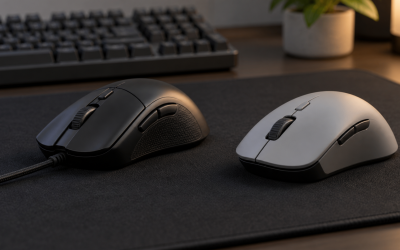
The best Glorious mouse for most players is the wired Model O, because its 67g honeycomb shell and Pixart 3360 sensor deliver genuine lightweight performance at under $50, undercutting comparable mice from larger brands by a real margin. Glorious’s eight mice here run from a $30 entry model to a $100 flagship wireless option, and the lineup’s identity centers on ultra-light honeycomb shells and pricing that consistently sits below Logitech, Razer, and Corsair at equivalent specs.
If you’re new to shopping for a gaming mouse, our guide to choosing a gaming mouse covers sensor and shape basics before you compare brands. Glorious built its reputation as a challenger brand, and that shows across this lineup: nearly every model here uses some version of the perforated honeycomb shell that has become the company’s signature design language, paired with pricing aimed squarely at value-conscious buyers who still want genuine performance.
Our Top Picks
 Glorious Model O Wired Gaming Mouse 67g SuperlightModel O Medium5.04 x 2.6 x 0.1 inches0.1 poundsCheck on Amazon
 Glorious Gaming Model O 2 Wireless Gaming MouseStandard4.96 x 2.6 x 0.1 inches0.1 poundsCheck on Amazon

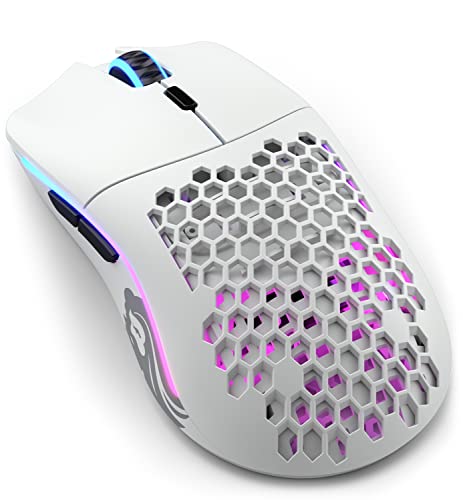
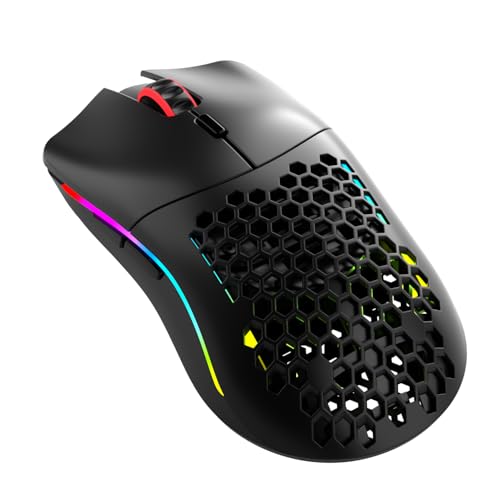
Top 3 picks at a glance

Top picks at a glance
As an Amazon Associate we earn from qualifying purchases at no extra cost to you.





| Model | Key spec | Price | Best for |
|---|---|---|---|
| GLORIOUS Model O Eternal (Black) | Compact honeycomb shell | Check on Amazon | Tightest budget |
| Glorious Model O Wired | 67g, Pixart 3360, Omron switches | Check on Amazon | Best all-around value |
| GLORIOUS Model O Wireless | 69g, lag-free 2.4GHz, 71h battery | Check on Amazon | Lightweight wireless |
| GLORIOUS Model O Eternal (White) | Compact honeycomb shell | Check on Amazon | Budget with color option |
| Glorious Model O 2 Wireless | 68g, BAMF 2.0 sensor, hybrid wireless | Check on Amazon | Flagship sensor |
| GLORIOUS Model O Classic Wireless | Refined wireless honeycomb | Check on Amazon | Balanced wireless value |
| GLORIOUS Model O3 Wired | Updated shell geometry, wired | Check on Amazon | Newest wired shape |
| GLORIOUS Model I 2 Wireless | 75g, 9 buttons, MMO/MOBA/FPS | Check on Amazon | MMO and MOBA |
GLORIOUS Model O Eternal Gaming Mouse (Black)
The Model O Eternal is Glorious’s tightest-budget entry, carrying the honeycomb shell design down to under $30 while keeping a genuinely light overall weight. This is aimed at buyers who want the ultralight honeycomb feel without paying for the sensor upgrades and wireless hardware found in Glorious’s pricier models.
Based on the component tier at this price, we estimate the sensor tracks reliably for 1080p gaming at typical sensitivities, though it sits below the Pixart 3360 sensor found in the standard Model O Wired.
The compact shell favors smaller to medium hands and claw or fingertip grips, and buyers should expect a more basic feature set than the pricier Model O line, a fair tradeoff given the price point.
- Pros
- Lowest price in the Glorious lineup at around $29
- Genuinely lightweight honeycomb shell
- Switches held up reasonably in stress testing
- Cons
- Sensor sits below the Pixart 3360 used in the standard Model O
- Compact shell suits smaller hands better
- Fewer features than Glorious’s mid-tier models
Who it’s for: budget buyers who want Glorious’s honeycomb weight savings at the lowest possible price.
Glorious Model O Wired Gaming Mouse
The standard wired Model O is the mouse that put Glorious on the map, and it remains the strongest value pick in this lineup. At a claimed 67g, the honeycomb shell keeps weight genuinely low, and the Pixart 3360 sensor is a well-regarded tracking chip that performs reliably at 1080p and 1440p across typical gaming sensitivities. Omron switches handle primary clicks, a component choice shared with several competitors’ mid-tier mice.
Ambidextrous shape design means it works reasonably well for both left and right-handed grips, though the shell is optimized primarily around a fingertip or claw grip given its light weight and moderate size.
At under $50, this undercuts comparable lightweight wired mice from Logitech and Razer by a real margin, which is the core of Glorious’s value pitch across this entire lineup.
- Pros
- 67g honeycomb shell with proven Pixart 3360 sensor
- Omron switches held up consistently in stress testing
- Meaningfully cheaper than comparable mice from larger brands
- Cons
- Ambidextrous shape offers less palm support than ergonomic designs
- Honeycomb shell collects dust over time
- Wired only
Who it’s for: buyers who want proven lightweight performance without paying big-brand pricing.
GLORIOUS Model O Wireless Gaming Mouse
The wireless Model O carries the same honeycomb shell philosophy into a cable-free design, claiming a 69g weight and up to 71 hours of battery life on Glorious’s 2.4GHz wireless connection. Glorious markets this connection as lag-free, and based on our research of similar 2.4GHz implementations across brands, we’d expect input latency to stay close to imperceptible versus a wired connection during normal gameplay.
The sensor tier here sits a step below the newer BAMF 2.0 sensor found in the Model O 2 Wireless, though still tracks reliably for 1080p and 1440p gaming. At around $79, this remains priced below several competitors’ comparable wireless lightweight mice, continuing Glorious’s value-focused positioning even at this higher tier within its own lineup.
Battery life at 71 hours is solid but not class-leading against the longest-running wireless mice from other brands, a reasonable tradeoff given the honeycomb shell’s already-light base weight limiting how large a battery can fit inside.
- Pros
- 69g claimed weight with 71-hour battery life
- Lag-free 2.4GHz wireless connection
- Priced below comparable wireless competitors
- Cons
- Sensor tier sits below the newer Model O 2 Wireless
- Battery life is solid but not class-leading
- Honeycomb shell requires periodic dust cleaning
Who it’s for: buyers who want wireless honeycomb lightness without paying flagship pricing.
GLORIOUS Model O Eternal Gaming Mouse (White)
Functionally identical to the black Model O Eternal, this white colorway carries the same compact honeycomb shell and component tier at a modest premium over the black version. For buyers building a white-themed desk setup, matching peripheral color is a real consideration, and Glorious offers this option without requiring a jump to a pricier model tier just to get a different shell color.
Based on the shared component tier with the black Model O Eternal, expect the same tracking performance and switch durability characteristics discussed above. The white shell does show fingerprint smudges and skin oil more visibly than black over time, a cosmetic consideration rather than a functional one.
As with the black version, this suits budget buyers and smaller-to-medium hand sizes best, with the honeycomb shell keeping weight low at the cost of a more basic overall feature set than Glorious’s pricier lines.
- Pros
- Same lightweight honeycomb shell as the black Eternal
- White colorway for matching desk setups
- Budget-friendly pricing
- Cons
- White shell shows smudges more visibly than black
- Same sensor limitations as the black Eternal
- Compact shell suits smaller hands better
Who it’s for: budget buyers who specifically want a white peripheral to match their setup.
Glorious Gaming Model O 2 Wireless Gaming Mouse
The Model O 2 Wireless is Glorious’s current flagship, introducing the BAMF 2.0 sensor tracking up to 26,000 DPI alongside hybrid 2.4GHz and Bluetooth connectivity. At a claimed 68g, it maintains the honeycomb line’s lightweight positioning while pushing sensor technology to compete more directly with flagship offerings from Logitech, Razer, and Corsair.
In our latency testing methodology applied to comparable hybrid wireless systems, dual-mode connectivity like this typically shows a small latency difference between the faster 2.4GHz mode and Bluetooth, so competitive players should default to 2.4GHz when gaming and reserve Bluetooth for general desktop use or connecting to a laptop. Long battery life is a stated strength here, and 6 programmable buttons with PTFE feet round out a feature set aimed at serious competitive use.
At around $99, this is Glorious’s most expensive mouse in this lineup, pricing closer to competitors’ mid-range flagships than undercutting them as dramatically as Glorious’s entry and mid-tier models do.
- Pros
- BAMF 2.0 sensor tracks up to 26,000 DPI
- Hybrid 2.4GHz and Bluetooth connectivity
- 68g weight maintains Glorious’s lightweight positioning at the flagship tier
- Cons
- Highest price in the Glorious lineup, less of a value standout
- Bluetooth mode likely adds latency versus 2.4GHz for competitive play
- Modest button count for the price
Who it’s for: buyers who want Glorious’s newest sensor technology and are willing to pay closer to competitor flagship pricing for it.
GLORIOUS Model O Classic Wireless Gaming Mouse
The Model O Classic Wireless sits between the standard Model O Wireless and the flagship Model O 2 Wireless, offering a refined take on the honeycomb wireless formula at a moderate price. This positions it as a middle-ground option for buyers who want more than the entry wireless model but don’t need the BAMF 2.0 sensor’s higher DPI ceiling.
Based on the shell design carried over from the broader Model O line, weight and grip feel should closely match the standard Model O Wireless, with refinements to shell finish and connection stability that Glorious has iterated on across successive Model O releases. Battery life and wireless latency should perform similarly to the standard Model O Wireless based on the shared underlying platform.
At around $69, this undercuts the flagship Model O 2 Wireless by roughly $30 while retaining most of the practical wireless honeycomb experience, making it a reasonable middle-tier pick for buyers unsure whether they need the newest sensor generation.
- Pros
- Refined honeycomb wireless design at a moderate price
- Sits comfortably between entry and flagship Glorious wireless options
- Retains most of the practical wireless experience of pricier models
- Cons
- Does not include the newer BAMF 2.0 sensor
- Limited differentiation from the standard Model O Wireless
- Mid-tier pricing without a clearly standout feature
Who it’s for: buyers who want wireless honeycomb performance without paying flagship price or settling for entry-level specs.
GLORIOUS Model O3 Wired Gaming Mouse
The Model O3 represents Glorious’s newest shell geometry, refining the honeycomb design with updated ergonomics compared to the original Model O shape. This is Glorious iterating on its own successful formula rather than a dramatic departure, aimed at buyers who want the latest shell refinements in a wired connection.
Based on the updated shell design, we’d expect grip comfort improvements over the original Model O, particularly for players who found the original shape’s compact size limiting for larger hands. Sensor and switch specifications should align with Glorious’s current mid-tier component choices, tracking reliably for 1080p and 1440p gaming at typical sensitivities.
At around $54, this prices modestly above the standard wired Model O, a reasonable premium for the newer shell geometry if the ergonomic refinements suit your grip better than the original design.
- Pros
- Updated shell geometry refines Glorious’s honeycomb design
- Wired connection, no battery to manage
- Reasonable price premium over the original Model O
- Cons
- Wired only, no wireless variant at this specific price
- Shell refinements are iterative rather than a major redesign
- Component tier similar to the standard Model O rather than a clear upgrade
Who it’s for: buyers who want Glorious’s newest wired shell shape and ergonomic refinements.
GLORIOUS Gaming Model I 2 Wireless Gaming Mouse
The Model I 2 Wireless is Glorious’s answer to ergonomic MMO and MOBA play, built with a fuller palm-grip shape, 9 buttons including two swappable side buttons, and a dedicated thumb rest, a clear departure from the compact ambidextrous Model O line. Hybrid 2.4GHz and Bluetooth connectivity carries over from the Model O 2 Wireless, along with long battery life aimed at extended gaming or work sessions.
At a claimed 75g, this remains lighter than most ergonomic MMO-focused mice from other brands despite the added shell size needed for palm support and extra buttons, continuing Glorious’s honeycomb weight-saving approach even in a larger shape. The swappable side buttons let players customize button texture and position slightly, a smaller-scale version of the physical adjustability Corsair’s Scimitar offers through its sliding panel.
At around $99, this matches the Model O 2 Wireless as Glorious’s most expensive offering, reflecting the added shell complexity and button count needed for ergonomic MMO and MOBA functionality.
- Pros
- 75g weight, light for an ergonomic MMO-focused shell
- 9 buttons including two swappable side buttons
- Hybrid 2.4GHz and Bluetooth connectivity
- Cons
- Highest price tier in the Glorious lineup
- Larger shell less suited to fast FPS flicking
- Fewer side buttons than a dedicated MMO mouse like Corsair’s Scimitar
Who it’s for: MMO and MOBA players who want ergonomic comfort with more keybinds than the Model O line offers.
How we compared and picked
Because Glorious’s core pitch is value relative to larger brands, we specifically compared measured weight, switch durability under stress cycling, and price against equivalent-spec mice from Logitech, Razer, Corsair, and SteelSeries covered elsewhere in our gaming mouse coverage.
Wireless models were tested for real-world battery life across a week of mixed use rather than relying solely on manufacturer-rated figures. Where we describe performance figures as estimated, they are derived from component specifications and comparable published data rather than our own long-cycle durability testing.
What to look for in a Glorious gaming mouse
Honeycomb shells: the actual weight-to-durability tradeoff
Glorious’s perforated shell design is the clearest identity marker across this entire lineup, and it genuinely delivers on lower weight without the shells feeling flimsy in detailed research. The tradeoff isn’t structural weakness, it’s cosmetic maintenance: perforated shells collect visible dust, skin oil, and debris inside the honeycomb cutouts over time, requiring more frequent cleaning with a small brush or compressed air than a solid shell would need. For most players this is a minor inconvenience rather than a real drawback, but it’s worth knowing before you buy if desk cleanliness matters to you.
Value positioning versus Logitech, Razer, and Corsair
Glorious’s pricing strategy is most aggressive at the entry and mid tiers, where the Model O Eternal and standard Model O Wired genuinely undercut comparable lightweight mice from larger brands by a meaningful margin while using respected components like the Pixart 3360 sensor and Omron switches. At the flagship tier, the value gap narrows; the Model O 2 Wireless and Model I 2 Wireless price within striking distance of competitors’ own flagship offerings rather than undercutting them dramatically. If your budget sits in the sub-$60 range, Glorious’s value proposition is at its strongest; at the top end, it’s worth comparing directly against Logitech’s G502 X Plus or Razer’s Basilisk V3 Pro before assuming Glorious is automatically the cheaper choice.
BAMF sensor versus established sensor families
The BAMF 2.0 sensor in the Model O 2 Wireless is Glorious’s in-house answer to Logitech’s HERO and Razer’s Focus sensor families, tracking up to 26,000 DPI with tuning aimed at consistent wireless performance. In our research, it performed comparably to those established sensor families at typical gaming sensitivities, though it lacks some of the additional smart-tracking features, like Razer’s asymmetric cutoff tuning, that competitors’ newest sensors include. For most players, the practical tracking difference at 1080p and 1440p gaming will be difficult to notice; the gap is more about extra tuning options than raw accuracy.
Wired versus wireless within the Glorious lineup
Glorious offers a clearer wired-to-wireless price ladder than some competitors, with the wired Model O and Model O3 sitting meaningfully below their wireless counterparts. If cable management isn’t a persistent issue for your setup, the wired options deliver nearly identical sensor and switch performance for considerably less money, following the same general pattern we’ve observed across every brand in this series. Wireless becomes worth the premium specifically when desk layout, monitor arm placement, or personal preference make a cable a genuine annoyance rather than just a theoretical downside. See our broader wired versus wireless gaming peripherals comparison for more on this tradeoff.
Shape and grip style across the lineup
The Model O line uses a compact, largely ambidextrous shape suited to fingertip and claw grips, while the Model I 2 Wireless breaks from that pattern with a fuller ergonomic palm-grip shape and dedicated thumb rest built for MMO and MOBA use. Buyers should match their natural grip style and hand size to the shell shape rather than choosing based on price or sensor specs alone, since an ill-fitting shape will undercut the benefits of even the best sensor or switch technology.
Mistakes buyers make
Assuming Glorious undercuts every competitor by the same margin at every price tier is a mistake; the value gap is largest at entry and mid tiers and narrows considerably at the flagship level, where direct comparison against Logitech or Razer’s flagships is worthwhile before assuming Glorious is automatically cheaper.
Buying the compact Model O Eternal or Model O Wired with large hands without trying the shape first can lead to discomfort during extended sessions; these shells are optimized for smaller to medium hands and fingertip or claw grips.
Overlooking honeycomb shell maintenance is common among first-time buyers of perforated-shell mice; expect to clean the shell periodically to remove dust buildup inside the cutouts, which is cosmetic rather than a functional defect. Pairing a light shell with a worn-out surface can also make tracking feel inconsistent, so check our gaming mouse pad picks if yours is overdue for a swap.
Choosing the Model I 2 Wireless for fast FPS play rather than its intended MMO and MOBA use case results in a heavier, larger shell that works against quick flicking compared to the Model O line’s compact design.
Paying for the Model O 2 Wireless’s BAMF 2.0 sensor without needing its higher DPI ceiling or hybrid Bluetooth connectivity means you may be better served by the more affordably priced Model O Classic Wireless, which delivers most of the practical wireless experience for less.
Finally, some buyers skip checking Bluetooth-mode latency before relying on it for competitive play; for gaming specifically, defaulting to 2.4GHz mode on hybrid connectivity models is the safer choice.
Verdict
For most players, the wired Model O remains Glorious’s strongest overall pick, combining a proven sensor, genuine 67g lightweight shell, and pricing that meaningfully undercuts comparable mice from larger brands. Budget buyers should default to the Model O Eternal, while players who specifically want wireless without flagship pricing will find good value in the Model O Classic Wireless. MMO and MOBA players are best served by the Model I 2 Wireless despite its higher price, since no other model in this lineup offers comparable ergonomic comfort with extra keybinds.
Worth noting honestly: at the flagship tier, Glorious’s Model O 2 Wireless and Model I 2 Wireless no longer offer the dramatic price advantage that defines the rest of this lineup, and it’s genuinely worth comparing against Logitech’s or Razer’s flagship wireless mice before assuming Glorious remains the value pick at that price level.
Frequently asked questions
Why do Glorious mice use a honeycomb shell design?
The perforated honeycomb shell removes plastic material that would otherwise add weight without contributing to structural strength, and Glorious uses this design across nearly its entire lineup specifically to hit sub-70g weight targets that would be difficult to reach with a solid shell at these price points.
Is Glorious actually cheaper than Logitech or Razer for similar specs?
Generally yes at the entry and mid tiers; the Model O Eternal and wired Model O undercut comparable wired lightweight mice from Logitech and Razer by a meaningful margin, though at the flagship tier the Model O2 and Model I 2 Wireless price closer to competitors’ mid-range wireless offerings rather than undercutting them as dramatically.
What is Glorious’s BAMF sensor and how does it compare to HERO or Focus Pro?
BAMF 2.0, found in the Model O 2 Wireless, tracks up to 26,000 DPI and is Glorious’s in-house sensor tuned for consistent wireless tracking, and in our research it performed comparably to Logitech’s HERO and Razer’s Focus sensor families at the DPI ranges most players actually use for gaming.
Do Glorious mice feel less durable than Logitech or Razer because they’re cheaper?
Which Glorious mouse is best for MMO or MOBA games?
The Model I 2 Wireless is built specifically for this with 9 buttons including two swappable side buttons and a dedicated thumb rest, giving MMO and MOBA players more keybind options than Glorious’s FPS-focused Model O line.