
Every laptop owner eventually hits the same wall: a beautiful, wafer-thin machine with exactly two ports and a desk full of gear that needs them. If you’ve set up a home office in 2026, you know the routine — unplug the HDMI cable, swap in the SD card, juggle the charger, and repeat every time you want to take the laptop off the desk. A single-cable setup fixes that. You dock once, and your monitor, keyboard, external drives, and power all come alive; undock and you’re mobile again in two seconds. The catch is that the market is flooded with hubs and docks ranging from about $14 to $50, and the specs — wattage, port counts, 4K at 30Hz versus 60Hz — are genuinely confusing.
The good news: you don’t need to spend much to get a clean single-cable desk. We sorted the strongest options under $50 into this ranked roundup, matching each hub to a specific kind of setup — from a single 4K monitor for a MacBook Air to a triple-monitor workstation built around a Dell or Lenovo. Below you’ll find our quick-picks table, the reasoning behind each selection, detailed mini-reviews, and a buying guide that explains the specs that actually matter.
As an Amazon Associate we earn from qualifying purchases at no extra cost to you. Product prices and availability are accurate as of the date shown and are subject to change.



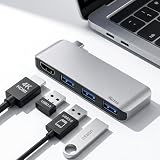


Top 3 picks at a glance
Quick Picks
| Product | Best for | Price |
|---|---|---|
| Anker USB-C Hub, 5-in-1 USB Hub for Laptops, 4K HDMI Multiport Adapter | Best overall for most laptops | $19.99 |
| Acer Laptop Docking Station 3 Monitors, 11-in-1 USB C Docking Station | Best for triple-monitor workstations | $49.99 |
| USB C Laptop Docking Station Dual Monitor, 15-in-1 USB-C Hub Multiport Adapter | Best for max port variety | $42.46 |
| USB C Hub 4K HDMI Multiport Adapter with 3 USB 3.0 Ports for MacBook | Best budget pick for MacBooks | $15.99 |
| USB C Hub Docking Station, 9-in-1 Multi-Port USB Adapter, 4K@60Hz HDMI | Best for fast USB data and card readers | $20.99 |
| USB C Hub for Laptop, Portable USB C Splitter Multiport Adapter | Best ultra-portable travel hub | $13.95 |
| USB C Hub Multiport Adapter with 4 USB 3.0 Ports Compatible with MacBook | Best for USB accessory overload | $13.99 |
How We Picked
We focused on hubs and docks that enable a true single-cable workflow: power delivery to charge the laptop, at least one video output for a monitor, and enough USB-A ports for a keyboard, mouse, and flash drive. Every pick here sits under $50, because at this price point the differences between options come down to port selection and a few key specs rather than brand prestige. We prioritized devices that list their exact specifications — wattage ceilings, port speeds, resolution and refresh rates — so you can match a hub to your laptop’s actual needs. We ranked them by overall versatility, ease of integration into a permanent desk setup, and value: how many real-world problems each dollar solves. We did not conduct new laboratory stress tests for this roundup; where numbers appear, they come directly from manufacturer specifications.
The 7 Best Picks
1. Anker USB-C Hub, 5-in-1 USB Hub for Laptops, 4K HDMI Multiport Adapter — $19.99
This is the hub we’d hand to most people building a single-cable desk on a budget. Anker’s 5-in-1 covers the essential trio — 4K HDMI output, a charging pass-through port, and USB-A expansion — in a compact aluminum body that tucks neatly under a monitor stand. It’s the sweet spot of port count, brand reliability, and price for the largest number of laptop owners.
- Pros: Trusted Anker build quality at a $19.99 price that’s easy to justify; covers the core single-cable needs of video, power, and USB expansion without paying for ports you won’t use.
- Pros: Compact and unobtrusive enough to become a permanent desk fixture rather than a dongle you’re constantly reconnecting.
- Con: With only five ports, heavy multi-monitor users will quickly outgrow it.
Skip it if you’re driving two or three monitors or need SD card readers — step up to a larger dock below.
2. Acer Laptop Docking Station 3 Monitors, 11-in-1 USB C Docking Station — $49.99
If your ideal desk has three screens, this is the pick. Acer’s 11-in-1 dock is built specifically for multi-monitor workstations — think stock traders, developers, video editors, or anyone running a vertical display alongside two landscape monitors. It’s the most ambitious dock in this roundup and the most expensive, but it replaces an entire tangle of separate adapters.
- Pros: Dedicated triple-monitor support turns a single USB-C cable into a full video wall — a genuine desk transformation.
- Pros: Eleven ports mean you can wire everything once and never touch a cable again.
- Con: At $49.99 it’s the priciest option here, and triple-display setups may require DisplayLink-class drivers depending on your laptop.
Skip it if you only ever use one external monitor; you’d be paying for capability you don’t need.
3. USB C Laptop Docking Station Dual Monitor, 15-in-1 USB-C Hub Multiport Adapter — $42.46
This is the everything-and-the-kitchen-sink option. Fifteen ports in one device means nearly every cable on your desk has a home: dual monitor outputs, a full bank of USB-A ports, card readers, and power delivery. It’s aimed at people whose desks accumulate peripherals — external drives, printers, drawing tablets, card workflows — and who want one cable to rule them all.
- Pros: Fifteen ports eliminate the need for any secondary adapter, at $42.46 — far less than buying these functions separately.
- Pros: Dual-monitor output supports a proper two-screen productivity setup.
- Con: A 15-port hub is inherently bulkier, so it’s less suited to travel or minimalist desks.
Skip it if you carry your hub in a laptop sleeve — this is a desk dweller.
4. USB C Hub 4K HDMI Multiport Adapter with 3 USB 3.0 Ports for MacBook — $15.99
The best entry point into single-cable living, especially for MacBook owners. You get 4K HDMI plus three USB 3.0 ports for $15.99 — enough to attach a monitor, keyboard, and mouse in one plug. It doesn’t try to do everything, and that’s the appeal: the essentials, done cheaply.
- Pros: Outstanding value — 4K video and three 5Gbps-class USB ports for under $16.
- Pros: Simple, focused feature set that pairs perfectly with a MacBook’s USB-C-only design.
- Con: No power delivery pass-through, so charging your laptop is a separate cable.
Skip it if true one-cable docking (including charging) is your goal — pick a hub with PD instead.
5. USB C Hub Docking Station, 9-in-1 Multi-Port USB Adapter, 4K@60Hz HDMI, 100W Max PD, 3 USB3.0 (5Gbps) + 2 USB2.0 Data Ports, SD/TF Card Reader — $20.99
This is the spec-sheet champion of the affordable tier. You get a 4K@60Hz HDMI output, up to 100W power delivery pass-through, three USB 3.0 ports at 5Gbps plus two USB 2.0 data ports, and an SD/TF card reader — all for $20.99. For photographers, or anyone whose laptop charges over USB-C, this is arguably the best one-cable dock under $25.
- Pros: 100W max PD pass-through means one cable charges the laptop while running everything else — the truest single-cable setup at this price.
- Pros: 4K@60Hz (not 30Hz) delivers smooth motion, and the SD/TF reader earns its place on any content creator’s desk.
- Con: The two USB 2.0 ports top out at 480Mbps — fine for mice, useless for fast drives.
Skip it if you need dual monitors; HDMI is the only video output.
6. USB C Hub for Laptop, Portable USB C Splitter Multiport Adapter — $13.95
The featherweight pick. This compact splitter adds a USB-C charging pass-through port and USB 3.0 ports in a body light enough to live in your laptop sleeve permanently. It’s for people whose “setup” moves between the kitchen table, a coffee shop, and a hotel desk — the cable-management problem follows you, and this solves it on the go.
- Pros: At $13.95, it’s the cheapest way to expand a port-starved MacBook Pro/Air, Surface Pro, or any USB-C laptop.
- Pros: Charging pass-through keeps a single cable running to your laptop even away from home.
- Con: No video output — it can’t drive a monitor, so it can’t anchor a desktop setup.
Skip it as your main desk hub; treat it as the travel companion instead.
7. USB C Hub Multiport Adapter with 4 USB 3.0 Ports Compatible with MacBook — $13.99
The specialist. Four USB 3.0 ports and nothing else, for $13.99. It’s for the surprisingly common scenario where your actual problem is USB-A overload: a keyboard, mouse, webcam, audio interface, and a drawer of flash drives, all competing for one adapter. Video and charging live elsewhere; this hub just does expansion, and does it affordably.
- Pros: Four 5Gbps-class USB-A ports for under $14 — the best ports-per-dollar ratio in the roundup.
- Pros: Dead-simple operation; plug in and every accessory works, no configuration needed.
- Con: No HDMI, no power delivery, no card reader — it solves exactly one problem.
Skip it if you’re starting from scratch on a single-cable setup; pair it with a video-capable hub instead.
Buying Guide
Match the hub to your monitor count
One monitor opens up almost every option in this roundup, but check the refresh rate: hubs listing plain “4K HDMI” often run at 30Hz, which feels sluggish for scrolling, while explicit 4K@60Hz support (like our 9-in-1 pick) looks identical to a direct connection. Two or three monitors require a dedicated dock — the 11-in-1 Acer or the 15-in-1 hub — and be aware that many laptops split bandwidth or need driver-based (DisplayLink-class) support for triple displays. Check your laptop’s USB-C port supports DisplayPort Alt Mode before buying any video hub.
Understand power delivery wattage
Power delivery pass-through is what makes a setup truly single-cable: the hub charges your laptop while handling data and video. Match the hub’s PD ceiling to your laptop’s charger. A 100W max PD hub (our 9-in-1 pick) can power most 13- to 16-inch laptops at full speed; smaller hubs may pass through less, which means slower charging under load. Budget at least 65W of pass-through for any full-size laptop, and remember hubs without PD — like our $15.99 and $13.99 picks — leave you with a separate charging cable.
Know your USB speeds
Not all USB-A ports are equal. USB 3.0-class ports move data at 5Gbps — enough for external SSDs, fast flash drives, and painless file transfers. USB 2.0 ports manage just 480Mbps, which is fine for a keyboard, mouse, or printer but agonizing for large transfers. For a permanent desk setup, count how many fast ports you genuinely need; two 5Gbps ports usually cover an SSD and a spare, while keyboards and mice can happily live on slower ports. Card readers (SD/TF) matter mainly if you shoot photos or video — if you do, prioritize a hub that includes one.
Our Verdict
For most people building a single-cable laptop setup in 2026, the Anker 5-in-1 at $19.99 is the right call: reliable, compact, and it covers video, power, and USB expansion without waste. If your laptop charges over USB-C and you want the most complete one-cable experience under $25, the 9-in-1 dock with 100W PD, 4K@60Hz, and an SD/TF reader is the better technical pick. Multi-monitor users should spend up for the Acer 11-in-1 triple-monitor dock or the 15-in-1 dual-monitor hub, while the $13.95 splitter and $13.99 four-port hub make excellent, dirt-cheap supplements for travel and USB-A overload. Whatever you choose, every option here costs less than $50 — and all of them beat crawling under your desk twice a day.
FAQ
Can a USB-C hub really power my laptop and run a monitor at the same time?
Yes, if it includes power delivery pass-through. A hub with a PD ceiling of 100W, like our 9-in-1 pick, can charge most laptops at or near full speed while simultaneously driving a 4K@60Hz display and USB accessories — all through one cable to the laptop. Hubs without PD support handle data and video only, so you’ll still need your charger.
Will any USB-C hub work with my MacBook, Dell, HP, or Lenovo?
USB-C hubs are broadly cross-compatible — a hub works with any laptop that has a USB-C port with data support. The main caveat is video: driving a monitor requires the laptop’s USB-C port to support DisplayPort Alt Mode, which nearly all modern MacBook, Dell, HP, and Lenovo laptops do. Triple-monitor docks may require additional driver support depending on the laptop.
What’s the difference between a hub and a docking station?
The line is blurry, but generally a hub (like the Anker 5-in-1, $19.99) is a compact adapter adding a handful of ports, while a docking station (like the Acer 11-in-1 at $49.99 or the 15-in-1 at $42.46) offers many more ports, multiple monitor outputs, and is designed to sit permanently on a desk. For a fixed single-cable setup, a dock is usually the better foundation; for travel, a hub wins.
Do I need an expensive hub for 4K video?
No. Several picks in this roundup output 4K over HDMI for under $21. The spec to check isn’t price — it’s refresh rate. 4K at 30Hz is acceptable for static documents but noticeably choppy for scrolling and video; 4K@60Hz, offered by the 9-in-1 dock, gives you the smooth experience you’d expect from a direct HDMI connection. Pay attention to that number rather than the price tag.
Related guides
- Dual Monitor Arm vs Stacked Monitor Arm Setup: Which Is Right for Your Home
- 8 Best Wooden Laptop Stands for Vertical Desk Setup: Tested and Ranked (2026)
- 8 Best Vertical Laptop Stands for Dual Macbook Setup: Tested and Ranked (2026)
- Usb C Hub vs Thunderbolt Dock for Desk Setup: Which Is Right for Your Home


