
If you have ever watched TV in a dark room and felt eye strain, headaches, or washed-out contrast, you already know why bias lighting matters. A soft glow behind your screen reduces the harsh difference between a bright display and a dark wall, making long viewing sessions more comfortable without raising the room’s overall brightness. The real decision a buyer faces is not whether to add bias lighting, but which form factor actually fits your setup: a pair of vertical RGB light bars that sit on either side of your TV, or a flexible LED strip that sticks to the back of the screen itself.
Both use similar RGB LEDs and low-voltage power, but they install differently, light differently, and live very different lives on your furniture. Light bars are freestanding, angled, and often packed with smart features. Strips are minimal, adhesive-backed, and designed to disappear. In 2026, with most options USB-powered and app-controlled, the choice comes down to your TV size, wall space, rental rules, and how much control you want over color and brightness.
As an Amazon Associate we earn from qualifying purchases at no extra cost to you.



Our Top Picks
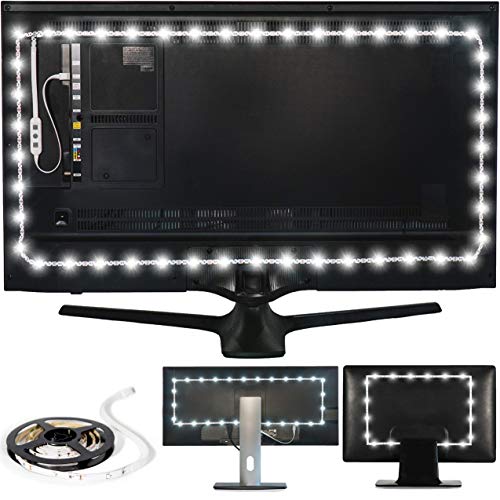 Power Practical LED Lights for TV BacklightWhite: Large (30-40 in TV)1 x 1 x 1 inchesCheck on Amazon


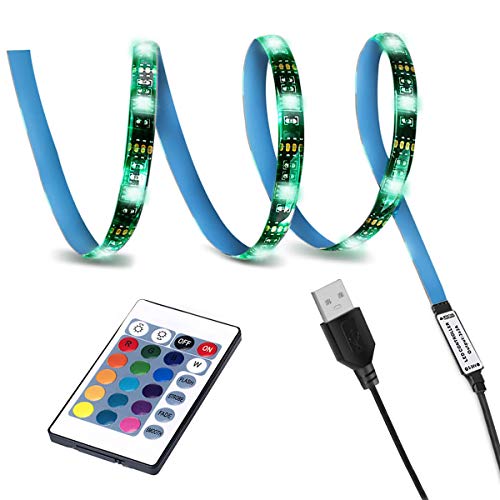
Top 3 picks at a glance
Quick Verdict
Choose an RGB light bar if you want powerful, room-filling accent light, easy repositioning, and no adhesive on your TV. It is the better pick for gamers, renters who cannot stick anything to furniture, and anyone who wants bias lighting that doubles as decor.
Choose an LED strip for bias lighting if you want a true, even halo directly behind the screen for maximum eye comfort, a cleaner look with no extra objects on your media console, and the lowest upfront cost. It is the better pick for dedicated home theaters, wall-mounted TVs, and minimalist setups where the light source should stay invisible.
If you only need classic eye-strain relief and have a TV between 30 and 65 inches that sits against a light-colored wall, a strip will do the job for less. If you want dynamic color, music sync, and lighting you can move from TV to desk to shelf, a light bar kit is more versatile.
Side by Side
| Feature | RGB Light Bar | LED Strip for Bias Lighting |
|---|---|---|
| Comfort and Eye Strain | Soft, indirect wash on the wall; reduces contrast but can leave a gap in the center if bars are placed wide | Even 360-degree halo around the TV edge; most uniform reduction in contrast for long viewing |
| Durability | Solid housing, typically ABS plus metal base; no adhesive to fail; lasts 30,000 to 50,000 hours | Adhesive and flexible PCB can loosen with heat; waterproof IP65 models resist dust but adhesive is the weak point; same 30,000 to 50,000 hour LED lifespan if mounted well |
| Price Range | $35 to $75 for a 2-bar kit with controller; smart RGBICWW models like the Govee Smart Light Bar at around $54 sit in the middle | $11 to $35 for most TV kits; basic USB kits like the LED TV Backlight SMY Strip at around $11 or the Power Practical True White strip at around $12 are entry-level |
| Maintenance | Dust occasionally, wipe housing; no re-sticking required | Check adhesive every 6 to 12 months; clean wall and TV back with alcohol before install to prevent peeling |
| Space Needed | Requires 10 to 14 inches of vertical clearance and about 4 x 4 inches of base footprint per bar on console or desk | Zero footprint; strip is 0.4 inches wide and 0.1 inches thick, sticks to TV back within 0.5 to 1 inch from edge |
| Look | Visible design object; black tower or bar that adds modern accent even when off; corner floor lamp versions like the Bright LED RGB+IC Corner Floor Lamp at around $29 create a taller vertical glow | Invisible when off; only the glow is seen, ideal for clean, floating-screen effect |
| Resale and Flexibility | High; can be reused on a monitor, bookshelf, or behind a new TV without residue | Low; sized to TV perimeter (e.g., 3.28 feet for 30 to 40 inch TVs, 6.5 to 12 feet for 55 to 75 inch TVs) and adhesive rarely transfers cleanly |
| Power and Control | USB or AC adapter, 5 to 12 watts per set; often includes Wi-Fi, app, remote, and music sync | USB powered, 2 to 6 watts; basic RF remote or inline controller; smart Wi-Fi less common at low price points |
| Best For | Gaming setups, renters, frequent movers, anyone wanting accent light beyond bias lighting | Home theaters, wall-mounted TVs, pure bias lighting for eye comfort on a budget |
Where Rgb Light Bar Wins
Light bars win on flexibility and presence. A typical two-bar kit stands 9 to 14 inches tall and weighs 1.2 to 2.5 pounds total, with weighted bases that keep them stable on a media console, desk, or on included brackets behind the TV. You simply set them upright, angle them toward the wall, plug into USB or a low-voltage adapter, and you are done. There is no measuring, cutting, or pressing adhesive around corners.
The light itself is different. Bars project a wide, blended wash that can cover a 4 to 6 foot wide section of wall, even if your TV is only 55 inches. Many RGBICWW models can show multiple colors at once, tune from warm 2700K white to cool 6500K daylight, and run music-reactive scenes. That makes them useful beyond movies. The Govee Smart Light Bar, for example, is marketed for both TV and gaming because you can lay the bars flat, stand them vertically, or place them behind a monitor for an immersive glow that moves with sound.
Durability is another advantage. With no sticky tape on a hot TV back, there is nothing to curl or fall off in summer. If you move, you just pick them up. For renters or anyone with a leased TV, that no-residue install matters. They also solve a common strip frustration: uneven corners. Strips must bend at 90 degrees and often dim at the corners; bars avoid that entirely with two independent points of light.
Where bars fall short is precision. Because the light comes from two points rather than the TV perimeter, the center of the wall behind the screen can be slightly darker than the edges. In a completely dark room, videophiles will notice the halo is not as uniform as a well-installed strip.
Where Led Strip for Bias Lighting Wins
Strips win on the core job of bias lighting: creating an even, low-brightness halo that tracks the edge of the screen. A strip installed 0.5 to 1 inch from the TV edge throws a consistent 10 to 15 percent of the screen’s brightness onto the wall, which is the range most often recommended for reducing eye fatigue without washing out the picture. When the wall is matte white or light gray and the TV is 1 to 4 inches from the wall, the effect is a smooth rectangle of light that makes the screen appear to float.
Installation is discreet. A 3.28-foot kit covers the top and sides of a 30 to 40 inch TV, while a 6.5-foot kit does three sides of a 55 inch and a 9.8 to 13-foot kit does four sides of a 65 to 75 inch. The strip itself is thin enough to hide behind even a wall-mounted panel with a slim mount. Once on, there is nothing else on your furniture to dust, knock over, or coordinate with your decor. For wall-mounted setups where there is no console to hold bars, a strip is often the only clean option.
Cost is the other clear win. Basic USB-powered strips draw just 2 to 6 watts, so they can run directly from your TV’s USB port and turn on and off with the TV. Models like the Power Practical LED Lights for TV Backlight focus on accurate True White around 6500K, which is preferred for color-critical viewing, while budget RGB kits like the SMY USB LED Strip Light add multi-color fun with a simple wireless remote. At around $11 to around $12, you can try bias lighting for less than the price of an HDMI cable.
The trade-off is that adhesive is permanent in theory but not always in practice. Heat from the TV, dust on the plastic, and tight bends can cause peeling after a year or two, especially on textured TV backs. Strips are also cut to length, so moving to a larger TV usually means buying a new kit, and color accuracy on the cheapest RGB strips can skew toward pink or blue-white instead of clean D65 white.
Cost Over 5 Years
Upfront price is only part of the story. Both options use efficient LEDs with very low running costs, so the difference over five years is modest unless you buy multiple replacements.
A light bar kit at $35 to $75 typically includes everything you need: two bars, base stands, USB or adapter cable, and a controller. Power draw of 5 to 12 watts for four hours of daily use equals about 7 to 17 kWh per year, or roughly $1 to $3 per year at the average US rate of around $0 per kWh. With no adhesive to replace and a housing that protects the LEDs, most owners spend nothing after the initial purchase. Five-year total: about $40 to $90.
A strip kit at $11 to $35 is cheaper to start, and its 2 to 6 watt draw costs less than $2 per year to run from a TV USB port. The hidden cost is replacement if the adhesive fails or you upgrade your TV. Budget strips use 3M-style tape that can lose grip, and reapplying with new tape or clips adds $5 to $10. If you replace a around $12 strip once in five years due to peeling or a larger TV, your five-year total is still only $25 to $50. Even premium addressable strips with app control at $30 to $40 stay under $60 over five years.
In practical terms, strips remain the lower-cost path for a single TV, while light bars cost more upfront but can follow you to your next home or setup without repurchasing.
Which One for Your Home
The best bias lighting is the one you will actually keep installed and use nightly. Match the form factor to your room and habits rather than chasing the brightest specs.
Small Apartment
Go with an LED strip if your TV is wall-mounted or your console is narrow. With zero footprint and no extra cord clutter, a strip keeps a 400 to 650 square foot living room feeling open. Choose a 6500K white or tunable white strip so the glow is relaxing but still accurate. If you use your TV as a monitor for work and play, add a small light bar later on your desk for task accent without crowding the TV area.
Family with Kids or Pets
Go with an LED strip for safety and stability. Bars are stable but can still be knocked over by a wagging tail or curious toddler reaching for a glowing tower. A strip hidden behind the TV is out of reach, has no small bases to topple, and has no hot surfaces; both options run cool to the touch at under 100 degrees Fahrenheit. If you love the look of vertical light, consider a corner floor lamp like the Bright LED RGB+IC Corner Floor Lamp instead of console bars; its tall, weighted base tucks into a corner and spreads light high on the wall away from hands and paws.
Rental
Go with an RGB light bar. Most leases prohibit adhesive modifications, and even removable tape can leave marks on painted media units or pull finish off an older TV. Light bars sit freely on furniture, need no wall anchors, and move with you. You can also take them from living room to bedroom without tools. If you must have a strip in a rental, use USB power and test the adhesive on a small, hidden area of the TV back, never on the wall itself.
Long-Term Home
Choose based on your viewing priority. For a dedicated home theater where you watch movies with the lights off, a four-sided strip gives the most uniform, cinema-like bias and the best perceived contrast. Pair it with a dimmer or app to hold brightness at about 10 percent of screen luminance. For a multi-use living room where lighting is part of the decor, light bars offer more design impact and smart scenes that work for parties, gaming, and everyday ambient light long after the TV is off.
FAQ
Do I need bias lighting if my TV already has good contrast?
Yes, even OLED and high-end QLED sets benefit. Bias lighting is not about fixing a dim TV; it is about reducing the strain your eyes feel when a bright rectangle floats in a dark room. A 6500K white glow at low brightness helps your pupils stay more relaxed and makes dark scenes easier to parse, regardless of panel technology.
Will a USB-powered strip dim when my TV is off?
Most strips powered from the TV’s USB port turn off automatically with the TV, which is convenient and saves energy. Some TVs keep USB ports live in standby, so the strip may stay on faintly. If that happens, use the inline controller or switch to a USB port labeled HDD or service that powers down, or add a simple inline switch.
Can I use both a light bar and a strip together?
You can, but keep brightness low and color consistent. Use the strip for the even halo directly behind the TV and set light bars to a matching warm or daylight white at a similar low level. Avoid running saturated red or blue on one and white on the other, as mismatched colors increase eye fatigue rather than reduce it.
How far should my TV be from the wall for bias lighting to work?
Ideally 1 to 6 inches from a matte, light-colored wall. At less than an inch, the glow becomes a harsh line; beyond 8 to 10 inches, the halo diffuses and loses its effect. If your wall is dark, textured, or brick, bias lighting will be much less effective — in that case, light bars that wash a larger area or a floor lamp that lights the adjacent wall will be more noticeable than a strip trapped behind the screen.
Related guides
- Best Ultrawide Gaming Monitors: Six Screens Sized Against Real Desks: 6 Compared (2026)
- Best Game Room Neon Lights: Ten Signs and Icon Lamps Compared: 10 Compared (2026)
- 10 Best 75% Hot-Swappable Mechanical Keyboards (October 2026)
- Best Mini-LED Monitor: Five Listings From a Renewed KTC to a 5K LG, Compared by Pixels and Ports (2026)









