
Lighting is the single fastest upgrade you can make to any camera setup, and RGB kits have matured from gimmicky desk toys into genuinely reliable creative tools. Across streaming, product video and desk ambience, the gap between a good unit and a mediocre one shows up quickly once the light is in use.
The problem is that the market is flooded with cheap panels that look identical in product photos but behave completely differently once you dial up color saturation or try to sync multiple lights to a music beat. What separates the best RGB lighting kits from the rest is a combination of color accuracy, app responsiveness, and build quality that survives daily transport. This roundup covers all of that for 2026.
As an Amazon Associate we earn from qualifying purchases at no extra cost to you.




Our Top Picks


Top 3 picks at a glance
Quick Picks
| Product | Best For | Price tier |
|---|---|---|
| NEEWER 660 PRO II | Solo creators wanting one versatile light | Mid-range |
| NiceVeedi 2-Pack RGB | Budget streamers who want color effects | Budget |
| NEEWER NK800 Softbox Kit | Talking-head and product video | Mid-range |
| GVM 800D 3-Pack | Small studio with key, fill, and rim | Premium |
| GVM 800D Panel 2-Pack | Color-accurate streaming and video | Mid-range |
| Govee 32.8ft RGBIC LED Strip | Desk, shelf and wall-edge color | Budget |
| Nanoleaf Shapes Hexagons 7-Pack | Wall-mounted backdrop behind a streaming desk | Premium |
| Torjim RGB Studio Light | Beginners and color-accent setups | Budget |
How We Compared
Each kit was compared on four criteria: color accuracy under camera (based on published CRI where available), control responsiveness whether via app or physical remote, real-world output relative to the claimed wattage, and how well the included hardware stands up to repeated setup and teardown. A light that looks great in a static product shot but has an unreliable companion app is a poor buy, so control options and build quality weigh as heavily as raw output.
The 8 Best RGB Lighting Kits in 2026
NEEWER 660 PRO II RGB LED Video Light
For solo creators who need one bright, dependable panel that travels well. The 660 PRO II handles both full-color RGB work and standard daylight-to-tungsten balancing, making it a true do-everything light rather than a color-effect specialty unit. App control lets you pull up scene presets without fiddling with physical buttons mid-recording.
- Pro: Integrated app control with scene modes is reliable and fast to connect.
- Pro: Comes with a tripod stand, so you are shooting within minutes of unboxing.
- Con: Single light means you are always compromising between key and fill, or repositioning mid-session.
Skip this if your workflow demands two-light setups for shadow control. The price is reasonable for one unit, but stacking two gets expensive quickly.
NiceVeedi 2-Pack RGB Photography Lighting
Streamers and short-form content creators who want vibrant color washes behind them on a tight budget get the most value here. Twenty built-in effects cover common moods, and the physical remote plus front display mean you are never digging for your phone to change a preset.
- Pro: 20 effects and 40W output per unit deliver solid color coverage for desk-to-wall distance.
- Pro: Remote and display combo eliminates app dependency entirely.
- Con: 40W per panel will not fill a room larger than roughly ten by twelve feet with usable RGB wash.
Skip if you need color-accurate product photography; the CRI is unspecified, and saturated RGB effects trade accuracy for drama.
NEEWER 2 Pack NK800 RGB Softbox Lighting Kit
YouTubers shooting talking-head or close-up product video benefit most here because the softbox diffusion flattens skin texture and eliminates harsh shadow edges without requiring a separate modifier. Two lights in the box give you a proper key and fill arrangement out of the gate.
- Pro: Built-in softbox diffusion produces flattering, even light straight from the panel.
- Pro: App control with 520W-equivalent brightness handles spaces larger than most LED panels.
- Con: Softbox frames add bulk, making setup and breakdown slower than bare-panel alternatives.
Skip if you shoot in a closet, car interior, or any space under six feet across where the diffusion geometry will not clear nearby surfaces.
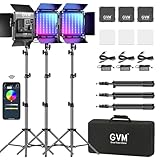
GVM RGB LED Video Lighting Kit 800D 3-Pack
Anyone building a small home studio who needs key, fill, and rim lighting simultaneously should look here. Three panels with eight scene modes each give you a complete three-point setup without mixing brands or worrying about color drift between different light families.
- Pro: Three matched units ensure consistent color rendering across the entire rig.
- Pro: APP control manages all three lights from a single interface.
- Con: One of the pricier kits in this roundup, and you are paying for the third light even if you only use two.
Skip if your setup is already complete with two lights or if you shoot exclusively as a single-camera creator who bounces one panel off a wall.
GVM RGB LED Panel Video Light 800D 2-Pack
The standout here is a rated CRI of 97, which makes these panels genuinely suitable for color-critical work like product reviews, craft video, or anything where white balance must be accurate on camera. Two panels, eight scene modes, and app control round out a well-balanced kit.
- Pro: CRI 97 puts it among the most color-accurate kits in this roundup.
- Pro: Eight scene modes with app sync allow quick look changes without stopping a recording.
- Con: Bare panel design means you need separate diffusion if shooting directly into skin tones.
Skip if you already own softbox modifiers and only need a simple color-wash effect for a background.
Govee 32.8ft RGBIC LED Strip Lights
Gamers who want color along the back of a desk, under a shelf, or around the edge of a wall without buying several separate lights. RGBIC means different segments of the strip can show different colors at the same time, so rainbow flows and gradients look smoother than on single-color strips. The adhesive backing mounts it in minutes, and the Govee Home app handles color, scenes and music mode.
- Pro: Segmented RGBIC color produces multi-color effects from a single strip.
- Pro: A built-in microphone drives music-reactive modes without extra hardware.
- Con: It is an ambient light only; it adds color to the room but does nothing to light your face on camera.
Skip if you need a key light for video. Pair it with one of the panels above instead of relying on it alone.
Nanoleaf Shapes Hexagons 7-Pack
For streamers who want a recognizable lit backdrop on the wall behind them. The seven hexagon panels join together in whatever layout you design, and each panel can show its own color. The Nanoleaf app adds scenes and a Rhythm mode that reacts to music, the panels respond to touch, and the Nanoleaf desktop app can mirror on-screen colors on a PC.
- Pro: Modular panels let you build a custom shape that reads well in the background of a facecam shot.
- Pro: Works with Alexa, Google Assistant and Apple HomeKit for voice and smart-home scenes.
- Con: Premium cost for a decorative light, and the adhesive mounts need a clean, smooth wall.
Skip if you rent and cannot stick panels to the wall, or if you only want simple color behind a monitor; the Govee strip does that for far less.
Torjim RGB Photography Video Lighting
The absolute floor price in this list, and it earns that spot honestly. A single adjustable-stand light with 16 colors is enough to add a colored backdrop wash to a streaming corner, a vlog set, or a makeup station. The tripod stand is height-adjustable, so you are not stuck at desk level.
- Pro: Budget-tier cost of entry gets you a working RGB accent light with a stand.
- Pro: Adjustable tripod stand means it works as a floor light for taller setups.
- Con: Only 16 preset colors and no app control, so you cannot dial in a custom hue or trigger effects.
Skip if you need beat-reactive modes, custom color mixing, or more than one light in the frame.
More RGB Lighting Kits Worth Considering
The eight kits above lean toward studio panels, plus a strip and wall panels for ambience. Most competing roundups also cover three groups that matter a lot to people building a gaming or streaming desk: compact desk key lights with RGB built in, tube lights for background color, and screen-synced ambient bars that react to what is happening in a game. The six picks below fill those gaps, and each one plays a different role from the lights already listed.
NEEWER GL25C RGB Streaming Key Light
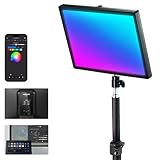
The GL25C is the closest thing in this guide to a dedicated streaming key light that can also do color. It is a 25W edge-lit panel that sits on a desk stand with a C-clamp, so it lives beside your monitor instead of on a floor tripod. NEEWER rates it at 2500 lux at half a meter, with a 2900K to 7000K white range and CRI 95+ / TLCI 97+. Those numbers are made for a face about an arm’s length away, not for lighting a whole room.
Where it stands apart from the NEEWER 660 PRO II and the GVM panels above is control. It has four modes (CCT, HSI, RGBCW and 18 FX scenes), and you can run it from the onboard display, the NEEWER phone app over Bluetooth, the NEEWER Control Center desktop software over Wi-Fi, or a Stream Deck. Changing a scene from the same keypad that switches your OBS scenes is a real workflow upgrade for live streamers. The cooling is fanless, so it adds no hum to a sensitive desk microphone. A USB passthrough port can also charge a phone or power a small accessory.
Strengths: desk-friendly clamp stand, silent operation, Stream Deck and PC control, and solid color accuracy for skin tones.
Drawbacks: output falls off quickly past about a meter, so it is a key light for one seated person, not a room light. The white range also stops at 2900K, which is not as warm as some panels for a cozy tungsten look.
Who it is for: PC streamers and webcam users who want one clean, controllable light on their face and the option to switch to colored scenes for intros or breaks. It sits in the mid-range tier, and it pairs well with any of the tube lights below for background color.
NEEWER TL60 RGB Tube Light

Tube lights have become the standard background tool for gaming streams and YouTube sets, and the TL60 is one of the most capable at its size. It is a roughly two-foot, 20W RGBWW tube with a 2500K to 10000K white range, CRI 97+ and TLCI 98+, and NEEWER claims about 36,000 colors in HSI mode. The headline feature is pixel control. The tube is split into eight sections you can set separately, with seven pixel effects and 18 scene effects such as police lights, fireworks, candle and lightning.
A built-in 3000mAh battery gives about two hours at full brightness, so you can place it behind a couch or on a shelf with no cable showing in frame. When the battery is not needed, it runs from the included DC adapter. Control comes through an onboard touchscreen, the NEEWER app, a 2.4G remote, or DMX for people who run larger lighting rigs. You can stand it on a light stand with the 1/4-inch thread or hang it from a crossbar.
Strengths: pixel effects that a flat panel cannot match, high color accuracy that also lets it work as a fill light, and battery operation.
Drawbacks: it is a narrow source, so it is not a soft key light on its own. Two hours at full power also means long streams need the adapter plugged in.
Who it is for: creators who want moving color behind them, a rim light that separates them from a dark background, or a prop light that appears on camera. It sits in the mid-range to premium tier, and two of them on either side of a desk is a common setup. Compared with the NiceVeedi panels above, it gives far more control over where color falls in the frame.
ULANZI VL49 RGB Mini Video Light

The VL49 is a pocket-sized light that has stayed popular for years because it is so easy to place anywhere. It is a 6W panel with 20 white, 20 warm and 20 RGB LEDs, a 2500K to 9000K white range, CRI above 95 and full hue control in HSI mode. Ulanzi lists about 800 lux at half a meter, which is enough for a small accent or a face light at very close range. A 2000mAh battery charges over USB-C and runs for roughly two hours at full brightness, and much longer when dimmed. It can also run while charging.
Mounting is its party trick. It has three cold shoes, a 1/4-inch thread on the bottom and a magnet on the back, so it can stick to a metal shelf or PC case side panel, sit on a camera, or hold a small mic. On a gaming desk it works well hidden behind a monitor to throw color onto the wall, or placed inside a display cabinet to light collectibles.
Strengths: very small, magnetic, high CRI for its size, and the lowest cost of entry among the new picks.
Drawbacks: limited output and a small light surface, so it gives harsh light if you use it as a main key light. It also has no app control, so color changes happen on the light itself.
Who it is for: beginners and anyone who needs a few small color accents. It sits firmly in the budget tier. Next to the Torjim light above, it has better color accuracy and more mounting options but less output and no stand.
LUXCEO Mood1 Pro RGB Tube Light 2-Pack
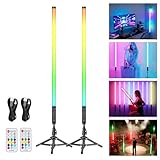
If you want two tall color tubes on stands without spending at the TL60’s level, this LUXCEO kit is a practical option. Each three-foot (90cm) tube has its own 5000mAh battery and light stand. LUXCEO lists up to about nine hours at full brightness and charging over USB-C, so they work well for room decor, parties and streaming backdrops where running cables is awkward. A 2.4G remote with eight function buttons can control each tube separately for color, brightness, speed and effect.
The effect library is large, with hundreds of preset color-change patterns and a music sync mode that changes the glow length to match the beat. That makes it one of the better fits in this guide for the “sync to music” question in the FAQ, at least within a single kit. Keep in mind that these are mainly colored effect lights. LUXCEO’s own comparison chart does not list an adjustable white color temperature for this model. For white light on your face, pair them with a proper key light such as the GL25C or the GVM 800D panels.
Strengths: long battery life, two full-height tubes with stands in one box, and simple remote control with music sync.
Drawbacks: no app ecosystem or PC control, and it is not designed as a color-accurate white source.
Who it is for: gamers who want tall vertical color on either side of a desk or TV, party hosts and TikTok creators. It sits in the budget to mid-range tier.
Govee RGBIC Gaming Light Bars H6047

The H6047 is built for the space right behind your monitor rather than for a camera. The kit includes two bars about 16.7 inches tall, a dial controller the size of a hockey puck, detachable stands and mounting hardware. Govee recommends them for monitors around 24 to 32 inches. RGBIC means each bar can show several colors at once, so gradients and chasing effects look smoother than on single-color bars.
For gamers, the main draw is integration. The bars support Razer Chroma through Razer Synapse and the Govee Desktop app, so supported games can trigger lighting changes. Govee’s DreamView feature can also group them with other Govee gaming lights. A built-in mic handles music-reactive modes, and you can adjust brightness, mode and color with the dial, the Govee Home app over Bluetooth or 2.4GHz Wi-Fi, or Alexa and Google Assistant. Note that the bars alone do not read colors from your screen. That needs a separate camera-based or sync-box product.
Strengths: strong gaming ecosystem support, a handy physical dial, and multi-zone color that looks good in the background of a facecam shot.
Drawbacks: they only connect to 2.4GHz Wi-Fi, they do not match your screen on their own, and they are ambient lights that do nothing for your face on camera.
Who it is for: PC gamers who want their desk to react to games and music. It is a mid-range kit that complements a key light rather than replacing one.
Philips Hue Play Light Bar 2-Pack Base Kit

Hue Play bars are the premium choice for people who already use, or plan to use, Philips Hue smart lighting in the rest of the home. The base kit includes two compact white-and-color bars and a power supply. They can stand upright behind a monitor or TV, or lie flat to wash a wall with color. The bars need a Hue Bridge for full features, and the Bridge is sold separately. That is the main extra cost to plan for.
Once they are on a Bridge, the bars join Hue rooms, schedules and scenes. The free Hue Sync desktop app can also match them to on-screen content and game audio on a PC. Because they use the Hue ecosystem, the same scene that dims your ceiling lights can turn your desk bars blue when you start a session. More Play bars can share the same power supply, so the setup can grow.
Strengths: excellent smart-home integration, PC screen sync through Hue Sync, good build quality and a tidy, low-profile design.
Drawbacks: you need a Bridge for full features, the cost per bar is high, and like the Govee bars they are ambient lights, not camera key lights.
Who it is for: Hue users and anyone who wants desk lighting that works with the rest of the house. It is a premium kit. Compared with the Govee H6047, it gives up some game-specific integration in exchange for a more polished smart-home platform.
Buying Guide
Color Accuracy and CRI Rating
CRI measures how faithfully a light renders colors compared to natural sunlight. For gaming streams, background washes, and mood lighting, CRI barely matters. For anything where a product, skin tone, or artwork must look correct on camera, a rating above 90 is the practical floor. The GVM 800D Panel lists CRI 97, and several NEEWER lights in this guide list CRI 95 or higher, which tells you where those manufacturers invested in quality.
Control Method: App, Remote, or Physical Dial
App control offers the deepest feature set including custom hue selection, scene grouping, and timer scheduling, but it introduces a Bluetooth or Wi-Fi layer that can drop mid-session. Physical remotes and on-panel displays are more reliable and faster for quick changes. Decide before buying whether you want to reach for your phone every time you change a preset or whether a hand-held remote fits your workflow.
Output Power and Diffusion Fit
Wattage alone is misleading because panel efficiency varies widely. What matters is whether the light fills your subject distance with enough intensity to avoid cranking your camera gain. At roughly four to six feet, a 40W panel like the NiceVeedi units works as a background accent, while you need softbox diffusion like the NEEWER NK800 to serve as a primary key light at similar distances. Match the output to the role: accent, key, or fill.
Additional Picks Compared
| Product | Type | Best role | Power | Control | Price tier |
|---|---|---|---|---|---|
| NEEWER GL25C | Desk key light, RGB | Face light for one seated streamer | Mains adapter | Onboard, app, PC, Stream Deck | Mid-range |
| NEEWER TL60 | RGBWW pixel tube | Background color, rim light, effects | Battery or DC | Touchscreen, app, 2.4G, DMX | Mid-range to premium |
| ULANZI VL49 | Mini RGB panel | Small accents, shelf and case lighting | USB-C battery | Onboard buttons | Budget |
| LUXCEO Mood1 Pro 2-Pack | RGB effect tubes on stands | Tall background color, music sync | USB-C battery | 2.4G remote | Budget to mid-range |
| Govee H6047 | RGBIC ambient bars | Behind-monitor glow, game sync | Mains adapter | Dial, app, voice, Razer Chroma | Mid-range |
| Philips Hue Play 2-Pack | Smart ambient bars | Desk and TV ambience in a Hue home | Mains adapter | Hue app, Hue Sync, voice (Bridge required) | Premium |
How to Choose the Right Type of RGB Kit
The buying guide above covers CRI, control and output. Before you look at any of those numbers, the most useful decision is what job the light needs to do. RGB “kits” sold today fall into four families that are rarely interchangeable.
Key Light, Accent Light, or Ambient Light
A key light lights your face or subject. It needs a broad, soft surface, high CRI in white mode and enough output at your working distance. The GVM 800D panels, NEEWER NK800 softboxes and NEEWER GL25C belong here. An accent light adds color to a background, rim or prop. Tubes such as the TL60 and LUXCEO, small panels like the VL49 and the NiceVeedi units are best used this way. An ambient light sets the mood of a room or desk and is not aimed at a camera at all. The Govee bars and strip, the Nanoleaf panels and the Hue bars fall here. Most good setups combine one key light with one or two accent or ambient sources, instead of trying to make one product do all three jobs.
Battery Versus Mains Power
Battery lights such as the TL60, VL49 and LUXCEO tubes let you place color where no outlet exists, such as on a bookshelf behind you or on the floor in a corner. The trade-off is runtime at full output, which can be as short as one to two hours on small tubes. For streams that run all evening, choose mains-powered lights for anything that stays on the whole time, or check that the light can run on its adapter while charging.
Ecosystem and Sync
If you want lights to react to games, music or on-screen colors, the ecosystem matters more than the specs of any single product. Govee products link through Govee Home and DreamView. Philips Hue links through the Hue Bridge and Hue Sync. NEEWER studio lights share the NEEWER app and, on some models, Stream Deck control. Mixing brands usually means several apps and no shared scenes, which is the main reason syncing across brands is unreliable. Pick one platform for ambient lighting and one for camera lighting, and you will avoid most headaches.
Fan Noise and Heat
Larger COB and panel lights often use cooling fans that can be picked up by a sensitive condenser microphone a meter away. For a desk where you also record voice, fanless designs such as edge-lit desk panels, tubes and small battery panels are the safer choice. If you do use a fan-cooled light, check whether it offers a silent or fan-off mode at reduced output.
Setup Tips for Streaming and Gaming Desks
- Start with the key light. Place it about 30 to 45 degrees to one side of the camera and slightly above eye level, angled down. Lighting your face straight on from eye level looks flat and causes strong reflections in glasses.
- Add fill at lower intensity. A second light on the opposite side at roughly half the brightness of the key softens shadows. Bouncing a panel off a white wall works as fill too.
- Use color behind you, not on you. Saturated RGB on your face makes skin look unnatural. Aim tubes and bars at the wall or shelves behind you, or use them as a rim light from behind to separate your outline from the background.
- Match white color temperatures. If two lights are in white mode, set them to the same Kelvin value. Mixing a 5600K key with a 3200K fill gives patchy skin tones that are hard to fix later.
- Do not run everything at 100 percent. Lower brightness with the camera exposure set correctly usually looks better, runs cooler and extends battery life. Lock your webcam’s exposure and white balance once the lights are set, so the camera does not shift when colors change.
- Handle glasses glare. Raise the key light higher and move it further to the side until reflections leave the lenses. Large, soft sources produce softer reflections than small, bright ones.
- Manage cables and mounting. Clamp-mounted and magnetic lights keep your desk clear. Run power cables along the back edge of the desk or through a cable tray, and keep battery lights topped up between sessions.
Common RGB Lighting Mistakes to Avoid
- Buying on wattage or lumens alone. A bright light with poor color accuracy makes skin look gray or green on camera. For anything that lights a face, check the CRI and TLCI in white mode first, then the output.
- Using RGB as the only face light. Colored light on skin is a stylistic choice for short clips, not a daily streaming look. Keep the key light in white mode and put color on the background.
- Mixing too many brands. Three apps for three lights means no shared scenes and no reliable sync. Stay with one platform for the lights you want to change together.
- Placing lights too close to the lens. A light right beside the webcam flattens your face and fills glasses with reflections. Moving it 30 to 45 degrees off-axis improves the image right away.
- Ignoring the room. A bright window behind you or a ceiling light overhead will fight any desk light. Close blinds during streams, or turn the desk so daylight falls on your face instead of behind you.
- Forgetting heat and noise. A fan-cooled panel next to a condenser microphone can add a constant hiss to every recording. Choose fanless desk lights or check for a silent mode.
Our Verdict
The NEEWER 660 PRO II takes the top spot because one bright panel with full RGB, adjustable white balance, app control and an included stand covers most solo creators. If color accuracy matters most, the GVM 800D Panel 2-Pack and its CRI 97 rating is the pick for cleaner footage with less correction. For tight budgets, the Torjim RGB is an easy entry point that solves the “I just need color behind me” problem completely. If your priority is flattering skin tones in a talking-head video without buying a separate modifier, the NEEWER NK800 Softbox Kit wins because the diffusion is built in and the app lets you lock in a look in seconds.
FAQ
Can an RGB light serve as my only source of illumination?
Not effectively. RGB kits are best as accent or background sources because full-color saturation shifts the ambient hue across the entire frame. For a usable key light, pair an RGB panel with a standard white-balanced source or use a kit with a dedicated daylight mode like the NEEWER 660 PRO II.
What CRI rating should I target for streaming versus product photography?
For streaming and background mood lighting, anything above 80 is fine because viewers are not color-grading your footage. For product photography, paint matching, or any content where a viewer needs to judge color accurately on their screen, shoot for 90 or above and verify with a color checker card during your first session.
Are ambient RGB kits and studio RGB kits interchangeable?
No. Ambient kits like the Govee strip and Nanoleaf panels are built to color a wall or room and usually stay fixed in place, while studio panels are stand-mounted units built for consistent, color-accurate output on a subject at close distance. Their color modes, mounting systems, and roles all differ substantially.
Can I sync multiple RGB kits to music or external triggers?
Only some. Kits with app control and scene modes like the GVM and NEEWER units often include audio-reactive or timer-based presets, but true music sync across multiple brands is unreliable. Sticking to one brand family, such as the GVM 3-Pack, gives you the best shot at synchronized effects without third-party software.
How many lights do I need for a streaming setup?
One good key light is enough to look clean on camera. A second light for fill or background color makes the biggest visible jump after that. A common gaming desk layout is one key light such as the NEEWER GL25C or a GVM 800D panel, plus one or two tubes or ambient bars behind you for color and depth. A full green-screen setup is different. It usually needs separate lights for the screen and for you, so the background lights evenly without spilling green onto your shoulders.
Do RGB lights work for green screen?
They can, but keep RGB effects away from the green screen itself. Light the screen evenly in white so the keying software sees one flat shade of green. Then use a rim light from behind, in white or a soft color, to separate you from the backdrop and reduce green spill on your edges. Avoid saturated green or cyan accent colors anywhere in the frame, because the keyer may cut them out.
Will screen-sync lights like the Govee or Hue bars add input lag?
No. Ambient sync lights do not touch your game’s video signal. Desktop sync apps read what is on screen, or game events through integrations such as Razer Chroma, and then send commands to the lights. There may be a short delay before the lights change color, but it has no effect on frame times or input response in the game.
Can I control studio RGB lights from a Stream Deck?
Some, but not all. The NEEWER GL25C explicitly supports Stream Deck control through NEEWER’s software. Many other app-controlled panels only work with their own phone app. If one-button scene changes during a live stream matter to you, confirm Stream Deck or PC software support before buying, rather than assuming app control means desktop control.
Are battery-powered RGB tubes safe to leave charging overnight?
Follow the manufacturer’s charging guidance, use the supplied cable or a quality USB-C charger, and avoid charging on soft surfaces or inside closed cabinets where heat can build up. If you use a tube as a permanent background light, running it from its adapter while it stays plugged in is fine for most models that support it. Unplug it if the battery or housing ever gets unusually hot.
Related guides
- Best Ultrawide Gaming Monitors: Six Screens Sized Against Real Desks: 6 Compared (2026)
- Best Game Room Neon Lights: Ten Signs and Icon Lamps Compared: 10 Compared (2026)
- 10 Best 75% Hot-Swappable Mechanical Keyboards (October 2026)
- Best Mini-LED Monitor: Five Listings From a Renewed KTC to a 5K LG, Compared by Pixels and Ports (2026)









