
The best cable management kit for a PC setup is a combination, not a single box: a rigid metal under-desk tray such as the PAMO trays or the IKEA SIGNUM to hold the power strip, reusable hook-and-loop straps such as Velcro Brand ONE-WRAP to bundle runs, and either a wide neoprene sleeve such as the JOTO large sleeves or a raceway from D-Line or Legrand Wiremold to carry cables down to the floor. All-in-one kits sell those same pieces together, so the smart move is to judge any kit by whether it includes the three jobs every gaming desk needs: hold, bundle and route.
As an Amazon Associate we earn from qualifying purchases at no extra cost to you.


Our Top Picks
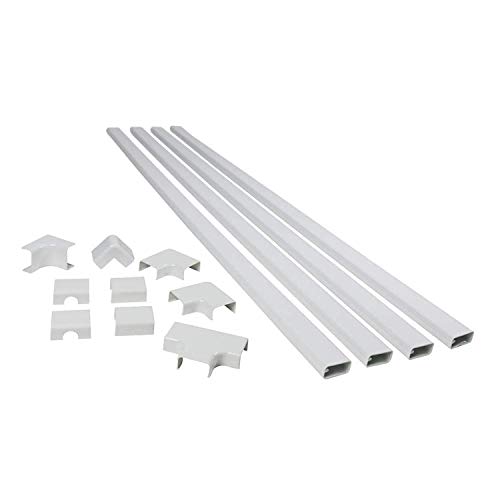 Legrand Wiremold Cordmate II 120 Inch 12 PieceMedium Capacity30 x 0.5 x 1 inches1.4 PoundsCheck on Amazon


Top 3 picks at a glance
Before You Buy: A Ten-Minute Cable Audit
Most people buy a kit first and then discover it is the wrong size. A quick audit avoids that. Sit at the desk with a notepad and work through the setup in this order.
- List every cable by destination. Group them as PC, monitors, audio, peripherals, charging and network. Note which ones go to the wall outlet and which stay on the desk.
- Count the power bricks. Monitors with external adapters, speakers, a laptop dock, LED strips and a router each add a brick. Bricks decide the size of the tray more than anything else.
- Measure the desk. Note the width, the depth of any frame or crossbar under the top, and the desktop thickness for clamp-on parts.
- Locate outlets and the floor route. Measure from the back of the desk to the outlet and decide whether the trunk runs down a desk leg, along the wall or across the floor.
- Note surfaces. Smooth laminate, glass, textured wood or raw MDF each change which adhesive or mount will hold.
- Plan for change. If you swap headsets, add a capture card or move the PC often, favor reusable straps and openable sleeves over zip ties and sealed raceways.
The audit usually shows that one tray, one wide sleeve or spine and a pack of reusable ties solve most of the clutter, with small adhesive clips only for the last few cables on the desk surface.
Cable Management for Specific Gaming Gear
Monitor arms
Most monitor arms include clip-on channels along the arm. Route the display and power cables through them, leave a loop of slack at each joint so the arm can swing and tilt, and bring the cables down at the arm’s clamp point straight into the tray. That keeps the arm’s movement from tugging cables off the desk.
Wired mouse and keyboard
A mouse bungee lifts the cable off the desk and prevents drag. For the keyboard, an adhesive clip at the back edge of the desk stops the cable from sliding off, and a short run along the underside to the PC’s USB ports keeps it hidden.
Headsets and microphones
Run the headset or mic cable along the boom arm with small reusable ties and leave slack for head movement. If you use a desktop audio interface or DAC, place it near the tray so its power and USB cables join the main trunk.
Consoles and second screens
A console beside the PC adds power, HDMI and network cables. Route them into the same trunk and label both ends so you know which HDMI is which when you troubleshoot.
LED strips and RGB accessories
RGB controllers and their power supplies often end up loose on the floor. Stick the controller to the inside of the tray or under the desk and run thin strip leads through adhesive clips along the desk edge.
The Three Jobs a Kit Has to Do
Most cable mess on a gaming desk comes from about 10 to 15 cables: PC power, two or three monitor power cables, two or three display cables, speakers, a USB hub, a lamp, phone charging and network. A kit that only contains clips and ties cannot fix that because the bulk is the power strip and the power bricks.
- Hold: a tray, basket or box that lifts the power strip and adapters off the floor. This removes the largest single visual mess.
- Bundle: reusable straps that group cables into one or two trunks. Reusable matters because a gaming PC gets upgraded.
- Route: a sleeve, spine or raceway that carries the trunk from desk to floor or wall outlet without a waterfall of loose cables.
Kit Components Compared
| Component | Example products | Capacity | Install | Price tier |
|---|---|---|---|---|
| Steel under-desk tray | IKEA SIGNUM | Power strip plus 4-6 bricks | Screws into desk underside | Budget |
| Hook-and-loop straps | Velcro Brand ONE-WRAP | Bundles of 3-12 cables per strap | None | Budget |
| Zippered neoprene sleeve | Alex Tech, JOTO sleeves | About 8-12 cables at 1-1.5 inch diameter | Zip around cables, cut to length | Budget |
| Adhesive raceway kit | D-Line, Legrand Wiremold CordMate | 3-6 cables depending on channel size | Adhesive or screws on wall/desk leg | Budget to mid-range |
| Adhesive cable clips | Generic multi-slot clips | 1-5 cables each | Peel and stick | Budget |
Worked Example: Sizing a Kit for a Dual-Monitor Desk
Take a 160cm desk with a gaming tower on the floor at the right, two monitors on arms, speakers and a wall outlet 60cm behind the desk.
- Count the trunk. PC power, two monitor power cables, two DisplayPort cables, speaker power, USB hub cable and Ethernet make eight cables between desk and floor. A 1-inch zippered sleeve fits that comfortably; a narrow raceway channel will not.
- Measure the drop. Desk height is about 74cm, plus 30cm of slack so the sleeve curves rather than pulls, gives roughly 105cm of sleeve. Most sleeves come in 50 to 60 inch lengths and can be cut, so one sleeve covers it with spare.
- Size the tray. A 6-outlet power strip is about 30cm long. A tray of at least 55-60cm leaves room for monitor and speaker bricks beside it.
- Count straps. Strap the trunk every 25-30cm along the desk underside and at both sleeve ends. On a 160cm desk that is about eight straps, plus a few for the monitor arms. A pack of 50 small straps covers this with spares for inside the PC.
Result: one tray, one 1-inch sleeve, about 12 straps and a few adhesive clips. Bought separately, that combination stays within a budget-tier spend, which is a good benchmark for judging the value of a bundled kit.
Which Kit Type Fits Your Setup
| Setup | Prioritize | Skip |
|---|---|---|
| Fixed desk against a wall | Tray plus raceway on the wall to the outlet | Long sleeves |
| Standing desk | Tray plus flexible sleeve or spine with 30-40cm extra slack | Rigid raceway between desk and floor |
| Desk in the middle of a room | Sleeve to the floor plus a floor cord cover | Adhesive wall clips |
| Glass desk | Clamp-on tray or basket, adhesive clips only on frame | Screw-mounted trays |
| Rented space | Clamp-on tray, straps, removable adhesive | Screws into walls |
More Kit Pieces Worth Buying: Trays, Straps, Sleeves and Spines
The PAMO trays, the D-Line and Wiremold raceways and the D-Line cable box above cover the under-desk hold, the route to the wall and the floor-level power strip. The products below fill the other jobs a complete gaming desk kit needs: holding the power strip under the desk, bundling runs with reusable straps, and carrying the trunk to the floor on a fixed or standing desk. Mix one from each job rather than buying several of the same type.
Univivi No Drill Under Desk Cable Management Tray (36 inch)

The Univivi tray is the hold piece for most gaming desks. It is a 36-inch metal frame wrapped in fabric that mounts either with clamps that grip the desk edge or with screws, so it suits both renters and owners. At 36 inches it is long enough for a 6-outlet power strip with the monitor and speaker bricks beside it, which matches the 55–60 cm minimum worked out in the dual-monitor example above.
The clamp option is the real advantage. It avoids drilling into a desk that may be particleboard, and the tray can be moved when you rearrange. The fabric cover hides the contents from view at seated eye level better than an open wire basket, which matters on desks without a modesty panel.
Strengths: long enough for a full desk’s power gear, no-drill clamp or screw mounting, and a cleaner look than mesh baskets. Drawbacks: clamps need a desk edge without a deep frame lip, and the fabric traps heat a little more than open mesh, so do not pack hot laptop bricks in tightly.
Choose this over the D-Line cable box when you want the power strip off the floor entirely rather than hidden on it.
Litwaro Under Desk Cable Management Tray

The Litwaro tray is the budget, compact alternative. It is an open metal mesh basket with a no-drill clamp mount, aimed at smaller desks, side tables and standing desks where a long tray would get in the way of the frame or crossbar. Its open mesh lets air move freely around power bricks, which addresses the heat concern raised in the FAQ below.
Because it is shorter, it works best for a single-monitor setup or as a second tray for a specific cluster of cables, such as the monitor arm’s power and display leads on one side of a wide desk. Two compact trays can be easier to fit around a standing desk’s motor housing than one long one.
Strengths: budget pricing, clamp mounting, airy mesh for heat, and a small footprint. Drawbacks: not long enough for a 6-outlet strip plus several bricks, and the open design leaves the contents visible from some angles.
VELCRO Brand ONE-WRAP Cable Ties (8 inch, 100 pack)

These are the straps named in the introduction, and they are the bundle piece in almost every good kit. Each tie is 8 inches long and half an inch wide, with a slot at one end so you can anchor the strap to one cable and then wrap the bundle; the tie stays put on the cable when you undo it, so it is ready to reuse. The 100-pack covers the roughly 12 desk straps from the worked example with plenty left for inside the PC case and behind the TV.
Hook-and-loop ties are the right choice for a gaming setup because cables change. A new GPU, a capture card or a second monitor means re-routing, and these open by hand instead of needing snips. The 8-inch length bundles up to about a dozen cables, and you can overlap two ties for thicker trunks.
Strengths: reusable, gentle on cables, quick to adjust, and enough for a whole setup. Drawbacks: bulkier than nylon zip ties on very tight bundles, and the black finish is not ideal for all-white builds; color variants exist.
JOTO Cable Management Sleeve, 2 Pack Large

The JOTO large sleeves are the route piece for the desk-to-floor drop. Each neoprene sleeve is 130 inches long and wraps to about 1.5 inches in diameter, which JOTO rates for roughly 8 to 10 cables. That matches the eight-cable trunk in the dual-monitor example, and the length covers the 105 cm drop several times over. The sleeves can be cut to size.
These close with full-length hook-and-loop strips rather than a zipper, which makes them easier to load with chunky DisplayPort and HDMI plugs and to open later when you add a cable. The flexible neoprene bends with a standing desk’s height changes, unlike rigid raceway.
Strengths: wide enough for a full gaming trunk, long and cuttable, and easy to open. Drawbacks: a soft sleeve sags if not strapped at both ends, and neoprene can collect pet hair and dust.
Use it instead of the D-Line raceway when the desk is in the middle of a room or moves up and down.
VIVO Clamp-on Desk Vertebrae Cable Management Kit
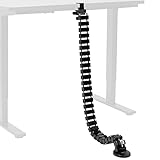
A cable spine is the tidiest route option for standing desks. VIVO’s clamp-on vertebrae is 4 feet long with removable segments to adjust height, four separate entry channels so power and data can be split, and a weighted base about 5 inches wide. The clamp fits desktops from about 0.4 to 2 inches thick, and it can be screwed down on desks at least 1 inch thick.
Each link swivels, so the spine flexes as a sit-stand desk rises and lowers without pulling on connectors. Separate channels let you keep power cables apart from USB and audio leads, which can help with hum on analog audio runs.
Strengths: a clean, structured look; made for moving desks; no-drill clamp. Drawbacks: each channel holds only a few cables, so a heavy trunk may need a sleeve as well, and very thick display cables can be tight to clip in.
N NOROCME 192-Piece Cable Management Kit

If you want an all-in-one box as a starting point, the N NOROCME kit is one of the most commonly recommended. It bundles four split-style cable sleeves, a large set of self-adhesive cable clips, reusable hook-and-loop ties and nylon zip ties. That covers the bundle and part of the route job; what it lacks is a tray, which is why it pairs well with the Univivi or Litwaro trays above.
Strengths: budget pricing, lots of small parts for clips along desk edges and monitor arms. Drawbacks: its sleeves are narrower than the JOTO large sleeve, so they suit smaller runs; the adhesive clips need the surface prep described in the adhesive section.
New Picks Compared
| Product | Job | Mounting | Best for | Price tier |
|---|---|---|---|---|
| Univivi 36-inch tray | Hold | Clamp or screw | Full gaming desk with power strip and bricks | Mid-range |
| Litwaro mesh tray | Hold | Clamp | Small desks, standing desks, extra cable clusters | Budget |
| VELCRO ONE-WRAP ties | Bundle | None | Every setup, inside the case too | Budget |
| JOTO large sleeves | Route | Wraps around cables | 8–10 cable trunk, room-center or standing desks | Budget |
| VIVO clamp-on vertebrae | Route | Clamp or screw | Standing desks wanting a structured look | Mid-range |
| N NOROCME 192-piece kit | Bundle and light routing | Adhesive clips | Starter kit, pair with a tray | Budget |
What Separates a Good Kit From a Cheap One
Adhesive quality
Clips and raceways fail more from adhesive than from plastic. Foam tape works on smooth laminate and painted metal but loses grip on textured wood, raw MDF and warm surfaces near monitors or the PC exhaust. Clean the surface with isopropyl alcohol, press firmly for 30 seconds and wait several hours before loading cables. Kits that include screw holes as a backup are worth a little more.
Reusable versus single-use ties
Nylon zip ties are cheap and neat but must be cut every time you swap a GPU or add a drive. Hook-and-loop straps cost slightly more and make upgrades painless. A kit built mostly around zip ties is fine for inside a case that rarely changes, less ideal for the desk.
Sleeve diameter
Many kits include several narrow sleeves. One 1 to 1.25 inch sleeve for the main trunk is usually more useful than four thin ones, because display cables with large DisplayPort or HDMI plugs need room to pass through the zipper.
Tray strength
A loaded tray with a power strip and four bricks can weigh 2 to 3kg. Steel trays hold that without sag; thin plastic trays bow over time and can drop the strip if the adhesive mounts let go.
Routing Along Walls and Floors
The last stretch from desk to outlet is where many setups fall apart. Three tools handle it, and choosing between them depends on the surface and how often the route changes.
Wall raceways
Adhesive raceways such as the D-Line and Wiremold kits above suit fixed desks against a wall. Plan the run so the channel follows the shortest straight path from the desk edge to the outlet, use the included corner and joint pieces rather than bending the channel, and cut lengths with a fine-tooth saw or the cutter some kits include. Most raceways can be painted to match the wall, which makes them nearly invisible. Choose a channel with spare capacity; a raceway packed full is hard to close and pushes on its adhesive.
Floor cord covers
When cables must cross a walkway, use a low-profile floor cover designed for foot traffic. It protects the cables and prevents trips. Do not run cables under rugs, which hides wear and traps heat.
Desk leg routing
On desks away from walls, follow the leg nearest the outlet. Adhesive clips or small ties every 20–30 cm hold a sleeve or a few loose cables against the leg, and on metal frames, magnetic cable clips avoid adhesive entirely.
Reduce the Cable Count First
The easiest cable to manage is the one you remove. Before buying more trays and sleeves, look for cables you can eliminate.
- Switch to wireless peripherals where latency is no concern. Modern 2.4 GHz gaming mice and keyboards perform at a level most players cannot distinguish from wired, and they remove two cables from the desk surface.
- Use a powered USB hub or monitor hub. Many monitors include a USB hub; one upstream cable to the PC then serves a webcam, headset stand and charger on the desk.
- Consolidate chargers. A multi-port USB-C charger can replace several phone, controller and earbud bricks.
- Pick a monitor with internal power. Monitors with an internal power supply use a simple cable instead of a brick, which frees space in the tray.
- Use Wi-Fi or powerline networking only if your connection is stable enough; for competitive gaming, a single well-routed Ethernet cable is still the better choice.
Inside the PC Case
A desk kit does not cover the case, but the same principles apply. Most modern cases have tie-down points behind the motherboard tray. Use hook-and-loop straps there so GPU and PSU cable changes do not require cutting, route the 24-pin and 8-pin CPU cables through the nearest grommets, and leave enough slack on the 12V-2×6 GPU power cable that it is not bent sharply near the connector. Clean cable routing helps airflow less than many expect, but it makes dust cleaning and upgrades much faster.
Cable Management Plans by Budget
You do not need to buy everything at once. These three plans show what to prioritize at each spending level, starting with the pieces that remove the most visible clutter.
| Plan | What to buy | What it fixes | Price tier |
|---|---|---|---|
| Starter | A pack of reusable straps, a compact clamp-on tray and a handful of adhesive clips | Power strip off the floor, cables bundled under the desk | Budget |
| Complete | Full-length tray, straps, a wide neoprene sleeve or raceway to the outlet, adhesive clips | Hold, bundle and route all covered; nothing visible from the front | Budget to mid-range |
| Showcase | Fabric or steel full-length tray, cable spine, raceway painted to the wall, cable labels, matching color accessories | A clean look from every angle, ideal for streaming setups and standing desks | Mid-range |
White and color-matched setups
All-white gaming desks show black cables and trays clearly. Look for white versions of sleeves, trays and ties, which many brands offer, and consider white or braided cables for the visible runs such as the keyboard, mouse and headset. For dark setups, black hardware hides best. A single accent color for labels or ties can make troubleshooting easier without spoiling the look.
Streaming and camera views
If you stream with a camera that shows the desk or the space behind you, check the view on screen before finishing. Cables that look hidden from the chair can be obvious from the camera’s angle. Route anything in shot behind the monitor, desk leg or a backdrop, and keep the area under the desk dark or covered by a modesty panel.
Going Further Inside the Case
The basics above cover the main power cables. These extra steps make a build look and work better, especially in cases with glass side panels.
- Use only the modular cables you need. With a modular or semi-modular power supply, leave unused SATA and PCIe cables in the box. Fewer cables mean less clutter behind the motherboard tray and easier side-panel closing.
- Plan fan and RGB wiring. Daisy-chain fans with the manufacturer’s connectors or a fan hub, and route the single lead to the motherboard header behind the tray. Many modern fans connect in chains, which removes several cables at once.
- Seat the GPU power cable fully. The 12V-2×6 connector on high-end cards must click in completely with no visible gap, and the cable should run straight out for a short distance before bending. Avoid side-panel pressure on the plug.
- Use cable combs for visible runs. On the 24-pin and GPU cables, combs keep individual wires parallel for a cleaner look in glass-panel cases.
- Use the PSU shroud. Tuck excess cable length into the shroud area rather than behind the motherboard, where it can stop the rear panel from closing.
- Leave room around front intake fans. Bundled cables in front of intake fans block airflow more than anything behind the motherboard tray does.
Tools That Make the Job Easier
A handful of inexpensive tools save time and prevent damage. Flush cutters trim zip ties cleanly without leaving sharp edges. Isopropyl alcohol and a lint-free cloth prepare surfaces for adhesive. A tape measure and a pencil help mark tray and raceway positions. A small level keeps raceways straight on walls. Cable labels or a label maker make every later change faster. A headlamp or flashlight makes working under a desk far easier than relying on room lighting, and a magnetic parts tray keeps tray screws and clips from disappearing into the carpet.
Install Order That Saves Time
- Unplug everything and lay cables out by destination.
- Mount the tray first and load the power strip and bricks.
- Run monitor cables down the monitor arm channels, then to the tray.
- Bundle the desk-side runs with straps every 25-30cm.
- Gather the desk-to-floor cables into the sleeve or raceway.
- Plug in, power everything on and test before trimming any sleeve or tie.
Safety Rules for Power Strips and Cable Bundles
Hiding cables should not create a fire or trip hazard. A few rules keep a tidy setup safe.
- Do not daisy-chain power strips. Plugging one strip into another can overload the first strip and the outlet. If you need more outlets, use a single strip with enough sockets or a properly rated surge protector.
- Check the strip’s rating. A gaming PC, two monitors, speakers and chargers rarely exceed the capacity of a quality surge protector, but add up wattage if you also run a space heater or another high-draw device, which should never share a strip with the PC.
- Give bricks room to breathe. Power adapters get warm. Use open trays or ventilated boxes, avoid stacking bricks, and keep them away from the PC’s exhaust.
- Do not run cords under rugs. Cables under a rug get crushed and overheat. Use a floor cord cover rated for foot traffic instead.
- Separate power from audio where possible. Running power cables tightly alongside unbalanced analog audio leads over long distances can introduce hum. Bundling digital cables such as DisplayPort, HDMI and USB together with power is generally fine.
- Do not crush or kink cables. Avoid over-tightening ties on display cables and Ethernet, and respect each cable’s bend radius, especially for thick DisplayPort and fiber HDMI runs.
Keeping It Tidy After Upgrades
A setup stays clean only if changes are easy. Leave one or two spare ties attached to the trunk so you can add a cable without hunting for supplies. Label both ends of each cable with small tags or colored ties so you can find the right one during troubleshooting. Leave a short service loop at the PC end so you can pull the case forward for cleaning without unplugging everything. Every few months, check adhesive clips and tray mounts, tighten clamps that may loosen as a standing desk moves, and dust inside the tray where lint collects around power bricks.
FAQ
Are all-in-one cable management kits worth it?
They are worth it when they include a tray or a sleeve large enough for your trunk. Kits made only of clips and small ties tend to leave the power strip on the floor, which is the biggest source of clutter.
Can I put a power strip in a closed cable box?
Yes for a standard strip with normal loads, but leave room for airflow and avoid stuffing hot power bricks in a sealed box. A ventilated tray is the safer default under a gaming desk.
What is the best cable management for a standing desk?
Use a clamp-on tray that moves with the desktop to hold the power strip, then a flexible spine such as the VIVO vertebrae or a wide neoprene sleeve for the drop to the floor. Leave 30–40 cm of extra slack at full height and test the desk through its full range before trimming anything.
Do I need to drill holes in my desk?
No. Clamp-on trays like the Univivi and Litwaro, clamp-on spines, adhesive clips and sleeves all install without drilling. Screws give the strongest hold on solid wood desks, but clamps are the safer choice on particleboard, rented furniture and glass-top frames.
Zip ties or Velcro straps?
Use reusable hook-and-loop straps on the desk and anywhere you expect to change cables. Zip ties are fine for permanent runs, such as inside a cable raceway or a case you rarely open. If you do use zip ties, cut them with flush cutters rather than a knife to avoid nicking cable jackets.
How do I hide cables on a desk with no wall behind it?
Gather everything into a tray under the desk, run a single sleeve or spine down the leg closest to the outlet, and finish with a floor cord cover across the walkway. Painting a raceway or picking a sleeve that matches the floor color makes the run less noticeable.
How many cable ties does a gaming desk need?
About 10 to 15 for a typical dual-monitor desk: one every 25–30 cm along the underside, one at each end of the sleeve, and a few for monitor arms. Buy a pack of 50 to 100 so you also have spares for inside the case and behind a TV.
Will adhesive cable clips damage my desk or wall?
They can pull off paint or laminate when removed. Peel them slowly, warm stubborn ones with a hair dryer to soften the adhesive, and clean residue with isopropyl alcohol. On rented walls, use removable adhesive strips or freestanding solutions instead.
Is a cable spine better than a sleeve?
A spine looks more structured and handles standing desk movement neatly, but each channel holds fewer cables. A wide neoprene sleeve holds more and costs less. Many setups use a spine for a clean look and a sleeve or tray for overflow.
How do I manage cables for a PC on the floor?
Keep the tower on a small stand or caster base to reduce dust intake, bring its cables up the nearest desk leg in one bundle, and leave a service loop long enough to pull the case out for cleaning without unplugging everything.
Related guides
- Best Ultrawide Gaming Monitors: Six Screens Sized Against Real Desks: 6 Compared (2026)
- Best Game Room Neon Lights: Ten Signs and Icon Lamps Compared: 10 Compared (2026)
- 10 Best 75% Hot-Swappable Mechanical Keyboards (October 2026)
- Best Mini-LED Monitor: Five Listings From a Renewed KTC to a 5K LG, Compared by Pixels and Ports (2026)









