
As an Amazon Associate we earn from qualifying purchases at no extra cost to you.



Our Top Picks
 VIVO STAND-V002F Dual LED LCD Monitor Free-Standing Desk13" - 27" screens17.5 x 11.4 x 3.8 Inches4.48 poundsCheck on Amazon
 Spacrea Dual Monitor Stand Riser with Drawer and40" W x 9.3" L x 4.3" H40.6 x 9.3 x 4.3 inches6 poundsCheck on Amazon

Top 3 picks at a glance
The Short Answer
For dual 27 inch monitors, the ideal riser gives you a top surface of at least 26 to 30 inches wide per side — realistically, a total platform width of 38 to 42 inches — and lifts your screens 3 to 5 inches off the desk. Each monitor measures roughly 24 inches wide (with a 16:9 aspect ratio), so two of them side by side need about 48 inches of horizontal space plus a couple of inches between the bezels. That means a standard single-tier riser sold as “one size” will not work; you need a long platform riser, two separate risers, or a dual-arm mount with a clamp base.
Height matters more than most buyers expect. Ergonomists recommend the top of your screen sits at or just below eye level, which for most seated users means a lift of 3 to 5 inches. If your monitor already has a tall built-in stand, a 2-inch riser may be enough; if you use a low-profile monitor arm drop or a compact stand, aim for 4 to 6 inches. Depth should be at least 9 to 10 inches to fully support a 27 inch monitor’s foot, and the weight capacity should be 22 pounds per side or better — most 27 inch panels weigh 10 to 15 pounds.
Budget runs from about $20 for a basic wooden platform riser to $60 for an adjustable freestanding dual-mount stand.
Standard Sizes
Most risers and dual-monitor stands on the market fall into a handful of size categories. These figures reflect typical manufacturer specifications for popular 2026 models:
| Product Type | Platform / Footprint (W x D) | Height Range | Weight Capacity | Typical Price |
|---|---|---|---|---|
| Single long platform riser (dual-screen rated) | 38–42 x 9–11 in (97–107 x 23–28 cm) | 3–4.5 in (7.6–11.4 cm) | 44–66 lb total (20–30 kg) | $25–$45 |
| Two individual risers (one per monitor) | 15–22 x 9–11 in each (38–56 x 23–28 cm) | 2–5 in (5–13 cm) | 20–33 lb each (9–15 kg) | $15–$30 each |
| Riser with storage drawer (e.g., Spacrea-style) | 15–21 x 9–10 in (38–53 x 23–25 cm) | 4–5.5 in (10–14 cm) | 22–33 lb per unit (10–15 kg) | $20–$40 |
| Freestanding dual-arm stand (VESA mount) | Base 16–18 x 10–12 in (41–46 x 25–30 cm) | Pole 12–20 in; arms raise screens 2–22 in | 17.6–22 lb per arm (8–10 kg) | $30–$70 |
| Vertical stack dual stand | Base 10–12 x 10–12 in (25–30 x 25–30 cm) | Screens stack up to ~25 in tall | up to 44 lb per screen (20 kg) | $25–$45 |
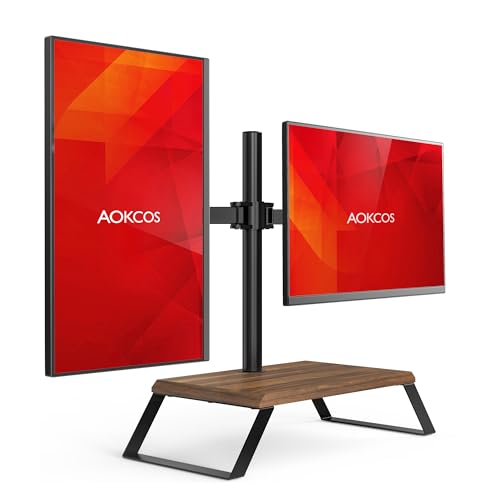
VESA compatibility is the other number to check. Virtually all 27 inch monitors use either 75x75mm or 100x100mm mounting patterns, so any arm-style stand you buy should list both. Arm-style stands such as the VIVO STAND-V002F (around $34) and the AOKCOS dual stand (around $59) support VESA 75×75 and 100x100mm, with per-arm capacities of roughly 17.6 to 22 pounds — comfortable margins for typical 27 inch panels.
How to Measure Your Space
- Measure monitor width. A 27 inch monitor with a 16:9 panel is about 24 inches (61 cm) wide including bezels. Check your exact model; some 27 inch ultrawides are much larger, but standard 16:9 is the norm.
- Multiply and add spacing. Two monitors side by side need 48 inches plus roughly 1 to 2 inches between them, so plan for 49 to 50 inches (124–127 cm) of clear horizontal desk space.
- Measure your desk width. Standard desks run 47 to 60 inches wide. If yours is 48 inches, two 27 inch screens side by side will nearly touch the edges — a vertical stack stand or a dual-arm mount with tighter arm angles may serve you better.
- Measure desk depth. You need at least 24 inches (61 cm) of depth for a 27 inch screen at a comfortable viewing distance of 20 to 30 inches. Riser platforms need 9 to 11 inches of that depth; arm stands need 10 to 12 inches for the base.
- Find your eye level. Sit in your normal posture and measure from the desk surface to your eyes. Subtract half your monitor’s height (a 27 inch 16:9 panel is about 13 inches tall), and the result is roughly the riser height you need — usually 3 to 5 inches.
- Check clearance above. If your desk sits under shelving or a hutch, make sure the riser height plus 13 inches of monitor height plus 2 to 3 inches of tilt clearance fits. A 4 inch riser with a 27 inch screen needs about 19 to 20 inches of vertical clearance.
- Weigh your monitors. Most 27 inch displays weigh 10 to 15 pounds. Any riser or arm should be rated for at least that per screen; 22 pounds per arm gives a safe margin.
By Room or Use Case
Home Office
A dedicated desk in a home office usually has room for the cleanest solution: either one long platform riser spanning both screens or a freestanding dual-arm mount. If your desk is 55 to 60 inches wide, a 40-inch platform riser at $25 to $45 keeps both screens at identical height and leaves space underneath for a keyboard tray or notebooks. A VESA dual-arm stand such as the VIVO STAND-V002F frees the entire platform surface and lets you pull screens 4 to 6 inches closer, which helps if your desk is only 24 inches deep.
Small Apartment or Compact Desk
With a 47 to 48 inch desk, side-by-side 27 inch screens are a squeeze. The best dimensional fix is a vertical stack stand, which fits two 13 to 34 inch screens on a base footprint of only 10 to 12 inches square, or a dual-arm mount angled with one screen slightly behind the other. Both keep your horizontal footprint near 24 to 26 inches instead of 49.
Gaming Setup
Gamers often run one primary 27 inch screen centered with a secondary screen angled to the side. That asymmetry favors two individual risers at different heights — a 4 to 5 inch riser for the primary and a 2 to 3 inch riser offset to the side — rather than a single long platform. Look for models with adjustable or stackable legs so each screen lands at the right eye line, and confirm the riser depth is 9 inches or more so the monitor foot cannot slide off.
Creative Workstations (Photo, Video, Design)
Color-critical work benefits from matched screen heights and solid, wobble-free platforms. A heavy-duty dual-arm stand rated 22 pounds per arm with VESA 75×75/100x100mm support lets you align both panels precisely and add tilt and swivel. Budget around $40 to $70. Avoid lightweight risers under 3 inches deep on desks that get bumped — lateral stability matters when you are nudging screens during calibration.
Office or Cubicle
Corporate desks are often 48 inches wide and shallow, and furniture policies discourage clamping. A freestanding (non-clamp) dual riser or a pair of modest risers is the practical pick. A riser-with-drawer unit around $20 to $40 per screen adds storage for pens and notepads while lifting each screen the needed 4 inches.
Common Sizing Mistakes
- Buying a riser that is too short for two 27 inch screens. Most “monitor risers” sold online have platforms of 15 to 22 inches — designed for one screen or a laptop. Two 27 inch panels need 49 to 50 inches of combined width.
- Ignoring the monitor foot dimensions. Many 27 inch monitors have Y-shaped feet spanning 9 to 10 inches deep and 8 to 9 inches wide. A riser 8 inches deep or narrower lets the foot overhang, a tipping hazard.
- Underestimating height needs. Risers under 3 inches rarely put a 27 inch screen at eye level for average-height seated users. Check the actual lifted surface height, not the product’s total height including any lip or drawer.
- Exceeding weight capacity. Bargain risers sometimes rate only 10 to 15 pounds per platform. A 15-pound monitor plus cable drag can exceed that; aim for 22 pounds per screen.
- Forgetting VESA on arm-style stands. Confirm your monitor has 75x75mm or 100x100mm mounting holes before buying an arm stand; many budget panels lack removable VESA adapters.
- Measuring the desk, not the clear space. Monitor arms, desk lamps, and speaker stands eat horizontal room. Measure between existing obstacles, not wall to wall.
FAQ
How wide should a riser be for two 27 inch monitors?
Each 27 inch 16:9 monitor is about 24 inches wide, so a single shared platform should be at least 40 inches, ideally 42 inches, to fit both with a small gap. Alternatively, use two 15-to-22-inch risers or a dual-arm mount with a base under 18 inches.
How tall should a monitor riser be for a 27 inch screen?
Three to five inches works for most seated users, placing the top of the screen at or just below eye level. If you are taller than about 6 feet, look for a 5-to-6-inch riser or an adjustable arm stand, since your eye line sits higher.
Can one riser hold two 27 inch monitors safely?
Only if it is rated for it. The combined weight of two typical 27 inch panels is 20 to 30 pounds, so a long dual-screen riser should list at least 44 pounds total capacity with a platform at least 38 inches wide and 9 inches deep. Standard single-screen risers should not be doubled up beyond their rating.
Is a monitor arm better than a riser for dual 27 inch setups?
For desks under 50 inches wide or 24 inches deep, yes — an arm stand’s base occupies only 16 to 18 inches of width and adds height adjustability a fixed riser cannot match. Risers win on price ($20 to $45 versus $30 to $70), tool-free setup, and desks where clamping or VESA mounting is not possible.









