If your work involves copying from a source into your computer, whether transcribing notes, entering data, or referencing a document, your neck pays the price when the source sits flat on the desk. Two tools raise that source to a comfortable viewing position: a physical document holder that props up paper beside or below your screen, and a second monitor that shows a digital copy. This guide compares them so you reduce neck strain and work faster, whether your source is paper or a file.
As an Amazon Associate we earn from qualifying purchases at no extra cost to you.



Top 3 picks at a glance
The problem both solve
Reading from a flat surface forces you to bend your neck down repeatedly, and glancing between a low source and an upright screen adds constant refocusing. Both a document holder and a second monitor raise the source near your line of sight so your head stays neutral and your eyes travel less. The right choice depends mainly on whether your source material is physical or digital.
When the source is paper
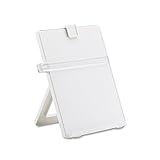
If you copy from printed pages, a document holder is purpose-built and cheap. An inline holder sits between the keyboard and monitor, holding paper at a raised angle right below the screen, so your gaze barely moves. A side-arm holder clamps to the desk and positions pages next to the monitor. Either keeps paper upright and readable without hunching.
When the source is digital
If your source is a file, PDF, or web page, a second monitor is the natural fit because you can display the source at full size, scroll, zoom, and search. It costs far more than a document holder but doubles as general screen real estate for everything else you do. For heavy digital reference work, the flexibility is worth it.
| Factor | Document holder | Second monitor |
|---|---|---|
| Best source type | Paper | Digital files |
| Neck relief | Yes, raises paper | Yes, at eye level |
| Extra desk use | None | General workspace |
| Cost | $12-35 | $100+ |
| Setup | Instant | Cables, mount, config |
Which to choose
Match the tool to your source. If you regularly type from printed documents, a document holder is the cheap, focused fix that positions paper right where you need it. If your reference material lives on a screen, a second monitor is the better investment, giving you a full digital view plus extra workspace for everything else. Some people keep both: a monitor for digital sources and an inline holder for the occasional paper page.
Placement tips
Put the source as close to the screen as possible and at a similar height so your eyes shift with minimal head movement. For a document holder, an inline position directly below the monitor usually beats a side position because the vertical glance is shorter. For a second monitor, angle it inward and match its height to your main screen.
Frequently asked questions
Can I use a tablet as a document holder?
Yes, a tablet on a stand can display a digital source at a raised angle, bridging the two options. It works well for PDFs and images, though the smaller screen limits how much you see at once compared with a second monitor. A propped tablet is a compact middle ground for light reference work.
Which is better for reducing neck strain?
Both help significantly as long as the source is raised near eye level and close to your main screen. The key is minimizing how far you look down and to the side. A document holder placed inline and a properly height-matched second monitor both cut neck movement; the wrong choice is leaving the source flat on the desk.
Bottom line
Choose a document holder when you copy from paper; it is cheap, instant, and positions pages right by your screen. Choose a second monitor when your source is digital, since it gives a full, scrollable view plus general workspace, justifying the higher cost. Match the tool to your source, place it close to your main screen, and your neck and eyes will thank you.