Upgrading your workspace or gaming battle station with RGB lighting is one of the quickest ways to boost visual appeal, reduce eye strain, and create an immersive atmosphere. However, nothing halts the excitement of a desk upgrade faster than realizing your newly unboxed LED strip is eighteen inches too short—or so long that you are left with an awkward, dangling tail of bright diodes.
Determining the exact length of RGB light strip you need requires looking at more than just the width of your desk. You must factor in your preferred mounting layout, your desk’s depth, cornering techniques, and power supply locations. This comprehensive size guide will walk you through standard desk measurements, step-by-step measuring instructions, and layout-specific recommendations to ensure a flawless installation.
As an Amazon Associate we earn from qualifying purchases at no extra cost to you.


Our Top Picks

The Short Answer
For a quick rule of thumb, the length of the RGB strip you need depends on your preferred coverage style:
- Single Rear Edge Glow: You need a strip equal to the width of your desk. For a standard 55-inch desk, a 4.5-foot to 5-foot strip is ideal.
- Three-Sided Perimeter (Back and Sides): You need a strip that covers the width plus twice the depth. For a 55-inch wide by 28-inch deep desk, you will need approximately 111 inches (9.25 feet) of lighting. A standard 10-foot (3-meter) strip works perfectly here.
- Full Four-Sided Under-Desk Wrap: You need to cover the entire perimeter. For that same 55-inch by 28-inch desk, you will need a total of 166 inches (13.8 feet). A standard 16.4-foot (5-meter) spool is the best choice, allowing you to trim off the excess.
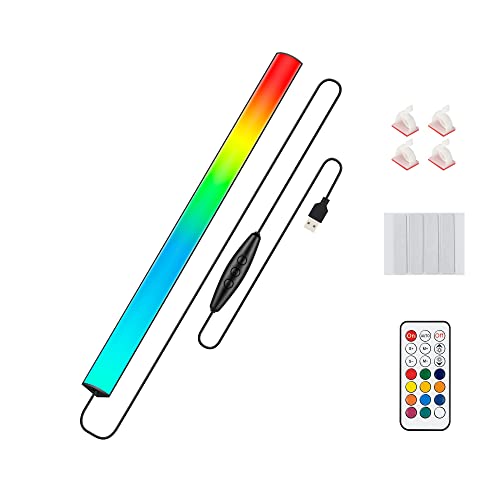
Budget-friendly, 5V USB-powered LED strips typically cost between $10 and $25 and are perfect for shorter back-edge runs. If you want a seamless, premium look without visible “hot spots” (individual light dots), high-end diffused 12V or 24V RGBIC neon rope lights range from $50 to $80 and are usually sold in 10-foot or 16.4-foot lengths.
Standard Sizes
To help you visualize your project, the table below outlines common desk dimensions and the corresponding RGB strip lengths required for the three most popular installation styles. These calculations assume standard desk depths of 24 inches for smaller desks and 28 to 30 inches for larger gaming or studio desks.
| Desk Width (Inches / cm) | Typical Depth (Inches / cm) | Single Back Edge Length | 3-Sided Perimeter (Back + Sides) | Full 4-Sided Perimeter |
|---|---|---|---|---|
| 40 in (102 cm) | 24 in (61 cm) | 3.3 ft (1.0 m) | 7.3 ft (2.2 m) | 10.6 ft (3.2 m) |
| 47 in (119 cm) | 24 in (61 cm) | 3.9 ft (1.2 m) | 7.9 ft (2.4 m) | 11.8 ft (3.6 m) |
| 55 in (140 cm) | 28 in (71 cm) | 4.6 ft (1.4 m) | 9.3 ft (2.8 m) | 13.8 ft (4.2 m) |
| 60 in (152 cm) | 30 in (76 cm) | 5.0 ft (1.5 m) | 10.0 ft (3.0 m) | 15.0 ft (4.6 m) |
| 72 in (183 cm) | 30 in (76 cm) | 6.0 ft (1.8 m) | 11.0 ft (3.4 m) | 17.0 ft (5.2 m) |
How to Measure Your Space
Do not guess your desk’s dimensions based on memory. Follow these steps to get a precise measurement before hitting the checkout button.
- Select Your Lighting Path: Decide where the lights will sit. Will they attach directly to the back edge of the desktop pointing at the wall? Will they run underneath the lip of the desk pointing downward? Tracing your intended path determines how many corners you must navigate.
- Measure the Desk Edges: Use a flexible sewing tape measure or a piece of non-stretchy string. Measure the exact length of each side along the path you chose in Step 1. If measuring with string, lay the string flat against a standard metal tape measure afterward to record the inches or centimeters.
- Account for Corner Slack: Standard LED strips cannot make sharp 90-degree turns without damaging the delicate copper circuitry. To route around a corner safely, you must either make a small, looping fold (which requires about 1 to 2 inches of extra slack per corner) or use clip-on solderless corner connectors. Add 2 inches of total length for every corner you plan to turn.
- Identify the Power Drop: Measure the distance from the end of your planned LED run to your power outlet or PC USB port. If your RGB strip’s power cable is only 3 feet long, but your outlet is 5 feet away, you will need to shift your starting point or plan for an extension cable. Do not use active LED lighting sections to bridge the gap to the floor.
- Check the Cut Points: Most RGB strips can only be cut at designated intervals (usually every 2 to 4 inches, marked by copper pads or scissor icons). Round your final measurement up to the nearest standard retail length, ensuring you can trim down to a safe cut point during installation.
By Room or Use Case
As we head into 2026, the trend in desk aesthetics is shifting away from exposed, harsh lighting toward diffused, indirect glow setups. Different rooms and desk configurations require unique lighting approaches.
The Minimalist PC Gamer (Single Back Edge)
If your goal is a clean, distraction-free setup that reduces eye fatigue during late-night gaming sessions, a single rear-edge strip is your best option. This configuration casts a soft glow directly onto the wall behind your monitor. For this look, a simple 3-foot to 5-foot strip is plenty. Alternatively, you can opt for a 12-inch USB-powered under-monitor light bar. These compact bars cost around $15, run on 5V power, and provide direct keyboard illumination while casting adjustable ambient colors backward against your monitor mount.
The Full-Perimeter Glow (Immersion Setup)
For those who want their entire desk to look like it is floating on a cloud of light, a 3-sided or 4-sided under-desk wrap is essential. Because this setup requires the light to wrap around the sides of the desk, standard LED tape can look uneven due to visible individual diodes. Instead, look for a 10-foot or 16.4-foot flexible neon rope light. These thick, silicone-jacketed lights blend the colors seamlessly, offering a neon-sign effect that looks spectacular when viewed from any angle in a bedroom or dedicated gaming room.
Dual-Monitor and L-Shaped Desks
L-shaped desks present a unique routing challenge because they have an inner corner. If you want to light the entire back edge of an L-shaped desk, you will likely need a much longer run—typically 16.4 feet (5 meters) to 32.8 feet (10 meters). When dealing with runs longer than 16 feet, make sure to purchase a 12V or 24V system. Lower-voltage 5V USB strips will suffer from voltage drop over long distances, causing the lights at the far end of the desk to look dim, flicker, or shift to an inaccurate, yellowish hue.
Under-Shelf and Monitor Mount Accent Lighting
If your desk features a hutch, floating shelves, or an elevated monitor riser, you can use shorter accent strips to highlight these levels. Instead of running one long, continuous strip, consider buying a modular kit that includes shorter 1-foot or 2-foot pre-cut strips connected by flexible, unlit pin cables. This allows you to jump from shelf to shelf without wasting active LEDs on the vertical gaps.
Common Sizing Mistakes
Avoid these frequent pitfalls to save time and money during your installation:
- Cutting in the Wrong Spot: Never cut an active RGB strip while it is plugged in, and only cut along the designated copper solder pads. Cutting anywhere else will instantly ruin the entire segment of lights downstream.
- Forgetting the Thickness of Neon Ropes: Premium silicone neon rope lights are much thicker and heavier than paper-thin adhesive LED strips. They require mounting clips that screw or stick to the desk. Ensure your desk lip has at least 0.5 inches of flat clearance underneath to accommodate these mounting brackets.
- Pulling the Corners Too Tight: Forcing a standard LED strip into a tight, flat 90-degree bend creases the copper pathway. Over time, this crease will break, causing the colors past that corner to fail or display the wrong hue. Always use a small loop or a dedicated corner connector.
- Overloading USB Ports: Many users try to power a 16-foot LED strip directly from a motherboard USB port. Standard USB 2.0 or 3.0 ports only output 0.5 to 0.9 amps, which is insufficient for long strips. If your strip is longer than 6.5 feet, use a dedicated wall adapter power brick to prevent damage to your computer’s ports.
FAQ
Can you cut RGB light strips to fit your desk?
Yes, most standard RGB and RGBIC LED light strips can be cut to fit your desk. Look for the designated cut lines, which are typically marked with a scissor icon or gold copper contact pads. Keep in mind that once you cut a strip, the segment you cut off cannot be reused unless you buy additional solderless clip connectors to link it to a new power supply.
Is 10 feet of LED lights enough for a desk?
For most standard home office and gaming desks, 10 feet (3 meters) of LED lights is the sweet spot. It is the perfect length to cover the back edge and both sides (a 3-sided layout) of a standard 55-inch or 60-inch desk, providing a gorgeous, wrapping ambient glow without any wasted overhang.
What wattage power supply do I need for a 16-foot RGB strip?
A standard 16.4-foot (5-meter) RGB LED strip typically draws about 4.5 to 5 watts per foot. Therefore, you will need a power supply that can deliver at least 24 watts. For safety and longevity, it is best to follow the “80% rule” and choose a power adapter rated for 30 to 36 watts to avoid overheating the power brick.
How do you run LED strips around desk corners?
To navigate corners safely, you can use the “ribbon fold” method, which involves folding the strip back on itself and making a 45-degree angle turn to create a neat 90-degree corner without creasing the circuit board. Alternatively, you can cut the strip at the corner mark and use a clip-on, solderless 90-degree corner connector to bridge the gap easily.
Related guides
- Best Mini-LED Monitor: Five Listings From a Renewed KTC to a 5K LG, Compared by Pixels and Ports (2026)
- Curved vs Flat Monitor: Which to Choose for Your Desk
- 1440p vs 4K Monitor: Which Should You Choose?
- Best Curved Monitor: Seven 24 to 34 Inch Picks Compared by Curve Radius, Resolution and Inputs (2026)