
Pairing a slow treadmill with a standing desk turns idle standing into 3,000–6,000 extra steps a day without leaving your keyboard. The trick is that a walking-desk treadmill is a very different machine from a running treadmill: no tall handrails, a low deck, a quiet motor, and a top speed around 4–6 km/h. Pick the wrong one and it is too tall to fit under your desk or too loud for calls.
Our Top Picks
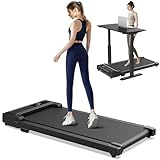
 XVCAS Walking Treadmill Pad for Home with Incline43.5 x 18.1 x 4.3 inches35.27 poundsCheck on Amazon
 Yagud Walking Pad Treadmill for Home Office42"D x 19.6"W x 5.5"H42 x 19.6 x 5.5 inches36.46 PoundsCheck on Amazon


Top 3 picks at a glance

What makes a walking-desk treadmill work
Deck height is the first spec to check—you are already standing on it, so every centimeter of deck raises you closer to your monitors. Slim models sit 10–13cm tall; add that to your height and confirm your standing desk lifts high enough to keep the screen at eye level. Motor noise matters next: look for units rated around 45–50 dB at walking speed so you can take a call over them. A top speed of 4–6 km/h is plenty; walking-desk pace is usually 2–3.5 km/h.
As an Amazon Associate we earn from qualifying purchases at no extra cost to you.



| Spec | Walking-desk target | Why it matters |
|---|---|---|
| Deck height | 10–13cm | Keeps monitor at eye level |
| Top speed | 4–6 km/h | Walk, not run |
| Motor noise | 45–50 dB | Usable on calls |
| Weight capacity | 90–130kg | Stable, durable deck |
Name-brand walking pads worth comparing
Many of the picks above are generic walking pads sold under rotating brand names, which makes support and parts harder to judge. The six models below come from established walking-pad makers and cover the main use cases: foldable storage, smart auto-speed, a handlebar for jogging, a budget incline pad, a heavy-duty auto-incline deck, and an extra-compact pad for small spaces. Check deck height against your standing desk before buying any of them.
WalkingPad Z1 Foldable Walking Pad
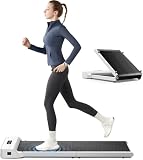
Who it’s for: people in small apartments who need a walking pad that folds in half and rolls away under a bed or sofa after work.
The Z1 comes from WalkingPad (KingSmith), one of the brands that popularized the folding walking pad. It folds 180 degrees to about 31.8 x 22 inches, and has wheels for moving it. Unfolded, it measures about 56.1 x 22 x 4.1 inches, which is within the slim-deck range this guide recommends. The walking area is about 47.6 x 15.8 inches, longer than many budget pads. Top speed is about 6 km/h (roughly 3.7 mph), and maximum user weight is listed at 110 kg (about 242 lb). It arrives fully assembled and is controlled with a remote or the KS Fit app.
Key specs: about 4.1-inch deck, 47.6 x 15.8-inch walking area, 1 to 6 km/h, 110 kg max user, folds in half, about 51 lb.
Strengths: The fold makes it one of the easiest pads to store. The longer belt suits taller walkers better than short-deck budget pads. Many editorial reviews rate WalkingPad’s build quality above the generic pads common at the lower tiers.
Drawbacks: It is walking only, with no incline. The 110 kg limit is lower than the 300 lb ratings of several rivals, and it sits higher up the price scale than generic pads.
How it compares: Against the frameless pads above, the Z1 trades a higher price for folding storage and a known brand. If your walking desk shares a room with other activities, folding is worth paying for.
WalkingPad C2 Foldable Walking Pad

Who it’s for: people who want a compact folding pad with automatic speed control, so they can focus on work rather than the remote.
The C2 is WalkingPad’s double-folding model, collapsing to about 32.5 x 20.4 x 5.4 inches for storage against a wall or under a desk. Unfolded it measures roughly 56.9 x 20.4 x 4.9 inches, with a walking area of about 47.2 x 15.7 inches. Its signature feature is FootSense: sensors in the deck detect where your feet land and adjust speed automatically, speeding up as you move forward and slowing as you drift back. Top speed is about 6 km/h, and the weight capacity is about 100 kg (220 lb).
Key specs: about 4.9-inch deck, 47.2 x 15.7-inch walking area, up to about 6 km/h, 100 kg max user, double fold, app and remote control, about 55 lb.
Strengths: Automatic speed is useful at a desk, because you can slow down while you concentrate and speed up while reading, without reaching for anything. Folding storage is compact. No assembly is required.
Drawbacks: Some reviewers find automatic mode confusing at first, and the app has drawn complaints. The 220 lb capacity is the lowest of these picks. It is a premium-tier pad.
How it compares: It is the smart-feature step up from the Z1. If you want set-and-forget speed control, choose the C2; if you prefer manual control and a little more capacity, the Z1 is simpler.
UREVO Strol 2E Pro
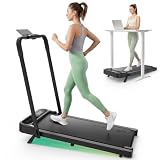
Who it’s for: people who want one machine for slow desk walking and short jogging sessions, with a fold-down handlebar and manual incline.
The Strol 2E Pro is a two-in-one design. With the handlebar folded down, it works as an under-desk walking pad at 0.6 to 4.0 mph, with the deck about 4.2 inches off the floor. Raise the handlebar and the top speed rises to 6.2 mph for light jogging. It adds a 12 percent manual incline, set by flipping down support legs rather than by a motor, and raises the weight capacity to 300 lb compared with the original 2E. UREVO also lists an AI speed mode that adjusts pace to your movement.
Key specs: about 4.2-inch deck height with the handlebar down, 36.2 x 15.2-inch running area, 0.6 to 4.0 mph walking (up to 6.2 mph with handlebar up), 12 percent manual incline, 300 lb capacity, about 44 lb.
Strengths: Flexibility for people who want a jog after work, a higher capacity, and a handlebar for stability on harder sessions. It is light enough to move around.
Drawbacks: The 36-inch running area is short, so taller users with long strides may feel cramped. The incline requires stopping and adjusting by hand. The handlebar, when raised, blocks access to the desk.
How it compares: It sits in the mid-range, alongside the handrail-style pad in the list above. It suits people who split time between desk walking and workouts more than people who only walk while typing.
DeerRun Under Desk Walking Pad with 6% Incline

Who it’s for: budget-minded buyers who want a slim, frameless pad with a modest incline and a high weight rating.
DeerRun is one of the more common names in editorial walking-pad roundups, and this model packs a 6 percent manual incline into a thin, frameless deck. Speed runs from 0.6 to 3.8 mph, and the manual describes three bands: a slow working mode for desk use, a walking mode, and a brisk mode for use with the incline. It is rated for 300 lb, uses a 2.5 HP motor, and DeerRun lists noise below 45 dB. Control is by remote or the PitPat app.
Key specs: 0.6 to 3.8 mph, 6 percent manual incline, 2.5 HP motor, 300 lb capacity, roughly 42.6 inches long and about 3.9 inches tall, about 41 lb, remote and app control.
Strengths: The slim deck keeps you lower at the desk, the 300 lb rating is generous for the tier, and the quiet motor claim suits calls. Incline adds variety for walks outside work hours.
Drawbacks: It does not fold. The incline is manual. Its belt is shorter than the WalkingPad models, and the app is basic.
How it compares: It competes directly with the generic incline pads above but comes from a brand with more editorial coverage. It is a solid budget-tier choice if you do not need folding storage.
MERACH UltraWalk W60 Walking Pad
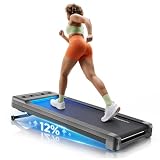
Who it’s for: heavier users and people who want motorized auto-incline for harder walks, and who have a standing desk that lifts high.
The W60 is one of the more robust walking pads in this guide. It uses a brushless motor rated at 1.25 CHP continuous (3.5 HP peak), a 16.5 x 41.3-inch belt, and a motorized incline of up to 12 percent in 12 levels. Speed runs from 0.6 to 4.0 mph. Most listings rate it for 400 lb, though MERACH’s own site notes a sustained-load rating of 330 lb after third-party testing. It includes a magnetic remote, app sync with Apple Health and Google Fit, a child lock, and auto shut-off after 10 idle minutes.
Key specs: about 50.2 x 22.2 x 6.1 inches, 16.5 x 41.3-inch belt, 0.6 to 4.0 mph, auto incline up to 12 percent, brushless motor, 330 to 400 lb rating depending on source, about 68 lb, maker-listed average noise around 54 dB.
Strengths: Wider belt, auto incline at the press of a button, and a heavy-duty build that feels more stable than lightweight pads. A strong choice for heavier walkers.
Drawbacks: At about 6.1 inches tall, the deck is thicker than the 10 to 13 cm this guide recommends, so your desk must lift higher. It is heavy to move, louder than the slimmest pads, and some owners have reported less incline than advertised, while the UK version lists a lower maximum. Check the version you buy.
How it compares: It is the heavy-duty option among these picks, in the mid-range tier. Choose it for capacity and auto incline; choose the WalkingPad or DeerRun models if a low deck matters most.
Egofit Walker Pro M1
Who it’s for: people with very little floor space under the desk who only want slow, steady walking while they work.
The Egofit Walker Pro M1 is built around a short, compact footprint of roughly 21.9 x 38.4 inches, one of the smallest in editorial roundups, which makes it a fit for narrow desks and small home offices. It is designed purely for desk walking, with a top speed of about 3.1 mph, and its deck sits at a fixed 5 percent incline that cannot be adjusted. It arrives ready to use, with no assembly, and is listed for users up to about 220 lb.
Key specs: roughly 21.9 x 38.4-inch footprint, about 0.5 to 3.1 mph, fixed 5 percent incline, about 6.9-inch overall height, about 220 lb capacity, installation-free.
Strengths: The compact size suits desks where a standard 50 to 56-inch walking pad would stick out into the room. The speed range matches real desk walking, so you are not paying for running ability you will never use.
Drawbacks: The short deck can feel cramped for tall users with long strides. The capacity is lower than the 300 lb pads above, and it sits in the premium tier for a walking-only machine.
How it compares: It is the smallest option among these picks. Choose it when floor space is the limiting factor; choose the WalkingPad Z1 or C2 if you want a longer belt and folding storage instead.
How to choose
Match it to your standing desk range
This is the mistake people make: they buy the treadmill first. Measure your standing desk’s maximum height, subtract your elbow-to-floor standing height, then subtract the treadmill deck. If the number lands below a comfortable typing height, you need either a taller-lifting desk or a slimmer deck. Column-style standing desks that reach 125cm-plus pair best with treadmills.
Frameless vs handrail models
Under-desk “walking pads” are frameless—no upright post—so they tuck fully under the desk and store on end against a wall. Models with a short handrail add stability but block you from getting close to the desk and are harder to store. For a pure walking desk, frameless is usually the better fit.
Belt length and width
Deck height gets the attention, but belt size decides whether walking feels natural. At slow desk speeds, a walking area of about 40 inches long and 15 to 16 inches wide is comfortable for most people. Taller walkers with long strides do better with 45 inches or more. Short belts around 35 to 36 inches can feel cramped and make you shorten your stride, which becomes tiring over a long session. Width matters when you look at the screen rather than your feet, since a wider belt gives more room for drifting side to side.
Motor rating and duty cycle
Walking pads list motor power in two ways: peak horsepower, which looks big on the box, and continuous horsepower (CHP), which is what the motor can sustain. For hours of slow walking, continuous rating and cooling matter more than peak numbers. Brushless motors tend to run quieter and cooler. Some makers also list a maximum continuous run time; respect it, and let the motor rest between long blocks.
Weight capacity
Pick a pad rated comfortably above your weight. Walking near the limit every day strains the motor and belt, and a higher-rated deck usually feels more solid underfoot. Be aware that some listed capacities are peak ratings, so a sustained rating may be lower.
Incline
Incline makes walks more demanding at the same slow speed, which is useful for exercise sessions outside work. At a desk, most people walk flat, because incline tilts you relative to the keyboard and screen. Manual incline needs you to stop and adjust; auto incline changes with a button.
Controls and safety
A remote is essential, because the deck is under your desk and there are no handrail buttons on frameless pads. Look for a safety feature such as a magnetic safety key, an auto-stop when you step off, or an idle shut-off. A child lock helps in homes with kids or pets. Apps are optional; many people never open them after setup.
Warranty and support
Walking pads are motors running for hours a day, so support matters. Established brands typically list motor and frame warranties and sell spare parts such as belts and remotes. For generic pads, check that the seller lists a warranty and a way to contact support.
Comparison of the added picks
| Model | Deck height | Walking area | Speed | Incline | Capacity | Folds | Price tier |
|---|---|---|---|---|---|---|---|
| WalkingPad Z1 | About 4.1 in | About 47.6 x 15.8 in | Up to about 3.7 mph | None | About 242 lb | Yes | Mid-range |
| WalkingPad C2 | About 4.9 in | About 47.2 x 15.7 in | Up to about 3.7 mph | None | About 220 lb | Yes, double fold | Premium |
| UREVO Strol 2E Pro | About 4.2 in | About 36.2 x 15.2 in | 0.6 to 4.0 mph (6.2 with handlebar) | 12% manual | 300 lb | Handlebar folds | Mid-range |
| DeerRun 6% incline | About 3.9 in | Compact deck | 0.6 to 3.8 mph | 6% manual | 300 lb | No | Budget |
| MERACH UltraWalk W60 | About 6.1 in | About 41.3 x 16.5 in | 0.6 to 4.0 mph | Up to 12% auto | 330 to 400 lb | No | Mid-range |
| Egofit Walker Pro M1 | About 6.9 in overall | Compact, about 21.9 x 38.4 in footprint | About 0.5 to 3.1 mph | Fixed 5% | About 220 lb | No | Premium |
For a pure walking desk, the slimmest decks with a long belt are the best match. Spend more for folding storage or auto features only if you will use them.
Living with a walking desk
Walking and precise mouse work do not mix, so plan for tasks like reading, calls, and messaging while you walk and drop to standing or sitting for detailed editing. Start with 20–30 minute blocks at 2–2.5 km/h and build up; your legs adapt within a couple of weeks. Keep a mat or hard floor under it, wear supportive shoes rather than socks, and lubricate the belt per the manual every few months to keep it quiet.
FAQ
Can I type accurately while walking?
Light typing and mouse work are fine at 2–2.5 km/h once you adjust, but fine cursor precision suffers. Most people walk for calls, reading, and email, then stop the belt for detailed design or gaming.
How slim does the deck need to be?
Aim for 10–13cm. Every centimeter of deck raises your standing height, so a thick deck can push your monitors below eye level unless your desk lifts unusually high.
How fast should I walk at a treadmill desk?
Most people settle between about 1.2 and 2.2 mph (2 to 3.5 km/h) while working. Start at the slow end for typing and calls, and go faster for reading or video meetings where you are listening. If you notice more typos or have to concentrate on your feet, slow down.
How long should I walk each day?
Begin with 20 to 30 minute blocks once or twice a day and add time as your legs adapt. Many walking-desk users work up to one to three hours spread across the day. Mix walking, standing, and sitting rather than walking for an entire workday, and stop if you feel joint pain.
Can I use a walking pad on carpet?
You can, but a firm treadmill mat or hard board underneath is better. Thick carpet lets the deck flex, can block motor ventilation, and pulls fibers into the belt. A mat also protects the carpet and reduces vibration.
Is a walking pad loud enough to hear on calls?
At slow speeds, good pads are fairly quiet, but footsteps and belt noise can still reach a sensitive microphone. A headset with a directional or noise-cancelling microphone, a mat under the pad, and a well-lubricated belt all help. Most people can take calls while walking slowly without complaints.
Do I need a handrail?
Not for slow desk walking, since you can rest your hands on the desk if needed. A handrail helps people who want to jog, who feel unsteady, or who will use the pad away from a desk. Frameless pads store more easily and let you get closer to the keyboard.
Can a walking pad help with weight loss or fitness?
Walking at a desk adds low-intensity movement to time you would otherwise spend sitting, which can add thousands of steps a day. It is not a substitute for harder exercise, but many people find it an easy way to be more active. Talk to a doctor before starting if you have heart, joint, or balance concerns.
Can I use a regular desk instead of a standing desk?
Only if it happens to be tall enough, which most fixed desks are not. Typical fixed desks are around 73 to 76 cm high, far below standing elbow height plus a treadmill deck. A height-adjustable standing desk, or a tall counter-height desk, is usually required.
How long do walking pads last?
Lifespan depends on use, user weight, and care. Regular belt lubrication, keeping the deck clean, staying well within the weight rating, and giving the motor breaks between long sessions all extend its life. Established brands that sell replacement belts and parts make it easier to keep a pad running for years.
Floor protection and maintenance
A walking pad is a moving machine, so plan for the floor and upkeep. On hardwood or tile, a thin treadmill mat under it dampens vibration, stops the pad from creeping, and protects the finish; on carpet, a hard board underneath keeps the belt from sinking and overheating the motor. Belt care is the main maintenance task—most walking pads need a few drops of silicone belt lubricant every one to three months to stay quiet and reduce motor strain, and a dry, unlubricated belt is a common cause of squeal and premature wear. Keep the belt centered; if it drifts to one side, small tensioning bolts at the rear roller re-track it. Wipe dust off the deck and check for anything caught under the belt before each session, and unplug it when storing on end so a bumped remote cannot start it.
Getting work done while walking
Most people find their productivity dips for the first few days, then recovers as walking becomes automatic. A few habits speed that up.
- Sort tasks by precision. Keep a list of “walking tasks” such as inbox triage, reading documentation, watching tutorials, and calls, and save detailed editing, spreadsheet work, and gaming for standing still or sitting.
- Increase text size slightly. Small screen movements while walking make tiny text harder to read. Bumping display scaling up a notch reduces eye strain.
- Use keyboard shortcuts. Shortcuts need less precise aiming than clicking small buttons, which helps when your body is moving.
- Dictate where it works. Voice typing for drafts and messages pairs naturally with walking, especially with a headset microphone.
- Keep the belt steady. Constantly changing speed is distracting. Pick one comfortable pace per task block and leave it.
What about gaming on a walking desk?
Fast-paced games need steady hands and precise aim, so they are a poor match for walking. Slower genres can work at a gentle pace: turn-based strategy, card games, management sims, and story-driven games with relaxed controls are all playable, especially with a controller rather than a mouse. A controller lets your hands move with your body instead of fighting it. For competitive matches, stop the belt and stand, or roll in your chair; the pad slides out of the way easily if it is frameless. Many players use walking sessions for the non-gaming parts of the hobby instead, such as watching patch notes, catching up on streams, or planning builds.
Working out your desk height: a worked example
The “measure first” advice above is easier with numbers. Here is how to do the math in a few minutes.
- Measure your standing elbow height. Stand in the shoes you will walk in, arms relaxed, elbows bent to about 90 degrees. Measure from the floor to the underside of your forearm. Say it is 108 cm.
- Add the deck height. If your walking pad deck is 12 cm, your keyboard needs to sit at about 120 cm, plus the thickness of the keyboard itself if you measure to the desktop. A keyboard tray or low-profile keyboard reduces that extra amount.
- Check your desk’s maximum height. If your standing desk tops out at 118 cm, it is too short for this pad and person. You would need a slimmer deck, a taller-lifting desk, or a keyboard tray that can sit above the desk surface.
- Check monitor height. Your eye level also rises by the deck height. A monitor arm makes it easy to lift the screen so its top edge sits at or slightly below eye level.
Taller users feel this most. If you are over about 185 cm, look for desks that lift past 125 cm and pads with decks closer to 10 cm.
Setting up the walking desk
- Position the pad centered under the keyboard. You should be able to walk naturally without reaching forward. Leave a small gap so your toes do not hit the desk frame.
- Check clearance behind you. Walking pads need free space behind the deck in case you drift off the back. Keep chairs and cables out of that area.
- Route the power cable safely. Run the cord to the side, away from the belt, and plug it directly into a wall outlet. Treadmill makers commonly advise against extension cords and power strips because of the current draw.
- Place the remote within reach. A small tray or holder on the desk keeps the remote where you can stop the belt quickly.
- Lower your mouse sensitivity a little. Slight body movement while walking makes fine cursor control harder. A slightly lower sensitivity or a larger mouse pad helps.
- Use a wrist rest sparingly. It can help stabilize your hands while typing, but avoid leaning on it heavily while walking.
A sample walking-desk schedule
A gradual build-up keeps sore feet and calves at bay. This example plan works for most people starting from a seated routine.
| Period | Walking per day | Typical speed | Tasks while walking |
|---|---|---|---|
| Week 1 | Two 20-minute blocks | About 1.2 to 1.5 mph | Email, reading, calls |
| Week 2 | Three 30-minute blocks | About 1.5 to 1.8 mph | Add light typing and messaging |
| Weeks 3 to 4 | Up to two hours spread out | About 1.5 to 2.2 mph | Meetings, planning, research |
| Ongoing | Whatever feels sustainable | Varies by task | Walk for calls and reading, sit or stand for precise work and gaming |
Gaming and detailed design work are best done standing still or seated. Walking pads are ideal for the parts of the day that do not need pixel-precise input.
Safety tips
- Start and stop at the lowest speed. Stand on the side rails when starting the belt, then step on once it is moving slowly.
- Wear proper shoes. Supportive sneakers protect your feet and give better grip than socks or bare feet.
- Keep kids and pets away. Use the child lock if your pad has one, and unplug it when not in use.
- Stay hydrated and take breaks. Walking for long periods at a desk is still exercise.
- Stop if something feels wrong. Unusual noises, burning smells, or belt slipping are signs to stop and check the manual before continuing.
Walking pad vs other under-desk exercise options
A walking pad is not the only way to add movement to desk time. Here is how it compares with the alternatives, so you can choose the one that fits your desk and routine.
Under-desk bike or pedal exerciser
Pedal exercisers work with a regular seated desk, so there is no need for a standing desk. They are quiet, compact, and cheap, and most people can type normally while pedaling. The trade-off is lower intensity and less total movement than walking, and some models need a chair that does not roll.
Under-desk elliptical
Seated ellipticals move your legs in a smooth glide and are gentler on knees than pedaling for some people. Like bikes, they work at a seated desk. They take more legroom than a pedal exerciser and can push a rolling chair away unless it is locked.
Balance board or standing mat
A balance board or textured anti-fatigue mat keeps you shifting your weight at a standing desk. It adds subtle movement rather than steps, needs no power, and costs far less than a treadmill. It suits people who stand often but do not want a moving belt.
When the walking pad wins
If your goal is steps and you already own a standing desk that lifts high enough, a walking pad adds the most activity per hour. It is also the most natural movement: you are simply walking. The cost is price, floor space, and a little noise.
Apartment living: noise and neighbors
Walking pads run quietly at desk speeds, but footsteps transmit through floors, especially in upper-floor apartments with wooden joists. To keep the peace:
- Use a dense rubber mat. A thick treadmill mat absorbs impact better than thin foam and also protects the floor.
- Walk heel-to-toe at slow speed. Gentle, rolling steps make far less noise than brisk pounding.
- Keep the belt lubricated. A dry belt squeaks and makes the motor work harder.
- Avoid early and late sessions. If you are unsure how much sound travels, walk during normal daytime hours and ask the neighbors below once you have set up.
- Consider the deck design. Heavier, more rigid decks such as the MERACH W60 transmit less flex than ultralight pads, though they are harder to move.
Quick buying checklist
- Desk height: Your standing desk lifts high enough for your elbow height plus the deck height, with your keyboard at a comfortable level.
- Floor space: The pad fits under the desk with room behind it for safety, and you have a place to store it if needed.
- Belt length: The walking area suits your stride, roughly 40 inches or more for most adults, longer for tall walkers.
- Capacity: The weight rating is comfortably above your weight.
- Noise: The listed noise level and deck design suit calls and your living situation.
- Controls: It has a remote and a clear safety stop.
- Support: The brand lists a warranty and sells parts such as belts and remotes.
- Power: There is a wall outlet within reach, without needing an extension cord.
Bottom line
Choose a frameless walking pad with a 10–13cm deck, quiet sub-50 dB motor, and 4–6 km/h top speed—then confirm your standing desk lifts high enough to keep screens at eye level with you standing on it. Used for calls and reading, it quietly adds thousands of steps to a desk day.
Related guides
- Best Cheap Tablets for Kids: Eight Listings Sorted by Age, Controls and Storage: 8 Compared (2026)
- Best Ultrawide Gaming Monitors: Six Screens Sized Against Real Desks: 6 Compared (2026)
- Best Game Room Neon Lights: Ten Signs and Icon Lamps Compared: 10 Compared (2026)
- 10 Best 75% Hot-Swappable Mechanical Keyboards (October 2026)









