A stream lives or dies on its voice. Viewers forgive a soft webcam image, but muddy audio, keyboard clatter bleeding into every sentence, or a microphone that clips on every loud moment will push people away fast. A good streaming microphone puts the voice front and center while the rest of the room fades into the background, and the best ones do it with nothing more than a USB cable and a few minutes of setup.
This guide compares five USB microphones built for streaming, from a budget starter to broadcast-style condensers, with a focus on pickup pattern, resolution, onboard controls, and how each one fits a real desk. Every pick plugs straight into a computer with no audio interface in between, and every pick below was confirmed against published product information.
As an Amazon Associate, we earn from qualifying purchases.
Our Top Picks
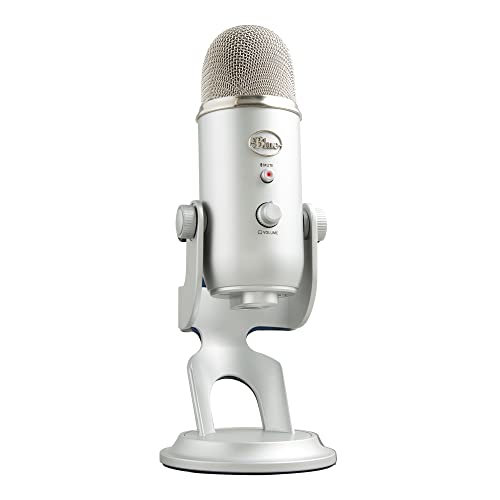 Logitech Creators Blue Yeti USB Microphone for PCMic Only4.9 x 4.7 x 11.6 inches3.2 poundsCheck on Amazon
 RØDE NT-USB Mini Studio-Quality USB Condenser Microphone4.257.3 x 2.4 x 2 inches1.3 poundsCheck on Amazon
 Audio-Technica AT2020USB+ Cardioid Condenser USB MicrophoneBlack6.4 x 2 x 2 inches0.9 poundsCheck on Amazon

Top 3 picks at a glance

Quick Answer
For most streamers, the HyperX QuadCast is the best first pick: four pickup patterns, a built-in shock mount, tap-to-mute, and a headphone jack cover nearly every solo streaming setup. The Blue Yeti suits streamers who want the fullest feature set, the Rode NT-USB Mini fits small desks, the Audio-Technica AT2020USB+ fits a focused cardioid setup, and the FIFINE K669B is the budget pick.
Blue Yeti
The Blue Yeti is the microphone that defined USB streaming. Three condenser capsules sit behind a grille, and a dial on the back switches between four pickup patterns: cardioid for a solo voice, bidirectional for two people facing each other, omnidirectional for a whole room, and stereo for instruments. One microphone covers a solo stream, a two-person interview, and a music session.
Onboard controls keep the basics under the hand: a gain knob, a mute button, and a headphone jack with its own volume dial for zero-latency monitoring.
The trade-off is size and room pickup. At 3.2 pounds, the Yeti is the largest pick in this guide, and its condenser capsules hear more of the room than a dynamic microphone would. Keyboard clatter and fan noise reach the stream unless the cardioid pattern is selected and the microphone sits close to the mouth.
Specs
| Spec | Detail |
|---|---|
| Model | 988-000103 |
| Capsules | Three condenser capsules |
| Pickup patterns | Cardioid, bidirectional, omnidirectional, stereo |
| Resolution | 16-bit, 48 kHz |
| Frequency response | 20 Hz to 20 kHz |
| Signal-to-noise ratio | 100 dB |
| Connection | USB |
| Headphone output | Yes, with volume control |
| Weight | 3.2 lb |
| Dimensions | 4.9 x 4.7 x 11.6 in |
HyperX QuadCast
The HyperX QuadCast is the most streamer-friendly microphone in this guide. Like the Yeti it uses three 14 mm condenser capsules and four pickup patterns, but it wraps them in a package built for a gaming desk: a built-in anti-vibration shock mount hangs the microphone on elastic cords, a tap-to-mute sensor sits on top with a red LED status light, and a gain dial sits at the bottom. Desk bumps and keyboard thumps reach the microphone far less than they would on a rigid stand.
It records at 48 kHz and 16-bit depth, with a frequency response of 20 Hz to 20 kHz. The cardioid pattern focuses on the voice directly in front of the microphone and rejects sound from behind, which helps in a room with a humming computer. A headphone jack gives zero-latency monitoring, and the included cable and mic arm adapter fit a boom arm.
Its red lighting is fixed rather than customizable, and as a condenser it still hears the room more than a dynamic model.
Specs
| Spec | Detail |
|---|---|
| Model | 4P5P6AA |
| Capsules | Three 14 mm electret condensers |
| Pickup patterns | Stereo, omnidirectional, cardioid, bidirectional |
| Resolution | 16-bit, 48 kHz |
| Frequency response | 20 Hz to 20 kHz |
| Sensitivity | -36 dB |
| Signal-to-noise ratio | 90 dB |
| Connection | USB |
| Headphone output | Yes, 32 ohm |
| Weight | Microphone 254 g, total with cable 710 g |
| Dimensions | 5.05 x 4 x 9.8 in |
Rode NT-USB Mini
The Rode NT-USB Mini is the compact pick, and it proves that a small microphone can still sound like a studio tool. A single cardioid condenser capsule sits in a steel body barely wider than a phone, with a detachable magnetic desk stand that lifts off in one motion when the microphone moves to a boom arm. A built-in pop filter sits behind the grille, and a 3.5 mm headphone jack gives zero-latency monitoring with its own volume dial.
Inside, the NT-USB Mini runs at 24-bit depth and a 48 kHz sample rate, the highest resolution in this guide, with a maximum sound pressure level of 121 dB. Loud moments stay clean instead of distorting.
The compact size has a cost. There is no mute button on the body, so muting means reaching for software or a keyboard shortcut, and there is no gain knob either, so input level is set in the computer. It ships with a USB-C to USB-A cable.
Specs
| Spec | Detail |
|---|---|
| Model | NTUSBMINI |
| Capsule | Single condenser, cardioid |
| Pickup pattern | Cardioid |
| Resolution | 24-bit, 48 kHz |
| Frequency response | 20 Hz to 20 kHz |
| Maximum sound pressure | 121 dB |
| Signal-to-noise ratio | 82 dB |
| Connection | USB-C |
| Headphone output | Yes, 3.5 mm, with volume control |
| Weight | 585 g |
| Dimensions | 7.28 x 2.36 x 1.97 in |
Audio-Technica AT2020USB+
The Audio-Technica AT2020USB+ is the focused pick in this guide. It does one thing: a single cardioid condenser capsule aimed at one voice, with a built-in headphone jack and volume control for zero-latency monitoring. There are no pattern switches, no lighting, and no software to install. Streamers who sit in one spot and talk to one audience get a clean, articulate voice with nothing extra in the way.
The capsule is the same family as the studio AT2020, and the USB version keeps its 20 Hz to 20 kHz frequency response with a maximum input sound level of 144 dB, the highest in this guide. The cardioid pattern rejects off-axis sound, which helps when a keyboard sits beside the microphone. The converter runs at 16-bit depth with 44.1 or 48 kHz sampling.
One pattern means one seating position, and the microphone has no mute button or gain knob, so level and mute live in software. It also uses a USB-A cable, so newer laptops may need an adapter.
Specs
| Spec | Detail |
|---|---|
| Model | AT2020USB PLUS |
| Capsule | Single condenser, cardioid |
| Pickup pattern | Cardioid |
| Resolution | 16-bit, 44.1 or 48 kHz |
| Frequency response | 20 Hz to 20 kHz |
| Maximum input sound level | 144 dB |
| Signal-to-noise ratio | 74 dB |
| Connection | USB |
| Headphone output | Yes, with volume control |
| Weight | 13.6 oz |
| Dimensions | 6.4 x 2 x 2 in |
FIFINE K669B
The FIFINE K669B is the budget pick, and it is the simplest way to leave a headset microphone behind. A single cardioid condenser capsule in an all-metal body plugs into a computer over USB and works immediately, with a volume knob on the body and a folding tripod stand in the box. There is no software, no driver, and no extra hardware to buy. For a first stream, that is enough.
The converter runs at 16-bit depth and 48 kHz, the signal-to-noise ratio is 78 dB, and the frequency response runs from 20 Hz to 20 kHz according to the maker listing, though one roundup cites 50 Hz to 15 kHz instead. The microphone weighs 159 g in its product information, though one retailer listing cites a heavier figure. A 5.9-foot cable ships in the box according to one listing, while another cites 6.5 feet.
The limits are real. There is no mute button, no headphone jack for monitoring, and no shock mount, so desk bumps reach the recording and muting means using software.
Specs
| Spec | Detail |
|---|---|
| Model | K669B |
| Capsule | Single condenser, cardioid |
| Pickup pattern | Cardioid |
| Resolution | 16-bit, 48 kHz |
| Frequency response | 20 Hz to 20 kHz |
| Sensitivity | -34 dB |
| Signal-to-noise ratio | 78 dB |
| Connection | USB |
| Headphone output | Not stated |
| Weight | 159 g |
| Dimensions | Not stated |
How to choose
Start with the pickup pattern. A solo streamer sitting in one spot needs cardioid, which every pick here offers, and the multi-pattern models add options for guests, interviews, and instruments. A streamer who hosts a co-host should pick a microphone with bidirectional or omnidirectional modes, which here means the Blue Yeti or the HyperX QuadCast.
Next, look at the onboard controls. Tap-to-mute and a gain knob matter during a live stream, when muting must happen in a second and levels change between a quiet chat and a loud game. The QuadCast and the Yeti have both; the other three picks put mute and gain in software. A headphone jack matters too, and four of the five picks here include one.
Then match the microphone to the room: a noisy room needs the microphone close to the mouth and the cardioid pattern selected. Finally, check the connection: the Rode NT-USB Mini uses USB-C, the others use USB-A.
Who should skip it
Skip a USB condenser microphone entirely when the stream already runs through an XLR audio interface or a mixer, because an XLR microphone connects there directly. Skip the Blue Yeti when desk space is tight, since it is the largest and heaviest pick here. Skip the HyperX QuadCast when the desk already has a shock mount and a separate mute solution.
Skip the Rode NT-USB Mini when muting must happen on the microphone body, since it has no mute button and no gain knob. Skip the Audio-Technica AT2020USB+ when the stream needs more than one voice or more than one pattern, because its single cardioid capsule covers one seating position only. Skip the FIFINE K669B when headphone monitoring matters, since it has no headphone jack.
Frequently Asked Questions
Do I need an audio interface for a USB streaming microphone?
No. A USB microphone connects straight to the computer and carries its own analog-to-digital converter, so no interface is needed. An interface only becomes necessary when the microphone uses an XLR connector instead of USB.
What pickup pattern should a solo streamer use?
Cardioid. It focuses on sound directly in front of the microphone and rejects sound from the sides and rear, which keeps keyboard noise and room echo out of the stream. Every microphone in this guide offers cardioid.
Why does my microphone pick up keyboard noise?
Move the microphone closer to the mouth, select the cardioid pattern, lower the gain, and keep the keyboard behind the microphone rather than beside it.
Can I mount these microphones on a boom arm?
Yes, with one check. The Blue Yeti, HyperX QuadCast, Rode NT-USB Mini, and Audio-Technica AT2020USB+ all thread onto a standard boom arm mount. The FIFINE K669B uses its included tripod stand, and moving it to an arm needs an adapter.
Final verdict
For most streamers, the HyperX QuadCast is the best first pick: four patterns, a built-in shock mount, tap-to-mute, and a headphone jack cover nearly every solo streaming setup. The Blue Yeti suits streamers who want the fullest feature set, small desks suit the Rode NT-USB Mini, the Audio-Technica AT2020USB+ fits one focused cardioid voice, and the FIFINE K669B is the budget pick. Match the microphone to the room, the desk, and the number of voices, and confirm the exact ASIN at checkout.
Product and ASIN Reference
| Product | ASIN | Value group |
|---|---|---|
| Blue Yeti | B002VA464S | premium |
| HyperX QuadCast | B07NZZZ746 | mid-range |
| Rode NT-USB Mini | B084P1CXFD | mid-range |
| Audio-Technica AT2020USB+ | B00B5ZX9FM | premium |
| FIFINE K669B | B06XCKGLTP | budget |
Related guides
- Best GPU for The Stanley Parable (2026): 1080p, 1440p and 4K Picks
- 4 Best GPUs for Return of the Obra Dinn (2026): 1080p, 1440p and 4K Picks
- Best Powered Keyboard Stage Monitors With Balanced Line Outputs for Stage Piano Amplification: 5 Compared (2026)
- Best Sim Racing Pedals for Precise Braking and Real Feel: 5 Compared (2026)
More from Amazon
Programs that pair well with the guide above. Offers and eligibility are set by Amazon and may change.
Free shipping on eligible items, Prime Video and more. Eligible new members can start with a free trial.
Start a Prime free trialAd-free music streaming. Eligible new subscribers can start with a free trial.
Try Music Unlimited freeA Prime membership for ages 18-24 with a trial period. Eligibility is set by Amazon.
See Prime for Young AdultsAudiobooks and podcasts to listen to on the go. Eligible new members can start with a free trial.
Try Audible freeAs an Amazon Associate we earn from qualifying purchases.