Our Short List of 3

- Best for: Players who want a proven symmetrical pro shape with modern flagship internals.
- Brand: Logitech G
- Model Name: G PRO X 2
- Model Number: 910-006628
- Weight: 60g

- Best for: Palm and relaxed claw players with medium to large hands who prefer a sculpted shape.
- Brand: Razer
- Model Name: DeathAdder V3 Pro
- Model Number: RZ01-04630100-R3G1
- Weight: 63g Ultra Lightweight

- Best for: Players who want one flagship mouse for games, work and heavy shortcut use.
- Brand: Razer
- Model Name: Basilisk V3 Pro
- Model Number: RZ01-04620100-R3U1
- Sensor: 30K DPI Optical Sensor
All 3 Picks at a Glance
| Product | Specs | Action |
|---|---|---|
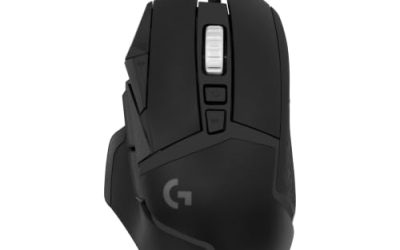
| Logitech G PRO X SUPERLIGHT 2 Wireless Gaming Mouse |
| Check price on Amazon |
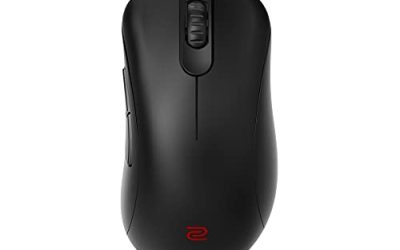
| Razer DeathAdder V3 Pro Gaming Mouse |
| Check price on Amazon |
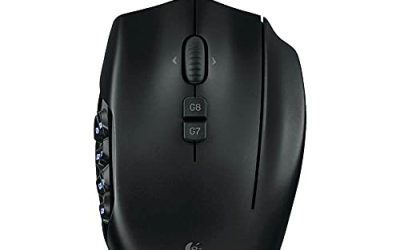
| Razer Basilisk V3 Pro Wireless Gaming Mouse |
| Check price on Amazon |
Buying at the top of the mouse market is not really about chasing the biggest sensor number, because every flagship here already tracks far beyond what a hand can demand. The real decision is which premium package fits you: an ultralight symmetrical shell for flick shots, a sculpted ergonomic shape for long sessions, or a feature-loaded body with a tilt wheel and extra controls for mixed work and play.
This guide is for competitive players, enthusiasts upgrading from a mid-range mouse, and anyone who wants one flagship that will stay relevant for years. Every product below was chosen from the names and specifications printed on its Amazon product page, and each one represents a different idea of what premium should mean.
Our Top Picks
- Logitech G Pro X Superlight 2 Lightspeed WirelessClassic1.57 x 2.5 x 4.92 inches0.1 poundsCheck on Amazon
- Razer DeathAdder V3 Pro Wireless Gaming Mouse1000 Hz5.01 x 2.65 x 1.69 inches0.1 poundsCheck on Amazon
- Razer Basilisk V3 Pro Customizable RGB Wireless GamingMouse5.12 x 2.96 x 1.67 inches0.24 poundsCheck on Amazon
Top 3 picks at a glance
Quick Picks
As an Amazon Associate we earn from qualifying purchases.
| Product | Best for | Key spec from title |
|---|---|---|
| Logitech G PRO X SUPERLIGHT 2 Wireless Gaming Mouse | Players who want a proven pro shape | 44k DPI Sensor |
| Razer Viper V3 Pro Wireless Esports Gaming Mouse | Competitive claw and fingertip players | 35K DPI Optical Sensor |
| Razer DeathAdder V3 Pro Gaming Mouse | Palm grip players with larger hands | Focus Pro 30K Optical Sensor |
| Razer Basilisk V3 Pro Wireless Gaming Mouse | Players who want maximum controls and features | HyperScroll Tilt Wheel |
How to Choose
Sensor Class and Polling Rate
Premium sensors earn their place through consistency rather than headline numbers, so look at the full tracking package instead of a single figure. The flagship models in this guide pair their top optical sensors with very fast wireless polling, which shortens the gap between a hand movement and the report reaching your PC. That combination matters most in fast shooters, where small corrections happen constantly. Check that the stated polling figure applies to the wireless mode you will actually use, because some mice reach their highest rate only with a specific receiver or setting enabled in the companion software.
Shape, Size and Grip Fit
No flagship specification can rescue a shell that fights your hand, so treat shape as the first filter and electronics as the second. Symmetrical bodies such as the Viper V3 Pro and the SUPERLIGHT 2 suit claw and fingertip grips and let either side of the hand steer quick corrections. Sculpted right-handed shells such as the DeathAdder V3 Pro support a relaxed palm and spread contact across more of the hand. Measure your current mouse, note where your fingers rest, and match length and height to a similar outline before comparing anything else on the page.
Weight and Balance
Weight changes how a mouse starts, stops and lifts, and premium models now span from featherlight esports shells to heavier feature carriers. Lighter mice reduce the effort of repeated flicks and suit low sensitivity settings with wide arm movements across a large pad. Heavier bodies can feel steadier during slow tracking and carry extras such as tilt wheels, more buttons and larger batteries. Neither direction is automatically better. Decide by your games and sensitivity: fast arena play rewards lightness, while mixed desktop and strategy use often rewards the calmer feel of added mass.
Switches, Buttons and Battery Life
Flagship optical switches are a genuine premium marker because they actuate with light rather than a metal contact, which the makers link to speed and long click life. Beyond the main clicks, count the programmable controls you will realistically map, and check whether the wheel offers anything extra, such as tilt inputs or a free-spin mode for long pages. Battery claims also deserve a careful read, since the longest figures usually assume a standard polling setting. If you plan to run the fastest wireless mode daily, expect shorter intervals between charges and confirm the charging connector suits your cables.
The 4 Best Options
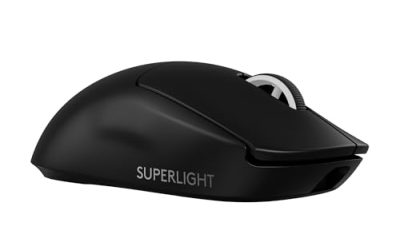
Logitech G PRO X SUPERLIGHT 2 Wireless Gaming Mouse
- Best for: Players who want a proven symmetrical pro shape with modern flagship internals.
- Brand: Logitech G
- Model Name: G PRO X 2
- Model Number: 910-006628
- Weight: 60g
Players who want a proven symmetrical pro shape with modern flagship internals.
Check the five-button layout covers everything you map, because there are no extra controls.
Logitech’s flagship takes a conservative route, refining a shape that professional players already trust instead of reinventing it. The sixty-gram body keeps the familiar safe outline, while the current sensor generation, hybrid switches and fast report rate update the internals to modern premium standards. Five programmable buttons keep the layout clean, and USB-C charging removes the annoyance of older connectors when the battery finally runs low. It suits players who want a dependable, no-drama mouse for ranked play, especially anyone upgrading from an earlier Logitech pro model and hoping to keep the same grip habits.
Razer Viper V3 Pro Wireless Esports Gaming Mouse
The Viper V3 Pro is the purest esports entry in this group, built around a symmetrical shell and a very low weight for players who steer with claw or fingertip grips. Its flagship optical sensor, fast wireless polling and third-generation optical switches form a package aimed squarely at competitive shooters, with nothing spent on lighting or decorative extras. Eight programmable buttons cover the essentials without crowding the sides. Choose it if your priority is a light, balanced mouse that disappears during fast play and leaves every decision to your hand rather than to extra features.
Specs
- Brand: Razer
- Model Name: Viper V3 Pro
- Model Number: RZ01-05120100-R3U1
- Weight: 54g Lightweight
- Sensor: 35K DPI Optical Sensor
- Polling: 8K Polling
- Switches: Gen3 Optical Switches
- Programmable Buttons: 8
- Battery: 95 Hr Battery
- Color: Black
- Shape: Symmetrical
Best for: Competitive shooter players using claw or fingertip grips who want the lightest flagship feel.
Watch out for: Confirm the symmetrical shape suits your hand, since there is no sculpted palm support.
ASIN: B0CW25XR5R
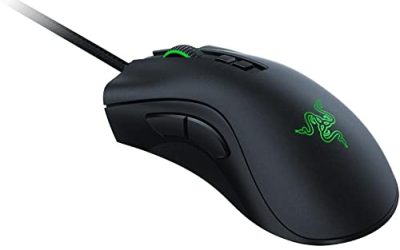
Razer DeathAdder V3 Pro Gaming Mouse
- Best for: Palm and relaxed claw players with medium to large hands who prefer a sculpted shape.
- Brand: Razer
- Model Name: DeathAdder V3 Pro
- Model Number: RZ01-04630100-R3G1
- Weight: 63g Ultra Lightweight
Palm and relaxed claw players with medium to large hands who prefer a sculpted shape.
Confirm your hand size against the dimensions, because smaller hands may find the shell long.
The DeathAdder name has defined ergonomic gaming mice for years, and the V3 Pro keeps that sculpted right-handed outline while cutting the weight dramatically for a shell of its size. A palm or relaxed claw grip gets full support along the raised body, which can reduce strain during long sessions compared with a flat symmetrical mouse. Its flagship optical sensor, optical switches and wireless connection bring the internals up to the same level as lighter rivals. Pick it if your hand is medium to large and you have always preferred a shaped mouse over an ambidextrous one.
Razer Basilisk V3 Pro Wireless Gaming Mouse
- Best for: Players who want one flagship mouse for games, work and heavy shortcut use.
- Brand: Razer
- Model Name: Basilisk V3 Pro
- Model Number: RZ01-04620100-R3U1
- Sensor: 30K DPI Optical Sensor
Players who want one flagship mouse for games, work and heavy shortcut use.
Check the larger, heavier body against your grip, because it is built for features rather than speed.
Where the other flagships strip things away, the Basilisk V3 Pro adds them, making it the premium pick for players whose mouse also handles work, strategy games and long browsing sessions. The tilt wheel shifts between tactile steps and free spinning, the lighting zones give the desk some character, and the generous set of programmable controls supports macros and shortcuts far beyond shooter needs. Three connection modes let one mouse serve a gaming PC and a laptop without swapping hardware. Choose it if features matter more to you than shaving off grams, and your grip is a relaxed right-handed palm hold.
Which One Fits Your Situation
You Play Competitive Shooters Every Night
Start with the Razer Viper V3 Pro, because its light symmetrical shell, flagship sensor and fast polling are aimed directly at fast, repeated target changes. Players who already know they like the Logitech outline can take the SUPERLIGHT 2 instead and keep a familiar shape. Either way, you are buying responsiveness and low weight rather than extra controls, so set your sensitivity once and let the hardware stay out of the way.
Your Hand Aches After Long Sessions
The Razer DeathAdder V3 Pro is the natural starting point, since its sculpted right-handed body supports a palm grip instead of asking your fingers to pinch a flat shell. That support spreads contact and can feel calmer over an evening of play. Measure your current mouse first, because the benefit depends on the size match. If your hand is smaller, compare the lighter symmetrical models and use a relaxed claw grip rather than forcing a shell that is too long.
One Mouse Has to Cover Work and Play
Choose the Razer Basilisk V3 Pro, because its tilt wheel, free-spin scrolling and wide set of programmable controls earn their keep in documents, timelines and strategy games as well as shooters. Three connection modes also help if you move between a desktop and a laptop during the day. You accept a larger body and give up the ultralight feel of the esports models, but for a mixed desk that trade is usually the sensible one to make.
You Are Upgrading From a Mid-Range Mouse
Any model here is a step up in sensor class and switch technology, so let shape decide rather than specifications. Former symmetrical mouse owners should shortlist the Viper V3 Pro and the SUPERLIGHT 2, while shaped-shell owners will feel at home sooner with the DeathAdder V3 Pro or the Basilisk V3 Pro. Keeping a familiar outline means your aim transfers immediately, and the premium internals then show up as consistency instead of a relearning period.
Common Mistakes
- Choosing by sensor number alone, when shape and grip fit decide far more about how a flagship actually feels.
- Buying an ultralight esports shell for a relaxed palm grip, then blaming the mouse for a cramped hand.
- Assuming the longest battery figure applies at the fastest polling setting, when makers rate endurance under gentler conditions.
- Ignoring button count and wheel type, even though those details shape daily use more than small sensor differences.
- Forgetting to check hand size against the listed dimensions, especially with large ergonomic models built for bigger hands.
Frequently Asked Questions
Is a premium gaming mouse worth it over a mid-range one?
It can be, provided the upgrade targets what you actually feel: a better-fitting shell, lighter weight, optical switches and faster wireless polling. The sensor gap alone rarely justifies the move, because mid-range tracking is already strong. Buy premium when the shape suits your grip and the feature set matches your games, not simply because a model sits at the top of a range.
Does higher polling make a visible difference in games?
Faster polling shortens the interval between reports, which can make fast movements feel smoother and more immediate, particularly in competitive shooters played at high refresh rates. The benefit is subtle rather than dramatic, and it usually costs battery life. Many players settle on a middle setting for daily use and reserve the fastest mode for ranked sessions where every small advantage feels worthwhile.
Should I choose a symmetrical or an ergonomic premium mouse?
Let your grip decide. Symmetrical shells suit claw and fingertip players who steer with their fingers and value a balanced, ambidextrous outline. Ergonomic shells suit palm players who want the body to support the whole hand through longer sessions. If you are unsure, compare the length and height of your current mouse with the listed dimensions and stay close to the outline your hand already knows.
How long do flagship wireless mice usually last between charges?
It depends heavily on polling settings, lighting and how many hours you play each day. The models in this guide state long battery figures under standard conditions, but running the fastest wireless mode or bright lighting shortens that span noticeably. A sensible routine is to charge during a break once a week or whenever the indicator warns you, rather than letting the battery empty before an important session.
Related guides
More from Amazon
Programs that pair well with the guide above. Offers and eligibility are set by Amazon and may change.
Free shipping on eligible items, Prime Video and more. Eligible new members can start with a free trial.
Start a Prime free trialAd-free music streaming. Eligible new subscribers can start with a free trial.
Try Music Unlimited freeA Prime membership for ages 18-24 with a trial period. Eligibility is set by Amazon.
See Prime for Young AdultsAudiobooks and podcasts to listen to on the go. Eligible new members can start with a free trial.
Try Audible freeAs an Amazon Associate we earn from qualifying purchases.