Battlefield matches swing on the small moments: a flick onto a rooftop sniper, tracking a strafing medic across a street, and holding a steady spray while a vehicle pushes your squad. The mouse in your hand decides how clean those moments feel, and the wrong one adds drag, fatigue, and missed shots that no amount of practice fixes. Picking the right mouse means matching weight, shape, and sensor to the way you actually play, not chasing the biggest number on the box.


This guide is for Battlefield players who want a mouse that stays accurate through long rounds, whether you play assault on the front line, recon from distance, or support holding an objective. Every mouse below is a gaming mouse built for fast first-person shooters, chosen from its Amazon listing for a light body, a modern optical sensor, and a low-latency wireless or wired connection.
Our Top Picks
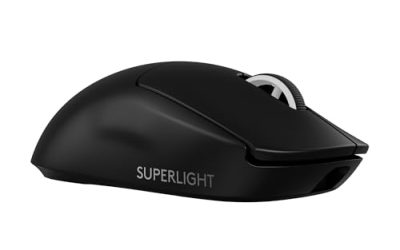
- Logitech G Pro X Superlight 2 Lightspeed WirelessClassic1.57 x 2.5 x 4.92 inches0.1 poundsCheck on Amazon
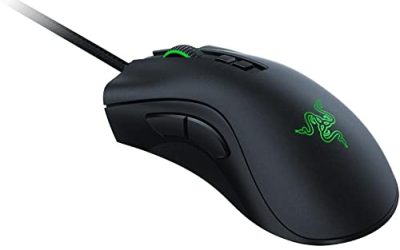
 Razer DeathAdder V3 Pro Wireless Gaming Mouse1000 Hz5.01 x 2.65 x 1.69 inches0.1 poundsCheck on Amazon

Top 3 picks at a glance
Quick Picks
As an Amazon Associate we earn from qualifying purchases.
| Product | Best for | Key spec from title |
|---|---|---|
| Logitech G Pro X Superlight 2 | Competitive players who want the lightest flagship feel | 60g body with 44,000 DPI sensor |
| Razer Viper V3 Pro | Symmetrical shape with tournament-grade polling | 54g body with 8,000 Hz polling |
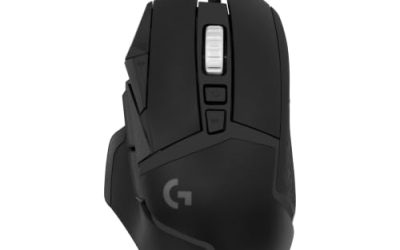
| Logitech G502 X LIGHTSPEED | Players who want extra buttons for gadgets and binds | 13 programmable buttons with HERO 25K sensor |
| Razer DeathAdder V3 Pro | Palm-grip players who want an ergonomic right-hand shape | 63g ergonomic body with 30K optical sensor |
| Logitech G305 LIGHTSPEED | Budget-minded players who want reliable wireless | 99g body with 250-hour battery life |
How to Choose
Weight matters more than the sensor number
Every modern optical sensor tracks faster than your hand can move, so weight is the spec that changes how a mouse actually feels in a Battlefield round. A lighter mouse makes flick shots easier, lets you reset your aim faster after a recoil pull, and keeps your wrist fresher during a long conquest match. Mice under 65 grams suit low-sensitivity players who sweep their arm across a large pad, while a mouse near 100 grams can feel steadier for high-sensitivity players who aim mostly with the wrist. Try to stay under 100 grams either way, and treat anything above that as a deliberate choice, not a default.
Pick a shape that matches your grip
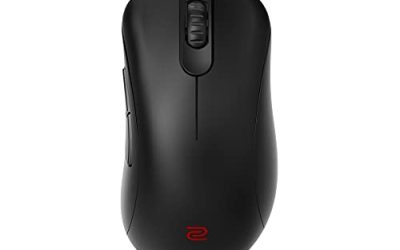
Battlefield sessions run long, and a shape that fights your hand will cost you accuracy by the third round. Palm-grip players should look for a taller, right-handed shell with a raised hump that fills the hand, like the DeathAdder shape, because it supports the whole palm during sustained tracking. Claw and fingertip players do better with a lower, symmetrical shell that leaves the palm free, like the Viper or Superlight shape, because it allows quick micro-adjustments and fast lifts. If you are unsure, a symmetrical mouse is the safer first pick, since it adapts to more grip styles.
Wireless latency is no longer the weak link
A good 2.4 GHz wireless connection now reports at 1,000 Hz with a 1 ms report rate, which matches a wired mouse for practical purposes in Battlefield. The real differences are battery life and polling rate: a mouse with an 8,000 Hz polling mode reports movement more often, which can make tracking feel slightly smoother on a high-refresh monitor, but it drains the battery much faster. If you play wired or charge nightly, that trade is easy to accept. If you forget to charge, a mouse with a long battery life on a single AA cell or a 90-hour rechargeable battery is the smarter pick.
Buttons, software, and the details that add up
Battlefield rewards players who bind gadgets, spot enemies, and switch weapons without reaching for the keyboard, so count the buttons before you buy. Five buttons cover the basics, while thirteen buttons let you map gadgets, melee, and vehicle commands to your thumb. Onboard memory matters if you play on more than one machine, because it carries your DPI and button settings with the mouse. Switches matter too: optical switches resist the double-click faults that mechanical switches can develop over time. Check the cable or receiver setup as well, since a stiff cable or a missing receiver slot becomes a daily annoyance.
The 5 Best Options
Logitech G Pro X Superlight 2
The Superlight 2 is the default pick for competitive Battlefield players who want the lightest possible mouse without giving up sensor performance. At 60 grams it disappears in the hand during fast flicks, and the HERO 2 sensor tracks cleanly at high speeds, which helps when you snap between targets in close-quarters fights. The symmetrical shape suits claw and fingertip grips, the LIGHTFORCE switches combine optical speed with a mechanical feel, and the 8,000 Hz polling mode keeps tracking smooth on high-refresh monitors. It is the mouse to buy when you want proven tournament hardware and nothing extra.
Specs
- Weight: 60 grams
- Sensor: HERO 2, up to 44,000 DPI
- Polling rate: up to 8,000 Hz
- Switches: LIGHTFORCE hybrid optical-mechanical
- Programmable buttons: 5
- Connection: LIGHTSPEED wireless with USB-C charging
- Compatibility: PC and Mac
Best for: Competitive players who want the lightest flagship mouse for flick shots and fast resets.
Watch out for: No Bluetooth, no RGB lighting, and only five buttons, so gadget-heavy players may want more controls.
ASIN: B09NBWL8J5
Razer Viper V3 Pro
The Viper V3 Pro is the symmetrical rival to the Superlight 2, and it wins on raw lightness at 54 grams. That lower weight makes long arm-aim sessions easier, and the Focus Pro 35K optical sensor holds tracking steady through fast sweeps and sudden stops. The 8,000 Hz wireless polling mode is included in the box, the Gen-3 optical switches are built for long use, and the shape works for claw and fingertip grips of most hand sizes. It is a strong pick for Battlefield players who run low sensitivity and want a mouse that never feels like it is dragging behind the crosshair.
Specs
- Weight: 54 grams
- Sensor: Focus Pro 35K optical
- Polling rate: up to 8,000 Hz wireless
- Switches: Gen-3 optical
- Programmable buttons: 8
- Battery life: up to 95 hours
- Connection: HyperSpeed wireless with USB-C charging
Best for: Low-sensitivity arm aimers who want the lightest symmetrical mouse with tournament polling.
Watch out for: No RGB lighting, no Bluetooth, and battery life drops sharply at 8,000 Hz polling, so keep the charger handy.
ASIN: B0CW25XR5R
Logitech G502 X LIGHTSPEED
The G502 X LIGHTSPEED is the pick for Battlefield players who use a lot of gadgets, because it carries thirteen programmable buttons where most FPS mice carry five. You can map spotting, gadgets, melee, and vehicle commands to your thumb, and the dual-mode scroll wheel switches between a notched step for weapon swaps and a free spin for fast scrolling. The HERO 25K sensor tracks accurately at any speed you will reach in a match, the LIGHTFORCE switches resist double-click faults, and the wireless battery lasts up to 140 hours. It is heavier than the ultralight picks, but the extra controls are worth it for gadget-focused play.
Specs
- Weight: 102 grams
- Sensor: HERO 25K, up to 25,600 DPI
- Programmable buttons: 13
- Switches: LIGHTFORCE hybrid optical-mechanical
- Scroll wheel: Dual-mode with infinite scroll toggle
- Battery life: up to 140 hours
- Connection: LIGHTSPEED wireless with USB-C charging, PowerPlay compatible
Best for: Gadget-heavy Battlefield players who want many thumb buttons and a versatile scroll wheel.
Watch out for: At 102 grams it is the heaviest mouse here, so pure flick-shot players may prefer a lighter shell.
ASIN: B092CRH1RX
Razer DeathAdder V3 Pro
The DeathAdder V3 Pro is the ergonomic pick in this guide, built for palm-grip players who want a right-handed shell that fills the hand during long Battlefield sessions. At 63 grams it is far lighter than older ergonomic mice, and the Focus Pro 30K optical sensor tracks cleanly at high DPI settings. The HyperSpeed wireless connection reports at 1,000 Hz, the Gen-3 optical switches give a crisp click, and the battery lasts up to 90 hours, so a weekend of matches needs no charging break. It is the mouse to choose when a symmetrical shell leaves your hand aching after an hour of play.
Specs
- Weight: 63 grams
- Sensor: Focus Pro 30K optical
- Polling rate: 1,000 Hz wireless
- Switches: Gen-3 optical
- Programmable buttons: 5
- Battery life: up to 90 hours
- Connection: HyperSpeed wireless with USB-C charging
Best for: Palm-grip players who want a light ergonomic mouse for long Battlefield sessions.
Watch out for: The 8,000 Hz polling mode needs a separate HyperPolling dongle, which is not included with the standard black model.
ASIN: B0B6XZLNHQ
Logitech G305 LIGHTSPEED
The G305 LIGHTSPEED is the budget pick that still delivers real FPS performance, and it is the best way into wireless Battlefield play without a flagship outlay. The HERO sensor tracks up to 12,000 DPI with no smoothing or acceleration, the LIGHTSPEED wireless link reports at 1 ms, and a single AA battery lasts up to 250 hours in performance mode, so you will not be swapping cells mid-match. The compact 99-gram body suits claw and fingertip grips, the built-in receiver storage keeps the dongle safe on the move, and six programmable buttons cover the essentials. It is the sensible pick for a second setup or a first serious mouse.
Specs
- Weight: 99 grams with battery
- Sensor: HERO, up to 12,000 DPI
- Report rate: 1 ms LIGHTSPEED wireless
- Programmable buttons: 6
- Battery life: up to 250 hours on one AA battery
- Onboard memory: yes
- Connection: LIGHTSPEED wireless via USB receiver, no Bluetooth
Best for: Budget-minded players who want reliable wireless performance and very long battery life.
Watch out for: No Bluetooth fallback and no USB-C charging, since it runs on a replaceable AA battery.
ASIN: B07CMS5Q6P
Which One Fits Your Situation
You play low sensitivity and aim with your arm
Pick the Razer Viper V3 Pro. At 54 grams it is the lightest mouse in this guide, so wide arm sweeps and fast resets cost less effort, and the 8,000 Hz polling mode keeps tracking smooth through big flicks. The symmetrical shape stays out of the way of a claw or fingertip grip, which is how most low-sensitivity players hold the mouse.
You play palm grip and sessions run long
Pick the Razer DeathAdder V3 Pro. Its right-handed ergonomic shell supports the whole palm, which reduces fatigue during long conquest rounds, and at 63 grams it is light enough for quick flicks without feeling like a brick. The 90-hour battery means you will not be hunting for a cable between matches.
You rely on gadgets, spotting, and vehicle play
Pick the Logitech G502 X LIGHTSPEED. Thirteen programmable buttons let you map gadgets, spot, melee, and vehicle commands to your thumb, and the dual-mode scroll wheel handles both notched weapon swaps and free scrolling. The 140-hour battery and HERO 25K sensor keep it reliable through a full evening of matches.
You want solid wireless performance on a tight budget
Pick the Logitech G305 LIGHTSPEED. The HERO sensor tracks up to 12,000 DPI with no smoothing, the 1 ms wireless link feels wired in a firefight, and one AA battery lasts up to 250 hours, so it is the cheapest mouse here to own and run. It is also a good second mouse for a laptop or travel setup.
Common Mistakes
- Chasing the highest DPI number on the box instead of weight, shape, and grip fit, which change your aim far more.
- Buying a heavy mouse with many buttons when you mostly flick and track, since the extra weight slows every reset.
- Ignoring grip style and picking a tall ergonomic shell for a claw grip, or a flat symmetrical shell for a full palm grip.
- Running 8,000 Hz polling all the time without noticing the battery drain, then losing a match to a dead mouse.
- Forgetting to check whether the mouse needs a separate dongle for its fastest polling mode before assuming it is included.
Frequently Asked Questions
What DPI should I use for Battlefield?
Most Battlefield players settle between 400 and 1,600 DPI with an in-game sensitivity that gives a full 360-degree turn across 30 to 45 centimeters of mouse movement. Lower DPI with a higher in-game sensitivity feels the same as higher DPI with a lower sensitivity, so pick a DPI that gives you fine control in menus and stick with it. Every mouse in this guide tracks cleanly across that range.
Is wireless fast enough for Battlefield?
Yes. A modern 2.4 GHz wireless mouse reports at 1,000 Hz with a 1 ms report rate, which matches a wired mouse for practical purposes in a match. The connection type no longer decides who wins a gunfight; weight, shape, and your own aim matter far more. Keep the receiver close to the mouse, avoid USB hubs when possible, and charge the mouse before a long session.
How light should a Battlefield mouse be?
Under 100 grams is a good target, and under 65 grams suits low-sensitivity players who sweep their arm across a large pad. Lighter mice make flick shots and fast resets easier, but they can feel twitchy if you aim with the wrist at high sensitivity. The G502 X at 102 grams shows that a slightly heavier mouse can still work well when its extra buttons serve your play style.
Do I need 8,000 Hz polling for Battlefield?
No, it is a nice extra rather than a requirement. A 1,000 Hz polling rate already reports your movement every millisecond, which is fast enough for Battlefield at any skill level. The 8,000 Hz mode can make tracking feel slightly smoother on a high-refresh monitor, but it drains the battery much faster. Turn it on if you charge nightly, and leave it off if you value battery life.
Related guides
More from Amazon
Programs that pair well with the guide above. Offers and eligibility are set by Amazon and may change.
Free shipping on eligible items, Prime Video and more. Eligible new members can start with a free trial.
Start a Prime free trialAd-free music streaming. Eligible new subscribers can start with a free trial.
Try Music Unlimited freeA Prime membership for ages 18-24 with a trial period. Eligibility is set by Amazon.
See Prime for Young AdultsAudiobooks and podcasts to listen to on the go. Eligible new members can start with a free trial.
Try Audible freeAs an Amazon Associate we earn from qualifying purchases.