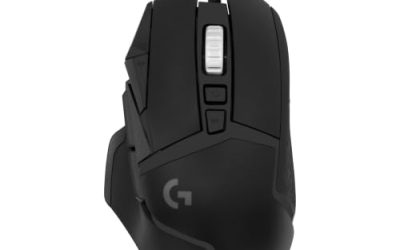
A gaming mouse is not the only route to a comfortable session. Plenty of players spend most of their computer time on work, browsing and documents, then load a game in the evening with the same mouse in hand. Buying a second, dedicated gaming mouse means another device on the desk, another cable or receiver to manage, and another shape to get used to. The real decision is whether an office mouse can hold up when the pace quickens: whether its sensor tracks cleanly, its clicks feel consistent, and its shape stays comfortable through a long match.
This guide is for desk workers who game after hours, laptop players who travel light, and anyone whose wrist prefers an ergonomic shape over a low, aggressive gaming shell. Every mouse below is an office or ergonomic model rather than a gaming-branded one, and each was chosen from the name and specifications shown on its Amazon product page, with attention to sensor resolution, connection type, button layout and comfort.
Our Top Picks
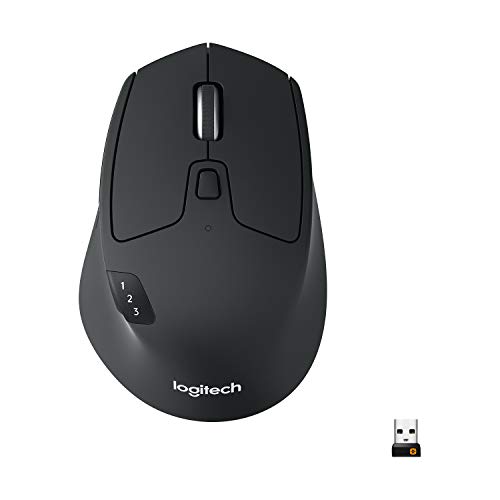 Logitech M720 Triathalon Full Size Multi-Device Wireless MouseOne Size1.77 x 2.91 x 4.53 inches0.3 poundsCheck on Amazon
 Logitech MX Vertical Wireless Mouse Ergonomic Design1 Pack4.7 x 3.11 x 3.09 inches0.5 poundsCheck on Amazon

Top 3 picks at a glance

Quick Picks
As an Amazon Associate we earn from qualifying purchases.
| Product | Best for | Key spec from title |
|---|---|---|
| Logitech MX Master 3S | Long workdays that end in relaxed evening gaming | 8K DPI tracking |
| Logitech MX Anywhere 3S | Gaming from a laptop bag, a hotel desk or a small table | 8K DPI any-surface tracking |
| Logitech M720 Triathlon | Switching between a work PC, a laptop and a tablet | 1000 DPI with 6 programmable buttons |
| Logitech Lift Vertical Ergonomic Mouse | Smaller hands that want a vertical grip for long sessions | 4000 DPI with a 57-degree angle |
| Logitech MX Vertical | Larger hands that want a vertical grip and a rechargeable battery | Rechargeable ergonomic design for up to 3 computers |
How to Choose
Sensor Resolution and Tracking Surface
Sensor resolution decides how far the cursor moves for a given hand movement, and it matters more than the marketing label on the box. A mouse with an 8000 DPI sensor lets you pick a sensitivity that suits both spreadsheet work and a slower, steadier aim in a shooter, because the range gives you room to tune. Tracking surface matters just as much: a sensor that works on glass keeps you playing on a bare desk, a glass table or a glossy surface without hunting for a pad. Before settling on a model, check the DPI range on the Amazon listing and think about the surfaces you actually use, since a mouse that needs a perfect pad will frustrate you in a hotel room or on a kitchen table.
Connection Type and Latency
Wireless office mice usually connect over Bluetooth or a small USB receiver, and the two behave differently in games. A dedicated receiver generally delivers a steadier link than Bluetooth, which is why it is the better choice when timing matters, such as in a fast shooter or a rhythm game. Bluetooth is still fine for slower titles, strategy games and story-driven adventures, and it frees a USB port on a thin laptop. Some models offer both, so you can use the receiver at your desk and Bluetooth on the move. Check the listing for which connection options are included, and confirm whether the receiver comes in the box or must be bought separately.
Shape, Weight and Hand Size
An office mouse is shaped for comfort over eight hours, which can be a genuine advantage in long gaming sessions, but only if the shape fits your hand. A tall, sculpted body supports the palm during slow, deliberate movement, while a compact mouse suits a fingertip grip and a small bag. Weight plays a part too: a heavier mouse feels planted and steady, which some players like for aiming, while a lighter one is easier to lift and reposition quickly. Measure your hand against the dimensions on the product page, and remember that a vertical mouse changes your wrist angle entirely, so it deserves a trial period before you judge it in a fast game.
Buttons, Scrolling and Software
Extra buttons turn an office mouse into a surprisingly capable gaming tool, because they can carry reload, crouch, push-to-talk or inventory shortcuts. Count the buttons on the listing and picture where your thumb and fingers will rest during play. A fast scroll wheel helps in games with long item lists or map zooming, while a quiet click keeps late-night sessions from waking the household. Software matters as well: a companion app that lets you reassign buttons per application means your work shortcuts and your game bindings can live on the same mouse without clashing. Check that the software supports your operating system before you buy.
The 5 Best Options
Logitech MX Master 3S

The MX Master 3S is the natural pick for someone whose desk does double duty. Its sculpted right-hand shape fills the palm, the thumb rest sits exactly where a tired hand wants support, and the sensor tracks cleanly across glass and glossy desks. In a game, the high-resolution sensor and the steady receiver connection keep movement predictable, while the side buttons and the second scroll wheel give you places to park common commands. It is a heavy mouse by gaming standards, so it suits deliberate, slower-paced play rather than rapid flick shots, and it rewards players who value comfort over raw speed.
Specs
- 8K DPI Darkfield sensor that tracks on glass
- MagSpeed electromagnetic scroll wheel with ultra-fast scrolling
- Quiet clicks
- Logi Bolt USB receiver and Bluetooth connectivity
- USB-C charging
- Multi-device pairing for up to 3 computers with Flow
Best for: Desk workers who want one premium mouse for a full workday and relaxed evening gaming.
Watch out for: The weight and the sculpted shape suit a palm grip, so check the dimensions against your hand size if you play with a claw or fingertip grip.
Logitech MX Anywhere 3S
Small size is the whole point of the MX Anywhere 3S, and it is the mouse to reach for when your gaming setup is a laptop on a tray table. Despite its compact body it carries the same high-resolution sensor as its larger sibling, tracks on glass, and connects through a receiver or Bluetooth. The MagSpeed wheel makes scrolling through inventories and maps feel effortless, and the programmable buttons cover the essentials without crowding a small shell. Its low profile can tire a large hand during a marathon session, so it shines brightest in shorter bursts and on the move rather than as a permanent desktop anchor.
Specs
- 8K DPI any-surface tracking, including glass
- MagSpeed fast scrolling
- Quiet clicks
- Programmable buttons
- USB-C charging
- Bluetooth and Logi Bolt USB receiver connectivity
- Multi-device pairing for up to 3 computers with Flow
Best for: Laptop gamers and travellers who need a pocket-sized mouse that still tracks precisely.
Watch out for: The compact, low shape can feel cramped for large hands, so compare its footprint with your current mouse before committing.
Logitech M720 Triathlon
The M720 Triathlon is the practical, multi-device workhorse of this list. It pairs with three computers at once, runs for a very long time on a single AA battery, and gives you six programmable buttons plus a hyper-fast scroll wheel. Its 1000 DPI sensor is modest next to the MX models, which means it is better suited to slower games, strategy titles and casual play than to twitch shooters where fine sensitivity tuning matters. The full-size shape is comfortable for long sessions, and the dual connectivity means it works with older machines as well as new ones.
Specs
- 1000 DPI sensor
- 6 programmable buttons
- Hyper-fast scroll wheel
- Bluetooth and USB Unifying receiver connectivity
- Multi-device pairing for up to 3 computers
- 2-year battery life from a single AA battery
Best for: Players who jump between a work PC, a personal laptop and a tablet and want one mouse for all three.
Watch out for: The 1000 DPI ceiling limits sensitivity tuning, so confirm it matches the pace of the games you play most.
Logitech Lift Vertical Ergonomic Mouse
Lift takes a different approach entirely: a 57-degree vertical grip that holds the hand in a handshake position. For smaller to medium hands, that angle can make a long evening of gaming noticeably easier on the wrist and forearm, especially in slower games where the hand rests rather than darts. The sensor adjusts up to 4000 DPI, the clicks are quiet, and the mouse connects over Bluetooth or the included Logi Bolt receiver. Battery life stretches to around two years on one AA battery. Vertical mice demand an adjustment period, and fast, wide movements feel different at first, so give it a few sessions before deciding.
Specs
- 57-degree vertical angle for small to medium hands
- 4000 DPI sensor, fully adjustable
- Quiet clicks
- Bluetooth Low Energy and Logi Bolt USB receiver connectivity
- Up to 24 months of battery life from one AA battery
- Wireless range up to 10 meters
- Weight: 125 g; dimensions: 108 x 70 x 71 mm
Best for: Smaller-handed players whose wrist tires during long sessions and who want a vertical grip.
Watch out for: The vertical grip and the right-hand-only shape are a real adjustment, so check the handedness and the size guidance on the listing before ordering.
Logitech MX Vertical
The MX Vertical is the larger sibling of the Lift, built for medium to large hands that want the same handshake posture with a rechargeable battery. Its 57-degree angle keeps the forearm in a more neutral position, the 4000 DPI sensor is adjustable for different games, and it connects to three computers through Bluetooth or the included receiver. A USB-C cable tops up the built-in battery, so there are no disposable batteries to keep buying. Like any vertical mouse, it trades some flick speed for posture, which makes it a better match for slower, more deliberate games than for competitive shooters.
Specs
- 57-degree advanced ergonomic vertical design
- 4000 DPI high-precision sensor
- Rechargeable battery with USB-C charging
- Bluetooth and USB receiver connectivity
- Connects to up to 3 Windows and Apple computers
- Move content between computers with Flow
Best for: Larger-handed players who want a rechargeable vertical mouse for long, comfortable sessions.
Watch out for: The vertical shape changes your aiming motion, so allow a trial period and check the size guidance on the listing if your hands are on the smaller side.
Which One Fits Your Situation
You Work All Day, Then Game at the Same Desk
Pick the Logitech MX Master 3S. Its palm-filling shape stays comfortable from the first email to the last match, the 8K DPI sensor gives you room to tune sensitivity for different games, and the receiver connection keeps movement steady. The thumb wheel and side buttons carry your most-used commands without reaching for the keyboard.
You Game From a Laptop Anywhere
Pick the Logitech MX Anywhere 3S. It slips into a bag pocket, tracks on glass and glossy surfaces without a pad, and pairs with three devices. The compact body is easy to carry, and the high-resolution sensor means you are not giving up precision just because the mouse is small.
Your Wrist Hurts After Long Sessions
Pick the Logitech Lift Vertical Ergonomic Mouse if your hands are small to medium, or the Logitech MX Vertical if they are medium to large. Both hold the hand at a 57-degree angle that reduces forearm twist, and both keep the sensor resolution high enough for relaxed gaming. Try one for a full week before judging it, since vertical grips feel strange on day one.
You Switch Between Three Machines
Pick the Logitech M720 Triathlon. Its three-device pairing, long battery life and six programmable buttons make it the most practical choice for a multi-machine setup. The lower DPI ceiling is a fair trade for a mouse that simply works everywhere, and it is at its best in slower games and strategy titles.
Common Mistakes
- Choosing an office mouse only for its DPI number and ignoring shape, weight and grip style, which matter more over a long session.
- Using Bluetooth for a fast-paced game when the included USB receiver would give a steadier connection.
- Buying a vertical mouse and judging it after one evening, before the new wrist angle has had time to feel natural.
- Assuming every button on the listing is easy to reach mid-game, without checking the layout against your own grip.
- Picking a compact travel mouse as a permanent desktop mouse when your hands are large enough to cramp around it.
Frequently Asked Questions
Can a non gaming mouse work well for gaming?
Yes, for many types of games. An office mouse with a precise sensor, a steady receiver connection and a comfortable shape handles strategy games, role-playing games, simulations and casual shooters well. Competitive players who rely on very high polling rates and ultralight shells may still prefer a dedicated gaming mouse, but a good office mouse covers relaxed and mid-paced play comfortably.
What DPI should I look for in a non gaming mouse for gaming?
A sensor that reaches at least 4000 DPI gives you useful room to adjust sensitivity, while 8000 DPI models offer even more flexibility. The number alone is not the whole story, though: tracking quality on your desk surface, the steadiness of the wireless connection and the shape of the mouse all affect how the DPI setting feels in practice.
Is Bluetooth fast enough for gaming with an office mouse?
Bluetooth is fine for slower games such as strategy, simulation and story-driven titles, where a fraction of input delay goes unnoticed. For faster games, use the USB receiver if the mouse includes one, since a dedicated receiver generally provides a more stable link. Keeping the receiver close to the mouse and away from other wireless devices also helps.
Are vertical mice good for gaming?
Vertical mice can be good for gaming when comfort is the priority and the game does not demand rapid, wide flicks. The upright grip reduces forearm twist during long sessions, which suits slower and more deliberate titles. They take time to learn, so expect an adjustment period of several sessions before your aim feels natural again.
Related guides
More from Amazon
Programs that pair well with the guide above. Offers and eligibility are set by Amazon and may change.
Free shipping on eligible items, Prime Video and more. Eligible new members can start with a free trial.
Start a Prime free trialAd-free music streaming. Eligible new subscribers can start with a free trial.
Try Music Unlimited freeA Prime membership for ages 18-24 with a trial period. Eligibility is set by Amazon.
See Prime for Young AdultsAudiobooks and podcasts to listen to on the go. Eligible new members can start with a free trial.
Try Audible freeAs an Amazon Associate we earn from qualifying purchases.