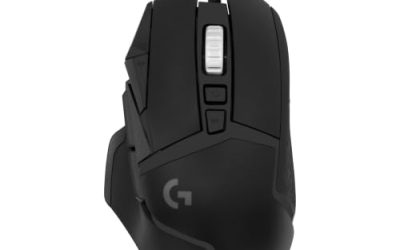
Choosing a Logitech gaming mouse is a decision about your hand first and the sensor second. Every mouse in this guide tracks far beyond what a human hand can use in a match, so the real differences sit in shape, weight, button layout, and whether the cable disappears. A palm-grip player with large hands needs a tall shell with a thumb rest, while a fingertip player wants a short, light body that stops and starts with almost no effort.
This guide is for four kinds of buyers. Competitive players want the lightest wireless mouse they can flick across a pad. MMO and MOBA players want enough buttons to cast a full skill bar from the thumb. Everyday players want one comfortable mouse for work and play. Budget-minded buyers want wireless freedom without giving up a reliable sensor. The four mice below, taken from their Amazon listing titles and specifications, cover all four groups.
Our Top Picks


Top 3 picks at a glance
Quick Picks
As an Amazon Associate we earn from qualifying purchases
| Product | Best for | Key spec from title |
|---|---|---|
| Logitech G502 HERO | Palm-grip players who want buttons and tuning | HERO 25K sensor, 25,600 DPI, 11 programmable buttons |
| Logitech G PRO X Superlight | Competitive players who want the lightest wireless mouse | HERO 25K sensor, 25,600 DPI, under 63 grams |
| Logitech G305 LIGHTSPEED | A first wireless mouse with long battery life | HERO 12K sensor, 12,000 DPI, 250-hour battery |
| Logitech G502 X Wired | A modern wired all-rounder with fast switches | HERO 25K sensor, 25,600 DPI, LIGHTFORCE switches |
How to Choose
Match the shape to your grip
Grip decides comfort more than any specification on the box. Palm-grip players rest the whole hand on the shell, so a taller, longer mouse with a thumb rest keeps the wrist relaxed during long sessions. Claw-grip players arch their fingers and need a mid-height shell with a steep front slope, while fingertip players touch only the fingertips and the base of the palm, so a shorter, lighter body works better. Measure your hand from wrist to middle fingertip and compare it with the listed length before ordering. A mouse that is too long forces the fingers to stretch, and one that is too short leaves the palm unsupported.
Weigh the sensor against the weight
Modern Logitech sensors all track well past the sensitivity most players use, so treat the sensor as a baseline and judge the weight instead. A 63-gram mouse changes direction with far less effort than a 121-gram one, which matters in fast flick shots and long sessions. Heavier mice feel planted and steady for slow, deliberate aim, and some players add tuning weights to shift the balance toward the palm or the fingers. Check whether the listed weight includes the battery or the cable, since wireless mice often quote a dry weight. If you play at low sensitivity and lift the mouse often, a lighter body saves more energy than a higher DPI number will.
Count the buttons you will actually use
Button count is only useful when the buttons sit where your thumb can reach them without shifting your grip. Two side buttons cover most shooters, since they handle melee, grenades, or push-to-talk. MOBA and MMO players benefit from a thumb grid or extra top buttons, because a full skill bar can live under one thumb instead of stretching across the keyboard. Programmable buttons matter most when the software lets you save profiles on the mouse itself, so your bindings travel with the hardware. Before paying for a dozen extra buttons, count the actions you cast in a typical match and check that each one has a comfortable home.
Choose wired certainty or wireless freedom
Wired mice never need charging and cost less for the same sensor, which makes them the safe pick for a fixed desk. Wireless mice remove cable drag and suit players who travel to LAN events or share a desk with other work. Battery life varies widely: one AA cell can last hundreds of hours on an efficient sensor, while a rechargeable cell needs a cable or dock nearby. Check the polling rate, since a 1,000 Hz report rate keeps wireless response on par with wired. If your desk has a cable bungee or a clean cable route, wired saves money; if the cable ever snags mid-fight, wireless is worth the premium.
The 4 Best Options
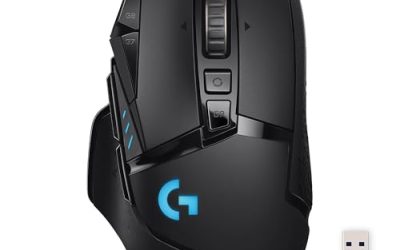
Logitech G502 HERO

The G502 HERO is the most versatile mouse in this guide, and it suits palm-grip players who want a full set of controls under one hand. Its right-handed shell carries a thumb rest and a sensitivity clutch button, while eleven programmable buttons cover skills, macros, and on-the-fly sensitivity changes. Five tuning weights let the owner shift the balance toward the palm or the fingers, so the same mouse can feel planted for slow aim or lighter for faster flicks. It is the natural pick for a player who games, works, and browses on one desk all day.
Specs
- Sensor: HERO 25K optical, 100 to 25,600 DPI
- Buttons: 11 programmable buttons, dual-mode hyper-fast scroll wheel with tilt
- Weight: 121 grams, plus five 3.6-gram tuning weights
- Size: 132 x 75 x 40 mm, right-handed ergonomic shape
- Connection: Wired USB, 2.1 m braided cable
- Lighting: LIGHTSYNC RGB, about 16.8 million colors
- Memory: Onboard memory for 5 profiles
- Report rate: 1,000 Hz
- Warranty: 2-year limited hardware warranty
Best for: Palm-grip players who want many buttons, a thumb rest, and adjustable weight in one wired mouse.
Watch out for: At 121 grams before weights, it is heavy for fingertip play, and the right-handed shell does not suit left-handed players.
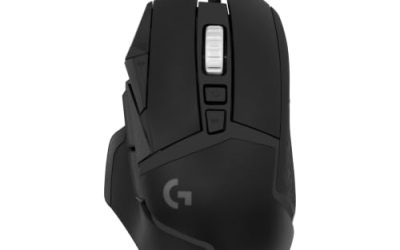
Logitech G PRO X Superlight
The PRO X Superlight is built for competitive players who want the mouse to disappear in the hand. At under 63 grams it changes direction with almost no effort, and the HERO 25K sensor holds tracking steady at high speeds. LIGHTSPEED wireless keeps the report rate at 1,000 Hz, so the cable-free setup feels as direct as a wired connection. Five programmable buttons cover the essentials and nothing more, which keeps the shell clean and the weight down. It suits aim-heavy shooters where every gram and every millisecond of drag matters.
Specs
- Sensor: HERO 25K optical, up to 25,600 DPI
- Buttons: 5 programmable buttons
- Weight: Under 63 grams
- Size: 125 x 63.5 x 40 mm, symmetrical shape
- Connection: LIGHTSPEED wireless, 1 ms report rate
- Battery: Up to 70 hours on a single charge
- Feet: Zero-additive PTFE feet
- Compatibility: PC and Mac
- Extras: Powerplay wireless charging compatible, onboard memory
Best for: Competitive shooter players who want the lightest wireless mouse Logitech makes.
Watch out for: Only five buttons, so MOBA and MMO players who need a thumb grid should look elsewhere, and the AA-free rechargeable cell needs a cable nearby when it runs low.
Logitech G305 LIGHTSPEED
The G305 is the easiest way into wireless gaming, and it suits players who want a reliable sensor and months of battery life without a premium outlay. Its HERO 12K sensor tracks cleanly to 12,000 DPI, and a single AA battery keeps it running for up to 250 hours. The compact, symmetrical shell fits palm, claw, and fingertip grips in smaller hands, and the nano receiver stows inside the body for travel. Six programmable buttons cover the usual bindings, and onboard memory stores up to five profiles with five DPI levels each.
Specs
- Sensor: HERO 12K optical, 200 to 12,000 DPI
- Buttons: 6 programmable buttons
- Weight: 99 grams with battery
- Connection: LIGHTSPEED wireless, 1 ms report rate
- Battery: Up to 250 hours on one AA battery
- Memory: Onboard memory for 5 profiles
- Tracking: Over 400 IPS, 40 G acceleration
- Compatibility: Windows, macOS, and ChromeOS
Best for: Players buying their first wireless gaming mouse, and anyone who travels with a laptop and a mouse.
Watch out for: The 12,000 DPI ceiling is lower than the flagship models, and the AA battery adds weight that a rechargeable cell avoids.
Logitech G502 X Wired

The G502 X Wired takes the familiar G502 shape and rebuilds it for modern play. LIGHTFORCE hybrid optical-mechanical switches give the primary buttons a crisp, fast actuation, while the HERO 25K sensor tracks to 25,600 DPI with no smoothing or acceleration. A thin-wall shell drops the weight to 89 grams, and the reversible DPI-shift button adapts to different grips. The dual-mode scroll wheel switches between hyper-fast free spin and precise ratcheting, and it tilts left and right for two extra controls. It is the pick for players who loved the original G502 but want a lighter, faster version.
Specs
- Sensor: HERO 25K optical, 100 to 25,600 DPI
- Switches: LIGHTFORCE hybrid optical-mechanical primary switches
- Controls: 13 programmable controls, reversible and removable DPI-shift button
- Weight: 89 grams
- Size: 131.4 x 41.1 x 79.2 mm, right-handed ergonomic shape
- Connection: Wired USB
- Scroll wheel: Dual-mode hyper-fast and ratchet, tilts left and right
- Memory: Up to 5 onboard memory profiles
- Feet: PTFE feet
Best for: G502 fans who want a lighter wired mouse with modern switches and the same button-rich layout.
Watch out for: Wired only, so there is no wireless option, and the 89-gram body is still heavier than ultralight esports mice.
Which One Fits Your Situation
A palm-grip desk mouse with buttons to spare
Pick the Logitech G502 HERO. Its tall right-handed shell supports the whole hand, the thumb rest gives the thumb a place to sit, and eleven programmable buttons cover skills, macros, and sensitivity changes without reaching for the keyboard. The tuning weights let the owner set the balance once and forget it.
A featherweight mouse for competitive shooters
Pick the Logitech G PRO X Superlight. At under 63 grams it flicks and resets with the least effort on this list, and the HERO 25K sensor plus LIGHTSPEED wireless keep tracking and response on par with a wired mouse. Five buttons keep the shell clean for aim-first play.
A first wireless mouse for a laptop setup
Pick the Logitech G305 LIGHTSPEED. It runs for up to 250 hours on one AA battery, the receiver stows inside the body, and the compact shell travels well in a laptop bag. Six programmable buttons and onboard profiles cover everyday gaming without a premium outlay.
A modern wired all-rounder
Pick the Logitech G502 X Wired. It keeps the button-rich G502 layout, drops the weight to just 89 grams, and adds LIGHTFORCE switches with a reversible DPI-shift button. It suits players who want a wired mouse that feels current and modern without giving up the familiar shape.
Common Mistakes
- Chasing the highest DPI number instead of matching the shape to your grip and hand size.
- Buying a heavy palm-shaped mouse for fingertip play, then fighting its weight in every flick.
- Paying for a dozen extra buttons and never binding more than two of them.
- Ignoring battery life on wireless mice and discovering the mouse needs charging mid-session.
- Assuming a mouse with onboard memory works the same on every system without checking the software support first.
Frequently Asked Questions
Which Logitech mouse is best for palm grip?
The G502 HERO fits palm grip best on this list. Its tall right-handed shell, thumb rest, and 132 mm length support the whole hand, and the sensitivity clutch sits under the thumb for quick DPI drops. Players with smaller hands may find it long, so compare the listed length with your hand before ordering.
Is wireless as fast as wired for gaming?
Yes, on the models listed here. LIGHTSPEED wireless reports at 1,000 Hz, the same rate as a wired USB connection, so input latency does not decide a match. The practical differences are battery life, weight, and whether a cable ever snags on the desk edge.
How many buttons does a gaming mouse need?
Most shooters need only two side buttons for melee, grenades, or push-to-talk. MOBA and MMO players benefit from a thumb grid or extra top buttons, since a full skill bar can live under one thumb. Count the actions you cast in a typical match and match the button layout to that count.
Does a higher DPI sensor make aim better?
No. Nearly every modern sensor tracks far beyond the sensitivity players actually use, and most shooter players aim between 400 and 1,600 DPI. Shape, weight, and switch feel change aim far more than a higher DPI ceiling, so judge a mouse on how it fits the hand first.
Related guides
More from Amazon
Programs that pair well with the guide above. Offers and eligibility are set by Amazon and may change.
Free shipping on eligible items, Prime Video and more. Eligible new members can start with a free trial.
Start a Prime free trialAd-free music streaming. Eligible new subscribers can start with a free trial.
Try Music Unlimited freeA Prime membership for ages 18-24 with a trial period. Eligibility is set by Amazon.
See Prime for Young AdultsAudiobooks and podcasts to listen to on the go. Eligible new members can start with a free trial.
Try Audible freeAs an Amazon Associate we earn from qualifying purchases.