Adding a keyboard and mouse to a PS5 is not really about raw speed. The real decision is whether a set will actually work when you plug it into the console, and whether the games you play accept keyboard and mouse input at all. A combo that shares one USB receiver keeps setup simple, while a wired fallback saves you when a wireless link misbehaves at the worst moment.
This shortlist is for PS5 owners who play supported shooters, strategy titles, and MMO ports from the couch or a small desk, and for anyone tired of typing messages with a controller. Every set below is a single listing with both a keyboard and a mouse in the box, chosen from the names and specifications on its Amazon product page.
Top 3 picks at a glance


Quick Picks
As an Amazon Associate we earn from qualifying purchases.
| Product | Best for | Key spec from title |
|---|---|---|
| Redragon S155-PRO Wireless Gaming Keyboard and Mouse Combo | Players who want wired, 2.4GHz, or Bluetooth in one set | 12800 DPI mouse |
| CHONCHOW Wireless Keyboard and Mouse Combo (W301a) | Couch players who need range and explicit PS5 support | 2.4GHz connection with 10m range |
| CHONCHOW G311 Gaming Wireless Keyboard and Mouse | Buyers who want a metal panel and one shared receiver | Mouse DPI levels of 800/1200/1600 |
| RedThunder K10 Wireless Gaming Keyboard and Mouse Combo | Full-size fans who want pudding keycaps and a big battery | 3800mAh rechargeable battery |
How to Choose
Start With the Connection the PS5 Will Actually Accept
A PS5 talks to keyboards and mice over USB, so the safest combos are the ones that arrive through a USB receiver or a USB cable. Bluetooth-only sets are a gamble on console, even when the same set pairs happily with a phone or tablet. Look for a listing that names a 2.4GHz receiver, a wired mode, or both. The Redragon S155-PRO, for example, offers Bluetooth, 2.4GHz, and USB-C wired modes, which means you can fall back to the cable if the wireless link drops. One shared receiver also leaves the console’s other USB port free for a headset dongle or an external drive.
Check That Your Games Support Keyboard and Mouse
Console support and game support are two different questions. The PS5 system software recognises standard USB keyboards and mice for menus, text entry, and browsing, but each game decides for itself whether those devices can control gameplay. Many shooters, strategy games, and MMO ports allow it, while plenty of action titles remain controller-only. Before you buy any combo, confirm that the specific titles on your shelf accept keyboard and mouse input. If they do not, the set still earns its keep for chat, searching the store, and entering codes, yet it will not change how those games play.
Match the Layout to Your Space, Not Your Habits
A full-size board brings a number pad and dedicated media keys, but it also eats the surface your mouse needs to move. Couch players and small-desk setups usually do better with a compact layout. A 75 percent board such as the one in the Redragon S155-PRO set keeps the function row while trimming the frame, and it weighs just 1.13 pounds, so it balances on a lap desk without a fight. Full-size sets like the RedThunder K10 and the CHONCHOW G311 suit a proper desk where the board stays put. Measure your tray or desk first, then pick the layout that leaves room for wide mouse sweeps.
Read the Battery and Charging Details Closely
Wireless freedom ends the moment both devices die mid-session, so the charging story matters more than the headline battery figure. Prefer sets that recharge over USB Type-C with the cable included, and check whether the keyboard and mouse can charge while you keep playing. The CHONCHOW G311, for instance, lists a four-hour full charge over Type-C and can be charged during use, while its receiver hides in the bottom of the keyboard so it travels with the set. Also note sleep behaviour: aggressive auto-sleep stretches battery life but can add a wake-up tap at the start of a match.
The 4 Best Options
Redragon S155-PRO Wireless Gaming Keyboard and Mouse Combo
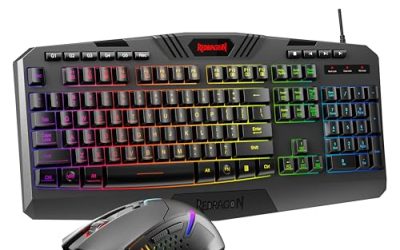
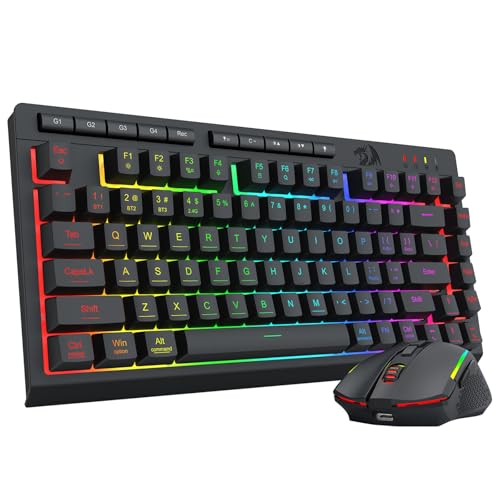
This is the most flexible set here for a PS5 owner who also plays elsewhere. Its keyboard uses a compact 75 percent layout with quiet membrane keys and macro support, and it can reach the console three ways: over a 2.4GHz link, over Bluetooth for other devices, or through a USB-C cable when you want the most dependable route. The listing names Playstation among its compatible devices, and the bundled mouse reaches 12800 DPI, which gives you plenty of sensitivity headroom for supported shooters. At 1.13 pounds for the package, it also suits a lap desk.
Specs
- Brand: Redragon
- Model: S155-PRO
- Connectivity: Bluetooth, 2.4GHz, and USB-C wired
- Keyboard layout: 75 percent, RGB backlit membrane with macro keys
- Mouse: 12800 DPI
- Compatible devices listed: Laptop, Playstation, Smartphone, Tablet, Xbox
- Special features listed: Backlit, ergonomic, hotkeys and media keys, integrated stand, spill proof
- Item weight: 1.13 pounds
- Batteries: 1 nonstandard battery, included
Best for: PS5 players who want one combo that can switch between the console, a laptop, and a tablet without buying twice.
Watch out for: On the PS5, plan on using the 2.4GHz receiver or the USB-C cable rather than Bluetooth, and confirm your game accepts keyboard and mouse input.
ASIN: B0FDG55BPG
CHONCHOW Wireless Keyboard and Mouse Combo (W301a)
Few listings in this category state their console support as plainly as this one. The product description says the set works with the PS5, connects by 2.4GHz wireless, and needs no additional driver, which is exactly the plug-and-play behaviour a couch setup demands. The stated connection range is 10 metres, enough to cross most living rooms, and the keyboard adds rainbow LED lighting plus 19-key anti-ghosting for busy moments. Both devices recharge with the included cable instead of disposable batteries, and the removable ABS keycaps make cleaning up crumbs and dust straightforward after long sessions.
Specs
- Manufacturer: CHONCHOW
- Model: W301a
- Connectivity: 2.4GHz wireless
- Connection range listed: 10 metres
- Anti-ghosting: 19 keys
- Compatibility listed: PC, computer, laptop, PS3, PS4, PS5, Xbox, Mac
- Keycaps: Removable ABS
- Charging: Rechargeable via the included charging cable
- Item weight: 1.76 pounds
Best for: Living-room players who want a set that names the PS5 directly and reaches across the room on one wireless link.
Watch out for: The listing gives no mouse DPI figure, so players who tune sensitivity precisely should weigh that gap before ordering.
ASIN: B0DJR9JW6P
CHONCHOW G311 Gaming Wireless Keyboard and Mouse
The G311 takes a sturdier route, pairing a metal-panel keyboard with a mouse that offers three sensitivity steps. Both devices share a single USB receiver stored in the bottom of the keyboard, so there is one less loose part to lose behind the TV stand. The title confirms compatibility with PS4 and PS5 alongside Windows, Mac, and Xbox One, and the rainbow backlighting switches on only when the receiver is plugged in, a small detail that prevents wasted battery. A foldable stand under the board lets you set a tilt angle for longer sessions at a desk.
Specs
- Manufacturer: CHONCHOW
- Model: US-G311
- Connectivity: 2.4G wireless through one shared USB receiver
- Mouse DPI: 800/1200/1600, three levels
- Charging: Type-C cable, full charge listed at 4 hours, can charge while in use
- Keyboard features listed: Metal panel, mechanical feel, anti-ghosting, foldable tilt stand
- Package includes: Keyboard, mouse, USB receiver, Type-C charging cable
- Compatibility listed: Windows, Mac, PS4/PS5, Xbox One
- Item weight: 2.01 pounds
Best for: Desk-based PS5 players who prefer a solid metal panel and a simple three-step mouse sensitivity they can change on the fly.
Watch out for: The top mouse setting of 1600 DPI is modest, so players who like very high sensitivity in supported games may find it limiting.
ASIN: B0C6ZBYWC2
RedThunder K10 Wireless Gaming Keyboard and Mouse Combo

The K10 is the full-size option for players who refuse to give up the number pad. Its translucent pudding keycaps let the RGB backlighting spill through the sides of each key, and the board carries a mechanical-feel design with anti-ghosting for crowded key presses. Keyboard and mouse share one USB receiver kept in the bottom of the mouse, and both recharge over Type-C with the same cable. The mouse is the most detailed here on paper, with an optical sensor rated at 3200 DPI, 12000 FPS scanning, 40G acceleration, and tracking up to 400 IPS across four adjustable DPI levels.
Specs
- Brand: RedThunder
- Model: K10
- Connectivity: Wireless through one shared USB receiver
- Keyboard: 104 keys, pudding keycaps in two-colour ABS, RGB backlighting
- Battery: 3800mAh rechargeable, per the listing title
- Mouse: 3200 DPI optical sensor, 4 DPI levels, 12000 FPS, 40G acceleration, up to 400 IPS tracking
- Charging: Type-C for both keyboard and mouse
- Product dimensions: 17.28 x 5.28 x 1.5 inches
- Item weight: 2.09 pounds
Best for: Desk players who want a full-size board, bright pudding keycaps, and the most thoroughly specified mouse sensor in this group.
Watch out for: The listing is written for PC gamers and does not name the PS5, so check the return terms and try it in a supported title promptly after it arrives.
ASIN: B0BTT2VCRR
Which One Fits Your Situation
You Play From the Couch, Several Metres From the TV
Distance rules this choice. The CHONCHOW W301a set lists a 10-metre wireless range and names the PS5 in its compatibility notes, so it is the natural pick when the console sits across the room. Keep the receiver on a short USB extension if the TV cabinet blocks the signal, and remember that the keyboard still needs a firm surface, so a lap desk completes the setup.
You Split Time Between the PS5 and a Laptop
A set that speaks several connection languages saves you from owning two combos. The Redragon S155-PRO moves between Bluetooth, 2.4GHz, and a USB-C cable, and its maker lists Playstation among the compatible devices. Park the receiver in the console, pair Bluetooth with the laptop, and plug the cable in when either battery runs low during a long evening.
You Have a Small Desk Beside the TV
Space, not features, should drive this decision. The S155-PRO’s 75 percent frame leaves room for the mouse to travel, and at 1.13 pounds it is easy to slide aside when the desk turns back into a workspace. If you would rather keep a number pad and can spare the width, the RedThunder K10 fits the same desk only if your mouse area stays generous.
You Type as Much as You Play
Party chat, store searches, and code entry reward a comfortable board more than a fast mouse. The CHONCHOW G311 brings a foldable tilt stand and a metal panel that stays planted while you type, and its three mouse DPI steps are plenty for menus and browsing. Its shared receiver also means setup is a single plug, which suits a family console that several people use.
Common Mistakes
- Assuming every PS5 game accepts keyboard and mouse input, when support is decided title by title.
- Buying a Bluetooth-only combo for a console that expects peripherals to arrive over USB.
- Choosing a full-size keyboard for a lap desk, then running out of room to move the mouse.
- Losing the tiny shared USB receiver, which can leave both the keyboard and the mouse unusable at once.
- Ignoring the charging routine, so both devices run flat on the same evening because they share a cable and a schedule.
Frequently Asked Questions
Will any USB keyboard and mouse combo work on a PS5?
Most standard USB and 2.4GHz receiver combos are recognised by the console for menus and text entry. Gameplay support is narrower, because each game chooses whether to accept keyboard and mouse controls. A combo that names Playstation or PS5 compatibility, or offers a wired USB mode, gives you the best chance of a painless setup.
Is a wired or wireless combo better for PS5 gaming?
Wireless sets keep a living room tidy and work well in supported games, especially when both devices share one receiver. A wired mode still earns its place as a backup when batteries fade or the signal struggles. Combos such as the Redragon S155-PRO that offer both routes remove the need to choose in advance.
Can I use the keyboard for chat and menus if my game is controller-only?
Yes. Even when a title restricts gameplay to the controller, the PS5 system interface still accepts keyboard input for messages, searches, and entering codes, and a mouse can help with browsing. Many players keep a compact combo beside the console for exactly this reason, then pick up the controller when the match starts.
Why does my combo’s mouse feel slow or fast on the PS5?
Mouse feel on console comes from the sensitivity steps built into the mouse itself, since there is no driver software to install. Sets list their steps in the specifications, such as 800, 1200, and 1600 DPI on the CHONCHOW G311. Cycle through the DPI button on the mouse and match the step to the game’s own sensitivity settings.
Related guides
More from Amazon
Programs that pair well with the guide above. Offers and eligibility are set by Amazon and may change.
Free shipping on eligible items, Prime Video and more. Eligible new members can start with a free trial.
Start a Prime free trialAd-free music streaming. Eligible new subscribers can start with a free trial.
Try Music Unlimited freeA Prime membership for ages 18-24 with a trial period. Eligibility is set by Amazon.
See Prime for Young AdultsAudiobooks and podcasts to listen to on the go. Eligible new members can start with a free trial.
Try Audible freeAs an Amazon Associate we earn from qualifying purchases.