A headphone stand with a built-in USB hub solves two desk problems with one object: where the headset lives when it is off the head, and where the extra ports come from when the PC sits under the desk or the laptop has only two sockets left. The decision this search implies is how much of that hub function matters. Some buyers need a couple of charging ports for a controller and a phone, others want a data port for a flash drive or dongle, and a few want mains outlets built into the base. Those are quite different products that happen to share a silhouette.
This guide is for gamers, streamers, and home office workers who want a tidy headset parking spot and a handful of extra ports within arm’s reach in 2026. It leans on what the listing titles actually state: port counts, USB-C versus USB-A, whether AC outlets are included, lighting, color, and the consoles named. Details the titles leave out, such as hub speed or per-port output, are flagged as things to confirm on the listing. Anything that plugs into a wall outlet deserves a read of the rated load printed by the manufacturer.
Our Top Picks
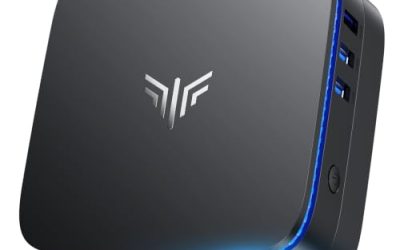
 cozoo Headphone Stand with Charger for DeskStandard4.17 x 3.94 x 10.4 inches0.9 poundsCheck on Amazon


Top 3 picks at a glance
Quick Picks
As an Amazon Associate we earn from qualifying purchases at no extra cost to you.

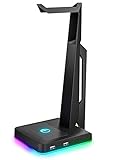
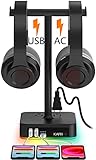


| Product | Best for | Key spec from the title |
|---|---|---|
| cozoo Headphone Stand with Charger | Charging many devices from one stand | 3 USB (1 USB-C) and 2 AC outlets |
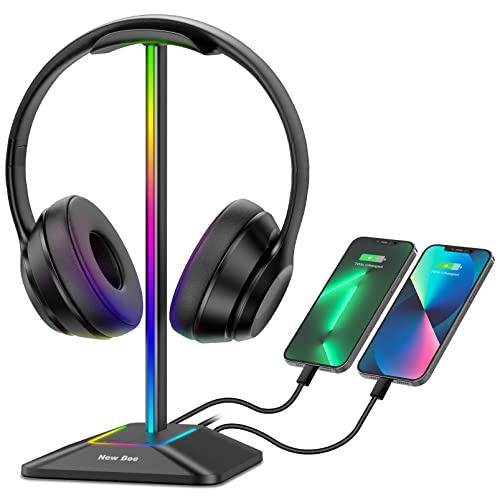
| New Bee RGB Headphone Stand | Aluminum build with USB-C | RGB lighting, USB-C and USB charging ports |
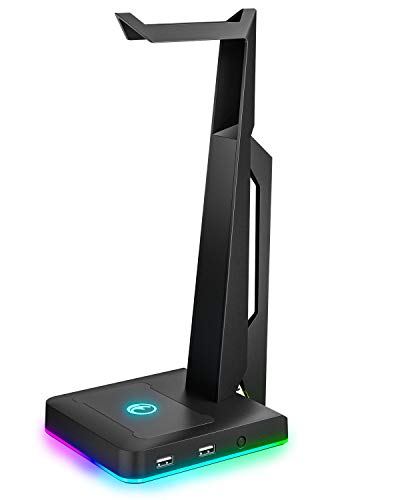
| IFYOO RGB Gaming Headset Stand | Console and PC desks | 2 USB ports, named for PC, Xbox One, PS4, Switch |
| KAFRI RGB Dual Headphone Stand | Two headsets at once | USB-C charger, 3 USB charging ports and 2 outlets |
| PHNIXGAM RGB Headphone Stand | Data ports plus a headset jack | 3.5mm AUX and 3-port USB 2.0 hub, white |
| Tilted Nation Gaming Headset Stand | Clean setups with cable control | Mouse bungee and USB hub |
How to Choose
Decide between data ports and charging-only ports
A hub that carries data lets a keyboard dongle, flash drive, or wireless headset receiver plug in near the keyboard, while a charging-only port simply tops up a phone or controller. Titles that mention a USB 2.0 hub signal modest data speed, fine for receivers and flash drives but slow for large file transfers. If the listing says only “charging ports”, assume no data connection unless the description states otherwise, and check that before relying on it for a headset receiver.
Look at the connector type and the upstream cable
The hub needs a cable to the computer, and the type matters. A stand with a USB-C data port is simpler on a laptop with USB-C only, while USB-A suits older towers. Check how long the cable is and whether it reaches a rear motherboard port from the desk. Several listings in this guide offer a mix of USB-C and USB-A downstream ports, which is handy when devices have different plugs. A short upstream cable that cannot reach a rear port from a desk edge is a common annoyance, so measure the distance from stand to computer before buying.
Check stability, size, and headset fit
Wide, non-slip bases keep heavy over-ear headsets from tipping, while narrow designs can wobble under a large pair of cans. A stand with a rubber base or an aluminum body tends to feel steadier than lightweight plastic. Measure the available desk depth, because lit stands with multiple ports can have a deeper footprint. Dual stands hold two headsets or a headset plus a controller hook. Weight distribution matters too, because a headset that hangs far off-center can pull a light stand forward over time.
Lighting, outlets, and where budget models cut corners
RGB lighting is cosmetic, so focus on the mode count only if the look matters. Built-in AC outlets are convenient, but they must stay within the rated load stated on the listing, so do not run heaters or other high-draw items through them. Budget models usually cut corners on port speed, cable quality, and the weight of the base, so a long feature list does not always mean a sturdy product. Ignore claims of faster charging unless the listing prints actual output. Set the stand where the cable reaches a free computer port without strain, and keep liquids away from any stand with outlets or exposed ports.
The 6 Best Options
cozoo Headphone Stand with Charger
This is the most outlet-heavy option in the lineup. The title states three USB ports, one of them USB-C, plus two AC outlets, in a black desk stand marketed as a gift for gamers. It fits a crowded desk where a lamp, a phone charger, and a controller dock all compete for power strip space, and where moving some of those plugs onto the stand would clear the cable tangle behind the monitor.
- Two AC outlets and three USB ports concentrate power near the headset parking spot.
- A USB-C port among the three suits newer phones and controllers.
- Trade-off: AC outlets must stay within the rated load on the listing, which limits what can be plugged in.
Skip it if the desk already has a surge-protected power strip within reach, or if a lit design is the priority.
New Bee RGB Headphone Stand
A sturdy-looking pick for people who like an aluminum finish. The title mentions RGB lighting, a sturdy aluminum gaming headset holder, USB-C and USB charging ports, and a stable desktop design. It suits a desk setup with a mix of USB-C and USB-A devices, where a phone and a controller need to charge while the headset hangs overhead. Buyers who care about how the desk looks, and who want a stand that feels more like furniture than a toy, will find the metal-forward description appealing.
- Aluminum construction, as described in the title, points to a steadier build than lightweight plastic.
- Mixed USB-C and USB ports cover newer and older cables.
- Trade-off: the title describes the ports as charging ports, so data use should be confirmed on the listing.
Skip it if a data hub is essential, since charging use is the clear selling point here.
IFYOO RGB Gaming Headset Stand with 2 USB Ports
The title ties this stand to PC, Xbox One, PS4, and Switch use, which suits console players who share a desk with a PC. It lists two USB ports and RGB lighting, and presents the stand as a headset hanger for gaming stations. It is a compact fit for someone who wants a modest port count rather than a big power block, such as a student with a PC in a dorm and a console under the TV who moves the same headset between them.
- Two USB ports are enough for a controller cable and a dongle.
- Named console compatibility signals it is aimed at living-room and desk setups.
- Trade-off: only two ports, so heavy peripheral users will run out of sockets quickly.
Skip it if several devices need charging at once, or if a mixed USB-C and USB-A layout matters for newer phones.
KAFRI RGB Dual Headphone Stand
One of the few that holds two headsets. The title says dual, with a USB-C charger, three USB charging ports, and two outlets, and it adds that it suits gamers. It makes sense for a shared desk, a couple who stream together, or someone who keeps a gaming headset and a work headset side by side, with enough ports left over to charge a phone and a controller.
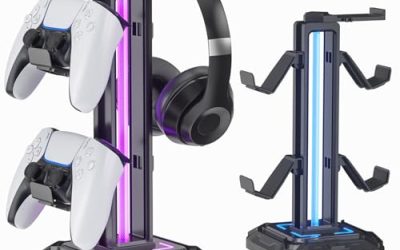
- The dual design is meant for two headsets, or a headset plus a controller, on one desk.
- A big mix of ports and outlets covers multiple devices at once.
- Trade-off: the larger footprint needs more desk space, and the outlets still follow the rated load on the listing.
Skip it if desk depth is short or only one headset needs a home.
PHNIXGAM RGB Headphone Stand with 3.5mm AUX and USB 2.0 Hub
A white stand that pairs a three-port USB 2.0 hub with a 3.5mm AUX connection. The title lists both, which makes it appealing to anyone who wants a headphone jack within reach and a few data ports for a dongle, a keyboard, or a flash drive. It fits light-colored setups where a black stand would stand out, and it works for someone who wants a wired headset plug within reach without crawling behind the tower.
- A true USB 2.0 hub supports receivers, mice, and flash drives.
- The 3.5mm AUX adds an audio connection near the headset.
- Trade-off: USB 2.0 speeds are slow for big file transfers.
Skip it if fast external storage will be plugged into the stand, or if USB-C connections are needed on the stand itself.
Tilted Nation Gaming Headset Stand with Mouse Bungee
This one builds cable management into the stand. The title lists an RGB design with a mouse bungee and a USB hub, and describes the result as a cool and clean setup. It suits competitive players who dislike a dragging mouse cable and want the headset hung within easy reach, and anyone who keeps a wired mouse and enjoys a minimalist desk free of loose cords.
- A mouse bungee keeps the cable from snagging during fast movements.
- A built-in USB hub frees up ports on the PC itself.
- Trade-off: the title does not specify port counts, so confirm how many ports are provided.
Skip it if the mouse is wireless and no cable help is needed, or if a known number of charging ports is a requirement.
Which One Fits Your Situation
Crowded desk with too few sockets
The cozoo adds both AC outlets and USB ports in one base, which cuts the number of plugs behind the monitor.
Two people sharing one desk
The KAFRI dual stand gives each user a hook and a charging port. Confirm the desk can fit the wider footprint.
Wired mouse player who wants a tidy layout
The Tilted Nation stand combines the bungee, the hub, and the headset hook for a streamlined setup.
Light-colored or minimal setup
The PHNIXGAM in white matches pale desks, and its USB 2.0 hub and AUX jack serve simple needs.
Common Mistakes
- Assuming every USB port on a stand carries data when the listing says charging only.
- Plugging high-draw devices into built-in AC outlets beyond the rated load.
- Skipping a measurement of desk depth and bumping the stand against the monitor.
- Buying for lighting modes alone and ignoring base weight and stability.
- Forgetting the stand’s upstream cable needs a free port on the computer.
Related guides
- What Is The Best Budget Most Responsive Gaming Mouse Wired
- Low Latency Gaming Headphones Usb-C 2.4 Ghz Wireless
- Mechanical Gaming Keyboards Competitive Pc Gaming
Frequently Asked Questions
Do headphone stands with USB hubs need their own power?
Data hubs draw power from the computer connection, while models with AC outlets plug into the wall. Check the listing to see which approach each stand uses.
Can a stand hold a large gaming headset?
Wide, weighted bases generally hold large headsets more steadily. Check the listing for stated dimensions and base materials.
Is USB 2.0 enough for a headset receiver?
Yes, receivers and keyboards use very little bandwidth. It is not suited to moving large files quickly, so plug fast storage directly into the computer instead.
Does RGB lighting affect headset use?
The lighting is purely cosmetic. Many stands offer several modes and a way to turn the lights off.
Related guides
More from Amazon
Programs that pair well with the guide above. Offers and eligibility are set by Amazon and may change.
Free shipping on eligible items, Prime Video and more. Eligible new members can start with a free trial.
Start a Prime free trialAd-free music streaming. Eligible new subscribers can start with a free trial.
Try Music Unlimited freeA Prime membership for ages 18-24 with a trial period. Eligibility is set by Amazon.
See Prime for Young AdultsAudiobooks and podcasts to listen to on the go. Eligible new members can start with a free trial.
Try Audible freeAs an Amazon Associate we earn from qualifying purchases.