
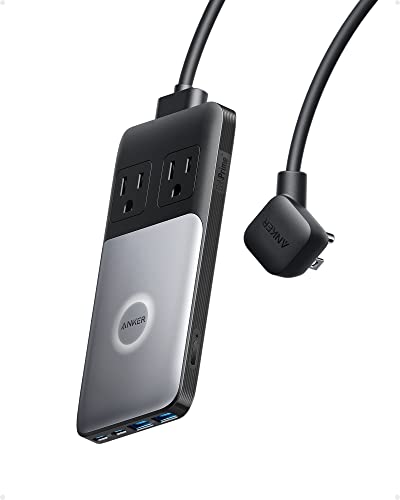
Between a phone, tablet, earbuds case, a smartwatch, and maybe a controller, a modern desk is a graveyard of charging cables. A dedicated desk charging station consolidates all of it into one hub with the right ports and wattage, so every device tops up in its own slot instead of fighting over a single charger. Here is how to pick one that charges everything at full speed without a rat’s nest. Our top pick, the Anker 727 Charging Station, pairs 100W of shared USB output with two AC outlets in a slim desktop strip.
Our Top Picks


Top 3 picks at a glance
Wired station vs charging dock
Multi-port wall-brick stations
A desktop charging station with several USB-A and USB-C ports and its own power supply lets each device use its own cable at proper speed. The key spec is total wattage and per-port output, because a cheap 30W hub cannot fast-charge a phone and a tablet at once.
As an Amazon Associate we earn from qualifying purchases at no extra cost to you.


Cradle and stand docks
A dock adds slots or stands that hold devices upright while they charge, which keeps the desk tidy and your phone visible for notifications. Many combine wired cradles with a wireless pad for the phone and earbuds.
More desk charging stations worth considering
The picks above lean toward compact multi-port desktop chargers and docks. If you want more wattage per port, a station that also charges a laptop, a cleaner wired-plus-wireless combo, or a dock that keeps a whole family’s devices in one place, these six add the depth the main list is missing. Each entry explains who it suits and how it differs from the existing picks.
Anker Prime Charging Station (200W, 6 Ports)

Who it’s for: anyone whose desk includes a laptop alongside the phone, tablet, and earbuds, and who wants every device to fast-charge at the same time without hunting for the “fast” port.
Key specs: four USB-C ports and two USB-A ports share up to 200W. Any single USB-C port delivers up to 100W, and two USB-C ports can each deliver 100W at once. With all four USB-C ports in use, Anker lists roughly 65W, 65W, 45W, and 25W; with all six ports busy the split is about 65W, 45W, 45W, 20W, 12W, and 12W. The USB-A ports top out at 22.5W. The body is about 4.4 x 3.0 x 1.4 inches and weighs around 1.2 lbs, and Anker’s ActiveShield temperature monitoring is built in.
Strengths: this is the answer to the “Avoiding slow-charge traps” section below. Even with six devices connected, the main USB-C port still gets 65W, enough for a laptop, while a tablet and phone each keep 45W, well above what they need to fast-charge. The compact, heavy body stays put on the desk, and the ports face forward for easy reach.
Drawbacks: it sits in the mid-to-upper price tier, which is overkill if you only charge a phone and earbuds. It has no wireless pad and no AC outlets. To get the full 100W you need a 100W-rated (e-marked) USB-C cable.
Setup tip: reserve the top USB-C port for the laptop or tablet with an e-marked 100W cable, and run short cables from the remaining ports to a phone stand and earbuds tray. Because the ports face one way, place it at the back corner with the ports toward you so cables do not cross the desk.
How it compares: it is the step up from the Anker 112W 6-port desktop charger in the main list, roughly doubling total output so a laptop can join the party. Compared with the Lcssio 300W station, it has fewer ports but much stronger per-port output on USB-C, which matters more for modern devices.
UGREEN Nexode 65W GaN Charging Station with Qi2 Stand

Who it’s for: people who want the hybrid setup recommended in the FAQ, a magnetic wireless stand for the phone plus wired ports for everything else, in one compact unit.
Key specs: a Qi2-certified 15W magnetic wireless stand plus two USB-C ports and one USB-A port, for four devices at once. A single USB-C port can deliver up to 65W when used alone, enough for a thin laptop. The wireless pad folds up to about 65 degrees and rotates 360 degrees, so the phone can sit in portrait or landscape, and it supports iPhone StandBy mode. The unit measures roughly 2.4 x 2.4 x 3.6 inches.
Strengths: it replaces a separate MagSafe-style stand and a multi-port brick with one object and one power cord. Qi2 magnets snap the phone into the correct position, avoiding the misaligned-coil slowdowns of older flat pads. It works with recent iPhones and Qi2-capable Android phones.
Drawbacks: 65W is a shared budget, so charging a laptop, tablet, and phone together will slow the wired ports. Three wired ports may not be enough for a busy gaming desk with controllers and a headset. The wireless side is 15W Qi2 rather than the newer 25W Qi2.2 standard.
Setup tip: put it where you can see the screen while gaming or working, so the phone doubles as a second display for chat or StandBy clock. Use the 65W USB-C port for the tablet or laptop and the USB-A port for a controller or earbuds case.
How it compares: it is a more powerful, better-integrated alternative to the 3-in-1 MagSafe stand in the main list, adding real wired ports. If you need more wired wattage, pair a wireless stand with the Anker Prime instead.
UGREEN 100W 6-Port GaN Desktop Charger

Who it’s for: value seekers who want modern USB-C fast charging for a phone, tablet, earbuds, and a thin laptop without paying premium prices.
Key specs: four USB-C and two USB-A ports share 100W. USB-C1 and USB-C2 are rated up to 65W, USB-C3 and USB-C4 up to 35W, and each USB-A port up to 22.5W. The fast ports support PD, PPS (including 45W Samsung Super Fast Charging 2.0), and QC. It stands vertically to save desk space and includes an AC extension cord so the outlet can be out of sight.
Strengths: clearly labeled port tiers make it easy to plug the tablet into a 65W port and earbuds into a slower one. PPS support matters for Samsung Galaxy owners, whose phones only reach top speed on PPS chargers. The vertical tower layout takes up little desk depth.
Drawbacks: 100W total is fine for mobile devices but tight once a laptop is involved. Smart power distribution means the 65W figure drops when several devices draw at once. There is no wireless pad and no cradle, so devices lie flat on the desk unless you add a stand.
Setup tip: use the included extension cord to hide the wall plug behind the desk, then stand the charger upright beside the monitor. Keep the tablet on C1 or C2, the phone on the other fast port, and earbuds, mouse, or controller on the slower ports.
How it compares: it overlaps with the Anker 112W and the 6-port GaN brick in the main list, but its four USB-C ports suit an all-USB-C household better than chargers heavy on USB-A. It costs noticeably less than the Anker Prime while covering most non-laptop desks.
Anker Nano Charging Station (7-in-1, 100W)

Who it’s for: desks where cable clutter is the main enemy and you also need a couple of AC outlets for a lamp, monitor, or console.
Key specs: three AC outlets on the back, two built-in retractable USB-C cables that extend about 2.3 feet, one extra USB-C port rated up to 100W when used alone, and one USB-A port at up to 12W. Total USB output is 100W, shared when several devices are connected. Surge protection is listed at 300 joules, and a small display shows charging status for the USB side.
Strengths: the retractable cables are the tidiest solution in this guide: pull a cable out to charge the phone or controller, and it snaps back when done, so there are no loose leads on the desk. The AC outlets let one unit replace a small power strip. The display makes it easy to spot a device that is trickle-charging.
Drawbacks: the 300J surge rating is modest, so do not rely on it to protect expensive gaming hardware. The USB-A port is slow. The retractable cables reach about 2.3 feet, which limits where devices can sit.
Setup tip: use the included adhesive pad so the unit does not slide when you pull a retractable cable. Plug the monitor or lamp into the rear outlets and keep the retractable cables for the two devices you charge most often during the day.
How it compares: it is the closest rival to the Anker 727 at the top of the main list. Both pair 100W of USB output with AC outlets, but the Nano adds a third outlet, retractable cables, and a status display, while the 727 is slimmer and lets you choose your own cable lengths.
Belkin UltraCharge Pro 3-in-1 (Qi2.2, 25W)
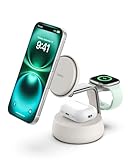
Who it’s for: iPhone, Apple Watch, and AirPods owners who want the fastest wireless charging currently available on a desk, without any visible cables to the devices.
Key specs: a Qi2.2 magnetic pad that charges a compatible iPhone at up to 25W, an MFi-certified Apple Watch fast-charging puck, and a 5W AirPods spot. It tilts for portrait or landscape viewing, has a weighted base for one-handed removal, and uses Belkin’s ChillBoost cooling fan, which can be switched off. A 45W power adapter and USB-C cable come in the box, and Belkin lists a 2-year warranty.
Strengths: 25W Qi2.2 closes most of the speed gap between wireless and wired charging for iPhone. Active cooling addresses the heat concern raised in “Heat and battery health” below. Everything an Apple user carries daily charges in one spot with one plug.
Drawbacks: it sits in the premium tier, it charges only three devices, and it has no USB ports for a tablet or controller. Full 25W speed needs a Qi2.2-capable phone; older iPhones charge at lower rates. The fan, while quiet, is one more moving part.
Setup tip: place it within arm’s reach so the phone can be lifted one-handed, and use landscape mode for watching video or StandBy. If you hear the fan in a quiet room, switch cooling off for overnight charging, when speed matters less.
How it compares: it is a major speed upgrade over the budget 3-in-1 MagSafe stand in the main list. Pair it with a compact multi-port charger like the UGREEN 100W for the tablet and controllers, and you have the ideal hybrid desk.
Zobirez 420W 10-Port Charging Station

Who it’s for: families, shared gaming rooms, and anyone charging many devices overnight, such as several phones, tablets, controllers, and a handheld console.
Key specs: ten ports with a 420W total rating. Zobirez lists two 65W USB-C ports for laptops, three 45W ports, and five 30W ports, along with fixed dividers that create upright slots, including two wider and taller slots for tablets or small laptops in cases. Short mixed charging cables are included, and the maker lists a 2-year warranty.
Strengths: it is the most port-rich option here, and the upright slots keep a crowd of devices organized instead of piled on top of each other. Every port is at least 30W, so even phones on the slower ports still fast-charge.
Drawbacks: its footprint is far larger than a GaN brick, so it suits a side table or shelf more than a cramped gaming desk. As with every multi-port hub, the total is shared, so do not expect every port at full output at once. It is a lesser-known brand compared with Anker, UGREEN, or Belkin.
Setup tip: label which slot belongs to whom in a shared home, and keep the laptop-rated USB-C ports for tablets or laptops. Set it on a shelf or side table rather than the main gaming desk so it does not eat into mouse space.
How it compares: it competes with the Lcssio 300W 8-port station and the Unitek 10-port dock in the main list. The Unitek has a lower 96W total and focuses its power on two 65W USB-C PD ports, while the Zobirez offers a much higher total rating, at least 30W on every port, and slots wide enough for tablets in cases.
Quick comparison of the additional stations
Price tiers are approximate and shift with sales, so use them to compare classes of product rather than as exact figures.
| Station | Ports | Total output | Wireless | Best for | Price tier |
|---|---|---|---|---|---|
| Anker Prime 200W | 4 USB-C, 2 USB-A | 200W | No | Laptop plus mobile devices | Mid-range |
| UGREEN Nexode 65W + Qi2 | 2 USB-C, 1 USB-A + stand | 65W wired, 15W wireless | Qi2 15W | Compact hybrid setup | Mid-range |
| UGREEN 100W 6-Port | 4 USB-C, 2 USB-A | 100W | No | Value multi-device charging | Budget |
| Anker Nano 7-in-1 | 2 retractable USB-C, 1 USB-C, 1 USB-A, 3 AC | 100W USB | No | Cable-free desks needing outlets | Mid-range |
| Belkin UltraCharge Pro 3-in-1 | Phone, watch, earbuds pads | 25W phone | Qi2.2 25W | Fastest wireless for Apple users | Premium |
| Zobirez 420W | 10 ports with slots | 420W | No | Families and shared rooms | Mid-range |
How to choose: a quick checklist
Before comparing models, run through these questions. They narrow a crowded category to two or three candidates.
- List every device and its connector. Count USB-C, USB-A, Lightning, and proprietary watch chargers. A station with the wrong port mix forces you into adapters.
- Add up simultaneous draw. Use the power planning table: phone, tablet, earbuds, watch, and controllers usually total 50-80W; add 45-100W for a laptop.
- Check the per-port numbers with everything plugged in. Manufacturers publish charging guides showing how power splits across ports. The best stations still give 30W or more to your two main devices under full load.
- Decide wired, wireless, or hybrid. Wireless is convenient for phones, earbuds, and watches; wired is faster and handles tablets, laptops, and controllers.
- Measure your space. GaN bricks are palm-sized; slotted docks and power towers can take as much room as a hardcover book. Gaming desks rarely have room to spare near the mouse.
- Consider AC outlets. If you also need to plug in a lamp or monitor, a station with outlets saves a separate strip, but check its surge rating.
- Check safety listings and warranty. A recognized safety certification and at least a 1-2 year warranty are reasonable minimums.
Cables: the overlooked half of the setup
A fast station paired with the wrong cables will disappoint. Standard USB-C to USB-C cables carry up to 60W; anything above that, such as a 65W or 100W laptop port, needs a cable with an e-marker chip rated for 100W or 240W. Lightning cables for older iPhones top out at around 20W through a USB-C adapter or cable, and USB-A to USB-C cables do not support USB PD at all, so a phone charged that way will never reach its fastest speed.
Keep cable length short at the desk, around 1-3 feet, to reduce clutter and avoid tangles. Braided cables survive daily plugging better, and right-angle connectors help devices sit neatly in a stand. Label or color-code cables by device so they do not migrate between ports, and retire any cable with exposed wires, loose connectors, or intermittent charging.
Power planning
| Device | Fast-charge draw | Port needed |
|---|---|---|
| Phone | 18-30W | USB-C PD 20W+ |
| Tablet | 20-45W | USB-C PD 30W+ |
| Earbuds case | 3-5W | Any USB / Qi pad |
| Smartwatch | 3-10W | Proprietary / Qi |
| Controller | 5-10W | USB-A / USB-C |
Add up the simultaneous draw. A phone plus a tablet plus earbuds can want 50-70W together, so a station rated 65-100W with intelligent power sharing keeps everything charging quickly instead of crawling.
Charging standards explained
Port labels on charging stations are full of acronyms, and the right one decides whether a device fast-charges or crawls. Here is what each one means for the devices on a typical desk.
USB-C Power Delivery (PD)
USB Power Delivery is the universal fast-charging standard for iPhones, iPads, most Android phones, Nintendo Switch consoles, handheld gaming PCs, and laptops. A PD charger and device negotiate a voltage and current, so a 100W port safely charges earbuds at 5W and a laptop at its full rate. When a listing says “PD 30W” or “PD 65W,” that is the most a single port will deliver. For anything bigger than a phone, look for at least 30W on the port you plan to use.
PPS (Programmable Power Supply)
PPS is part of the USB PD specification that lets the charger adjust voltage in fine steps. Samsung’s Super Fast Charging relies on it, so a Galaxy phone on a non-PPS charger falls back to a slower rate. If you own a recent Galaxy phone or tablet, check that at least one port lists PPS.
Quick Charge and USB-A
Qualcomm Quick Charge (QC) and similar USB-A fast-charge modes are mostly legacy now. USB-A ports are still useful for earbuds, wireless mice, controllers, and smartwatch chargers that came with USB-A cables, but they rarely exceed 12-22.5W. A station with mostly USB-A ports is a poor fit for a modern phone and tablet.
Qi, Qi2, and Qi2.2 wireless
Standard Qi pads typically charge at 5-15W, and speed depends on lining the phone up with the coil. Qi2 adds magnets (based on Apple’s MagSafe) so the phone snaps into the correct position every time, with up to 15W. Qi2.2, newer still, raises the ceiling to 25W on compatible phones. Earbuds cases and many watches charge at only a few watts wirelessly no matter which standard the pad supports.
GaN
GaN (gallium nitride) refers to the chips inside the charger, not a charging standard. GaN chargers are smaller and run cooler than older silicon designs at the same wattage, which is why a 200W GaN desktop station can fit in your palm. For a desk station, GaN is a strong plus but not a requirement.
Features that keep it tidy
Wireless plus wired
A station with a Qi pad for the phone and earbuds, plus wired ports for the tablet and controller, hits the sweet spot: drop-to-charge convenience where it helps and full-speed cables where you need power. Look for Qi2 or 15W wireless if fast pad charging matters.
Cable management and footprint
The best stations route cables out the back through a channel and stay compact, around the size of a paperback, so they claim a back corner rather than sprawling. Silicone slots or a weighted base stop the dock from sliding when you lift a device.
Sample setups for common desks
Matching the station to the devices you actually own is easier with a few worked examples. Add up the draw for your own gear using the power planning table above.
Phone, earbuds, and smartwatch only
A 3-in-1 wireless station covers everything. If you use an iPhone, a Qi2 or Qi2.2 stand avoids alignment problems and keeps the phone upright for notifications. Budget: low to mid tier. No multi-port hub needed unless you add a tablet later.
Phone, tablet, earbuds, and controllers
This is the typical gaming-desk mix. Plan for roughly 60-80W of simultaneous draw: 20-30W for the phone, 30-45W for the tablet, and 5-10W each for earbuds and a controller. A 100W multi-port charger with two strong USB-C ports, or a hybrid station with a wireless pad for the phone, handles it comfortably.
All of the above plus a laptop
Laptops change the math. Most thin laptops want 45-65W and larger performance models 100W or more. Choose a station rated around 200W with at least one 100W USB-C port, and check that the laptop port still gets 65W or more when every other port is busy. Gaming laptops that ship with large barrel-plug power bricks usually still need their own charger.
Handheld gaming PCs and consoles
Handheld PCs charge over USB-C PD and typically want 45-65W or more for full speed while playing. A Nintendo Switch is happy on a 45W-capable PD port. Plug these into the station’s highest-rated USB-C port, not a 20W phone port, or the battery may drain while you play even though it is plugged in.
A family or shared room
When several people drop devices off overnight, port count and slots matter more than peak speed. A 10-port station with dividers keeps phones and tablets organized, and overnight charging means 30W per port is plenty.
Placement tips for a cleaner desk
Where the station sits matters almost as much as which one you buy. A few habits keep it useful without taking over the desk.
- Back corner, ports facing you. Putting the station in a rear corner keeps it out of your mouse and keyboard space, and forward-facing ports mean you do not reach behind the monitor every time.
- Route the power cord first. Run the station’s power lead down a desk leg or through a grommet before arranging device cables. Adhesive cable clips along the back edge stop cords from sliding off.
- Dedicate cables to positions. Leave each cable plugged into the station and resting in a clip at the desk edge. Devices come to the cable rather than the cable wandering around the desk.
- Keep wireless pads clear. Metal objects such as keys, coins, or cards on a wireless pad can heat up and interrupt charging. Give the pad its own spot away from clutter.
- Allow airflow. Avoid placing stations under monitor stands, inside closed drawers, or against PC exhaust vents. Heat slows charging and shortens battery life.
- Consider an under-desk option. Clamp-on power strips or a station mounted on a shelf under the desk keep the surface clear, with a couple of short cables brought up to a phone stand.
Charging station, USB hub, or monitor dock?
These three get confused often. A charging station is designed purely to power devices, with strong per-port wattage and its own power supply. A USB hub connected to your PC mainly adds data ports; unpowered hubs provide very little charging power, and even powered hubs often give modest wattage per port. A monitor with USB-C or a laptop docking station can charge a laptop and pass through a few accessory ports, but usually offers only low-power USB-A for phones. For a desk where phones, tablets, earbuds, and controllers all need regular top-ups, a dedicated charging station is still the most reliable option, and it keeps working even when your PC is off.
FAQ
How many watts does a desk charging station need?
If you want a phone, tablet, and earbuds to fast-charge together, aim for 65-100W total with at least one 30W+ USB-C PD port. Lower-wattage stations and wireless stands still charge everything, just more slowly when several devices share power; the higher total lets the station fast-charge your two biggest devices simultaneously.
Should I get a wireless or wired charging station?
A hybrid is usually best. Use the wireless pad for the phone and earbuds where dropping them down is convenient, and wired PD ports for the tablet and controller that need higher wattage. Pure wireless is tidy but slower and cannot power everything on a busy desk.
Is it safe to leave devices on a charging station overnight?
Yes, with a reputable station. Phones, tablets, and earbuds manage their own charging and stop drawing power when full, and many phones offer optimized or limited charging to reduce time spent at 100%. Pick a station with listed over-current, over-voltage, and temperature protection, and keep it in an open spot rather than buried under papers.
Can a desk charging station charge a laptop?
Many can, if they have a USB-C PD port rated for your laptop’s needs, typically 45-65W for thin laptops and 100W for larger ones. Check the per-port figure when other devices are connected, not just the headline number, and use a cable rated for the wattage. Laptops that use proprietary barrel connectors cannot charge from a USB station.
Why does my phone charge slower on the station than on its own charger?
Usually one of three reasons: the port is a lower-rated port, the station is sharing power because several devices are connected, or the cable cannot carry high current. Samsung phones also need a PPS-capable port for their fastest mode. Move the phone to the station’s top USB-C port with a quality cable and compare.
Do I need surge protection on a charging station?
If the station has AC outlets feeding a monitor, console, or PC, a proper surge protector upstream is a good idea. USB-only stations draw little power and have internal protections, but plugging them into a surge-protected strip still adds a layer of safety during storms or power fluctuations.
Will a charging station work with a controller or gaming headset?
Yes. Most wireless controllers and headsets charge at 5-10W over USB-C or USB-A, so any port will do. Keep the original cable if the controller uses an unusual connector, and use the slower ports for these devices so the fast ports stay free for the phone and tablet.
Avoiding slow-charge traps
The most common disappointment is a station whose total wattage is shared poorly, so plugging in a second device throttles the first. Read the fine print: a hub advertised at 100W might deliver that only on one port, dropping to 18W each when several are in use. If you routinely charge a phone and tablet together, you want a station that still pushes 30W or more to each under load, not a headline number it only hits with one device connected.
Cable quality matters as much as the station. A fast USB-C PD port paired with a thin charge-only cable that cannot carry the current will trickle-charge a tablet no matter how good the hub is. Use cables rated for the wattage you expect, and keep a short high-quality USB-C cable on the station’s fastest port for whatever device needs the quickest top-up.
Heat and battery health
Charging several devices in one spot generates heat, and heat is hard on batteries. Give the station a little breathing room rather than boxing it in, and favor one that stops or slows charging when a device is full. For devices that live on the dock overnight, a slower, cooler charge is gentler on their long-term battery health than blasting them at maximum wattage.
Safety checks before you buy
A desk charging station sits beside expensive devices for years, often powered on all the time, so a few minutes of checking pays off.
- Look for a safety listing. UL, ETL, or equivalent certification means the design was evaluated by an independent lab. It is the simplest filter for avoiding poorly made no-name chargers.
- Check the protections. Over-current, over-voltage, short-circuit, and temperature protection should be listed. Premium GaN chargers often add active temperature monitoring.
- Read the surge rating on power-strip stations. Joule ratings in the low hundreds are basic. If the station will power a monitor or console, put a stronger surge protector upstream.
- Mind the AC load. Power towers with many outlets are not meant for space heaters or other high-draw appliances. Keep them to electronics.
- Replace damaged cables. Frayed or bent cables are a bigger fire and failure risk than the station itself.
Which charging station should you buy?
- Phone and earbuds only: a 3-in-1 wireless stand, or the Belkin UltraCharge Pro if you want the fastest wireless speeds for an iPhone.
- Phone, tablet, earbuds, controllers: the UGREEN 100W 6-port charger for value, or the UGREEN 65W Qi2 station for a hybrid wired-plus-wireless setup.
- Add a laptop: the Anker Prime 200W, which keeps a laptop-class port even with every port in use.
- Need outlets and zero cable clutter: the Anker Nano 7-in-1 with retractable cables.
- Whole household: a slotted multi-port dock like the Zobirez 420W on a shelf or side table.
Common mistakes to avoid
- Buying on port count alone. Ten ports at 12W each charge ten devices slowly. Two or three strong USB-C ports serve a modern desk better than a wall of USB-A.
- Trusting the headline wattage. A “100W” label often describes one port on its own. Look for the multi-port charging chart before buying.
- Ignoring the phone’s own standard. Galaxy phones want PPS, recent iPhones want USB-C PD or Qi2, and older phones may only manage 10-18W anyway. Match the station to the phone you own.
- Stacking adapters. Chaining a USB-A to USB-C adapter onto a fast port disables USB PD negotiation. Use the right native cable instead.
- Using thick cases on wireless pads. Cases thicker than a few millimeters, or ones without built-in magnets, can slow or block wireless charging. Choose MagSafe or Qi2-compatible cases.
- Forgetting future devices. If a laptop or handheld PC is likely in the next year or two, buying slightly more wattage now avoids replacing the station later.
Bottom line
Our top pick, the Anker 727 Charging Station, is the easy all-in-one choice: 100W of shared USB output, a USB-C port that can fast-charge a laptop when used on its own, and two AC outlets for a lamp or monitor. If you do not need outlets, pick another station rated 65-100W total with a 30W+ USB-C PD port, such as the Belkin 108W desktop station or the Anker 112W desktop charger, add a Qi pad if you want drop-to-charge for the phone and earbuds, and choose one with rear cable routing and a compact, grippy base. Plan for your devices’ combined wattage, and the whole cable graveyard collapses into one neat hub in the corner of your desk.









