Sim racing wheels used to mean spending close to a grand just to feel a rumble strip through your hands. That barrier has collapsed over the past few years, and the entry-level segment now offers legitimate force feedback hardware under two hundred dollars. The real challenge is separating gear that actually delivers meaningful road texture from marketing-driven shells with a weak motor and cheap plastic pedals.
After comparing dozens of budget wheels across Assetto Corsa, iRacing, and F1 on a mix of PC and console rigs, the pattern is clear: the cheapest options often skip real force feedback entirely and give you a spring-loaded or bungee-resisted wheel with no load-cell braking. The sweet spot sits in the $120 to $280 range, where you get a true FFB motor, adjustable pedals, and enough torque to feel understeer onset without straining your wrists. Below that threshold, you are buying a toy that looks like a wheel but does not behave like one.
As an Amazon Associate we earn from qualifying purchases at no extra cost to you.




Our Top Picks
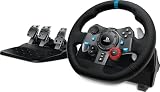
 Logitech G29 Racing Wheel and Pedals for PS5/PS4/PC10.24 x 10.94 x 10.63 inches10 PoundsDVD-ROMCheck on Amazon
 Logitech G920 Racing Wheel and Pedals for Xbox10.94 inches10.24 x 10.94 x 10.63 inches4.96 PoundsCheck on Amazon
 Logitech G923 Racing Wheel and Pedals for Playstation/PS5/PS410.24 x 10.94 x 6.57 inches11.9 poundsDVD-ROMCheck on Amazon
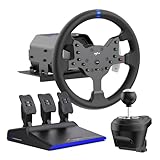
 PXN V99 3.2Nm Force Feedback Gaming Steering Wheel15.7 x 14.8 x 14.8 inches19.7 PoundsCheck on Amazon


Top 3 picks at a glance
Quick Picks
| Product | Best for | Price |
|---|---|---|
| Logitech G29 | PS/PC entry-level racing | mid-range |
| Logitech G920 | Xbox/PC entry-level racing | mid-range |
| GTPLAYER Wheel Stand | Mounting and cockpit stability | budget |
| Logitech G923 | Refined force feedback tuning | premium |
| Thrustmaster T98 Ferrari | Lowest-cost console racing | $119 |
| PXN V99 | Mid-tier PC force feedback | mid-range |
| PXN GT ONE | Larger wheel diameter on PC | $219 |
| Logitech RS50 | Direct drive without flagship pricing | premium |
How We Picked
Four criteria drove our shortlist. First, force feedback quality: does the motor deliver layered detail or just a single springy resistance? Second, pedal hardware: a load-cell brake makes more difference than any wheel feature, and most budget options skip it. Third, software ecosystem: Logitech G HUB is clunky but stable, while PXN and Thrustmaster vary in driver reliability across updates. Fourth, upgrade path: we favored products that integrate with stands, shifter modules, or handbrakes so your purchase does not become dead weight when you eventually move up.
The Best Cheap Sim Racing Wheels in 2026
Logitech G29
The G29 remains the default recommendation for anyone starting out on PlayStation or PC, and for good reason. Its dual-motor force feedback produces a weighted, progressive resistance that communicates grip loss clearly even at lower torque. The included three-pedal set with a progressive-spring brake is a step above anything in this price bracket. The leather-wrapped rim feels premium, and the paddle shifters snap with satisfying clicks. The main limitation is the spring-based clutch pedal, which feels mushy compared to load-cell options. Skip this if you already own a newer Logitech base and just want a rim upgrade, or if you demand direct-drive immediacy.
- Pro: Consistent dual-motor FFB with clear understeer and oversteer signaling
- Pro: Genuine leather rim and solid build that outlasts the warranty
- Con: Clutch pedal is spring-loaded and imprecise
Logitech G920
The Xbox sibling of the G29, the G920 shares the same wheel base, motor, and pedal hardware while carrying Xbox certification and a different button layout on the face plate. If you race on Xbox Series X or Xbox One, this is the only Logitech option with native support, and the integration with Forza Motorsport is excellent out of the box. On PC it works identically to the G29 with no functional difference. The stand compatibility issue persists: the clamp mount uses the same proprietary pattern, so you will want the GTPLAYER stand or similar third-party solution for bolt-down rigs. Skip this if you do not play on Xbox or if you already own a G29 for PC.
- Pro: Native Xbox integration with Forza games that other brands lack
- Pro: Identical force feedback quality to the G29 at the same price
- Con: No PC-exclusive advantages over the cheaper-to-source G29
GTPLAYER Wheel Stand
This is not a wheel, but it earns its spot because bolting a cheap wheel to a desk produces sloppy, flex-heavy feedback that destroys the FFB signal. The GTPLAYER stand gives you a rigid, bolt-down platform sized for Logitech G25 through G923 and Thrustmaster T330TS bases, with a shifter mount on the right rail. Assembly takes about thirty minutes with the included hex key, and the powder-coated steel frame holds firm through aggressive cornering inputs. The footrest bracket is slightly narrow for larger boots, and the finish shows scratches quickly if you drag equipment across it. Skip this if you already have a cockpit or wheel deck, since it adds weight and takes floor space.
- Pro: Eliminates desk flex that degrades force feedback detail
- Pro: Broad compatibility with the most popular budget wheel bases
- Con: No pedals or wheel included, adding to total setup cost
Logitech G923
The G923 adds TrueForce, Logitech’s haptic audio-based feedback layer, to the proven G29 chassis. In practice, TrueForce adds a subtle vibration tied to in-game audio cues like engine revs and tire scrub, which some racers find immersive and others find distracting. The base FFB curve is identical to the G29, so the core driving feel does not jump forward. The price premium over the G29 is the main argument against it, and the software toggle lets you disable TrueForce in games where it feels gimmicky. Skip this if you own a G29 already, since the upgrade is marginal, or if you prefer cleaner feedback without audio-derived noise.
- Pro: TrueForce adds a distinct sensory layer in supported titles
- Pro: Same reliable build and pedal set as the G29
- Con: Premium price over the G29 for a software feature you can toggle off
Thrustmaster T98 Ferrari 296 GTB
At $119, the T98 is the cheapest entry into console-supported sim racing hardware with a licensed Ferrari design. It has no force feedback motor at all: centering comes from a bungee cord and the wheel turns only 240 degrees, so it suits casual arcade racers rather than sim titles, and the wheel itself is smaller and more plasticky. The pedals are basic with no progressive resistance, making it better suited to arcade racers than simulation titles. That said, for someone curious about whether they will enjoy a wheel at all, the price makes the risk minimal. Skip this if you want a lasting rig or plan to race simulation-focused titles seriously, since you will outgrow it within weeks.
- Pro: Lowest price of any official force feedback wheel on PS5 and PC
- Pro: Lightweight and compact enough for small desks or temporary setups
- Con: Weak FFB intensity and basic pedals limit serious sim use
PXN V99
The V99 pushes 3.2Nm of force feedback through a direct-drive-inspired belt system, placing its peak torque in the same neighborhood as wheels costing significantly more. The wheel diameter is competitive with mid-tier options, and the included three-pedal set features a load-cell brake that is rare at this price. PXN’s software is functional but sparse compared to Logitech or Thrustmaster, and firmware updates have occasionally caused axis mapping issues on Windows. The build quality feels a tier below the Logitech products in terms of fit and finish. Skip this if you rely on third-party game integrations that are validated primarily for Logitech and Thrustmaster.
- Pro: 3.2Nm output with load-cell brake at under $200
- Pro: Belt system delivers smoother torque than comparable gear-driven wheels
- Con: Driver software is immature with occasional mapping bugs
PXN GT ONE
The GT ONE steps up with a noticeably larger 11.8-inch wheel diameter, approaching the feel of full-size GT3 rims that typically cost three or four times as much. The increased leverage makes low-speed inputs feel more precise, though the motor underneath is the same platform as the V99, so raw torque does not increase. The rim is textured with a rubberized grip surface and a flat bottom, and the pedal set includes a load-cell brake. Weight and desk clearance become real concerns given the diameter. Skip this if your rig or desk surface does not have room for a large wheel arc, or if you prioritize compact portability over size.
- Pro: 11.8-inch diameter gives GT3-level physical feel without premium pricing
- Pro: Flat-bottom design with textured grip suits closed-cockpit car racing
- Con: Large footprint demands a dedicated stand or wide desk area
Logitech RS50
The RS50 is Logitech’s direct drive base and it represents the ceiling of what most people would call cheap in 2026. It is not inexpensive in absolute terms, but its pricing undercuts every other direct drive option from Thrustmaster and Fanatec by a meaningful margin. The direct drive motor eliminates belt and gear slop entirely, producing near-instant response and high fidelity at low speed. The base includes a detachable hub, so you can swap rims without replacing the motor. Pedals and shifter are sold separately, which adds to the total cost. Skip this if your budget is truly constrained or if you cannot source a compatible stand, since it requires a bolt-down setup to shine.
- Pro: Direct drive responsiveness eliminates gear-driven lag at any price point
- Pro: Detachable hub lets you upgrade rims independently of the base
- Con: Pedals and shifter are not included, raising total system cost
More Cheap Wheel and Pedal Sets Worth Considering
The list above covers the Logitech staples and two PXN options. These five sets fill the remaining gaps: the cheapest real force feedback bundle from Thrustmaster, a stronger console-ready hybrid wheel, two entry-level direct drive bundles for PC that now cost about the same as a Logitech G923, and a complete direct drive kit for Xbox.
Thrustmaster T128 P

The T128 is the cheapest way to get genuine motor-driven force feedback from Thrustmaster, and it is the wheel to buy instead of the T98 if you want to feel the car rather than a centering spring. Its Hybrid Drive system combines a belt and gears, which Thrustmaster says gives 20% more power than its older T150 and TMX hybrid wheels. Rotation is adjustable from 270 to 900 degrees, and the set ships with the T2PM two-pedal unit that uses Thrustmaster’s magnetic H.E.A.R.T sensors, so there are no potentiometers to wear out and get noisy.
Who it is for: PlayStation and PC players on the tightest budget who still want proper force feedback, and younger or casual racers who mostly play Gran Turismo 7, F1 or Forza-style games. An Xbox and PC version, the T128 X, is sold separately.
Strengths: real force feedback at a lower price than the Logitech sets, magnetic paddle shifters, rev LEDs on the rim, 13 buttons, a compact footprint that suits small desks, and a base that accepts upgraded Thrustmaster pedals later.
Drawbacks: the force feedback is light, with reviewers estimating peak torque at around 2Nm, so it communicates less detail than a G29 in serious sims. The two-pedal set has no clutch, the rim cannot be swapped, and the brake is a simple spring pedal rather than a load cell.
Bottom line: the best entry point if your budget stops near the bottom of this range and you are on PlayStation or PC.
Thrustmaster T248 X
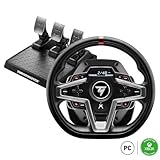
The T248 is Thrustmaster’s step-up hybrid wheel and the main rival to the Logitech G920 and G923 on Xbox. The T248 X version is officially licensed for Xbox Series X|S and Xbox One and also works on PC; a PlayStation version is sold as the T248. Thrustmaster says its Hybrid Drive belt-and-gear system delivers 70% more power than its T150-series wheels, and independent reviewers generally place peak torque around 3.1 to 3.5Nm, which is stronger than the Logitech gear-driven bases.
Who it is for: Xbox players who want more force feedback strength and features than the G920 offers, and PC racers who like a built-in screen and lots of controls on the rim.
Strengths: a smoother feel than pure gear-driven wheels, an interactive display on the rim that shows telemetry and lets you change force feedback presets mid-race, 25 buttons including magnetic paddle shifters, and the T3PM three-pedal set with magnetic sensors and an adjustable brake with four pressure modes.
Drawbacks: the roughly 270mm rim is smaller than a real GT wheel, the magnetic paddles are loud, and the pedals are mostly plastic. The base is not a direct drive, so it still has some belt and gear damping compared with the MOZA options below.
Bottom line: the best non-direct-drive choice for Xbox, and a better buy than the G920 if you want stronger feedback and a clutch pedal with more adjustability.
MOZA R3 Bundle
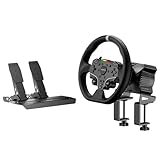
The MOZA R3 bundle is one of the cheapest complete direct drive packages available. The R3 base produces 3.9Nm of peak torque with unlimited rotation and a 15-bit encoder, housed in an aluminum alloy body. The PC bundle includes an ES-series round wheel with quick release, SR-P Lite throttle and brake pedals with Hall sensors, a table clamp and the power supply. MOZA also sells an officially licensed Xbox and PC version of the R3 bundle with a different wheel, so pick the version that matches your platform.
Who it is for: PC racers, and Xbox players with the licensed version, who want direct drive detail and smoothness on a beginner’s budget and plan to grow into a MOZA setup over time.
Strengths: direct drive response with no belt or gear slop, a quick-release hub so you can add MOZA formula or GT rims later, a wide accessory ecosystem including load cell pedals, shifters and handbrakes, and Pit House software with detailed force feedback tuning.
Drawbacks: 3.9Nm is modest for direct drive, so strong cars feel lighter than on bigger bases. The bundled pedals are throttle and brake only with no clutch and no load cell, and the PC version does not work on consoles.
Bottom line: the cheapest sensible doorway into direct drive, especially if you already know you will upgrade the pedals later.
MOZA R5 Bundle

The R5 bundle is the one many sim racing guides call the best value in the hobby. Its direct drive base delivers 5.5Nm of peak torque, noticeably more than the R3 and well above any gear- or belt-driven wheel in this guide. The bundle includes the ES steering wheel with quick release, SR-P Lite pedals and a table clamp, and the base works with the full range of MOZA wheels and accessories.
Who it is for: PC players who take sims like iRacing, Assetto Corsa Competizione, Assetto Corsa EVO or Le Mans Ultimate seriously and want a base they will not outgrow quickly.
Strengths: strong, detailed and smooth force feedback for the money; quick release for easy rim upgrades; a large ecosystem of add-ons; and enough torque to feel weight transfer and curb detail clearly. MOZA sells a performance kit that adds a load cell to the SR-P Lite brake pedal.
Drawbacks: it is PC only, it costs more than the Logitech and Thrustmaster sets, and the included pedals have no load cell or clutch out of the box. At 5.5Nm the base is strong enough that a desk clamp on a thin or wobbly desk can flex, so a rigid desk or a wheel stand is strongly recommended.
Bottom line: the bundle to stretch for if you are on PC and want the best driving feel this side of a mid-range direct drive setup.
Turtle Beach VelocityOne Race KD3

The VelocityOne Race KD3 is one of the few complete direct drive wheel and pedal kits that is officially licensed for Xbox, which makes it the main alternative to the Xbox version of the MOZA R3. It works with Xbox Series X|S, Xbox One and Windows 10 and 11 over a wired connection. Turtle Beach’s K: Drive direct drive motor delivers 3.2Nm of peak torque, with rotation adjustable up to 2,160 degrees, and the kit includes a detachable 12-inch wheel, aluminum throttle and brake pedals with Hall effect sensors, and mounting hardware.
Who it is for: Xbox racers who want to move up from a Logitech G920 or a Thrustmaster T248 X to direct drive without building a rig piece by piece, and Forza Motorsport players who want a complete plug-and-play kit.
Strengths: direct drive smoothness with no gear rattle, a full-color dashboard display on the wheel with five onboard profiles, dual magnetic paddle shifters, a quick-release system that accepts Turtle Beach’s add-on wheels and shifter, extra USB-C ports for expansion modules, and a companion tuning app on Xbox, PC and mobile. The pedals are highly adjustable, with changeable spring tension, pedal throw and pedal face positions.
Drawbacks: 3.2Nm is the low end for direct drive, so strong cars do not feel heavy, and it costs noticeably more than the MOZA R3 on PC. The two-pedal set has no clutch and no load cell brake, and the pedals are largely plastic beneath their metal faceplates. It does not support PlayStation.
Bottom line: the most complete direct drive starter kit for Xbox players. On PC alone, the MOZA bundles give you more torque for the money.
Three More Budget Wheels and Add-Ons Worth Shortlisting
The eight picks above cover the most common starting points, but they leave two gaps: an affordable direct drive bundle that comes with a wheel and pedals in the box, and a Thrustmaster option for Xbox owners who want something newer than the G920. There is also one accessory that changes how the Logitech wheels feel in older road-car titles. These three fill those holes.
MOZA R3 Bundle for Xbox and PC
The MOZA R3 is the cheapest complete direct drive package most buyers will come across. The base delivers 3.9 Nm of peak torque, which looks modest on paper, but there is no gear train or belt between the motor and the rim, so every bump and slip arrives without the notchy feel of a geared wheel. The bundle ships with a compact wheel, a two-pedal set and a desk clamp, and this version carries Xbox certification alongside PC support, which makes it one of very few direct drive routes on Xbox at this budget tier.
Best for: PC or Xbox racers who want direct drive detail now and a base that can accept other MOZA rims and pedals later.
Skip if: you play on PlayStation, since this version is not certified for it, or you need a clutch pedal for manual-gearbox titles out of the box.
- Drive type: direct drive
- Peak torque: 3.9 Nm
- Platforms: Xbox Series X|S, Xbox One, PC
- Included: base, wheel, two pedals, desk clamp

Thrustmaster T248 X
The T248 X sits between Thrustmaster’s entry wheels and its more expensive belt-driven bases. It uses a hybrid drive that combines a belt with gears, which smooths out some of the cogging you feel on a pure gear-driven wheel. Magnetic paddle shifters give a crisp click, and a small built-in screen can show information such as gear and revs. The three-pedal set uses magnetic sensors instead of potentiometers, which avoids the dust-related signal noise older pedals tend to develop.
Best for: Xbox and PC players who want a newer feature set than the G920 in a similar budget tier.
Skip if: you want a load-cell brake from day one, or you plan to move to direct drive soon and would rather put the money toward a base like the MOZA R3.
- Drive type: hybrid belt and gear
- Platforms: Xbox Series X|S, Xbox One, PC
- Pedals: three-pedal set with magnetic sensors
- Extras: magnetic paddle shifters, built-in display
Logitech G Driving Force Shifter
This is the official H-pattern shifter for the G29, G920 and G923, and it plugs into the wheel base rather than needing its own USB port. It gives you six forward gears plus a push-down reverse, with a steel shift rod and a leather-wrapped knob. In games built around older road cars, rally machines or trucks, a stick shift adds more immersion than almost any other upgrade at this price, and it clamps to a desk or bolts to the shifter mount on stands like the GTPLAYER.
Best for: owners of a G29, G920 or G923 who enjoy road-car, rally or truck sims with manual gearboxes.
Skip if: you mostly race modern GT or formula cars that use paddles, or you own a non-Logitech base.

Buying Guide
Force Feedback Type
Within the budget segment, you will encounter three architectures: spring-loaded (bungee), gear-driven, and direct drive. Bungee wheels like the Thrustmaster T98 provide a centering spring with minimal texture. Gear-driven wheels like the Logitech G29 use worm gears that introduce some cogging but still deliver layered road information. Direct drive bases like the RS50 couple the motor shaft directly to the rim, eliminating mechanical lag entirely. If your goal is sim racing rather than arcade drift titles, gear-driven is the minimum you should accept, and direct drive becomes worth the jump once you have a stable rig to mount it to.
Pedal Hardware
The brake pedal matters more than any wheel feature for lap times. A progressive spring brake like the Logitech G29’s is serviceable but teaches inconsistent braking points under load. A load-cell brake, as found on the PXN V99 and GT ONE, registers pressure rather than travel distance, which translates directly to threshold braking technique. If you are serious about iRacing or ACC, prioritize a load-cell brake over a fancier wheel rim. Aftermarket pedal upgrades exist but often require adapter plates and custom mounting, so buying a wheel and pedal set with the brake you want upfront saves time and money.
Mounting and Compatibility
Budget wheels ship with desk clamps that flex under aggressive inputs, smearing the FFB signal and causing the wheel to drift off-center during long sessions. A dedicated stand transforms the experience by giving the base a rigid anchor point. The GTPLAYER stand covers most Logitech and Thrustmaster bases, but check bolt pattern dimensions before purchasing. Direct drive bases in particular should never run on desk clamps, as the higher torque can crack table surfaces or shear the clamp mount. Plan your mounting solution before choosing a wheel, since it affects both your budget and your available desk space.
Gear, Belt, Hybrid or Direct Drive: Side by Side
Most budget wheels fall into one of four drive types, and the drive type matters more than the brand name for how a wheel feels.
| Drive type | Examples in this guide | Typical peak torque | Feel | Price tier |
|---|---|---|---|---|
| Bungee or spring (no force feedback) | Thrustmaster T98 | None, centering spring only | Even resistance, no road detail | Under $150 |
| Gear-driven | Logitech G29, G920, G923 | Around 2 to 2.5Nm | Clear but notchy, some rattle and noise | $150 to $300 |
| Hybrid belt and gear | Thrustmaster T128, T248 | Around 2 to 3.5Nm | Smoother than gears, slightly damped | $150 to $300 |
| Entry direct drive | MOZA R3, MOZA R5, Turtle Beach KD3, Logitech RS50 | 3.2 to 8Nm | Smooth, fast, detailed, no mechanical slop | $300 to $700 |
Platform Compatibility at a Glance
Console wheels are licensed per platform, and buying the wrong version is the most common budget mistake. PC support is nearly universal, but PlayStation and Xbox support is not.
| Wheel | PC | PlayStation | Xbox |
|---|---|---|---|
| Logitech G29 | Yes | Yes | No |
| Logitech G920 | Yes | No | Yes |
| Logitech G923 | Yes | PlayStation version | Xbox version |
| Thrustmaster T128 | Yes | T128 P | T128 X |
| Thrustmaster T248 | Yes | T248 | T248 X |
| Thrustmaster T98 | Yes | Ferrari 296 GTB | Ferrari 296 GTS |
| MOZA R3 | Yes | No | Xbox-licensed bundle only |
| MOZA R5 | Yes | No | No |
| Turtle Beach VelocityOne Race KD3 | Yes | No | Yes |
| PXN V99 and GT ONE | Yes | Check listing | Check listing |
What a Cheap Setup Really Costs
The price on the box is rarely the full price of a working rig. Budget for these extras before you choose:
- Mounting: a desk clamp is included with most sets, but a foldable wheel stand or a basic cockpit is the most common first upgrade, especially for direct drive bases.
- Pedals: two-pedal sets have no clutch, and almost no bundle in this price range includes a load cell brake. A load cell pedal set or a load cell conversion kit is often the single biggest lap-time upgrade.
- Shifter and handbrake: only needed for manual gearbox cars, rally and drifting. Many players never buy them.
- Games: the most popular PC sims are paid titles, and iRacing adds a subscription plus paid cars and tracks.
A practical rule: if your total budget is fixed, spend more on the base and pedals and less on extras. A good wheel on a rigid mount with decent pedals beats a weak wheel surrounded by accessories.
Budget Pedal Upgrades: When and What
Because almost every cheap bundle ships with spring-based pedals, the pedals are usually the first part worth upgrading. The key change is moving from a brake that measures how far the pedal travels to a load cell brake that measures how hard you press. Human legs are much better at repeating a pressure than a position, so a load cell makes trail braking and threshold braking far more consistent.
- Check compatibility first. Thrustmaster bases accept Thrustmaster pedal sets through the base connector, MOZA pedals plug into MOZA bases or connect to a PC by USB, and Logitech pedals on the G29, G920 and G923 connect through the base. On consoles, pedals usually must come from the same brand as the wheel to work.
- Consider a load cell kit before a full set. Some brands sell kits that convert an existing brake pedal to a load cell, which is cheaper than replacing the whole set.
- Use a stiffer brake mod on Logitech pedals. Aftermarket brake spring or rubber stop kits for Logitech pedals are an inexpensive way to get a firmer, more progressive brake feel.
- Mount the pedals solidly. A load cell brake needs a fixed pedal plate or a stand. On a bare floor the pedals will slide away under the higher braking force.
Which Cheap Wheel Should You Buy? Quick Decision Guide
- Lowest budget, want real force feedback, PlayStation or PC: Thrustmaster T128.
- Want to try a wheel at the lowest cost and do not care about force feedback: Thrustmaster T98, ideally for arcade racers.
- PlayStation, proven all-rounder with three pedals: Logitech G29 or G923.
- Xbox, budget: Logitech G920.
- Xbox, stronger feedback and more features: Thrustmaster T248 X.
- Xbox, direct drive: the Xbox-licensed MOZA R3 bundle, or the Turtle Beach VelocityOne Race KD3 if you want a dashboard display and a complete kit.
- PC, cheapest direct drive: MOZA R3 bundle.
- PC, best value overall: MOZA R5 bundle.
- Want a load cell brake in the box on PC: check the pedal specifications of the PXN sets carefully before buying, since pedal configurations vary between versions.
Setup Tips That Make a Cheap Wheel Feel Better
- Update firmware and drivers first. Install Logitech G HUB, the Thrustmaster drivers, MOZA Pit House or the PXN software before plugging the wheel into a game, and apply any firmware updates.
- Match rotation to the car. Most PC sims set rotation automatically when the wheel software allows the game to control it. Leave the wheel at its maximum rotation, typically 900 degrees on gear and hybrid wheels, and let the sim handle the rest.
- Avoid force feedback clipping. If the wheel feels like a wall of resistance in fast corners with no detail, the signal is clipping. Lower the in-game force feedback gain until you can feel the tires loading up and losing grip, rather than maxing everything out.
- Calibrate the pedals. Set a small dead zone at the top of the brake so it does not drag, and use the brake curve or brake sensitivity settings to make threshold braking easier with spring-based pedals.
- Stop the pedals sliding. Put the pedal base against a wall, use a rubber mat, or bolt it to a stand. Sliding pedals ruin brake consistency faster than any hardware limitation.
- Use a stable seat. An office chair with wheels rolls back under heavy braking. A fixed chair or a stand with a seat makes a large difference to control.
Drive Types Compared Side by Side
The biggest factor in how a budget wheel feels is the mechanism that connects the motor to the rim. Price tiers line up with drive type more closely than with brand, so it helps to know what each one gives you before comparing models.
| Drive type | How it works | What you feel | Typical examples | Price tier |
|---|---|---|---|---|
| Vibration only | Rumble motors shake the rim; a spring or bungee centers it | Buzz on impacts, no change in steering weight | Many no-name multi-platform wheels | Lowest |
| Gear driven | Motor turns the shaft through a set of gears | Real resistance and grip cues, some notchiness | Logitech G29, G920, G923 | Entry |
| Hybrid belt and gear | Belt plus gears share the load | Smoother than gears, slightly softer detail | Thrustmaster T248 X | Entry to mid |
| Belt driven | Motor drives the shaft through belts and pulleys | Smooth, consistent force with little cogging | Thrustmaster T300 family | Mid |
| Direct drive | Rim mounts on the motor shaft itself | Fast, detailed, no mechanical slack | MOZA R3, Logitech RS50 | Mid to upper |
One warning that matters at the cheap end of the market: many low-cost wheels advertise “dual motor feedback” or “vibration feedback”. In most of those listings the motors are rumble motors, not force feedback motors. The wheel shakes when you hit a wall, but it will not get heavier in a fast corner or go light when the front tires lose grip. If a listing does not say force feedback explicitly, assume vibration only.
Platform Compatibility at a Glance
Console licensing is one of the most common reasons people return a wheel. PlayStation and Xbox each require certified hardware, so most wheels support one console family plus PC, not both. Check this before anything else.
| Wheel | PlayStation 5/4 | Xbox Series/One | PC |
|---|---|---|---|
| Logitech G29 | Yes | No | Yes |
| Logitech G920 | No | Yes | Yes |
| Logitech G923 | Depends on edition | Depends on edition | Yes |
| Thrustmaster T98 Ferrari 296 GTB | Yes | No | Yes |
| Thrustmaster T248 X | No | Yes | Yes |
| MOZA R3 (Xbox bundle) | No | Yes | Yes |
| Logitech RS50 | Depends on edition | Depends on edition | Yes |
The G923 and RS50 are sold in separate PlayStation and Xbox editions, so read the exact product title before ordering. PC is the most forgiving platform: almost every wheel works there, and PC sims expose the deepest force feedback settings. If you own two consoles, the cheapest answer is usually to pick the one you race on most and accept that the wheel also works on a PC.
Pedal Sensors: Potentiometer, Hall Effect and Load Cell
The buying guide above explains why a load-cell brake helps consistency. It is also worth knowing how the other pedals read your inputs, because sensor type decides how long a cheap pedal set stays accurate.
- Potentiometer: a resistive track and wiper measure pedal position. Cheap and accurate when new, but the track can wear or collect dust, which shows up as spikes or dead spots in the input.
- Hall effect or magnetic: a magnet and sensor measure position without physical contact. Nothing rubs, so readings stay stable for longer. This is a worthwhile feature on throttle and clutch pedals.
- Load cell: measures how hard you press rather than how far the pedal moves. It matches how real brakes behave and helps you repeat the same braking pressure lap after lap.
A practical rule for a tight budget: accept a basic throttle and clutch, but push for a load-cell brake or at least a stiffer, progressive brake spring. A firmer aftermarket spring or rubber insert for a stock brake costs very little and gets you part of the way toward load-cell feel.
Mounting Options From Desk to Cockpit
Your mounting choice affects the feel of the wheel almost as much as the wheel itself. Here is how the four common setups compare.
| Mount | Stability | Space needed | Best match |
|---|---|---|---|
| Desk clamp | Fine for gear-driven wheels on a solid desk; flexes on thin or light desks | None beyond the desk | T98, G29, G920 for casual sessions |
| Foldable wheel stand | Good for entry wheels; can rock under stronger direct drive torque | Small, folds away | Shared living rooms, G29-class wheels |
| Fixed wheel stand | Solid for gear, belt and low-torque direct drive | Medium footprint, uses your own chair | Most budget setups, GTPLAYER-style stands |
| Aluminum profile cockpit | Rigid at any torque level | Largest, permanent | Direct drive upgrades and serious sim use |
Two details people overlook. First, the chair: an office chair on casters rolls backward under heavy braking, especially with a load-cell brake, so lock the casters, use a chair without wheels, or choose a stand that ties the seat and pedals together. Second, pedal distance: the pedals should sit far enough away that your knee stays slightly bent with the brake fully pressed. Sitting too close makes threshold braking harder than any hardware limit does.
Setup Settings That Make a Cheap Wheel Feel Better
Many complaints about budget wheels come from default settings rather than hardware. A few minutes in the driver software and game menus fix most of them.
- Install the official software first. Use Logitech G HUB, the Thrustmaster driver package or MOZA Pit House before launching any game, and update the base firmware if prompted.
- Set rotation at the driver level and let the game adjust it. Leave the wheel at its full range (900 degrees on the Logitech G29, G920 and G923) and enable the game’s own rotation or soft-lock option, so each car uses its correct steering ratio.
- Turn force feedback strength down, not up. Budget motors clip, meaning they max out and lose detail, when overall strength is too high. Lower it until you can feel curbs and tire slip without the wheel going numb in long corners.
- Reduce or disable canned effects. Engine vibration or road rumble effects can mask the useful steering signal. Start them low and add only what helps.
- Calibrate pedals and check dead zones. Make sure each pedal reaches 0 and 100 percent in the game’s input screen. A small dead zone at the top of the brake prevents accidental light braking from a resting foot.
- Save a profile per game. Each sim scales force feedback differently, so a setting that feels right in one title can be too strong or too weak in another.
A Sensible Upgrade Path on a Budget
Sim racing hardware is easy to over-buy. The order below gets the most improvement per dollar for most people starting with an entry wheel.
- Stable mounting. A stand or rigid desk mount fixes flex and slipping, and it carries over to every future wheel.
- Better brake pedal. A load-cell brake or a firmer brake spring improves consistency more than a stronger motor does.
- Add-ons for the games you play. An H-pattern shifter or handbrake only makes sense if your favorite titles use them.
- Direct drive base. Move to direct drive once the mount and pedals are sorted, otherwise the extra detail gets lost in flex.
- Cockpit and extras. A full cockpit, bass shakers and dashboards come last and are mostly about immersion.
Before jumping between brands, check ecosystem lock-in. Logitech, Thrustmaster, MOZA and Fanatec each use their own connections for rims, pedals and shifters. Staying in one ecosystem lets you keep pedals and add-ons when you upgrade the base, which often saves more than a cheaper base from another brand would.
Our Verdict
Our top pick is the PXN V99. It offers 3.2Nm of force feedback through a belt system, a load-cell brake, and a full three-pedal set for a mid-range price, undercutting both Logitech options while delivering hardware features they lack. If you want the absolute cheapest entry point, the Thrustmaster T98 at $119 gets you on the ladder without breaking the bank, though you will want to replace it quickly if you stick with sim racing. The condition that flips this ranking is ecosystem maturity: if you require verified third-party app support or a known long-term driver track record, the Logitech G29 remains the safer bet despite inferior pedals.
More Questions About Cheap Sim Racing Wheels
What is the cheapest racing wheel and pedals with real force feedback?
The Thrustmaster T128 is one of the cheapest sets with motor-driven force feedback from a major brand. Below that price, most wheels, including the Thrustmaster T98, use a bungee or spring to return the wheel to center and do not reproduce road and tire effects.
Is direct drive worth it on a budget?
On PC, usually yes. Bundles like the MOZA R3 and R5 now cost about the same as, or a little more than, a Logitech G923, and direct drive gives smoother, more detailed feedback with no gear rattle. On consoles, direct drive options are limited and more expensive, so a Logitech or Thrustmaster set is often the more practical choice.
Do I need three pedals?
Only if you want to drive manual-gearbox cars with a clutch. Most modern race cars use paddle shifters, so a quality throttle and brake matter far more than having a clutch pedal. Prioritize a better brake over a third pedal.
Can I use a cheap wheel on PlayStation and Xbox?
Not usually with one unit. Console wheels are licensed per platform, so a PlayStation wheel will not work on Xbox and vice versa, though nearly all of them work on PC. Buy the version that matches the console you play on most.
How much torque do I need for sim racing?
For learning and casual racing, 2 to 3.5Nm from a gear or hybrid wheel is enough to feel grip and slides. Entry direct drive bases at 4 to 8Nm give much more detail and headroom without clipping. More torque than that is mainly useful for heavy cars and for players who like strong steering weight, and it requires a rigid mounting setup.
More Questions Buyers Ask About Budget Wheels
What steering rotation do I need for sim racing?
For simulation titles, look for a wheel that can turn 900 degrees or more. The game then limits rotation per car, so a GT car might use a much smaller range than a road car. Wheels limited to around 180 or 270 degrees are designed for arcade games and feel twitchy in sims.
Is a vibration-only wheel worth buying for a child or casual player?
For arcade racers and occasional use, it can be, as long as you know what you are buying. A vibration wheel cannot communicate grip or weight, so it will not help anyone learn car control in a sim. If there is any chance the player gets into sim racing, an entry force feedback wheel is the better long-term buy.
Can I use one wheel on both PlayStation and Xbox?
Generally no. Licensed wheels support one console family plus PC. Third-party adapters exist, but they are not supported by the wheel makers and can add input delay. Buy the edition for the console you use most.
Are direct drive wheels too strong for beginners?
Not at the budget end. Low-torque bases like the MOZA R3 sit in a similar strength range to entry geared wheels, and every direct drive base lets you lower the force in software. The bigger consideration is mounting: direct drive needs a stable stand or rigid desk to feel its best.
FAQ
Do cheap sim racing wheels work with every game?
Most PC titles support Logitech and Thrustmaster natively through built-in wheel profiles. PXN wheels generally work via their own software mapping layer, and compatibility varies game to game. Always check a specific title’s support list before committing if you race a particular sim exclusively.
Is a wheel stand necessary or can I clamp to my desk?
A desk clamp works for casual sessions but introduces noticeable flex during hard cornering or braking, which degrades force feedback clarity. If you race more than casually, a stand is a cheap upgrade that transforms the feel of any wheel in this price range.
Can I upgrade from a Logitech G29 to a direct drive later?
Yes, and the wheel itself often becomes useful as a secondary rig or for drifting games. The real question is whether your desk or stand accommodates the larger base and whether you are willing to buy separate pedals. The RS50 uses a quick-release hub, so other Logitech or third-party rims can be fitted with the right adapter; the G29’s own rim is fixed to its base and cannot be moved over.
How long do budget force feedback wheels last?
Logitech gear-driven bases regularly exceed five years of daily use with no degradation, though gear grease can dry out over time. Direct drive bases have fewer wear components and should last longer mechanically. PXN products are newer to the market, so long-term reliability data is still limited.