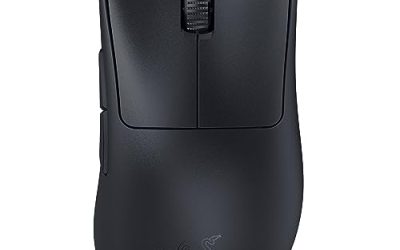
A lightweight gaming mouse changes how fast the hand can start, stop, and redirect, and the difference shows up most in long sessions where a heavy mouse drags on the wrist. The real decision is not just finding the lowest weight figure, because a mouse that is light but the wrong shape, the wrong connection type, or missing the buttons a player relies on will still feel wrong. Weight, shape, connection, and sensor wording all have to line up before a pick earns its place.
The five mice below were chosen from listings that state a low weight or carry lightweight wording in the listing title itself, and every specification quoted comes from that title wording alone. The range covers a portable wireless model, a durable all-round pick, a claw-grip wireless model built for modification, a holey-shell RGB model, and the lightest wired pick in the group. Each one suits a different hand and a different way of playing.
Our Top Picks


Top 3 picks at a glance

Quick Picks
As an Amazon Associate we earn from qualifying purchases.
| Product | Best for | Key spec from title |
|---|---|---|
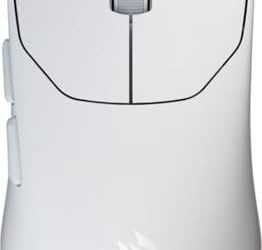
| Razer Orochi V2 Wireless Gaming Mouse | A light wireless mouse for laptop and desktop | Ultra Lightweight, 18K DPI, Bluetooth and 2.4GHz |
| SteelSeries Rival 3 Gen 2 Gaming Mouse | A stated 77g weight with durable switches | 77g Lightweight, 8500 DPI TrueMove Core sensor |
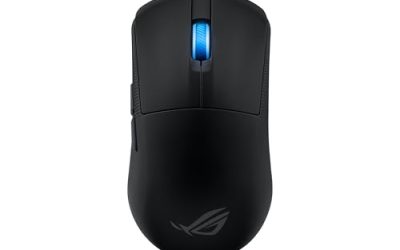
| ENDGAME GEAR OP1we Wireless Gaming Mouse | Claw-grip players who want a mod-friendly mouse | 2.1 oz, Pixart PAW3370 sensor, hybrid skate design |
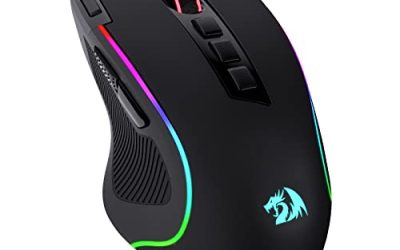
| SteelSeries Aerox 5 Gaming Mouse | A holey RGB shell with water resistant design | Ultra-lightweight, 18K DPI TrueMove Air sensor |
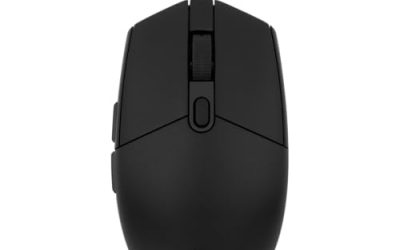
| Redragon M617 Wired Gaming Mouse | The lightest wired pick with a paracord cable | 41g Ultralight honeycomb shell, 10,000 DPI |
How to Choose
Start with the stated weight, not the shape
A mouse earns the lightweight label in this roundup only when its listing title states a weight figure or carries lightweight wording, because shells and honeycomb patterns alone prove nothing about grams. Compare the figures directly: 41 grams and 77 grams are stated in grams, while 2.1 ounces works out to just under 60 grams, so all three sit in the same light class despite the different units. Treat a title with no weight wording as unproven, however airy the shell looks. Also remember that a stated weight may or may not include the cable or battery depending on the listing, so check the full listing for exactly what was weighed before treating two figures as directly comparable.
Match the connection to how you play
Wireless and wired mice solve different problems, and the right choice depends on where the mouse will be used. A wireless model with both Bluetooth and 2.4GHz connections suits players who move between a laptop and a desktop, since Bluetooth covers casual use while the 2.4GHz link is the one built for responsive play. A wired model with a drag-free paracord cable suits players who never want to think about charging and who keep the mouse at one desk. Battery-life wording matters only for wireless picks: a long stated battery life means fewer interruptions, but it says nothing about weight, so weigh it after the weight figure, not before it.
Read the sensor and switch wording carefully
Sensor wording is where listings differ most, and the title is the only wording this roundup trusts. A named sensor such as TrueMove Core, TrueMove Air, or PAW3370 tells more than a bare DPI number, because the sensor name identifies the hardware while the DPI figure only states the ceiling. Click-durability wording, such as 60 million clicks, describes switch longevity rather than feel, and PTFE feet wording describes glide material rather than speed. Do not assume a high DPI ceiling means better aim: most players use only part of the stated range, so sensor name, polling wording, and feet material deserve at least as much attention as the headline DPI figure.
Check the shell, grip, and hand fit
Weight means little if the shell fights the hand, so grip style should decide between otherwise equal picks. A claw-grip title points to a shape with a raised rear and room for curled fingers, while a symmetrical shape suits players who switch between grips. A honeycomb shell cuts weight through openings in the shell, which also means dust and debris can reach the inside more easily than with a closed shell, so it needs more frequent cleaning. Side-button count, RGB wording, and water-resistant design wording are secondary: useful when they match a real need, but never a reason to accept a shape or weight that does not fit the hand.
The 5 Best Options
1. Razer Orochi V2 Wireless Gaming Mouse
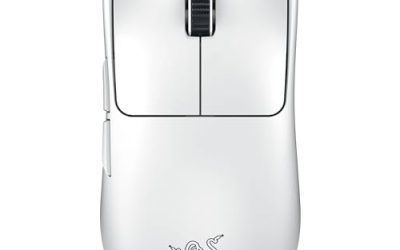
The Orochi V2 is the portable pick in this group, built around an ultra-lightweight title claim and a wireless design that covers both Bluetooth and 2.4GHz connections. The listing title pairs that portability wording with an 18K DPI figure and a battery-life claim of up to 950 hours, which suits players who carry one mouse between machines and dislike charging often. The white finish and PC and Mac compatibility wording round out a listing aimed squarely at players who move around. Its light build and dual-connection wording make it the easiest pick here to carry in a bag and use on more than one computer.
Specs
- Ultra Lightweight and portable wording in the listing title
- Bluetooth and 2.4GHz wireless connectivity
- 18K DPI sensor figure
- Up to 950hrs battery life wording
- Compatible with PC and Mac
- White finish
Best for: players who want one light wireless mouse for a laptop and a desktop.
Watch out for: the white finish shows dirt and wear sooner than a black finish, so check the exact colour listing before ordering.
– ASIN: ⚠ B0916MW7CG
2. SteelSeries Rival 3 Gen 2 Gaming Mouse
The Rival 3 Gen 2 is the durability pick, with a listing title that states a 77g lightweight figure alongside an 8500 DPI TrueMove Core optical sensor. The title adds 60 million click durability, low-latency wording, and 100 Percent PTFE feet, which together describe a mouse built for long, fast sessions rather than for show. RGB wording and a black finish complete a straightforward listing with no exotic claims. Its stated weight sits in the middle of this group, heavier than the ultralight wired pick but lighter than most standard gaming mice, and the durability wording gives it the strongest longevity story of the five picks here.
Specs
- 77g Lightweight wording in the listing title
- 8500 DPI TrueMove Core optical sensor
- 60 million click durability wording
- Low latency wording
- 100 Percent PTFE feet
- RGB lighting and black finish
Best for: players who want a stated 77g weight with durable switches and a simple design.
Watch out for: the title states no connection type, so confirm wired or wireless wording on the full listing before buying.
– ASIN: ⚠ B0F6BDV5Q8
3. ENDGAME GEAR OP1we Wireless Gaming Mouse
The OP1we is the specialist pick, aimed at claw-grip players who like to modify their gear. Its listing title states a 2.1 oz weight, names the Pixart PAW3370 optical sensor and the CompX CX52850 microcontroller, and adds mod-friendly wording with a hybrid skate design. That combination describes a light wireless mouse built for players who swap skates and tune their setup, rather than for players who want a finished, unchanging product. The claw-grip wording and black finish narrow the audience further, but for that audience the sensor naming and modification wording carry real weight in the decision.
Specs
- Wireless gaming mouse wording in the listing title
- 2.1 oz stated weight
- Pixart PAW3370 optical sensor
- CompX CX52850 microcontroller
- Mod-friendly wording and hybrid skate design
- Claw grip shape and black finish
Best for: claw-grip players who want a light, mod-friendly wireless mouse.
Watch out for: the title gives no DPI figure or polling wording, so confirm the sensor settings on the full listing.
– ASIN: ⚠ B0CDCBDGGT
4. SteelSeries Aerox 5 Gaming Mouse
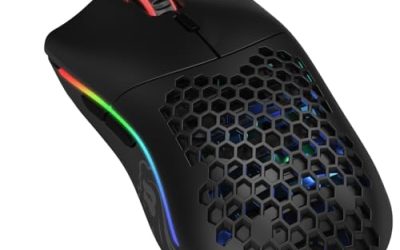
The Aerox 5 is the holey-shell pick, with a listing title that pairs ultra-lightweight wording with a holey RGB design and a water resistant design claim. The title adds an 18K DPI TrueMove Air optical sensor figure, which puts its sensor ceiling at the top of this group alongside the portable wireless pick. The open shell is the point: holes cut weight while keeping the shape rigid, and the RGB lighting runs through the perforated design. Its water-resistant wording is unusual in this group and suits players who worry about spills, though the title alone does not explain the limits of that protection.
Specs
- Ultra-lightweight wording in the listing title
- Holey RGB gaming mouse design
- Water resistant design wording
- 18K DPI TrueMove Air optical sensor
Best for: players who want a holey RGB shell with water resistant design wording.
Watch out for: the title states no connection type, and a wireless variant carries a separate listing, so confirm the exact model and connection on the full listing.
– ASIN: ⚠ B09VNTCZZN
5. Redragon M617 Wired Gaming Mouse
The M617 is the lightest wired pick in the group, with a listing title that states 41g alongside ultralight honeycomb-shell wording. The title adds a 10,000 DPI figure, six programmable buttons, two side buttons, a drag-free paracord cable, and Type-C wording, which together describe a wired mouse built for players who want minimum weight without giving up buttons or a flexible cable. The black finish and PC, Mac, and laptop compatibility wording keep it general-purpose. At 41 grams it undercuts every other pick here on stated weight, and the paracord cable answers the usual complaint about wired mice dragging on the desk.
Specs
- Ultralight honeycomb shell wording in the listing title
- 41g stated weight
- 10,000 DPI sensor figure
- 6 programmable buttons with 2 side buttons
- Drag-free paracord cable and Type-C wording
- Wired design for PC, Mac, and laptop, black finish
Best for: players who want the lightest wired mouse with a flexible paracord cable.
Watch out for: the open honeycomb shell lets dust inside more easily than a closed shell, so it needs more frequent cleaning.
– ASIN: ⚠ B0F1MKKKV5
Which One Fits Your Situation
You play on a laptop in different rooms
A portable wireless model with Bluetooth and 2.4GHz connections fits best: Bluetooth pairs quickly with a laptop, while the 2.4GHz link serves serious play at a desk. Light weight matters too, since the mouse travels in a bag. Look for long battery-life wording, because a travel mouse that needs constant charging becomes a chore. A white finish is cosmetic, so decide whether showing wear sooner is acceptable before letting colour decide.
You want the lightest wired mouse possible
A wired ultralight model with a stated weight in the low forties and a honeycomb shell is right when every gram matters and charging is not wanted. The drag-free paracord cable matters as much as the weight figure, because a stiff cable adds drag that cancels the benefit of a light shell. Check the button count: six programmable buttons with two on the side cover most games, but players who rely on many thumb buttons should look elsewhere.
You play claw grip and want to modify your mouse
A claw-grip wireless model with mod-friendly wording and a hybrid skate design suits players who swap skates and tune their setup over time. The stated weight near 60 grams keeps flicks fast, while the named sensor and microcontroller wording give a clearer picture than a bare DPI figure. Confirm the sensor settings on the full listing, since the title used here gives no DPI figure or polling wording.
You want RGB lighting and a holey shell
A holey RGB model with ultra-lightweight wording and water resistant design wording fits players who like visible lighting and an open, airy shell. The sensor ceiling matches the top of this group, so nothing is given up for looks. Confirm the connection type and exact model on the full listing, because a wireless variant of the same model line carries a separate listing and the title used here does not state connectivity.
Common Mistakes
- Choosing by looks alone: a honeycomb shell or slim profile does not prove a low weight, so only a stated weight figure or lightweight wording in the listing title counts.
- Comparing weights in different units without converting: grams and ounces describe the same thing, so convert before ranking, since 2.1 ounces is just under 60 grams.
- Assuming wireless means laggy or wired means better: check the connection wording and latency wording in the listing instead of relying on old assumptions about either type.
- Ignoring grip style: a light mouse in the wrong shape still causes strain, so match the shell to claw, palm, or fingertip grip before comparing weights.
- Trusting a DPI ceiling as a quality score: the sensor name, feet material, and switch-durability wording say more about real performance than the highest DPI number in the title.
Frequently Asked Questions
What weight counts as lightweight for a gaming mouse?
Listings here state weights from 41 grams to 77 grams, with one model stating 2.1 ounces, which converts to just under 60 grams. Anything in that range qualifies as lightweight by its own listing title. There is no single official cutoff, so compare stated figures directly and check the full listing for what was weighed, since a figure may or may not include the cable or battery.
Is a wireless lightweight mouse as responsive as a wired one?
Responsiveness depends on the connection wording in the listing, not on wireless versus wired alone. A 2.4GHz wireless link is built for responsive play, while Bluetooth suits casual use and travel. Match the connection to the situation: 2.4GHz for competitive play at a desk, Bluetooth for portability, and a paracord wired cable for players who never want to charge.
Do honeycomb shells make a mouse weaker or harder to clean?
A honeycomb shell removes material to cut weight while keeping the shape rigid, so lightness does not automatically mean fragility. The real trade-off is cleaning: openings let dust and debris inside more easily than a closed shell, so honeycomb models need more frequent cleaning. If low maintenance matters more than minimum weight, a closed-shell pick with a stated weight figure is the safer choice.
Should DPI or sensor name matter more when choosing?
The sensor name matters more, because it identifies the hardware while the DPI figure only states the ceiling. A named sensor such as TrueMove Core, TrueMove Air, or PAW3370 tells what is actually tracking movement, while most players use only part of the stated DPI range. Check the sensor name first, then feet material and switch-durability wording, and treat the headline DPI number as a secondary detail.
Related guides
More from Amazon
Programs that pair well with the guide above. Offers and eligibility are set by Amazon and may change.
Free shipping on eligible items, Prime Video and more. Eligible new members can start with a free trial.
Start a Prime free trialAd-free music streaming. Eligible new subscribers can start with a free trial.
Try Music Unlimited freeA Prime membership for ages 18-24 with a trial period. Eligibility is set by Amazon.
See Prime for Young AdultsAudiobooks and podcasts to listen to on the go. Eligible new members can start with a free trial.
Try Audible freeAs an Amazon Associate we earn from qualifying purchases.