A gaming mouse does not need a flagship budget to feel fast and accurate. The real decision in this band is where to put the allowance: a stronger sensor and a lighter shell, or a simpler wired design with lighting and extra buttons. The wrong pick is rarely a slow mouse. It is a mouse whose shape fights your grip, whose cable drags across the desk, or whose connection stutters at the worst moment in a match.
The five mice below cover both sides of that choice. Wired picks suit players who want a constant connection and RGB lighting without ever charging a battery. Wireless and tri-mode picks suit players who want a clear desk and the option to move between a desktop and a laptop. Every pick is described only from what its listing title states, so sensor, weight, DPI, and connection details come from the listing itself rather than from roundup prose.
Our Top Picks


Top 3 picks at a glance

Quick Picks
As an Amazon Associate we earn from qualifying purchases.
| Product | Best for | Key spec from title |
|---|---|---|
| Redragon M612 Wired RGB Optical Gaming Mouse | A wired all-rounder with remapping | 8000 DPI, remapping keys |
| INPHIC A9 V2 Explorer Wireless Gaming Mouse | Quiet clicks and three connection modes | 12800 DPI, silent, tri-mode |
| RK ROYAL KLUDGE M30 Wireless Gaming Mouse | An ultralight shell with a strong sensor | 24000 DPI, 43g, PAW3311 sensor |
| ATK VXE Dragonfly R1 SE+ Wireless Gaming Mouse | Lightweight esports play with long battery life | 55g, PAW3395 SE sensor, 70 hr battery |
| BENGOO Wired Gaming Mouse with RGB Backlit | An ergonomic wired pick with adjustable DPI | 4 adjustable DPI up to 3600, 6 buttons |
How to Choose
Start with grip and shape, not DPI
DPI numbers are easy to compare and easy to overrate. Most players settle on a sensitivity far below the maximum a modern sensor offers, so the shape of the shell matters more than the headline number. A palm grip needs a taller, fuller body that fills the hand. A claw grip needs a shorter shell with a defined hump under the fingers. A fingertip grip needs a light, compact body that pivots freely. Read the shape wording in the listing title first, then check the weight and the button layout. A mouse that fits your hand will feel accurate within an hour. A mouse that fights your hand will not feel right at any DPI setting.
Choose wired, wireless, or tri-mode deliberately
Wired mice remove charging and connection worries entirely, and they suit a fixed desktop setup where the cable can be routed cleanly. Wireless mice remove cable drag and suit players who move the mouse across a wide pad or switch desks often. Tri-mode mice add a third option, usually a wired USB connection plus a 2.4 GHz receiver and Bluetooth, so one mouse can serve a desktop, a laptop, and a wired fallback. The trade is upkeep: wireless and tri-mode mice need charging, and Bluetooth can add latency compared with a dedicated receiver. Match the connection to where you actually play, not to the feature list.
Read sensor and DPI wording honestly
The sensor name tells you more than the DPI ceiling. A named optical sensor from a known sensor family, such as a PAW-series part, is a stronger signal than a bare DPI figure with no sensor named. DPI still matters as range, not as a target: look for adjustable steps that include the sensitivity you already use, and for wording about programmable buttons or remapping, which decides whether the extra buttons do anything useful in your games. Polling rate wording matters for competitive play, where a higher rate reports movement more often. If a listing states none of these, treat the pick as a general-purpose mouse rather than a competitive one.
Weigh weight, buttons, and upkeep together
Weight changes how a mouse feels far more than most buyers expect. Shells in the 40 to 60 gram range feel fast and flick easily, but they can feel insubstantial to players used to heavier mice, and their thin shells leave less room for extra buttons. Heavier ergonomic shells usually carry more programmable buttons and a fuller grip, which suits MMO and strategy players who map abilities to the mouse. Also weigh upkeep: rechargeable wireless mice need a charging habit, wired mice need cable routing, and RGB lighting adds a setting to manage. Pick the combination you will actually live with every day.
The 5 Best Options
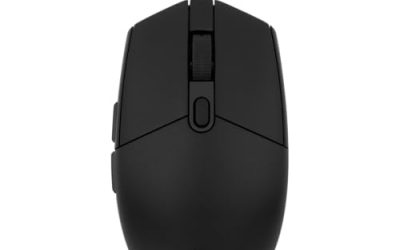
1. Redragon M612 Wired RGB Optical Gaming Mouse
The Redragon M612 is the straightforward wired pick in this group: a corded optical mouse with RGB lighting and remapping keys, aimed at players who want a dependable desktop mouse without charging or pairing. Its wired connection keeps input constant, and the remapping wording means the extra buttons can be assigned to game actions rather than sitting idle. It suits a fixed setup where the cable stays routed and the mouse rarely leaves the desk.
Specs
- Wired RGB optical gaming mouse
- 8000 DPI
- Remapping keys
- Redragon M612 model
Best for: players who want a wired RGB mouse with remappable buttons for everyday PC gaming.
Watch out for: the listing title states no weight, sensor name, or polling rate, so confirm those details on the full listing before buying for competitive play.
- ASIN: ⚠ B08SJ5Z8JL
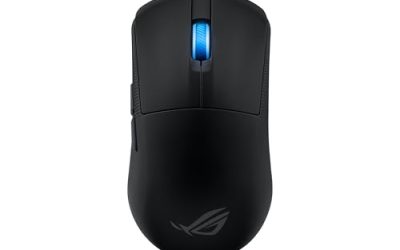
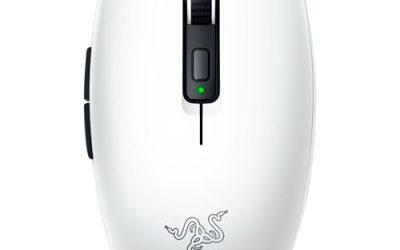
2. INPHIC A9 V2 Explorer Wireless Gaming Mouse
The INPHIC A9 V2 Explorer is the quiet, flexible pick: a wireless mouse with silent clicking and three connection modes, so it can run over a 2.4 GHz receiver, a Type-C wired connection, or Bluetooth. The silent wording matters in shared rooms and late sessions, and the visible battery indicator removes the guessing about when to recharge. Its high DPI ceiling gives plenty of adjustment range, and the RGB light adds the look many gaming setups expect.
Specs
- Wireless gaming mouse, 12800 DPI, silent clicks
- Tri-mode: 2.4G, Type-C wired, and Bluetooth
- Rechargeable, with RGB light and visible battery indicator
- For laptop, PC, and computer use
Best for: players who share a room or switch between a desktop and a laptop and want silent clicks.
Watch out for: the listing title states no weight or sensor name, so confirm both on the full listing if a light shell or a named sensor matters to you.
- ASIN: ⚠ B0F1D7P51F
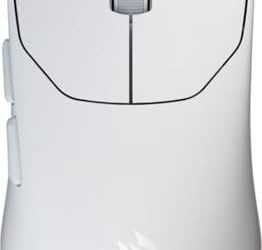
3. RK ROYAL KLUDGE M30 Wireless Gaming Mouse
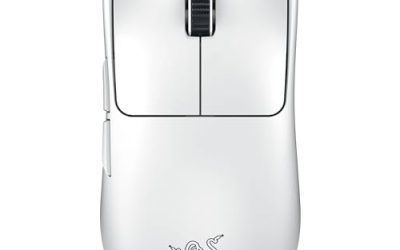
The RK ROYAL KLUDGE M30 is the specification leader of this group on paper: a 43 gram ultralight shell with a named PAW3311 sensor and a 24000 DPI ceiling. That combination suits fast flick aiming, where a light mouse changes direction with less effort. It connects over 2.4 GHz, Bluetooth, or USB-C, recharges rather than using disposable batteries, and carries five programmable buttons. The white shell and the PC and Mac wording make it an easy fit for mixed setups.
Specs
- Wireless gaming mouse, 24000 DPI, 43g ultra-lightweight
- PAW3311 sensor
- 2.4G, Bluetooth, and USB-C rechargeable connection
- 5 programmable buttons, for PC and Mac, white
Best for: players who want the lightest shell here with a named sensor for fast-paced shooters.
Watch out for: a 43 gram shell feels very different from a standard mouse, so players who like a planted, heavier feel should confirm the shape suits their grip.
- ASIN: ⚠ B0DQY58FCD
4. ATK VXE Dragonfly R1 SE+ Wireless Gaming Mouse
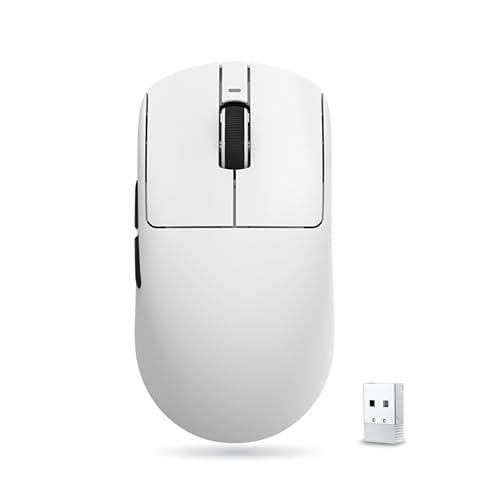
The ATK VXE Dragonfly R1 SE+ is the esports-leaning pick: a 55 gram lightweight shell with a PAW3395 SE sensor, a DPI ceiling of 18000, a 1K polling rate, and a 70 hour battery life. Those four figures cover the details competitive players check first, and the tri-mode connection means it can run wirelessly on a receiver or Bluetooth and wired when the battery runs low. The white finish and the stated battery life make it a practical daily mouse as well as a match mouse.
Specs
- Wireless gaming mouse, white, 55g lightweight
- PAW3395 SE sensor, up to 18000 DPI, 1K polling rate
- 70 hr battery life
- Tri-mode: 2.4G, Bluetooth, and wired
Best for: competitive players who want a light shell, a named sensor, and long battery life in one mouse.
Watch out for: the listing title states no button count or switch type, so confirm the button layout on the full listing if you map many actions to the mouse.
- ASIN: ⚠ B0FN7K443F
5. BENGOO Wired Gaming Mouse with RGB Backlit
The BENGOO wired mouse is the ergonomic value pick: a corded RGB mouse with an ergonomic shape, four adjustable DPI steps up to 3600, and six programmable buttons. Its DPI ceiling is lower than the wireless picks here, but the adjustable steps cover the sensitivities most players actually use, and the ergonomic wording suits longer sessions where hand comfort matters more than headline numbers. Broad system wording covers older and current Windows versions and Linux, which helps on shared or older machines.
Specs
- Wired gaming mouse with RGB backlit, ergonomic shape
- 4 adjustable DPI steps up to 3600
- 6 programmable buttons, optical sensor
- For PC and laptop, Windows 7, 8, 10, XP, Vista, and Linux
Best for: players who want a comfortable wired RGB mouse for long sessions on a fixed desk.
Watch out for: the 3600 DPI ceiling is the lowest here, so players who play at very high sensitivity should confirm the steps include their setting.
- ASIN: ⚠ B00Z9V0NKC
Which One Fits Your Situation
You play at one desk and never move the mouse
A wired pick removes every wireless worry. The Redragon M612 and the BENGOO both stay connected, never need charging, and keep RGB lighting running without battery anxiety. Choose the Redragon if remapping keys and a higher DPI ceiling matter more, and the BENGOO if an ergonomic shape and a lower, adjustable DPI range suit longer sessions. Route the cable once, and the setup stays the same every time you sit down.
You switch between a desktop and a laptop
A tri-mode mouse earns its place here. The INPHIC A9 V2 covers a desktop receiver connection, a wired fallback, and Bluetooth for a laptop, with a battery indicator so the charge state stays visible. The RK M30 and the ATK Dragonfly offer the same three-mode flexibility with lighter shells and stronger sensor wording. Pick the INPHIC for silent clicks in shared spaces, and either lightweight pick when speed matters more than quiet operation.
You want the lightest mouse you can control
Weight is the deciding factor, and the RK M30 leads at 43 grams with a named PAW3311 sensor and a very high DPI ceiling. The ATK Dragonfly follows at 55 grams with a PAW3395 SE sensor, a 1K polling rate, and a long stated battery life. Both reward a fingertip or claw grip and fast flicks. If you have only used standard-weight mice, expect an adjustment period: a lighter shell overshoots until your hand relearns the stopping force.
You share a room and play late
Silent clicks change the experience more than any lighting feature. The INPHIC A9 V2 is the only pick here whose title states silent operation, and its tri-mode connection still covers desktop and laptop play. Pair it with a low sensitivity and a large pad so small hand movements stay quiet. If silence matters less than sensor wording, the RK M30 or ATK Dragonfly are the stronger competitive choices, but neither states silent switches.
Common Mistakes
- Chasing the highest DPI number instead of checking grip shape, weight, and sensor name, which decide how the mouse actually feels.
- Buying a wireless mouse for a fixed desk without a charging habit, then playing through low-battery warnings.
- Assuming every extra button is programmable; confirm remapping or programmable wording in the listing title before counting on it.
- Picking an ultralight shell for a palm grip that needs a fuller body, then blaming the sensor for poor control.
- Ignoring the connection type and discovering Bluetooth latency or a missing receiver only after the first match.
Frequently Asked Questions
Is a wired mouse better than a wireless mouse for gaming?
Neither is always better. A wired mouse removes charging and connection concerns, which suits a fixed desk. A wireless mouse on a 2.4 GHz receiver removes cable drag and performs well for most players. Decide by setup and habits: choose wired for a permanent desk, wireless or tri-mode if you move between machines or hate cable drag, and Bluetooth only when convenience matters more than the lowest latency.
How much DPI do I actually need?
Most players use far less than the maximum a modern sensor offers. What matters is adjustable steps that include your preferred sensitivity and a sensor that tracks cleanly at that setting. A ceiling of 3600 DPI covers many players, while higher ceilings add headroom for very high sensitivity or large monitors. Treat a named sensor and adjustable steps as stronger signals than the biggest DPI number on the page.
Does a lighter mouse always help?
A lighter mouse helps fast flicks and long sessions because the hand works less. It does not help every grip: palm-grip players prefer a fuller, heavier shell that anchors the hand, and a light mouse can overshoot until the hand adjusts. If light mice are new to you, give a 43 to 55 gram shell a few sessions before judging it, and keep your sensitivity unchanged while you adjust.
Can one mouse work for both gaming and office work?
Yes. Tri-mode mice handle the switch best. A mouse with a receiver, Bluetooth, and a wired fallback can move between a gaming desktop and a work laptop without re-pairing. Silent clicks and a comfortable ergonomic shape matter more for office hours, while sensor wording and polling rate matter more for games. The INPHIC A9 V2 covers the quiet office case; the lightweight picks cover gaming.
Related guides
More from Amazon
Programs that pair well with the guide above. Offers and eligibility are set by Amazon and may change.
Free shipping on eligible items, Prime Video and more. Eligible new members can start with a free trial.
Start a Prime free trialAd-free music streaming. Eligible new subscribers can start with a free trial.
Try Music Unlimited freeA Prime membership for ages 18-24 with a trial period. Eligibility is set by Amazon.
See Prime for Young AdultsAudiobooks and podcasts to listen to on the go. Eligible new members can start with a free trial.
Try Audible freeAs an Amazon Associate we earn from qualifying purchases.