The real decision when buying an extended mouse pad is how much desk it should cover and how the surface should feel under the mouse. A pad that is too short leaves the keyboard half on bare wood, while a surface with the wrong glide makes small aim corrections feel sticky. Thickness, edge stitching and base grip decide whether the pad stays flat through long sessions or curls at the corners after a few weeks.
This guide is for PC gamers who want one mat under keyboard and mouse, for players who sweep wide with low sensitivity, and for anyone setting up a shared desk where a single clean surface beats a small pad. Each pad below was picked from its Amazon listing name and specs, with size, surface, edge finish and extras checked against the listing. The four picks cover plain cloth, coated cloth and one RGB option with a hub.
Our Top Picks
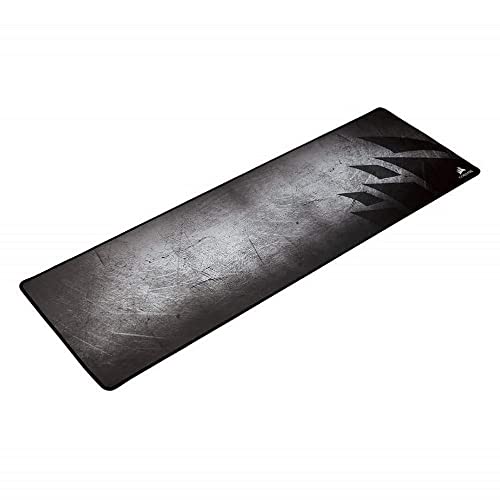 Corsair MM300 Extended Anti-Fray Cloth Gaming Mouse Pad36.6L x 11.8W inches36.6 x 11.8 x 0.1 inches1 poundsCheck on Amazon
 Logitech G840 XL Cloth Gaming Mouse Pad15.7L x 35.4W inches35.4 x 15.7 x 3 inches0.2 poundsCheck on Amazon
Top 3 picks at a glance

Quick Picks
As an Amazon Associate we earn from qualifying purchases
| Product | Best for | Key spec from title |
|---|---|---|
| Corsair MM300 Extended | a simple wide cloth surface | 930 x 300 mm cloth, stitched edges |
| ASUS ROG Scabbard II Extended | a coated surface that resists spills | 900 x 400 mm, nano-coated cloth |
| Logitech G840 XL | a tuned cloth surface for low sensitivity | 900 x 400 mm, moderate friction |
| Corsair MM700 RGB Extended | lighting plus a USB hub | 930 x 400 mm, three-zone RGB |
How to Choose
Size and desk coverage
Measure the desk before ordering, because an extended pad only works when it fits with room to spare. A 900 mm pad suits a standard desk with a full-size keyboard and room for wide mouse sweeps, while a narrower 930 x 300 mm pad fits desks where depth is tight but width is free. Leave a small margin at the front edge so the pad does not hang over the desk, and check that the monitor stand or speaker bases will not sit on top of the pad and lift it. If the desk has a cable tray underneath, confirm the pad thickness will not push the keyboard too high for comfortable typing.
Surface glide and control
Cloth surfaces split into two camps: smooth glide for fast flicks and higher friction for steady aim. A micro-weave cloth gives a balanced feel that suits most players, while a coated surface adds spill resistance and a slightly faster slide. Think about the games played most often: fast arena shooters reward a slick surface, while tactical shooters reward a surface that holds the mouse still between shots. The mouse feet matter too — worn feet drag on any cloth, so a pad with a consistent weave keeps tracking even across the whole mat. Washable cloth helps when drinks or dust reach the desk.
Edges, base and thickness
Stitched edges keep a cloth pad from fraying after months of wrist contact, and they matter most on pads that see daily use. Unstitched edges can lift and catch a sleeve, so check the listing photos for a clean bound edge before ordering. The base should grip the desk without glue: textured rubber holds best on smooth wood and glass, while a thinner base suits desks with a raised lip. Thickness changes the feel under the wrist — a 3 mm pad sits close to the desk, while a 4 mm pad cushions the wrist more but lifts the keyboard slightly. Pick the thickness that matches the chair height and arm angle.
Extras that earn their place
Extras like RGB lighting and USB hubs only make sense when they solve a real desk problem. An RGB edge looks good on a dark desk and can sync with other gear through software, but it needs a USB cable and adds a light source that some players find distracting. A built-in hub helps when the PC sits under the desk and the mouse dongle or headset cable cannot reach, while a plain pad keeps the setup simple and avoids another cable. Water resistance matters for desks where drinks sit close to the keyboard. Judge every extra by whether it removes a cable or a chore, not by how it looks in a photo.
The 4 Best Options
Corsair MM300 Anti-Fray Cloth Extended
The MM300 Extended suits players who want a wide cloth surface without extras. At 930 mm across it holds a full-size keyboard with room left for broad mouse movement, and the textile weave gives a steady glide that works for both fast flicks and careful aim. Stitched edges stop the cloth from fraying where the wrist rests, and the rubber base keeps the pad planted on smooth desks. It is a plain, honest mat: no lighting, no hub, just a large flat surface that does its job and stays out of the way.
Specs
- 930 x 300 x 3 mm (36.6 x 11.8 inches)
- Textile-weave cloth surface
- Stitched anti-fray edges
- Anti-skid rubber base
- Optimized for laser and optical mice
- Model CH-9000108-WW
Best for: players who want a wide, plain cloth pad for keyboard and mouse.
Watch out for: the 300 mm depth is narrower than 400 mm pads — measure the desk depth first.
ASUS ROG Scabbard II Extended, Black
The Scabbard II fits players who spill drinks or game in dusty rooms. Its nano-coated cloth shrugs off water, oil and dust, so a knocked-over glass wipes away instead of soaking in. At 900 x 400 mm it covers keyboard and mouse with room for wide sweeps, and the coating keeps the glide smooth even after months of use. Anti-fray edges and a non-slip base hold the pad flat. It is the pick for a desk that takes a beating and still needs to feel fast under the hand.
Specs
- 900 x 400 mm (35.4 x 15.7 inches)
- Smooth glide cloth surface
- Water, oil and dust resistant nano coating
- Anti-fray edges
- Non-slip base
- 3 mm thick
- Model 90MP0210-BPUA00
Best for: players who want a spill-resistant coated pad for a busy desk.
Watch out for: confirm the 900 x 400 mm size fits the desk — the coating adds no extra depth.
Logitech G840 XL Cloth
The G840 XL suits players who run low sensitivity and sweep the mouse across a wide arc. Its performance-tuned cloth offers moderate friction, so the mouse stops where the hand stops instead of sliding past the target. At 900 x 400 mm it gives a full-size keyboard and a generous aiming area, and the 3 mm height keeps the wrist close to the desk. The pad rolls up for transport, which helps players who move between desks. It is a focused tool for aim, not a showpiece.
Specs
- 900 x 400 x 3 mm (35.43 x 15.74 inches)
- Performance-tuned cloth surface
- Stable rubber base
- Consistent 3 mm height
- Moderate surface friction
- Rolls up for transport
- 1-year warranty
- Model 943-000776
Best for: low-sensitivity players who want a tuned cloth surface for steady aim.
Watch out for: no stitched edges — check the edge wear after heavy use.
Corsair MM700 RGB Extended Cloth Gaming Mouse Pad
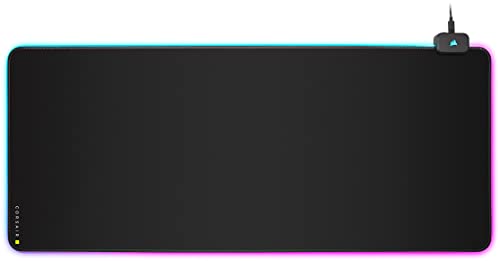
The MM700 RGB Extended fits a desk that doubles as a showpiece. Three-zone RGB lighting runs around the edge and syncs through iCUE, while twelve onboard profiles keep the lighting ready without software. The 930 x 400 mm micro-weave cloth gives a smooth, consistent glide, and a two-port USB hub on the pad connects a mouse dongle or headset without reaching under the desk. The detachable USB-C cable makes the pad easy to move. It is the most feature-rich pad in this roundup, built for players who want light and function in one mat.
Specs
- 930 x 400 x 4 mm (36.6 x 15.8 inches)
- Micro-weave cloth surface
- 360-degree three-zone RGB lighting
- 12 onboard lighting profiles
- 2-port USB hub
- Detachable USB-C cable
- Textured natural rubber base
- iCUE software support
- Model CH-9417070-WW
Best for: players who want RGB lighting and a USB hub on a wide desk pad.
Watch out for: the pad needs a USB connection for the lighting — plan the cable route first.
Which One Fits Your Situation
A plain wide pad for everyday play
Pick the Corsair MM300 Extended. Its wide cloth surface covers keyboard and mouse without extras, and stitched edges plus a rubber base keep it flat through daily use. It suits a desk where the pad should simply work and never draw attention, and its 3 mm height keeps the wrist close to the desk.
A desk where drinks sit close
Pick the ASUS ROG Scabbard II Extended. Its nano-coated cloth resists water, oil and dust, so spills wipe away instead of soaking into the weave. The 900 x 400 mm size still leaves room for wide mouse sweeps, and anti-fray edges hold up where the wrist rests. It suits a shared desk where cups and snacks sit near the keyboard.
Low-sensitivity aim on a big sweep
Pick the Logitech G840 XL. Its tuned cloth offers moderate friction, so the mouse stops where the hand stops during long sweeps. The 900 x 400 mm surface gives a full-size keyboard and a generous aiming area, and the slim 3 mm height keeps the wrist low. It suits players who value steady control over flashy extras.
Light, hub and desk presence
Pick the Corsair MM700 RGB Extended. Its three-zone RGB edge and twelve onboard profiles light the desk, while the two-port USB hub connects a dongle or headset without reaching under the desk. The wide micro-weave surface still tracks smoothly for play. It suits a setup where the pad anchors the whole look of the desk.
Common Mistakes
- Buying a pad without measuring the desk, then finding it hangs over the front edge.
- Picking a slick surface for tactical play, where the mouse slides past the target.
- Ignoring edge stitching, then watching the cloth fray where the wrist rests.
- Placing a monitor stand on the pad, which lifts the surface and breaks tracking.
- Choosing RGB lighting for looks alone, then having no free USB port to power it.
Frequently Asked Questions
What size extended pad fits a standard desk?
A 900 mm wide pad suits most standard desks with a full-size keyboard, leaving room for wide mouse sweeps. Check the desk depth too: a 400 mm deep pad needs a desk at least that deep, while a 300 mm pad fits tighter desks. Measure twice and leave a small margin at the front edge.
Does an extended pad slow the mouse down?
No, the pad itself does not slow the mouse — the surface texture does. A high-friction cloth gives more control for steady aim, while a smooth micro-weave lets the mouse glide fast for flicks. Pick the texture that matches the games played most, and replace worn mouse feet so the glide stays even.
Are stitched edges worth it?
Yes, for a pad used every day. Stitched edges stop the cloth from fraying where the wrist rests and keep the border flat instead of curling up. Unstitched edges can lift and catch a sleeve mid-game. If the pad will see heavy daily use, stitched edges are a simple mark of a longer-lasting mat.
Do I need a USB hub on a mouse pad?
Only when the PC sits far from the desk surface. A hub on the pad connects a mouse dongle or headset without a cable run under the desk, which keeps the setup tidy. If the PC sits on the desk and ports are free, a plain pad works just as well and avoids one more cable.
Related guides
More from Amazon
Programs that pair well with the guide above. Offers and eligibility are set by Amazon and may change.
Free shipping on eligible items, Prime Video and more. Eligible new members can start with a free trial.
Start a Prime free trialAd-free music streaming. Eligible new subscribers can start with a free trial.
Try Music Unlimited freeA Prime membership for ages 18-24 with a trial period. Eligibility is set by Amazon.
See Prime for Young AdultsAudiobooks and podcasts to listen to on the go. Eligible new members can start with a free trial.
Try Audible freeAs an Amazon Associate we earn from qualifying purchases.