A mouse with extra buttons puts abilities, macros, and shortcuts under your thumb instead of spread across the keyboard. For MMO and MOBA players, that can mean a full hotbar within reach at all times. For everyone else, it means push-to-talk, weapon swaps, and everyday shortcuts without lifting a hand from the mouse.
The five mice below all carry well beyond the usual five-button layout, with programmable controls you can remap through the maker’s software. They differ in button count, layout, connection, and weight, so the right pick depends on how many buttons you actually want and how you hold the mouse.
Our Top Picks
 Razer Naga V2 HyperSpeed Wireless MMO Gaming MouseNaga V2 HyperSpeed (Mouse)4.71 x 2.96 x 1.71 inches0.2 poundsCheck on Amazon
 SteelSeries Aerox 9 Wireless Gaming Mouse5.07 x 2.47 inch (Pack of 1)5.07 x 2.47 x 1.05 inches0.2 poundsCheck on Amazon

Top 3 picks at a glance

Quick Picks
| Mouse | Programmable buttons | Connection | Best for |
|---|---|---|---|
| Logitech G600 | 20 | Wired USB | MMO players who want the most controls |
| Redragon M908 Impact | 18 | Wired USB | A budget MMO setup |
| Corsair Scimitar RGB Elite | 17 | Wired USB | An adjustable thumb panel |
| Razer Naga V2 HyperSpeed | 19 | Wireless | Wireless MMO play |
| SteelSeries Aerox 9 Wireless | 18 | Wireless | Lightweight wireless MMO play |
How to Choose
Count the buttons you will actually use. A 12-button thumb grid suits players who map a full hotbar to the mouse, while a mouse with six or seven extra buttons suits players who only need a few macros, push-to-talk, and DPI control. More buttons are not better if the grid feels cramped under your thumb.
Check the layout, not just the number. A 12-button grid works when each button has a distinct shape or position you can find by touch. A sliding side panel, like the one on the Corsair Scimitar RGB Elite, lets you move the grid to match your thumb reach. If you have small hands, look for a compact shell or a panel you can shift forward.
Decide between wired and wireless. Wired mice never need charging and tend to weigh less for the same button count. Wireless mice give you a clean desk and freedom of movement, and modern 2.4 GHz links keep latency low enough for competitive play. Battery life matters most on wireless MMO mice, where a long session can run for hours.
Look at the sensor and polling rate. Any optical sensor in this guide tracks well past the sensitivity most players use, so treat sensor numbers as a baseline rather than a deciding factor. A 1000 Hz polling rate is the norm, and higher polling mainly matters for fast flicks in shooters.
Think about software and profiles. Extra buttons only help if you can program them easily. Each mouse here ships with the maker’s software for remapping, macros, and lighting, and most of them store profiles on the mouse itself, so your setup follows the mouse to another computer.
Mind the weight. Multi-button mice are heavier than plain FPS mice because the thumb panel and extra switches add mass. If you play long sessions, a lighter shell like the 89-gram Aerox 9 Wireless can keep your wrist fresher than a 130-gram-plus brick.
1. Logitech G600 MMO Gaming Mouse

The Logitech G600 is the classic multi-button mouse, and it still leads this group on sheer control count. Twenty programmable buttons include a 12-button thumb panel arranged in two rows of six, and a G-Shift ring-finger button doubles the actions available on every other button. That layout lets an MMO player keep an entire rotation, plus consumables and mounts, under one thumb.
The thumb panel uses a slight dish shape on each button, so you can tell the buttons apart by touch once muscle memory sets in. RGB lighting can be set to show which profile is active, which helps when you switch between games or between a gaming profile and a work profile. The mouse is a full, sculpted right-handed shape built for palm grips, and at 133 grams without the cable it has a planted feel that suits players who rest their whole hand on the shell.
On-board memory stores your profiles on the mouse, so your bindings travel with the mouse. The optical sensor reaches 8,200 DPI, which is more than enough for MMO play at the sensitivity ranges most players use. This is a wired mouse, so there is no battery to manage and no wireless link to think about.
Specs
- Programmable buttons: 20, including a 12-button thumb panel
- G-Shift button: doubles the actions on every other button
- Sensor: optical, up to 8,200 DPI
- Weight: 133 grams without cable
- Dimensions: 118 x 75 x 41 mm
- Lighting: RGB, customizable per profile
- On-board memory: stores profiles on the mouse
- Connection: wired USB
- Model: 910-002864
Best for: MMO players who want the highest button count and a proven layout.
Watch out for: the large, heavy shell suits palm grips and larger hands; claw or fingertip players may find it bulky.
2. Redragon M908 Impact RGB MMO Gaming Mouse
The Redragon M908 Impact brings a full 12-button side panel to a budget-friendly build. Eighteen programmable buttons cover the thumb grid plus the usual top buttons, and five memory profiles let you keep a setup for each game. The Pixart PAW3327 optical sensor reaches up to 12,400 DPI across five adjustable levels, with fine tuning through the software.
A standout feature at this level is the 8-piece weight tuning set, with 2.4-gram weights you can add or remove to change how the mouse feels in the hand. That is a rare option on a mouse built around a thumb grid, and it helps players who like a heavier mouse for steady aiming or a lighter one for fast turns. RGB lighting offers 16.8 million color options and can be turned off entirely.
The M908 is a wired mouse with a 6-foot braided cable, and it runs on Windows for full programming, with basic use on Mac. The shell is right-handed and ergonomic, with a textured grip that keeps the mouse steady during long sessions.
Specs
- Programmable buttons: 18, including 12 side buttons
- Sensor: Pixart PAW3327 optical, up to 12,400 DPI
- DPI levels: 5 adjustable levels (500/1000/2000/3000/6200 DPI)
- Polling rate: 1000 Hz
- Acceleration: 30G
- Weight tuning: 8-piece set, 2.4 g each
- Memory profiles: 5
- Lighting: RGB, 16.8 million colors
- Cable: 6 ft braided USB
- Dimensions: 4.81 x 3.62 x 1.65 inches
- Model: M908
Best for: players who want a full MMO button grid on a modest budget.
Watch out for: the wired-only connection and the heavier feel with all weights installed; try it with fewer weights if it feels sluggish.
3. Corsair Scimitar RGB Elite Wired MMO Gaming Mouse
The Corsair Scimitar RGB Elite solves the most common complaint about 12-button mice: the thumb grid sits in the wrong place. Its Key Slider lets you move the 12-button side panel forward or back, so you can line the grid up with your thumb instead of stretching for it. Seventeen programmable buttons in total cover the panel plus the top controls.
The optical sensor reaches 18,000 DPI, and Omron switches are built for 50 million clicks. On-board profile storage keeps your bindings and lighting on the mouse, and Corsair iCUE software handles remapping, macros, and RGB zones. The shell is contoured for right-handed palm grips, with a textured side grip that keeps the mouse steady when your thumb works the panel.
This is a wired mouse, so it suits players who want a fixed setup with no charging routine. The combination of a movable panel and a high-resolution sensor makes it a strong pick for players who split time between MMOs and other genres.
Specs
- Programmable buttons: 17, including a 12-button side panel
- Key Slider: side panel moves forward or back to match your thumb
- Sensor: optical, up to 18,000 DPI
- Switches: Omron, built for 50 million clicks
- On-board profile storage: yes
- Lighting: dynamic RGB, iCUE compatible
- Connection: wired USB
- Model: CH-9304211-NA
Best for: players whose thumb does not line up with a fixed button grid.
Watch out for: the wired-only design and the full-size shell, which suits medium to large hands better than small ones.
4. Razer Naga V2 HyperSpeed Wireless MMO Gaming Mouse
The Razer Naga V2 HyperSpeed is the wireless pick for players who want a full MMO layout without a cable. Nineteen programmable buttons include a 12-button thumb grid, and the HyperScroll Pro wheel switches between tactile cycling and free-spin scrolling. The Focus Pro 30K optical sensor tracks at up to 30,000 DPI, with smart tracking and motion sync features that keep aim steady at high sensitivity.
Battery life is the headline here: up to 400 hours over Bluetooth and up to 250 hours over HyperSpeed 2.4 GHz wireless. That means weeks of play between charges for most players, and the mouse also works wired over USB-C while charging. Mechanical Mouse Switches Gen-2 handle rapid clicking, and on-board profiles store your bindings on the mouse.
The shell is right-handed and ergonomic, with a 12-button grid that sits under the thumb in a familiar 3-by-4 layout. At 4.71 inches long and 2.96 inches wide, it is a full-size mouse that fills the palm, and the matte finish keeps it from slipping during long raids.
Specs
- Programmable buttons: 19, including a 12-button thumb grid
- Sensor: Razer Focus Pro 30K optical, up to 30,000 DPI
- Scroll wheel: HyperScroll Pro, tactile and free-spin modes
- Switches: Mechanical Mouse Switches Gen-2
- Battery life: up to 400 hours on Bluetooth, up to 250 hours on HyperSpeed wireless
- Connection: HyperSpeed 2.4 GHz wireless, Bluetooth, wired USB-C
- On-board profiles: yes
- Dimensions: 4.71 x 2.96 x 1.71 inches
- Model: RZ01-03600100-R3U1
Best for: MMO players who want a wireless mouse with a very long battery life.
Watch out for: the full-size shell and the weight that comes with a large battery; players with small hands should check the fit first.
5. SteelSeries Aerox 9 Wireless MMO Gaming Mouse
The SteelSeries Aerox 9 Wireless is the lightweight option in this group, and it proves that a multi-button mouse does not have to feel like a brick. At 89 grams, it is far lighter than most MMO mice, thanks to a honeycomb shell that cuts weight while keeping the frame rigid. Eighteen programmable buttons include a 12-button side panel for ability rotations and macros.
The TrueMove Air optical sensor reaches 18,000 DPI with 400 IPS tracking and 40G acceleration, and Quantum 2.0 Wireless pairs a 2.4 GHz link with Bluetooth for use across devices. Battery life runs up to 180 hours, and the mouse charges over a detachable USB-C cable. AquaBarrier protection guards the internals against dust and splashes, and Golden Micro IP54 switches are built for over 80 million clicks.
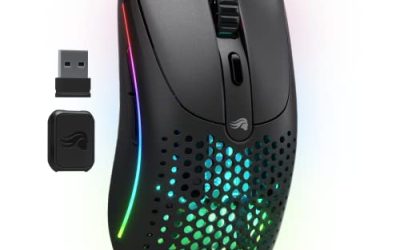
SteelSeries Engine software handles remapping, macros, and PrismSync RGB lighting. The holey shell also lets the RGB glow show through, which gives the mouse a distinct look on the desk. This is the pick for players who want MMO controls in a shell that moves fast.
Specs
- Programmable buttons: 18, including a 12-button side panel
- Sensor: TrueMove Air optical, up to 18,000 DPI
- Tracking: 400 IPS, 40G acceleration
- Weight: 89 g
- Battery life: up to 180 hours
- Connection: Quantum 2.0 Wireless 2.4 GHz, Bluetooth, wired USB-C
- Switches: Golden Micro IP54, built for over 80 million clicks
- Protection: AquaBarrier, IP54 dust and splash resistant
- Lighting: PrismSync RGB
- Model: 62618
Best for: players who want a full button grid in the lightest wireless shell here.
Watch out for: the honeycomb shell is not for everyone; players who dislike open shells should look at the solid-body picks above.
Which One Fits
- Most buttons for the lowest learning curve: the Logitech G600, with 20 programmable buttons and a G-Shift button that doubles every binding.
- Best value MMO grid: the Redragon M908 Impact, with 18 programmable buttons, weight tuning, and five profiles.
- Best adjustable layout: the Corsair Scimitar RGB Elite, whose sliding side panel moves the grid to your thumb.
- Best wireless battery life: the Razer Naga V2 HyperSpeed, with up to 400 hours on Bluetooth and a 30,000 DPI sensor.
- Best lightweight multi-button mouse: the SteelSeries Aerox 9 Wireless, at 89 grams with an 18,000 DPI sensor.
If you play MMOs almost exclusively, pick the mouse whose grid feels best under your thumb and whose weight you can live with for hours. If you split time between genres, favor the picks with a movable panel or a lighter shell, since they adapt better to fast shooters. Wireless players should weigh battery life against weight, since a bigger battery usually means a heavier mouse.
Common Mistakes
Buying for button count alone. A mouse with 19 buttons is only useful if you can reach each button without looking. A grid that fits your thumb beats a bigger grid that forces you to stretch.
Ignoring grip style. Multi-button mice are built for palm grips and right hands. Claw and fingertip players often find the wide thumb panel awkward, and left-handed players should note that every mouse in this guide is right-handed.
Mapping everything on day one. Fill the thumb grid slowly, a few buttons at a time, and let muscle memory build. Players who map a full hotbar at once often fumble in fights and blame the mouse.
Forgetting on-board profiles. If you play on more than one computer, save your bindings to the mouse itself. Otherwise you will rebuild your setup every time you switch machines.
Overlooking weight. A heavy multi-button mouse can tire your wrist in long sessions. If you feel fatigue after an hour, try removing tuning weights or switching to a lighter shell like the Aerox 9 Wireless.
Frequently Asked Questions
How many extra buttons do I really need for gaming?
Most players use between six and twelve extra buttons. A 12-button thumb grid suits MMO and MOBA players who map a full hotbar, while players who only need push-to-talk, a few macros, and DPI control can do well with fewer buttons. Begin with the controls you use every session and add more only when you have a clear use for them.
Are MMO mice with extra buttons good for FPS games?
They can work, but the wide thumb panel and extra weight make fast flicks harder than on a plain FPS mouse. If you split time between genres, look for a lighter shell, a movable side panel, or a mouse with swappable plates. Players who play shooters most of the time are usually happier with a dedicated FPS mouse and a separate MMO mouse.
Do wireless multi-button mice lag in competitive play?
Modern 2.4 GHz wireless links keep latency low enough for competitive play, and the wireless mice in this guide use the same class of link as top FPS mice. Bluetooth mode adds latency and suits casual play or work better than ranked matches, so use the 2.4 GHz dongle when it matters.
Can I use a gaming mouse with extra buttons for work and everyday tasks?
Yes, and many players do. Extra buttons map well to copy and paste, browser navigation, media controls, and app shortcuts, and the on-board profiles let you keep a work setup apart from your gaming setup. A lighter wireless model like the Aerox 9 Wireless or the Naga V2 HyperSpeed works well as a daily driver.
As an Amazon Associate, we earn from qualifying purchases.
Related guides
More from Amazon
Programs that pair well with the guide above. Offers and eligibility are set by Amazon and may change.
Free shipping on eligible items, Prime Video and more. Eligible new members can start with a free trial.
Start a Prime free trialAd-free music streaming. Eligible new subscribers can start with a free trial.
Try Music Unlimited freeA Prime membership for ages 18-24 with a trial period. Eligibility is set by Amazon.
See Prime for Young AdultsAudiobooks and podcasts to listen to on the go. Eligible new members can start with a free trial.
Try Audible freeAs an Amazon Associate we earn from qualifying purchases.