A Bluetooth gaming mouse changes the way a desk is set up. There is no receiver to keep track of, no USB port taken up by a dongle, and no cable dragging across a mousepad. A laptop, a tablet, a desktop, and a living-room PC can all pair with the same mouse, and switching between them is a matter of changing the active Bluetooth connection rather than moving hardware from one machine to another. For players who travel, work from a laptop during the day and game at night, or simply want a cleaner desk, that flexibility is the main attraction.
The trade-off is latency and polling behaviour. Bluetooth is designed for broad compatibility and low power use, not for the fastest possible input reporting. Most dual-mode gaming mice therefore pair Bluetooth with a dedicated 2.4 GHz wireless mode for competitive play, and the choice between the two modes matters more than any single sensor number.
Our top pick: Razer Orochi V2. Runner-up: SteelSeries Aerox 3 Wireless. This guide compares published specifications only: Bluetooth version and dual-mode connectivity, sensor resolution and tracking speed, polling rate, weight and shape, button count and switch durability, battery type and battery life, software, and multi-device pairing behaviour.
Our Top Picks
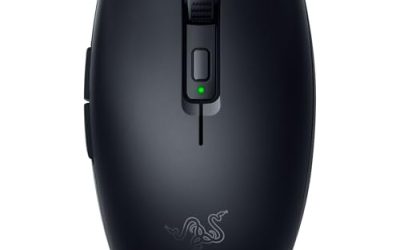
 Razer Orochi V2 Wireless Gaming Mouse4.26 x 1.52 inch (Pack of 1)4.26 x 1.52 x 2.47 inches0.13 poundsCheck on Amazon

Top 3 picks at a glance

At a Glance
| Product | Best for | Key specification |
|---|---|---|
| Razer Orochi V2 | Travel and multi-device play | Bluetooth and HyperSpeed wireless, 18,000 DPI sensor, under 60 g |
| SteelSeries Aerox 3 Wireless | Lightweight play with long Bluetooth battery life | Bluetooth 5.0 and 2.4 GHz wireless, 18,000 CPI sensor, 66 g |
| Logitech G705 Wireless Gaming Mouse | Smaller hands and a compact, contoured shape | Bluetooth and LIGHTSPEED wireless, 8,200 DPI sensor, 85 g |
| Corsair Katar Pro Wireless | Compact claw and fingertip grips | Bluetooth and Slipstream wireless, 10,000 DPI sensor, 96 g |
How to Choose
1. Decide how Bluetooth fits into your setup
Start by deciding whether Bluetooth will be the main connection or a secondary one. If the mouse will live on a laptop with limited USB ports, or move between a work laptop and a gaming desktop, Bluetooth is the connection that makes that routine practical. If the mouse will stay on one gaming desktop, a 2.4 GHz receiver may be the main link and Bluetooth may serve as the backup for a second machine. Every mouse in this guide has both Bluetooth and a dedicated 2.4 GHz mode, so the question is not whether Bluetooth is present, but how often it will be used and for which games.
2. Understand Bluetooth latency and polling
Bluetooth connections generally report movement less often than a dedicated 2.4 GHz gaming link, and that difference is felt most in fast first-person shooters, where small delays in aiming and flicking become visible. A 2.4 GHz mode with a 1,000 Hz polling rate reports position one thousand times per second, while Bluetooth polling is lower and varies with the host device. The practical approach is to use Bluetooth for strategy games, role-playing games, casual play, browsing, and work, and to switch to the 2.4 GHz mode for ranked matches and reaction-heavy genres.
3. Check the Bluetooth version
The Bluetooth version stated on a listing affects pairing behaviour, power use, and stability. Bluetooth 5.0 and later versions generally pair more reliably, reconnect faster after sleep, and use less power than older versions, which matters on a battery-powered mouse. A mouse that lists Bluetooth 5.0 will still pair with a host that supports an earlier version, but it will operate at the capability of the older side of the connection.
4. Compare sensor resolution in context
Sensor resolution, stated in DPI or CPI, describes how far the cursor moves for a given physical movement of the mouse. The mice in this guide range from 8,200 DPI to 18,000 DPI, and all of them cover the sensitivity settings most players actually use, which sit far below the maximum figure. More important than the headline number are the tracking speed, stated in inches per second, and the acceleration rating, stated in G, because those figures describe whether the sensor keeps tracking accurately during fast flicks. A sensor rated at 400 inches per second and 40 G will hold tracking through movements that are faster than most hands can produce, while a lower tracking speed can lose accuracy during the same motion. Choose a sensor that covers your sensitivity and your hand speed, not the largest number on the box.
5. Weigh the mouse against your grip and hand size
Weight changes how a mouse feels during long sessions and how quickly it can be repositioned. The lightest mouse in this guide is under 60 g, the heaviest is 96 g, and that gap is large enough to feel immediately when switching between them. Lighter mice suit fingertip and claw grips and fast, low-sensitivity aiming, where the hand lifts and repositions the mouse often. Heavier mice can feel steadier for palm grips and high-sensitivity play, where the hand rests on the shell and moves it in smaller arcs. Shape matters as much as weight: a compact, low-profile shell suits smaller hands, while a taller, ergonomic shell supports a full palm. Measure your hand, compare it with the stated dimensions, and favour a shape that matches your grip before chasing a lower weight.
6. Count buttons and check switch durability
Six programmable buttons is the common layout in this guide, and that count covers the left and right clicks, the scroll-wheel click, a DPI switch, and two side buttons. That layout is enough for weapon switching, ability shortcuts, push-to-talk, and DPI changes without reaching for the keyboard. Switch durability, stated as a click rating, describes how many clicks the main switches are rated for before wear becomes a factor. Ratings in this guide range from 30 million to 80 million clicks, and a higher rating generally indicates a switch built for longer service. Check whether the side buttons sit on the left side only, which suits right-handed players, and whether the DPI button is placed where it can be reached without changing grip.
7. Compare battery type and battery life by mode
Battery behaviour is where Bluetooth and 2.4 GHz modes diverge most clearly. Bluetooth mode almost always lasts longer, because it reports less often and uses less power, while the 2.4 GHz mode drains the battery faster in exchange for lower latency. The mice in this guide state Bluetooth battery life from 135 hours to 950 hours, depending on the model and the battery type. Replaceable AA or AAA batteries suit travel, because a fresh cell restores full use without a cable, while a built-in rechargeable battery suits a fixed desk, where a USB-C cable can top the mouse up between sessions.
8. Look at software, pairing, and multi-device switching
Companion software controls DPI steps, polling rate, button assignments, lighting, and power settings, and the four mice in this guide each use a different application. A mouse that stores settings in onboard memory keeps its DPI and button assignments when moved to a machine without the software installed, which matters for a multi-device Bluetooth mouse. Pairing behaviour also matters: some mice pair with several Bluetooth hosts and switch between them with a button on the underside, while others pair with one Bluetooth host at a time and need to be re-paired when moving to a new machine.
Our Picks
Razer Orochi V2 — ASIN B0916N2LPZ
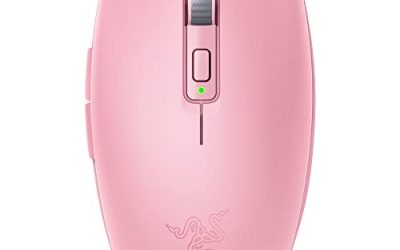
The Razer Orochi V2 is a compact, ambidextrous wireless gaming mouse with Bluetooth and Razer HyperSpeed Wireless modes, an 18,000 DPI Razer 5G Advanced optical sensor, and a stated weight of under 60 g without its battery. Its sensor is rated for 450 inches per second of tracking speed and 40 G acceleration, its mechanical switches are rated for 60 million clicks, and it has six programmable buttons with side buttons arranged for right-handed use. Battery life is stated at up to 950 hours in Bluetooth mode and up to 425 hours in HyperSpeed Wireless mode, and the mouse runs on a single AA or AAA battery, which makes it easy to keep going while travelling.
Best for: Travel, small desks, and players who switch between a laptop and a desktop and want the longest stated Bluetooth battery life in this guide.
Consideration: The compact shell suits claw and fingertip grips and smaller hands, and palm-grip players with larger hands may find it short. The mouse has no RGB lighting, and its battery is a replaceable cell rather than a built-in rechargeable pack.
SteelSeries Aerox 3 Wireless — ASIN B08KWKDRFF
The SteelSeries Aerox 3 Wireless is a 66 g wireless gaming mouse with Bluetooth 5.0 and 2.4 GHz Quantum 2.0 Wireless connectivity, an 18,000 CPI TrueMove Air optical sensor, and a perforated shell with AquaBarrier protection rated to IP54. Its sensor is rated for 400 inches per second and 40 G acceleration, its polling rate is 1,000 Hz, and it has six programmable buttons with Golden Micro IP54 switches. Battery life is stated at up to 200 hours in Bluetooth mode and up to 80 hours in 2.4 GHz mode, and the mouse charges over USB-C, with fast charging stated to restore a useful amount of use from a short charge.
Best for: Players who want a very light mouse with a long Bluetooth battery life, a perforated shell, and splash resistance for a desk that sees drinks and everyday use.
Consideration: The perforated shell and right-handed ergonomic shape suit claw and fingertip grips, and the 2.4 GHz battery life is shorter than the Bluetooth figure, so competitive sessions drain the battery faster.
Logitech G705 Wireless Gaming Mouse — ASIN B08V1JWV82
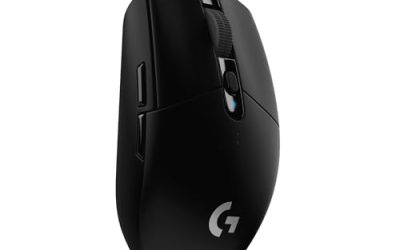
The Logitech G705 Wireless Gaming Mouse is a compact, contoured wireless mouse from the Aurora Collection, with Bluetooth and LIGHTSPEED wireless connectivity, a gaming-grade optical sensor rated up to 8,200 DPI, and a stated weight of 85 g. It has six programmable buttons, LIGHTSYNC RGB lighting, and a rechargeable battery charged over USB-C, and it is designed for smaller hands, with a sculpted shape that supports the palm without forcing the fingers to stretch. The mouse connects through a LIGHTSPEED receiver for low-latency play or over Bluetooth for pairing with laptops and other devices, and its settings are managed through Logitech G HUB software.
Best for: Smaller hands, players who want a contoured, comfortable shape with RGB lighting, and anyone who pairs a gaming mouse with a laptop for both work and play.
Consideration: The sensor ceiling of 8,200 DPI is lower than the other mice in this guide, although it covers the sensitivity settings most players use. The 85 g weight is heavier than the lightest models here, and the compact shape may feel small for larger hands.
Corsair Katar Pro Wireless — ASIN B08JDVR3GZ
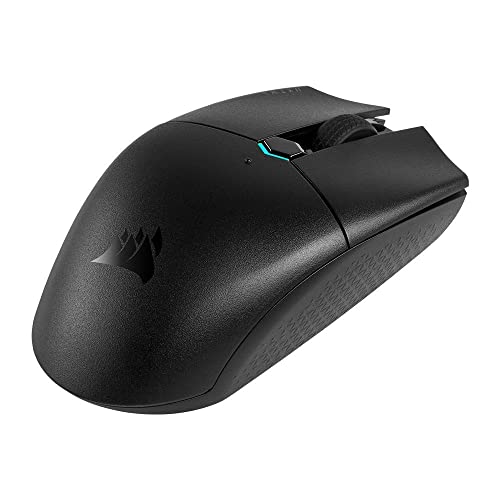
The Corsair Katar Pro Wireless is a compact, symmetric wireless gaming mouse with sub-1 ms Slipstream Wireless and low-latency Bluetooth connectivity, a 10,000 DPI PixArt PMW3325 optical sensor, and a stated weight of 96 g including its battery. It has six programmable buttons, switches rated for 30 million clicks, a polling rate selectable up to 1,000 Hz, and a compact shape designed for claw and fingertip grips. A single AA battery is stated to deliver up to 135 hours of use, and the mouse is managed through Corsair iCUE software, which controls DPI steps, button assignments, and lighting.
Best for: Claw and fingertip players who want a simple, compact, symmetric mouse with a replaceable AA battery and a straightforward six-button layout.
Consideration: At 96 g it is the heaviest mouse in this guide, and its 10,000 DPI sensor ceiling and 30 million click rating are lower than the other models here. It has no wired mode, so a lost receiver leaves Bluetooth as the only wireless link.
Which One Is Right for You?
Choose the Razer Orochi V2 if travel, multi-device switching, and the longest stated Bluetooth battery life matter most, and a compact shell suits your grip. Choose the SteelSeries Aerox 3 Wireless if you want the lightest feel with a high-resolution sensor, a perforated shell, and splash resistance, and you are comfortable charging over USB-C. Choose the Logitech G705 Wireless Gaming Mouse if you have smaller hands and want a contoured shape with RGB lighting and a rechargeable battery. Choose the Corsair Katar Pro Wireless if you prefer a compact, symmetric shell for claw or fingertip play, a replaceable AA battery, and a simple six-button layout. For competitive play, use the 2.4 GHz mode on any of these mice, and keep Bluetooth for work, casual play, and second devices.
Frequently Asked Questions
Is Bluetooth fast enough for gaming?
Bluetooth is fast enough for strategy games, role-playing games, casual play, and most single-player games, where input timing is less critical. For fast first-person shooters and ranked competitive play, the dedicated 2.4 GHz mode on a dual-mode mouse reports movement more often and with lower latency, so it is the better choice for those genres. The mice in this guide all have both modes, so the practical setup is Bluetooth for everyday use and 2.4 GHz for competitive sessions.
Can a Bluetooth gaming mouse pair with more than one device?
It depends on the model. Some Bluetooth mice store several pairings and switch between hosts with a button on the underside, while others pair with one Bluetooth host at a time and need to be re-paired when moving to a new machine. Check the listing for the number of Bluetooth pairings and the location of the mode switch before buying.
Does Bluetooth drain the battery faster than 2.4 GHz wireless?
No, Bluetooth generally uses less power than a dedicated 2.4 GHz gaming link, because it reports movement less often. The mice in this guide state longer battery life in Bluetooth mode than in 2.4 GHz mode, with the gap ranging from a modest difference to several hundred hours on the longest-lasting model.
What DPI should I use on a Bluetooth gaming mouse?
Most players use a DPI setting between 400 and 3,200, combined with an in-game sensitivity setting, and the mice in this guide all cover that range with room to spare. A higher DPI is not automatically more accurate, and very high DPI settings can make the cursor hard to control. Start at 800 or 1,600 DPI, adjust the in-game sensitivity to taste, and change the DPI in small steps until aiming feels stable and flicks land where expected.
Will a Bluetooth gaming mouse work with a laptop, tablet, or console?
A Bluetooth gaming mouse pairs with any host that supports Bluetooth mice, including most laptops, tablets, and desktop PCs, and the mice in this guide list PC and Mac compatibility. Some tablets and consoles support Bluetooth mice for menus and certain games, while others do not, so check the host device and the game for mouse support before relying on it.
Do I need the companion software to use a Bluetooth gaming mouse?
No, a Bluetooth gaming mouse works as a standard pointing device without its companion software, with default DPI steps and button assignments. The software is needed to change DPI steps, reassign buttons, adjust polling rate, control lighting, and update firmware, and some mice store those settings in onboard memory so they carry over to machines without the software.
Bottom Line
The best bluetooth gaming mouse is the one whose Bluetooth behaviour, weight, shape, and battery type match how it will actually be used. The Razer Orochi V2 leads this guide on stated Bluetooth battery life and travel-friendly size, the SteelSeries Aerox 3 Wireless leads on light weight and sensor resolution, the Logitech G705 Wireless Gaming Mouse suits smaller hands with a contoured shape, and the Corsair Katar Pro Wireless suits compact claw and fingertip grips with a replaceable battery. Pick the shape and connection behaviour first, use Bluetooth for everyday and multi-device play, and switch to the 2.4 GHz mode when latency matters most.
Disclosure: As an Amazon Associate, this site earns from qualifying purchases.
Related guides
More from Amazon
Programs that pair well with the guide above. Offers and eligibility are set by Amazon and may change.
Free shipping on eligible items, Prime Video and more. Eligible new members can start with a free trial.
Start a Prime free trialAd-free music streaming. Eligible new subscribers can start with a free trial.
Try Music Unlimited freeA Prime membership for ages 18-24 with a trial period. Eligibility is set by Amazon.
See Prime for Young AdultsAudiobooks and podcasts to listen to on the go. Eligible new members can start with a free trial.
Try Audible freeAs an Amazon Associate we earn from qualifying purchases.