A budget-tier gaming mouse does not have to feel like a compromise. The mice in this guide keep the core features that define a gaming mouse: an optical sensor with adjustable sensitivity, programmable buttons, a polling rate built for fast input, and a shape made for long sessions. What the budget tier usually gives up is found at the edges of the specification sheet: a lower maximum DPI ceiling, simpler lighting, fewer programmable buttons, a heavier shell, or a wired connection instead of a wireless one. None of those trade-offs automatically makes a mouse a poor fit, because the right choice depends on your grip, your hand size, the games you play, and whether you want a cable on your desk at all.
That is why comparing published specifications side by side matters more than chasing a single headline number. A mouse with a very high DPI ceiling is not automatically the most comfortable mouse for a palm grip, and a very light mouse is not automatically the most stable mouse for a player who rests a full hand on the shell. A wired mouse removes battery management entirely, while a wireless mouse removes cable drag and gives you a cleaner desk. A mouse with seven programmable buttons gives a MOBA or MMO player more room for macros and shortcuts, while a mouse with five buttons can be simpler to learn and harder to press by accident.
Our top pick: Logitech G305 LIGHTSPEED Wireless Gaming Mouse. Runner-up: Logitech G203 LIGHTSYNC Wired Gaming Mouse. This guide compares published specifications only: sensor sensitivity and maximum DPI, connection type and report rate, weight and dimensions, programmable buttons, switch durability, cable and battery details, onboard memory, lighting, and grip shape.
Our Top Picks


Top 3 picks at a glance

At a Glance
| Product | Best for | Key specification |
|---|---|---|
| Logitech G305 LIGHTSPEED Wireless Gaming Mouse | Wireless play with long battery life | HERO sensor up to 12,000 DPI, 99 grams, 250 hours on a single AA battery |
| Logitech G203 LIGHTSYNC Wired Gaming Mouse | RGB lighting and a light wired design | 8,000 DPI sensor, 6 programmable buttons, LIGHTSYNC RGB lighting |
| Razer DeathAdder Essential Gaming Mouse | Large right-handed ergonomic shape | 6,400 DPI optical sensor, 5 programmable buttons, switches rated for up to 10 million clicks |
| Redragon M711 Cobra Gaming Mouse | Extra buttons and bold RGB lighting | 10,000 DPI sensor, 7 programmable buttons, 16.8 million RGB colors |
How to Choose
1. Start with grip and shape, not DPI
Grip style decides comfort before any sensor number does. A palm grip rests the whole hand on the shell and suits a taller, longer mouse. A claw grip arches the fingers and suits a medium-length mouse with a defined hump toward the rear. A fingertip grip touches the mouse only with the fingertips and suits a shorter, lighter shell. Measure your hand from the wrist crease to the tip of the middle finger, then compare that length with the published length and width of each mouse. A mouse that is too long forces the fingers to stretch, while a mouse that is too short leaves the palm unsupported. The DeathAdder Essential is the clearest example here of a right-handed ergonomic shape made for palm and claw grips, while the G305 and G203 use more compact, symmetrical shells.
2. Read the sensor specification in full
Maximum DPI is only one part of a sensor specification. Look also for the sensor name, the tracking speed in inches per second, and the acceleration rating when the listing states them. A HERO sensor in the G305 lists up to 12,000 DPI with tracking above 400 inches per second, which covers fast flicks in first-person shooters. The Redragon M711 Cobra lists up to 10,000 DPI with adjustable steps from 100 DPI upward. The G203 lists up to 8,000 DPI, and the DeathAdder Essential lists a true 6,400 DPI optical sensor. All four ceilings sit well above the sensitivity most players actually use, which is often between 400 and 3,200 DPI, so treat the ceiling as headroom rather than as a ranking. What matters more is whether the sensor tracks cleanly at your chosen DPI and whether a dedicated DPI button lets you change sensitivity without opening software.
3. Decide between wired and wireless
A wired mouse draws power through its cable, so there is no battery to charge or replace and no wireless receiver to keep track of. The trade-off is cable drag, which can pull against fast movements. The G203, the DeathAdder Essential, and the M711 Cobra are wired mice, and the M711 Cobra adds a braided-fiber cable for extra durability. A wireless mouse removes the cable entirely, but it adds battery management and a receiver that needs a USB port. The G305 uses LIGHTSPEED wireless with a stated 1 millisecond report rate and a single AA battery rated for up to 250 hours of play. It also includes built-in storage for the USB wireless receiver inside the mouse. If you play mainly at one desk and want the simplest setup, a wired mouse is a sound fit. If you want a clean desk and freedom of movement, the wireless option here is the one to compare first.
4. Weigh the mouse, literally
Weight changes how a mouse feels during fast flicks and extended sessions. A lighter mouse needs less force to start and stop, which can help in aim-heavy games. A heavier mouse can feel more planted for players who prefer slow, deliberate movements. The G305 lists a weight of 99 grams, which is light for a wireless mouse that runs on a replaceable AA battery. The DeathAdder Essential lists approximately 96 grams excluding the cable, which is light for a full-size ergonomic mouse. The M711 Cobra lists a larger shell at 5.0 by 2.6 by 1.6 inches, which suits players who want a fuller grip. Always read weight with the cable or battery included in mind, because a listing may state weight with or without those parts.
5. Count the buttons and check what they can do
Programmable buttons turn a mouse into a control surface for more than aiming and clicking. Two side buttons cover forward and back in a browser or a quick weapon switch in a shooter. Extra top buttons cover DPI changes, lighting changes, or a push-to-talk key. The G203 and the G305 each list 6 programmable buttons, which is enough for the primary clicks, the scroll-wheel click, two side buttons, and a DPI button. The DeathAdder Essential lists 5 programmable buttons, which keeps the layout simple. The M711 Cobra lists 7 programmable buttons, which gives MOBA and MMO players more room for abilities, items, and macros. Check also whether the mouse software lets you remap each button and create macros. Onboard memory matters here: a mouse with onboard memory stores a profile on the device itself, so your button assignments and DPI steps travel with the mouse to another computer.
6. Look at switches, polling rate, and cable or battery details
Switches decide how a click feels and how long the primary buttons are rated to last. The DeathAdder Essential lists mechanical switches rated for up to 10 million clicks. Polling rate decides how often the mouse reports its position to the computer, and a 1,000 Hz polling rate, which the M711 Cobra lists, reports position one thousand times per second. The G305 lists a 1 millisecond report rate through LIGHTSPEED wireless. Cable details also matter for wired mice: a braided cable resists tangling and wear, while a rubber cable is lighter and more flexible. Battery details matter just as much for wireless mice: a replaceable AA battery can be swapped in seconds. Read these details together, because a strong sensor paired with a stiff cable or a short battery life can still feel awkward in daily use.
7. Treat lighting as a feature, not a performance metric
RGB lighting changes how a mouse looks on a desk, and it can also serve as a visual cue for DPI level or profile. The G203 uses LIGHTSYNC RGB lighting with a rainbow effect across the light strip and logo, and the listing states that the lighting can be customized through Logitech G HUB software. The M711 Cobra lists 16.8 million RGB colors with multiple lighting modes. The DeathAdder Essential uses a single-color green LED for the scroll wheel and logo, which is simpler and draws less attention in a shared room. The G305 has no RGB lighting in its published specification, which helps explain its long battery life. None of these lighting choices changes tracking accuracy, so choose lighting based on your desk setup and your preference for a bright or a plain look.
8. Match the mouse to your games and your desk
Different games reward different layouts. A first-person shooter rewards a light mouse, a clean sensor, and a reliable primary click. A MOBA or MMO rewards extra programmable buttons and onboard profiles for abilities and macros. A strategy game rewards a comfortable ergonomic shape for long sessions. Your desk matters too: a small desk rewards a compact mouse and a wireless connection, while a large desk rewards a larger ergonomic mouse with a longer cable. Check the published dimensions against your hand and the connection type against your available USB ports.
Our Picks
Logitech G305 LIGHTSPEED Wireless Gaming Mouse — ASIN B07CMS5Q6P
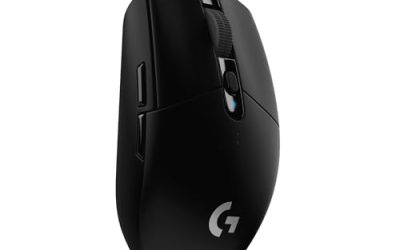
The Logitech G305 LIGHTSPEED Wireless Gaming Mouse is a budget-tier wireless mouse built around the HERO sensor with sensitivity from 200 to 12,000 DPI and tracking above 400 inches per second. LIGHTSPEED wireless lists a 1 millisecond report rate, and the mouse runs for up to 250 hours of continuous play on a single AA battery. The shell weighs 99 grams and includes built-in storage for the USB wireless receiver, plus 6 programmable buttons and onboard memory through Logitech G HUB software.
Best for: players who want wireless freedom, long battery life, and a light, compact shell for FPS and everyday play.
Consideration: it has no RGB lighting in its published specification, and it runs on a replaceable AA battery rather than a built-in rechargeable cell.
Logitech G203 LIGHTSYNC Wired Gaming Mouse — ASIN B07YN82X3B
The Logitech G203 LIGHTSYNC Wired Gaming Mouse is a budget-tier wired mouse with an 8,000 DPI sensor, 6 programmable buttons, and LIGHTSYNC RGB lighting with a rainbow optical effect. The listing states on-board memory and screen mapping through Logitech G HUB software, so DPI settings and button assignments can be stored on the device. The classic symmetrical shape suits palm, claw, and fingertip grips.
Best for: players who want RGB lighting, a light wired mouse, and onboard memory at a budget-tier position.
Consideration: it is wired only, so cable placement and cable drag need attention on a small desk.
Razer DeathAdder Essential Gaming Mouse — ASIN B07F7T8J9P
The Razer DeathAdder Essential Gaming Mouse is a budget-tier wired mouse with a true 6,400 DPI optical sensor, 5 programmable buttons, and a right-handed ergonomic shape with rubber side grips. Razer lists mechanical switches rated for up to 10 million clicks, a maximum tracking speed of up to 220 inches per second, and acceleration up to 30 G. The mouse measures approximately 127 mm long by 61.7 mm wide by 42.7 mm high, weighs approximately 96 grams excluding the cable, and connects through a 1.8 m wired cable.
Best for: players with medium to large hands who want a full-size ergonomic palm-grip mouse with a proven shape.
Consideration: the listing states no onboard memory, so settings are managed through Razer Synapse software rather than stored on the device.
Redragon M711 Cobra Gaming Mouse — ASIN B0751D11BL

The Redragon M711 Cobra Gaming Mouse is a budget-tier wired mouse with a 10,000 DPI optical sensor, 7 programmable buttons, and 16.8 million RGB colors. The listing states adjustable DPI from 100 to 10,000, five DPI levels, a 1,000 Hz polling rate, and a PixArt PMW3325 sensor. The shell measures 5.0 by 2.6 by 1.6 inches and connects through a 1.8 m braided-fiber cable.
Best for: MOBA and MMO players who want extra programmable buttons, bold RGB lighting, and a fuller shell.
Consideration: the larger shell may feel wide for small hands, and the software download is separate from the hardware in the box.
Which One Is Right for You?
Choose the Logitech G305 LIGHTSPEED if you want wireless play and the longest battery life in this guide, with a light shell that suits fast aim. Choose the Logitech G203 LIGHTSYNC if you want a wired mouse with RGB lighting and onboard memory, and you prefer a simple setup with no battery to manage. Choose the Razer DeathAdder Essential if you have a medium to large hand and want a full-size right-handed ergonomic shape with rubber side grips. Choose the Redragon M711 Cobra if you play MOBA or MMO games and want seven programmable buttons, a high DPI ceiling, and strong RGB lighting in a fuller shell.
Frequently Asked Questions
What DPI should I use on a budget gaming mouse?
Most players use a sensitivity between 400 and 3,200 DPI, with a lower setting for precise aiming in first-person shooters and a higher setting for fast turns and desktop work. All four mice here list maximum DPI ceilings well above that range, so the ceiling itself is less important than whether the mouse lets you switch between useful DPI steps quickly. Use the dedicated DPI button or the software to set two or three levels you actually use.
Is a wireless gaming mouse fast enough for competitive play?
A wireless mouse with a published 1 millisecond report rate, such as the Logitech G305 LIGHTSPEED in this guide, is specified to report position as often as a wired mouse. The practical difference is battery management and receiver placement rather than input speed. Keep the receiver close to the mouse and keep a spare AA battery nearby. If you prefer no battery management at all, a wired mouse removes that step entirely.
Do I need RGB lighting on a gaming mouse?
No, RGB lighting does not change sensor accuracy, polling rate, or click response. It changes how the mouse looks and can serve as a visual cue for a DPI level or profile. The G203 and the M711 Cobra include full RGB lighting, the DeathAdder Essential uses a single-color green LED, and the G305 has no RGB lighting in its published specification. Choose lighting based on your preference for a bright or plain look, not based on performance.
How many programmable buttons do I need?
Five programmable buttons cover the primary clicks, the scroll-wheel click, and two side buttons, which is enough for most shooters and everyday use. Six buttons add a DPI button or an extra shortcut. Seven buttons, as listed for the M711 Cobra, give MOBA and MMO players room for abilities, items, and macros. More buttons help only if you can reach each one without shifting your grip, so check the button layout against your hand size before you choose.
What is onboard memory, and why does it matter?
Onboard memory stores DPI settings, button assignments, and lighting profiles on the mouse itself, so those settings travel with the mouse to another computer. The G203 and the G305 list onboard memory in their published specifications, while the DeathAdder Essential listing states no onboard memory and relies on Razer Synapse software. If you play on more than one computer, onboard memory makes switching simpler. If you play on one computer only, software profiles work just as well.
Can a budget gaming mouse work for everyday computer use?
Yes, all four mice in this guide work for everyday computer use as well as gaming, because they connect through standard USB or a USB wireless receiver. The programmable buttons can be assigned to browser forward and back, copy and paste, or media controls, and the DPI button lets you switch to a higher sensitivity for large monitors and a lower sensitivity for detailed work. A comfortable grip matters just as much for a long work session as it does for a long gaming session, so choose the shape that fits your hand first.
Bottom Line
The best affordable gaming mouse is the one that fits your hand, your games, and your desk, with a sensor and button layout that match how you play. The Logitech G305 LIGHTSPEED leads this guide for wireless freedom and long battery life, the Logitech G203 LIGHTSYNC is the runner-up for RGB lighting and onboard memory in a wired design, the Razer DeathAdder Essential suits large right-handed ergonomic grips, and the Redragon M711 Cobra suits players who want extra buttons and bold lighting. Compare the published specifications in the table above and check the dimensions against your hand before you choose.
Disclosure: As an Amazon Associate, this site earns from qualifying purchases.
Related guides
More from Amazon
Programs that pair well with the guide above. Offers and eligibility are set by Amazon and may change.
Free shipping on eligible items, Prime Video and more. Eligible new members can start with a free trial.
Start a Prime free trialAd-free music streaming. Eligible new subscribers can start with a free trial.
Try Music Unlimited freeA Prime membership for ages 18-24 with a trial period. Eligibility is set by Amazon.
See Prime for Young AdultsAudiobooks and podcasts to listen to on the go. Eligible new members can start with a free trial.
Try Audible freeAs an Amazon Associate we earn from qualifying purchases.