The Glorious GMMK 3 Rapid Trigger 75% is the best overall Glorious gaming keyboard on this list for competitive players: it combines Hall effect switches, Rapid Trigger, an 8K polling rate and a hot-swappable gasket-mounted body in a compact layout. If you prefer a conventional mechanical board you can mod, the standard GMMK 3 75% with a knob is the better fit. Glorious is a keyboard brand known for hot-swappable, customizable boards, and every board here lets you change switches without soldering.
Our Top Picks
Top 3 picks at a glance
Quick List
- GMMK 3 75% with Knob – best for a customizable mechanical board with a modular gasket system
- GMMK 2 65% (listed as TKL) – best for a compact, hot-swappable board with a classic tray-mount feel
- GMMK 3 Rapid Trigger 75% – best overall for competitive play with adjustable Hall effect switches
- GMMK 3 Rapid Trigger 100% – best for Hall effect speed with a full-size layout and number pad
- Glorious Keyboard Wrist Rest (Compact) – best as a comfort add-on, not a keyboard (runner-up)
- GMMK 3 Barebones 75% – best for builders who want to bring their own switches
Which One Is Right for You?
| If you… | Choose |
|---|---|
| play fast shooters or rhythm games and want adjustable actuation and Rapid Trigger | GMMK 3 Rapid Trigger 75% |
| need a number pad along with Hall effect switches | GMMK 3 Rapid Trigger 100% |
| want a mechanical board you can tune with plates and gaskets | GMMK 3 75% with Knob |
| want to pick your own switches from scratch | GMMK 3 Barebones 75% |
| want a compact, wired board that is simple to mod | GMMK 2 65% |
| already own a keyboard and want more wrist comfort | Glorious Keyboard Wrist Rest (Compact) |
The decision splits into three paths: Hall effect speed (Rapid Trigger models), classic mechanical customization (standard GMMK 3 and barebones) and a smaller, simpler board (GMMK 2). The wrist rest is an accessory, so treat it as an add-on rather than a keyboard choice.
All 6 Picks in Detail
1. Glorious GMMK 3 75% with Knob – Best for a Customizable Mechanical Board
As an Amazon Associate we earn from qualifying purchases at no extra cost to you.

The standard GMMK 3 is the mechanical version of Glorious’ modular 75% board, with a rotary knob, a modular gasket system and doubleshot PBT keycaps in the listing name. It suits typists and gamers who want a tunable feel without going fully custom.
Think of this as the tinkerer’s all-rounder. The knob and modular gasket system let you change plates and gaskets over time, and PBT keycaps are less prone to shine than ABS. Its mechanical switches register at a fixed depth, so it lacks the adjustable actuation of the Hall effect models. If you want to type comfortably and game casually, the feel you get from swapping switches can matter more than a speed feature.
Who should skip it: competitive players who want adjustable actuation and Rapid Trigger, and anyone who needs a wireless board without checking the exact version on the listing.
- 75% layout, hot-swappable switch sockets (5-pin, MX style)
- Modular gasket system with swappable plates and gaskets, per Glorious
- Doubleshot PBT keycaps
- Rotary knob; per-key RGB lighting according to Glorious
- Connectivity and polling rate: wired; confirm on listing; warranty is typically 2 years
Pros
- Highly modifiable with swappable parts
- PBT keycaps resist shine
Cons
- No Hall effect or Rapid Trigger on this version
- Body material is plastic on the standard model, per published reviews
Compared with the GMMK 3 Rapid Trigger 75%, it is the better choice for typing feel and the worse one for competitive speed.
2. Glorious GMMK 2 65% (Listed as TKL) – Best for a Compact, Simple Board

The listing name says both “TKL” and “65%,” which is confusing. The GMMK 2 in this form is a compact 65% board with hot-swap sockets, Cherry MX-style switches and doubleshot keycaps. Confirm the layout on the listing before you buy. It suits small desks and builders who want an easy entry to switch swapping.
Because the listing calls it both TKL and 65%, treat the pictures and key count as the final word. A 65% board has about 67 keys with arrow keys but no function row, so you reach function keys through a layer. It is wired, tray-mounted and uses standard 5-pin hot-swap sockets, which makes it an inexpensive way to learn switch swapping, though its feel is firmer than the gasket-mounted GMMK 3.
Who should skip it: players who want a function row, gasket-mounted softness, Hall effect speed or wireless connectivity, none of which this older wired board offers.
- 65% layout (about 67 keys), per Glorious’ product guide
- 5-pin hot-swap sockets that accept Cherry, Gateron and Kailh switches
- Tray-mount design with a CNC aluminum top frame and a polymer base
- Wired USB-C, 1000 Hz polling rate and a 2-year warranty, per retailer data
- Doubleshot ABS keycaps in an OEM profile on the standard version
Pros
- Compact footprint and easy switch swapping
- Familiar layout with arrow keys
Cons
- Older design with no Hall effect or wireless option
- Confusing layout naming in the listing
Compared with the standard GMMK 3, it is simpler and more compact but less modular.
3. Glorious GMMK 3 Rapid Trigger 75% – Best Overall for Competitive Play
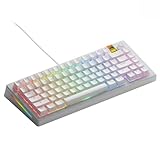
This board uses Hall effect (magnetic) switches with adjustable actuation, Rapid Trigger and an 8K polling rate, according to the listing name. It also accepts MX and magnetic switches in its hot-swap sockets. It suits competitive players in games where very fast key resets matter.
Hall effect switches change what you configure: instead of one fixed actuation point, you set it per key, and Rapid Trigger resets the key as soon as it begins to rise. That is why players use it in fast shooters. Expect to spend time in Glorious’ software dialing in values. Glorious lists 8K polling for wired use, so read any wireless claim carefully, and check current firmware notes because reviewers reported a chatter issue on early units.
Who should skip it: people who mostly type, who dislike tuning software, or who need a number pad; the 100% version or the standard mechanical board suits them better.
- 75% layout (about 80 keys), per Glorious
- Hall effect switches with Rapid Trigger; actuation adjustable between 0.1 and 4.0mm, per published specs
- Up to 8,000 Hz polling, which Glorious lists for wired use
- Hot-swap sockets for MX and magnetic switches; modular gasket system
- Wired or wireless: confirm on listing; the wireless version is sold as the Pro model
Pros
- Adjustable actuation and fast key reset
- Hot-swap sockets keep options open
Cons
- Needs software setup to get the most out of it
- Published 8K polling may apply only when wired
Compared with the 100% Rapid Trigger model, it saves desk space but drops the number pad.
4. Glorious GMMK 3 Rapid Trigger 100% – Best for Full-Size Hall Effect

This is the full-size version of the same Hall effect keyboard, with the same Rapid Trigger, 8K polling and hot-swap features named in the listing. It suits players who need a number pad for spreadsheets, simulation controls or macros.
The full-size layout adds the number pad, arrow cluster and navigation keys, which suits work-and-play desks. The trade-off is width: a 100% board pushes the mouse further to the right, which matters for players with low sensitivity. If you rarely use the number pad, the 75% model leaves more room for arm sweeps. Both Hall effect boards share software and features, so the choice is mostly about layout.
Who should skip it: players with small desks or low mouse sensitivity, and typists who never use a number pad and would rather have the compact 75% board.
- 100% layout with number pad
- Hall effect switches with Rapid Trigger and adjustable actuation
- Up to 8,000 Hz polling, per the listing; likely wired-only
- Hot-swappable MX and magnetic switches
- Modular gasket system; key count and weight: confirm on listing
Pros
- Full layout with all keys available
- Same Hall effect features as the 75% board
Cons
- Takes more desk space, which cuts mouse room
- Heavier and bigger than the 75% model
Compared with the 75% board, you gain a number pad and lose desk space.
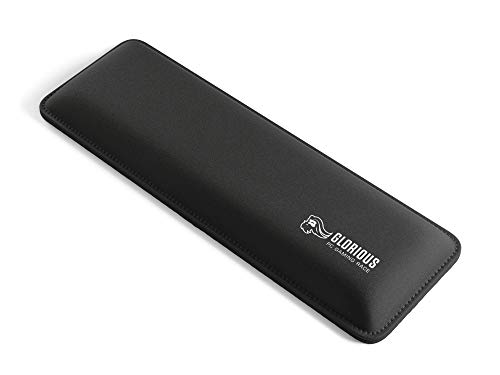
5. Glorious Keyboard Wrist Rest (Compact) – Best as a Comfort Add-On (Not a Keyboard)

This listing is a compact wrist rest, not a keyboard, so it does not match the facet of this guide. We include it as a runner-up add-on for readers who already own or are buying a Glorious board and want a cushioned support under their palms.
This is the odd one in the list. A wrist rest is about comfort and desk height, so measure your keyboard’s front edge height before buying. The compact size is intended for smaller boards, and it should sit roughly level with the keycaps’ lower row. Glorious boards vary in thickness, so a mismatch is possible. Keep it clean with a damp cloth; it has no electronics to worry about.
Who should skip it: anyone expecting a keyboard from this listing, and users whose board is already low enough that an added rest would raise their wrists too high.
- Compact size, about 12 x 4 x 1 inches
- Black finish
- Material and cushioning type: confirm on listing
- No electronics, no software and no connectivity
- Pairs best with low-profile or 65% and 75% boards
Pros
- Adds a soft resting surface
- Simple, no setup
Cons
- It is not a keyboard
- Height may not match every keyboard
Compared with the barebones kit, it solves a comfort need rather than a typing need.
6. Glorious GMMK 3 Barebones 75% – Best for Bring-Your-Own-Switches Builders

The barebones version provides the case, plate, PCB and hot-swap sockets without a full set of switches. It suits experienced builders who already have switches and want to assemble their own board. Confirm exactly what is in the box, since barebones kits commonly leave out switches and sometimes keycaps.
Barebones kits are for people who already own switches. You will also need to confirm whether keycaps are included and whether the stabilizers come pre-lubed, as these vary by kit. Fit switches straight into the sockets and press until they click, without bending pins. The advantage is control over feel and sound; the cost is extra purchases and time, so beginners should consider a prebuilt board.
Who should skip it: first-time builders, anyone who wants to plug in and play today, and buyers unsure whether switches and keycaps are included in the listing.
- 75% layout, hot-swappable MX 5-pin sockets
- Modular gasket system with sound-dampening foam per the listing
- Switches and keycaps: not clearly included, confirm on listing
- Rotary knob and per-key RGB per Glorious’ product line
- Wired; warranty typically 2 years
Pros
- You choose every switch
- Same modular body as the prebuilt boards
Cons
- Needs extra purchases to be usable
- Not suited to first-time builders
Compared with the prebuilt GMMK 3, you control the feel at the cost of extra parts and effort.
Specs Compared
| Model | Layout | Switch type | Mounting | Connectivity | Polling rate |
|---|---|---|---|---|---|
| GMMK 3 75% with Knob | 75% | Mechanical, hot-swap MX | Modular gasket | Confirm on listing | Confirm on listing |
| GMMK 2 65% (listed TKL) | 65% | Cherry MX-style, hot-swap | Tray mount | Wired USB-C | 1000 Hz |
| GMMK 3 Rapid Trigger 75% | 75% | Hall effect, MX and magnetic sockets | Modular gasket | Confirm on listing | Up to 8,000 Hz |
| GMMK 3 Rapid Trigger 100% | 100% | Hall effect, MX and magnetic sockets | Modular gasket | Confirm on listing | Up to 8,000 Hz |
| Glorious Keyboard Wrist Rest | Not a keyboard | Not applicable | Not applicable | Not applicable | Not applicable |
| GMMK 3 Barebones 75% | 75% | Hot-swap MX 5-pin sockets; switches confirm | Modular gasket | Confirm on listing | Confirm on listing |
How We Chose These
We built this list from the Glorious products in the current catalog and compared them using Glorious’ product pages, retailer listing fields and published independent reviews. Our criteria were layout, switch technology (mechanical or Hall effect), mounting style, customization, connectivity and polling rate. We did not use these keyboards ourselves or run latency measurements, and we do not make claims about feel or speed beyond published specifications. Where the listing name was confusing, as with the GMMK 2, or where the product is not a keyboard, as with the wrist rest, we said so and ranked accordingly.
What to Look For
Hall effect versus mechanical switches
Traditional mechanical switches register a press when two metal contacts touch at a fixed point. Hall effect switches measure a magnet’s position, so the keyboard can register presses at any depth you choose, usually between about 0.1mm and 4.0mm. Rapid Trigger releases the key the instant it begins to rise and re-presses it on the next push, which lets you stop and restart movement faster in competitive shooters. A shallow actuation point such as 1.0mm can feel twitchy, so many players start near 1.5mm and adjust.
Layout: 65%, 75% and 100%
A 100% layout has about 104 keys including a number pad. A 75% board drops the pad and compresses the rest into about 80 keys while keeping function keys. A 65% board removes the function row and keeps the arrow keys. Choose based on desk width: a full-size board leaves less room for mouse sweeps, which matters in low-sensitivity play. As a rule of thumb, if you use a mouse sensitivity that needs a wide arm swing, pick 75% or smaller.
Polling rate and connection
Polling rate is how often the keyboard reports to the PC. 1,000 Hz is standard, while 8,000 Hz reports eight times as often. Independent reviewers have found the real-world gain from 8K polling to be small, and it increases CPU interrupt load on older systems. Glorious lists the highest rate for wired use, so confirm before relying on it wirelessly. Always use the supplied cable in a direct motherboard USB port rather than a hub.
Mounting, customization and sound
Gasket mounting suspends the plate on soft gaskets for a cushioned, quieter feel. Tray mounting is stiffer. A hot-swap board lets you change switches without soldering, but bent pins damage the sockets, so pull switches straight up. Plate materials such as aluminum, polycarbonate and brass change the sound and flex. Barebones kits require you to supply switches, keycaps and often stabilizers.
Safe use and setup
Disconnect the USB cable before removing switches or keycaps. For wireless models, charge the battery with the supplied cable and avoid leaving the keyboard in a hot car or direct sun. Keep liquids away from hot-swap boards, since moisture reaching the sockets can cause key failures. Check that your hands rest comfortably at desk height; a wrist rest adds comfort but does not replace good posture and regular breaks.
Keycaps and stabilizers
Doubleshot PBT keycaps are made by molding legends through the cap, so they do not wear off, and PBT resists shine better than ABS. Stabilizers keep long keys such as the spacebar steady; pre-lubed stabilizers reduce rattle. If you buy a barebones kit, confirm whether keycaps and stabilizers are included. Replacing a rattly stabilizer is a ten-minute job with a keycap puller and small screwdriver.
Software and firmware
Hall effect boards depend on configuration software to set actuation points and Rapid Trigger. Glorious uses its CORE software, which runs on Windows, macOS and Linux, and stores profiles on the board so settings persist without the app. Download firmware only from the manufacturer’s site. If a setting behaves oddly after an update, reset the profile to defaults and reapply your changes one at a time.
Questions
Are Hall effect keyboards better than mechanical ones?
They are better for adjustable actuation and Rapid Trigger, which help in fast-paced games. Classic mechanical switches can feel more familiar and offer a wider choice of third-party switches, so the better option depends on how you play and type.
Is 8K polling worth it?
For most players the difference is small. It can help in very high refresh-rate setups, but it adds CPU load and may reduce battery life on wireless boards. A 1,000 Hz rate is adequate for most uses.
What is the difference between GMMK 3 and GMMK 3 Pro?
The standard GMMK 3 has a plastic body and is wired, while the Pro uses an aluminum body and comes in wired and wireless versions, according to published reviews. Check each listing to see which version you are buying.
Can I use any switch in a hot-swap board?
Mostly, but check the socket type. MX-style 5-pin switches fit the sockets on these boards, and the Hall effect versions accept both MX and Glorious magnetic switches. Do not force switches with bent pins into the sockets.
Do I need the wrist rest?
No, it is optional. It can make long sessions more comfortable if your desk and keyboard height suit it, but it does nothing for performance. Pick a height that matches your board.
Are barebones kits good for beginners?
Usually not. You must buy switches and often keycaps and stabilizers separately, and you assemble the board yourself. A prebuilt GMMK 3 is a simpler start.
Update History
- October 14, 2026 – Initial publication; product set drawn from current catalog listings.
- Check the product page for current specifications and availability before buying.
Sources
- Manufacturer product and specification pages and product guides from Glorious
- Retailer listing titles and specification fields
- Independent published reviews of the Glorious GMMK 3 from Tom’s Hardware and Digital Trends