Our Top Picks
 ASUS ROG Strix Scope II 96 Wireless MechanicalStorm Clicky14.8 x 5.2 x 1.6 inches2.78 PoundsCheck on Amazon

Top 3 picks at a glance
Currency Check
As of October 2026, the parts that make a white build hard are mostly availability and compatibility, not looks. Memory and storage are in a tight market, as TrendForce’s late-September outlook describes, so white-trimmed kits can be scarce or limited to certain capacities. Back-connect motherboard and case standards from ASUS, MSI and Gigabyte are real and shipping, but they are not interchangeable. No unreleased hardware is assumed in this list. Color finish and exact SKUs change between production runs, so confirm them on the product page.
A white gaming setup is easy to describe and surprisingly easy to get wrong. The short answer: pick one standard for cable routing, one power connector plan, and one white finish, then match everything else to those three decisions. A mismatched back-connect board and case, or a card that the case cannot physically hold, will ruin a build faster than a slightly different shade of white. This guide gives a parts list by category, the compatibility rules that matter, and keyboard options that suit a white desk.
Quick Verdict
| Your situation | Our verdict |
|---|---|
| You want the cleanest look with the fewest visible cables | Choose a back-connect board and a case labeled compatible with that exact board standard. Do not assume ATX equals compatible. |
| You already own a standard ATX case | Stay with a conventional white board and use white GPU, RAM and fans for the visible parts. A back-connect board will not fit just any ATX case. |
| You are building around an RTX 5070-class card | Plan for a 16-pin power cable, a case with room for a roughly 2.5-slot, 300 mm-class card, and a quality power supply with a native cable. |
| You want a wireless keyboard that matches the desk | A 96% tri-mode board with hot-swappable switches is the most flexible of the three options below, if you can live with a charging routine. |
| You are on a tight budget | Go white only on what is visible: case, GPU, RAM, keyboard. Hidden parts can stay black without anyone noticing. |
| You care about long-term color consistency | Buy as much as possible from one brand family and keep white parts out of direct sun and heat. |
What You Need to Know Before Buying
“White” is not one color
Builders regularly report that white parts from different brands do not match. Finishes range from pure bright white to off-white or cream, and some are closer to light gray. A white PCB, a painted steel panel, a plastic shroud and an aluminum heatspreader will each reflect light differently. The practical rule is simple: pick a brand family for the large visible surfaces (case, graphics card shroud, memory) and accept small differences in the minor ones (cables, fan frames, desk accessories).
Yellowing is a separate worry. PC Gamer’s explainer on white parts describes plastics yellowing as polymer chains degrade, commonly through UV photo-oxidation and heat. That is a general materials point, not a claim about any one product. In practice it argues for placing the desk away from a window with direct sun and keeping the case from running hot.
Back-connect standards are similar but not interchangeable
ASUS calls its design BTF, MSI calls it Project Zero, and Gigabyte calls it Project Stealth. All three move the power and data connectors to the back of the motherboard so the front looks clean. Each uses slightly different connector positions, so a case built for one is not automatically valid for another. The boards use the usual ATX mounting pattern, but the protruding rear connectors mean they do not fit a standard ATX case. Manufacturers such as Fractal Design publish compatibility lists that name which of their cases work, and Corsair has said its reverse-connector cases are validated for all three standards. Always check the list for your exact board and case.
Back-connect also does not mean cable-free. CPU power, front-panel USB and audio, fan and RGB cables, and SATA cables still exist. Whether the graphics card needs a visible cable depends on the standard: on MSI and Gigabyte boards the card is cabled conventionally, while ASUS offers a special GC_HPWR path that only works with BTF graphics cards on BTF boards. A standard GPU works on those boards with normal cables.
Graphics card size and power are the real constraints
Take a white RTX 5070-class card as an example. ASUS lists its Prime RTX 5070 at roughly 304 x 126 x 50 mm, a 2.5-slot design, with one 16-pin connector and a 750W recommended power supply. NVIDIA’s reference board power for the RTX 5070 is 250W, and NVIDIA recommends a 650W system supply for the reference card, so partner recommendations are a little more conservative. ASUS’s TUF version of the same GPU is listed at around 329 x 140 x 62.5 mm in a 3.125-slot design, which is a very different fit in a compact case. The table below compares the points that most often decide a case choice.
| Item | What to check | Rule of thumb |
|---|---|---|
| Case GPU clearance | Maximum card length and thickness in the case manual | Leave at least 10 to 15 mm beyond the card length for cables and airflow |
| GPU power connector | 16-pin 12V-2×6 versus 8-pin cables | Use a native cable from an ATX 3.1 supply where possible |
| Power supply wattage | GPU maker’s recommended supply | Follow the card maker’s number, not just the chip’s reference number |
| Motherboard standard | Conventional versus BTF, Project Zero, Project Stealth | Board and case must be on the same compatibility list |
| Memory height | Heatspreader height versus cooler clearance | Low-profile kits are safer under large air coolers |
| Wireless peripherals | Receiver placement and USB ports | Use a front or desk-level port so the signal is not blocked by the case |
The 16-pin power connector needs care
The 12V-2×6 connector is rated for 600W, and ATX 3.1 power supplies are meant to carry it natively. Vendor guidance, including CableMod’s, is to keep at least 35 mm of straight cable before any bend near the connector, and to push it fully home until it clicks with no visible gap. The revised connector uses longer power pins and shorter sense pins so a poorly seated plug is less likely to deliver power. Treat that as a safety margin, not a license to bend the cable sharply. If the case is narrow, an angled cable made for this connector is a safer solution than forcing a tight bend. A native cable is preferable to an adapter when you have the choice.
Memory and the platform
For AMD Ryzen 7000-class platforms, AMD has called DDR5-6000 the sweet spot, and kits with EXPO profiles are designed for it. Two modules are the simplest and fastest arrangement. Four modules are supported but make high speeds harder, and AMD’s published specifications list lower official speeds with two modules per channel. White memory is easy to find, but tall heatspreaders on some premium lines can touch large air coolers, so check clearance before buying.
How to Decide: A Worked Parts List
Use this order. It keeps early decisions from being undone by later ones.
- Choose the cable-routing standard first. Back-connect or conventional. If back-connect, write down which standard and shortlist only cases on that board maker’s list.
- Choose the case. Check maximum GPU length, GPU thickness, radiator or cooler height, and panel material. Glass panels show internal parts, so they raise the stakes on color matching.
- Choose the GPU and measure it. If a card is 304 mm long and the case allows 330 mm, you have 26 mm of room, which is comfortable. If the case allows 310 mm, that is only 6 mm and a front-mounted radiator can erase it.
- Choose the power supply. Start from the card maker’s recommended wattage. As a rule of thumb, add headroom so the supply is not running near its limit during gaming peaks. Confirm a native 16-pin cable if the card uses one.
- Choose the motherboard. Match socket, memory type and, for back-connect builds, the standard. White boards exist for AMD and Intel platforms from several makers; confirm the exact SKU and color on its product page.
- Choose memory. For gaming, a matched two-module kit is the simplest route. Look for the profile your CPU maker supports (EXPO for AMD, XMP for Intel, or kits that carry both).
- Choose storage and cooling. These are usually hidden, so color matters less. Pay attention to heatsink height on M.2 slots under the GPU.
- Choose peripherals last. Keyboard, mouse, headset and mat are the easiest white upgrades and the cheapest to change later.
A checklist helps at the end: does the case list name the board standard? Is there clearance beyond the card length? Does the power supply have the right cable? Do the memory and cooler fit together? Are the visible whites from the same family? A yes to all five means the build is ready.
Products That Fit
The products below are examples that fit the desk-side situations described above. They are not a ranking, and they cover only the keyboard slot of a full white parts list. Confirm color, layout and switch options on each product page before buying.
White RGB keyboard and mouse combo – for a first white desk on a budget
As an Amazon Associate we earn from qualifying purchases at no extra cost to you.

This listing is a keyboard and mouse bundle in white with an RGB backlit, 104-key keyboard, aimed at PC and laptop users. It fits the situation where the goal is to get a matching white desk without spending much on peripherals. A combo also means one purchase covers the two most visible items and keeps the color consistent between them. It is the weakest match for readers who want a premium typing feel, because bundled boards in this class are built around cost, not around switch quality.
- White colorway with RGB LED backlighting, per the listing name
- 104-key full-size layout, per the listing name
- Includes a mouse; sensor, DPI range and connection type: confirm on listing
- Switch type and polling details: confirm on listing
Caveat: bundled mice and keyboards vary widely in software support and build, and the listing does not tell us how the white finish compares with other brands. Treat it as a starting point you can replace piece by piece.
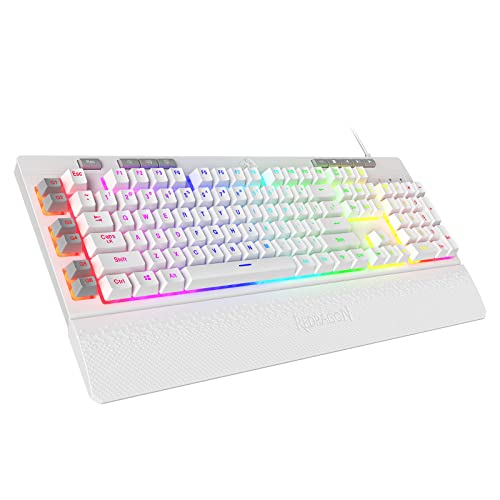
Redragon K512 Shiva – for a wired full-size board with macro keys

The K512 is a wired membrane keyboard with a mechanical feel, in a white colorway on this listing. It suits someone who wants a full-size board with extra keys for games and a wrist rest, and who is comfortable with a USB cable. In a back-connect build the cable matters little, because the keyboard cable runs to the desk-level USB ports, not into the case. The wired design also avoids the receiver and charging questions that come with wireless boards.
- Wired USB, membrane keyboard described as linear mechanical-feel in manufacturer listings
- Six onboard macro keys on the left side
- Dedicated media controls; confirm whether the listing has a scroll wheel or buttons
- Detachable magnetic wrist rest and RGB backlighting, per retailer listings
Caveat: it is a membrane board, so the keys cannot be swapped or modded the way a hot-swappable mechanical board can. It is also full-size, which uses more desk width than a compact layout.
ASUS ROG Strix Scope II 96 Wireless – for a wireless, upgradeable desk

This is the most feature-rich option of the three. ASUS describes a 96% layout that keeps the function row and number pad in a smaller footprint, with hot-swappable pre-lubed switches and three ways to connect: Bluetooth for up to three devices, 2.4 GHz with ROG SpeedNova, or wired USB. For a white desk where a cable is the most visible blemish, wireless is a real benefit, and the hot-swap sockets mean the switch feel can be changed later.
- 96% layout with function row and number pad retained, per ASUS
- Tri-mode: Bluetooth, 2.4 GHz and wired USB, per ASUS
- Hot-swappable ROG NX switches (Snow linear or Storm clicky are the options ASUS describes); which switch this white listing carries: confirm on listing
- Battery figures from ASUS: more than 1,500 hours on 2.4 GHz with lighting off, 90 hours with lighting on, 35 hours on Bluetooth with lighting on
Caveat: the battery numbers depend heavily on lighting, and real use will vary. A compact 96% board also leaves less room for a wrist rest, and the 2.4 GHz receiver needs an accessible USB port.
Common Mistakes
- Buying a back-connect board without a compatible case. The board fits ATX mounting holes, but the rear connectors still collide with a standard case. Check the manufacturer’s list.
- Mixing white finishes from many brands. Off-white, bright white and light gray sit badly together. Choose a primary family for the biggest visible surfaces.
- Trusting a card’s length number without checking thickness. A 2.5-slot card and a 3.125-slot card of the same chip are different jobs for a small case.
- Sharp bends on the 16-pin cable. Leave at least 35 mm straight before a bend, push the plug fully in, and use a native cable if you can.
- Picking tall white memory under a big air cooler. Low-profile kits avoid the clash.
- Forgetting the desk. A white keyboard and mouse on a dark pad still look mismatched. Choose the pad and headset stand at the same time.
Questions
Do all-white PC parts cost more than black ones?
Often yes, because white variants are produced in smaller runs and are not always stocked. The size of the difference changes by part and by week, so compare the white and black versions of the same model on the product page. Limiting white to the most visible parts is the usual way to control cost.
Will a standard graphics card work on a back-connect motherboard?
Yes on all three standards, using normal PCIe power cables. The exception is ASUS’s special BTF graphics cards, which use a dedicated connector and only work on BTF boards. A graphics card with that connector in a conventional board will not use it.
Is DDR5-6000 the right memory speed for a white AMD build?
AMD has called DDR5-6000 the sweet spot for Ryzen 7000 chips, and kits that carry EXPO profiles are designed for it. Check your specific CPU generation’s page for official memory speeds, and use two modules for the simplest setup.
Does a white case yellow over time?
Plastics can yellow with UV exposure and heat, as PC Gamer’s explainer notes. Keeping the case out of direct sun and avoiding high internal temperatures reduces the risk. Quality varies by manufacturer, so a general claim of resistance on a box is not a guarantee.
Is a wireless keyboard better than a wired one for a clean desk?
It removes one visible cable, but it adds a battery to charge and a receiver to place. If you rarely move the keyboard, a wired board with a neatly routed cable is just as tidy and never needs charging.
What should I buy first when building in stages?
Buy the case and motherboard together, because they depend on each other. Graphics card and power supply come next, since they must fit the case. Peripherals can wait.
Update History
- October 14, 2026 – Initial publication.
- Check the product page for current specifications and availability before buying.
Sources and Methodology
Facts were gathered from manufacturer specification pages, vendor compatibility notes and trade press coverage, and cross-checked where sources disagreed. Retailer listing fields were used for product names and bundled features, and anything not stated there is marked as something to confirm. No physical measurements were made for this guide.
- ASUS product and technical specification pages for the RTX 5070 Prime and TUF cards and the ROG Strix Scope II 96 Wireless
- NVIDIA GeForce RTX 5070 product specifications
- Fractal Design and Corsair compatibility notes for ASUS BTF, MSI Project Zero and Gigabyte Project Stealth
- Tom’s Hardware and PC Gamer coverage of back-connect designs and white-part yellowing
- CableMod 12V-2×6 cable guidance and ATX 3.1 vendor notes
- AMD statements on DDR5-6000 for Ryzen 7000, as reported by TechPowerUp and Guru3D
- TrendForce memory market outlook, September 2026
- Redragon product pages and retailer listing fields