The best controller thumb grips for most PS5 and Xbox players are the KontrolFreek No-Slip Thumb Grips in the Universal Edition, because one pack is built to fit PlayStation, Xbox and Switch Pro controllers and the brand has a long track record in this accessory category. Players who just want a lot of spare caps at the lowest outlay should look at the 50-piece CDHKOZ set, and anyone who uses an Xbox Elite Series 2 or wants a softer cushioned feel should look at the PlayVital cushion caps. Every pick below is a slip-on silicone cap that stretches over the stick you already have, so none of them require tools, pairing or batteries. The real decisions come down to three things: whether the cap fits your controller’s stick shape, how much extra height you want, and whether you need two caps or two dozen. This guide walks through ten listed options, explains what each one is designed to do, and finishes with a sizing calculation and a decision table so you can match a pack to your own controllers and play habits.
Our Top Picks
 16-in-1 Performance Thumb Grips Joystick Caps for PS5/4/Xbox/SwitchHigh-Rise, Mid-Ris, Low-Rise0.8 x 0.8 x 0.2 inches0 poundsCheck on Amazon


Top 3 picks at a glance
Top 3 Picks
Best overall: KontrolFreek No-Slip Thumb Grips (Universal Edition). A single pack covers the PS4, PS5, Xbox One, Xbox Series X|S and Switch Pro controllers, which makes it the easiest choice for households that own more than one platform. It is a recognized name in controller accessories and the listing name states the no-slip design clearly.
Best budget/value: CDHKOZ 50PCS Silicone Thumb Grips. A 50-piece count gives you enough caps to outfit several controllers and still keep a drawer of spares. It also lists older PS3 and Xbox 360 compatibility, so it works for a mixed collection of consoles.
Best for comfort and Elite controllers: PlayVital Thumbs Cushion Caps. The listing names the Xbox Elite Series 2 alongside PS5, PS4 and Xbox Series controllers, and the cushion design is aimed at players who find bare plastic sticks tiring during long sessions.
Quick Comparison
| Product | Best for | Key specs from the listing |
|---|---|---|
| 24 PCS Rainbow Silicone Grips | Colorful multi-controller households | 24 pieces, rainbow colors, PS4/PS5/Xbox, non-slip |
| 4pcs Thumb Grips Cover | One controller, minimal spend | 4 pieces, PS5/PS4/Xbox Series X|S |
| 16-in-1 Performance Grips | Players who want several stick shapes | 16 pieces, PS5/PS4/Xbox/Switch Pro |
| KontrolFreek No-Slip Universal | Overall pick across platforms | Universal Edition, Switch Pro/PS4/PS5/Xbox One/Series |
| PlayVital Cushion Caps | Comfort and Elite Series 2 owners | Cushion design, PS5/PS4/Xbox Series/Xbox One/Elite 2/Switch |
| GameSir Thumb Grip Pack | Brand-name Xbox and PlayStation use | Black, Xbox One/Series, PS4/PS5, Switch Pro |
| Silicone Joystick Caps (anti-stickiness) | Players bothered by sticky silicone | Anti-stickiness and anti-slip wording, PS4/PS5/Xbox |
| 24-Pack Textured Dot Caps | Grip texture and color coding | 24 pieces, 12 colors, 360-degree textured dots |
| CDHKOZ 50PCS Silicone Grips | Lowest cost per cap, large households | 50 pieces, PS5/PS4/PS3, Xbox 360/One/Series, Switch Pro |
| KontrolFreek No-Slip PS5/PS4 | PlayStation-only players | 4-pack, blue and black, PS5/PS4 |
How We Chose
This guide is built from desk research and published specifications. We started with the exact product names in the list and kept only the facts those names state: pack size, compatible consoles, colors and any named design feature. We then compared each option against well-established knowledge of how silicone stick caps behave, including how they stretch over a stick, how they wear, and how added height changes aim. Selection criteria were platform coverage, pack size relative to the number of controllers a household typically owns, texture and grip claims, brand history, and fit for special controllers such as the Xbox Elite Series 2. Where a listing leaves a spec unclear, such as the exact cap height or silicone hardness, this article says so and points you to the product page to confirm. Nothing here relies on ratings or counts of opinions, and no performance numbers are invented.
1. 24 PCS Rainbow Silicone Thumb Grips – Best for Colorful Multi-Controller Households
As an Amazon Associate we earn from qualifying purchases at no extra cost to you.
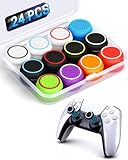
This 24-piece pack is aimed at players who want volume and color. The listing describes premium silicone, a rainbow assortment, non-slip joystick caps and thumbstick grips, and it names PS4, PS5 and Xbox controllers. Twenty-four caps is enough to put a pair on six controllers, which suits a family that shares a console, a streamer who wants each friend to have a distinct color, or a competitive player who likes to color-code a left-stick and right-stick height setup.
Key specs
- Pack size: 24 pieces, sold as a mixed rainbow assortment
- Material: silicone, described as non-slip
- Platforms named: PS4, PS5 and Xbox controllers (confirm Xbox Series and Elite fit on the product page)
- Style: slip-on cap that covers the existing stick top
Color coding is a practical benefit that gets overlooked. When four controllers sit on a coffee table, a red pair and a blue pair let everyone pick up their own pad without checking the lightbar or the player indicator. A bag of spares also means a worn cap is a thirty-second swap rather than a shopping trip.
The trade-off is that mixed assortment packs often contain several shapes or heights, and not every shape will suit every stick. Plan on an initial fitting session where you try each cap, keep the ones that sit snug and flat, and put the rest in a spare bag. Silicone also picks up skin oil and dust over weeks, so a quick wash with mild soap and a full dry keeps the surface from turning tacky.
A practical way to use a large pack is to build a small fitting routine. Press a cap onto the stick until it seats fully against the base, rotate the stick through its full circle, and watch for any rubbing against the controller shell. A cap that clears the opening cleanly is a keeper. Next, make a quick drop test: hold the controller upside down and give it a gentle shake, since a cap that slides off needs a tighter style. Keep the rejects in a labeled bag instead of throwing them out, because a cap that is too loose for one controller can still be perfect for another with a slightly different stick top.
Pros
- Large count covers many controllers and replacements
- Color coding helps shared setups
- Works across PlayStation and Xbox pads according to the listing
- Low-friction way to try different stick feels before committing
Cons
- Assortments can include shapes you will never use
- Generic brand, so confirm return terms and exact sizing on the product page
- Bright colors may show dirt and wear sooner than black
Against the nearest alternative, the 24-Pack Textured Dot Caps, this rainbow set focuses on color variety while the dot pack leads with surface texture. Choose this one if identification and quantity matter more than a specific grip pattern.
2. 4pcs Thumb Grips Joystick Cap Cover – Best for a Single Controller on a Tight Budget

The 4-piece set is the simplest product in this roundup. The listing names PS5, PS4 and Xbox Series X|S controllers and offers four joystick cap covers, which is exactly two pairs. For someone who owns a single DualSense or Xbox pad and only wants a basic non-slip upgrade, that is all the quantity needed: one pair on the controller and one pair as a spare.
Key specs
- Pack size: 4 pieces
- Platforms named: PS5, PS4, Xbox Series X|S
- Style: cover-type thumb grip that slips over the stick top
- Material and height: not stated in the listing name, so confirm on the product page
A small pack has one underrated advantage: you will not feel pressure to use every piece. Large assortments tempt people to swap grips constantly, which prevents the hands from settling into a consistent muscle memory. With a single pair installed, your aim and movement habits stay stable.
The downside appears when you own more than one controller. Four pieces cover only two sticks plus two spares, so a household with three pads would need a larger pack or several purchases. Also, because the listing gives few details, treat material feel and height as unknowns until you read the product page and the return policy.
For a single-controller player, the question is mostly how the cap sits at rest. A good cover should seat all the way down without a gap at the base, and the top should feel centered under the thumb instead of tilted. After installing the pair, play a few rounds of a game you know well and pay attention to whether your thumb still lands in the same spot. If your aim feels off, the cap may be changing the height more than you want, and returning to bare sticks or trying a lower profile is a sensible fix. Treat the second pair as insurance against tearing, since the edges of thin silicone are usually the first place wear shows.
In short, it is a sensible entry point for anyone who has never used stick caps and wants to find out whether they help before committing to a bigger purchase.
Pros
- Right-sized for one controller with a spare pair
- Names the current PS5 and Xbox Series controllers
- Minimal clutter and nothing to sort through
Cons
- Too few pieces for multi-controller homes
- Limited detail on height and silicone hardness in the name
- No Switch Pro mention in the listing name
Compared with the KontrolFreek PS5/PS4 4-pack, which is the same count, this set covers Xbox as well but comes without a recognized brand name behind the design. If you play only on PlayStation and want a known name, the KontrolFreek pack is the closer match.
3. 16-in-1 Performance Thumb Grips – Best for Testing Different Stick Heights

The 16-in-1 label signals a multi-shape kit. The listing calls these performance thumb grips and names PS5, PS4, Xbox and Switch Pro controllers. Sixteen pieces typically means several heights and top shapes, for example taller domes, concave tops and flatter caps, although the listing name does not break down the exact mix. Read the product page for the included shapes before ordering.
Key specs
- Pack size: 16 pieces
- Platforms named: PS5, PS4, Xbox, Switch Pro
- Style: slip-on joystick caps marketed for performance
- Included shapes and heights: confirm on the product page
Stick height changes aiming in a predictable way. A taller stick is a longer lever, so the same thumb movement travels a larger arc at the tip, which can make fine corrections feel easier but can also encourage overshooting. A shorter cap tends to feel more stable for fast flicks. Shooters and racing players often experiment, and a multi-shape kit is the cheapest way to do that experiment without buying separate branded packs.
Because you may use only two or four pieces from the set, the rest become spares. That is fine for a single player, but it makes this kit less attractive if you wanted every piece to be useful on day one.
A simple testing method keeps a multi-shape kit from becoming a drawer of confusion. Choose one shape for the left stick, which controls movement, and a different one for the right stick, which controls aim, and play for a week before changing anything. Players commonly report preferring a lower, more stable cap for the aiming stick and a slightly taller or more concave one for movement, but that is a preference rather than a rule. Write down what you tried and how it felt. If you share the controller, agree on a configuration, because swapping heights every session defeats the muscle memory you are trying to build.
Think of it as a sampler: useful for finding your preference, after which a larger pack of your favorite shape makes the long-term supply easier to manage.
Pros
- Variety lets you find a preferred stick height and top shape
- Covers four platforms according to the listing
- Good for players who like to tune each stick differently
Cons
- Not all pieces will suit your controller
- Performance claims are marketing language, not measured results
- Exact pack contents require checking the product page
Next to the 24 PCS Rainbow pack, this kit trades quantity for variety of shape. If you want the same grip repeated across many controllers, the rainbow or CDHKOZ packs fit better. If you want to experiment, this one is the stronger choice.
4. KontrolFreek No-Slip Thumb Grips Universal Edition – Best Overall Across Platforms

The Universal Edition is the broadest of the branded KontrolFreek options on this list. The listing names Nintendo Switch Pro, PlayStation 4, PlayStation 5, Xbox One and Xbox Series controllers, so the same pack follows you if you change consoles or share accessories between platforms. KontrolFreek has long sold controller accessories, and its no-slip grips are a familiar choice for players who prefer a known brand to an anonymous bulk set.
Key specs
- Design: no-slip thumb grips, Universal Edition
- Platforms named: Switch Pro, PS4, PS5, Xbox One, Xbox Series
- Style: slip-on cap over the existing stick
- Pack count and colors: confirm on the product page
The universal approach means the grip is shaped as a compromise across stick designs. DualSense and Xbox sticks differ in diameter and top contour, so a universal cap is built to stay put on several of them rather than being cut to one. For most players this fits well enough; for those who are very particular about a locked-in feel, a platform-specific pack may be a better fit.
The main reasons to put this at the top are coverage and reputation. Players buying a gift for someone whose console is unknown, or families with a PlayStation in the living room and a Switch Pro controller in the bedroom, can buy one pack and be done.
Because the pack follows a universal design, it is worth confirming two details before relying on it for a specific controller. First, check that the cap seats fully on the stick and does not leave a gap at the base where dust can collect. Second, make sure the controller’s stick still returns smoothly to center, since a cap that rubs the shell can add drag. On a DualSense, the shell opening is fairly snug, so a taller cap may touch the rim at full deflection. If you see rubbing, a lower-profile cap or a different pack is the cleaner solution than forcing the fit.
Players who move between a console and a handheld-style Switch Pro setup will appreciate that the same grip feel carries across devices, which keeps muscle memory consistent from one controller to the next.
Pros
- One pack for PlayStation, Xbox and Switch Pro
- Established accessory brand
- Simple, no-slip design without gimmicks
Cons
- A universal shape may not match each stick as closely as a platform-specific cap
- Limited quantity compared with bulk silicone sets
- Check exact pack contents before buying
Compared with the KontrolFreek PS5/PS4 4-pack, the Universal Edition gives up platform-specific tailoring in exchange for wider compatibility. If you only play on PlayStation, the specific pack is the nearest alternative; otherwise this universal one is the safer purchase.
5. PlayVital Thumbs Cushion Caps – Best for Elite Series 2 and Comfort-Focused Players

PlayVital’s listing names a longer list of controllers than most: PS5, PS4, Xbox Series X|S, Xbox One, Xbox Elite Series 2 and Switch Pro. The wording about cushion caps and a thumbstick grip cover points to a softer, padded feel on the thumb. Players who find bare plastic sticks fatiguing after a long session, or who have calluses from marathon play, may appreciate a thicker, more forgiving top.
Key specs
- Design: cushion-style caps with thumbstick grip cover
- Platforms named: PS5, PS4, Xbox Series X|S, Xbox One, Xbox Elite Series 2, Switch Pro
- Style: slip-on joystick caps
- Exact height and silicone firmness: not stated in the listing name
The Elite Series 2 mention matters. The Elite pad has its own removable stick tops, and a grip cap has to sit securely over whichever top you have installed. If you swap sticks on that controller, double-check the fit on the product page and try the cap on your preferred top.
Cushioned caps come with one practical consideration. A thicker cap adds material over the stick, which can slightly raise the effective height and change the stick travel feel. Some players like the cushioning, while others find it dulls the sense of the stick edge. If you play precision shooters, start with the cap on one stick only and compare.
If you own an Elite Series 2, use the cap as part of a deliberate setup rather than an add-on. That controller lets you change stick tops and adjust tension, so decide on the stick top first and fit the cap second. A cushioned cap on a tall stick gives a long lever with a soft landing, which some players enjoy for racing games and slow, deliberate aiming. For fast competitive shooters, a lower stick with a lighter cap may feel more direct. The listing names the Elite model, so compatibility is promised, but confirm the exact shape on the product page.
For players with smaller hands, a cushioned cap can also fill out the stick top so the thumb has more surface to rest on, though bigger hands may find it too wide. Trying one stick first is the cheapest way to find out.
Pros
- Broadest named controller list on the page, including Elite Series 2
- Cushioned feel aimed at long-session comfort
- Suitable for both PlayStation and Xbox users
Cons
- Extra padding can soften stick feedback
- Cap height not stated in the name
- Soft silicone can attract lint if the controller sits in a bag
The closest alternative is the GameSir Thumb Grip Pack, which is a more minimal black design. Pick PlayVital when comfort and Elite compatibility are the priority, and GameSir when a low-profile look matters more.
6. GameSir Thumb Grip Pack – Best for a Clean, Low-Profile Black Look

GameSir is a controller and accessory brand known for its own gamepads, and this pack is listed for Xbox One and Series controllers, PS4 and PS5 controllers, and the Switch Pro, in black. A single neutral color helps if you do not want bright accents clashing with a white DualSense or a black Xbox pad, and the brand’s controller background suggests the caps were designed with stick geometry in mind.
Key specs
- Color: black
- Platforms named: Xbox One/Series, PS4/PS5, Switch Pro
- Style: slip-on thumb grip pack
- Pack count and cap heights: confirm on the product page
Black caps hide dirt better than pale or bright ones, which matters because stick tops collect skin oil quickly. They also look consistent if you stream or film your controller on camera. If you like a subtle upgrade rather than a visible accessory, this is the type of product that blends in.
A branded pack from a company that makes controllers is also easier to reason about. If a cap tears or fits poorly, you are dealing with a recognizable seller, which tends to make support and replacements simpler than with anonymous bulk sets. That is a general pattern rather than a guarantee, so read the return terms.
Neutral black caps work well as a starting point for testing stick height. Install them on both sticks, play for a few sessions, then change only one variable at a time, such as swapping the aiming stick cap for a taller one from another set. Because there is no color to distract you, the difference is easier to feel. Also keep in mind that a black cap on a white controller makes the stick position more visible in a dim room, which some players find helpful when they look down to check their grip, and it keeps your setup tidy in photos or on stream.
In a shared household, a plain black set is also the least likely to cause arguments about color, which makes it a good default for gifts.
Pros
- Neutral black styling
- Covers PlayStation, Xbox and Switch Pro per the listing
- Recognized controller-accessory brand
Cons
- One color only
- Pack quantity is likely modest compared with bulk sets
- Few details in the listing name about texture or height
Against the KontrolFreek Universal Edition, the two are very close in coverage. KontrolFreek leans on its dedicated grip heritage, while GameSir brings controller-maker credibility; which one fits better comes down to which cap shape you prefer when you try them.
7. Silicone Joystick Caps with Anti-Stickiness – Best for Players Who Dislike Tacky Silicone

The wording of this listing emphasizes anti-stickiness and anti-slip, and it carries a third anti- claim that is cut off in the product name, so confirm that line on the product page. It names PS4, PS5 and Xbox controllers. The anti-stickiness angle speaks to a common annoyance: some silicone caps develop a tacky surface that grabs lint and drags on the thumb.
Key specs
- Material: silicone joystick caps
- Claims in the name: anti-stickiness, anti-slip, and one further anti- claim
- Platforms named: PS4, PS5, Xbox
- Pack count: not stated in the name
Silicone feels sticky when the surface holds oil, when a mold-release residue remains from manufacturing, or when the compound is soft enough to deform under the thumb. A first wash with warm water and mild dish soap, followed by thorough air-drying, removes most factory residue. Never use harsh solvents, which can degrade silicone and leave it gummy. If a cap stays tacky after washing, treat that as a quality issue and return it.
Wiping caps weekly with a slightly damp cloth also keeps them from becoming slick in the opposite direction. Slip depends on dirt buildup as much as on the cap design.
A useful cleaning rhythm keeps any silicone cap from turning slick or sticky. Once a week, pull the caps off, wash them in lukewarm water with a drop of mild dish soap, rinse, and let them air-dry fully before reinstalling. Wipe the exposed stick with a lightly dampened microfiber cloth in the meantime. Avoid hand sanitizer and alcohol-heavy wipes on silicone, because they can dry out the surface or leave residue. If a cap stays tacky after washing, or if it attracts lint within a day, set it aside and move to a different set instead of persisting with a poor fit.
Because the listing name is truncated and the pack count is not shown, read the full description and the return terms before buying, and keep the packaging until you have confirmed the fit on your own controller.
Pros
- Marketing focuses on a drier, less tacky surface
- Covers PlayStation and Xbox controllers
- Easy to rinse and reuse
Cons
- Claims are descriptive, not verified measurements
- Listing name is truncated, so some details need checking
- No Switch Pro mention in the listing name
The nearest alternative is the 24-Pack Textured Dot Caps. That set relies on raised dots for grip, while this one leans on a surface that resists stickiness. If you sweat a lot, textured dots may help more; if your main complaint is a tacky feel, try this one first.
8. 24-Pack Anti-Slip Silicone Thumb Grip Caps – Best for Textured Grip and Color Coding

This pack combines quantity with a specific surface design. The listing describes 24 anti-slip silicone caps in 12 colors, with 360-degree textured dots intended to improve sensitivity and grip. That makes two caps per color, so a left and right stick can match, and a household can give every controller its own color.
Key specs
- Pack size: 24 pieces in 12 colors
- Surface: 360-degree textured dots
- Material: silicone, anti-slip
- Platforms: PS5, PS4, Xbox Series X|S and others (the name is cut off, so confirm the full list)
Raised dots increase surface friction through many small contact points, which can help when hands are damp. The trade-off is that dots wear differently from smooth tops. Over weeks of use the tips of the dots flatten, and the thumb’s skin can feel the texture as slightly abrasive during long sessions. If you play for hours every day, check whether the pattern feels comfortable on your thumb pad before you commit all of the controllers.
Twelve colors is a lot to organize, but it gives a clean answer to a common household problem: which controller is whose. It also lets you use one color for sticks that you want slightly higher or lower, if the pack includes more than one height.
Textured caps reward a gentle break-in. Spend the first session paying attention to how the dots feel against the pad of your thumb, especially in the area where you rest during long play. If you notice irritation, take a break and try again with shorter sessions, or reserve this set for the sticks you move less often. Keep a soft toothbrush for cleaning between the dots, because oil collects in the gaps and reduces the grip over time. Color matching helps here too: put a bright color on the controller you use most so you notice when the dots are due for a wash.
If you share a controller, the pack makes it easy to give every player a color, so the caps can be swapped quickly and returned to the owner’s bag after the session ends.
Pros
- Strong grip texture on every side of the cap
- 24 pieces and 12 colors for multi-controller setups
- Good for sweaty hands or warm rooms
Cons
- Texture can feel rough during very long play
- Dots may collect lint and need regular cleaning
- Full platform list is truncated in the name
It sits next to the 24 PCS Rainbow set in this list. Both offer 24 pieces, but this one is the better pick when texture matters, and the rainbow pack is the better pick when you simply want the broadest color assortment.
9. CDHKOZ 50PCS Silicone Thumb Grips – Best Budget Pick for Large Households and Retro Consoles

With 50 pieces, this is the highest-count pack in the roundup. The listing names PS5, PS4 and PS3, Xbox 360, Xbox One and Xbox Series X|S, and Switch Pro, so it spans five console generations. A collector who keeps an Xbox 360 and a PS3 controller around for retro games can cover everything with one purchase.
Key specs
- Pack size: 50 pieces
- Platforms named: PS5, PS4, PS3, Xbox 360, Xbox One, Xbox Series X|S, Switch Pro
- Material: silicone joystick caps
- Style: slip-on analog stick covers
The older consoles are the interesting part. The PS3 DualShock 3 and the Xbox 360 controller have different stick geometries from modern pads, and a cap sold across them is shaped as a compromise. Expect some caps to fit snugly and others to feel loose, and keep the ones that sit flush. For stick fit, a gentle tug test is useful: if the cap shifts when you rotate the stick quickly, it is too loose to use.
Fifty pieces is also a reasonable supply for a classroom, a gaming room at a community center, or a family that destroys caps. Silicone does not last forever, and heavy use can tear the cap at the edge where it meets the stick.
With this many pieces, a simple inventory system saves frustration. Sort the caps by fit after the first trial: snug caps go on active controllers, medium-fit caps go into a spare bag, and loose caps are set aside for older pads. Mark the bag with the controller names they suit. For retro consoles, remember that the Xbox 360 and PS3 sticks are a different size from the current generation, so a cap that grips well on a DualSense may spin on a DualShock 3. Test each fit with a slow full-circle sweep, then a quick flick, and discard any cap that moves on its own.
A bulk set like this also works as a handy classroom or party supply: when a cap tears or goes missing during a game night, you can replace it on the spot without interrupting play.
Pros
- Highest piece count in the list
- Covers current and older consoles
- Good for gift sets and shared controllers
Cons
- Fit varies across so many controller shapes
- Generic design with no stated texture or height details
- More caps than a single player will ever use
The nearest alternative is the 24 PCS Rainbow pack, which has half the count and a more cosmetic focus. If you want quantity at the lowest cost per cap, this is the pick; if you want a brand-name design, move to KontrolFreek or GameSir.
10. KontrolFreek No-Slip Thumb Grips for PS5 and PS4 – Best for PlayStation-Only Players

This is the platform-specific counterpart to the Universal Edition. The listing names the PlayStation 5 and PlayStation 4 controllers, a 4-pack, in blue and black. Being cut for the DualSense and DualShock 4 means the cap shape can follow the stick contour more closely than a universal one.
Key specs
- Pack size: 4 pieces
- Colors: blue and black
- Platforms named: PS5 and PS4 controllers
- Design: no-slip thumb grips
Four pieces mean two for each stick pair or one pair plus a spare. The blue-and-black split is handy: you can use blue on one stick and black on the other to tell left from right at a glance, which some players like when they are using different heights on each side.
A PlayStation-specific cap generally gives the most predictable fit on the DualSense. Because the DualSense stick has a slightly different diameter and top compared with the Xbox pad, a cap built for it tends to sit more securely without a loose edge. If your household is entirely PlayStation, this is a straightforward choice.
The two-tone color set invites a tidy approach to setup. Many players put the darker color on the stick they use for movement and the brighter color on the stick they use for aiming, which makes it easy to confirm the pairing by glance. If you play on a DualSense Edge, which has swappable stick modules, check how the cap fits over the module you have installed. Whatever your controller, remember that the pack of four gives you two sets of the same cap, so a spare pair lets you wash one pair while the other stays in use.
It is also a natural gift for a PlayStation owner who already likes the stock controller but wants a bit more bite under the thumb. The small pack is easy to wrap with a game card, and because it is cut for PlayStation controllers, there is little risk of the recipient receiving the wrong platform. If you are replacing worn caps, buy a second pack when the first pair starts to show tearing at the base, so you always have a fresh set waiting. Keep the packaging, because the printed fit information is useful if you need to confirm compatibility later with a different PlayStation pad.
Pros
- Designed around PlayStation controllers
- Recognized brand with a no-slip focus
- Two-tone color set for left and right identification
Cons
- Not intended for Xbox or Switch Pro
- Only four pieces
- Limited use as a spare stock for a large family
The closest alternative is the KontrolFreek Universal Edition. The universal pack covers more consoles, while this one is the more precise fit if every controller you own is a PlayStation model.
Thumb Grip Types Explained: Caps, Domes, Cushions and Extenders
Before you choose a pack, it helps to know the four shapes that dominate this category, because the listings in this roundup use them loosely.
Low-profile caps
Low caps add very little height and mostly change the surface. They are the closest to stock and suit players who want better traction without relearning their aim. Racing and sports players often prefer them because stick travel stays familiar.
Domed or concave tall caps
Taller caps raise the stick and give your thumb a larger lever. A concave top cradles the thumb pad, while a domed top lets the thumb roll. Taller options are popular with shooter players who want slow, controlled aiming, but they can also feel top-heavy and may rub the shell on some controllers.
Cushioned caps
Cushioned caps use thicker or softer silicone to spread pressure across the thumb. They reduce the hard edge of the stick, which some people find more comfortable over long play. The trade-off is a softer sense of where the stick edge sits.
Textured caps
Dots, ridges or rings add friction. They work well if your hands get damp, and they give a clear tactile cue of thumb position. They need more frequent cleaning and can feel rough to people with sensitive skin.
Mistakes to avoid
- Buying on color alone and ignoring whether the platform is named.
- Installing the tallest cap on both sticks and assuming it helps movement; the movement stick often benefits from a lower cap.
- Forcing a cap that is too small onto the stick, which can tear the silicone or strain the stick base.
- Skipping the first wash, which leaves factory residue on the surface.
- Expecting a cap to cure stick drift; it will not.
- Changing several variables at once, such as height, texture and sensitivity settings, which makes it impossible to know what helped.
Each product in this list falls mostly into one of these buckets, and the right choice depends on which bucket matches your hands and your games, which is what the buying guide below helps you work out.
How to Choose Controller Thumb Grips
Thumb grips look simple, but a handful of decisions determine whether they feel like an upgrade or an annoyance. Work through the points below in order, and the right pack usually becomes obvious.
Step 1: Confirm the platform and stick shape
PlayStation and Xbox controllers use different stick designs. The DualSense and DualShock 4 sticks have a slightly concave, rubber-coated top, while Xbox sticks are concave with a textured ring. Caps labeled for both platforms are made to stay on either one, but a fit that is merely acceptable can feel loose at the edge. If you own only one platform, favor a pack that names it. If you share accessories between a PlayStation pad, an Xbox pad and a Switch Pro controller, a universal pack saves effort. Always confirm on the product page that your exact model, such as the Xbox Elite Series 2, is named.
Step 2: Decide how much height you want
Height is the main performance variable. Stock sticks stand a few millimeters above the shell. A cap that adds several millimeters makes the stick a longer lever: the same thumb movement sweeps a bigger arc at the tip, so small aim corrections can feel more precise, though large flicks can overshoot. A low or flat cap adds little height and tends to feel closer to stock. Many shooter players add height to the aiming stick and keep the movement stick lower, while racing and platformer players often keep both low. Because listings seldom state exact heights in the name, treat height as something you confirm on the product page or find by trial.
Step 3: Pick a surface that matches your hands
Smooth silicone is gentle and easy to clean. Textured dots or ridges give more bite for damp hands but can feel abrasive over very long sessions and collect lint. Cushioned caps spread pressure for comfort but soften stick feedback. If you sweat during play, begin with a textured cap. If you have sensitive skin on your thumbs, start with smooth.
Step 4: Size the pack for your household
Use this simple calculation. Each controller uses two caps. Multiply by the number of controllers you want to outfit, then add spares for wear, because silicone tears and picks up dirt. A typical rule is to hold about the same number again as spares if you play daily.
- One controller: 2 in use + 2 spare = 4 pieces. A 4-piece pack is enough.
- Two controllers (couch co-op): 4 in use + 4 spare = 8 pieces. Two 4-packs or one 16-piece kit works.
- Four controllers (family or party room): 8 in use + 8 spare = 16 pieces. A 16-in-1 or 24-piece pack covers it.
- Six or more controllers, or a mix with older consoles: 12 in use + 12 spare = 24 pieces or more. The 24-piece packs or the 50-piece set make sense.
Decision matrix
| Your situation | Best pick | Why |
|---|---|---|
| Own PS5 and Xbox, want one trusted pack | KontrolFreek No-Slip Universal Edition | Names PlayStation, Xbox and Switch Pro |
| Own only a PS5 or PS4 | KontrolFreek No-Slip PS5/PS4 4-pack | Cut for PlayStation controllers |
| Need many caps for a big household | CDHKOZ 50PCS | Highest count in the list |
| Use an Xbox Elite Series 2 or want cushioning | PlayVital Cushion Caps | Elite named, padded feel |
| Hands get sweaty | 24-Pack Textured Dot Caps | Raised dots for grip |
| Want to try several stick heights | 16-in-1 Performance Grips | Mixed shapes in one kit |
| Want a clean black look | GameSir Thumb Grip Pack | Neutral color, known brand |
| Tired of tacky silicone | Anti-Stickiness Silicone Caps | Listing stresses a non-sticky surface |
Step 5: Plan for care and replacement
Silicone caps wear. Look for tearing at the base, flattening of any texture, or a surface that stays tacky after washing. Wash caps every week or two with mild soap and lukewarm water, and let them dry fully. Avoid solvents and strong cleaners. Remove caps before packing a controller in a tight bag so the stick is not pressed continuously.
A word about drift and damage
Grips change the feel of the stick; they do not repair a worn stick mechanism. If your controller drifts or the stick no longer returns to center, a cap will not fix it, and a cap that rubs the shell can make a sticky stick feel worse. Ask the controller maker about warranty or repair options if the stick itself is faulty.
Frequently Asked Questions
Do thumb grips fit both PS5 and Xbox controllers?
Many packs are marketed for both, and several in this list name PS5, PS4, Xbox One and Xbox Series controllers. The fit depends on the cap’s inner diameter and the stick top, so confirm that your controller model is named. A platform-specific pack usually sits more securely.
Will thumb grips improve my aim?
They can change how the stick feels, which may help some players feel more in control, but results are personal and depend on the game. Taller caps give a longer lever and finer small adjustments for some players, while others prefer a low profile. Treat them as a comfort and feel adjustment rather than a guaranteed advantage.
Can thumb grips damage the controller?
Properly fitted silicone caps should not harm the stick. A cap that is too tall can rub the shell opening at full deflection, and an overly tight cap can put some extra stress on the stick shaft when pulled off roughly. Remove caps by pulling straight up and avoid prying at the stick base.
How often should I replace them?
There is no fixed interval. Replace a cap when it tears, when it stays sticky after washing, or when the texture is worn smooth. Heavy daily players may see wear within months, while casual players can go much longer.
How do I clean thumb grips?
Remove them and wash with mild dish soap and lukewarm water, rinse, and air-dry fully before reinstalling. Avoid alcohol-heavy wipes, solvents and hot water, which can dry out or soften silicone. Wipe the bare stick with a slightly damp cloth while the caps are off.
Are colorful packs just cosmetic?
Color mostly helps identify controllers and sticks, although the material and texture matter more for feel. Bright colors may show dirt more than black. If grip and durability are your priorities, choose based on surface texture and fit first, then pick the color you like.
Is a bigger pack worth it for a single controller?
Usually not, unless the lower count is also a lower-quality option or you want to experiment with different shapes. For one controller, two pairs is plenty. Large packs make sense when you have several controllers or want spares for a shared room.
Do grips work on a controller with a case or skin?
Most do, but a thick silicone skin around the stick opening can reduce clearance for a tall cap. If you use a skin, try a lower-profile cap first and check that the stick can move through its full circle without touching the skin.
Our Recommendation by Situation
If you want one dependable pack for a mixed PlayStation and Xbox household, buy the KontrolFreek Universal Edition. For a PlayStation-only home, the KontrolFreek PS5/PS4 pack is the closer fit. Choose the CDHKOZ 50-piece set when you need many caps for a big group or older consoles, the PlayVital cushion caps for Elite Series 2 owners or comfort seekers, and the textured 24-pack if damp hands are your problem. Whatever you pick, confirm the platform and fit on the product page, and start with one stick before committing.