A media corner stays fun when everything in it has exactly one place to live. The Xbox console stands where air can move freely around it, controllers and the headset rest on a single home shelf, and game cases line up in one neat row instead of drifting across the room. None of that happens by accident. It happens when the corner follows a few simple rules: clear airflow first, one shelf for the everyday gear, one row for the games, and a monthly dust wipe so the vents never clog up.
This guide pulls together five supporting picks that help a media corner follow those rules. One honest note before the list: none of the five picks below is itself a storage unit, a shelf, or a media stand. They are the small helpers around the storage plan — a light-duty rail for leads and lists, automatic background bulbs, a mount for a small accessory, a padded case for a laptop that shares the room, and proper glassware that lives safely on a side table. The storage system itself is the routine.
As an Amazon Associate, we earn from qualifying purchases.
SANY DAYO Jewelry Organizer With 30 Hooks as a Light-Duty Rail
The first pick is a wall-mounted jewelry organizer with thirty small hooks, and in a media corner it earns its place as a light-duty rail rather than as jewelry storage. Mounted beside the media shelf, it holds the small, light things that otherwise wander: a short charging lead, a spare headset cable, and a card carrying the game list — the running note of what is borrowed, finished, and next in the row.
The framing has to stay plain, because this rail has real limits. It never holds the console. It never holds controllers in bulk, power strips, or charging bricks — those belong on the shelf, where their weight is properly supported. Hooks like these are made for necklaces and keys, not for gaming hardware, and treating the rail as light-duty only is what keeps it useful instead of bent. Within that honest role, it does one job very well: every light lead gets a hook, and the game list stays visible instead of disappearing under the game cases. Loose cables are usually what break a tidy case row, because they get stuffed wherever they fit; with leads hanging on hooks, the shelf below stays reserved for controllers, the headset, and the cases themselves.
Specs
- Wall-mounted organizer with 30 small hooks
- Designed for jewelry; used here as a light-duty rail only
- Suitable loads: light charging leads, a spare cable, a paper game list
- Never used for: the console, bulk controllers, power strips, charging bricks
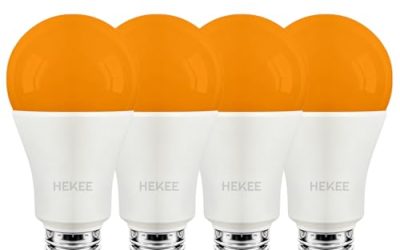
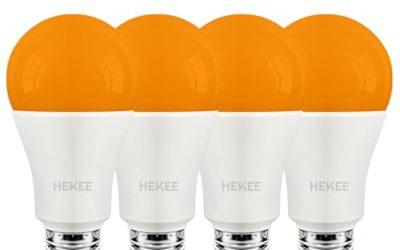
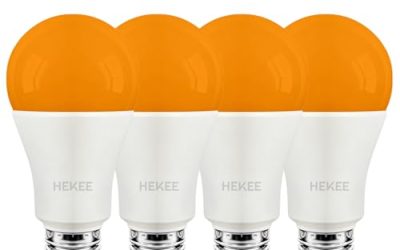
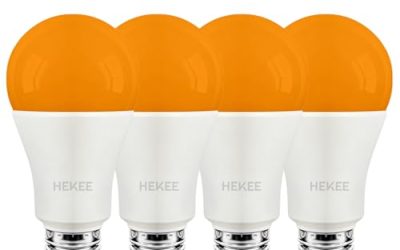
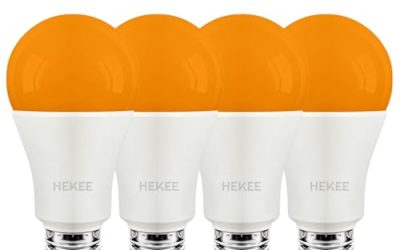
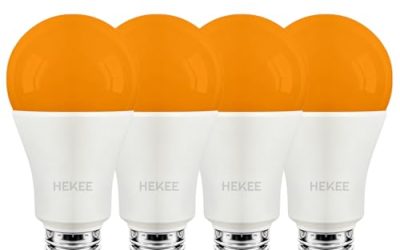
HEKEE Dusk to Dawn Bulbs A19 for Background Light
Media corners often sit in the dimmest part of the room, which makes finding a case spine or a dropped cable harder than it should be. These A19 bulbs carry a built-in light sensor, so they switch on automatically as the room darkens and off again when daylight returns, providing plain background light that makes the shelf and the case row readable.
The honest description matters here. These are plain automatic dusk-to-dawn sensor bulbs. They are explicitly not smart bulbs: no app, no voice control, no color changing, no scheduling beyond the sensor itself. They are also not screen lighting — they do not bias-light a television, reduce glare, or improve picture quality, and should never be bought for that purpose. They simply keep the corner from going dark.
Two caveats belong in every plan. In a windowless room, the sensor may read the space as permanently dark, so the bulbs may stay on far longer than expected, including all day. And before fitting them anywhere enclosed, check the enclosed-fixture caveat on the packaging, because not every bulb is rated for fully enclosed fittings.
Specs
- A19 bulb shape with a standard screw base
- Built-in dusk-to-dawn sensor for automatic on and off
- No app, voice control, or scheduling — not a smart bulb
- Role here: background room light only, never screen or bias lighting
- Caveats: may stay on in windowless rooms; confirm the rating for enclosed fixtures
ULANZI Super Clamp as a Small Accessory Mount
A super clamp is a grip mount: it clamps onto a shelf edge, a desk lip, or a stand pole and holds one small accessory steady. In a media corner, its role is narrow but real — it can hold a small phone used as a second screen for a game guide, at a fixed angle beside the television instead of being set down somewhere different every session.
The limits are just as clear as the use. The clamp is a mount only; it includes no light, no phone, and no camera of its own, so anything it holds has to be supplied separately. It should be clamped only to furniture that can take the pressure without damage, and it must never be clamped to the console or to the TV. Console shells and vents need to stay unobstructed and unstressed, and a television screen or bezel can be damaged by clamp pressure. Shelf edge, desk edge, stand pole — those are the safe anchor points, and used within those rules, the clamp removes one more loose object from the corner.
Specs
- Clamp-style grip mount for small accessories
- Mount only: includes no light, phone, or camera
- Suitable anchors: shelf edges, desk lips, stand poles
- Never clamped to: the console, its vents, or any part of the TV
tomtoc Laptop Case for the Laptop That Shares the Room
Many media corners double as the room’s laptop spot, and a laptop left loose on the media shelf is how the console’s airflow gets blocked and the case row gets pushed aside. This padded case gives that laptop its own home: out of use, it slides into the case, which stands in a separate spot away from the console shelf, keeping the laptop protected from dust and knocks.
Two plain statements belong with this pick. First, it is a laptop case, not a console case — it is shaped and padded for a laptop and should not be treated as transport or storage for the Xbox itself. Second, it is a padded soft case: it is not a hard shell, and it is not waterproof, so it guards against everyday bumps and scratches rather than drops or spills. Before ordering, check the internal dimensions against the laptop’s actual measurements, including its thickness, because a case that is nearly right is still wrong. Framed that way, the case quietly enforces the corner’s main rule: the console shelf stays a console shelf.
Specs
- Padded soft case sized for a laptop
- A laptop case only — not a console case
- Protection level: everyday bumps and scratches; not a hard shell
- Not waterproof; keep away from drinks and damp spots
- Fit check: compare the laptop’s measurements with the internal dimensions first
JoyJolt Faye Highball Glasses 13 oz, 6 Pack, for the Side Table
Long sessions usually involve a drink, and the storage plan has to decide where that drink is allowed to exist. These highball glasses are real glass, which is exactly why they belong on a side table away from the media shelf and the console — never on the same surface as the hardware, never beside the game cases, and never within an elbow’s reach of a controller in motion.
The care rule is simple and non-negotiable: retire any glass with a chipped rim. A chipped glass goes out of the set rather than back into rotation, because a damaged rim only gets worse and is unpleasant and unsafe to drink from. Glassware may look like the odd pick in a storage guide, but it solves a storage problem directly: when drinks have a proper glass and a proper place, they stop appearing in tumblers balanced on the media shelf — which is how consoles get wet and case rows get knocked over.
Specs
- Set of 6 highball glasses, 13 oz capacity each
- Real, breakable glass — handle and store accordingly
- Placement rule: side table only, away from the media shelf and console
- Care rule: retire any glass with a chipped rim, without exception
How to Choose
Start with the console, because its needs are not negotiable. Choose its position for airflow first: every vent clear, nothing stacked on top of it, and enough space around it that warm air can move away. Any storage plan that crowds the console is a bad plan no matter how neat it looks, so if a shelf forces the console into a tight slot with blocked vents, change the shelf arrangement, not the console’s breathing room.
Next, give the everyday gear one home shelf. Controllers and the headset should return to the same shelf after every session, in the same arrangement, so picking them up and putting them away become automatic. One shelf, one purpose: if the laptop, drinks, or spare cables start living there, the system is already slipping — which is why this guide pairs the shelf with a rail for light leads, a case for the laptop, and a side table for glasses.
Then set up the game cases in a single row: one row deep, spines facing out, in an order that suits the household — alphabetical, by series, or by how often each game is played. Every title stays visible, and the game list on the rail tracks anything lent out.
Finally, schedule the dust wipe. Once a month, power everything down, wipe the console’s vents and surfaces with a dry or barely damp cloth, and clear dust from the shelf and case row. Vents clog slowly and silently, and a console that cannot breathe runs hotter and louder. The wipe only works if it is on the calendar rather than left to memory. And when adding the supporting picks, measure first: check the rail’s mounting surface, the clamp’s jaw range against its shelf edge, and the case’s internal dimensions against the laptop.
FAQ
How much space does the console actually need around it?
Enough that no vent is covered and air can circulate on every side that has openings. Keep other gear and cases off the console entirely, avoid tight enclosed slots with no airflow, and if the only shelf space is a cramped cubby, rearrange the corner rather than forcing the console into it.
Where should controllers and the headset live between sessions?
On one home shelf, in the same spots every time. A single shelf keeps them off the floor and away from the console’s vents. Light charging leads can hang on the rail nearby, but the controllers themselves belong on the shelf, not on hooks.
Can the rail or the clamp hold the console or its accessories?
No. The rail is light-duty and holds only light leads and the paper game list — never the console, bulk controllers, power strips, or charging bricks. The clamp is a mount for one small accessory on a shelf or desk edge, and it must never be clamped to the console or the TV.
How often should the vents and shelf be cleaned?
Once a month works for most rooms. Power the console down, wipe the vents and surfaces, and dust the shelf and case row. Rooms with pets or carpets may need it more often; visible dust on the vents between wipes is the sign to act sooner.
Final Verdict
A tidy Xbox media corner is a routine wearing a small amount of gear. Stand the console where its vents stay clear, give controllers and the headset one home shelf, line the game cases up in a single readable row, and wipe the dust away once a month. Those four habits do the heavy lifting, and the five picks in this guide exist to protect them: the rail keeps light leads and the game list off the shelf, the sensor bulbs keep the corner readable without pretending to be smart lighting or screen lighting, the clamp fixes one small accessory in place without ever touching the console or TV, the padded case gives the household laptop a home that is not the console shelf, and real glassware on a side table keeps drinks away from the hardware. Keep the honest limits in view — the rail is light-duty, the case is soft and made for a laptop, and none of the picks is a storage unit — and the corner stays tidy.
Product and ASIN Reference
| # | Product | ASIN |
|---|---|---|
| 1 | SANY DAYO jewelry organizer 30 hooks | B07QFZSVQW |
| 2 | HEKEE dusk to dawn bulbs A19 | B07HGZMYZ4 |
| 3 | ULANZI super clamp | B09C882D4M |
| 4 | tomtoc laptop case | B073TVX735 |
| 5 | JoyJolt Faye highball glasses 13 oz 6 pack | B08BB62QWT |
Related guides
More from Amazon
Programs that pair well with the guide above. Offers and eligibility are set by Amazon and may change.
Free shipping on eligible items, Prime Video and more. Eligible new members can start with a free trial.
Start a Prime free trialAd-free music streaming. Eligible new subscribers can start with a free trial.
Try Music Unlimited freeA Prime membership for ages 18-24 with a trial period. Eligibility is set by Amazon.
See Prime for Young AdultsAudiobooks and podcasts to listen to on the go. Eligible new members can start with a free trial.
Try Audible freeAs an Amazon Associate we earn from qualifying purchases.