
A purple gaming setup is one of the easiest color themes to get right, because purple is what RGB does best. Mix red and blue light and you get violet, with no fiddly color matching. The hard part is the hardware. Purple desks, chairs and monitors are rarer than pink or white ones, so it pays to know which pieces really come in purple and which ones should stay black or white with purple light on top. This guide covers the whole build: picking a shade, then desk, chair, monitor, mouse, headset, controller, lighting and decor. Each part gets a pick, followed by a budget table at three price tiers.
Quick answer: for a full purple base, pair the Arozzi Arena Deep Purple Galaxy desk with a purple fabric chair and a Pixio PX278 Wave Purple monitor. Then add lilac Logitech peripherals and an RGBIC LED strip set to violet. Disclosure: this page has affiliate product cards, and we may earn a commission if you buy through them, at no cost to you. The picks come from spec research, not from our own use.
Purple Setup Picks at a Glance
| Category | Pick | Key spec | Shade | Price tier |
|---|---|---|---|---|
| Desk | Arozzi Arena Ultrawide Curved, Deep Purple Galaxy | 63 x 32 in top, full-surface mat, height about 28–32 in | Deep purple / galaxy print | Upper-mid |
| Chair | N-GEN GAMING Chair, Purple Fabric | Breathable fabric, lumbar support | Mid purple | Budget to mid |
| Monitor (27″) | Pixio PX278 Wave Purple | 2560 x 1440, 180Hz, Fast IPS, 1ms GTG | Pastel lavender | Mid |
| Monitor (32″) | Arozzi Nova 32 Purple | 31.5″ 2560 x 1440 IPS, 180Hz, HDR10, rear RGB ring | Purple | Mid |
| Mouse | Logitech G305 Lightspeed, Lilac | HERO 12K sensor, 99 g, up to 250 hrs on one AA | Lilac | Budget |
| Headset (wireless RGB) | Logitech G733 Lightspeed, Lilac | 40mm Pro-G drivers, 278 g, up to 29 hrs | Lilac | Mid |
| Headset (multi-platform) | SteelSeries Arctis Nova 3P, Lavender | 2.4GHz + Bluetooth 5.3, up to 40 hrs | Lavender | Mid |
| Controller | PlayStation DualSense, Galactic Purple | Haptics, adaptive triggers, USB-C / Bluetooth for PC | Deep galaxy purple | Mid |
| Lighting | Govee RGBIC LED Strip, 16.4 ft | Segmented color control via app | Any purple | Budget |
| Desk mat | Hahafelt Scalloped Desk Mat, Purple | 31.5 x 15.8 in | Soft purple | Budget |
Pick Your Purple First: Lavender, Violet or Galaxy
Purple covers a huge range, from the soft lilac of Logitech’s colorway to the near-black indigo of a galaxy print. Mixing the two ends of that range is the most common reason purple setups look off. Lilac hardware next to a deep violet desk can look like two different rooms. Choose one family and plan around it.
- Lavender and lilac (soft): pale, dusty purples with white furniture. Calm and cozy, and it pairs well with pink, mint or light wood. Most purple peripherals from big brands (Logitech Lilac, SteelSeries Lavender) are in this family.
- Violet (vivid): saturated mid purples, usually with black furniture and strong RGB. The classic gamer look, and the easiest to light.
- Deep purple and galaxy (dark): indigo and plum tones, star or nebula prints, dim lighting. Moody and great for night gaming and streaming.
- Black and purple: black desk, black monitor, purple chair and purple light. Works with any gear you already own.
- Synthwave (purple and cyan or pink): violet walls with cyan or hot pink accents, retro posters and neon signs. Very photogenic, and it needs the most lighting.
Use the table below to turn your chosen family into exact values for RGB apps. The names and hex codes are standard CSS colors, so any app that takes hex input will show the same shade on screen. Your LEDs will still vary a little by brand.
| Shade (CSS name) | Hex | RGB | Best family | How it looks on LEDs |
|---|---|---|---|---|
| Lavender | #E6E6FA | 230, 230, 250 | Soft | Reads as cool white on most strips. Use for screens, not for lights |
| Thistle | #D8BFD8 | 216, 191, 216 | Soft | Pale pinkish white. Lower green to about 120 for visible lilac |
| MediumPurple | #9370DB | 147, 112, 219 | Soft to vivid | Good “lilac light” that still looks purple |
| BlueViolet | #8A2BE2 | 138, 43, 226 | Vivid | Strong, clean violet. A safe default |
| DarkViolet | #9400D3 | 148, 0, 211 | Vivid to dark | Rich purple with no white cast |
| RebeccaPurple | #663399 | 102, 51, 153 | Dark | Moody plum, nice as a wall wash |
| Indigo | #4B0082 | 75, 0, 130 | Dark / galaxy | Very dim on LEDs. Pair with a brighter accent |
The pattern is simple. The less green in the mix, the more “purple” it looks on an LED strip. Pale lavenders have high green values, and cheap LEDs turn them into white. For a soft look, use MediumPurple-style values at low brightness instead of true lavender.
The Desk: The Biggest Purple Surface in the Room
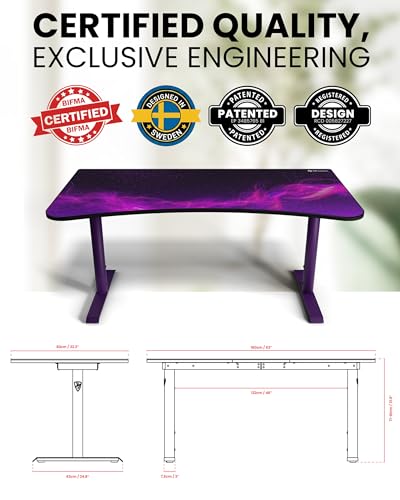
Purple desks are rare. Most “purple setups” online use a black or white desk with a purple mat and lighting. If you want the desk itself to carry the color, Arozzi’s Arena Deep Purple Galaxy is one of the few large gaming desks sold in a purple finish.
Desk pick: Arozzi Arena Ultrawide Curved Gaming Desk, Deep Purple Galaxy
Key specs: about 63 x 32.3-inch curved top, height adjustable from roughly 28 to 32 inches, full-surface water-resistant and washable mat with a purple galaxy print, purple steel legs, three cable and monitor-mount cutouts, under-desk cable net. Retail specs list a weight capacity of about 176 lb.

Arozzi Arena Ultrawide Curved Gaming Desk Deep Purple Galaxy




As an Amazon Associate we earn from qualifying purchases. Product prices and availability are accurate as of the date/time indicated.
The 32-inch depth is the standout spec. It lets you sit a 32-inch or ultrawide monitor at a comfortable distance, which shallow budget desks can’t do. The curved front edge brings the sides of the desk closer, so speakers or a second monitor sit within reach. The full-surface mat works as one giant mousepad, and the galaxy print sets the color theme for the whole desk without any extra decor.
The height adjustment uses a fixed range of a few inches, not a motorized sit-stand frame. Set it once when you assemble the desk, using the ergonomics checks further down. The plain “Deep Purple” Arena (purple legs, black top) is a separate model, so pick the galaxy version if you want the printed surface.
Best for: deep purple and galaxy setups with big monitors. Skip if: your room is small. At 63 inches wide it needs a full wall, and a black or white desk around 47 inches plus a purple desk mat will fit better.
The Chair: Purple Fabric Over Purple Leather
Purple gaming chairs come in two main types: PU leather and fabric. For a purple build, fabric has a real edge. The color is woven in rather than coated on, it breathes better in long sessions, and it doesn’t crack the way cheap PU leather can after a few years.
Chair pick: N-GEN GAMING Chair, Purple Breathable Fabric
Key specs: purple breathable fabric upholstery, lumbar support, gaming-style high back. See the listing for the exact recline range, armrest type and weight rating.

N-GEN GAMING Gaming Chair, Lumbar Support with Breathable Fabric, Purple


As an Amazon Associate we earn from qualifying purchases. Product prices and availability are accurate as of the date/time indicated.
A mid-purple fabric chair sits well between soft and vivid themes. It looks deliberate next to lilac peripherals and still holds its own under strong violet RGB. The fabric also photographs better than glossy PU on stream, because it doesn’t pick up hot spots from your key light.
Before buying any gaming chair, check three numbers against your body: the weight rating (go at least 50 lb above your weight), the seat height range (your feet should rest flat with thighs level) and the backrest height (the headrest should reach your neck, not your shoulder blades). If the purple chair doesn’t fit you, buy a comfortable black chair and add a purple seat cushion and lumbar pillow. You’ll keep the theme without paying for discomfort.
Best for: evening gaming in vivid or black-and-purple setups. Skip if: you need a chair for full-time desk work. A mesh office chair with adjustable lumbar support will hold up better.
The Monitor: Two Purple Screens Compared
Purple monitors used to mean cheap 1080p panels. Now Pixio and Arozzi both sell purple 1440p gaming screens at 180Hz. That matters, because 2560 x 1440 is now the second most common primary resolution among Steam users. It reached 27.04% in Valve’s September 2026 survey. The two picks below share the same resolution and refresh rate, so the choice comes down to size, shade and extras.
| Spec | Pixio PX278 Wave Purple | Arozzi Nova 32 Purple |
|---|---|---|
| Size | 27″ | 31.5″ |
| Resolution / refresh | 2560 x 1440 / 180Hz | 2560 x 1440 / 180Hz |
| Panel | Fast IPS | IPS |
| Pixel density | About 109 PPI | About 93 PPI |
| Response time (listed) | 1ms GTG | 2ms GTG / 1ms MPRT |
| Brightness (listed) | 350 nits | 300 nits, HDR10 |
| Color (listed) | About 96.5% DCI-P3 | 100% sRGB, 73% DCI-P3 |
| Ports | 1x DP 1.4, 2x HDMI 2.0 | 1x DP 1.4, 2x HDMI 2.0, 3.5mm out |
| Extras | Built-in speakers | 2x 3W speakers, rear RGB ring, 3-year warranty |
| Stand | Basic | Tilt only |
| Best for | Lavender and soft setups, sharper text | Bigger image, galaxy and vivid setups |
27-inch pick: Pixio PX278 Wave Purple
Key specs: 27-inch Fast IPS, 2560 x 1440 at 180Hz over DisplayPort (144Hz over HDMI), 1ms GTG, AMD FreeSync, 350 nits listed, built-in speakers.

Pixio PX278 Wave Purple 27 inch 180Hz Refresh Rate Quad HD 1440p Resolution Fast IPS Panel 1ms GTG Response Time Built-in Speakers Gaming Monitor with AMD FreeSync


As an Amazon Associate we earn from qualifying purchases. Product prices and availability are accurate as of the date/time indicated.
Pixio’s purple is a soft pastel, so this monitor is the natural centerpiece for lavender, lilac and white-and-purple setups. At 27 inches, 1440p gives about 109 pixels per inch. Text and HUDs look sharp at normal viewing distance, and a mid-range GPU can still push high frame rates. Plug into DisplayPort on a PC to get the full 180Hz. Retail listings disagree on the VESA pattern (75 vs 100 mm), so confirm it before you buy a monitor arm.
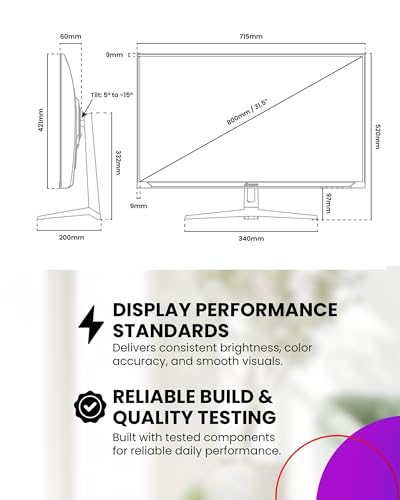
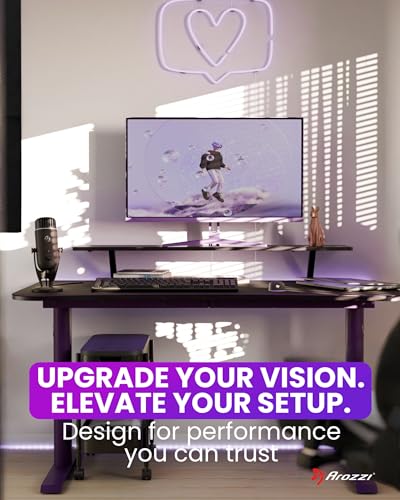
32-inch pick: Arozzi Nova 32 Purple
Key specs: 31.5-inch IPS, 2560 x 1440 at 180Hz, HDR10, 100% sRGB listed, Adaptive Sync, RGB ring on the back, 2x 3W speakers, VESA 75 x 75 (100 x 100 with the included adapter), 3-year warranty.

Arozzi Nova 32 inch Gaming Monitor 180Hz QHD Purple






As an Amazon Associate we earn from qualifying purchases. Product prices and availability are accurate as of the date/time indicated.
The bigger screen fills more of your view, which helps in racing games, open-world games and movies. The rear RGB ring is a neat extra for a themed setup, since it throws light onto the wall behind the screen. That’s basically built-in bias lighting. The trade-off is lower pixel density, about 93 PPI, so text looks a little softer than on the 27-inch. Sit a bit further back, about 30 to 36 inches. It pairs naturally with the deep Arozzi desk.
Mouse, Keyboard and Desk Mat
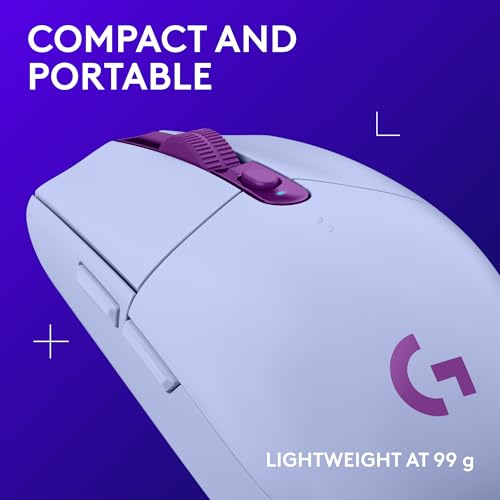
Mouse pick: Logitech G305 Lightspeed, Lilac
Key specs: HERO sensor at 200–12,000 DPI, LIGHTSPEED 2.4GHz wireless at 1000Hz, 6 programmable buttons, about 99 g with battery, up to 250 hours of continuous gaming on one AA battery (Logitech’s rating), and up to 9 months in Endurance mode.

Logitech G305 Lightspeed Wireless Gaming Mouse - Lilac




As an Amazon Associate we earn from qualifying purchases. Product prices and availability are accurate as of the date/time indicated.
The G305 has been a go-to budget wireless gaming mouse for years, and the lilac version matches Logitech’s G733 headset exactly. That makes it easy to build a coordinated soft-purple desk. The single-AA battery means no charging cable, so there’s one less wire to hide. At about 99 g it’s heavier than modern ultralight mice. Competitive players who want something lighter could look at the SteelSeries Rival 3 Wireless Gen 2 in Lavender. It’s listed at 83.5 g without batteries, with an 18K sensor and both 2.4GHz and Bluetooth.
Keyboard: go purple with keycaps
Purple gaming keyboards from major brands are hard to find, and many purple boards on sale are office combos. The better route for a gaming setup is a good white or black mechanical keyboard with a purple or lilac PBT keycap set. Keycaps cost far less than a new keyboard, and you can match your exact shade. A white board with lavender caps suits soft setups. A black board with violet or galaxy-pattern caps suits dark setups. Per-key RGB set to BlueViolet (138, 43, 226) gives you purple even without new caps.
Desk mat pick: Hahafelt Scalloped Desk Mat, Purple
Key specs: 31.5 x 15.8 inches, scalloped edge, purple.

Hahafelt Large Scalloped Desk Mat Pad, Purple, 31.5 x 15.8 Inches


As an Amazon Associate we earn from qualifying purchases. Product prices and availability are accurate as of the date/time indicated.
If you skip the galaxy desk, the desk mat becomes your main purple surface. At 31.5 x 15.8 inches it fits a full keyboard and gives the mouse room to move. The scalloped edge leans cute and cozy, so it fits lavender and pastel setups best. For a dark or synthwave setup, pick a black mat with a stitched purple edge or a nebula print instead.
Headsets: Lilac Wireless RGB or Lavender Multi-Platform
Two big brands sell official soft-purple wireless headsets, and they suit different players. Here’s how the specs compare:
- Drivers: both use 40mm drivers (Logitech Pro-G on the G733, neodymium on the Nova 3P).
- Wireless: G733 uses LIGHTSPEED 2.4GHz through a USB-A dongle. Nova 3P adds Bluetooth 5.3 to a USB-C 2.4GHz dongle.
- Battery (maker ratings): G733 up to 29 hours (about 20 with default lighting). Nova 3P up to 40 hours.
- Weight: G733 about 278 g. Nova 3P about 260 g (listings vary).
- RGB: G733 yes (LIGHTSYNC). Nova 3P none.
- Platforms: G733 suits PC and PlayStation via its dongle. Nova 3P covers PC, Mac, PS4/PS5, Switch and mobile.
Wireless RGB pick: Logitech G733 Lightspeed, Lilac
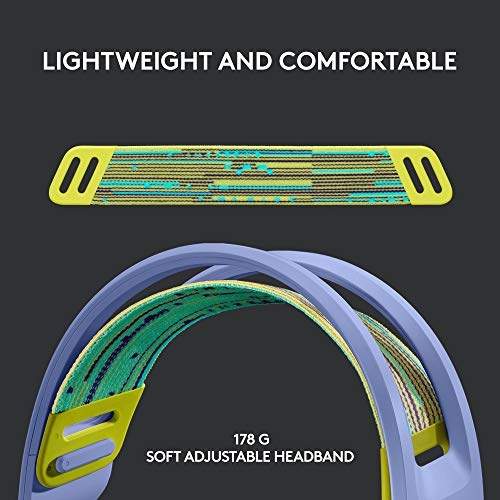
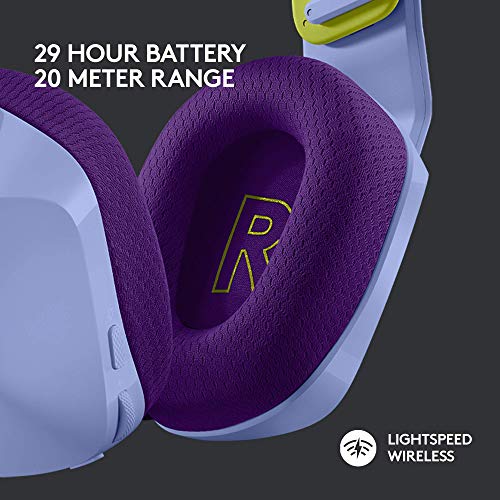
Key specs: 40mm Pro-G drivers, LIGHTSPEED wireless with up to 20 m range, DTS Headphone:X 2.0, detachable cardioid mic with Blue VO!CE, front-facing RGB, reversible suspension headband, about 278 g, up to 29 hours with lighting off.
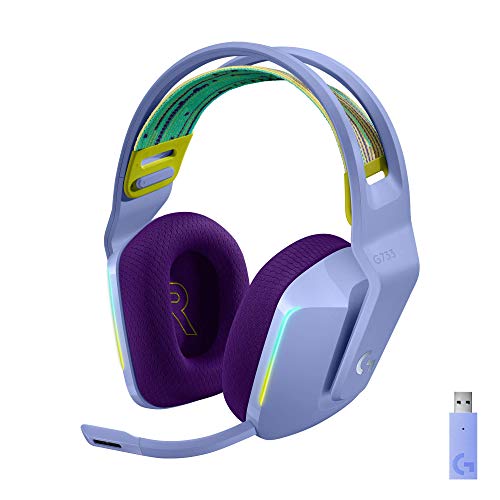
Logitech G733 Lightspeed Wireless Gaming Headset - Lilac


As an Amazon Associate we earn from qualifying purchases. Product prices and availability are accurate as of the date/time indicated.
The G733’s lilac shell, colored headband and front RGB strip make it part of the décor. Through Logitech G HUB, its lighting can sync with the G305 and other LIGHTSYNC devices. At 278 g it’s light for a wireless RGB headset. Reviewers have noted that the plastic frame feels less sturdy than Logitech’s premium Pro X line, so it’s worth treating gently. Turning the RGB off stretches battery life from about 20 to 29 hours.
Multi-platform pick: SteelSeries Arctis Nova 3P, Lavender
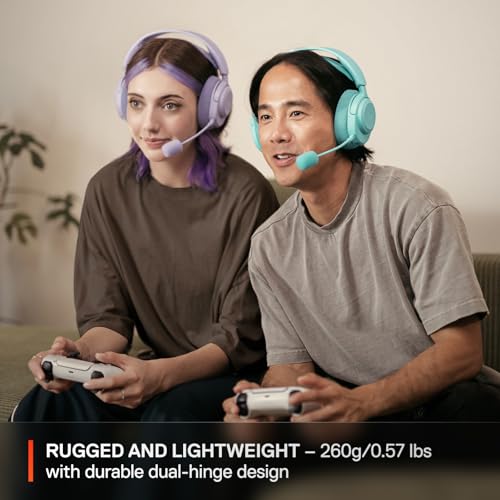
Key specs: 40mm drivers, 2.4GHz via USB-C dongle plus Bluetooth 5.3, up to 40 hours battery (SteelSeries rating), fast charge of about 9 hours from 15 minutes, works with PC, Mac, PlayStation, Switch and mobile.

SteelSeries Arctis Nova 3P Wireless Multi-Platform Gaming Headset - Lavender







As an Amazon Associate we earn from qualifying purchases. Product prices and availability are accurate as of the date/time indicated.
If your purple setup includes a PS5 or a Switch as well as a PC, the Nova 3P is the more flexible choice. The USB-C dongle plugs into consoles and phones, and Bluetooth covers everything else. There’s no RGB, but the lavender finish matches Logitech’s lilac closely enough to sit on the same desk. Battery figures vary by mode in reviews, with Bluetooth lasting longer than 2.4GHz, so plan on charging about weekly with daily use.
Controller: The Galactic Purple DualSense
Key specs: haptic feedback, adaptive triggers, built-in mic and speaker, 3.5mm headset jack, motion sensors, USB-C charging, and USB-C or Bluetooth connection to PC and Mac.

PlayStation DualSense™ Wireless Controller – Galactic Purple - For PS5, PC, MAC & Mobile
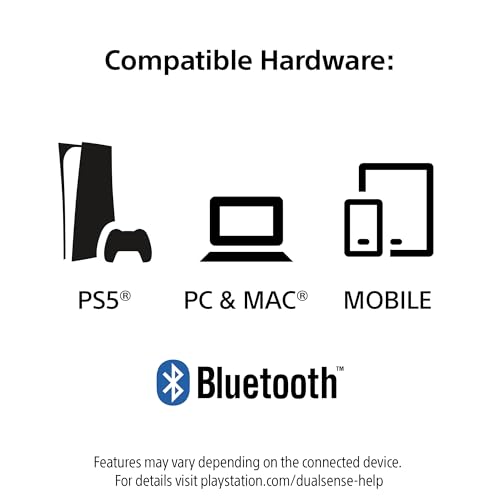


As an Amazon Associate we earn from qualifying purchases. Product prices and availability are accurate as of the date/time indicated.
Galactic Purple is the darkest, richest purple of any mainstream controller, with a nebula-style speckle that fits galaxy and deep-purple setups perfectly. On PC, Steam supports the DualSense well. Advanced features like haptics and adaptive triggers work in supported games, most reliably over a USB cable. If you want an Xbox-style layout instead, 8BitDo sells its Ultimate 2 controllers in purple, which are a solid PC alternative.
Lighting: Where a Purple Setup Comes Alive
Purple is the easiest theme to light, because it’s just red plus blue with little or no green, and every RGB product can produce it cleanly. That also means it’s easy to overdo. A room lit only by full-brightness violet looks flat and can be tiring at night. Build up the lighting in layers.
Lighting pick: Govee RGBIC LED Strip, 16.4 ft
Key specs: 16.4-foot RGBIC strip, segmented color control through the Govee Home app, scene and DIY modes.

Govee 16.4ft RGBIC LED Strip Lights, LED Lights for Bedroom, APP Control


As an Amazon Associate we earn from qualifying purchases. Product prices and availability are accurate as of the date/time indicated.
RGBIC means different sections of the strip can show different colors at the same time. That’s what lets you run a gradient from violet to pink, or from purple to cyan, instead of one flat color. Govee sells Bluetooth-only and Wi-Fi versions of its 16.4-foot strips, so check the listing if you want voice assistant control. At 16.4 feet, one strip covers the back edge of a 63-inch desk and still reaches up the wall behind the monitor.
A layered purple layout that works in most rooms:
- Wall wash: strip along the back of the desk, aimed at the wall, in your deepest shade (RebeccaPurple or DarkViolet) at medium brightness.
- Bias light: behind the monitor, either neutral white for comfort or the RGB ring on the Arozzi Nova at low brightness.
- Accent: peripherals, PC fans and the headset in a brighter violet (BlueViolet) so the gear stands out from the wall.
- Second color: one small zone in pink or cyan, such as a neon sign or a shelf strip, for depth in photos.
- Room light: a warm white lamp at around 2700K, so you’re not sitting in pure colored light all night.
One comfort tip: purple light has a lot of blue in it. Late at night, shift toward warmer, redder purples or dim the strips to 20 to 30%. Your eyes will feel the difference.
PC Case and Decor
Purple PC cases are scarce. For most builds, a white or black glass case with purple ARGB fans is the better choice anyway, since you can change the theme later just by changing the lighting. White cases reflect light better, so purple looks brighter in them. Black cases make purple look deeper and moodier. A panoramic case with glass on the front and side shows off the most light. Fill the intake fan slots for airflow, since glass fronts don’t breathe.
For decor, a few well-chosen pieces beat a crowded desk:
- Wall: a purple LED neon sign, a galaxy or synthwave poster, or a pegboard for headsets and controllers.
- Desk: a monitor riser, a headset stand, one plant (purple foliage like a purple shamrock works with the theme) and a figure or two.
- Floor: a dark purple or gray rug under the chair, plus a chair mat if the floor is carpet.
- Cables: purple or black braided sleeves, an under-desk tray and adhesive clips. The Arozzi desk’s cable net handles most of this.
Purple Gaming Setup Budget at Three Tiers
Ranges are rough figures based on typical late-2026 prices for each category. Prices change often, and themed colorways can cost a bit more than black. Use the totals to plan, not as a quote.
| Component | Accent (keep most gear) | Coordinated (full purple desk) | Full room |
|---|---|---|---|
| Desk | Keep current desk | Keep desk, add purple desk mat, about $15–$25 | Arozzi Arena Galaxy class, about $280–$450 |
| Chair | Purple cushion + lumbar pillow, about $25–$45 | Purple fabric gaming chair, about $80–$150 | Ergonomic chair in purple or black + purple accents, about $300–$600 |
| Monitor | Keep current monitor | Purple 27″ 1440p, about $230–$280 | Purple 32″ 1440p plus a second screen, about $400–$550 |
| Mouse + keyboard | Purple keycaps, about $20–$40 | Lilac wireless mouse + keycaps, about $60–$90 | Premium mouse + custom keyboard, about $200–$350 |
| Headset | Keep current headset | Lavender or lilac wireless, about $80–$130 | Premium wireless, about $130–$250 |
| Controller | Skip | Skip or purple 8BitDo, about $20–$60 | Galactic Purple DualSense, about $65–$80 |
| Lighting | One RGBIC strip, about $12–$30 | Strip + bias light, about $35–$80 | Multi-zone strips, neon sign, smart bulbs, about $150–$300 |
| Decor | One poster or plush, about $15–$30 | Rug, cable sleeves, riser, about $60–$120 | Shelves, art, rug, display storage, about $200–$400 |
| PC | Set existing RGB to purple, free | Purple ARGB fans for current case, about $30–$70 | New build in a glass case, about $1,800–$3,000 |
| Rough total | About $70–$145 | About $610–$1,005 | About $3,525–$5,980 |
The full-room PC range reflects the 2026 memory shortage. 32GB DDR5 kits now cost several times their mid-2025 price, which raises the cost of any new build. If money is tight, the Coordinated tier gets you a purple setup that looks finished while you keep your current PC.
Ergonomics Checklist
- Seat first: feet flat, thighs about level, elbows near desk height. Set the Arozzi desk’s height to match your seated elbow height when you assemble it.
- Screen height: top edge at or slightly below eye level. Use a riser or arm if the stand is too low. Both monitors here have limited stand adjustment.
- Screen distance: about 24 to 32 inches for a 27-inch screen, and 30 to 36 inches for a 32-inch screen.
- Mouse and keyboard: close enough that your upper arms hang relaxed at your sides.
- Light: never game in a dark room lit only by the screen. Keep a bias light and a low, warm room light on.
Purple Setup Mistakes to Avoid
- Mixing lilac and deep violet hardware. Pick one family. Soft gear works with soft lighting, dark gear with dark lighting.
- Using lavender values for LEDs. They come out white. Use MediumPurple or BlueViolet-style values instead.
- Buying purple for purple’s sake. A purple office keyboard or a slow purple monitor drags down a gaming setup. Check specs first and use keycaps and lighting to fill color gaps.
- One flat color everywhere. Add depth with a darker wall wash, brighter gear and one small second-color accent.
- Too much blue late at night. Dim the strips and shift warmer after dark.
- Ignoring cable routing. On a galaxy-print or pastel desk, black cables stand out sharply. Route them through cutouts and sleeves before you call the setup done.
How We Chose
We looked at what top purple setup guides cover: lighting, chair, desk, monitor, keyboard, mouse, headset, controller, case and decor. Then we searched each category for products sold in a real purple, lilac or lavender colorway that also have competitive gaming specs. We checked maker spec pages, retailer listings and independent reviews. Where sources disagreed (Pixio’s VESA pattern, the Arozzi desk’s height range, Arctis Nova 3P battery figures), we noted the conflict instead of picking one number. We also checked coverage across budget, mid and upper-mid tiers, and across soft and dark purple families. These picks are research-based. We have not used the products ourselves, so confirm current listing details before buying.
Purple Gaming Setup FAQ
What colors go well with a purple gaming setup?
Black and white are the safest bases: black makes purple look deep, white makes it look bright. For accents, pink suits soft lavender setups, cyan or teal suits vivid synthwave setups, and silver or light gray suits minimal setups. Avoid adding more than one accent color.
How do I get a true purple from my RGB lights?
Keep green very low or at zero, set blue high and adjust red to taste. BlueViolet (138, 43, 226) and DarkViolet (148, 0, 211) look purple on almost every LED. Pale lavender values contain lots of green and usually come out white. Lowering brightness also deepens the color.
How much does a purple gaming setup cost?
A purple accent upgrade starts around $70 to $145 if you keep your existing gear. A coordinated purple desk with a chair, 27-inch 1440p monitor, lilac peripherals and lighting is roughly $610 to $1,005. A full room with a new PC runs about $3,500 or more in 2026, mostly because of PC component prices.
Are there purple gaming monitors that are actually good?
Yes. The Pixio PX278 Wave Purple and Arozzi Nova 32 Purple both offer 2560 x 1440 at 180Hz on IPS panels, which is a strong spec for mid-range gaming. The Pixio is 27 inches and sharper, while the Arozzi is 31.5 inches with HDR10 and an RGB ring on the back.
Is purple lighting bad for your eyes?
Purple light isn’t harmful at normal room brightness, but it contains a lot of blue, which some people find harsh at night. Keep RGB at moderate brightness, use a neutral or warm bias light behind the monitor, and shift to warmer purples late in the evening.
Should I buy a purple PC case or a white case with purple RGB?
A white case with purple RGB is usually the better choice. It’s easier to find, it reflects light well so purple looks bright, and you can switch themes later by changing the lighting. Pick a purple case only if you want the color visible when the lights are off.
What is a good purple gaming chair?
Look for one that fits your body first: a weight rating at least 50 lb above your weight, a seat height range that keeps your feet flat and adjustable lumbar support. Fabric chairs breathe better and hold color well. The N-GEN purple fabric chair is a budget option that fits vivid and black-and-purple themes.
Can I make a purple setup without buying new furniture?
Yes. A purple desk mat, an RGBIC LED strip, purple keycaps and a purple seat cushion can change a black or white desk for well under $150. Set every RGB device to the same purple value and hide your cables, and the setup will read as purple in photos.
Which Purple Gaming Setup Should You Build?
For a soft lavender room, build around the Pixio PX278 Wave Purple, the lilac G305 and G733, and the scalloped purple desk mat on a white desk, with MediumPurple lighting at low brightness. For a deep purple or galaxy room, the Arozzi Arena Galaxy desk and the Arozzi Nova 32 make a matching pair, with the Galactic Purple DualSense and DarkViolet lighting to finish the look. If you play across PC, PS5 and Switch, swap the G733 for the Arctis Nova 3P. And if you’re on a tight budget, start with the Accent tier: one RGBIC strip, purple keycaps and a cushion. Light first, buy hardware later. Whatever you choose, stick to one purple family, light in layers and keep the cables out of sight.
Sources
Product specs come from maker pages and retail spec listings for Arozzi, Pixio, Logitech G, SteelSeries, Sony PlayStation, Govee and N-GEN, along with independent reviews of the G733, Arctis Nova 3P and Rival 3 Wireless Gen 2. Display share data comes from the Steam Hardware and Software Survey for September 2026. Memory price context comes from industry reporting on the 2026 DRAM shortage. Color values are the standard CSS named colors.
Last updated: October 2026


