
The best keyboard stands for most setups are the Hercules KS120B for maximum adjustment and portability, the On-Stage KS7190 for a compact, budget single-X frame, and the K&M 18950 for a sturdy, office-friendly permanent setup.
Choosing between them depends less on brand than on the keyboard’s width, weight, playing height, and whether the stand must fold away. A gaming keyboard or computer keyboard normally belongs on a desk or keyboard tray; a MIDI controller, digital piano, or stage keyboard needs a musical-keyboard stand with enough depth and load capacity.
As an Amazon Associate we earn from qualifying purchases at no extra cost to you.


Our Top Picks
 Hercules Stands KS120B EZ-LOK Double X Keyboard Stand47.5 x 20.7 x 4.6 inches15.7 poundsCheck on Amazon
 OnStage On-Stage KS7350 Pro Heavy-Duty Folding-Z Keyboard Stand27.5 x 4.25 x 14.5 inches17.3 PoundsCheck on Amazon
 Yamaha OEM PKBX2 Double-Braced Adjustable X-Style Keyboard StandOne Size4.9 x 24.25 x 13 inches9.2 poundsCheck on Amazon
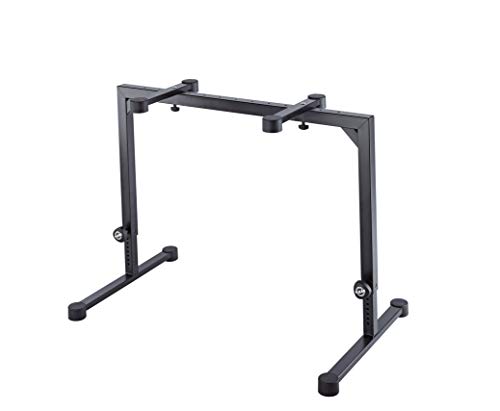 K&M König & Meyer 18810.015.55 Omega Adjustable SteelManual setting37.8 x 3 x 24.8 inches18.7 PoundsCheck on Amazon

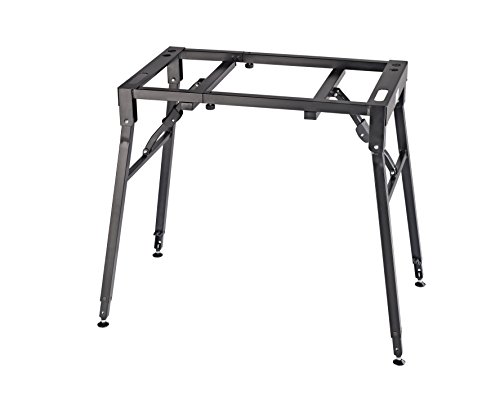
Top 3 picks at a glance
Best keyboard stands compared
| Stand | Design | Approx. width range | Typical load rating | Best fit | Portability |
|---|---|---|---|---|---|
| Hercules KS120B | X-style, height-adjustable | Fits most 61- to 88-key keyboards; about 20–39 in. high | Up to about 220 lb | Portable MIDI keyboards, stage pianos, rehearsals | Folds quickly; light to carry |
| On-Stage KS7190 | Single-X, height-adjustable | Sliding arm sleeves fit most keyboard widths | About 90 lb | Small-to-medium keyboards and seated studio setups | Light and folds flat |
| On-Stage KS7350 | Heavy-duty folding Z-style | About 21–33 in. | About 375 lb | Heavy 88-key pianos; optional second tier for a controller | Folds flat, but heavier than an X stand |
| K&M 18950 | Table-style keyboard stand | Approximately 27–46 in., depending on configuration | About 176 lb | Wide digital pianos and stable home studios | Less compact; designed for repeat setup |
| Yamaha PKBX2 | Double-braced X-style | About 9–30 in. arm width | About 64 lb | Home players wanting simple, dependable support | Folds for storage |
Published dimensions and weight ratings can vary slightly by revision and market. Treat the table as a buying guide, then verify the current manufacturer specifications for your exact keyboard and stand combination.
Our picks by setup
Best all-round portable stand: Hercules KS120B
The KS120B is the strongest general-purpose choice when one stand must accommodate several keyboards. Its X-style frame adjusts for different playing heights, and the locking mechanism makes setup faster than manually tightening several separate braces. The high stated load rating also gives useful headroom for heavy stage pianos, although a stand should not be loaded right at its limit.
Its main compromise is the geometry of an X stand: the feet and center brace can occupy more legroom than a Z-style frame. At low seated heights, check that your knees do not contact the lower supports. It is particularly suitable for musicians who transport a 61- or 88-key keyboard and need a stand that folds without tools.
Best budget compact option: On-Stage KS7190
The KS7190 is a classic single-X stand: light, simple and quick to fold. Sliding arm sleeves make it useful for compact MIDI controllers, 49-key instruments, and many 61-key keyboards.
This stand suits light keyboards in small rooms where it must fold away between sessions; at low seated heights, check that the single brace leaves room for your knees and a sustain pedal. Its capacity is lower than the Hercules model, so check the keyboard’s actual weight rather than assuming that a full-size digital piano will fit.
Best heavy-duty Z stand, expandable to two tiers: On-Stage KS7350
The KS7350 is a single-tier folding Z stand rated for about 375 lb, and On-Stage sells the optional KSA7550 second tier for a controller above a primary keyboard. This is useful for a gaming-and-music workstation, where a lower 61-key controller can handle instruments while an upper compact MIDI keyboard controls software or mixing functions.
Two-tier stands need more careful balancing than single-tier models. Put the heavier instrument on the lower tier, keep the upper keyboard centered, and avoid attaching a monitor arm or speaker shelf unless the stand is explicitly rated for that load. Raising the second tier also increases leverage, so uneven floors and loose adjustment knobs become more noticeable.
Best for a permanent home setup: K&M 18950
The K&M 18950 is aimed at stability rather than the smallest folded package. Its table-style support suits wide digital pianos and studio keyboards, and the broad frame can feel more secure during vigorous playing than a narrow X stand.
Choose it when the keyboard will stay in one room and you have enough floor space. It is less convenient for transport, and its wide footprint may conflict with a computer chair, desk legs, or a pedalboard. Measure the complete setup, not just the keyboard: include the stand’s feet, your chair clearance, and space for cables.
Best simple home stand: Yamaha PKBX2

The Yamaha PKBX2 is a practical double-braced X-style option for players who want a straightforward folding stand from a major instrument manufacturer. It works well for common home keyboards and portable stage instruments, provided the instrument stays within its rated load of about 64 lb.
It is not the best option for a multi-tier studio, unusually deep weighted keyboards, or a desk-style workstation. For those uses, a Z-style or table-style stand usually provides better legroom and accessory space.
Best table-style stand for heavy digital pianos: K&M 18810 Omega
The K&M 18810 Omega is the table-style stand that appears most often in musician-focused roundups, and it is the model to consider if you like the idea of a stable table frame but want something that still folds flat. It is made of steel and rated by K&M for 80 kg, roughly 176 lb, which gives comfortable headroom for heavy 88-key stage pianos, workstations and digital pianos without a dedicated furniture stand.
Its main advantage over X-style stands is adjustability in every direction that matters. Height runs from about 600 to 1,020 mm, roughly 23.6 to 40.2 inches, which covers low seated positions, taller players and standing performance. The support arms slide along the frame from about 180 to 790 mm apart, so they can sit directly under the strong points of a narrow controller or a full-size piano. Locking screws with springs on both sides make height changes straightforward, and the height scale is engraved so you can return to the same setting every time.
The four-legged table design leaves the space between your knees open, which is better for pedal placement and for players who sit close to the keys. Leveling caps on the feet help on uneven floors, and K&M includes cable clamps to keep power and USB leads away from your legs. If your setup grows, K&M sells a dedicated stacker for a second tier, and a further third tier, which is useful for adding a laptop or a second controller later.
The trade-offs are size and weight. At around 9.5 kg the Omega is heavier than most X stands, and its base footprint is large: plan for an area a little over a metre wide and well over half a metre deep. It sits in the premium tier, and casual players with a light 61-key keyboard do not need this much frame.
Compared with the K&M 18950 covered above, the Omega folds flat for storage and offers a wider range of arm positions, while the 18950 is aimed at fixed home use. Compared with Z-style stands such as the On-Stage KS7350, it gives more legroom and a far more refined height adjustment system.
Best Z-stand for 88-key stage pianos: Roland KS-11Z

Roland designed the KS-11Z for its own RD and FP series stage pianos, but it suits most heavy 88-key keyboards. It is a steel Z-style stand rated for 100 kg, about 220 lb, and Roland’s Z geometry leaves no cross brace near the floor in front of the player. That keeps the pedal area clear, which is the main complaint players have about X stands when they use sustain and expression pedals.
Height adjusts in seven steps from roughly 25 to 36 inches with a spring-loaded lever, so changing between a child’s seated height and an adult’s height takes seconds. Width adjusts steplessly from about 22.8 to 37 inches with a quick-release lever, which covers compact 61-key instruments as well as long 88-key boards. The padded support arms fold down for transport, and adjustable rubber feet help the stand sit level on uneven floors.
At about 10 kg, the KS-11Z is heavier than X-style stands of similar capacity, which helps stability but makes it less convenient to carry to gigs every week. It also occupies more floor depth than a slim X stand, roughly 24 inches front to back, so measure the space between your chair and the wall.
The KS-11Z is a mid-range to premium purchase. It makes most sense when the keyboard weighs 40 lb or more, when you play with pedals, or when the stand will be used by several people of different heights. Compared with the Hercules KS120B above, the Roland offers better legroom and a stepless width setting but folds less compactly. Compared with budget Z-stands, it has a higher stated capacity and a quicker adjustment mechanism.
Best two-tier Z stand: On-Stage KS1365

If you need a genuine two-keyboard stand, the On-Stage KS1365 is a clear option. It is a Z-frame stand with a removable second tier, and On-Stage rates the complete stand for 400 lb, including up to 60 lb on the upper tier. That combination is enough for a heavy 88-key stage piano below and a synth, MIDI controller or laptop above.
The first tier adjusts from about 20.5 to 33.75 inches high, and the width adjusts from 21 to 36 inches. The second tier sits about 16.5 to 18 inches above the first, with adjustable height and tilt, and its rubber bumpers can be angled to give the lower keys room. The main frame is welded steel with 1.4-inch square tubing, assembly needs no tools, and the upper tier comes off for transport.
The KS1365 suits home studios where a music production setup sits beside a gaming or streaming desk: the lower keyboard handles playing, while the upper tier can hold a compact controller or a laptop running the software. As with any two-tier stand, put the heavier instrument on the lower tier, keep the upper load centred and tighten every knob before playing.
Drawbacks: the stand weighs about 18 lb, which is heavy for frequent carrying, and the Z frame takes more floor depth than an X stand. The upper tier’s 60 lb limit is generous for a controller but not for a second heavy piano. Compared with the K&M Spider Pro below, the KS1365 has a much higher total capacity and costs less, while the Spider Pro is lighter, more compact when folded and more adjustable per tier.
Best premium column stand for two keyboards: K&M 18860 Spider Pro

The K&M 18860 Spider Pro is a long-running favourite among touring and studio keyboard players, and it appears regularly in musician-focused buying guides. It uses a different design from the X, Z and table stands covered elsewhere in this article: a central aluminium column on a folding base, with two pairs of telescopic support arms that can be clamped at any height along the column.
K&M rates it for 35 kg per tier and 105 kg in total. Support depth extends from about 300 to 470 mm and support width from about 670 to 940 mm, so it can hold a wide range of keyboards. The upper arms are angled at 15 degrees, which improves visibility and reach for a second keyboard. Because each tier slides along the column without fixed steps, you can set exact heights for seated or standing play. Threaded mounts let you attach a microphone boom, and K&M offers extra arms for a third keyboard.
Aluminium construction keeps the stand at roughly 10 to 11 kg depending on finish, and it folds into a long, slim package that fits easily into a car. For players who move between rehearsal rooms and a home studio, that portability is a key reason to choose it over a welded Z stand.
The disadvantages are cost and capacity per tier. The Spider Pro is firmly premium, and 35 kg per tier is fine for most stage pianos and synths but leaves less margin for the heaviest 88-key instruments than the On-Stage KS1365 or a table-style stand. The column also sits in front of your legs, which some players find less comfortable when seated close to the keys. Choose it if you want a professional, highly adjustable two-tier rig; choose the KS1365 if total capacity matters more than weight.
Best budget X stand with fine height adjustment: RockJam Xfinity

The RockJam Xfinity is a budget double-X stand that solves one specific problem: most inexpensive X stands only lock at five or so preset heights, while the Xfinity adjusts to any height within its range. RockJam lists a range from about 4 inches, low enough for a keyboard on the floor with a cushion, up to about 38 inches for standing play. That makes it a good match for children, shorter players and households where the stand must suit more than one person.
It ships pre-assembled with 1-inch steel tubing, a quick-release mechanism for folding and locking support straps that hold the keyboard to the arms. The width adjusts from a few inches up to roughly 38.5 inches, so it can carry anything from a small 49-key controller to many 88-key portable keyboards, provided the weight is within the rating.
That weight rating is the important limit. RockJam lists a maximum load of about 45 lb, far lower than the Hercules KS120B, Roland KS-11Z or any of the table stands in this guide. It is suitable for portable arranger keyboards, 61-key keyboards and lightweight 88-key instruments, but not for heavy weighted stage pianos. Applying the 70 to 80% loading guideline from our sizing section, aim to keep the keyboard and any accessories under about 35 lb on this stand.
As with every X design, the lower cross braces can interfere with pedals and knees at low seated heights. Compared with the single-X On-Stage KS7190, the Xfinity adds a second brace for stability and stepless height adjustment; compared with the Hercules KS120B, it adjusts more precisely but carries far less weight. It is a budget pick for beginners and lightweight keyboards rather than a stage workhorse.
Best mid-range double-X stand: Roland KS-20X
The Roland KS-20X sits between budget X stands and heavy-duty Z frames. It keeps the familiar offset-X shape and fold-flat convenience, but adds double bracing and heavy square steel tubing for stiffness, and Roland rates it for 75 kg, about 165 lb. That is enough headroom for most 88-key portable pianos and many stage pianos, not only lightweight arranger keyboards.
Height adjusts from roughly 27.8 to 39.4 inches with a spring-loaded lever and locking clutch, so you can move between seated and standing positions without fighting a pull pin. The support arms adjust from about 9.7 to 30.6 inches apart, and adjustable rubber sleeves help the stand sit firmly on uneven floors. Folded, it measures roughly 5 by 20 by 40 inches and weighs about 6.5 kg, which is light enough to carry to rehearsals.
The trade-offs are typical of X stands. The minimum height is higher than on the RockJam Xfinity, so very low seated positions and young children may need a different stand. The braces sit in front of the legs, which can crowd a sustain pedal at lower settings, and the depth of about 20 inches is moderate rather than compact.
Compared with the Hercules KS120B above, the KS-20X has a lower stated capacity but a simpler spring-lever adjustment; compared with the Roland KS-11Z, it is lighter and folds smaller but gives less pedal room. It is a sensible mid-range choice for a player with one 61- or 88-key keyboard who wants more rigidity than a budget single-X stand without moving to a large Z or table frame.
How to choose the right keyboard stand
1. Start with the keyboard’s weight and depth
Find the instrument’s net weight in its manual or specifications. Add the weight of anything physically supported by the stand, such as a music rest, laptop shelf, or second-tier attachment. A sensible target is to use no more than 70–80% of the published capacity.
For example, a 44 lb digital piano plus a 6 lb laptop shelf weighs 50 lb. At a conservative 75% loading target, divide 50 by 0.75: you need a stand rated for at least 67 lb. Choosing an 88 lb or higher model gives additional margin for movement and uneven loading.
2. Match width adjustment to the instrument
A stand that is too narrow leaves the keyboard overhanging its supports; one that is too wide can place the support arms near weak sections of the chassis. Measure the keyboard’s underside support points, not only its front-to-back width.
- 49-key MIDI controllers: most adjustable X and Z stands provide enough width, but check shallow chassis depth.
- 61-key keyboards: a medium-width adjustable stand is usually the most flexible choice.
- 88-key stage pianos: prefer a wide, high-capacity Z or table-style stand unless the manufacturer specifically approves an X stand.
- Gaming or office keyboards: use a desk, keyboard tray, or monitor shelf. Musical-keyboard stands are usually too low and too deep for comfortable computer typing.
3. Set height for elbows, knees, and pedals
When seated, aim for forearms that are approximately level with the keys and elbows close to a relaxed 90–110-degree angle. Place the sustain pedal so your heel can remain on the floor while the ball of your foot reaches the pedal. If the stand is comfortable for playing but blocks your knees, raise it slightly and adjust the chair rather than forcing your legs around the frame.
Standing players need a different measurement: with shoulders relaxed, the hands should meet the keys without bending the wrists sharply upward. A stand with many height positions is more useful than one with a high maximum height but few locking points.
4. Choose stability over folding convenience when appropriate
Folding designs are ideal for shared rooms, gigs, and occasional practice. They are not automatically unstable, but every hinge and locking point should be fully engaged before playing. Z-style and table-style stands generally offer more open legroom, while X stands often fold smaller and weigh less.
For a stable setup, place every foot on the same floor surface, tighten adjustment knobs by hand, and confirm that the keyboard is centered. On carpet, a rigid floor mat can reduce rocking. Never use folded or partially locked braces as a temporary height adjustment.
Decision matrix: which stand suits your situation?
| Your situation | Recommended design | What to prioritize | Likely compromise |
|---|---|---|---|
| Portable 61-key MIDI controller | Hercules KS120B or similar X stand | Fast folding, adjustable height, capacity above instrument weight | Less legroom than a Z frame |
| Seated home studio with one keyboard | On-Stage KS7350 or similar Z stand | Knee clearance, pedal room, width adjustment | Usually less compact when transported |
| Two-controller workstation | On-Stage KS7350 with its add-on tier, or another two-tier stand | Separate tier capacities and vertical spacing | More leverage and a larger footprint |
| Heavy 88-key digital piano | Wide table-style or high-capacity Z stand | Load margin, support width, anti-slip contact points | Reduced portability |
| Gaming PC and office keyboard | Desk, tray, or monitor riser | Typing height, wrist position, mouse space | Not suitable for supporting a full digital piano |
Important fit checks before buying
- Measure the distance between the keyboard’s rubber feet and compare it with the stand’s support-arm spacing.
- Check the stand’s minimum height with your chair and pedal position, not just its maximum height.
- Leave room for power and USB cables so connectors are not pressed against the frame.
- Confirm that the top supports are padded and wide enough to avoid point pressure on the instrument.
- If using speakers, a laptop, or a monitor arm, verify that their weight is included in the stand’s capacity.
Additional picks compared
| Stand | Design | Stated capacity | Height range | Best fit | Price tier |
|---|---|---|---|---|---|
| K&M 18810 Omega | Table-style, folds flat | About 176 lb | About 23.6–40.2 in. | Heavy 88-key pianos, seated or standing | Premium |
| Roland KS-11Z | Z-style, single tier | About 220 lb | About 25–36 in., 7 steps | 88-key stage pianos with pedals | Mid-range to premium |
| On-Stage KS1365 | Z-style with removable second tier | 400 lb total, 60 lb upper tier | About 20.5–33.75 in. (first tier) | Piano plus controller or laptop | Mid-range |
| K&M 18860 Spider Pro | Aluminium column, two tiers | About 77 lb per tier | Stepless along the column | Portable two-keyboard rigs | Premium |
| Roland KS-20X | Double-X, spring-lever height | About 165 lb | About 27.8–39.4 in. | One 61- or 88-key keyboard, portable | Mid-range |
| RockJam Xfinity | Double-X, stepless height | About 45 lb | About 4–38 in. | Beginners, children, light keyboards | Budget |
Capacity figures are the manufacturers’ published maximums. Apply the safety margin described earlier rather than loading any stand to its limit.
Keyboard stand types explained
Most roundups group keyboard stands into five designs. Each solves a different problem, and the right one depends more on how you play than on the keyboard’s brand.
- Single-X stands are the lightest and most compact. They fold quickly and suit lightweight keyboards, but a single brace can flex under heavy weighted pianos or energetic playing.
- Double-X stands add a second brace for stiffness. They remain portable and are the most common choice for 61-key and lighter 88-key keyboards, but the lower braces can get in the way of pedals and knees.
- Z-style stands place the frame to the sides and back, leaving open space in front of the player. They are very stable and pedal-friendly, though deeper and heavier than X stands.
- Table-style stands use four legs and a rectangular frame. They give the best stability and the most legroom for heavy pianos, at the cost of size and weight.
- Column and A-frame stands hold multiple keyboards on arms attached to a central post or angled frame. They are ideal for two- and three-keyboard setups and save floor space, but they cost more and need careful balancing.
Keyboard size and stand matching guide
| Instrument | Typical weight class | Suitable stand types | What to check |
|---|---|---|---|
| 25–49 key MIDI controller | Light | Single-X, desk mount, upper tier of a two-tier stand | Minimum arm width and shallow depth |
| 61-key portable or arranger keyboard | Light to moderate | Double-X, Z-style | Arm spacing under the rubber feet |
| 88-key portable digital piano | Moderate | Double-X with high rating, Z-style, table-style | Load margin and maximum width |
| 88-key weighted stage piano or workstation | Heavy | Heavy-duty Z-style, table-style | Capacity well above net weight, frame depth |
| Two keyboards or keyboard plus laptop | Combined load | Two-tier Z, column stand, table with stacker | Separate rating for the upper tier |
Setup and safety tips
- Assemble on the floor where the stand will live. Set the height and width before lifting the keyboard on, so you are not adjusting a loaded stand.
- Centre the keyboard left to right. Mark the centre of the instrument with a small piece of tape and align it with the centre of the stand to keep the load even.
- Put the support arms under the strongest points. Aim for the areas near the rubber feet on the underside, not under thin plastic or the battery compartment.
- Use the locking straps or rubber stops. Many budget stands include straps; they prevent the keyboard from sliding if someone bumps it.
- Check every knob and pin after a week. New stands settle, and vibration from playing can loosen hand-tightened knobs.
- Route cables away from your legs. Clip power, pedal and USB cables along the frame so they cannot be caught by a chair or foot.
- Keep pets and children clear of X stands. A light X stand with a keyboard on top can tip if pulled from one side. A wider Z or table stand is safer in busy family rooms.
- Use a rug or floor mat on smooth floors. A non-slip mat prevents the feet from sliding during energetic playing and protects hardwood.
Completing the keyboard station: bench, pedal and accessory space
A stand is only one part of a comfortable playing position. The bench or chair, pedal placement and accessories all change how high the stand should be and how much space it needs.
- Bench or chair: an adjustable-height bench is the most useful companion purchase, because it lets you fine-tune the seat instead of moving a loaded stand. Office chairs with armrests often collide with the keyboard; armless seats or benches work better.
- Sustain and expression pedals: place the pedal directly under your right foot with your heel resting on the floor. Z and table stands keep this zone clear; on X stands, check the brace position at your chosen height.
- Music rest or tablet holder: many keyboards include a music rest that clips into the instrument. If yours does not, a stand-mounted holder or a separate music stand keeps sheet music at eye level without adding weight to the keyboard.
- Headphones and cables: a headphone hook on the frame and a few cable ties keep the area tidy and reduce trip hazards.
- Laptop or audio interface: a small shelf or a second tier is useful for music software, but its weight must be included in the load calculation, and the shelf should be rated by the stand’s manufacturer.
When the keyboard sits beside a computer desk, align the stand’s height and the desk height where possible. A matched height makes it easier to swivel between a controller and a mouse without readjusting your chair, which is the most common pain point in combined gaming, streaming and music corners.
Bottom line
Pick the Hercules KS120B when portability and load capacity matter most, the On-Stage KS7190 when a light, low-cost folding stand is enough, the KS7350 for heavy pianos or a two-keyboard arrangement with its add-on tier, and the K&M 18950 for a stable home installation. For a normal gaming or office keyboard, skip a musical-keyboard stand and invest in a correctly sized desk tray or riser instead. The best keyboard stands are the ones whose height, support width, and load margin match the complete setup—not merely the number of keys.
Frequently asked questions
Is an X stand or a Z stand better?
An X stand is lighter, cheaper and folds smaller, so it suits portable use and lighter keyboards. A Z stand is more stable under heavy instruments and leaves the space in front of your legs open, which helps when you use pedals or sit close to the keys. For a heavy 88-key piano that stays at home, a Z or table stand is usually the better choice.
How high should a keyboard stand be?
For seated playing, set the stand so your forearms are roughly level with the keys and your elbows sit slightly above the keyboard. For many adults this falls around 26 to 30 inches from the floor to the top of the arms, but the right figure depends on your chair and the keyboard’s own height. Standing players usually need the keys around waist height or a little higher.
Can a keyboard stand hold an 88-key digital piano?
Yes, if the stand’s maximum width and load rating fit the instrument. Check the piano’s net weight in its manual, add any accessories, and choose a stand with a comfortable margin above that total. Heavy weighted stage pianos are best on double-braced X, heavy-duty Z or table-style stands.
Do I need a second tier?
Only if you use a second keyboard, a synth module or a laptop at the same position. A second tier adds height and leverage, so it needs a stand designed for it. Do not attach a tier to a stand whose manufacturer does not list one as compatible.
Can I use a keyboard stand for a computer keyboard or gaming setup?
It is not recommended. Musical-keyboard stands are designed for wide, heavy instruments and are usually deeper and lower than a comfortable typing position. For a computer or gaming keyboard, a desk at the right height, an under-desk keyboard tray or a monitor riser gives better wrist position and space for a mouse.
How do I stop a keyboard stand from wobbling?
Make sure every foot touches the floor and adjust any leveling feet, tighten all knobs and pins, centre the keyboard, and keep its weight well below the stand’s limit. On carpet, a rigid mat under the stand helps. If an X stand still wobbles with a heavy piano, a double-braced, Z or table design is the long-term fix.
Related guides
- Best Ultrawide Gaming Monitors: Six Screens Sized Against Real Desks: 6 Compared (2026)
- Best Game Room Neon Lights: Ten Signs and Icon Lamps Compared: 10 Compared (2026)
- 10 Best 75% Hot-Swappable Mechanical Keyboards (October 2026)
- Best Mini-LED Monitor: Five Listings From a Renewed KTC to a 5K LG, Compared by Pixels and Ports (2026)









