
The best mesh executive chairs for full-day home-office use are the Herman Miller Aeron for proven ergonomic support, the Ergohuman Gen 2 (ME7ERG) for maximum adjustability, and the Eurotech Vera for a more conventional executive look at a lower typical price.
As an Amazon Associate we earn from qualifying purchases at no extra cost to you.


Our Top Picks
 ELABEST X100 Ergonomic Mesh Office Chair with Footrest18.3 in x 20.47 in x 41 in26 x 24 x 41 Inches43 poundsCheck on Amazon


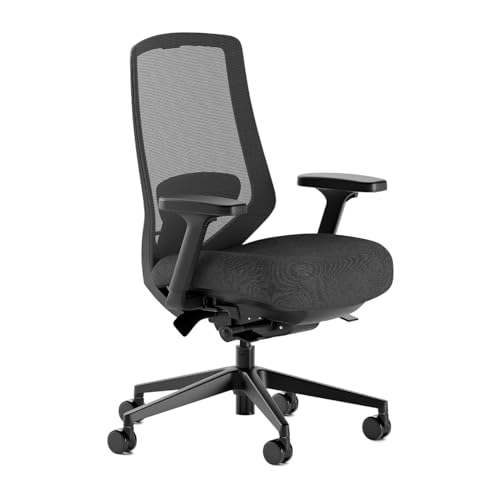

Top 3 picks at a glance
Best mesh executive chairs compared
| Chair | Seat-depth approach | Adjustability | Lumbar support | Weight capacity | Assembly difficulty | Typical market position |
|---|---|---|---|---|---|---|
| Herman Miller Aeron | Fixed depth by size: about 15.75–18.75 inches | Excellent; seat height, tilt, arms, tension, limiter, lumbar | PostureFit SL or adjustable lumbar, depending on configuration | Up to 350 pounds for sizes B and C | Easy; commonly ships largely assembled | Premium, depending on size and options |
| Ergohuman Gen 2 (ME7ERG) | Sliding seat pan with roughly two inches of travel | Very extensive; seat, back angle, arms, headrest, tilt and tension | Height- and depth-adjustable lumbar mechanism | About 275 pounds | Moderate; expect roughly 45–75 minutes | Upper mid-range |
| Eurotech Vera | Adjustable depth on many current configurations, around 18–21 inches | Strong; seat slide, arms, recline, tension and lumbar adjustment | Integrated adjustable lumbar support | About 275 pounds | Moderate; typically 30–60 minutes | Mid-range |
| WorkPro Quantum 9000 | Sliding seat pan, approximately 18–20 inches | Good; adjustable arms, seat, recline and lumbar | Adjustable back-support pad | Often listed around 350 pounds | Moderate; approximately 30–60 minutes | Budget to mid-range |
Specifications can vary by size, generation and configuration, so confirm the current manufacturer listing before ordering. The important comparison is not the number of knobs: it is whether the seat, back and lumbar support can be positioned for your body.
1. Herman Miller Aeron: the safest long-term choice
The Aeron is the strongest recommendation for buyers who prioritize durability, breathable mesh and reliable posture support over a padded executive appearance. Its 8Z Pellicle suspension mesh distributes pressure across multiple zones, and the chair is available in three body-size ranges rather than one oversized frame.
Its main limitation is seat depth. Each size has a defined seat pan rather than a sliding depth adjustment. That makes selection more important: smaller users generally need Size A, average-height users often fit Size B, and taller or broader users may prefer Size C. The front edge should stop several fingers short of the back of your knees; if it presses into your legs, the chair is too deep even if the back support feels good.
The Aeron is also less “executive” in the traditional sense. It has no thick cushion and its arms and back have a distinctly task-chair design. For eight-hour workdays, however, its suspended seat stays cooler than foam and is less likely to develop a permanent compression valley.
2. Ergohuman Gen 2 (ME7ERG): best for maximum adjustability
The Ergohuman Gen 2 is the better choice when several people share the chair or when you know you need a long, adjustable seat pan. Its sliding seat, adjustable lumbar mechanism, reclining back, multi-directional arms and adjustable headrest provide more tuning range than the Aeron.
The seat can suit taller users particularly well, but depth must be set correctly. Start with the pan retracted, sit fully back, then extend it until two to three fingers fit between the seat edge and your knees. A deep seat is not automatically ergonomic: if your feet leave the floor or your pelvis rolls backward, retract the pan or use a footrest.
The Gen 2 uses a firmer, more structured mesh-and-frame design than a cushioned executive chair. That firmness supports active posture but may feel less forgiving during the first week. It is also heavier and more involved to assemble, especially with the headrest and multiple arm components installed.
3. Eurotech Vera: best executive-style compromise
The Eurotech Vera is a practical middle ground for buyers who want a mesh back, a conventional office-chair silhouette and more adjustability than a basic fixed-back model. Its seat slide and recline controls help accommodate different leg lengths, while the adjustable lumbar area is more useful than a permanently molded bump.
Compared with premium chairs, the long-term question is consistency: adjustment mechanisms may not feel as substantial, and the mesh can show wear sooner in high-friction areas. That does not make the Vera unsuitable for daily work. It means buyers who spend 50 or more hours per week in the chair should pay close attention to warranty terms, replacement parts and the return period.
4. WorkPro Quantum 9000: best value-oriented option
The Quantum 9000 offers the core features needed for full-day use—mesh ventilation, a sliding seat, adjustable arms, reclining tension and lumbar adjustment—without reaching premium-chair pricing. It is a sensible choice for a first home office, a guest workstation or a second chair used several days per week.
Its value depends heavily on fit. Lower-cost mesh chairs often use a simpler seat frame and less refined controls, so a poor adjustment can feel harsher after several hours. Set the seat height so your feet are flat, adjust the lumbar pad to the belt-line area, and keep the recline tension high enough that you do not constantly brace yourself with your legs.
5. Branch Ergonomic Chair Pro: best mid-range mesh chair with deep adjustment
The Branch Ergonomic Chair Pro sits in the gap between budget mesh chairs and the premium models above. It pairs a breathable mesh back with a cushioned high-density foam seat, which suits people who like airflow behind the spine but find an all-mesh seat too firm. Branch lists 14 points of adjustment, and the important ones are those many mid-range chairs skip: a seat-depth slider, lumbar support that moves in both height and depth, and a forward seat tilt for people who lean toward the desk while typing or drawing.
Its 5D armrests adjust for height, width, pad depth, pad width and pivot, so it is easier to bring the arm pads close to a keyboard tray or narrow desk than with a fixed-width arm. The published seat height range is roughly 17 to 20 inches with the standard cylinder, with a taller cylinder option for users over about 5 feet 11 inches. Seat depth runs from about 16.7 to 19.7 inches, a sensible range for average-height and moderately tall users. The weight rating is 275 pounds, and the chair is covered by a seven-year warranty. A two-axis headrest is an add-on rather than standard, so check the configuration if you want neck support for reclined calls.
Strengths: the lumbar adjustment is genuinely useful rather than decorative, the forward tilt is rare in this tier, and the overall look is quieter and more home-office friendly than racing-style or heavily branded chairs.
Drawbacks: the 275-pound rating is lower than the Aeron Size B/C or the Steelcase Series 2, the seat is foam rather than suspension mesh, and some owners report armrest rattle over time. It also lacks the long track record of Herman Miller or Steelcase mechanisms.
How it compares: choose the Branch Pro over the WorkPro Quantum 9000 if you want more refined lumbar and arm adjustment, and over the Eurotech Vera if forward tilt and a cleaner design matter. Choose the Aeron instead if you want an all-mesh seat and a longer warranty for heavy daily use.
6. Steelcase Series 2: best breathable alternative from a premium brand

The Steelcase Series 2 is not a woven mesh chair in the strict sense. Its Air back uses a flexible polypropylene shell with a geometric open pattern that lets air through and flexes in two directions as you move. Versions with the 3D Microknit back add a knit layer over that frame. For buyers whose real goal is a cooler back than a padded executive chair, it behaves much like a mesh back while giving access to Steelcase engineering and parts support.
The specification is strong for the tier: a 400-pound weight rating, seat height from about 16.5 to 21.5 inches, adjustable seat depth, 4D arms that move in height, width, depth and pivot, and a weight-activated recline with extra tension settings. The seat has flexible front edges, which reduces the hard-rail pressure under the thighs described in the mesh construction section below. Steelcase backs the chair with its limited lifetime warranty, described as 12 years for multi-shift use on the main components.
Strengths: the highest weight rating in this group, a reputable warranty and parts network, and a back that encourages small posture changes instead of holding the spine in one position. Its compact footprint also suits smaller home offices.
Drawbacks: the back does not split into independently moving upper and lower sections like the flagship Steelcase Leap, lumbar availability depends on the back option chosen, and a headrest is not part of the standard configuration. The seat is foam, so it will not feel as airy as the Aeron’s suspension seat.
How it compares: it sits below the Aeron and Ergohuman in market position while offering a higher capacity than either, which makes it a strong choice for heavier users who want a premium-brand mechanism. Choose the Ergohuman instead if a tall back and headrest are must-haves.
7. ELABEST X100: best for reclining with a built-in footrest

The ELABEST X100 is aimed at people who want an executive-style recline without giving up a mesh back. Its standout feature is an extendable footrest of roughly 18 inches with two angle positions, so it can double as a break chair between long sessions. A three-stage recline mechanism locks the back at different angles, and the high back includes an adjustable headrest.
The listing describes a 3D lumbar unit that moves in height and depth and can rotate slightly, 5D flip-up armrests (height, width, forward and back, rotation, and a flip-up position so the chair slides closer to the desk), and a stated 300-pound capacity with a Class 4 gas lift and BIFMA certification. Seat height runs from about 18.3 to 23 inches and seat depth is listed around 18 inches. ELABEST quotes a five-year warranty and tool-free assembly.
Strengths: footrest and headrest in one package, flip-up arms that clear the desk edge, and adjustable lumbar depth, which many chairs in this tier lack.
Drawbacks: there is no seat-depth slider, so shorter users may find the front edge close to the knees, and the minimum seat height of roughly 18.3 inches is high for people under about 5 feet 4 inches. A footrest mechanism also adds moving parts that need occasional tightening. Specifications vary between sellers, so confirm the exact variant, because some colours ship without the footrest.
How it compares: it is more relaxation-focused than the WorkPro Quantum 9000 and far less refined than the Aeron, but no other chair here offers a footrest. Choose it for mixed work-and-rest use; choose the Branch Pro if seat-depth adjustment matters more than lounging.
8. CAPOT Ergonomic Mesh Office Chair: best budget pick for larger users

The CAPOT chair targets buyers who need a high weight rating without moving into the mid-range. It lists a 400-pound capacity, a stainless steel base, an SGS-certified gas lift and BIFMA X5.1 compliance. Unlike many budget chairs that use mesh only on the back, it uses mesh on the seat as well, which keeps it cooler in warm rooms.
The seat is about 19.3 inches deep and 20 inches wide, with height adjustment from roughly 18.5 to 22 inches. Lumbar support has several height levels and about 2 inches of travel, the back locks at 90, 110 or 125 degrees, the headrest adjusts in height and angle, and the armrests flip up. CAPOT suggests it for users roughly 5 feet 5 inches to 6 feet 2 inches tall and lists a five-year warranty with parts replacement. PU-coated casters are designed to roll quietly on hard floors.
Strengths: high capacity, mesh on both seat and back, a defined set of recline lock angles, and a headrest at a budget tier.
Drawbacks: the seat depth is fixed and fairly long, so shorter users may not get enough knee clearance; the recline uses fixed lock positions rather than smooth tension tuning; and listings disagree on overall chair height, so check the exact dimensions before ordering. Budget seat-mesh frames can also press into the thighs if the seat height is set too high.
How it compares: choose it over the WorkPro Quantum 9000 when capacity and a mesh seat are the priority, and over the ELABEST X100 if you do not need a footrest. For a 400-pound rating with a premium mechanism, the Steelcase Series 2 is the step up.
9. COLAMY Ergonomic Mesh Office Chair: best budget chair with a sliding seat
The COLAMY high-back mesh chair is a budget-to-mid-range option that includes one feature this guide repeatedly treats as essential: an adjustable seat depth. Its slide seat moves by about 2.4 inches, giving a seat depth of roughly 15.75 to 17.7 inches, which helps shorter and average-height users keep the recommended two to three fingers of space behind the knees.
The back uses imported mesh, paired with a thick high-density foam seat cushion. The chair adds an adjustable headrest, 4D armrests, adjustable lumbar support and a four-position tilt lock at about 90, 105, 120 and 130 degrees. Seat height runs from about 16.7 to 21 inches, a lower starting point than most budget high-back chairs, and the stated capacity is 300 pounds with a Class 4 gas cylinder. COLAMY lists a three-year warranty.
Strengths: the low minimum seat height and sliding seat make it one of the better fits for smaller users in this guide, and the headrest and 4D arms give it an executive feel without a leather cushion.
Drawbacks: the seat depth range tops out short of what tall users need, the warranty is shorter than the Branch or Steelcase, and COLAMY sells similar-looking variants, including a footrest version without a slide seat and with a lower capacity, so confirm the model before ordering.
How it compares: it is the budget counterpart to the Aeron Size A for shorter users, and a better fit than the CAPOT or ELABEST X100 if your feet do not reach the floor easily. Taller users should look at the Ergohuman Gen 2 or CAPOT instead.
Additional picks compared
| Chair | Mesh coverage | Seat depth | Lumbar | Headrest | Stated capacity | Warranty | Price tier |
|---|---|---|---|---|---|---|---|
| Branch Ergonomic Chair Pro | Mesh back, foam seat | Sliding, about 16.7–19.7 in | Height and depth | Optional add-on | 275 lb | 7 years | Mid-range |
| Steelcase Series 2 | Flexible Air back or knit back, foam seat | Sliding | Height, depending on back option | Not standard | 400 lb | Steelcase limited lifetime (12 years multi-shift) | Mid-range to premium |
| ELABEST X100 | Mesh back, padded seat | Fixed, about 18 in | Height, depth and slight rotation | Yes | 300 lb | 5 years | Mid-range |
| CAPOT Ergonomic Mesh | Mesh seat and back | Fixed, about 19.3 in | Height, about 2 in travel | Yes | 400 lb | 5 years | Budget |
| COLAMY Ergonomic Mesh | Mesh back, foam seat | Sliding, about 15.75–17.7 in | Adjustable | Yes | 300 lb | 3 years | Budget to mid-range |
Figures come from manufacturer and retailer listings and can change between variants and colourways. Treat capacity and warranty as the most important lines in this table: they are the clearest indicators of how the frame and mechanism are expected to age.
How to choose a mesh executive chair: seven criteria that matter
Executive chairs are often sold on appearance: a tall back, a headrest and a wide seat. For full-day use, the features below decide whether the chair is still comfortable at hour seven.
- Seat depth range. A chair that is too deep pushes the front edge into the back of the knees; one that is too shallow leaves the thighs unsupported. A sliding seat is the single most useful adjustment for shared chairs or users at either end of the height range.
- Lumbar adjustability. Height adjustment lets you put the support at the belt line. Depth adjustment controls how firmly it presses. A fixed bump only suits people whose spine happens to match it.
- Seat height range against your desk. Measure from the floor to the top of your desk. Most people need the seat roughly 9–12 inches below the work surface. If your desk is fixed at a standard height and you are short, look for a low minimum seat height or plan for a footrest.
- Mesh tension and frame edges. Tight, well-supported mesh spreads pressure. Loose mesh lets you sink onto the frame rail. Look for flexible or rounded front edges on the seat.
- Recline type. A synchro-tilt with adjustable tension lets the back move with you; fixed lock angles are simpler but less smooth. Heavier users should check that the tension knob has enough range to hold them upright without locking.
- Weight rating with a margin. Choose a rating at least 25–50 pounds above the user’s weight, especially if you recline often or rock in the chair.
- Warranty coverage. Read what is covered: mesh, foam, gas cylinder and tilt mechanism often have different terms. A long frame warranty with a short mechanism warranty is less reassuring than it sounds.
Headrests, footrests and other executive extras: are they worth it?
Headrests help when you recline for calls, reading or thinking, but they do little while you type upright. A headrest should adjust in height and angle; a fixed one that pushes the head forward is worse than none. If you rarely recline, a mid-back or high-back chair without one is fine.
Footrests built into the base, as on the ELABEST X100, are for breaks rather than working posture. They add weight and moving parts. If your actual problem is that your feet do not reach the floor at desk height, a separate under-desk footrest is the better fix.
Flip-up arms are valuable on smaller desks, for cross-legged sitting, or when using a gaming controller. They do not replace proper arm height adjustment, so prefer arms that both adjust and flip.
Forward tilt benefits people who lean in to write, draw or work on a laptop. Most users who sit back against the lumbar support will rarely use it.
Mesh versus leather and foam executive chairs
Traditional executive chairs use bonded leather, PU leather or thick foam. They look formal and feel soft on first contact, but they trap heat and the foam compresses over months of daily use. Mesh stays cooler, does not peel, and maintains its shape longer when the tension and frame are well made. The trade-off is firmness: a good mesh seat feels supportive rather than plush, and budget mesh can feel harsh along the frame edges.
A hybrid design, with mesh back and foam seat, is often the best compromise for people who find full-mesh seats too firm. The Branch Pro, COLAMY and ELABEST X100 follow this approach. Full-mesh seats, such as the Aeron and the CAPOT, are better choices for hot rooms and people who sweat easily.
Mesh construction: what matters beyond “breathable”
Mesh is not one material. A taut woven suspension mesh usually spreads pressure more evenly than a thin, loose fabric stretched over a basic frame. Look for a seat that supports the sit bones without creating a hard ridge under the thighs. A mesh back should flex slightly when you recline, but it should not collapse away from your spine.
- Seat mesh: cooler and less likely to trap moisture, but more sensitive to frame pressure and sharp objects.
- Back mesh: improves airflow and can conform to the shoulder blades, especially when the frame has separate tension zones.
- Edge design: a rigid front rail can cause thigh pressure even when the mesh itself is comfortable.
- Maintenance: vacuum dust from the mesh and wipe it with mild soap and water; avoid soaking tensioned fabric.
Choose by body type and working pattern
| Your situation | Best fit | Why | What to avoid |
|---|---|---|---|
| Shorter user with a desk that cannot be raised | Aeron Size A or a chair with a low minimum height | Shorter seat depth reduces knee pressure and keeps feet grounded | Deep fixed seats and tall gas cylinders |
| Tall user who reclines frequently | Ergohuman Gen 2 or Aeron Size C | Longer support area and greater seat-depth range | Shallow seats that leave the thighs unsupported |
| Shared home office | Ergohuman Gen 2 or Eurotech Vera | Sliding seat depth and multiple arm adjustments simplify re-fitting | Fixed-size chairs selected for only one person |
| Hot room or long summer sessions | Aeron or another full-mesh seat and back | Suspension mesh allows more airflow than thick foam | Bonded-leather executive chairs with closed cushions |
| Heavy daily use and a long ownership horizon | Aeron or Ergohuman Gen 2 | Stronger frames, better parts support and more durable mechanisms | Unbranded chairs with vague capacity and warranty information |
Match the chair to your desk, floor and room
A chair that fits your body can still fail in your room. Before ordering, check how it will interact with the rest of the workspace.
- Fixed-height desks. A typical fixed desk is about 29–30 inches tall. Average-height users usually want a seat height around 17–19 inches with it. Shorter users who need a higher seat to reach the desk should add a footrest rather than letting the feet hang.
- Standing desks. Because the desk adjusts, you can set the chair first for your legs and then bring the desk to elbow height. This makes seat-height range less critical, but armrests that drop low enough to slide under the desktop become more important.
- Keyboard trays and narrow desks. Flip-up or width-adjustable arms prevent the chair from colliding with the desk edge, so you can sit close enough to keep the lumbar support in contact with your back.
- Hard floors. Standard nylon casters can scratch wood and laminate and roll too freely. Rubber or PU-coated casters, or a chair mat, protect the floor and make the chair easier to control. Several premium chairs, including Steelcase models, are sold with different casters for carpet and hard floors.
- Carpet. Deep pile makes rolling harder and strains the base over time. A firm chair mat reduces effort and keeps the chair level.
- Room temperature. If the room regularly runs warm, prioritise mesh on both seat and back. If it runs cold, a mesh back with a foam seat is usually more comfortable through winter.
- Doorways and stairs. High-back chairs with headrests can be awkward to move between rooms. Chairs that ship mostly assembled, like the Aeron, are easier to set up but can be bulky to carry upstairs in the box.
Common mistakes when buying a mesh executive chair
Buying on height of backrest alone. A tall back looks executive, but if the lumbar zone does not line up with your lower back, the extra height adds nothing. Check the distance from seat to lumbar support and whether it moves.
Ignoring minimum seat height. Many high-back budget chairs start at 18 inches or more. Shorter users end up with dangling feet and pressure behind the knees. If you are under about 5 feet 4 inches, check this figure before any other.
Treating the weight rating as a target. A rating is a limit, not a comfortable working load. Choosing a chair rated exactly at your weight shortens the life of the gas cylinder and tilt mechanism.
Over-valuing adjustment counts. A listing that claims 5D, 6D or 14 adjustments says little about how well each one works. Seat depth, lumbar position, arm height and recline tension are the adjustments that matter most for all-day use.
Skipping the return window. Comfort is personal, and the first few days in a firmer mesh chair can feel unfamiliar. Keep the packaging, adjust the chair properly, and give it at least a week of normal work before deciding.
How to set up a mesh chair for an eight-hour day
- Set seat height first. Raise or lower the chair until your feet are flat and your knees are near a 90–100-degree angle. If the desk is too high, raise the chair and add a footrest rather than letting your feet dangle.
- Set seat depth second. Sit fully back and leave two to three fingers of space behind the knees. This prevents the front edge from compressing nerves and blood vessels.
- Position lumbar support. Place the strongest part of the support at or slightly above your belt line. If it forces your stomach forward or makes you arch excessively, reduce its depth or height.
- Adjust armrests last. Set them high enough to support relaxed shoulders while typing. If they prevent the chair from approaching the desk, lower them or move them inward.
- Use recline deliberately. A slight recline—roughly 100–110 degrees between your torso and thighs—can reduce static spinal loading. Locking perfectly upright all day is usually less comfortable than changing position.
Durability and assembly checklist
For full-day use, prioritize a metal or reinforced frame, replaceable casters, a tested weight rating comfortably above the user’s body weight, and a warranty that covers the mechanism rather than only the frame. A 250-pound user should not choose a chair rated exactly at 250 pounds if it will be reclined heavily every day; a margin of at least 25–50 pounds is more sensible.
During assembly, do not tighten every bolt fully until the back, arms and seat are aligned. Install the gas cylinder without hammering it, check that the tilt mechanism returns smoothly, and retighten fasteners after a week of use. Creaks often come from a loose arm or back connection rather than failed mesh.
Frequently asked questions
Are mesh chairs good for long hours?
Yes, provided the mesh is properly tensioned and the chair fits your body. Mesh dissipates heat and moisture better than foam or leather, which matters during eight-hour days. The common problems with mesh, such as a hard front rail or sagging seat fabric, come from cheap frames rather than the material itself, so check seat depth, edge design and warranty before buying.
Do mesh chairs sag over time?
Lower-quality mesh can loosen after a year or two of heavy use, especially on the seat. Well-engineered suspension mesh on premium chairs is designed to hold tension for many years and is usually covered by long warranties. If you choose a budget mesh chair, a mesh back with a foam seat tends to age more gracefully than a cheap all-mesh seat.
Is a mesh seat or a foam seat better?
A mesh seat is cooler and does not develop a compressed dip, but it feels firmer and is more sensitive to frame design. A foam seat feels softer and is more forgiving of posture changes, but it is warmer and slowly compresses. People in hot rooms, or who sit for very long stretches without breaks, often prefer mesh; people who find mesh uncomfortable under the thighs usually prefer a hybrid chair.
What weight rating do I need?
Choose a chair rated at least 25–50 pounds above your body weight. Recline, rocking and dropping into the chair all add dynamic loads. Big and tall users should also check seat width, gas cylinder class and base material, not just the headline capacity figure.
How do I know if a seat is too deep?
Sit fully back against the backrest. If you cannot fit two to three fingers between the front edge and the back of your knees, the seat is too deep. You will often find yourself perching forward to avoid the pressure, which defeats the lumbar support. A sliding seat solves this; otherwise choose a smaller size or a chair with a shorter fixed seat.
How should I clean a mesh office chair?
Vacuum the mesh with a soft brush attachment every few weeks to remove dust and skin flakes. For spots, use a cloth dampened with mild soapy water, then wipe with clean water and let it air dry. Avoid soaking the mesh, harsh solvents and steam cleaners, which can weaken the fibres or the bond to the frame.
Final verdict
Choose the Herman Miller Aeron when durability, breathable suspension and dependable ergonomic support matter most. Choose the Ergohuman Gen 2 when seat-depth adjustment, head support and fine positioning are priorities. Choose the Eurotech Vera for a more traditional executive appearance with useful adjustments, and the WorkPro Quantum 9000 when the budget is the deciding factor. In every case, correct seat depth is more important than a tall backrest or a large number of adjustment levers.
Related guides
- Best Ultrawide Gaming Monitors: Six Screens Sized Against Real Desks: 6 Compared (2026)
- Best Game Room Neon Lights: Ten Signs and Icon Lamps Compared: 10 Compared (2026)
- 10 Best 75% Hot-Swappable Mechanical Keyboards (October 2026)
- Best Mini-LED Monitor: Five Listings From a Renewed KTC to a 5K LG, Compared by Pixels and Ports (2026)









